
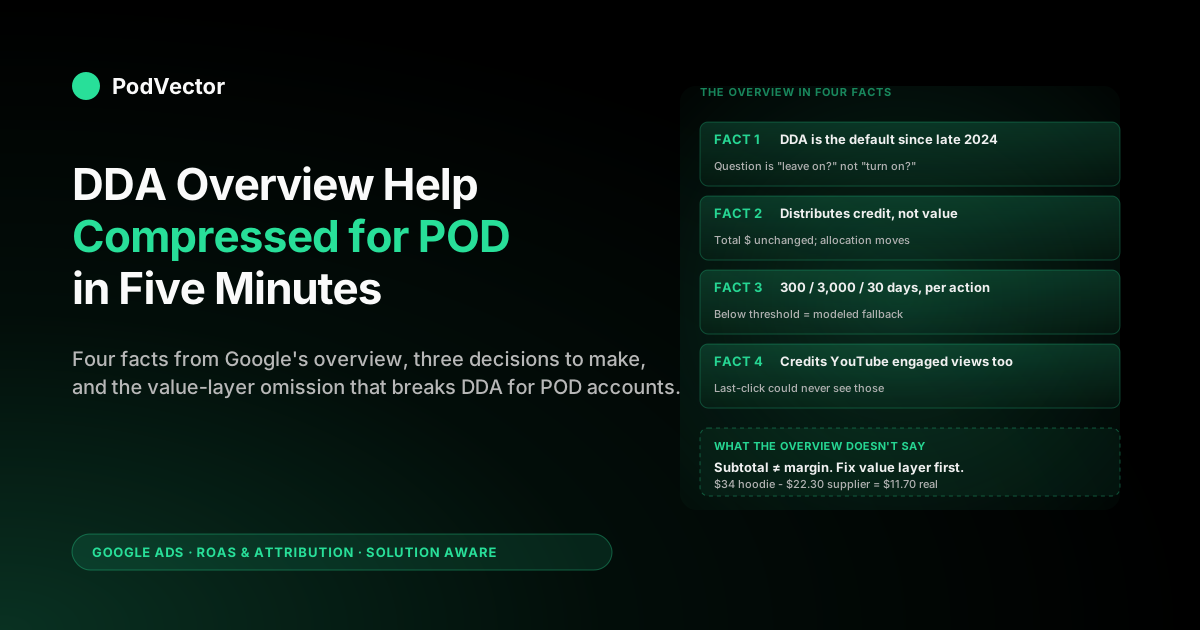
Quick Answer: Google's data-driven attribution (DDA) overview help page is a five-minute read that defines DDA, lists its benefits, states the data threshold (300 conversions and 3,000 ad interactions per action in 30 days), and points to the setup steps. For a print-on-demand seller, that overview is enough to understand what DDA does but not what to do about it. This article is the operator's compression of the overview: the four facts from the docs you actually need, how each one lands differently for a POD account than for the enterprise advertisers Google wrote the page for, and the three decisions the overview is implicitly asking you to make this week.
What Google's DDA overview help page actually says
The official Google Ads Help page on data-driven attribution is a single ~1,100-word document organised around five sections: a definition paragraph, a "benefits" list, a "how it works" explainer, a "data requirements" sub-section, and a six-step "how to set up" procedure. It opens with the line that matters operationally: "Data-driven attribution is the default attribution model for most conversion actions." That sentence is the entire reason most POD sellers are reading the overview at all — they noticed DDA was already on, didn't remember turning it on, and went looking for what it does.
The overview is written for a generic Google Ads advertiser. It is accurate, terse, and does what documentation is supposed to do.
It is not written for a $14K-per-month Etsy-plus-Shopify POD seller running a single PMax campaign with $22-supplier-cost hoodies. The translation work — what the overview's plain-English claims mean once you apply them to the economics and conversion patterns of a POD store — is what this article does.
Before you read further, anchor on context: this article sits inside the broader complete guide to Google Ads ROAS and attribution for POD, which covers attribution models, conversion windows, value tracking, Smart Bidding, and reporting as one system. If you want the deeper read of the same Google Help page — what to do with the DDA Model Comparison report, when to override DDA, and the six DDA-report patterns POD accounts hit — see data-driven attribution Google Ads help explained for POD sellers. This piece stays at the overview level: what the docs say, what each line means for you, and what to do today.
The four facts from the overview a POD seller has to internalise
Out of the overview's ~1,100 words, four facts do almost all the operational work for a POD account. Pin them in that order.
Fact 1. DDA is the default. Google made DDA the default attribution model for new conversion actions starting late 2024 and migrated existing accounts through 2025.
If you opened a Google Ads account or created a new conversion action in 2026, DDA is on without you having opted in. The operational consequence is that the question is not "should I turn DDA on" — it's "should I leave DDA on, and if not, what am I switching to and why." Most POD sellers should leave it on. The minority who shouldn't are described in the decisions section below.
Fact 2. DDA distributes credit, not value. The overview's "how it works" section says DDA "uses your conversion data to calculate the actual contribution of each ad interaction." That is a credit-distribution mechanism.
The total conversion value reported across your account is unchanged when you flip from last-click to DDA — only the allocation of that value to specific clicks moves. POD sellers who expected DDA to "find" extra revenue have misread the docs.
DDA cannot make a $34 order worth more than $34. It can only tell you which click did the work to produce it.
Fact 3. The 300/3,000/30 threshold is per conversion action, not per account. The overview states DDA needs 300 conversions and 3,000 ad interactions per conversion action within 30 days for the account-specific model to fully activate.
Below that threshold, DDA still runs, but it falls back to a "modeled" version trained on broader Google data — directionally fine, less account-specific. POD sellers often have separate "Purchase," "Add to Cart," and "Sign-up" actions; each is evaluated independently. A $20K-per-month POD store typically meets the threshold for Purchase but not for Add to Cart, which is fine — Purchase is the action that drives bidding.
Fact 4. DDA covers Search, Shopping, YouTube, Display, and Demand Gen. The overview names the channels DDA can credit.
Note what is included: YouTube engaged views (10+ seconds of a video ad followed by a conversion within the window). Last-click cannot credit those at all.
For POD sellers running YouTube creative — even passively, as part of PMax's automatic placement — DDA visibly redistributes credit toward upper-funnel touches that last-click was hiding. This is the single largest reason POD PMax accounts look different under DDA than under last-click.
The three decisions the overview is asking you to make
The overview never says "decide this." It is documentation, not a playbook. But once you read it as an employee, three decisions fall out of the page that you can make in under twenty minutes.
Decision 1. Leave DDA on, or override to last-click? The default answer is leave it on.
Override only if (a) you have fewer than 50 conversions per month total — at that volume, the modeled DDA fallback is too generic to give meaningful credit signal and last-click is more legible, or (b) you are running a one-channel pure-Search account with no YouTube, Display, or Demand Gen exposure — in which case DDA's main lever (cross-channel credit redistribution) doesn't apply. If neither condition is true, leave DDA on.
Decision 2. Is your conversion value layer feeding DDA accurately? The overview talks about DDA distributing "conversion value" without ever defining what value means.
For a Shopify-Google Ads integration, value defaults to order subtotal. For a $34 Printify hoodie with $22.30 supplier cost, that subtotal is wrong — you don't make $34 on the order, you make $11.70 before ad spend. DDA is allocating credit to a number that overstates your true unit economics by a factor of three.
The fix is to send margin (subtotal minus supplier cost) as conversion value via either a server-side tag, a Shopify Pixel, or a downstream tool. Until you do that, DDA's credit distribution is correct and your reported ROAS is fiction. We cover the mechanics in Google Ads data-driven attribution default help explained for POD sellers.
Decision 3. Are you running Smart Bidding to consume the DDA signal? The overview mentions in passing that DDA "works well with Smart Bidding." That undersells it.
Smart Bidding (tROAS, Maximize Conversion Value) is the only mechanism by which DDA's credit redistribution actually changes which keywords, audiences, and placements get budget. With manual CPC, DDA shifts the report but not the bid.
For a POD account, the canonical setup is DDA + Maximize Conversion Value with a tROAS target equal to your break-even-after-supplier-cost ratio. If you're on manual CPC, DDA still gives you a more honest report — but you're leaving the bidder's response on the table.
Translating each section of the overview into a POD context
Walk through the overview section by section with a POD reader. Each Google paragraph maps to one or two specific decisions for a print-on-demand operator.
"Definition" section. The overview defines DDA as a model that "uses machine learning to determine how much credit each click receives." For a POD store, the practical translation is: DDA stops treating the last click as the hero and starts crediting all the clicks in the path — generic Search, branded Search, Shopping, YouTube engaged view, Demand Gen. The credit distribution will visibly reallocate spend toward upper-funnel placements once Smart Bidding consumes it.
This is the change that produces the typical "PMax suddenly spending more on YouTube" feeling in POD accounts. That feeling is DDA working as intended.
"Benefits" section. The overview cites a 6% average conversion lift when accounts switch from last-click to DDA. That 6% is a Google-provided benchmark, weighted by larger advertisers.
POD-scale observations: Search-heavy accounts see 2–5% lift, PMax-heavy accounts see 5–12% lift, accounts with YouTube exposure see the higher end. If your DDA-vs-last-click delta is far outside that range after a clean 30-day comparison, the cause is usually a tracking change rather than DDA itself. Don't make budget decisions in the first 14 days post-switch — the model needs that long to stabilise.
"How it works" section. The overview says DDA compares paths that converted to paths that didn't, then assigns credit by counterfactual contribution. For a POD account, this means DDA notices that buyers who saw a YouTube ad and clicked a generic Search keyword convert more than buyers who only clicked a generic Search keyword — and credits the YouTube view accordingly.
Your branded Search conversion count will visibly drop under DDA because DDA credits the upstream touches that produced the brand search. The total purchase count is unchanged.
"Data requirements" section. The overview gives the 300/3,000/30 threshold and notes the modeled fallback below that. For a POD account at $14K/month average order value $32, you're doing roughly 437 orders per month — comfortably above the threshold for Purchase.
At $5K/month average order $32, you're doing 156 orders — below threshold, on the modeled fallback. That doesn't mean DDA is "off"; it means DDA's credit distribution is being learned from broader Google data rather than your own. The signal is weaker but still better than last-click in almost all POD account shapes.
"How to set up" section. The overview gives a six-step procedure: open Tools → Conversions → click an action → expand Attribution model → choose Data-driven → save. For a POD account that already has DDA on by default, you don't need to do anything.
The setup section exists for advertisers who previously overrode to last-click and want to come back, or who want to set DDA on a new conversion action manually. For most POD readers in 2026, the steps are reference material rather than action items.
What the overview omits that POD sellers need to know
The overview is good documentation. It is also intentionally narrow. Five things matter for a POD account that the overview either doesn't mention or mentions in passing.
The 14-day stabilisation window. When you switch a conversion action from last-click to DDA (or when the auto-switch fires for you), reported conversion counts are noisy for roughly 14 days while the model recalibrates. The overview doesn't warn you about this. POD sellers who panic and revert in the first week throw away the model's chance to settle.
What "modeled DDA" actually does below threshold. The overview says DDA "may use modeled data" if you don't meet the threshold. What it doesn't say is that modeled DDA leans on patterns from broader Google advertiser data in your vertical. For POD, that's roughly retail/apparel ecommerce — close enough that the credit distribution is directionally sound. It just won't see the buyer-pattern quirks specific to your store.
How DDA changes Smart Bidding behaviour. The overview says DDA pairs well with Smart Bidding. It does not say the bidder's spend allocation will visibly shift in the first month after DDA goes on — typically rotating budget away from branded Search and Shopping toward generic and PMax.
POD sellers who only watch the bottom-line ROAS number and not the per-campaign spend chart will miss this happening. See Google Ads data-driven attribution model help explained for POD sellers for the bidder-interaction read.
The Model Comparison report exists. The overview mentions it once, in passing. It is the most useful tool for understanding DDA's effect on your account, and most POD sellers never open it.
The report shows DDA versus your previous model side by side, by campaign, ad group, keyword, or device. It lives under Goals → Conversions → click an action → Model Comparison tab.
Conversion value is an input you control. The overview talks about value as if it were a fixed property of the conversion. It isn't.
The integer that lands in DDA's value column is whatever your tracking layer sends — order subtotal, margin, lifetime value estimate, anything. POD sellers who send subtotal get correct DDA credit on overstated value. The fix is upstream of DDA, in the tracking pixel.
A five-minute DDA checklist for POD operators
If you've read the overview and want to act on it without reading any further help docs, work this checklist top-to-bottom.
- Open Tools → Goals → Conversions and confirm your Purchase action's attribution model is "Data-driven." If it shows "Last click" or anything else, your account predates the auto-switch and is on a legacy model.
- Click into the Purchase action and check the eligibility status. If it shows "ineligible" or "modeled," you're below the 300-conversion threshold and on the fallback model. That's fine; the action is to grow Purchase volume, not to switch models.
- Open the Model Comparison tab. Set the comparison to last-click. Look at PMax, Generic Search, Branded Search, and Demand Gen rows. Expect: PMax up, Generic Search up, Demand Gen up (if running), Branded Search down. Total conversions should be identical.
- Confirm your conversion value source. If you're sending Shopify subtotal as value, your reported ROAS is overstated by your supplier-cost ratio. The fix is to send margin instead. This is a tag-side change, not a Google Ads change.
- Confirm Smart Bidding is on. If your campaigns are on Maximize Conversion Value with a tROAS target, DDA's signal is being consumed by the bidder. If they're on manual CPC, the bidder isn't reading credit weights — DDA is informational only.
- Set a calendar reminder for 30 days out. Re-open Model Comparison and look at the 30-day delta. The number should be in the 2–12% range for a POD account. If it's wildly outside that range, look for a tracking change or a campaign edit that happened in the same window.
That's the entire operational consequence of the overview page for a POD account. Everything else is depth.
Why the DDA overview is silent on your biggest POD problem
The DDA overview help page is silent on the single biggest problem print-on-demand sellers have with Google Ads attribution: the conversion value sent to Google does not equal the margin earned on the sale. Google can't fix this in their docs because it isn't a Google problem — it's a tracking-layer problem on your end. But it dominates the operator experience of using DDA on a POD account.
The mechanics: a $34 hoodie sold via Printify costs you roughly $22.30 in product plus fulfillment. Your gross margin is $11.70 before any ad spend.
If your Shopify-to-Google Ads pixel sends subtotal as conversion value, DDA is distributing credit across touches whose total assigned value is $34 per order — when the dollar amount you can spend on advertising and remain profitable is $11.70 per order. The bidder, consuming DDA-credited value, optimises against the larger number. Your tROAS target of "200%" is meaningful against $11.70 (you need to spend ≤ $5.85 per order) but meaningless against $34 (you'd happily spend $17 per order and be deeply unprofitable).
This is the same pattern across the entire DDA help cluster, which is why every article in it lands on the same conclusion: fix the value layer first, then read DDA reports, then trust the bidder. The overview page can't tell you that.
The overview page is talking to a generic advertiser whose conversion value approximately equals their margin. POD sellers don't have that property.
If you've read this far and the value-layer point lands, the next click is into Google Ads data-driven attribution documentation explained for POD sellers for the documentation-anchored fix list, or up to the cluster pillar at the complete guide to Google Ads ROAS and attribution for POD for how value tracking, attribution, and Smart Bidding compose into a single ROAS reporting setup. The wider strategic context — what to do across all of Google Ads for a POD store — is in the complete Google Ads playbook for print-on-demand sellers.
How Victor reads DDA against live POD margin
PodVector AI's agent, Victor, exists because the gap between what Google Ads reports and what a POD seller actually earns is too wide to bridge with a spreadsheet. Victor reads your Google Ads spend, your Shopify orders, and your Printify or Printful supplier invoices — all live, from the source — and computes true ROAS after supplier cost on whatever attribution slice you ask about.
The interaction is direct. You ask: "what was my DDA-credited ROAS on PMax last week, after Printify cost?" Victor pulls the DDA-credited spend from Google Ads, the matched orders from Shopify with the timestamp, the per-order supplier cost from Printify's invoice export, and computes the ratio.
No exporting CSVs, no maintaining a margin calculator, no waiting for monthly accounting. The Google Ads overview help page tells you DDA distributes credit honestly. Victor tells you whether the credit-distributed spend is making you money once Printify takes their cut.
Victor reads your data and pauses campaigns whose true ROAS falls below a margin threshold you set — with your approval per action.
Tomorrow, Victor acts. Both versions sit on top of the same DDA signal Google's overview page describes — and both versions are what the overview page assumes you already have working before you bother reading it.
FAQs
Is the Google Ads DDA overview help page enough to understand DDA fully?
For a basic conceptual understanding, yes. The overview defines DDA, lists benefits, gives the data threshold, and shows setup steps.
For an operator decision — should you keep DDA on, override it, or change something upstream — the overview is necessary but not sufficient. The omissions covered in the section above (stabilisation window, modeled fallback behaviour, Model Comparison report, value-layer dependency) all matter for a POD account and are not in the overview.
Where exactly is the DDA overview help page?
The canonical URL is support.google.com/google-ads/answer/6394265. Google links to it from the Conversions setup screen and from the attribution-model picker inside any conversion action. There's a sister page on switching to DDA at answer 10762625 and a Google blog post announcing the default switch — both are referenced in the overview.
What's the difference between the overview help page and the "about DDA" help page?
They're the same page. Google's help system uses "about [topic]" as the title pattern for overview pages. The article you may have seen referenced as "About data-driven attribution" is the overview. There is no separate, deeper help doc; depth lives in the sister pages on Smart Bidding, attribution windows, and conversion tracking.
Does DDA work for POD stores below the 300-conversion threshold?
Yes, but it falls back to a "modeled" version trained on broader Google advertiser data in your vertical. For POD, that's roughly apparel ecommerce — directionally sound but less specific to your store's buyer patterns. Below 50 conversions per month total, the credit signal is too weak to act on, and last-click becomes more legible despite being less accurate.
Will DDA make my reported ROAS higher or lower than last-click?
Neither. DDA redistributes credit across touches but doesn't change total reported value. The aggregate ROAS number across your account is identical under DDA and last-click for the same date range. What changes is per-campaign ROAS allocation: PMax and Generic Search go up, Branded Search goes down, Demand Gen finally appears as a positive contributor.
Should a brand-new Google Ads account use DDA from day one?
It will, by default — you don't need to do anything. The interesting question is whether DDA's credit signal is meaningful in the first 30 days when your conversion volume is below the 300-threshold.
The answer is: directionally yes, but the bidder's response is more sensitive to your manual budget caps and conversion-value calibration than to DDA's credit distribution at that volume. Focus on tracking accuracy first, model-fine-tuning second.
Can I read the overview, skip the rest, and still run Google Ads correctly for POD?
Probably not. The overview gives you the model.
It doesn't tell you that POD's value-tracking gap (subtotal vs margin) makes DDA's report look correct while making your bidder optimise toward the wrong number. You can run Google Ads on the overview alone if your value tracking already sends margin and your account is above 300 conversions per month. Most POD accounts don't have both, which is why the overview is necessary but not the whole job.
Read DDA reports against the margin number that actually matters
Google's DDA overview help page tells you how credit gets distributed. It doesn't tell you whether the credited spend is profitable once Printify takes their cut. Victor does. Connect Google Ads, Shopify, and Printify or Printful in five minutes and ask, in plain English, what your DDA-credited true ROAS was on any campaign, last week or last quarter — computed live from your data, not from a stale spreadsheet.
Try Victor free