
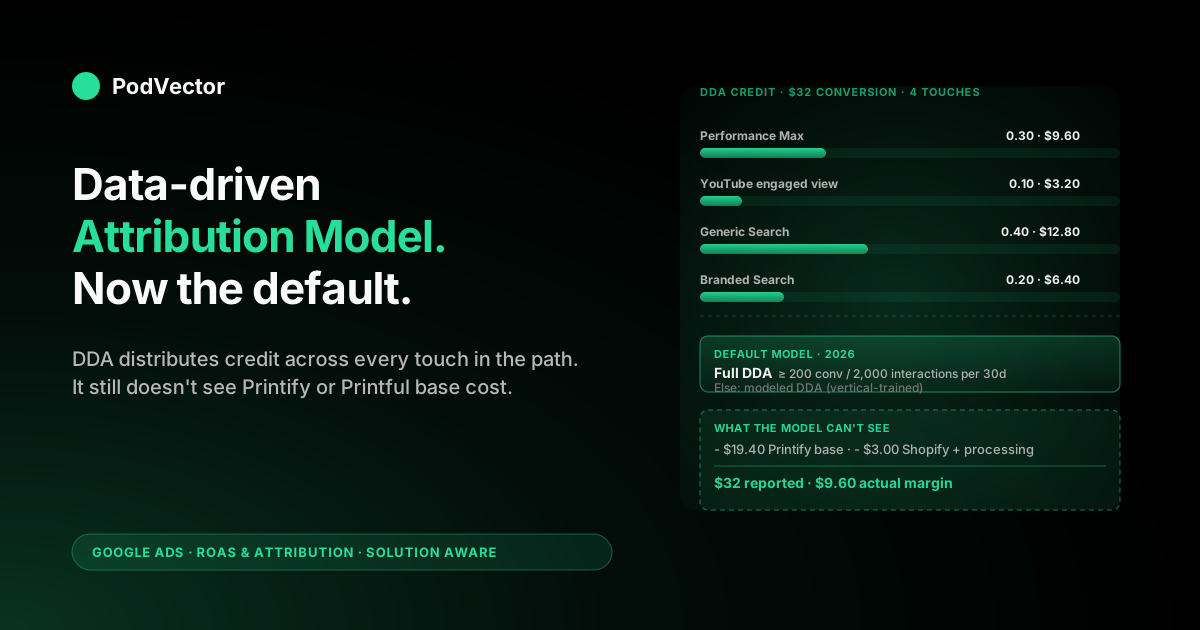
Quick Answer: The data-driven attribution model in Google Ads (DDA) assigns conversion credit to ad interactions by training a machine-learning model on your account's own conversion paths and comparing the paths of buyers to the paths of non-buyers. Touches that show up disproportionately on converting paths get more credit; filler touches that show up equally often on either path get less.
As of 2026 it's the default attribution model for new conversion actions and the only multi-touch model still selectable in Google Ads — last click is the only other option. Accounts that hit the historical threshold of 200 conversions and 2,000 ad interactions in 30 days get a fully account-trained DDA model; accounts below that threshold get modeled DDA, which uses Google-trained vertical models calibrated against advertisers in a similar category. For a print-on-demand seller, the model itself is fine — the gap that breaks ROAS reporting is that the conversion value DDA reads (typically Shopify order subtotal) doesn't include Printify or Printful base cost, Shopify platform fees, or processing fees, so even a perfectly distributed credit on a $32 conversion is being applied to a value that's roughly 2x the actual margin.
What the data-driven attribution model is
Data-driven attribution is a machine-learning attribution model. That phrase carries weight in the Google Ads context because every other attribution model the platform has ever offered — last click, first click, linear, time decay, position-based — used a fixed rule.
The rule was a one-line formula: give all the credit to the last touch, give all the credit to the first touch, split equally across touches, decay credit toward earlier touches. Pick a rule, apply the rule, distribute credit. No data, no training, no model in any technical sense.
DDA is a different category of object. The model is trained on the actual conversion paths in your account — every ad interaction across Search, Shopping, YouTube, Display, and Demand Gen that preceded either a conversion or a non-conversion — and it learns, from that training set, which touches in which positions tend to be associated with the conversion outcome. The credit it assigns to each touch in any future path is whatever the model has learned that touch's marginal contribution looks like, given everything else in the path.
The practical implication: two accounts running identical campaigns will get different DDA credit distributions, because the model is account-specific. The credit weights aren't a Google-wide formula; they're a fingerprint of how your specific buyers move through your funnel. The cluster-level frame for how all Google Ads attribution models fit together is at Google Ads attribution models explained for POD sellers; the broader topic-level frame for Google Ads in POD is at Google Ads for POD.
How the model assigns credit, mechanically
The mechanic underneath DDA is the same one Google has described in its official help doc on data-driven attribution: compare the paths of customers who converted to the paths of customers who didn't, find the touches that disproportionately appear on the converting paths, and credit those touches more heavily on future conversions.
The training set is your account's own historical data, segmented two ways: paths that ended in a conversion (positive examples) and paths that included ad interactions but didn't end in a conversion (negative examples). For each touchpoint type — campaign, ad group, ad format, channel, position-in-path, time-since-touch — the model asks how much the conversion probability changed when that touchpoint was present versus absent. Touches with the largest positive marginal effect get the largest credit weights; touches whose presence or absence didn't change the probability much get small weights.
Three mechanical details matter for reading the output:
- The model uses fractional credit. Unlike last click, which hands one full conversion to one campaign, DDA splits the conversion across the path. A four-touch converting path might land 0.30 of the conversion on Performance Max, 0.40 on generic Search, 0.10 on YouTube, and 0.20 on branded Search. The fractions sum to 1.0 per conversion; the conversion value splits the same way.
- The model includes engaged YouTube views, not just clicks. Once Google folded engaged-view conversions into attribution, DDA started weighting those interactions alongside clicks. A path with three clicks and one 10-second-plus YouTube engaged view is a four-touch path under DDA, even though only three of the touches involved a click.
- The model retrains continuously. The credit weights aren't computed once and frozen. As your account accumulates new converting and non-converting paths, the model updates its weights. A campaign whose contribution changed materially over the last quarter — because creative changed, or the audience shifted, or the SKU mix flowing through it changed — gets re-weighted on the new data.
The deeper walkthrough of the mechanic is in about data-driven attribution Google Ads help explained for POD sellers; the official Google Ads Help page version of the same explanation is the source the help-doc-style articles in this cluster cite directly.
Full DDA vs modeled DDA: which one your POD account is on
Before April 2021, DDA was gated behind a data threshold: an account had to log at least 600 conversions and 15,000 ad interactions in a 30-day window to qualify. Most POD accounts couldn't get there, so DDA was practically unavailable to small and mid-volume sellers. The threshold was relaxed first to 300/3,000, then to the current 200 conversions and 2,000 ad interactions in 30 days, and then — and this is the change that matters — Google made DDA available regardless of conversion volume by adding a fallback called modeled DDA.
The two states are real and worth distinguishing:
- Full DDA. Your account meets the 200-conversion / 2,000-ad-interaction threshold across the relevant 30-day window. The model is trained on your specific conversion paths. Credit weights are a fingerprint of your account.
- Modeled DDA. Your account is below the threshold. Google trains a vertical-level model on advertisers in a similar category (e.g., apparel ecommerce, a sub-category Printify and Printful sellers tend to fall into) and applies that model's credit weights to your conversions. The output is still labeled "Data-driven" in the Google Ads UI; the underlying training data is not your own.
The Google Ads UI doesn't expose which state your account is in. There's no "you're on modeled DDA" badge.
The conversion-action settings simply show "Data-driven" as the attribution model and don't distinguish the two implementations behind it. For most POD operators, this means assuming modeled DDA unless you have visible reason to believe you're consistently above 200 converted Google Ads conversions per 30 days — which most sub-$50K/month POD stores aren't, especially during shoulder-season months.
The practical implication: the credit distribution you read in your Google Ads UI is a generalized model's credit distribution applied to your specific conversions, not a model trained on your buyers. It's still better than last click for most POD accounts — vertical-level patterns of "branded Search at the end is over-credited under last click" hold across apparel ecommerce broadly — but it's not as account-specific as the DDA documentation implies. The fuller story on the threshold, when modeled DDA kicks in, and what to do about it is in data-driven attribution Google Ads help explained for POD sellers.
A worked example on a POD path
Concretely, here's how DDA distributes credit on a typical POD conversion path.
A customer is shopping for a personalized birthday t-shirt. Their actual ad interactions across a week:
- Day 1. Sees a Performance Max product listing while browsing Google for "personalized birthday gifts." Clicks the listing, lands on the store, doesn't buy.
- Day 3. Watches a 15-second YouTube preroll for the same store as an engaged view (skippable in-stream, watched past 10 seconds).
- Day 5. Searches "custom birthday t-shirt with name." Clicks the generic Search ad, lands on a different product page, doesn't buy.
- Day 7. Searches the store's brand name directly. Clicks the branded Search ad and converts on a $32 t-shirt.
That's a four-touch path: PMax click, YouTube engaged view, generic Search click, branded Search click. Conversion value: $32.
Under DDA, the model assigns credit weights per touch based on what it has learned (or, under modeled DDA, what the vertical model has learned about apparel-ecommerce paths) about the contribution of each interaction type at each position. Plausible weights for this specific path might land around:
- PMax click (Day 1, awareness): 0.30 → $9.60
- YouTube engaged view (Day 3, mid-funnel): 0.10 → $3.20
- Generic Search click (Day 5, intent): 0.40 → $12.80
- Branded Search click (Day 7, return): 0.20 → $6.40
The exact fractions vary path by path and account by account, but the shape of the distribution — moderate weight on the awareness touch, low weight on the passive YouTube view, highest weight on the high-intent generic Search click that brought the buyer back to the right product, moderate weight on the closing branded Search click — is broadly representative.
Compare that to last click on the same path: branded Search receives $32, every other touch receives $0. The Conversions column shows 1 conversion on branded Search, 0 on PMax, 0 on YouTube, 0 on generic Search.
The total conversion value is the same; the allocation is wildly different. This is the same underlying contrast covered in the linear retirement story at linear attribution model Google Ads explained for POD sellers, with DDA replacing linear as the multi-touch alternative.
DDA vs last click: the only comparison that still matters
Since April 2023, the Google Ads attribution-model dropdown has only two entries: Data-driven and Last click. First click, linear, time decay, and position-based were retired. Any DDA-vs-X comparison that still matters in 2026 is DDA vs last click.
The headline differences:
- Touches credited. DDA: every ad interaction in the path. Last click: only the final ad click before conversion.
- Credit distribution. DDA: fractional, learned from data. Last click: 100% to one touch, 0% to all others.
- How branded Search reports. DDA: reduced ROAS reflecting that branded close-clicks rode on earlier campaigns' work. Last click: inflated ROAS that hides upstream contribution.
- How Performance Max reports. DDA: meaningful credit from awareness/upper-funnel impressions. Last click: near-zero conversions despite real upstream contribution, because PMax rarely closes the path itself.
- How Smart Bidding behaves. DDA: bidder reads weighted credit and bids on touches in proportion to expected contribution. Last click: bidder reads only the final-touch credit and bids on closing touches almost exclusively.
For a POD account running multiple campaign types — Performance Max, generic Search, branded Search, and increasingly Demand Gen — DDA is structurally the better fit because it surfaces the contribution of every campaign rather than collapsing it onto whichever one closes the path. The case is laid out in more depth in Google Ads data-driven attribution explained for POD sellers and at the cluster pillar the complete guide to Google Ads ROAS and attribution for POD. For accounts pinned to last click for a specific reason — single-channel branded-only operations, external measurement match — the working frame is in Google Ads attribution explained for POD sellers.
Why the model is now the default
DDA became the default attribution model for new conversion actions in late 2021, then the recommended-and-prompted default for existing conversion actions through 2022 and 2023. By 2024, accounts that hadn't actively chosen last click had largely been moved onto DDA via in-product prompts ("switch to recommended attribution"), automated default flips for new conversion actions, and the spring-2023 retirement of the four rule-based multi-touch models that had been the legacy fallbacks.
Two reasons drove the default change. The official one: DDA's universal availability with modeled DDA as fallback meant the rule-based models were redundant — DDA's credit distribution dominates the rule-based options on most paths, and Google didn't want advertisers picking a worse model out of habit.
The unofficial one, which most analysts read between the lines: Smart Bidding works dramatically better when the bidder reads from a model whose credit weights reflect actual contribution rather than a fixed equal-credit or last-touch formula. A bidder reading from DDA-distributed credit prices upper-funnel inventory at roughly its true marginal contribution; a bidder reading from last click prices it at zero and the campaign starves.
By moving accounts to DDA en masse, Google improved Smart Bidding's measured performance across its advertiser base, which validated Smart Bidding as the recommended default path. The detailed treatment of why DDA was made default is in data-driven attribution default Google Ads help explained for POD sellers.
What the model can't see, structurally
DDA is a credit-distribution engine. It takes the conversion event Google was told about — including the conversion value Google was sent — and distributes that credit and that value across the touches in the path. The model is good at the distribution. It is structurally unable to fix what it was told about the conversion in the first place.
What the model never sees:
- Cost of goods. Printify or Printful base cost on each line item, by SKU, varies per product and per supplier. None of it appears in the conversion value Google receives. The default Shopify Google channel pixel sends order subtotal, not margin.
- Platform and processing fees. Shopify's platform fee and Stripe or Shop Pay's processing fees are deducted from the merchant's payout but never reach Google's conversion event. The conversion value DDA reads is gross of these.
- Returns and refunds. Personalized SKUs that print wrong or arrive damaged generate refunds that don't usually update the original conversion event in Google Ads. The conversion value DDA already credited to its model output stays as-is in your reporting; the actual revenue net of refund is lower.
- Channels outside Google Ads. Email opens, SMS taps, organic social impressions, organic search clicks before the buyer landed on a paid touch — none of those interactions enter the path DDA evaluates. Google Ads attribution is, by definition, scoped to ad interactions Google saw. Sellers also running Amazon traffic alongside Google sit in two separate attribution systems entirely; the way those compare is in Amazon Attribution vs Google Ads explained for POD sellers, and the broader scoping question is in attribution in Google Ads explained for POD sellers.
The first three are the structural problem. DDA is an attribution model, not a profitability model. It can give you the most accurate possible credit distribution within Google Ads while still leaving you with a number that misrepresents the profitability of the campaign — because the value the model is reading is wrong.
The POD margin gap on top of any model output
The structural blind spot lands hard on POD specifically because POD margins are thin and supplier-dependent. A typical Printify or Printful order has fulfillment cost in the $10–$25 range against a retail price often in the $25–$45 range. After Shopify's platform fee (~2.9% + $0.30 processing for most stores) and a small reserve for refunds, true contribution margin per order is usually 25–35% of subtotal. The conversion value DDA reads from the default Shopify pixel is 100% of subtotal.
The implication for ROAS targeting is direct. A POD account running tROAS at 2.5x with default Shopify-pixel revenue tracking is reporting "profitable" in Google Ads while actually being below break-even on contribution margin. To break even on margin in a 30%-margin account, the account needs a Google Ads-reported ROAS of roughly 3.3x just to cover fulfillment, platform, and processing costs. tROAS targets need to clear that floor to fund anything else — fixed costs, reinvestment, profit.
Three workable approaches to closing the gap, in order of setup effort:
- Adjust tROAS targets manually. Raise tROAS to compensate for the unseen cost. If your average POD margin is 30% of subtotal, set tROAS at roughly 3.3x to be neutral on margin. Easiest fix, instantly applicable, doesn't differentiate between higher-margin and lower-margin SKUs.
- Audit ROAS in a separate margin layer. Keep Google Ads' DDA model and conversion tracking as-is, but maintain a separate view (a warehouse, Looker Studio, a spreadsheet) that joins Google Ads spend against actual order-level margin from Shopify, Printify, and Printful. Google Ads UI keeps reporting attributed revenue; your separate view reports attributed margin. Decisions get made off the second number.
- Send margin in the conversion value field. The cleanest fix and the highest-effort one. Replace the default Shopify pixel that sends order subtotal with a custom integration that calculates margin per order — subtotal minus the supplier cost for each line item, minus a flat estimate for Shopify and processing. The conversion value Google reads becomes margin, DDA's credit distribution and Smart Bidding's tROAS targets all align to a number that reflects business reality. Requires order-fired integration and live supplier cost data.
Most POD operators we talk to start with option 1 because it's a 30-second change, then graduate to option 2 once monthly ad spend crosses $5K and a 2% accounting error turns into real money. Option 3 is the cleanest but requires the most engineering and is the least common in practice. The end-to-end setup of conversion tracking and margin-aware targeting on a Shopify POD store sits in Google Ads services for ecommerce strategy for print on demand and the Google Ads Shopify app strategy for print on demand.
How the model interacts with Smart Bidding
DDA's credit distribution doesn't just affect what your reports say — it affects what Smart Bidding optimizes toward. Any account running Target ROAS, Maximize Conversion Value, Maximize Conversions, or eCPC has a bidder that reads the credit weights from the active attribution model and bids on touches in proportion to the credit they're expected to receive.
Under DDA, the bidder reads weighted credit and bids on every touch in proportion to its modeled contribution. PMax impressions that earn 0.30 credit on a typical converting path get bid on at roughly 30% of expected conversion value; branded Search closing clicks that earn 0.20 credit get bid on at 20% of expected value. The bidder's internal economic model is consistent with the credit distribution.
Under last click, the bidder reads only the final-touch credit. PMax, YouTube, generic Search — anything that doesn't tend to close the path — receives effectively zero expected credit and the bidder cools off.
Branded Search, which closes most paths, gets all the bidder's attention. The result is a budget allocation that funds branded Search heavily and starves the upstream campaigns that fed branded Search the awareness it's now closing.
For POD accounts that switched from last click to DDA in 2023 or 2024, the immediate fallout was a 14–30 day Smart Bidding rebalancing window where budget shifted toward upper-funnel campaigns, ROAS reports looked chaotic during the shift, and the account stabilized at a different per-campaign distribution. The rebalancing wasn't a regression — it was Smart Bidding repricing inventory at its DDA-credited rate after the prior last-click pricing had under-funded everything but branded Search. The bid-strategy implications are covered in more depth in the complete Google Ads playbook for print-on-demand sellers.
Reading DDA-attributed reports without misleading yourself
Three habits that keep DDA-attributed reports honest in a POD context:
- Read campaign ROAS as relative, not absolute, until margin is layered in. The DDA distribution is internally consistent — every campaign's reported ROAS is comparable to every other campaign's reported ROAS, because they're all reading from the same model and the same conversion value. What's not honest is calling a 2.8x DDA-reported ROAS "profitable" when your true break-even is 3.3x. Compare campaigns to each other freely; compare any campaign's number to "is this profitable" only after layering margin.
- Don't treat fractional conversions as a reporting quirk. DDA shows fractional values (0.3, 0.4) in the Conversions column instead of whole numbers, which can look strange to operators who learned to read Google Ads under last click. The fractions are the model's actual output. A campaign that shows 12.3 conversions for the month attributed 12.3 conversions worth of credit; it doesn't mean Google is approximating. Treat the fractions as the data, not as an approximation of integer counts.
- Mark the model boundary in any historical series. Most POD accounts crossed at least one attribution-model regime change between 2022 and 2025 — typically pre-DDA → DDA, sometimes via a brief stop at last click. A daily or weekly ROAS series that crosses that boundary is comparing two different measurement systems. Mark the boundary on the chart; don't compare across it without the marker.
How Victor reads the model output against live POD margin
Victor is PodVector AI's AI agent for POD operators. It connects to your Google Ads, Shopify, and Printify or Printful accounts and answers questions about your campaigns from live data.
The DDA model itself isn't something Victor changes or replaces. The credit distribution your Google Ads account produces — full DDA on accounts above the threshold, modeled DDA on accounts below — is what Victor reads. The questions Victor answers add the layer the model can't see: actual margin from your supplier and store data, joined back to the model's attributed conversion values.
When you ask "what's my true ROAS on Performance Max for the last 30 days, after Printify cost," Victor pulls the DDA-attributed conversion value for PMax from Google Ads, joins it against the actual order-level fulfillment cost from your Printify or Printful account, subtracts Shopify and processing fees, and returns the margin-based ROAS. The DDA credit distribution stays Google's; the conversion value the credit is being applied to becomes the real margin number.
The same query infrastructure handles harder questions: "which campaigns have the widest gap between DDA-attributed revenue and actual margin," "for last week's converters, what was the average path length and how was credit distributed across PMax, generic Search, and branded Search," "what is my true tROAS target if I want to clear 20% net margin after fulfillment, platform, and processing fees on the SKUs flowing through this campaign." These are the questions the model alone can't answer — they require the model's output joined to data the model never sees.
The longer-term direction is moving from answering these questions to acting on them. Victor reports the gap between DDA-attributed revenue and margin and adjusts tROAS targets per campaign — with your approval based on the live SKU mix, raises the target on lower-margin sweatshirt campaigns, lowers it on higher-margin mug campaigns, and tells you what changed and why.
The DDA model stays Google's. The operational decisions that depend on it become Victor's to suggest or execute, with you in the loop.
FAQs
Is data-driven attribution the default model for new POD conversion actions in 2026?
Yes. DDA has been the default for new conversion actions since late 2021, and the only other selectable model in the Google Ads UI today is last click. New POD conversion actions land on DDA unless you change the setting at creation.
Does my POD account need 200 conversions a month to use DDA?
No. The 200-conversion / 2,000-ad-interaction threshold determines whether you're on full DDA (account-trained) or modeled DDA (vertical-trained). Both states are labeled "Data-driven" in the UI; both produce a multi-touch credit distribution. The threshold gates which version you're on, not whether DDA is available.
How can I tell if I'm on full DDA or modeled DDA?
The Google Ads UI doesn't expose this directly — the conversion-action settings show "Data-driven" without distinguishing the two implementations. Most sub-$50K/month POD stores are on modeled DDA; if your Google Ads-attributed conversions consistently exceed 200 per 30-day window, you're likely on full DDA. The cluster pillar covers the practical implications in detail.
Does the data-driven attribution model account for Printify or Printful base cost?
No. DDA is a credit-distribution model — it splits the conversion value Google was sent across the touchpoints in the path. The conversion value typically comes from the default Shopify pixel and equals order subtotal, with no deduction for Printify or Printful base cost, Shopify platform fees, or processing fees. Margin has to be layered in separately, either by sending margin in the conversion value field, raising tROAS to compensate, or auditing in a separate reporting layer.
Should I switch back to last click on a POD account?
Almost never. Last click systematically over-credits branded Search and starves upper-funnel campaigns that feed it, which is the wrong dynamic for an account running Performance Max alongside Search.
Edge cases — single-channel branded-only operations, external measurement systems that match on last-touch — are the only common reasons. The detailed comparison is at Google Ads attribution models explained for POD sellers.
Why does my Conversions column show fractional numbers like 12.3 under DDA?
That's the model's actual output. DDA assigns fractional credit weights per touch and the fractions sum to whole conversions across the full path. A campaign that shows 12.3 conversions for the month was credited with 12.3 conversions worth of model-distributed credit. Treat the fractions as the data, not as an approximation of integer counts.
Did the data-driven attribution model replace linear attribution?
Functionally, yes. Linear was retired in April 2023 along with first click, time decay, and position-based. DDA is the only multi-touch attribution model now selectable in Google Ads, and it's the default for new conversion actions. The linear-to-DDA migration story is covered at linear attribution model Google Ads explained for POD sellers.
How does DDA interact with Smart Bidding for a POD account?
Smart Bidding strategies (Target ROAS, Maximize Conversion Value, Maximize Conversions, eCPC) read credit weights from the active attribution model. Under DDA, the bidder bids on every touch in proportion to its modeled contribution, which funds upper-funnel campaigns at roughly their true marginal value. Under last click, the bidder bids almost exclusively on closing touches, which starves upper-funnel inventory.
Can I see how DDA distributed credit on a specific path?
Not directly at the path level. Google Ads exposes campaign-level and conversion-action-level DDA-attributed numbers but no longer surfaces touch-level path data the way the old Model Comparison report did. The visible output is aggregated credit per campaign, not per individual converting path.
What happens to DDA's credit distribution if I change my conversion value source mid-quarter?
The model continues to distribute credit per its existing weights, but the conversion value being distributed changes from the moment the value source changes forward. Historical conversions retain their original-source value; new conversions report the new-source value. If you switch from order subtotal to margin mid-quarter, expect a visible step-change in attributed value at the boundary — that's the value-source change, not a model retraining event.
See your DDA-attributed ROAS, after Printify and Printful cost
The data-driven attribution model is the right credit distribution for a POD Google Ads account. It's also incomplete on its own — the conversion value DDA reads doesn't include Printify or Printful base cost, Shopify platform fees, or processing fees, so even a perfectly distributed credit lands on a number that overstates profitability. Victor connects to your Google Ads, Shopify, and supplier accounts and answers margin-based ROAS questions from live data — no spreadsheets, no scheduled jobs. And ask "what's my true ROAS on Performance Max under DDA after fulfillment cost" as the first question.
Try Victor free