
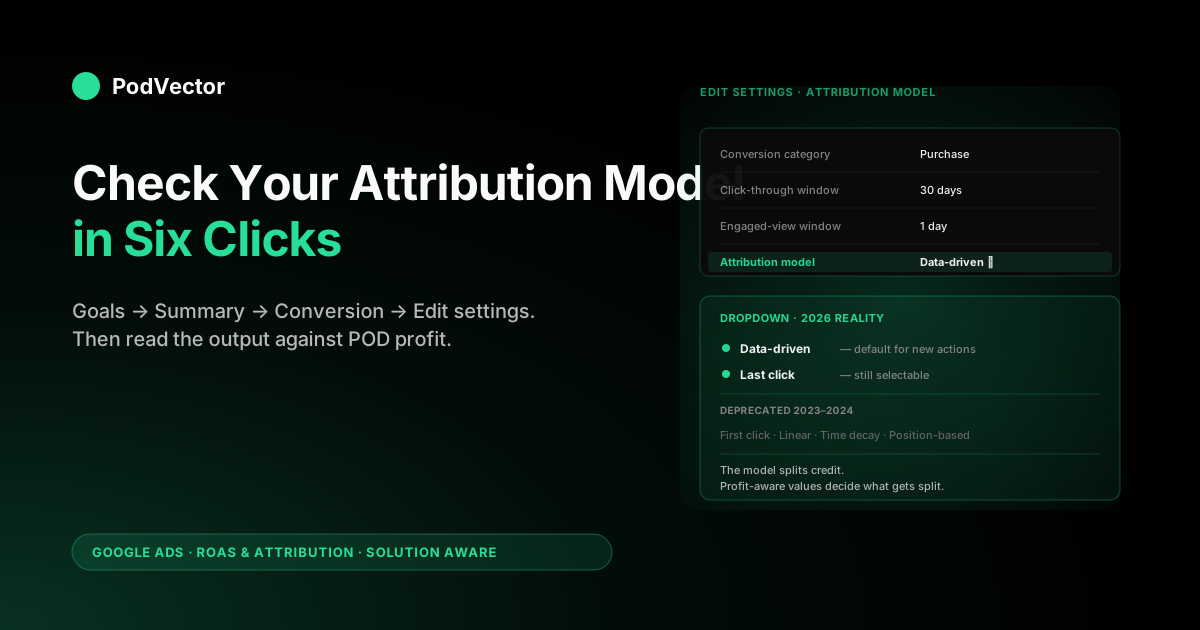
Quick Answer: To check the attribution model in Google Ads, open Goals → Summary → Conversions, click the conversion action whose model you want to inspect, then click Edit settings and look at the Attribution model row. As of 2026 only two models are still selectable — Data-Driven Attribution (DDA) and Last Click — and DDA is the default for most new conversion actions.
To see how the chosen model is actually distributing credit across campaigns, open Tools → Measurement → Attribution → Model Comparison; that report is where the model stops being a setting and becomes a number you can act on. For a print-on-demand seller, the model check is a five-minute job; the harder work is reading the output against true POD margin (price minus Printify or Printful supplier cost minus Shopify fees) rather than against Shopify gross subtotal, which is what Google Ads sees by default.
Why checking the attribution model matters for POD sellers
The attribution model decides how Google Ads splits credit for a conversion across the clicks that contributed to it. If a buyer clicks a Shopping ad on Tuesday, a Demand Gen ad on Wednesday, and a branded Search ad on Friday before purchasing on Saturday, the model decides which of those clicks gets the conversion.
That decision flows directly into Smart Bidding, which uses the per-campaign credit to decide how to allocate your budget tomorrow. A model that over-credits brand search starves Shopping.
A model that over-credits the first touch starves the bottom of the funnel. The model is not a reporting cosmetic; it is the input that shapes spend allocation.
For a print-on-demand seller, the stakes are higher than for the median Google Ads advertiser. POD margins are thin (often $5–$12 per shirt after Printify or Printful supplier cost, Shopify fees, and the ad click itself), so a 10% misallocation of spend toward the wrong campaign can flip an account from profitable to break-even in a week.
The first reason to check the model is to confirm you are not running a setting you did not pick — Google rolled most accounts onto Data-Driven Attribution as the default during 2023, and many POD operators have never opened the conversion settings since the original setup. The second reason is to confirm the model still matches the path shape your account actually has, which Google's own attribution models documentation describes but does not check for you.
If you are still building the conceptual frame for what attribution means in this account, start with attribution Google Ads explained for POD sellers — this guide assumes you already understand the basics and wants the procedural check.
Before you start: three prerequisites
The check itself is short, but it is only useful if three things are already true on the account.
1. You have at least one active conversion action. The attribution model is set per conversion action, not at the account level. If your account has zero conversion actions configured, there is no model to check. The setup walk-through is in conversion tracking Google Ads + Shopify setup guide for POD sellers.
2. You know which conversion action drives bidding. Most POD accounts have one Purchase action that is set as a primary conversion (counted toward the "Conversions" column and used by Smart Bidding) and may have secondary actions like Add to Cart that are tracked but not used for bidding.
Checking the model on a secondary action will tell you something, but checking the model on the primary Purchase action is what matters operationally. If you don't know which is which, check the "Conversion goals" column in the Goals → Summary view — primary actions are marked.
3. You have admin or standard access on the Google Ads account. Read-only users can view the model setting but cannot edit it. If you find a mismatch and need to change it, you'll need at least standard access. Manager (MCC) account users have it inherited; client account standalone users may not.
The step-by-step check (4 minutes)
The check has six clicks. Read it once, then run it.
- Sign in to Google Ads at
ads.google.comon the account whose model you want to check. If you manage multiple accounts through an MCC, click into the specific client account first — the model is per-account, not per-MCC. - Click Goals in the left navigation. The Goals icon looks like a flag. If you don't see Goals, your account is on the older nav layout — click the wrench icon (Tools and Settings), then Conversions under "Measurement"; the path lands you in the same place.
- Click Summary under Goals → Conversions. You'll see a table of every conversion action on the account with columns for Name, Source, Category, Tracking status, Count, Include in "Conversions", and (if columns are configured) Attribution model.
- Click the conversion action name you want to inspect (typically "Purchase" or "Shopify - Purchase"). This opens the action's detail page.
- Click Edit settings. The settings panel shows Conversion category, Value, Count, Click-through conversion window, Engaged-view conversion window, View-through conversion window, Include in "Conversions", and Attribution model.
- Read the Attribution model row. It will display either Data-driven or Last click. That is your live setting. Note it. If it shows one of the deprecated models (First click, Linear, Time decay, or Position-based), Google has likely already auto-migrated it but the UI is showing stale text — refresh the page; if the deprecated model is still showing, see the change-model section below because Google will force-migrate it within weeks.
That is the literal check. Total elapsed time: about four minutes. Now repeat for any other primary conversion action on the account so you have the full picture.
What you will actually see in 2026
Two notes about what 2026 looks like in the Google Ads UI compared to older guides you may have read.
The dropdown only has two options. Google deprecated First Click, Linear, Position-Based, and Time Decay as user-selectable models in 2023 and finished the migration during 2024. Older articles still show six options in the dropdown.
Today the dropdown shows two: Data-driven and Last click. If you are reading a guide from 2022 that walks you through choosing Position-Based, ignore that section — the option no longer exists. The DataFeedWatch 2025 guide has been updated to reflect the two-model reality; many older guides have not.
Data-driven is the default for new conversion actions. If you set up your conversion tracking after late 2022, your model is almost certainly DDA unless someone deliberately switched it. If your account predates 2022 and was on Last Click, Google's migration tooling left some accounts on Last Click and pushed the rest to DDA. The check you just ran is the only authoritative way to know.
The Attribution menu moved. The deeper attribution UI (Model Comparison, Top Paths, Time Lag) lives at Tools → Measurement → Attribution. In older accounts the path was Tools → Measurement → Attribution; in the 2024 redesign Tools became "Tools and settings" with a wrench icon, and Attribution sits under Measurement. The screenshots in KlientBoost's attribution model guide are from the older nav and the menu locations have shifted slightly; the labels are the same.
Adding the "Current model" columns to verify what is live
The settings check tells you what the model is configured to be. It does not tell you what the conversion data in your reporting was actually computed against — there is sometimes a lag between a model change and reporting columns updating. To verify, add the "Current model" columns to your Campaigns view.
- Open the Campaigns view (left nav).
- Click the Columns icon (looks like a column grid, top-right of the table).
- Click Modify columns.
- Open the Attribution section.
- Add Conversions (current model) and Conv. value (current model) alongside your standard Conversions and Conv. value columns.
- Click Apply.
The "current model" columns show what your conversion numbers would look like if the entire historical dataset were reattributed to the model that is currently set. Comparing the live Conversions column (what was used for bidding at the time) against Conversions (current model) tells you whether the active model has been stable across the date range you are looking at. If the two columns disagree by more than 10–15%, it usually means the model was changed during the window you're viewing and Smart Bidding spent some time learning against an old signal. Attribution models in Google Ads explained for POD sellers covers when that lag matters and when it doesn't.
Reading the Model Comparison report
The settings check confirms which model is active. The Model Comparison report shows what would change if you switched. This is the report that converts the model from a setting into a decision.
To open it: Tools → Measurement → Attribution → Model Comparison. The report shows your conversions and conversion value side-by-side under two models you choose — typically Data-driven on one side and Last click on the other — broken out by campaign, ad group, or keyword.
What to look for:
- Brand Search swing. If switching from DDA to Last Click moves more than 25% of credit onto your brand-search campaign, that campaign is benefiting from being last in the path on conversions that were really driven by Shopping or YouTube. DDA spreads that credit; Last Click hands it all to brand. The right reading depends on whether you are running brand-search Shopping at all or whether you are letting organic handle brand traffic.
- Performance Max stability. PMax tends to look about the same under DDA and Last Click because PMax already runs internal cross-channel optimization. If PMax credit swings by more than ±15% between models, your DDA may not have enough conversion volume to be reliable (the threshold is roughly 300 conversions in 30 days; below that DDA reverts to a hybrid).
- Shopping vs. branded Search ratio. Most POD accounts see Shopping receive 5–15% more credit under DDA than Last Click, and brand Search 5–15% less. If the magnitude is larger, your account has unusually multi-touch paths and the model choice matters more than average.
The Model Comparison output is not a directive — it does not tell you which model is right, only what the credit redistribution would look like. The decision still depends on whether DDA has enough volume to be stable on your account, which the cluster hub at Google Ads ROAS & Attribution covers across multiple angles.
How to change the model (and what changes when you do)
If the check surfaced a model you want to change, the change is two clicks:
- From the conversion action's Edit settings panel (where you read the model row), click Attribution model.
- Pick the new model from the dropdown — Data-driven or Last click.
- Click Save.
The change applies forward from the moment you save. Past conversions that were already attributed and used by Smart Bidding stay attributed under the old model. The new model only applies to conversions that haven't been attributed yet (open paths) and to conversions that occur after the change.
The relearn cost is real. Smart Bidding will treat the new model as a new optimization signal and will re-explore for 2–4 weeks. During that window your reported ROAS often swings 10–30% even when underlying performance hasn't changed; some campaigns will look like they're crashing and some like they're improving, and most of that volatility is the algorithm relearning rather than real performance change. Plan budget conservatively during the relearn — if you depend on a stable ROAS during a product launch or seasonal push, do not change the model in the two weeks leading up to it.
Conversion-action-level changes also do not affect attribution windows; those are configured separately. If you intended to change the window rather than the model, see attribution window Google Ads explained for POD sellers for that procedure.
Three mismatches the check often surfaces
When POD operators run this check for the first time, three patterns surface most often. None of them are emergencies, but each warrants a follow-up.
1. Multiple conversion actions, inconsistent models. An account that started on Last Click in 2021 and added a second conversion action in 2024 may have one action on Last Click and one on DDA.
The bidding signal Smart Bidding uses depends on which actions are marked primary and which are secondary, but the inconsistency itself is a flag — if the account owner intended to be on DDA, both actions should be on DDA. Pick the right model for the account, then standardize.
2. DDA active but volume too low to be reliable. DDA needs roughly 300 conversions in 30 days on the conversion action to produce stable model attribution.
Below that threshold, Google falls back to a hybrid that increasingly resembles Last Click. If your account is doing 50 conversions a month and is on DDA, you are functionally on Last Click anyway with extra noise on top. Switching to Last Click explicitly removes the noise without changing the signal much. Data-driven attribution Google Ads explained for POD sellers covers the volume threshold and what hybrid fallback actually does.
3. Model is right, conversion value is wrong. The most common mismatch is not the model itself — it is that the model is set correctly, but the conversion value being attributed is Shopify gross subtotal rather than POD-aware true profit.
The model is splitting credit for revenue dollars that are 60–75% supplier cost and Shopify fees, not for profit dollars. No model choice fixes this; you fix it upstream by passing a profit-aware conversion value. The setup is in the complete guide to Google Ads + Shopify integration for POD, and the broader profit framing is in break-even ROAS in POD: how to calculate it and why it matters.
The POD truth Google Ads will not show you
The attribution model check tells you which clicks get credit. It does not tell you whether the credited spend was profitable.
For a Shopify store selling shirts at $24.95 with a Printify supplier cost of $11, a Shopify fee of $1.05, and a Google Ads click cost of $1.40 per visitor at a 2.5% conversion rate (so about $56 of ad spend per converting click in real terms), the unit economics live entirely outside what the Google Ads attribution UI shows. Google Ads sees the $24.95 conversion value and reports a 4.5x ROAS, which looks healthy. The actual profit on that order is roughly negative once you account for the supplier cost, the fee, the spread of ad spend across non-converting clicks, and any returns or chargebacks.
The fix is not a different model — every model splits the same gross-revenue number. The fix is feeding profit-aware conversion values up into Google Ads in the first place, so DDA (or Last Click) is splitting credit for profit dollars rather than revenue dollars. That is what changes the bidding signal from "spend more on whatever produces gross sales" to "spend more on whatever produces actual profit."
This is where Victor (PodVector AI's AI employee for POD sellers) sits in the workflow. Victor reads your live Google Ads, Shopify, and Printify or Printful data from your warehouse, computes true ROAS per campaign after itemized supplier cost and fees, and answers the questions Google Ads cannot — "which campaigns are profitable after COGS this week, and which are losing money even though Google Ads says they're winning?" The model check you just ran tells you the rules of the credit-split; Victor tells you whether the credit-split is being applied to numbers that mean anything for your bottom line. Victor answers; the employee roadmap puts pause/scale actions inside the same loop. Google Ads attribution news explained for POD sellers tracks how attribution-stack changes ripple into POD operations.
FAQs
Where is the attribution model setting in Google Ads?
Goals → Summary → click the conversion action name → Edit settings → Attribution model row. The full path is described in the step-by-step section above. The setting is per-conversion-action, not per-account or per-campaign.
What attribution model does Google Ads use by default in 2026?
Data-Driven Attribution (DDA) is the default for new conversion actions. Accounts that existed before 2023 may still have Last Click depending on whether they were caught by Google's migration. Run the check above to confirm your live setting.
Are First Click, Linear, Time Decay, and Position-Based still available?
No. Google deprecated those four models as user-selectable options during 2023 and completed the migration in 2024. Only Data-driven and Last click are selectable as of 2026.
How do I see which model is being applied to my historical conversions?
Add the "Conversions (current model)" and "Conv. value (current model)" columns to your Campaigns view (Columns → Modify columns → Attribution). Compare those values to the standard Conversions and Conv. value columns to see whether the model has been stable.
How long does it take Smart Bidding to relearn after I change the model?
Roughly 2–4 weeks. Reported ROAS often swings 10–30% during the relearn even when underlying performance is unchanged. Avoid changing the model in the two weeks before a launch or seasonal push.
Should POD sellers run DDA or Last Click?
If your account does 300+ conversions in 30 days on the primary action, DDA produces a more accurate credit split. Below that volume DDA degrades into a hybrid that resembles Last Click with added noise; switching to Last Click explicitly removes the noise. The deeper decision logic is in data-driven attribution Google Ads explained for POD sellers.
Does changing the attribution model affect past reported conversions?
Reporting columns can be reattributed historically using the "current model" columns. The bidding signal that was used at the time of the conversion does not retroactively change — Smart Bidding optimized against whatever model was live at the moment. The change only affects forward bidding.
Is the attribution model the same setting as the attribution window?
No. The model decides how credit is distributed across eligible clicks. The window decides which clicks are eligible at all. Both settings live on the same conversion action page but are independent. Window detail is in attribution window Google Ads explained for POD sellers.
Want a faster answer than "open Goals, click Summary, click the action.."?
Victor is PodVector AI's AI employee for print-on-demand sellers. Connect Google Ads, Shopify, and Printify or Printful, and Victor reads your live data and answers attribution questions in plain English — including "which campaigns are profitable after COGS this week" and "is my model splitting credit for revenue dollars or profit dollars?" The model check is five clicks; the profit math behind it is what Victor handles.
Try Victor free