
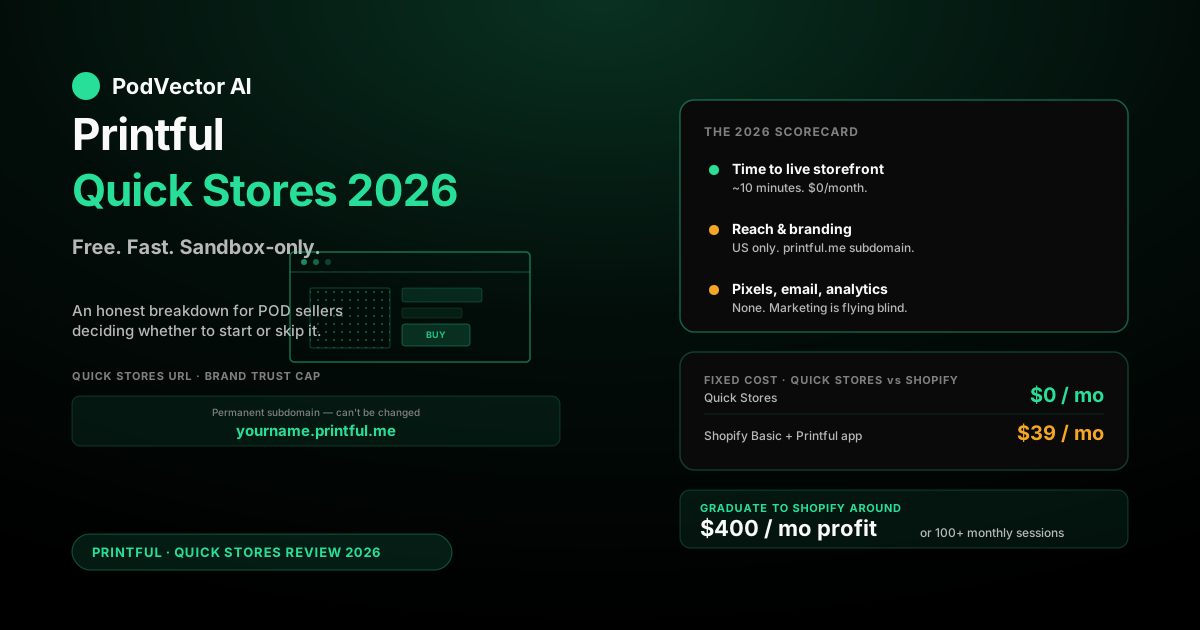
Quick Answer: Printful Quick Stores is a free, hosted storefront that lets US-based sellers list and ship Printful products without building a full ecommerce site. According to Printful's own product page, setup takes a matter of minutes, payouts run through Stripe, and Printful handles fulfillment automatically — you only pay for each product after a sale is made.
The trade-off is reach. Quick Stores ships only to US addresses, runs on a storename.printful.me URL, lacks a custom domain, has no built-in marketing tools, and gives you almost no analytics. There is no way to install a Meta Pixel or Google tag, which makes paid acquisition impractical. It's a sandbox, not a scalable business.
Best fit: complete beginners testing whether they can actually sell anything. Worst fit: anyone who already has traffic, a brand, or a margin model worth defending.
The 2026 Verdict at a Glance
Printful Quick Stores is exactly what it advertises: a free, zero-setup way to get a Printful storefront live in minutes. According to Printful's official Quick Stores page, there is no monthly fee, no billing method to configure, and no platform to learn. You pick products, set markup, hit publish, and you have a working store URL the same afternoon.
It also does very little beyond that. As confirmed by Printful's own Help Center, the storefront ships to US addresses only, runs on a Printful subdomain you can't change, and your store is not fully white-label — Printful appears in the URL. There is no email capture, no abandoned-cart flow, no analytics worth the name, and no way to install a tracking pixel from Meta or Google.
The honest read for 2026 is unchanged from when Quick Stores launched. It is a testing tool, not a business platform. If you've never sold a print-on-demand product and want to find out whether you can drive a single sale before committing to Shopify, it's the cheapest way to validate that. The moment you have consistent traffic or a brand worth protecting, you've outgrown it.
What Printful Quick Stores Actually Is
According to Bootstrapping Ecommerce, Printful launched Quick Stores in June 2024 as a free way to sell print-on-demand products without a website. You sign up for a Printful account, navigate to the Stores section inside the dashboard, and configure a storefront under yourname.printful.me. No Shopify. No WooCommerce. No code.
Crucially, as ecommerce-platforms.com notes, Quick Stores is not a marketplace — Printful is not bringing customers to you. You'll need to drive your own traffic. The platform simply removes every technical barrier between "I want to try POD" and "I have a live URL."
The simplicity is the feature. Quick Stores deliberately strips out almost every customization knob a normal ecommerce platform has, because each knob is a place a beginner gets stuck. The downside is that the knobs you actually need later — your own domain, email automation, analytics, paid ad tracking — aren't there either.
How Quick Stores Works in 2026
Setup is genuinely fast. Printful's product page describes it as launching a store "in only a few minutes," and that is roughly accurate if you already have product designs ready.
Step 1 — Sign up. Create a free Printful account. Quick Stores is a feature inside your main account dashboard, not a separate tier or upgrade.
Step 2 — Configure the store. Pick a store name and a subdomain (locked into printful.me). Upload a logo. Per Printful's Help Center, you cannot connect a custom domain, and the URL includes Printful branding.
Step 3 — Add products. Use Printful's Design Maker to put artwork on products from the standard Printful catalog. According to Sourcelow's Quick Stores guide, you can customize and sell any Printful products available in the US. The mockup generator and underlying pricing are identical to what you'd get on a Shopify-integrated Printful store.
Step 4 — Set markup. Define either a default markup percentage across the store or per-product retail prices. Profit equals your retail price minus Printful's base cost and shipping.
Step 5 — Publish. Stripe handles payments. Per Sourcelow, once your products are live, Printful gives you a unique store link to share. From here, your job is driving traffic — which Quick Stores will not help you with.
Pricing, Fees, and Payouts
Quick Stores itself is free. As Printful's official page states, "Quick Stores is completely free" — there is no subscription, setup fee, or per-product listing fee. Printful makes its money on the base cost of items you sell, exactly as it does on every other integration.
The fee structure on each sale:
- Base product cost: The same as every other Printful channel — you pay per product only after an order comes in, per Printful's own description.
- Stripe payment processing: Standard Stripe processing fees come out of your retail price at checkout.
- Shipping: Charged to the customer at checkout. Printful's regular shipping rates apply.
- Sales tax: Printful handles US sales tax collection and remittance automatically inside Quick Stores. This is genuinely useful — most beginners get this wrong on their own.
Per Sourcelow, earnings go into your Printful wallet and are transferred to your bank account monthly if you earn more than $25. Below that threshold, the balance rolls forward until you clear it.
One thing to flag: the Growth plan discount still works on Quick Stores. If you're already paying for Printful's Growth membership on another channel, Quick Stores inherits the discount. If you're not, paying for Growth purely to power a Quick Store rarely pencils out at low volume.
What Quick Stores Does Well
Time to first listing is genuinely short. Printful's own product page describes it as launching "in only a few minutes." For people who freeze at platform setup, this matters.
Zero fixed cost. Shopify Basic carries a monthly fee before any apps. Quick Stores is $0. If you sell nothing for three months, you owe nothing.
Sales tax handled. This is the boring feature that quietly saves new sellers from a real headache. Printful collects and remits US sales tax inside Quick Stores. On Shopify or WooCommerce, you need to configure this yourself.
Fulfillment is automatic. Per Printful, when a customer orders a product, Printful "prints, packs, and ships it directly to them, handling the logistics without requiring you to manage inventory." There's no integration to maintain, no webhooks to configure, no sync bugs to fix.
The catalog is the full US-available Printful catalog. According to GetApp, Printful offers over 450 customizable products across apparel, accessories, and home decor. Quick Stores gives access to whatever Printful makes available in the US — it isn't a stripped-down product range. Our Printful POD review walks through the catalog and quality in more detail.
What Quick Stores Doesn't Do
The cons are where Quick Stores stops being a real business platform. The list is long.
US-only. As Printful's Help Center explicitly states, Quick Stores are "currently available only to merchants in the US, and products can only be delivered to US addresses." If you're a non-US seller, or your customer is in Canada or the UK, Quick Stores isn't an option.
No custom domain. Per Printful's Help Center, "you can't connect a custom domain, and your store isn't fully white-label." Your URL is permanently yourname.printful.me. This is a brand problem and a trust problem.
Minimal customization. According to Sourcelow, you can only edit a few things: store name, URL, logo, and product descriptions. There are no themes, no layout options, no custom CSS, no hero images, no page builder. As TPOP's comparison notes, Quick Stores offers "few SEO settings" — meaning your store is difficult to find organically.
No SEO or blog capability. Quick Stores has virtually no SEO optimization or content publishing, which means you cannot build organic traffic over time through the storefront itself. This is a structural ceiling that isn't obvious until you're six months in.
No marketing tools. No email capture, no welcome series, no abandoned cart recovery, no discount codes, no affiliate links, no upsells, no cross-sells. Every conversion is single-touch and depends entirely on the traffic you bring.
No tracking pixels. You can't install the Meta Pixel, the Google tag, or any other tracking script. That makes paid traffic to Quick Stores almost unworkable — you can run ads to the URL, but you can't optimize them on conversion data, and you can't retarget cart abandoners.
No real analytics. You see sales in the Printful dashboard. You don't see traffic sources, conversion rate, time on page, or exit pages. Marketing decisions are made blind.
Printful products only. As ecommerce-platforms.com notes, you can't sell anything Printful doesn't fulfill — no dropshipped goods, no digital products, no services. If your brand requires any non-Printful SKU, Quick Stores isn't a fit.
Printful branding in the URL. The subdomain alone telegraphs that the store isn't independent. Some buyers don't care; brand-conscious buyers absolutely do.
Quick Stores vs Other Beginner Options
Quick Stores isn't the only beginner-oriented POD storefront. Understanding how it compares helps set expectations:
vs. Printify Pop-Up Store. Printify's Pop-Up Store fills the same niche on the Printify side — free, hosted, beginner-focused. Quick Stores is US-only; Pop-Up Store supports more countries. Catalog and base pricing differ between Printful and Printify regardless of which storefront tool you use. See our full Printify features and pricing breakdown for the cost comparison.
vs. Spring / Teespring / marketplaces. Marketplaces like Spring bring some built-in traffic; Quick Stores brings none. Marketplace commissions trade some margin for discovery. Quick Stores trades discovery for zero platform fees. Neither is a substitute for a real store once you're serious about building a brand.
vs. Etsy. Etsy has built-in search traffic and an existing buyer base, which Quick Stores entirely lacks. The trade-off is Etsy's listing fees, transaction fees, and intense competition. Quick Stores avoids those fees but also avoids any organic discovery.
Who Quick Stores Is Right For
The right fit for Quick Stores is narrower than the marketing suggests. Three audiences:
Complete beginners testing demand. If you've never sold a print-on-demand product and want to find out whether you can drive a sale at all before paying for Shopify, Quick Stores is the cheapest way to validate. Drive a small audience to it — Instagram, TikTok, a Reddit post — and see if anyone buys.
Creators with an existing US-only audience. If you have a YouTube channel, a podcast, or a TikTok account where you know your audience is mostly American, and you want a quick merch link in your bio without committing to a real storefront, Quick Stores does that job adequately.
Side projects and one-off campaigns. Holiday-themed merch, conference shirts, fundraising drops — anywhere the operation only needs to exist for a few weeks or months and serve a US audience, Quick Stores is sufficient.
The wrong fit is anyone trying to build a real business. The lack of pixels, custom domain, email capture, international support, and SEO tools means every growth lever a normal store has is unavailable on Quick Stores.
Quick Stores vs Shopify + Printful Integration
The honest comparison most beginners need to see:
| Feature | Quick Stores | Shopify + Printful |
|---|---|---|
| Monthly cost | $0 | Paid monthly plan required |
| Custom domain | No | Yes |
| International selling | US only | Global |
| Tracking pixels | No | Yes (Meta, Google, TikTok, etc.) |
| Email capture / automation | No | Yes |
| Abandoned cart recovery | No | Yes |
| Themes / layout customization | None | Extensive |
| Apps / extensibility | None | Thousands |
| Discount codes | No | Yes |
| SEO / blog | Virtually none | Full control |
| Sales tax (US) | Handled by Printful | Handled via Shopify Tax |
| Time to first listing | Minutes | Hours of setup |
Quick Stores wins on cost and speed. Shopify wins on everything that matters once you have any traffic to optimize.
The decision rule is unromantic. If you can't yet consistently drive sessions to a URL, Quick Stores is fine — Shopify's fixed cost is wasted on zero traffic. The moment you can, Shopify pays for itself in tracking pixels and abandoned cart recovery alone. For a deeper look at the Printful-Shopify integration specifically, see our guide on Printify and Shopify integration for print on demand and our coverage of Shopify Admin API automation for POD stores.
The Hidden Cost: No Margin Visibility
The thing that goes unsaid in every Quick Stores review is what it costs you to operate without analytics. It's not the $0/month — it's the decisions you can't make.
Print-on-demand margins on a mid-price retail tee depend on the blank, the print method, and shipping tier. What Quick Stores never shows you is actual per-SKU margin, conversion rate, or customer acquisition cost. You see a sale total; you don't see what that sale actually cost you to generate.
That gap is fine when traffic is free — an Instagram post, an organic TikTok hit, a friend buying. It becomes a real problem when traffic is paid. Without conversion tracking, you can't calculate ROAS. Without per-SKU margin data, you can't know which products to push harder and which to retire. Without abandonment data, you're losing sales you can't even see.
This is why Quick Stores is a sandbox. Every real POD operation hits a ceiling the moment it tries to scale paid acquisition without per-SKU margin and per-channel ROAS visibility. You can't optimize what you can't measure — and Quick Stores doesn't measure.
If you're running paid ads on Meta or Google and need to understand which SKUs are actually profitable, see our guides on Google Ads vs Facebook Ads for POD sellers and Facebook Ads strategy for POD product launches. The fix at scale is a unified data layer — our broader take on the Printful platform lives in our Printful POD service review.
When to Graduate From Quick Stores
Four signals tell you Quick Stores has served its purpose:
1. You're getting consistent organic traffic. Once a Quick Store is doing meaningful sessions per month from any channel — TikTok, Instagram, search — the lack of tracking pixels and email capture is actively costing you revenue. Move to Shopify.
2. You want to run paid ads. Meta and Google ads without conversion tracking and retargeting are materially less efficient. Paid scale on Quick Stores is a money pit. See our step-by-step guide on how to add Google Ads to Shopify for what the migration path looks like on the ad side.
3. You have non-US customers asking to buy. Quick Stores can't ship to them. Every customer asking "do you ship to Canada?" is a sale you're rejecting by design.
4. You're ready to build a brand. A printful.me URL caps the trust ceiling. Once you've validated that the product sells, you need your own domain to charge premium prices and build repeat purchase behavior. For the T-shirt-specific economics of running a real POD brand, see our guide on print-on-demand T-shirts for POD sellers.
The migration path is straightforward — set up a Shopify store, install Printful's free Shopify app, recreate your products (designs port over inside Printful), and redirect your Quick Store visitors to the new domain. The Printful side of the operation is identical on both channels, so production quality and lead times don't change.
For the full Printful-vs-Printify trade-off — including how pricing and quality compare on the same integration — see our Printify vs Printful pricing comparison and the broader Printify vs Printful pricing, quality, and features comparison. For the complete Printful review picture — quality, costs, integrations — see our Printful POD services review or browse the full Printful reviews cluster.
FAQs
Is Printful Quick Stores really free?
Yes. According to Printful's official product page, Quick Stores is "completely free" — no subscription, no setup fee, no per-product listing fee. You pay Printful for the base cost of each item you sell after a sale is made, plus Stripe processing fees taken from customer payments. Quick Stores itself is $0/month.
Can I use my own domain with Quick Stores?
No. Printful's Help Center confirms that as of 2026, you can't connect a custom domain — your storefront URL stays on the printful.me subdomain. If you need a custom domain, you'll need to migrate to Shopify or WooCommerce and use Printful's standard integration.
Does Quick Stores ship internationally?
No. Both the seller and the customer must be located in the United States. Per Printful's own page, the tool is "currently available only to merchants in the US, and products can only be delivered to US addresses." Use Shopify or another platform with Printful's regular integration for international sales.
Can I install the Meta or Google tracking pixel on Quick Stores?
No. Quick Stores doesn't expose the storefront HTML and doesn't support custom scripts. That makes paid ads to Quick Stores difficult to run profitably — you can drive traffic but you can't optimize on conversion data or retarget cart abandoners. See our Meta vs Google Ads comparison for POD sellers for how pixel tracking works on a real Shopify store.
How do I get paid from Quick Stores?
Per Sourcelow's Quick Stores guide, earnings go into your Printful wallet and are transferred to your bank account monthly if you earn more than $25. Below that threshold, the balance rolls forward until you cross it.
Can I have multiple Quick Stores?
Yes. A single Printful account can host multiple Quick Stores under different names and subdomains. This is useful if you want to test separate niches without mixing them in one storefront.
Is Quick Stores worth it for someone serious about POD?
As a permanent home, no — you'll outgrow it within weeks of getting real traffic. As a free testing ground to validate whether you can drive a sale at all before paying for Shopify, yes. Treat it as a sandbox, not a business. Once you graduate, consider how AI tools can help you manage margin and ad data at scale — see our guide on AI inventory management for Shopify POD sellers.
How does Quick Stores compare to Printify Pop-Up Store?
Printify's Pop-Up Store fills the same niche on the Printify side — free, hosted, beginner-focused. Quick Stores is US-only on both seller and buyer side; Pop-Up Store supports more countries. Catalog and pricing differ between Printful and Printify regardless of which storefront tool you pick. See our Printify features and pricing breakdown for a full cost comparison.
Can I switch from Quick Stores to Shopify later?
Yes. Your product designs live inside your Printful account, not inside Quick Stores, so they port directly to a Shopify-integrated Printful store. You'd rebuild the storefront in Shopify, install Printful's Shopify app, re-sync the products, and redirect any traffic from the Quick Stores URL to your new domain.
Does Quick Stores collect sales tax?
Yes, automatically inside the US. Printful handles tax collection and remittance for Quick Stores orders. This is genuinely useful — most beginners on other platforms get sales tax setup wrong.
Does Quick Stores have any SEO capability?
Virtually none. As noted in TPOP's platform comparison, Quick Stores has "few SEO settings" and no blog or content publishing capability. You cannot build organic search traffic through the Quick Stores storefront itself — all traffic must come from sources you drive manually.
For more context on the setup flow, see Sourcelow's Printful Quick Stores guide, which walks through the process in visual detail.
Outgrowing Quick Stores? Get the Margin View Quick Stores Won't Give You
Quick Stores hides every number that matters at scale — real per-SKU margin, channel ROAS, the cost of a refund, the gap between gross and net. The moment you graduate to Shopify and start running ads, that blindness gets expensive fast.
Victor is the AI employee built for POD sellers. Connect Shopify, your Meta and Google ad accounts, and your Printful data, and Victor reads your live business data to tell you which SKUs are actually making you money, which channels are leaking spend, and what Shopify-side action to take next — then executes the approved move for you.
Try Victor free