
Quick Answer: A Facebook Ads launch for a print-on-demand store is not the same workflow as a beauty brand or a Shopify supplements drop. The core difference is that you're launching a design on a known base product, not a new SKU with its own cost structure.
That changes three things: the test budget per launch is small (because the base cost is fixed), the cadence is fast (you can launch four to ten designs a month, not four a year), and the success signal is "profit per order on this design," not "ROAS on this campaign."
This guide walks the full POD launch workflow — pre-launch warming, launch week ad structure, creative testing inside a launch, profit-aware measurement, and what to do when a launch underperforms — through that lens.
Why a POD launch is a different ad problem
Most published Facebook Ads launch playbooks — including eCommerce Badassery's launch guide and LeadEnforce's launch best practices — assume an owned-inventory launch. A new flavor of supplement, a beauty bundle, a Kickstarter-backed gadget. One product, one campaign, one launch a quarter.
POD doesn't work like that. The base product (a Bella+Canvas 3001 tee, an 11oz mug, a Gildan hoodie) is already validated. What you're launching is the design on top of it.
That re-frames the launch in three concrete ways.
You're launching dozens of times a year, not one. A working POD store launches four to ten new designs a month. Each one is a creative test as much as a product test. The launch playbook has to scale to that cadence — a 28-day pre-launch email warm-up doesn't.
The cost structure is fixed before you launch. Printify and Printful base costs are public. Your retail price is set the day you upload the design. So unlike a brand launching a product with unknown unit economics, you know your contribution margin per order before the first ad runs. The launch question is "will the design sell at this margin," not "what is the margin."
The success signal is per-design, not per-campaign. A campaign holding 10 designs can show 2.1 ROAS overall while one design carries the whole campaign at 4.5 ROAS and the other nine bleed money. Campaign-level reporting hides that. You need design-level profit data, which is the part most ad-stack reports don't give you cleanly.
The strategic frame for this whole guide sits inside the broader complete Meta Ads playbook for POD sellers, which covers account architecture, audience strategy, and creative testing across the full ad lifecycle. This launch playbook plugs into that frame.
Launch cadence: four to ten drops a month, not one a quarter
The first decision a POD store makes about launches is volume. There are three working models.
The slow-curated model. One to two launches a month. Each design gets a deliberate pre-launch warm-up, a sustained ad budget, and a 30-day post-launch retargeting tail. This works for niche stores with a tight audience persona — pickleball-themed apparel, veterinary humor mugs, motorcycle clubs.
The mid-volume tested model. Four to six launches a month. Each design gets a small launch-week budget ($150–$400) to read profit signal, then either scales or sunsets. This is the most common shape for established POD stores running between $30k and $300k a month.
The high-volume catalog-test model. Eight to fifteen launches a month, sometimes more. Most designs are killed inside seven days. The store treats Meta itself as a design-validation engine. This works at scale but requires a profit-tracking system, because manual review of fifteen launches at the SKU level is impossible.
Pick the cadence before you pick the campaign structure. The campaign structure that fits "two launches a month" overspends if you scale to twelve, and the structure that fits twelve under-warms each design if you slow back down.
If your launches lean heavily into Q4 and gift-buying windows, the rhythm changes again — production lead times stretch, CPMs rise, and the cutoff date moves earlier. The POD seasonal Facebook Ads playbook covers how the launch cadence shifts during peak season.
Pre-launch warming: the seven days before the drop
Generic launch playbooks recommend a 14–21 day pre-launch warming window with email signups and lead-gen ads. For POD, that timeline is wrong on both ends.
It's too long for a single design. Most POD designs aren't worth a 21-day campaign before they ship. It's also the wrong shape — POD launches don't need email signups, they need warm video-views audiences that re-enter the launch-week conversion campaign.
The seven-day pre-launch loop that actually works for POD looks like this.
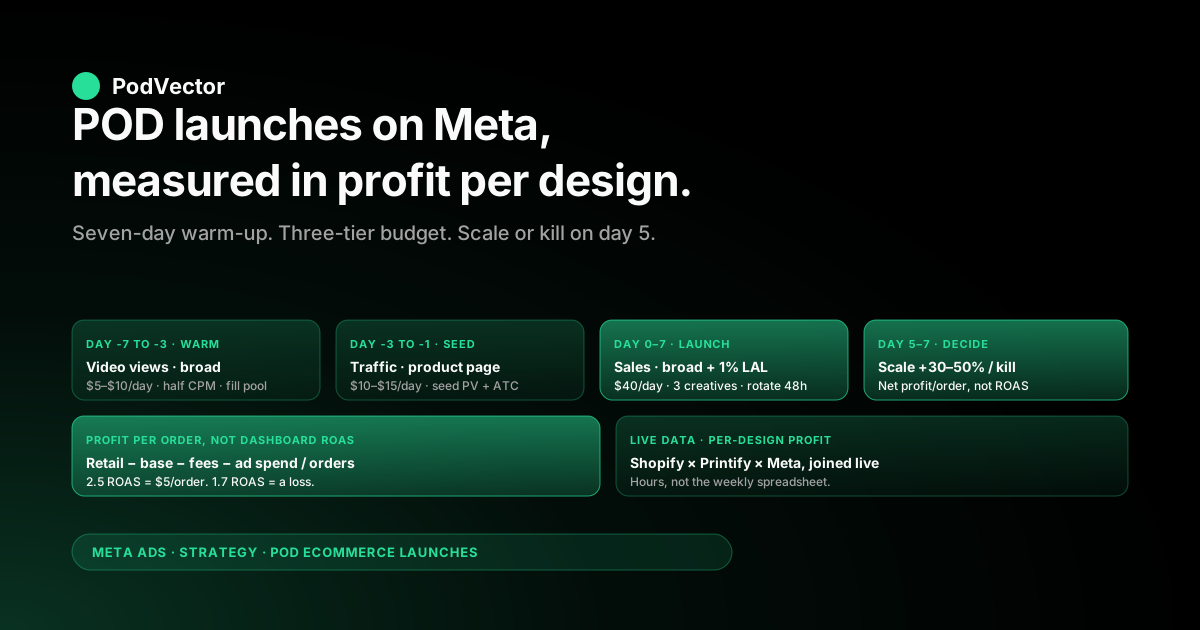
Days -7 to -3: video views campaign on broad audience. Run a $5–$10/day video views campaign with a 15-second mockup-on-model clip of the new design. The CPM here is half what conversion CPMs are. You're not selling — you're filling a 50% video-watcher retargeting pool.
Days -3 to -1: traffic campaign to the product page. Switch the ad set to a traffic objective on the same audience, pointing to the product page (which is now live but unannounced). $10–$15/day. This builds the Pixel a Page View → Add to Cart funnel for the design before launch day, so the conversion campaign doesn't enter learning phase cold.
Day 0: launch the conversion campaign. By the time you flip on the conversion campaign on launch day, you have a video-views audience of a few thousand people who saw the mockup, plus a website-visitor audience of a few hundred who hit the product page. Both feed the launch-week retargeting layer.
If you're running four launches a month, this seven-day loop runs in parallel — each design has its own ad set on the same overall video-views and traffic campaigns, staggered.
Launch-week campaign structure
The campaign structure for a POD launch should be boring on purpose. Three campaigns, predictable budgets, design-level visibility.
| Campaign | Objective | Audience | Budget (per launch) |
|---|---|---|---|
| 1. Pre-launch warm | Video Views / Traffic | Broad lookalike of past buyers, interest-broad | $50–$100 spread across 7 days |
| 2. Launch-week prospect | Sales (Conversion) | Broad + 1% lookalike of past buyers | $30–$60/day for 5–7 days |
| 3. Launch-week retarget | Sales (Conversion) | Pre-launch video viewers + product page viewers + ATC 30d | $15–$25/day for 7–14 days |
Two structural choices in this table that matter.
Broad before lookalike. Meta's algorithm in 2026 prefers broad audiences for cold prospecting. A 1% lookalike is a soft constraint that tightens the funnel, but the wider broad set learns faster. Run them in the same campaign as separate ad sets so the algorithm allocates between them.
Retargeting starts on launch day, not day three. The pre-launch video-views audience already exists by day zero. Don't wait for the prospect campaign to fill the retargeting pool — start retargeting from the warm pool you built in the prior week.
If you're using campaign budget optimization (CBO), set it at the campaign level. If you're using ad-set budgets (ABO), keep them tight and matching across ad sets. Mixing CBO with ABO inside the same launch confuses both you and the algorithm.
Creative testing inside a single launch
For owned-inventory brands, the creative test inside a launch is "which hook works." For POD, it's that plus "does the mockup itself sell."
The first 48 hours of every POD launch should run three creative variants minimum, on the same ad set, with the algorithm allocating between them.
- Mockup-on-model static. The product photographed on a person, in a real environment. This is the workhorse and usually wins for apparel.
- Lifestyle context still. The product in a setting that signals identity (a mug on a teacher's desk, a tee at a pickleball court, a hoodie at a campsite).
- 15-second motion ad. Vertical Reels-native format showing the design rotating, being unboxed, or being worn. Meta currently rewards this format with cheaper CPMs.
If you have time and budget for a fourth, add a UGC-style "I bought this for my [recipient]" testimonial — but only if you have authentic footage. Synthetic UGC reads as synthetic and underperforms in 2026.
The mistake to avoid is testing six or eight creatives in the first 48 hours of a $50/day ad set. Each creative needs at least 1,000 impressions to read signal, and a $50/day ad set with eight creatives gives each one about 500 impressions a day. You'll cycle through learning phase without learning anything.
Three creatives, $50/day, 48 hours. Then cut the bottom one and add a new variant for the next 48-hour window. That's the rhythm. Refer to the step-by-step Facebook Ads workflow for ecommerce for the detailed mechanics of the rotation.
Budgeting a POD launch: the $40-a-day rule
The single most useful POD launch budgeting rule is this: spend up to one day's expected break-even revenue on each launch, capped at seven days, before you decide to scale or kill.
The math, worked through.
Suppose your average POD apparel order is a $34 retail price, $12 Printify base cost, $1.50 transaction fees, and $4.50 shipping passed through (with the customer paying it). Your contribution margin per order is roughly $16. To break even on $40 of ad spend, you need 2.5 conversions a day at a $16 net per order.
That's a tight target on launch day. Most POD launches won't hit break-even on day one. The point of the $40/day cap isn't to be profitable on day one — it's to limit downside while you collect the signal.
Here's the tier table for the launch-week prospect campaign budget.
| Confidence in design | Day 1–3 budget | Day 4–7 budget | Decision point |
|---|---|---|---|
| Untested concept, weak mockups | $20/day | Kill or refine creative | Day 3 |
| Standard launch, decent mockups | $40/day | $40/day if breakeven, $20/day if soft | Day 5 |
| High-confidence (proven category, strong mockups) | $60/day | $80–$120/day if profitable | Day 7 |
The principle is the same across all tiers: the launch budget is bounded, the decision point is fixed, and the next decision is data-driven, not hopeful. A POD store running 10 launches a month with a $40/day average across 5 days = $2,000/month committed to design validation. That's a manageable test budget — but only if you measure profit cleanly.
Measuring profit, not ROAS
This is the section that most launch playbooks skip and most POD stores need.
Meta reports ROAS — return on ad spend — calculated as purchase value divided by ad spend. A 2.5 ROAS sounds healthy. For a POD store, it's often a loss.
The reason: ROAS uses purchase value, not contribution margin. On a $34 average order with $12 supplier cost, $1.50 fees, and pass-through shipping, the contribution margin is roughly $16. Your real "ROAS on profit" at the same 2.5 reported ROAS is closer to 1.18 — almost exactly break-even.
For a launch decision, the metric you want is profit per order after Meta spend.
Profit per order = (Retail price − Printify/Printful base − Transaction fees − Pass-through shipping) − (Ad spend / Orders).
Worked through with numbers from a typical apparel launch:
- Retail price: $34
- Printify base + shipping in: $14
- Stripe / Shopify fee: $1.50
- Gross contribution per order: $18.50
- Ad spend: $40, orders: 3, ad cost per order: $13.33
- Net profit per order: $5.17
That same launch reads as a 2.55 ROAS in Meta's dashboard. Sounds great. Net profit per order is $5.17 — workable for a Stage 1 design but thin if you scale spend.
Now imagine the design only converts at 2 orders per $40 ad spend. ROAS is 1.7. Net profit per order is -$1.50. The launch is bleeding money even though Meta's column shows revenue.
The infrastructure for measuring this cleanly is the part most POD stores get wrong. The two common patterns:
Spreadsheet-after-the-fact. Once a week, export Shopify orders and Meta spend, paste into a sheet, subtract Printify costs by SKU. Slow, error-prone, and decisions lag the signal by days.
Live data layer. Shopify orders, Printify cost feeds, Meta ad spend, and shipping all flow into a single warehouse you can query. Profit per order is computed continuously, not weekly. Decisions read in hours, not days. (This is where Victor sits — a live data layer with profit per order, per SKU, per design, queryable in plain English.)
For deeper coverage of the attribution side specifically, the Meta Ads ROAS and attribution guide for POD walks the full ROAS-vs-profit reconciliation.
When to scale a launch and when to kill it
The decision point in the budget table above is the most consequential single moment in a POD launch. The shape of the decision should be binary: scale, or kill.
The signal you're reading at the decision point isn't ROAS. It's the cumulative net profit per order on the launch.
| Net profit per order | Decision | Next action |
|---|---|---|
| +$5 or more | Scale | Increase budget 30–50% per 48 hours, watch frequency |
| +$1 to +$5 | Hold | Refine creative, hold budget, re-evaluate at day 14 |
| -$1 to +$1 | Test new creative | One more 48-hour creative cycle, then decide |
| Below -$1 | Kill | Sunset, archive design, move to next launch |
Two important nuances in this table.
Scaling is +30–50% every 48 hours, not doubling. Doubling Meta budget on a winner re-triggers learning phase and burns the early profitability you just measured. Slow scale holds the algorithm's accumulated learning intact.
Killing is fine. POD's whole strategic advantage is that killing a design costs you the launch budget, not inventory. A store running 10 launches a month should expect to kill 4–6 of them. That's the system working, not failing.
Post-launch: retargeting and the second wave
If a launch hits the "scale" decision, the next 14 days are about extending it without burning it out.
Three retargeting layers carry the post-launch period.
Recent visitor retargeting (3–14 days). Anyone who hit the product page or added to cart in the launch week. This is your highest-converting audience for the next two weeks.
Cross-design retargeting. Past buyers of related designs in your catalog. If the new launch is a hiking-themed mug and you have a hiking-themed tee that sold well last quarter, the buyer overlap is real.
Post-purchase upsell. Buyers of the new design retargeted with related catalog items 7–14 days after their first order, after the Printify production lead time so they're not getting upsold before their first order arrives.
For POD, the dynamic product ads format is particularly useful here because it auto-pulls catalog SKUs based on buyer behavior. The setup is covered in the Facebook retargeting ads for Shopify guide.
Retargeting budgets should always trail prospecting budgets by 2–4x. A $80/day prospecting campaign supports a $20–$40/day retargeting campaign. Going higher floods the retargeting pool with the same buyers, drives frequency above 3.5, and quietly tanks contribution margin.
Six mistakes that turn a winning design into a losing launch
Mistake 1: Launching all designs at once at full budget. A POD store with five new designs gets tempted to launch all five on day one with $50/day each. The algorithm needs ad-set-level signal to learn, and five simultaneous launches at full budget split your account-level signal five ways. Stagger by 48 hours.
Mistake 2: Optimizing on Add to Cart for too long. ATC optimization is fine when you have less than 30 weekly purchases. Once you cross that threshold, switch to purchase optimization. Staying on ATC past 50 weekly purchases dilutes signal toward window-shoppers.
Mistake 3: Single-creative ad sets. Running one creative per ad set in 2026 is leaving algorithm intelligence on the table. Three to four creatives per ad set, let Meta allocate.
Mistake 4: Refusing to kill a "near break-even" launch. A launch sitting at -$0.50 net profit per order for two weeks is not on the verge of breaking out — it's a slow drain. Kill it on day 7 or day 14, not day 30.
Mistake 5: Reading dashboard ROAS as the launch verdict. Already covered: ROAS without supplier cost in the denominator hides loss-making launches. Profit per order is the real verdict.
Mistake 6: Skipping pre-launch warming on lookalike-heavy stores. If your account leans on a 1% lookalike of past buyers, that lookalike is colder than it looks against a brand-new design with no engagement signal. Pre-launch video views on a broad audience warms the new design's signal so the conversion campaign doesn't enter cold.
If you want to step back to the broader Meta Ads picture across ad types, attribution, and platform integrations, the Meta Ads topic hub is the orientation map. For sibling tactics inside this cluster — scaling, audience structure, account architecture — the Meta Ads strategy hub indexes the full set.
FAQs
How much should I budget for a single POD design launch on Facebook Ads?
For a standard launch with decent mockups, $40/day for 5–7 days is the working benchmark — roughly $200–$280 total. High-confidence launches with proven category fit can start at $60/day. Untested concepts with weak mockups cap at $20/day for 3 days, then either kill or refine the creative.
How long before launch day should I start running pre-launch ads?
Seven days. Days -7 to -3 run video views on a broad audience to fill a retargeting pool. Days -3 to -1 run traffic to the product page to seed the Pixel with engagement signal. Day 0 the conversion campaign launches with both audiences already warm.
What's the right Facebook campaign objective for a POD product launch?
Sales / Conversion — optimized on Purchase if you have 50+ weekly purchases, or on Add to Cart if you're below that threshold. Pre-launch ads use Video Views or Traffic objectives to fill audiences cheaply before the conversion campaign starts.
How many creatives should I test in a single launch ad set?
Three or four. One mockup-on-model static, one lifestyle context still, one 15-second vertical motion ad, optionally one UGC-style testimonial. Each needs roughly 1,000 impressions to read signal, so don't over-fragment a $50/day ad set with eight creatives.
Should I use a 1% lookalike or broad targeting for a new POD design?
Both, in separate ad sets inside the same campaign. Broad scales faster and learns faster in 2026. The 1% lookalike of past buyers is a tighter constraint that often pays back per-conversion. Letting Meta's CBO allocate between them is more efficient than picking one.
How do I know if a launch is profitable when Meta only shows ROAS?
Subtract Printify or Printful base cost, transaction fees, and pass-through shipping from the order value to get contribution margin per order. Subtract ad spend per order from that. The result is net profit per order. A 2.5 ROAS on a typical $34 POD apparel order is roughly $5 net profit per order — workable but thin. A 1.7 ROAS is a loss. ROAS without supplier cost in the denominator hides loss-making launches.
How long should I wait before scaling a winning launch?
The first scale decision happens at day 5 or day 7 depending on confidence tier. Scale by 30–50% per 48-hour window, not by doubling. Doubling re-triggers the algorithm's learning phase and burns the early profitability you just measured.
Can I launch multiple POD designs in the same week?
Yes — that's the strategic advantage of POD. Stagger launches by 48 hours so each ad set gets clean learning signal. Five launches all opening on Monday at full budget split your account-level signal five ways and slow learning across all of them.
What's the difference between a POD launch and a regular ecommerce launch on Facebook Ads?
The base product is already validated, so you're launching a design on a known cost structure. Test budgets are smaller (no inventory risk), launch cadence is faster (4–10 a month vs. 1 a quarter), and the success signal is per-design profit, not per-campaign ROAS. The pre-launch warming window compresses to 7 days, not 28.
Stop guessing which launch made you money.
Meta says ROAS 2.5. That sounds great. Subtract your Printify base, your transaction fees, your shipping, and your true profit per order might be $1.50 — or $-1.50.
Victor reads your live Shopify, Printify, and Meta Ads data side-by-side and tells you, design by design, which launch is profitable, which is bleeding, and which one is about to enter learning phase. Ask in plain English. Get answers in seconds.
Try Victor free