
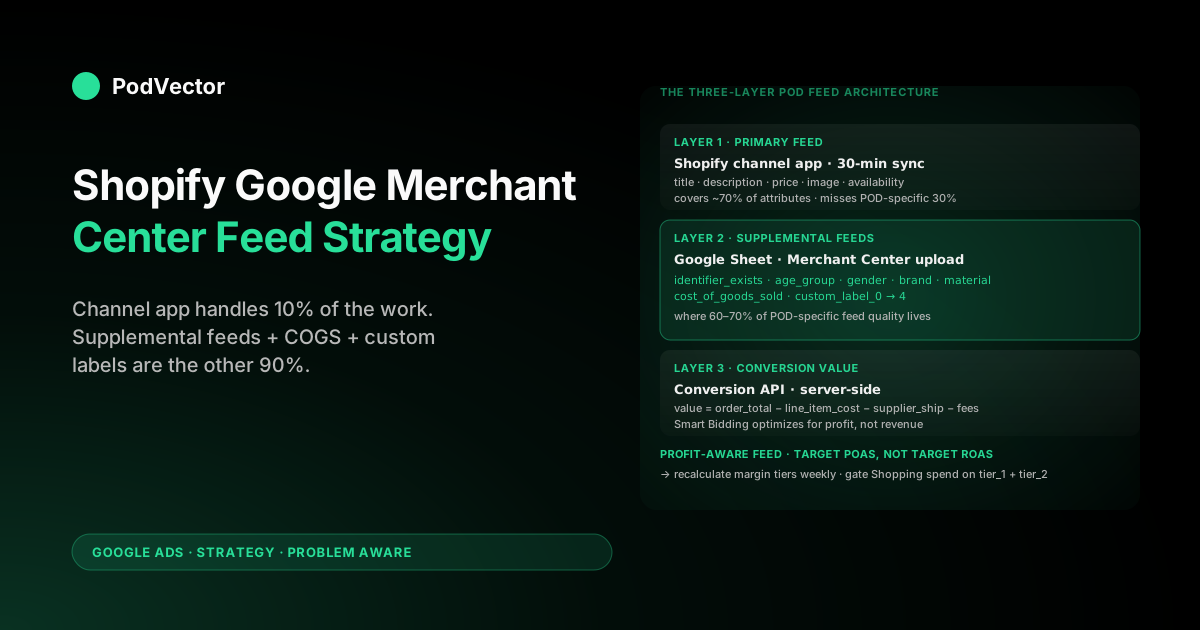
Quick Answer: A Shopify Google Merchant Center feed strategy for print-on-demand isn't about getting products into Merchant Center — the Google & YouTube channel app does that in an afternoon. It's about deciding what shape the feed takes once it's there: a primary feed from Shopify carrying the product data, two or three supplemental feeds in Merchant Center carrying the POD-specific overrides Shopify can't express (identifier_exists: false, cost_of_goods_sold from Printify, custom labels for margin tier and supplier, age_group/gender defaults), and a conversion-value setup that sends profit per order back to Google so Smart Bidding optimizes for margin instead of revenue.
The mechanical setup of the channel app is 10% of the work. The feed architecture decisions — which attributes go in the primary feed vs the supplemental layer, how custom labels segment the catalog by profitability, what conversion value gets reported back — drive the difference between Shopping campaigns that compound and Shopping campaigns that lose money quietly for six months.
Why the feed is the bottleneck for POD Shopping ROAS
Most POD operators treat the Merchant Center feed as plumbing — install the Google & YouTube channel app, hit sync, move on to picking campaign types and bidding strategies. That sequence is backwards for print-on-demand.
Shopping campaign performance is bounded by feed quality before it's bounded by bidding strategy: Google's auction logic uses feed attributes to decide which queries match each product, and a feed that's missing cost_of_goods_sold, custom labels, or correct identifier_exists values caps the algorithm's ceiling regardless of how clever the campaign structure is. Shopify's own Google Shopping feed guide walks through the channel-app install in detail; Digital Darts' definitive guide goes deeper on the attribute schema. Both are correct for owned-inventory ecommerce. Neither addresses the structural problem that makes POD different.
Print-on-demand catalogs have three feed-level constraints that owned-inventory catalogs don't share. First, GTINs don't exist — every POD product needs identifier_exists: false at the feed level or Merchant Center suppresses it from competitive auctions.
Second, supplier costs vary per SKU — a Printify Bella+Canvas tee costs $9.20 base while a Printful all-over-print hoodie costs $34.80, and that variance has to feed into bidding for Smart Bidding to make sane decisions. Third, the catalog explodes via variants — color × size on a single design produces 20–60 SKUs, each with its own feed entry, and most POD stores ship 4,000+ SKUs to Merchant Center on day one with attributes the Shopify channel app populated incorrectly.
The feed strategy is the architecture that handles those three constraints before they cap performance. The companion complete Google Ads playbook for print-on-demand sellers covers the campaign side; the Shopify Google Merchant Center strategy piece covers the broader policy and approval surface. This article focuses on the feed itself — what enters Merchant Center, in what shape, on what cadence, with what conversion data flowing back.
The four Merchant Center feed types POD stores actually use
Merchant Center supports six feed types in total. Most POD stores need four of them, and the difference between using all four vs only the primary feed is the difference between a feed Smart Bidding can optimize against and a feed that ships POD products with generic defaults the algorithm can't differentiate.
| Feed type | Source | POD purpose | Refresh cadence |
|---|---|---|---|
| Primary feed | Shopify (via channel app) | Product data: title, description, price, image, link, availability | Continuous (channel app pushes on product update; full sync every 30 min) |
| Supplemental feed: POD overrides | Google Sheet or file upload in Merchant Center | identifier_exists: false, age_group, gender defaults, brand, material | Manual or weekly sheet sync |
| Supplemental feed: COGS & custom labels | Google Sheet or file upload | cost_of_goods_sold per SKU, custom_label_0 through custom_label_4 for margin/supplier/niche segmentation | Weekly (when supplier costs change) |
| Promotions feed | Merchant Promotions in Merchant Center | "Free shipping over $X," "10% off first order" — read as discount, not as shipping rate | As promotions launch/expire |
| Product inventory updates | Channel app (automatic) | Stock and price changes between full feed refreshes | Real-time on product update |
| Local inventory ads | N/A | POD has no local inventory; skip this feed type | — |
The mistake most POD operators make is running only the primary feed and treating the supplemental layer as optional polish. In practice the supplemental feeds are where 60–70% of POD-specific feed quality lives, because they're the only place certain attributes can be expressed correctly without bloating Shopify's product data with marketing-channel-specific fields.
The primary feed: what the Shopify channel app gets right and wrong
The Google & YouTube channel app installs in seven steps from the Shopify admin and pushes product data to Merchant Center on a continuous schedule. It maps Shopify fields to Merchant Center attributes using a default schema that handles roughly 70% of attribute coverage out of the box and silently fails the other 30% — and the 30% it fails is where POD lives.
What the channel app maps correctly: product title (Shopify product title), description (Shopify product description), price (Shopify variant price), availability (Shopify inventory status if you're tracking inventory; defaults to "in stock" otherwise), product link (Shopify product URL), image link (Shopify featured image), product ID (Shopify variant ID).
What the channel app maps incorrectly or leaves empty for POD:
brand— pulls from Shopify product type by default, not vendor. POD operators usually leave product type as the design category ("T-Shirts," "Hoodies") and the vendor field as the storefront name. The channel app pushes "T-Shirts" tobrand, which Merchant Center treats as invalid. Fix at the channel-app attribute mapping screen: changebrandsource fromproduct.typetoproduct.vendor, and make sure every Shopify product has the storefront name in the vendor field.gtin/identifier_exists— POD products have no GTIN. The channel app leaves both fields empty, and Merchant Center's default interpretation of an empty GTIN with noidentifier_existsoverride is "you have a GTIN you forgot to provide." The SKU gets approved but suppressed from competitive auctions. Fix in a supplemental feed (covered below) by settingidentifier_exists: falseacross the catalog.age_groupandgender— required for all apparel. Shopify has no native fields. The channel app leaves them blank. Apparel SKUs without these get suppressed silently. Most POD apparel isadult+unisex; set those as supplemental-feed defaults and override per-product where the design is gendered.sizeandcolor— required for apparel. The channel app maps from Shopify variant options, but only if the option is literally named "Size" or "Color" (with that capitalization). POD stores often use "T-Shirt Size" or "Variant" or "Style" as the option name; those silently fail to map. Standardize variant option naming across the catalog before relying on the channel app's automatic mapping.material— strongly recommended for apparel; affects ranking. The channel app doesn't map this from product description text. Has to be set per-product in a Shopify metafield (namespacemm-google-shopping, keymaterial) or via supplemental feed.
The channel app's defaults work for owned-inventory Shopify stores running a few hundred SKUs with consistent product data hygiene. They fail for POD stores running 4,000+ SKUs across 100+ designs because the per-product attribute hygiene the channel app assumes doesn't exist in most POD product pipelines. The companion piece on Google Merchant Center Shopify strategy for print-on-demand walks the channel-app attribute mapping screen click-by-click.
Supplemental feeds: where the POD-specific overrides live
Supplemental feeds are the cleanest layer to fix the channel app's gaps without bloating Shopify product data. They live in Merchant Center under Products → Feeds → Supplemental feed, accept Google Sheets or file uploads, and layer on top of the primary feed without the channel app overwriting them on the next sync. For POD, two supplemental feeds handle the bulk of the corrective work.
Supplemental feed 1: POD attribute overrides. A single Google Sheet with one row per product (or per variant if attributes differ at variant level) and the following columns:
id— must match the variant ID from the primary feed exactly. Pull from Shopify's variant ID export.identifier_exists— set tofalsefor all rows. POD has no GTIN/MPN/UPC.age_group—adultfor the bulk of POD apparel; override tokids/toddler/infantper design where applicable.gender—unisexas the default; override tofemaleormalefor explicitly gendered designs.brand— your storefront name. Set even if the channel app already maps from vendor — supplemental feed wins on conflict, which is what you want.material— pull from Printify or Printful product spec. "100% cotton" for most Bella+Canvas tees; "50% cotton, 50% polyester" for many Gildan blanks; check the supplier product page per SKU.
This sheet has to update when new products launch — the cleanest approach is a Google Apps Script that pulls the product list from the Shopify admin API once a day and appends new SKUs with the default values. Manual maintenance works for catalogs under 200 SKUs but breaks down past that.
Supplemental feed 2: COGS and custom labels. Covered in detail in the next two sections — this feed carries the per-SKU profit data that turns Smart Bidding from revenue-optimizing to margin-optimizing. The structure is the same (Google Sheet with id as the join key) but the data has to refresh weekly when supplier costs change or when ad-spend efficiency shifts the margin tiers.
The two supplemental feeds together carry maybe 30 KB of data per 1,000 SKUs and clear in Merchant Center within an hour of upload. The cost is the discipline of keeping them in sync — most failures here come from new products launching in Shopify with no corresponding row in the supplemental feeds, which means the new SKUs ship to Merchant Center with the default channel-app gaps and silently underperform until someone audits.
Custom labels: the profit-aware segmentation POD demands
Merchant Center supports five custom label fields per product (custom_label_0 through custom_label_4). They're free-text and don't affect what queries match the product — but they're the primary way to segment a Shopping campaign or Performance Max asset group by anything other than product category.
For owned-inventory stores with consistent margins, custom labels are nice-to-have. For POD, where margins range from 8% on a discount tee to 45% on a niche AOP hoodie, custom labels are how you avoid burning ad spend on unprofitable SKUs.
The label structure that's worked across the POD operators we've seen ramp Shopping cleanly:
custom_label_0: margin tier. One oftier_1_high(≥30% margin after ad spend at target ROAS),tier_2_mid(15–30%),tier_3_low(5–15%),tier_4_loss(under 5% or negative). Recalculate weekly from actual sales data. Tier-1 gets aggressive Shopping bids; tier-4 gets pulled from the feed entirely or moved to a Performance Max asset group with the lowest target ROAS.custom_label_1: supplier.printify_us,printify_eu,printful_us,printful_eu,gelato, etc. Lets you segment by fulfillment economics — Printify Latvia partner has different shipping costs and margins than Printify Texas, and a campaign targeting EU should weight Printify EU SKUs differently than Printify US SKUs.custom_label_2: niche or audience.fitness,pets,nurses,teachers, etc. Niche-specific Shopping campaigns target audiences with very different intent and price sensitivity; a single store-wide campaign averages those signals into noise.custom_label_3: design family or collection. Useful for promoting new collections in standalone Shopping campaigns, or for excluding tired designs from a discovery-focused asset group.custom_label_4: seasonality.evergreen,q4_holiday,summer,back_to_school. Seasonal designs need different bid strategies in their season vs out, and the label makes that segmentation possible.
The margin tier label is the highest-leverage of the five. POD margins are small enough that the difference between bidding the same target ROAS across the full catalog vs differentiated bids per tier compounds into meaningful net profit changes.
A tier-1 SKU with 35% margin can support a target ROAS of 3.0 (33% ad cost, 35% margin = barely positive). A tier-3 SKU with 12% margin needs a target ROAS of 8.5+ to break even. Treating both with the same campaign-level target ROAS means either the tier-1 SKU is under-bid (leaving impression share on the table) or the tier-3 SKU is over-bid (losing money per click).
Recalculating margin tiers weekly is non-trivial without a profit data layer that joins Shopify orders, Printify costs, ad spend, and shipping/processing fees per SKU. Most POD operators run this in a spreadsheet that takes 3–6 hours per week and goes stale within days. The Victor agentic stack — live data joins of Shopify, Printify/Printful, and Google Ads — recalculates per-SKU margin nightly and writes the tier label to a Google Sheet that feeds Merchant Center, which is what changed the cadence from weekly-and-stale to daily-and-current for the operators using it.
cost_of_goods_sold and POAS: feeding margin into Smart Bidding
Google Ads' Smart Bidding (Maximize Conversion Value, Target ROAS) optimizes against whatever conversion value you report. Most POD operators report conversion value as order revenue, which trains Smart Bidding to maximize revenue — and revenue maximization on a 12% margin catalog produces a profitable-looking ROAS dashboard alongside an unprofitable P&L. The fix has two layers: the cost_of_goods_sold attribute in the feed, and the conversion value sent back to Google Ads.
The cost_of_goods_sold attribute. Set per-SKU in the supplemental feed as the supplier cost (Printify base price + supplier shipping). For a Bella+Canvas tee on Printify US, that's typically $9.20 base + $4.50 shipping = $13.70 per unit.
Merchant Center accepts the attribute and Google Ads can read it for profit-based bid signals. Crucially, cost_of_goods_sold is what enables Profit Optimization in Performance Max — when enabled, Google bids against gross profit (price minus COGS) instead of revenue. The shift from ROAS-bidding to profit-bidding inside Performance Max is the single biggest performance lever for POD that most operators leave untouched because the COGS attribute is empty.
Conversion value as profit, not revenue. The other layer is what Google Ads receives back from your conversion tag. By default, the Shopify checkout-tracking integration sends order subtotal as the conversion value.
For POD, that's revenue. To send profit, the conversion value has to be calculated server-side as order_total - sum(line_item_cost) - shipping_paid_to_supplier - processing_fee and pushed via the Google Ads conversion API or via dynamic remarketing tag value modification. The companion piece on setting up Google Ads conversions on Shopify walks the conversion-value calculation; the Shopify Google Ads tracking strategy piece covers the conversion API plumbing.
The combined effect — COGS in the feed + profit as conversion value — is that Smart Bidding starts optimizing for the metric that actually shows up in your bank account. POAS (profit on ad spend) is the metric Google Ads then reports against, and Smart Bidding's "Target ROAS" effectively becomes "Target POAS." Most POD operators see ROAS dashboard numbers drop 30–50% when they make this switch (because the conversion value is now smaller) while net profit climbs — an unsettling visual but the right outcome.
Feed refresh cadence and inventory accuracy
The Shopify channel app pushes a full feed refresh to Merchant Center every 30 minutes by default and pushes incremental product updates in real time when products are edited in Shopify. For most POD stores that cadence is sufficient — POD doesn't have the inventory-spike problem owned-inventory stores deal with, because Printify and Printful effectively have unlimited inventory at the supplier level.
The places where cadence matters for POD:
- New product launches. A new Shopify product takes 30 minutes to appear in Merchant Center via the primary feed and another 1–3 days for Merchant Center to review and approve. If the new product isn't yet in the supplemental feeds (POD overrides + COGS/custom labels), it ships with the channel-app gaps and underperforms until the supplemental rows are added. Either gate new products from the storefront until the supplemental feeds are updated, or automate the supplemental-feed append via Apps Script triggered on Shopify product creation webhooks.
- Price changes. Real-time via the channel app. No action needed, but verify after a sitewide price change that no products got disapproved for "price mismatch between feed and landing page" — a delay between Shopify cart price and Merchant Center feed price during the sync window can trigger this.
- Supplier cost changes. Printify and Printful adjust supplier prices periodically (usually 2–4x per year, usually upward). When that happens, the COGS supplemental feed has to be regenerated or the margin tier custom labels go stale and Smart Bidding bids against outdated profit data. Set a calendar reminder for the supplier-pricing-change announcements and rerun the COGS pipeline within 48 hours of the change.
- Out-of-stock at the supplier level. Rare, but happens — a Printify partner runs out of a specific blank in a specific size, and that variant becomes temporarily unfulfillable. Shopify's inventory tracking won't catch this unless the operator manually disables the variant. Merchant Center keeps showing the variant as in stock, drives clicks to it, the buyer checks out, and the order sits unfulfilled for 1–2 weeks. The fix is to subscribe to Printify's stock notification webhooks (or use a third-party service like Sellbery that mirrors supplier stock to Shopify inventory) and let Shopify's "deny purchases when out of stock" setting handle the rest.
Disapproval triage from the feed side
Merchant Center disapprovals fall into four buckets — required attribute, image quality, shipping accuracy, policy compliance — each of which has a feed-layer root cause and a fix that lives at a specific layer (Shopify product, channel app, supplemental feed, or Merchant Center policy settings). The decision tree we use when triaging a fresh batch of disapprovals:
- Required-attribute disapprovals (e.g., "missing
age_group," "missingbrand"): fix in the supplemental POD-overrides feed. Add the row, sync, wait 1–3 days for re-review. - Image disapprovals ("image too small," "promotional overlay," "watermark"): fix at the Shopify product level by replacing the featured image with a clean, ≥800×800 mockup. Channel app re-syncs within 30 minutes, Merchant Center re-reviews within 1–3 days.
- Shipping disapprovals ("shipping rate not declared," "rate mismatch"): fix in Merchant Center directly under Shipping & returns by setting a flat-rate fallback that approximates the actual Printify/Printful shipping rate. The Shopify and Google Merchant Center strategy piece walks the rate configuration.
- Policy disapprovals ("free returns not honored," "missing return policy," "restricted product"): fix in Merchant Center under Account → Business information → Shipping & returns. The
free returnsattribute should be set to false for POD because Printify doesn't accept buyer's-remorse returns. The companion structured data piece covers the schema.org annotations that reinforce the return policy at the page level.
The taxonomy matters because the fixes live at different layers. A new POD operator triaging 200 disapprovals at once tends to fix everything in Shopify product fields, which works for image and some attribute issues but misses the supplemental-feed and Merchant Center policy fixes — and the missed fixes silently cap performance even after the dashboard shows fewer disapprovals.
A 30-day feed-cleanup ramp
For an operator inheriting an existing POD Shopify store with the channel app already installed and Shopping campaigns already running but underperforming, the 30-day ramp that's worked across the operators we've watched do this cleanly:
- Days 1–3: audit. Pull the Merchant Center feed report and the disapproval queue. Categorize each disapproval into the four buckets (attribute, image, shipping, policy). Pull the Shopify product export and check vendor field consistency, variant option naming consistency (Size/Color), and image dimensions on the top 50 SKUs by trailing-90-day revenue. Pull the Google Ads conversion settings and confirm whether conversion value is revenue or profit.
- Days 4–7: primary feed cleanup. Fix vendor fields in Shopify (set to storefront name on every product). Fix variant option names where they're "Variant" or "Style" — rename to "Color" and "Size." Replace the 5–10 worst-offender images on top-revenue SKUs with ≥800×800 clean mockups. Wait for the channel app to re-sync.
- Days 8–14: supplemental feed 1 build. Build the POD-overrides Google Sheet (id, identifier_exists, age_group, gender, brand, material). Use Apps Script to pull the variant ID list from Shopify and pre-populate with defaults; manually override the per-product fields where the default doesn't fit. Upload to Merchant Center as a supplemental feed. Wait 24 hours for re-sync and re-review.
- Days 15–21: supplemental feed 2 build (COGS & custom labels). Pull supplier costs from Printify/Printful (manually if needed; Printify has a Bulk Edit export). Build the COGS column. Calculate margin tiers from trailing-30-day Shopify orders + Printify costs + ad spend allocated per SKU. Populate
custom_label_0throughcustom_label_4. Upload as a second supplemental feed. - Days 22–28: conversion value migration. Switch Google Ads conversion value from order revenue to gross profit. Update the conversion tag (or, cleaner, use the conversion API server-side) to send
order_total - sum(line_item_cost) - supplier_shipping - processing_feeas the value. Expect Smart Bidding to need 7–14 days to recalibrate; campaign-level ROAS dashboards will look worse during this period even as net profit improves. - Days 29–30: Performance Max profit optimization. Inside the existing Performance Max campaign, enable Profit Optimization (only available once
cost_of_goods_soldis in the feed for at least 80% of SKUs). Restructure asset groups by margin tier custom label — one asset group for tier_1_high, one for tier_2_mid, one for tier_3_low; exclude tier_4_loss entirely. The companion complete guide to Google Ads + Shopify integration for POD covers the asset-group restructuring step-by-step.
The ramp compounds. The primary feed cleanup unlocks impressions on previously suppressed SKUs.
The supplemental feeds unlock attribute coverage across the full catalog. The COGS data unlocks profit-based bidding.
The conversion value migration aligns Smart Bidding's optimization target with actual P&L. By day 30, the same Shopping campaigns running on the same budget produce a different shape of result — fewer impressions on tier-3 SKUs, more impressions on tier-1, lower revenue ROAS but higher net margin per dollar spent.
FAQs
How long does it take for Merchant Center to approve a Shopify POD feed?
Initial review takes 3–5 business days from the first feed sync. Re-reviews after fixes take 1–3 days.
Disapproved SKUs that get fixed via supplemental feed update typically clear faster (24–48 hours) than disapproved SKUs that get fixed via Shopify product changes (where the channel app sync has to fire first). The full 30-day ramp above assumes 3–4 review cycles spread across the cleanup phases.
Do I need a paid app like Simprosys, Nabu, or DataFeedWatch?
For most POD stores under 10,000 SKUs, no — the free Google & YouTube channel app handles the primary feed, and supplemental feeds via Google Sheets handle the POD overrides. Paid feed apps add value when (a) catalog size exceeds 10,000 SKUs and supplemental-feed maintenance becomes a full-time job, (b) the store needs feed transformations the channel app can't do (e.g., dynamic title rewriting based on category), or (c) the operator wants a single dashboard to monitor disapprovals and run feed rules. For a POD operator running 500–4,000 SKUs and willing to maintain the supplemental feeds in Google Sheets, the free channel app is sufficient.
Can I use the same feed for Performance Max and Standard Shopping?
Yes — both campaign types pull from the same Merchant Center feed. The differentiation between campaigns happens at the campaign level (which custom labels to include/exclude, which countries, which target ROAS) rather than at the feed level. Most POD stores running both Performance Max and Standard Shopping use the same primary + supplemental feed structure and let the campaign-level asset groups or product groups slice the catalog appropriately.
Should I include the supplier name in the product title?
No. Title space is the highest-leverage attribute in the feed for matching to queries; spending characters on supplier names ("Printify Bella+Canvas T-Shirt — [Design]") wastes space that should go to the design name, niche keyword, and product type. Put the supplier in custom_label_1 instead, which is invisible to Google's matching but available for campaign-level segmentation.
What happens to the feed when I change a product's price in Shopify?
The channel app pushes the new price to Merchant Center within 30 minutes. Existing Shopping campaigns continue to serve at the old price during the sync window, which can trigger a "price mismatch" disapproval if a buyer clicks during that gap. For sitewide price changes (e.g., cost-of-goods adjustment passed through to retail), schedule the change during off-peak hours and pause Shopping campaigns for 30 minutes around the change to avoid mismatch flags.
How do I send order profit (instead of revenue) as the conversion value?
Two approaches, depending on infrastructure. The simpler approach modifies the Google Ads conversion tag's value parameter at the Shopify checkout to subtract estimated COGS — works for stores with a roughly constant margin percentage but breaks down when margins vary by SKU.
The cleaner approach uses the Google Ads Conversion API (server-side), pulls actual order data from Shopify (including line-item cost from Printify/Printful via their APIs), calculates real profit per order, and posts the value back to Google Ads asynchronously. Most POD stores need the second approach because per-SKU margin variance is too high for a flat percentage to be accurate. The Shopify Google Ads tracking issues piece covers the conversion API setup.
Why does my feed show "approved" but my Shopping campaign gets no impressions?
Most common cause: feed approved but key SKUs are silently suppressed because of empty identifier_exists + missing brand or gtin. Merchant Center's "Performance" view doesn't surface the suppression as a disapproval, but the Diagnostics → Item issues view will list affected SKUs under "limited" or "suppressed" status.
Fix in the supplemental POD-overrides feed (set identifier_exists: false and ensure brand is populated). Second most common cause: campaign-level negative keywords or audience exclusions filtering the relevant queries. Third: target ROAS set too aggressive for the catalog's margin profile, so Smart Bidding finds zero queries that meet the threshold.
How does this feed strategy interact with Google Free Listings?
Free Listings (the unpaid Google Shopping listings on the Shopping tab) pull from the same Merchant Center feed as paid Shopping. Every fix in the feed strategy above — attribute completeness, image quality, COGS, custom labels — improves both paid and free placements. POD stores running clean feeds typically see 15–30% of total Google Shopping clicks come from free listings without any additional ad spend; stores running broken feeds get suppressed from both surfaces equally.
Ship a feed Smart Bidding can actually optimize
The COGS column, the margin tier custom labels, and the profit conversion value all assume the operator can recalculate per-SKU margin weekly without it eating the week. Victor is the AI employee that runs that calculation continuously — live data joins of Shopify, Printify, Printful, and Google Ads data, with margin tier labels and profit conversion values written back to the supplemental feed nightly. Victor answers "which SKUs are tier-1 this week, which are tier-3?" from real profit data and pushes the labels and values directly — with your approval. And see the per-SKU margin breakdown that turns a generic Shopping feed into a profit-aware feed in under an hour.
Try Victor free