
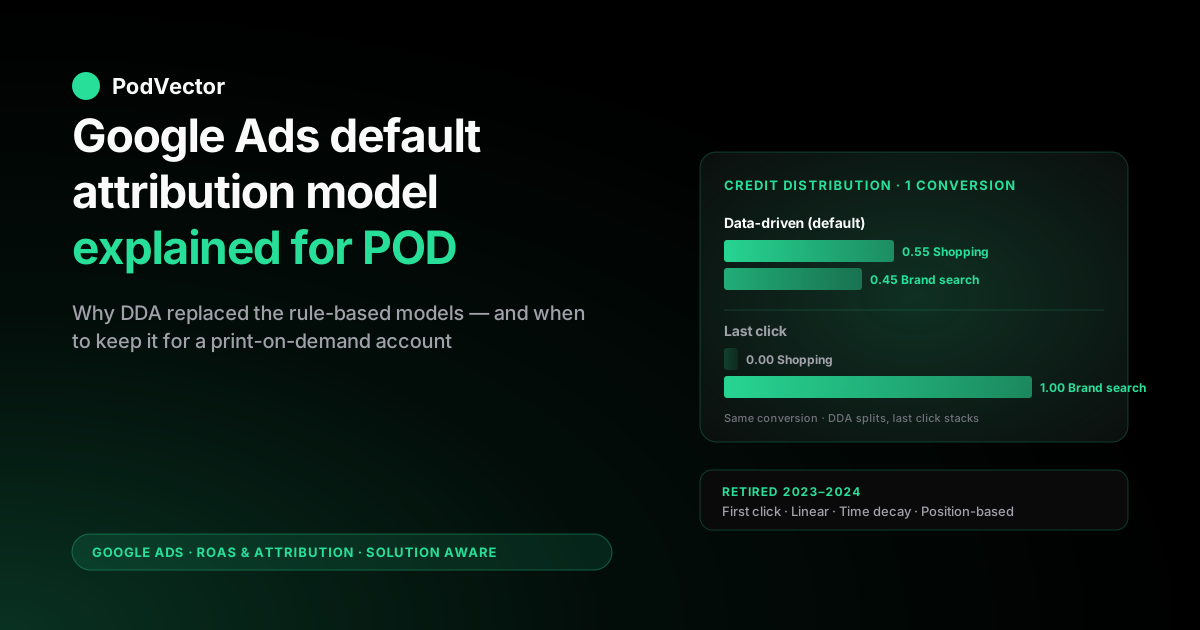
Quick Answer: The Google Ads default attribution model in 2026 is data-driven attribution (DDA). Every newly created conversion action ships with DDA pre-selected, and the only other model you can actually choose is last click — Google retired first click, linear, time decay, and position-based across 2023–2024 and silently migrated any conversion action still using one of those rules to DDA.
There is no longer a minimum-conversion threshold to qualify for DDA, which is the change that finally made it a sensible default rather than an enterprise-only feature. For print-on-demand sellers, the DDA default is mostly the right call: it distributes credit across touchpoints using a counterfactual model that handles POD's typical 1–3 ad-touchpoint paths better than last click and stops over-rewarding the closing branded-search click that buyers were going to use anyway.
Two situations make the default misfit: pure single-keyword Search accounts where last click is genuinely more interpretable, and accounts where Smart Bidding is being trained on conversion subtotal rather than margin — in which case the model is computing the wrong objective regardless of how cleanly DDA distributes the credit. The model is one decision; reading DDA-credited revenue against actual post-Printify or Printful margin is the other.
What the Google Ads default attribution model actually is in 2026
The Google Ads default attribution model is the rule Google applies when distributing credit for a conversion across the ad clicks (and engaged views) inside the eligible window, unless you choose a different rule at conversion-action setup. As of 2026, that default is data-driven attribution.
Every newly created conversion action — Purchase, Add to Cart, Begin Checkout, Sign Up, anything else — ships with DDA pre-selected. The only other model you can pick from the dropdown is last click. Google's own help center documents this in About attribution models, where the operative line is that DDA is "the default attribution model for most conversion actions" and the supported list contains exactly two entries.
Two clarifications matter before any decision about whether to keep or override the default. First, the default model is not the same as the default conversion window.
The model decides how credit is distributed across the touchpoints inside the eligible set; the window decides which touchpoints qualify for the eligible set in the first place. Both default to specific values on every new conversion action — DDA for the model, 30 days for the click-through window — and the two settings are independent of each other.
We unpacked the window side of that pair in Google Ads default attribution window explained for POD sellers; this article is the model side. Second, the Google Ads default model is not the GA4 default model.
GA4 has its own attribution settings configured separately in the GA4 admin and uses its own DDA implementation — same name, different mechanics, different reporting numbers on the same conversion. The two systems can show meaningfully different conversion credit on the same purchase because they are answering different questions with different inputs.
The wider context for any model decision sits inside the model–window–bidding triangle covered in Google Ads attribution explained for POD sellers; the cluster hub at Google Ads ROAS and attribution for POD ties model choice to actual ROAS measurement after supplier cost.
Why DDA became the default (and what changed to make it sensible)
DDA being the default is recent. Until 2021, last click was the platform-wide default and DDA was a feature gated behind a 600-conversion-and-15,000-click minimum that locked it out for the long tail of mid-market advertisers. Google's stated reason for promoting DDA to the default in 2021 was that the rule-based models — last click, first click, linear, time decay, position-based — all failed to reflect "the actual contribution of each touchpoint to a conversion." The unstated reason was that Google's bidder learns better from credit distributions that match the underlying causal structure than from rule-based distributions designed to be human-interpretable, and Google needed the bidder to learn faster as iOS 14, third-party-cookie deprecation, and Privacy Sandbox started compressing observable signal. DDA isn't just an attribution choice; it's the credit-distribution layer Google's own machine learning runs against.
The change that made DDA a sensible default rather than an enterprise-only feature, though, was the removal of the conversion threshold. Google quietly dropped the 600-conversion minimum in stages across 2022–2023, and by 2024 there was no minimum data threshold at all — DDA became available on any conversion action regardless of volume.
Smaller accounts that previously couldn't qualify suddenly inherited a model that handles their data the same way it handles enterprise data. The trade-off is that DDA on a low-volume conversion action falls back to a pooled industry-vertical model when the account itself doesn't have enough data to fit account-specific credit weights, which means the credit a single small POD account sees is partly its own and partly the sector's. This is mostly fine for POD operators in the first six months of a new account, where pooled-vertical credit is typically more accurate than last click would be — but it's worth knowing the credit you see isn't pure account-specific until you're past several thousand conversions.
Google's own pitch for the switch is a conversion lift of roughly 6–30% at comparable cost-per-acquisition, with the upper end on touch-rich, multi-channel accounts. Treat that range as a directional platform-wide average rather than a forecast for your account: a brand-defence POD micro-account with one touch per path gets almost none of it, while a Shopping-plus-YouTube-plus-remarketing POD account with genuine multi-touch paths gets most of it. The lift is real, but it's a function of how much touch-stacking DDA actually has to redistribute credit across — which is exactly the structural feature that decides whether the default fits your account at all.
The retired models you can no longer choose
Starting in September 2023 and completing across 2024, Google retired four of the six rule-based attribution models that previously sat in the dropdown: first click, linear, time decay, and position-based. The migration was automatic — any conversion action still configured to use one of those models was upgraded to DDA without operator intervention, and any reporting columns that referenced the retired model now show DDA-credited numbers instead.
The published rationale was that fewer than 3% of conversions across the platform were still using the retired models, which Google read as evidence the long tail of attribution choice wasn't actually delivering value to anyone. That number is not wrong, but it understates how much each of the retired models was specifically designed for.
Linear distributed credit equally across every touchpoint, which made it the only model that obviously didn't favour Google's own touch-rich Performance Max placements; we covered the implications of that retirement specifically in linear attribution model Google Ads explained for POD sellers. Time decay was the choice for accounts with multi-week consideration cycles where the closing touch genuinely was more important than the opening one.
Position-based was the compromise model for operators who wanted both the opening and closing touches to anchor the credit distribution. First click was rarely used outside upper-funnel measurement.
For POD operators specifically, the retirement of the rule-based models is mostly a non-event because almost no one was running them — POD's short decision cycle and small-touchpoint paths fit DDA reasonably well even before DDA became the default. The exception was operators using time decay on YouTube-heavy upper-funnel campaigns, who lost a model that materially under-weighted weak early touches and now have to filter those touches via window choice (covered in Google Ads attribution window explained for POD sellers) rather than via model choice.
Cross-account conversion tracking and any conversion action imported from GA4 also default to DDA. Imported GA4 events arrive with the GA4 model attached to the underlying GA4 measurement, but the Google Ads-side credit attribution still runs DDA against the eligible window. Accounts that connected GA4 conversions during the rule-based era and never revisited the setting almost always have DDA running today regardless of what the GA4 model says.
How DDA distributes credit — the counterfactual mechanic
DDA distributes credit across the eligible touchpoints using a counterfactual model. For any given conversion, DDA estimates how much each touchpoint actually contributed by comparing the converter's path to the paths of non-converters who shared some but not all of those touchpoints. The intuition is: if removing a particular ad click from a converter's path makes that path look like a typical non-converter's path, the click was load-bearing and gets large fractional credit; if removing the click leaves the path looking like other converter paths, the click was redundant and gets small credit.
The mechanic is fractional rather than winner-takes-all. A single conversion's credit is split across every touchpoint in the eligible set, with weights summing to one.
A typical POD purchase with two ad touchpoints — say, a Shopping click that introduced the design and a branded-search click that closed the order three hours later — might split as 0.55 to the Shopping click and 0.45 to the branded search under DDA, where last click would have given 1.0 to the branded search and zero to the Shopping click. The Shopping click did the work of getting the design in front of the buyer; the branded search was the buyer typing back what they'd already decided to buy. DDA captures that distinction; last click does not.
The counterfactual is computed against the account's own conversion paths when there's enough data, and against a pooled vertical model when there isn't. There's no minimum threshold to use DDA anymore, but the figure the trade press consistently cites for an account to fit its own account-specific credit weights is roughly 300 conversions and 3,000 ad interactions inside a rolling 30-day window — below that, the credit you see leans on the pooled vertical model, and the exact handover point shifts with path complexity.
For most POD accounts, the credit distribution is partly account-specific and partly vertical-pooled, with the mix shifting toward account-specific as monthly conversion volume grows past a few hundred. We covered the path-comparison mechanics in detail with POD examples in Google Ads data driven attribution explained for POD sellers; the mechanic-level detail and edge cases are covered in About data-driven attribution Google Ads help explained for POD sellers.
Two practical consequences of the counterfactual mechanic matter for POD operators reading DDA reports. First, DDA reduces credit on touchpoints that look like buyers were already going to convert anyway — most often, branded-search clicks at the end of the path.
Operators who shifted from last click to DDA almost always see branded-search ROAS drop by 20–40% under DDA; that drop is not branded search becoming worse, it's the model correctly removing credit that branded search was capturing under last click for paths the buyer would have converted on regardless. Second, DDA increases credit on early touchpoints whose removal makes the path look unlike a typical converter path.
Shopping clicks that introduced a never-seen-before design, YouTube engaged views that warmed up cold-audience buyers, and Demand Gen impressions that drove first-session traffic all tend to gain credit under DDA versus last click. The credit shifts from closing touches to opening ones to the extent the opening touches are causally load-bearing.
Last click vs. DDA: when each is genuinely correct
The supported alternative to DDA is last click, which gives 100% of the credit for a conversion to the final ad click inside the window. Last click is the model the wider marketing community has been on for fifteen years, and it remains the reporting model on most non-Google ad platforms (Meta defaulted to a hybrid, TikTok still defaults to last touch, Shopify's native ROAS is last click). Choosing last click on Google Ads in 2026 is a deliberate decision to make Google Ads' reporting consistent with the rest of the operator's stack rather than internally optimal.
The cases where last click is genuinely correct, not just easier:
- Single-keyword Search accounts. If your Google Ads account is a single Search campaign on one or two head-term branded keywords with essentially zero touch-stacking — the buyer searches your brand, clicks, buys — DDA's fractional distribution adds nothing. Last click is just as accurate and easier to interpret. We see this on under-$300/month POD micro-accounts running brand-defence Search only.
- Tightly siloed account structures. Some operators run separate Google Ads accounts per channel — one for Shopping, one for Search, one for YouTube — to keep the spend rationale interpretable. In that structure, every conversion has a single touchpoint inside the account; DDA and last click produce identical credit because there's nothing to distribute across.
- Operators reconciling Google Ads to a non-DDA source of truth. If your finance reporting runs against last-click ROAS pulled from Shopify or a Google Ads-to-Shopify reconciliation pipeline, the simplest way to keep numbers aligned is to set Google Ads to last click and accept that you're trading model accuracy for reconciliation simplicity. A meaningful minority of POD operators run this way deliberately. We unpacked the reconciliation mechanics in Shopify Google Ads ROAS reporting integration explained for POD sellers.
Outside those three patterns, DDA is the better default for almost every POD account. The full attribution-model comparison with POD examples is in Google Ads attribution models explained for POD sellers; for accounts choosing between DDA and last click at conversion-action setup, that piece is the right reference.
Why the DDA default is mostly the right call for POD
Three structural features of POD make DDA the better default than last click on the typical mid-market account.
POD has 1–3 ad touchpoints per conversion, not zero or one. The "single-touchpoint" world where DDA and last click produce the same answer doesn't actually describe POD. Most POD purchases involve at least one Shopping click introducing the design and at least one closing branded search or remarketing click. With two or three touchpoints in the path, the difference between DDA's fractional credit and last click's winner-takes-all is meaningful — and DDA's distribution lines up with how the buyer actually decided more often than last click does.
POD's high-design-velocity workflow benefits from credit on the introducing touch. Print-on-demand operators ship 5–50 new designs a month. The Shopping or Demand Gen impression that introduced a never-before-seen design is often the load-bearing touchpoint in the conversion path; the closing branded search just delivers the buyer back to the design they already saw.
Under last click, all the credit goes to branded search and the introducing channel looks weaker than it is, which leads operators to under-fund Shopping and YouTube and over-fund branded Search — the worst possible reallocation if your competitive moat is design velocity. DDA reverses that distortion.
POD's Smart Bidding works against DDA-credited values. Target ROAS and Maximize Conversion Value bidding both train against the credit distribution your selected model produces. On DDA, the bidder learns to allocate spend toward touchpoints that DDA scored as load-bearing — which, for POD, are usually Shopping and YouTube engaged views on cold-audience design discoveries.
On last click, the bidder learns to allocate spend toward whatever closes — usually branded search and remarketing. The first allocation grows the audience for new designs; the second just harvests existing demand. POD's growth depends on the first behaviour, which is the one DDA-and-Smart-Bidding produces.
The cross-cluster context for that bidding-and-attribution pairing sits inside the complete Google Ads playbook for print-on-demand sellers; the topic-level overview is in Google Ads for POD.
The two situations where the DDA default misfits a POD account
The DDA default is the right call for most POD accounts, not all. Two situations where the default misfits — and where switching to last click is the operationally correct response, not a measurement compromise:
Misfit 1: Pure single-keyword Search accounts where DDA's distribution adds noise rather than signal. A POD micro-account spending under $300 a month on one Shopping campaign and one branded-search defence campaign has 1.0–1.2 ad touchpoints per conversion, where DDA's fractional model has almost nothing to distribute and the credit it produces is essentially indistinguishable from last click. The downside is that DDA at low volume falls back to the pooled-vertical model, which can introduce vertical-wide noise into account-level reporting.
Last click here is genuinely cleaner; reporting is interpretable, the numbers reconcile to Shopify trivially, and Smart Bidding has nothing to optimise differently. We see this most often on brand-defence accounts where Google Ads is essentially harvesting demand created elsewhere.
Misfit 2: Conversion values sent to Google Ads are subtotal rather than margin. The deeper problem with the DDA default isn't the model — it's what the model is computing credit against. If your Google Ads conversion action is configured to send order subtotal (typical Shopify setup) rather than margin after Printify or Printful supplier cost, DDA is computing credit allocations against the wrong objective regardless of how cleanly it distributes the credit.
A 100% accurate credit distribution against the wrong target is still wrong. On POD accounts where supplier-cost variation between SKUs is meaningful — basic tee at $7.50 supplier cost, embroidered hoodie at $19, all-over-print legging at $24 — the DDA-credited ROAS Google reports can favour campaigns that sold the high-supplier-cost SKUs because their gross subtotal is higher even though their post-supplier margin is thinner.
Switching from DDA to last click doesn't fix this; switching the conversion-value source from subtotal to margin does. The DDA-vs-last-click choice and the value-source choice are independent decisions that operators conflate often enough that it's worth flagging here.
How to confirm you're on DDA (and migrate if you're still on a legacy rule)
Most accounts created after mid-2021 are already on DDA by default. Accounts created earlier may still be running last click, time decay, or position-based on conversion actions that pre-date the auto-migration. The path to confirm:
- Tools → Measurement → Conversions.
- For each conversion action, the Attribution model column shows the active model. DDA-credited actions show "Data-driven"; last-click actions show "Last click." Any other label is a legacy state — you should not see "Linear," "Time decay," "Position-based," or "First click" in 2026; if you do, the conversion action is in a stale state and the next reporting refresh will likely auto-upgrade it to DDA.
- Click into the conversion action → expand Attribution model in the settings panel. Choose Data-driven or Last click from the dropdown. Save.
- The change takes effect for new conversions immediately. Historical conversions continue to be reported under the model in effect at the time, which is why a recent model change can show a confusing dual-credit period in the model-comparison report for a few weeks.
If you have multiple conversion actions — Purchase, Add to Cart, Begin Checkout — set each one's model deliberately. The Purchase action is the one that drives Smart Bidding in 99% of POD accounts; the others typically inform reporting only.
The right setting for most POD operators is DDA on Purchase, DDA on Add to Cart (because cart-abandon paths often involve multiple touchpoints worth distributing across), and DDA on any soft-conversion micro-event. Setting different models on different actions is rarely the right call unless you have a specific reconciliation reason.
How the default model interacts with the default window
The default model and the default window are independent settings, but they compound in ways operators don't always anticipate. DDA distributes credit across all eligible touchpoints inside the configured window.
With the 30-day click default, DDA has a larger eligible set; with a 7-day click override, DDA has a smaller, denser set. The same conversion's credit is split across more or fewer touchpoints depending on the window — and Smart Bidding receives correspondingly different per-touchpoint credit signals.
The practical effect for POD: the 30-day-window-with-DDA combination tends to spread credit thinly across many weak associations, particularly on accounts running YouTube or Demand Gen as upper-funnel channels where the 30-day tail is mostly weak association rather than causal credit. The 7-day-window-with-DDA combination concentrates credit on touchpoints inside the real POD decision cycle, which is what Smart Bidding actually needs to optimise toward purchase.
For accounts choosing between defaults at conversion-action setup, the right pairing for most POD operators is: model = DDA (default), window = 7-day click + 1-day engaged view (override the 30-day default). The model side accepts Google's best-available credit distribution; the window side filters the eligible set to touchpoints that actually drove POD purchases.
The window-side mechanics are unpacked in detail in Google Ads default attribution window explained for POD sellers. The pairing decision is one of the highest-leverage attribution choices a POD operator makes.
Five mistakes POD sellers make with the default DDA model
The default is one setting, but the mistakes around it compound. The recurring patterns:
Mistake 1: Switching from DDA to last click because branded-search ROAS dropped. When you move from last click to DDA, branded-search ROAS typically falls 20–40% — not because branded search got worse, but because DDA correctly removes credit branded search was capturing under last click for paths the buyer would have converted on regardless. Reverting to last click because the number went down restores the over-credit to branded search but doesn't restore the underlying causal accuracy. The right response is to read DDA-credited branded-search ROAS as the more honest number, not the worse number.
Mistake 2: Treating DDA as a black box and not pulling the model-comparison report. Tools → Measurement → Attribution → Model comparison shows side-by-side credit allocations across the supported models for every conversion action, with toggle to DDA, last click, and any retired models that still have historical data. Pulling this report monthly tells you exactly how DDA is reallocating credit on your account versus last click, which is the data you need to predict how Smart Bidding will spend differently after a model change. Operators who change the model without pulling this report are guessing.
Mistake 3: Forgetting that DDA needs at least 30 days of conversion data on an action before it produces account-specific credit. A new conversion action set to DDA out of the box runs entirely on the pooled-vertical model for the first 2–4 weeks. The credit you see in that period is partly your account's data and mostly the sector's. Smart Bidding optimising against early-DDA credit can drift toward sector-typical allocations rather than your account's actual causal structure — usually fine for POD accounts because the sector is fairly homogeneous, occasionally misleading on accounts with unusual product mixes (for example, POD wholesale-event accounts whose path structure looks more like B2B than retail).
Mistake 4: Reading DDA-credited revenue as if it were a count rather than a model output. DDA produces fractional credit, partly account-specific and partly pooled, partly observed and partly modelled (because Privacy Sandbox forces 10–30% of conversions to be statistically estimated). The DDA-credited revenue number Google reports is reliable enough for account-level decisions and noisy enough that small differences across single keywords or single ad groups should not drive action. Decisions on small slices need either a longer measurement window or a separate ground truth — typically the actual revenue-and-margin data sitting in Shopify and Printify or Printful, read against the same time period.
Mistake 5: Setting different attribution models on different conversion actions for arbitrary reasons. A POD account where Purchase is on DDA, Add to Cart is on last click, and Begin Checkout is on DDA again has internally inconsistent measurement that no human can reconcile. Pick one model per account and apply it across every conversion action unless you have a specific reconciliation reason — for example, sending Add to Cart to a separate analytics tool that needs last-click semantics. Default-on-default consistency is more valuable than per-action optimisation in 99% of POD accounts.
Reading DDA-credited revenue against live POD margin
The model — default DDA or otherwise — decides which touchpoints get credit for which revenue. It does not tell you whether the credited revenue made you any actual money.
A DDA-credited Shopping touchpoint that took 0.55 fractional credit on a $34 hoodie purchase with a $14 Printify supplier cost on a Performance Max campaign that cost $7 in fractional CPC is reported as a 2.7x DDA-credited ROAS by Google Ads. After Printify supplier cost the actual margin is $20 - $7 ad cost = $13 of margin on $7 of spend — healthy if the $20 net margin actually showed up, marginal if the order was a $24 mug instead with a $9 supplier cost ($15 net minus $7 ad = $8 of margin), unprofitable if the order was an embroidered $39 sweatshirt with a $22 supplier cost ($17 net minus $7 ad = $10 of margin but at a 1.4x effective ROAS). The model choice doesn't fix that gap; only sending margin-as-conversion-value, or reading DDA-credited spend against live margin data outside Google Ads, does.
That second path is what Victor does. Victor sits across Google Ads campaign spend, the DDA-credited and window-filtered conversion data, Shopify orders, and Printify or Printful line-item supplier costs, and answers questions like "which DDA-credited campaigns sold sub-25%-margin SKUs last week," "is my Smart Bidding training on subtotal-DDA actually buying me margin," or "what would my DDA-credited ROAS look like if it were credited against margin instead of subtotal" — the kind of question that doesn't fit any single dashboard but fits the live data when it's read together. Victor answers questions and adjusts the model-and-bidding combination against live margin — with your approval rather than reported subtotal.
FAQs
What is the Google Ads default attribution model in 2026?
Data-driven attribution. Every newly created conversion action ships with DDA pre-selected. The only other model available in the dropdown is last click. First click, linear, time decay, and position-based were retired across 2023–2024 and any conversion action still using them was auto-migrated to DDA.
Should POD sellers keep the default DDA model?
Most should. POD accounts with 1–3 ad touchpoints per conversion benefit from DDA's fractional credit distribution because last click systematically over-credits closing branded-search clicks and under-credits the introducing Shopping or Demand Gen touch. The exceptions are pure single-keyword Search accounts under $300/month and accounts deliberately running last click to reconcile to Shopify-side reporting.
Why did Google make DDA the default?
Because Google's bidder learns better from credit distributions that match the underlying causal structure than from rule-based ones designed to be human-interpretable. Privacy Sandbox and third-party-cookie deprecation also compressed observable signal, which made DDA's counterfactual model — better at handling sparse paths than rule-based models — operationally necessary, not just preferable.
What's the difference between DDA and last click for a POD account?
DDA distributes credit fractionally across all touchpoints in the eligible window using a counterfactual model; last click gives 100% of credit to the final touchpoint. For a typical POD purchase with two ad touchpoints, DDA might split credit 0.55 to the introducing Shopping click and 0.45 to the closing branded search; last click gives 1.0 to the branded search and 0 to the Shopping click. Branded-search ROAS typically falls 20–40% when moving from last click to DDA, which is a correction not a regression.
Is there still a minimum conversion threshold for DDA?
No. Google removed the 600-conversion-and-15,000-click minimum across 2022–2023 in stages and dropped the requirement entirely by 2024. DDA is now available on any conversion action regardless of volume. Low-volume actions fall back to Google's pooled-vertical model when account-specific data is sparse, with the mix shifting toward account-specific credit as conversion volume grows past several hundred.
How do I change the attribution model in Google Ads?
Tools → Measurement → Conversions → click into your purchase conversion action → expand Attribution model in the settings → choose Data-driven or Last click → Save. Only those two options are available in 2026. The change takes effect immediately for new conversions; historical conversions continue to be reported under the model in effect when they occurred.
Does DDA work the same way in Google Ads and GA4?
No. Google Ads DDA and GA4 DDA share a name and a counterfactual approach but use different inputs, different cross-channel scope, and different reporting surfaces. GA4 DDA includes non-Google channels in its credit distribution; Google Ads DDA only sees Google-platform touchpoints. Conversion counts and credit allocations rarely match between the two systems on the same conversion.
Will DDA-credited ROAS look lower than last-click ROAS on my campaigns?
On branded-search and remarketing campaigns, almost always — DDA correctly removes credit from closing touchpoints that buyers would have converted on regardless. On Shopping, YouTube, and Demand Gen campaigns, DDA-credited ROAS usually looks higher than last-click would have shown because the introducing touch gains credit. The total credit in the system is conserved; DDA just redistributes it toward causal touches.
What happened to the linear, time decay, and position-based models?
All four (including first click) were retired across 2023–2024. Any conversion action still using one of those models was auto-migrated to DDA without operator action. Reporting columns that referenced retired models now show DDA-credited numbers; the model-comparison report still shows the retired models for historical reference but no new credit is allocated under them.
Should the model be the same on every conversion action?
Yes, for almost every POD account. Setting Purchase to DDA, Add to Cart to last click, and Begin Checkout to DDA again creates internally inconsistent measurement that no human can reconcile. Pick one model and apply it across every conversion action unless you have a specific reason — for example, exporting Add to Cart to a separate analytics tool that needs last-click semantics.
Does the default model interact with the default conversion window?
Yes. DDA distributes credit across all eligible touchpoints inside the configured window.
The 30-day-window-with-DDA combination spreads credit thinly across weak associations; the 7-day-window-with-DDA combination concentrates credit on touchpoints inside the real POD decision cycle. The right pairing for most POD operators is DDA (default) with a 7-day click window override (away from the 30-day default).
Can DDA-credited revenue be sent to Smart Bidding as a target?
Yes — Target ROAS and Maximize Conversion Value bidding both train against whatever credit distribution the selected attribution model produces. On DDA, the bidder optimises toward DDA-credited revenue; on last click, toward last-click-credited revenue. The choice of model directly shapes which campaigns Smart Bidding favours.
Is DDA computing credit against margin or subtotal?
Whatever conversion value your tracking is configured to send. Default Shopify-to-Google-Ads integrations send order subtotal, which means DDA computes credit allocations against pre-supplier-cost revenue.
To compute credit against post-supplier margin, you have to send margin as the conversion value — or read DDA-credited spend against live margin data outside Google Ads. We unpacked this in the Victor section above.
Default model is the right call — read DDA-credited spend against real POD margin
Google's DDA default is mostly right for POD: it distributes credit better than last click and trains Smart Bidding against the touchpoints that actually moved your designs. But DDA can only credit against the conversion value your tracking sends — and on most POD accounts that value is order subtotal, which masks the supplier-cost differences between SKUs that decide whether DDA-credited campaigns are actually profitable. Victor reads your DDA-credited Google Ads spend against live Shopify orders and itemized Printify or Printful supplier costs and tells you which DDA-favoured campaigns sold thin-margin SKUs and which produced real money — so you can keep the default model with confidence and run Smart Bidding against ground truth instead of subtotal.
Try Victor free