
Quick Answer: Google Ads only sees Google Ads. To attribute correctly across Google Ads, email (Klaviyo / Mailchimp), and organic search, you need four things wired together in 2026: (1) server-side conversion tracking via Shopify's Data Manager integration so browser-blocked conversions aren't lost, (2) GA4's Paid and organic channels setting so all channels compete for credit, (3) consistent UTM tagging on every email send so GA4 can see email as its own channel, and (4) an offline conversion adjustment loop that sends refunds and contribution margin back into Google Ads.
Most POD stores skip steps three and four, which is why their email "ROAS" looks enormous in Klaviyo, their Google Ads ROAS looks high in the UI, and the two numbers add up to more revenue than the store actually made. The fix is one source of truth — GA4 with paid+organic enabled, fed by server-side data, and adjusted for POD contribution margin — and treating Google Ads' attribution as one input, not the answer.
Why cross-channel attribution is the silent POD margin killer
Most POD sellers run at least three customer-acquisition channels: Google Ads (Search + Performance Max), email (Klaviyo or Mailchimp post-purchase flows and campaigns), and organic search (the product pages and articles you've published). Each platform reports the conversions it can see, and each reports them as if it were the only channel that mattered.
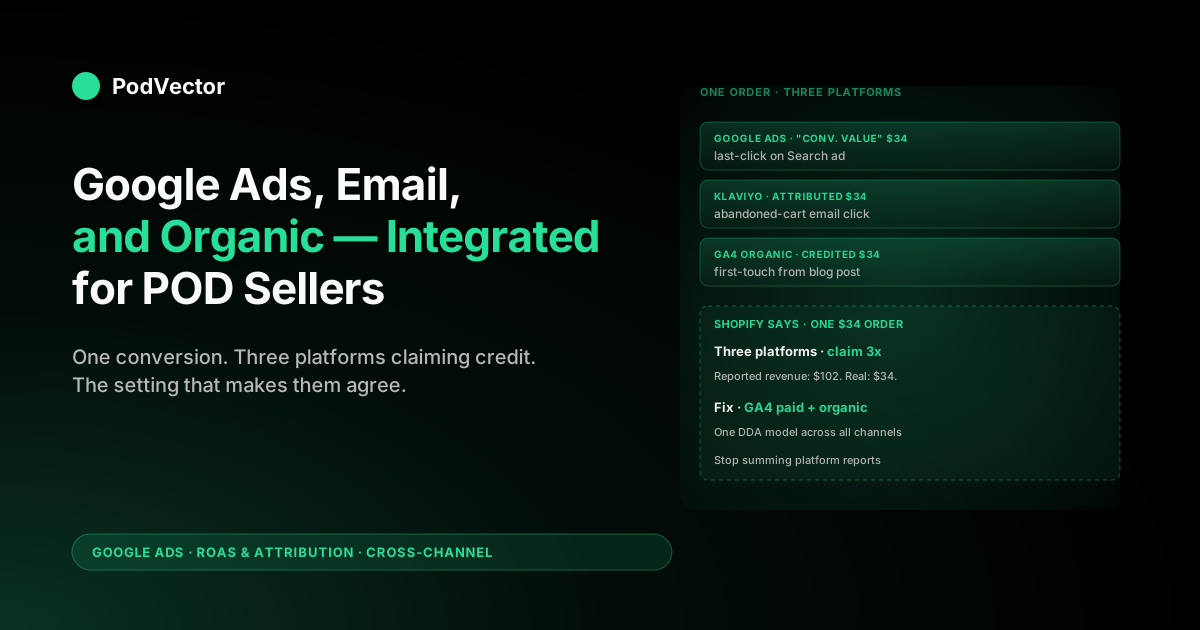
Add up Klaviyo's "attributed revenue," Google Ads' "Conv. value," and GA4's "Sessions → Purchases" for organic search, and the sum will routinely exceed your actual Shopify revenue. The same conversion is being claimed multiple times across platforms.
That's not a bug — every platform is measuring its own contribution honestly. The problem is that you're using several different lenses to look at one customer journey, and then making budget decisions as if the lenses agreed.
For a POD seller, this matters more than for a typical ecommerce store for one specific reason: your gross margin after Printify or Printful supplier cost, payment processing, and shipping subsidy is substantially thinner than an inventoried brand's. Even a modest misallocation of credit between channels in POD can mean you're cutting the channel that's actually building demand and pouring money into the channel that's just harvesting it. The contribution-margin math leaves no room for that mistake.
This guide walks through how Google Ads, email, and organic search interact in 2026, what GA4 and Google Ads actually do behind the scenes when a customer touches all three, and the specific configuration changes that make cross-channel attribution work for a POD store. For a side-by-side look at how Google Ads compares to Meta as a channel for POD, see Google Ads vs. Facebook Ads for POD sellers.
What changed in 2026: server-side tracking and Data Manager
Before getting into attribution models, POD sellers running Shopify need to understand a structural shift that happened in 2025–2026 that affects whether any attribution data is trustworthy at all.
The default Google Ads–Shopify integration has always relied on browser-based tracking: a cookie is set when someone clicks your ad, and a purchase event fires when they complete checkout. According to wetracked.io, in 2026 most Shopify merchants using this default setup are not tracking all sales correctly, even when everything looks "set up properly" — because ad blockers and privacy-focused browsers routinely prevent those signals from reaching Google.
Two significant infrastructure changes compound this:
- Shopify deprecated checkout.liquid in August 2024. As documented by mdniamul.com, the old file where merchants pasted tracking scripts directly into checkout was replaced by Customer Events (the Web Pixels API), which runs inside a sandboxed iframe. That sandbox can cause the marketing source carried in normal cookies to be lost when the order completes — unless you deliberately build a bridge to carry attribution data across.
- Google's Data Manager integration with Shopify. According to Google's own support documentation, the Shopify integration with Data Manager sends purchase conversion data directly from Shopify's server to Google Ads — bypassing the browser entirely. Per PPC Land, Google launched the Data Manager API in December 2025 and has been aggressively expanding it as the forward path for server-side data collection. As of mid-June 2026, this integration activates automatically for all Shopify stores with the Google & YouTube app installed.
What this means for POD sellers practically:
- If you have the Google & YouTube app installed, your purchase conversions are now sent server-to-server, improving measurement resilience. Per Google's support docs, the integration "aims to make measurement more resilient by recovering lost conversion signals."
- The server-side integration currently supports only the "Checkout completed" event — other funnel events (add-to-cart, begin-checkout) still rely on client-side tags.
- Running multiple tracking methods simultaneously — Google Ads tags, GA4 imports, Shopify's native integration, and third-party apps — can create duplicate conversions. As mdniamul.com puts it: "One clean pipeline beats three messy ones." Audit your setup before layering on additional tools.
For POD sellers using Printify and Printful and wanting the most accurate attribution picture, the combination of Shopify's server-side Data Manager integration (for Google Ads conversion fidelity) plus a clean GA4 setup (for cross-channel visibility) is the 2026 baseline — not a nice-to-have.
How Google Ads sees email and organic by default
Even with server-side tracking in place, Google Ads remains a closed loop for attribution purposes.
When a customer converts, Google Ads checks whether the converting user clicked, viewed, or engaged with one of your Google Ads within the attribution window. If yes, Google Ads claims the conversion (or a fractional share of it under data-driven attribution). If no, the conversion exists for that customer but doesn't show up in Google Ads at all.
This is why your Google Ads "Conversions" number is structurally smaller than your actual order count. Customers who came from email, organic search, direct, or referral aren't visible to Google Ads — not because the platform is hiding them, but because Google Ads is not the system of record for non-Google-Ads traffic.
The implication is subtle and important: Google Ads' attribution model — last-click or data-driven — only redistributes credit among Google Ads interactions. If a customer's path was YouTube view → Klaviyo email click → branded Google Search click → purchase, Google Ads' DDA model sees only the YouTube view and the Search click.
The email touch is invisible. Credit gets split between two of the three actual touches, which inflates the apparent contribution of both.
Two consequences for POD sellers:
- Google Ads always over-credits itself when other channels are working. Email warmup flows and organic content do real lifting; Google Ads counts the click that closed the deal as if there had been no warmup. ROAS reported in the Google Ads UI is therefore a ceiling, not a floor.
- Smart Bidding optimises on this incomplete view. Target ROAS strategies bid as if the click is doing all the work. In categories where email is a major part of the story (post-purchase upsell, abandoned-cart recovery), this is a meaningful misallocation.
As Littledata notes, Google Ads attribution is "greedier" than multi-channel, data-driven attribution in Google Analytics — a useful framing for why the two platforms almost never report the same conversion count. The rest of this article is about widening the lens.
The GA4 setting that actually integrates the channels
The single most consequential setting for cross-channel attribution in 2026 lives in Google Analytics 4, not in Google Ads. It's at Admin → Property Settings → Attribution settings → Reporting attribution model → Channels that can receive credit, and the choice is between two options.
- Google paid channels. Only Google Ads campaigns can receive credit in GA4 attribution reports. Email, organic search, direct, and referral are visible in standard reports but excluded from the attribution model. This is the legacy default and matches how Google Ads reports look in isolation.
- Paid and organic channels. All channels — Google Ads, email, organic search, direct, social, referral — compete for credit under the same data-driven attribution model. Conversions get distributed across the actual customer journey.
For any POD seller running more than one acquisition channel, "Paid and organic channels" is the right choice. It's also the setting most accounts have wrong, because new GA4 properties created before late 2023 defaulted to "Google paid channels."
What changes when you switch:
- GA4's Advertising → Attribution → Conversion paths report starts showing email and organic as touchpoints with their own credit fractions.
- The "Default channel grouping" attribution in standard reports shifts — organic and email typically gain credit that previously concentrated in Google Ads.
- Smart Bidding behaviour does not automatically change. Google Ads still bids using its own internal attribution. The GA4 setting changes your view, not Google Ads' bidding signal — closing that loop requires the offline-conversion work covered later in this article.
The setting takes "several days" per Google's own docs to fully propagate to linked Google Ads accounts. Plan around a 5–7 day reporting transition where attributed revenue moves around as the model rebuilds.
UTM tagging discipline for email and organic
GA4's "Paid and organic channels" setting works only if GA4 can tell where each session came from. Google Ads is auto-tagged via the gclid parameter; you don't have to do anything. Email and organic search are different stories.
Email. Every link in every Klaviyo or Mailchimp email needs a UTM. Without it, the click lands on your store as either Direct (if the email client stripped the referrer) or as a referral from mail.google.com / outlook.live.com (which gets bucketed into Referral, not Email). Either way, the touch isn't visible to GA4 as email.
Minimum tagging:
utm_source=klaviyo(ormailchimp, etc.)utm_medium=emailutm_campaign={{ campaign_name }}with the platform's merge tag so each send is distinguishable
Most ESPs support setting account-wide UTM defaults. Klaviyo's "UTM tracking" in account settings auto-appends these to every link in every flow and campaign. Set it once and stop thinking about it.
Organic search. You don't UTM-tag organic search results — Googlebot would index the parameters and mess up canonicals. GA4 identifies organic via the referrer header from google.com, bing.com, etc. The thing to verify is that your store hasn't broken the referrer with an aggressive noreferrer meta tag, which some Shopify themes ship with. If your GA4 organic-search sessions look implausibly low, this is the first thing to check.
The result. With clean UTMs on email and an unbroken organic referrer, GA4's "Paid and organic channels" attribution can finally see all three channels. Reports stop lying about email being "Direct." Cross-channel paths in the Conversion Paths report start including the actual sequence: organic → Google Ads → email → purchase.
The Klaviyo double-counting trap
Klaviyo (and Mailchimp, Omnisend, etc.) report their own attribution: an order is "Klaviyo-attributed" if the customer clicked an email within the platform's attribution window — by default 5 days for click in 2026 Klaviyo. That number is useful for evaluating email program health internally. It is not a number you should add to Google Ads' "Conv. value" or to GA4's revenue.
The double-counting works like this:
- Customer clicks a Google Search ad, browses, abandons.
- Klaviyo abandoned-cart flow sends an email two hours later.
- Customer clicks the email, completes purchase.
- Google Ads claims the order under last-click or DDA (Search ad click was within window).
- Klaviyo claims the same order under last-click email attribution.
- GA4 — depending on which setting we discussed above — claims it for either Google Ads (if "Google paid channels") or for whichever channel its DDA model credits (if "Paid and organic channels").
One conversion. Multiple platforms each report it as theirs. As Cometly notes, this is the core problem: "native ad platform reporting overcounts conversions — every platform claims credit for the same sale, and without a neutral third-party view, you end up making budget decisions based on inflated numbers." The fix is to pick one as your source of truth (almost always GA4 with "Paid and organic channels" enabled), and treat Klaviyo's number and Google Ads' number as diagnostic rather than additive.
Practically: don't sum channel numbers in your monthly P&L. Pull total revenue from Shopify, then use GA4's attribution report to allocate it across channels in proportion to the credit GA4's DDA model assigned. That allocation will sum to 100% of revenue by construction, which is what you actually want.
Brand search cannibalization: when Google Ads steals organic credit
The biggest cross-channel attribution mistake in POD specifically is bidding on your own brand name without asking what would happen if you didn't. When a customer who already heard about your store via social, an influencer post, or organic search types your brand name into Google and sees both your Search ad and your organic listing, they almost always click the ad — it's at the top.
Google Ads claims the conversion. Organic search loses the credit it would have earned for free.
This is brand cannibalization. Whether it's a problem depends on a single question: would the customer have clicked the organic result if the ad weren't there?. For most POD brand-name searches, the answer is yes — search intent for a specific brand is high-purchase-intent and the organic result is the same destination.
How to test it:
- Geo holdout. Pause brand campaigns in a portion of your geos for 14 days. Compare brand-revenue per geo before and after. If revenue holds up in the paused geos, brand spend was cannibalising organic. If it drops, brand spend was incremental (defending against competitor squatting).
- Search Console cross-check. Filter organic queries to your brand name in Google Search Console. Compare clicks before and after a 7-day brand-Search pause. Organic clicks for brand queries typically rise to offset a meaningful share of the lost ad clicks.
This isn't really an attribution-model question — it's a question about whether one channel is cannibalising another. But it shows up as an attribution problem because Google Ads' DDA can't see the counterfactual: it credits the click it caused, not the click that would have happened anyway. Cross-channel awareness means knowing the difference.
Closing the loop with offline conversion adjustments
So far, this article has been about your view of attribution — what GA4 reports, what shows up in Klaviyo, how to think about credit. There's a second loop: Google Ads' bidding signal.
Smart Bidding bids using its own attribution view, which (as covered above) doesn't see email or organic. Even with the GA4 setting flipped, Google Ads itself is still optimising as if Google Ads were the only channel.
The fix is offline conversion adjustments — sending data back into Google Ads so its bidding model has a more accurate value picture.
The two adjustments that matter most for POD:
- Refund adjustments. POD apparel sees meaningful refund rates. By default, Google Ads doesn't know about refunds. Wire up Enhanced Conversions for Web with a refund webhook from Shopify (Shopify → Order Refund → Google Ads conversion adjustment endpoint with
adjustment_type: RETRACT). Smart Bidding stops optimising toward customers who refund. Note: per Google's June 2026 update, Enhanced Conversions for web and leads have merged into a single toggle — check your account settings if you set this up before mid-2026. - Contribution-margin value adjustments. By default, Google Ads receives
checkout.subtotal_price— the order subtotal. Actual contribution margin after Printify or Printful supplier cost, processor fees, and shipping subsidy is materially lower. Send a value adjustment that replaces the subtotal value with contribution margin (or, more conservatively, with gross margin). Smart Bidding now optimises toward profit, not toward revenue.
This is non-trivial to implement manually — you need a webhook endpoint, the Google Ads API, and a SKU-to-supplier-cost lookup that updates as Printify pricing changes. It's also where the cross-channel picture and the POD-margin picture intersect: the same adjustment that fixes "Google Ads sees only Google Ads" also fixes "Google Ads sees subtotal, not profit." Both have to be true for Smart Bidding to actually optimise the metric you care about.
The POD-specific margin layer nobody else mentions
Mainstream attribution articles end here — pick a model, set up GA4, tag your emails, send refunds back. For an inventoried ecommerce brand running at healthy gross margins, that's enough. For POD, it isn't, and this is the gap most existing content misses.
The integration of Google Ads, email, and organic only matters if the underlying conversion value is correct. POD adds three margin variables that move per order:
- Supplier cost (Printify or Printful). Varies by SKU, by garment colour, sometimes by print method. A black hoodie costs more than a heather grey one. The same SKU costs differently in different print providers within Printify. For a deeper look at how Printful's costs and quality stack up, see the honest Printful embroidery review and the full Printify vs. Printful pricing and quality comparison.
- Shipping subsidy. If you offer free shipping over a threshold and the customer barely clears it with a low-margin item, you're eating the shipping cost. Same SKU, different orders, different margin. For a walkthrough on how to set that threshold strategically in Shopify, see how to set up buy-X-get-Y discounts on Shopify.
- Promo discount. Email-attributed orders frequently include a discount code (welcome flows, abandoned-cart recovery). Google Ads-attributed orders typically don't. Comparing email ROAS to Google Ads ROAS without normalising for this systematically over-credits email and under-credits Google Ads on a margin basis.
The implication: any attribution comparison that uses revenue or subtotal will mis-rank channels in POD. You need to compare on contribution margin, which means computing it per order.
That's the layer Victor sits on — pulling the live order, the live Printify or Printful cost data from completed orders, the actual processor fee, and the actual shipping cost from your Shopify data, then giving you a per-channel view that respects the margin variables. For context on how AI-powered analytics tools compare for POD, see the top AI tools for ecommerce in 2026 and how PodVector compares to Polar Analytics for Shopify.
Choosing one source of truth
If you take only one decision from this article, take this one: pick a single source of truth for cross-channel revenue attribution and stop arguing with the platform numbers. Klaviyo, Google Ads, and GA4 will always disagree, because they're each looking at a different slice. The slice you can control most cleanly is GA4 with "Paid and organic channels" enabled, fed by server-side data from Shopify's Data Manager integration.
The hierarchy that works for most POD sellers in 2026:
- Total revenue: Shopify (the only system that knows for sure).
- Channel allocation: GA4 "Paid and organic channels" attribution, applied to Shopify revenue.
- Channel ROAS: Per-channel revenue allocation × contribution margin rate ÷ ad spend (for paid) or program cost (for email).
- Diagnostic only: Google Ads' Conv. value, Klaviyo's attributed revenue. Use these to debug platform-specific issues, not to allocate budget.
This works because GA4 with paid+organic enabled is the only system that sees all three channels and applies a consistent attribution model across them. The Klaviyo number and the Google Ads number aren't wrong — they're measuring something different (their own contribution, in isolation). They'll always sum to more than Shopify revenue, and that's expected, not a problem.
A 6-step integration playbook
For a POD store moving from "every platform reports its own number" to "one cross-channel view that respects POD margin," the order of operations is:
- Audit and consolidate your tracking pipeline. Confirm you have one clean pipeline: the Google & YouTube app on Shopify for both Google Ads and GA4. Disable any duplicate GA4 connections (e.g., remove the GA4 Measurement ID from Shopify's native integration if you're running GA4 through GTM). Running multiple overlapping methods creates duplicate conversions and conflicting sources.
- Verify the Shopify Data Manager server-side integration is active. In Google Ads, navigate to Tools → Data Manager. If the Shopify integration shows as active, your "Checkout completed" events are flowing server-to-server. This improves conversion fidelity before you touch any attribution settings.
- Flip GA4 to "Paid and organic channels." Admin → Property Settings → Attribution settings → Reporting attribution model. Wait 7 days for full propagation. This is the cheapest, highest-impact change in the list.
- Audit and fix UTM tagging on every email. Klaviyo / Mailchimp account-level UTM defaults:
utm_source=klaviyo,utm_medium=email,utm_campaign={{ campaign_name }}. Confirm by checking GA4 traffic-acquisition reports — email sessions should rise sharply within 48 hours. - Wire Shopify refunds to Google Ads conversion adjustments. Use Enhanced Conversions for Web (now merged with leads toggle as of June 2026) + a refund webhook. The retraction adjustment improves Smart Bidding within approximately 14 days.
- Replace subtotal with contribution margin in the conversion value. Either via the Google Ads API directly or via a tool like Victor that reads your live Shopify and Printify/Printful order-cost data to compute real margin per order. Until this step, all the upstream attribution work is being applied to the wrong numbers.
Steps 1–4 are configuration and take a few hours. Steps 5–6 are engineering and take a sprint or a tool. Most stores stop at step 4 and call it integrated, which is why their cross-channel attribution still doesn't survive a hard look at the P&L.
Common mistakes POD sellers make
- Running duplicate tracking methods. Google Ads tags, GA4 imports, Shopify's native integration, and third-party apps all firing simultaneously creates duplicate conversions and unreliable data feeding Smart Bidding. One clean pipeline per tool.
- Ignoring the checkout.liquid deprecation. Shopify's August 2024 move to Customer Events (Web Pixels API) broke tracking scripts pasted directly into checkout for many stores. If your attribution data went sideways in late 2024, this is likely why.
- Adding up Klaviyo, Google Ads, and GA4 revenue. They overlap by design. The sum is meaningless. Use Shopify as the denominator.
- Leaving GA4 on "Google paid channels." The default for older properties. Means email and organic don't compete for credit. Flip the setting.
- Untagged email links. Without UTMs, email traffic shows up as Direct or Referral. Email's contribution becomes invisible.
- Bidding on brand without testing cannibalization. Geo holdouts take 14 days and can reveal whether brand spend is buying organic clicks at a paid premium.
- Sending subtotal as conversion value. Smart Bidding then optimises toward the cheapest acquisition of revenue, not the cheapest acquisition of margin. POD margins are too thin to absorb this.
- No refund feedback. Smart Bidding keeps spending on customers who'll return the product, overstating true ROAS.
FAQs
Does Google Ads attribution include email and organic by default?
No. Google Ads' attribution model — last-click or data-driven — only redistributes credit among Google Ads interactions (Search, Display, YouTube, Performance Max, etc.). Email and organic touches are invisible to it. To get a cross-channel view you need GA4's "Paid and organic channels" attribution setting, which applies a single attribution model across all channels GA4 can see.
Should I trust Klaviyo's attributed revenue?
Trust it as a measure of email program health, not as an additive number to Google Ads or GA4. Klaviyo claims any order whose customer clicked an email within the attribution window, which routinely overlaps with Google Ads claiming the same order. Use it for "is the email program working?" — not for "what's our total attributable revenue?"
What attribution window should I use across channels?
For POD, 30 days for click attribution and 1 day for view-through is a reasonable default in Google Ads. Match that to a 30-day session-based attribution view in GA4. Shorter windows under-credit upper-funnel touches; longer ones over-credit reactivation paths and inflate apparent ROAS.
Will switching GA4 to "Paid and organic channels" change my Google Ads bidding?
Not directly. Google Ads continues to bid using its own attribution view. The GA4 setting changes how revenue gets allocated in your reports. To change Google Ads' bidding signal you need offline conversion adjustments — sending refund and margin-corrected values back via the Google Ads API.
How do I separate email-driven revenue from email-influenced revenue?
You can't, perfectly. The cleanest proxy is to look at GA4's Conversion Paths report with "Paid and organic channels" enabled and segment by paths that include an email touch versus paths that don't. This won't be a clean split — many email-influenced customers also see Google Ads — but it's a directionally honest view that the platform-specific reports can't give you.
How does the Shopify Data Manager integration affect my attribution?
According to Google's official support documentation, the Shopify–Data Manager integration sends purchase conversion data directly from Shopify's server to Google Ads, recovering conversion signals that browser-based tracking misses due to ad blockers or cookie restrictions. It activates automatically if you have the Google & YouTube app installed. Currently it supports only the "Checkout completed" event. This doesn't change your GA4 attribution settings — it improves the fidelity of the Google Ads conversion data those settings draw on.
How does this change for Performance Max?
Performance Max specifically benefits from cross-channel awareness because it bids across Search, Display, YouTube, Discover, and Gmail simultaneously. Smart Bidding within PMax already integrates those Google-owned channels.
What it doesn't see is email and organic. Wiring up offline conversion adjustments and contribution-margin values is the highest-leverage change for accounts running PMax — without it, PMax optimises toward subtotal-based revenue across a partial view of the funnel.
Do I need a separate attribution tool?
Not if your channel mix is Google Ads + email + organic search and your revenue is at a stage where the platform-native setup handles the complexity. GA4 with "Paid and organic channels," clean UTMs, server-side Data Manager integration, and offline conversion adjustments handle the integration.
Third-party tools like Cometly or Northbeam matter more once you add Meta, TikTok, or affiliate channels — i.e., when no single platform has visibility across the stack. For a POD seller comparing Google Ads and Meta as channels, see Google Ads vs. Facebook Ads for POD sellers and the full Printify vs. Printful pricing guide for context on how fulfillment choice affects the margin math underpinning any ROAS target.
How does Victor fit into this?
Victor reads your live Shopify orders, Printify and Printful order-side cost data, and Google Ads spend from a live data warehouse, and answers cross-channel attribution questions in plain English — including the contribution-margin layer that GA4 doesn't compute. "What's our actual ROAS on Google Search after Printify costs and refunds?" is a question Google Ads' UI can't answer; it's the question Victor was built to answer. Victor proposes moves (such as repricing worst-margin SKUs or adjusting the free-shipping threshold) for your approval — he reads ads and proposes changes, but the writes he executes are Shopify-side. For a full picture of how POD-specific analytics tools stack up, see the Shopify–Printify setup guide for the integration foundation Victor builds on.
Want true cross-channel ROAS for your POD store?
Victor reads your live Shopify, Printify, Printful, and Google Ads data, applies your actual contribution margin per order, and gives you a single view you can use to reconcile paid against your organic results — without the double-counting. And see your real cross-channel attribution in under five minutes.
Try Victor free