
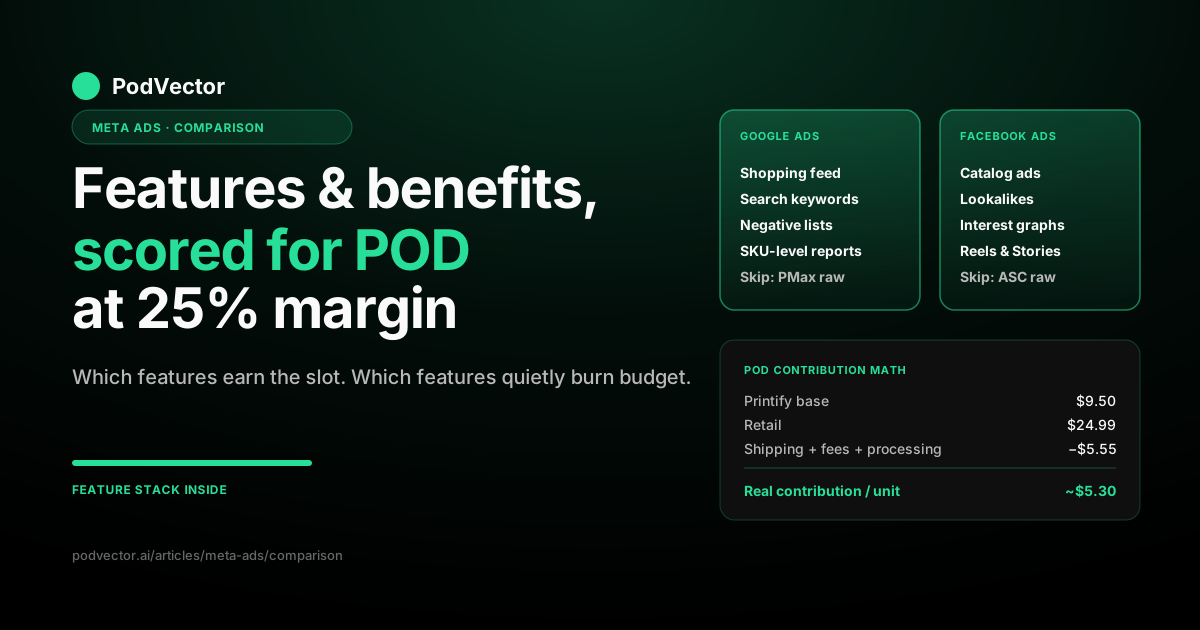
Quick Answer: Most "Google Ads vs Facebook Ads features and benefits" comparisons inventory every shiny option both platforms ship. That list looks identical to a SaaS marketer with 70% gross margin and to a print-on-demand seller with 25%. It isn't.
For POD, only a small subset of each platform's headline features actually moves contribution margin. Google Shopping's product feed, search-term reports, and negative-keyword controls do. Facebook's Catalog ads, Lookalike audiences, and Advantage+ creative variations do. Most of the rest — Performance Max in raw form, Advantage+ Shopping in raw form, broad targeting, automated bidding — over-rotates against POD's thin-margin SKU economics in ways generic guides never warn about.
This guide scores each platform feature-by-feature against 20–35% POD contribution and tells you which features earn their slot in the budget, which features need guardrails before they break you, and which features POD sellers should ignore entirely until they hit $20K MRR.
Why "feature inventory" misleads POD sellers
Open the WordStream comparison or the Shopify guide on Google Ads vs Facebook Ads, and you get a clean inventory. Google has Shopping, Search, Display, YouTube, Performance Max. Facebook has Catalog ads, Lookalikes, Advantage+, Reels, Stories, Messenger.
That inventory is true. It's also useless for picking a platform if you sell print-on-demand apparel at 25% contribution margin.
The reason: each "feature" carries an implied economics assumption. Performance Max assumes you have margin to absorb a learning phase that bids on branded queries you'd have won for free. Advantage+ Shopping assumes you have COGS data flowing into Meta so its bidding optimizes against true profit, not revenue. Lookalike audiences assume your seed audience is large and high-margin enough to be worth scaling.
POD breaks every one of those implied assumptions. Your supplier cost from Printify or Printful varies by garment, color, size, and shipping country. Your contribution margin after base price, shipping, payment processing, and platform fees usually lands at 20–35%. Your SKU count is in the hundreds, often thousands. Most of your designs have evergreen but micro-niche demand, not blockbuster volume.
The honest feature comparison for POD isn't "which platform has more features." It's "which platform's features behave well at 25% margin against a 1,000-SKU catalog, and which features will quietly burn budget if you turn them on without guardrails." That's the comparison this article runs.
Side-by-side: features that matter for POD
Here's the feature-by-feature scoring against POD's actual structural needs. Verdict column reflects how the feature behaves on a typical $1K–$10K MRR POD store, not its theoretical ceiling.
| Feature | Google Ads | Facebook Ads | POD verdict |
|---|---|---|---|
| Product feed / catalog | Merchant Center feed (strict) | Meta Catalog (looser) | Google more punishing on Printify exports; both need cleanup |
| Headline auto-bidding | Performance Max | Advantage+ Shopping | Both over-rotate without guardrails — manual setup safer for POD |
| Lookalike / similar audiences | Customer Match similar (deprecated 2023, partial revival) | Lookalike audiences (mature) | Facebook clear winner for POD niche scaling |
| Intent / keyword targeting | Search keywords (mature) | None (interest proxy only) | Google clear winner for niches with search volume |
| Visual creative discovery | Weak (Shopping image only) | Strong (Reels, Stories, carousels) | Facebook clear winner for design-led POD |
| Negative-targeting controls | Granular (negative keywords, placement exclusions) | Coarse (interest exclusions, placement) | Google more precise for POD waste-cutting |
| Server-side conversion tracking | Enhanced Conversions (mature) | Conversions API (mature) | Both essential post-iOS 14; Meta more reliant on it |
| Dynamic retargeting | Remarketing for Shopping (RLSA) | Catalog retargeting (mature) | Facebook deeper integration; Google catching up |
| Reporting granularity | SKU-level via Shopping report | Ad-level (SKU rollup is manual) | Google easier per-design profitability view |
| Min spend for feature efficacy | $50–$100/day (Shopping) | $30/day (Advantage+ needs $50+) | Facebook lower floor for early-stage POD |
The headline takeaway: Google's strongest features (search keywords, negative controls, SKU-level reporting) align with POD's need for diagnostic clarity and waste-cutting. Facebook's strongest features (Lookalikes, Catalog retargeting, visual creative) align with POD's need to discover niche designs and scale them.
Neither platform "wins" the feature comparison in the abstract. The right question is which feature subset you can actually use without burning thin margin on a learning phase.
Google Ads features and benefits, scored for POD
Google Ads ships dozens of features. For POD operators, six matter and three carry serious risk.
Google Shopping (the workhorse). Shopping ads serve product images directly in search results when someone types a category or product term. For POD, this is the highest-intent placement Google offers — a buyer searching "math teacher mug" is mid-purchase, not browsing. Shopping converts at 3–6% in proven POD niches, against a $0.55–$1.20 CPC. The benefit for POD: you compete on product image and price, not on copywriting or audience targeting.
Search Ads with negative keywords (the precision tool). Search ads let you bid on exact-match keywords ("german shepherd dad shirt") and exclude wasteful terms ("free," "amazon," "diy") via negative keyword lists. For POD's thin margin, negative-keyword discipline is the difference between a profitable Search campaign and one that bleeds budget on tire-kicker queries. The benefit: precise control over where your ad dollar lands.
Merchant Center product feed (the foundation). Merchant Center is where Google reads your SKU catalog. A clean feed — proper titles, descriptions, GTIN handling, image quality, attribute mapping — is the prerequisite for Shopping working at all. The benefit for POD: once it's clean, Google's bidding works against your actual products, not against blunt category bids.
SKU-level performance reporting (the diagnostic). Google's Shopping report shows revenue, clicks, and conversion rate per individual SKU. For a POD store with 500+ designs, this is the only practical way to spot which designs are paying back ad spend and which are leaking budget. Most POD sellers don't read this report weekly. They should.
Customer Match and Smart Bidding (the scaler). Customer Match lets you upload first-party customer email lists for retargeting. Smart Bidding (Target ROAS, Maximize Conversion Value) automates bid adjustments. Both work for POD once you have 90+ days of conversion data. Below that, manual bidding is safer — Smart Bidding under-optimized data tends to chase whatever signal it has, which on a thin-margin store can mean it chases the wrong SKUs.
YouTube and Display Network (the brand layer). Useful for POD only past $25K MRR when brand-building has measurable downstream conversion lift. Below that, the spend is more profitably routed to Shopping or Search.
Three Google features POD sellers should approach with guardrails:
- Performance Max (PMax — Google's all-in-one auto-targeted campaign type) over-rotates into branded search if not fenced with brand exclusion lists. It also makes diagnosis hard because placements are opaque. We recommend running standard Shopping for at least 90 days before evaluating Performance Max, and only running it with brand exclusions and clear audience signals.
- Broad-match keywords bleed budget on tire-kicker queries. POD margins can't absorb the learning phase. Stick with phrase and exact match until you have 60+ days of search-term report data to mine.
- Display Network on default placement settings places ads on low-quality apps and content sites. Apply placement exclusions aggressively or skip Display entirely for POD.
Facebook Ads features and benefits, scored for POD
Facebook Ads' feature set is structurally different. The benefits to POD lean heavily on creative discovery and audience scaling.
Catalog ads (the workhorse). Catalog ads pull from a product feed and dynamically generate ad creative — product image, price, title — without you designing each ad manually. For POD with hundreds of SKUs, this is essential. The benefit: launch one ad set against your full catalog and let Meta's algorithm decide which products to show which audiences.
Lookalike audiences (the scaler). Upload a seed audience (purchasers, high-LTV customers, email subscribers), and Meta finds similar users at scale. For POD, a 1% Lookalike of your top 25% revenue customers is one of the highest-ROAS audiences you can build. The benefit: you scale demand without manually researching new audiences, and the seed quality compounds as your customer base grows.
Detailed targeting and interest graphs (the discovery layer). Meta's interest graph captures behavioral signals — Facebook group memberships, page likes, content engagement. For POD niches Google search can't reach (regional micro-fandoms, occupation-specific tribes, hobby communities), Meta's interest targeting is the only practical demand source. The benefit: you reach buyers who would never search by keyword but cluster around shared identity signals.
Conversions API and server-side tracking (the recovery tool). Conversions API (CAPI — Meta's server-side event pipeline) recovers a meaningful share of the attribution lost to iOS 14. For POD, where every conversion data point compounds the algorithm's accuracy, properly configured CAPI is non-negotiable past $2K MRR.
Creative variations via Advantage+ creative (the labor saver). Advantage+ creative auto-generates variations of your ad — different placements, format adaptations, image enhancements. For POD operators producing 8–15 fresh creatives a week, this feature stretches each base creative further. The benefit: less time in Photoshop, more iterations in market.
Reels and Stories placements (the discovery accelerant). POD's design-led product fits Reels and Stories well. Vertical video showing a t-shirt being unboxed or a mug in use converts surprisingly well in 2026, often outperforming static image creative for new design drops.
Three Facebook features POD sellers should approach with guardrails:
- Advantage+ Shopping campaigns (ASC) work great for high-margin DTC brands and over-rotate for POD because they optimize against revenue, not contribution margin. If your COGS varies by SKU (it does — Printify base prices range $4–$28), ASC will scale the wrong SKUs. Run manual sales campaigns until you can feed COGS data into Meta's value rules.
- Broad targeting with no interest restrictions needs $50/day minimum to learn cleanly and often takes 14+ days to stabilize. POD margins can't absorb that learning cost without a baseline of which interests have already proved out.
- Automatic placements with no exclusions places creative in Audience Network and Right Column where engagement is poor. Fence to Feed, Reels, Stories, and Marketplace until you have data justifying the broader spread.
Google Shopping feed vs Meta Catalog: the POD inventory test
Both platforms run product-feed-driven advertising. The mechanics differ in ways that matter for POD's high-SKU, supplier-priced catalog.
Google Merchant Center is strict. Default Printify and Printful exports trip Google Merchant Center disapprovals roughly half the time on first submission. Common failures: missing GTIN, prohibited content in mockup images, mismatched landing-page price, missing brand attribute, image quality below threshold. Cleaning a POD feed for Google takes 4–8 hours upfront, then 30–60 minutes weekly to manage disapprovals as new designs ship.
Meta Catalog is looser. The same Printify or Printful export usually loads into Meta Catalog with no rejections. Meta's algorithm decides which products to show, with less upfront approval friction. The catch: looser approval means less filtering on product quality, so low-conversion or low-margin SKUs get equal algorithmic attention to your winners until you exclude them manually.
The POD takeaway: Google rewards feed discipline. Meta rewards catalog breadth. If your team has the bandwidth to maintain a clean Google feed, Shopping ads earn their slot in the budget. If you don't, Meta Catalog ads work with a coarser product set but require less ongoing maintenance.
For the deeper Meta-specific catalog setup, the complete guide to Meta ad types for POD sellers covers Catalog ads alongside the rest of the Meta format set.
Automation features: Performance Max vs Advantage+ for POD
Both platforms now push automated, AI-driven campaign types as their default recommendation. Both carry meaningful POD-specific risk.
Google Performance Max blends Shopping, Search, Display, YouTube, Discovery, and Gmail into one campaign optimized by Google's algorithm. The pitch: less manual work. The POD reality: PMax over-rotates into branded search (where you'd have won the click for free), makes channel-by-channel diagnosis impossible, and tends to scale spend faster than POD margin can absorb.
Meta Advantage+ Shopping blends prospecting and retargeting into one campaign with Meta's algorithm picking audiences, placements, and creatives. The pitch: less manual work. The POD reality: ASC optimizes against revenue, not contribution margin. On a 1,000-SKU POD store with COGS varying $4–$28 per garment, ASC will reliably scale the SKUs with the highest revenue-per-conversion, which are not always the SKUs with the highest profit-per-conversion.
The POD-specific guardrails for both:
- Run standard manual campaigns for at least 90 days first to establish a baseline ROAS to compare automated campaigns against.
- Apply brand-exclusion lists (PMax) and audience-exclusion lists (ASC) to prevent the automation from claiming credit for traffic you'd have captured organically.
- Reconcile against true contribution margin weekly, not against platform-reported ROAS. Both automation systems will look better than they are if you're only reading what the platform reports.
For the head-to-head comparison overview that includes the cost dimension, the Google Ads vs Facebook Ads cost guide covers CPC, CPM, and minimum efficient spend math.
Targeting features: keywords vs interest graphs vs lookalikes
The two platforms target structurally different demand. Generic comparisons cover this. The POD-specific cut is which targeting feature aligns with which kind of design.
Google's keyword targeting wins when your design has search demand. Occupations, professions, hobbies with established vocabulary ("ICU nurse gifts," "pickleball dad shirt," "veterinarian mug") have measurable search volume. Google's exact-match and phrase-match keywords let you bid precisely against that demand. Conversion rates of 3–6% are normal in those niches.
Facebook's interest targeting wins when your design serves a niche tribe. Regional micro-fandoms, fan-art adjacent designs, occupation jokes too inside-baseball for keyword tools, hobby tribes too small for search volume — Meta's interest graph reaches these audiences via Facebook group memberships, page likes, and engagement signals. Cold conversion is lower (0.8–1.8%), but it's the only platform that can find those buyers at all.
Lookalike audiences are Meta's force multiplier. Once you have 500+ purchasers seeded, a 1% Lookalike scales prospecting against the most profitable customer pattern your store has. Google's equivalent (Customer Match similar audiences) was deprecated in 2023 and only partially revived; for the POD use case, Meta's Lookalikes are still the better feature.
Practical POD targeting decision:
- Keyword-targeted Search and Shopping for any design in a niche with 50+ monthly searches on the core query.
- Meta interest targeting plus Lookalikes for any design serving a tribe Google can't reach by keyword.
- Both, in parallel, for any design that does both — most evergreen POD niches eventually do.
For the deeper strategy comparison, the Google Ads vs Facebook Ads strategy guide covers campaign architecture across MRR stages.
Reporting and attribution features: which is more honest for POD
Both platforms ship robust-looking reporting. Both overstate ROAS against bank-deposit revenue, in different magnitudes that matter for thin POD margin.
Concrete numbers from our client cohort: Meta-reported ROAS overstates real ROAS by 15–40%. Google-reported ROAS overstates by 5–20%. The gap is structural — Meta's attribution model relied more heavily on third-party-cookie-equivalent signals that iOS 14 disrupted, while Google's relies more on first-party search-and-click data.
Google's reporting strengths for POD:
- SKU-level Shopping report shows performance per individual product.
- Search-term report shows the actual queries triggering your ads (the raw material for negative-keyword discipline).
- Auction insights show which competitors are bidding against you.
- Attribution overstatement is smaller (5–20%) and Enhanced Conversions recovers more of the loss.
Meta's reporting strengths for POD:
- Ad-level breakdown by placement, age, gender, region (deeper than Google for creative diagnostics).
- Creative-fatigue diagnostics built into Ads Manager.
- Lookalike-audience overlap reporting.
- Conversions API recovers a meaningful share of post-iOS 14 attribution loss.
Where both fall short for POD: neither reports contribution margin. Both report revenue and ROAS. Neither integrates your itemized Printify or Printful supplier cost, your shipping cost, your payment processing, or your platform fees. The number you actually need to make budget decisions — true contribution margin per channel — has to be reconciled outside the ad platforms in a unified data layer.
For the full reconciliation workflow, the main Google Ads vs Facebook Ads guide covers the bank-deposit reconciliation cadence we recommend.
Features to skip until you scale past $20K MRR
Both platforms ship features marketed at every advertiser. For POD operators under $20K MRR, several of those features burn budget faster than they earn back.
On Google:
- Performance Max without brand exclusions and audience signals.
- Display Network on default placements.
- YouTube ads as a primary acquisition channel (vs as remarketing reinforcement).
- Discovery campaigns, which are placement-opaque and hard to diagnose.
- Smart Display before you have 90+ days of conversion data feeding the algorithm.
On Facebook:
- Advantage+ Shopping campaigns until you can feed value rules with COGS data.
- Audience Network placements (low engagement, weak conversion).
- Right Column placements on desktop (designed for desktop browsing, weak for visual POD products).
- Messenger ads as primary acquisition (better as retargeting touchpoint).
- Broad targeting on a sub-$50/day budget — the algorithm needs more to learn cleanly.
The pattern is the same on both platforms: features marketed as "set it and forget it" assume you have enough margin to absorb a learning phase. POD doesn't. Stick with the manual-control features until your contribution margin per channel is established and stable.
The POD-specific feature stack we recommend
For a POD store between $2K and $20K MRR, the feature stack that actually pays back looks like this.
Google Ads side:
- Standard Google Shopping campaigns on top 30–60 SKUs by recent revenue (where most volume concentrates).
- Search campaigns on exact-match and phrase-match keywords for niche-specific high-intent terms ("[occupation] gifts," "[hobby] [item]").
- Negative-keyword discipline: weekly review of search-term report, add wasteful queries to negative lists.
- Customer Match retargeting on email subscribers (RLSA — Remarketing Lists for Search Ads).
- Enhanced Conversions for server-side conversion recovery.
Facebook Ads side:
- One Catalog ad set running prospecting against your top 50–100 SKUs to a 1% Lookalike of purchasers.
- One Catalog retargeting ad set against site visitors and add-to-cart abandoners (7-day click window).
- Manual creative testing of 3–5 fresh creative concepts per week against a small budget ($10–$15/day each) before promoting winners.
- Reels and Stories placements only on visually strong creative — tested, not assumed.
- Conversions API server-side tracking for iOS 14 attribution recovery.
That stack uses each platform's strongest features against POD's actual structural needs and avoids the features that over-rotate at thin margin. Most POD operators running both platforms profitably are running approximately this stack, even if they didn't pick it deliberately.
For the cluster overview of every comparison angle in this series, the Meta Ads comparison cluster indexes the platform-by-platform deep dives. The Meta Ads topic hub covers the broader strategy, attribution, and ad-types ecosystem. For Meta-specific campaign architecture across MRR stages, the complete Meta Ads playbook for print-on-demand sellers goes deeper.
FAQs
Which Google Ads features actually pay back for a POD seller?
For a POD store under $20K MRR, the features that consistently pay back are standard Google Shopping campaigns, exact-match and phrase-match Search keywords on niche-specific terms, negative-keyword lists, Merchant Center feed cleanup, and Enhanced Conversions for attribution recovery. Performance Max, Display Network defaults, and broad-match keywords carry too much learning-phase cost for thin POD margin. The Google Shopping vs Facebook Ads guide covers the Shopping-specific deep dive.
Which Facebook Ads features actually pay back for a POD seller?
Catalog ads, Lookalike audiences seeded against purchasers, Conversions API for server-side tracking, and Reels and Stories placements for visually strong creative are the features that consistently pay back for POD. Advantage+ Shopping over-rotates without COGS-aware value rules, broad targeting needs $50+/day to learn cleanly, and Audience Network placements convert poorly for POD's visual product set.
Are Performance Max and Advantage+ Shopping safe to run on a POD store?
Not without guardrails. Performance Max over-rotates into branded search, where you'd have won the click organically. Advantage+ Shopping optimizes against revenue, not contribution margin, which on a POD store with COGS varying $4–$28 per garment will reliably scale the wrong SKUs. Run standard manual campaigns for at least 90 days first to establish a baseline ROAS before evaluating either automated campaign type.
Does Google Ads have anything equivalent to Facebook's Lookalike audiences?
Partially. Google's Customer Match similar audiences feature was deprecated in 2023 and only partially revived. Optimized Targeting in Google's Audience features fills part of the gap, but for POD's audience-scaling use case Meta's Lookalike audiences remain the more reliable feature. If your POD niche depends on tribe-based scaling rather than search volume, Meta's audience features are the stronger half of the stack.
Which platform's reporting features are more useful for POD diagnostics?
Google's SKU-level Shopping report and search-term report are the strongest diagnostic tools either platform ships for POD. They tell you which products are paying back ad spend and which exact queries are triggering your ads. Meta's reporting is stronger on creative diagnostics (placement, fatigue, audience overlap), which matters for the design-led discovery loop. Both platforms fall short on contribution margin reporting — neither integrates Printify or Printful supplier cost, so true profitability has to be reconciled outside the ad platforms.
How do feed-disapproval rates compare between Google Merchant Center and Meta Catalog for POD products?
Default Printify and Printful exports trip Google Merchant Center disapprovals roughly 50% of the time on first submission. The same exports usually load into Meta Catalog with no rejections. Meta's looser approval is a benefit for fast catalog onboarding and a drawback because low-quality SKUs get equal algorithmic attention to your winners until you exclude them manually. Plan for 4–8 hours of Google feed cleanup upfront.
Should POD sellers use both platforms' headline automation features (PMax and Advantage+) at the same time?
Generally not below $25K MRR. Both automation campaigns need a stable baseline of contribution margin to optimize against, and most POD stores under $25K MRR don't have the data volume or margin headroom to absorb both campaigns' learning phases simultaneously. A safer stack is standard Google Shopping plus standard Meta Catalog ads with manual targeting, then layer one automation campaign at a time once the manual baseline is proved.
Which platform's targeting feature is better for niche POD designs?
It depends on whether the niche has search volume. Google's keyword targeting wins decisively for designs in niches with measurable search volume — occupations, professions, hobbies with established vocabulary. Facebook's interest targeting and Lookalike audiences win for designs serving tribes Google can't reach by keyword — regional micro-fandoms, occupation in-jokes, hobby tribes too small for keyword tools to register. The when to use Google Ads vs Facebook Ads guide covers the niche-shape decision rule.
Do iOS 14 changes affect Google Ads features as much as Facebook Ads features?
No. iOS 14 hurt Meta's attribution and audience-targeting features meaningfully more than Google's. Meta's reported ROAS now drifts 15–40% from real; Google's drifts 5–20%. Lookalike audiences and retargeting on Meta lost data signal that has only partially returned via Conversions API. Google's keyword and Shopping features were less exposed because they relied more on first-party search-and-click data. For thin-margin POD, that gap is a structural reason to lean Google when the niche permits.
Stop comparing platform features. Compare what each one actually earns you.
Every POD seller arguing Google Ads vs Facebook Ads features is arguing against platform-reported numbers. The real comparison is contribution margin per channel after itemized Printify or Printful supplier cost — and almost no POD store sees that number live. Victor connects directly to your Shopify, Printify, Printful, Meta, and Google ad accounts, runs the reconciliation in a unified live data warehouse, and answers "which platform's feature stack actually earned me a dollar this week?" instead of "which platform's dashboard claims it did." and see your real channel-level profit before your next feature-by-feature budget decision.
Try Victor free