
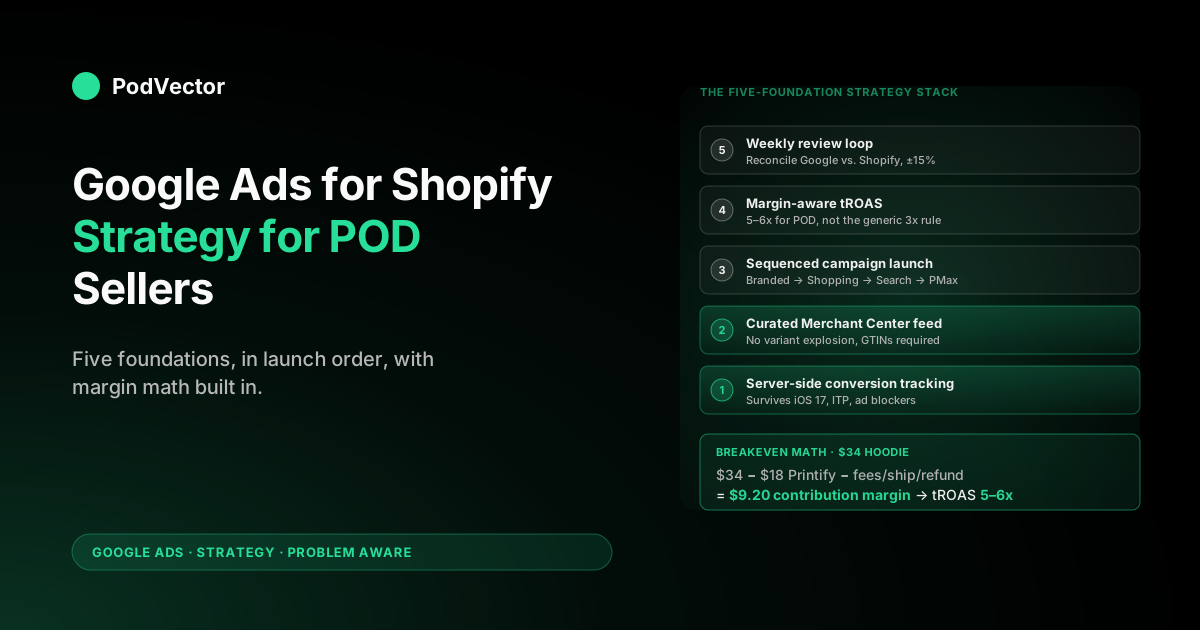
Quick Answer: A working Google Ads strategy for a Shopify POD store has five non-negotiable parts: (1) server-side conversion tracking with Enhanced Conversions, so iOS 17 doesn't gut your data; (2) a Merchant Center feed that hides duplicate variants and treats GTIN gaps as a launch blocker, not a warning; (3) a campaign mix of Branded Search → Standard Shopping → Performance Max, in that order, never the reverse; (4) a target ROAS computed from contribution margin (around 4–5x for POD), not Google's reported revenue; (5) a weekly review that compares Google-reported revenue to Shopify-confirmed revenue and pauses campaigns the second the gap crosses 25%. Skip any of the five and you're optimizing toward phantom profit.
Why POD Google Ads strategy diverges from generic ecommerce
Most "Google Ads for Shopify" guides assume a standard DTC margin profile: 60–70% gross margin, single-SKU bestsellers, one fulfillment partner, predictable shipping cost. That's the world Performance Max was tuned for, and it's the world most agency playbooks are written against.
Print-on-demand breaks the assumptions one by one:
- Margin sits at 28–35% after Printify or Printful base cost, payment processor fees, and shipping subsidy. A 4x reported ROAS on a DTC brand is a celebration; on a POD store it's breakeven.
- SKU counts explode. A modest catalog of 50 designs across 5 product types, 4 colors, and 6 sizes is 6,000 variants in Merchant Center. Most of them shouldn't be there.
- Per-variant cost is variable. The same hoodie costs $18.40 in size S and $20.10 in 3XL. Bidding against a fixed margin assumption misallocates spend across sizes.
- Mockups are visually similar. Google's image-similarity penalty in Shopping suppresses your white tee variants when the only difference is which side of the chest the print sits on.
- Refund rate is 3–8% and concentrated in the first two weeks of fulfillment. ROAS calculated on day 1 looks great; ROAS calculated on day 30 looks honest.
The strategy that works isn't a clever campaign structure or a magic bid modifier. It's an operating discipline that treats every dollar of ad spend as a question — "is this SKU profitable after Printify?" — and refuses to answer that question with Google's dashboard. The five sections below build that discipline in the order you should put them in place.
If you're earlier in the decision and still weighing whether to outsource the work, see Google Ads company for ecommerce strategy for print-on-demand. For the broader cluster context, the complete Google Ads playbook for POD sellers is the pillar this article expands.
Foundation 1: Conversion tracking that survives 2026 attribution
Tracking is non-negotiably first because every other decision — bid strategy, budget allocation, campaign restructuring — runs on the data tracking produces. Bad data doesn't just give you a wrong answer, it gives you a confidently wrong answer, which is worse than no data at all.
The 2026 baseline for a Shopify POD store has three layers stacked:
- Native Google & YouTube channel app installed in Shopify, with conversion tracking enabled. This is the floor; it gives you Google Ads access to checkout events through Shopify's first-party signal. Free, takes 15 minutes, and you should never run a campaign without it.
- Enhanced Conversions for Web turned on inside Google Ads. This sends hashed customer email and address data with each conversion, letting Google match users across devices and browser-restricted environments. The setting lives under Tools → Conversions → your purchase conversion → "Turn on enhanced conversions." Without it, you typically lose 12–25% of conversion volume to attribution gaps.
- Server-side conversion tracking via Google Tag Manager Server-Side or a Shopify-compatible service. This is what closes the gap iOS 17, Safari ITP, and ad blockers opened. For stores spending over $50/day it's the single highest-ROI infrastructure investment, recovering 15–30% of "lost" conversions and feeding cleaner data to Google's automated bidding.
The cleanup test that exposes whether your tracking is working: pick the last 30 days, pull Shopify's Sales by Source report filtered to Google Ads, and compare it to Google Ads' reported "Conv. value" for the same window. If the two numbers are within 10% of each other, your tracking is healthy.
If Google reports 25%+ more revenue than Shopify confirms, you have over-attribution and every ROAS-based decision you've made in the last quarter is suspect. If Google reports 25%+ less than Shopify, you have under-tracking and you're starving Smart Bidding of conversions it would otherwise optimize on.
For the implementation walkthrough, see the complete guide to Google Ads + Shopify integration for POD, which covers the channel app, Enhanced Conversions, and the GA4-to-Shopify reconciliation pattern step by step.
Foundation 2: A Merchant Center feed that doesn't bleed
If tracking is the data layer, the Merchant Center feed is the inventory layer — and POD stores break it harder than any other ecommerce vertical because of variant explosion. The default Shopify-to-Merchant-Center sync pushes every product variant as a separate item, including sizes that are inventory-light, colors with near-identical mockups, and price points that hide better-margin alternatives. The result is a feed where 70–80% of the items shouldn't be eligible for ads.
The four feed-discipline rules that pay for themselves within a month of any POD ad spend:
- Suppress sizes outside your margin band. 4XL and 5XL hoodies typically cost $4–$6 more than the base size while listing at the same retail price. Either price them up to preserve margin, or exclude them from the feed using a custom label and a feed rule. Don't let them leak in at standard tROAS — they'll quietly drag the campaign average.
- Use
item_group_idto group variants. All sizes of the same color of the same design should share anitem_group_id. This is what tells Google "these are the same product, just different sizes," and it's what stops the duplicate-listing penalty that suppresses your impressions. - Treat GTIN gaps as a launch blocker. Google ranks listings with manufacturer GTINs higher than those without, and POD products often arrive with GTIN fields blank. For Printify and Printful integrations, the supplier-provided GTIN should populate the field automatically. If it's empty, fix the integration before you launch — running without GTINs is leaving 15–30% of impressions on the table.
- Curate one mockup per color. Multiple chest-print angles of the same color hoodie trigger Google's image-similarity penalty and split your performance signal. Pick the best mockup per color, hide the rest from the feed.
The feed audit you should run weekly: open Merchant Center → Products → Diagnostics, filter to "Disapproved" and "Limited performance." Anything in those buckets is invisible to Shopping ads. POD stores routinely have 200–800 items in Limited Performance because of low-traffic variants — fix the GTIN, image, or pricing issues, or remove them from the feed entirely. There's no cost to a smaller, cleaner feed; there's substantial cost to a bloated one.
For Merchant Center setup specifically, see Shopify Google Merchant Center strategy for print-on-demand.
The right campaign stack and the order to launch
The single most common POD Google Ads mistake is launching Performance Max first because the agency dashboard suggests it. PMax is a finishing tool, not a starting one — it works when you have brand recognition, conversion history, and a clean feed to feed it.
Launching PMax day-one on a new POD store hands Google a budget with no signal, and Google spends it on whatever generates the cheapest conversions, which is almost always your branded search traffic that would have converted anyway. You pay for traffic you'd have gotten free.
The launch order that works for POD, in sequence:
- Branded Search. Defensive only. Bid on your store name and your top product titles. Daily budget: $5–$15. The point isn't growth, it's preventing competitors from buying your name and capturing high-intent searches that already have your URL in mind. This is the cheapest, highest-converting traffic you'll ever buy. Skipping it because "people will find us anyway" is the most expensive false economy in PPC.
- Standard Shopping. Manual CPC or Maximize Clicks at first, segmented by product type. Run two weeks before switching to tROAS — Smart Bidding needs 30+ conversions per campaign per month to optimize, and you can't get there from zero with a tROAS gate. This is where you learn which products Google can sell.
- Search non-brand. Tightly themed ad groups around 1–3 high-intent queries each ("custom dog hoodie," "personalized golf tee," etc.). Exact and phrase match only — broad match on a small POD budget burns through irrelevant clicks faster than you can add negatives.
- Performance Max. Only after you have 30+ Shopping conversions/month, a feed with GTINs and clean variants, and at least 60 days of conversion history. PMax leverages your existing signal; without it, the algorithm is guessing.
- Display remarketing. Late-stage. Audiences of past site visitors and cart abandoners. Cheap CPMs, low intent, mostly closes loops the other channels opened.
The reason this order matters for POD specifically: each layer feeds the next with conversion data and audience signal. Branded captures intent already in motion. Standard Shopping teaches Google which products have product-market fit.
Search non-brand expands into adjacent demand. Only then does PMax have enough signal to allocate budget intelligently across YouTube, Discover, Gmail, and Display without burning your money.
For the deep dive on Performance Max specifically, see Shopify Performance Max campaigns explained for print-on-demand.
Setting a ROAS target from POD contribution margin
The ROAS target is where most POD stores get their math wrong, and the wrong number is the one Google Ads will gladly optimize toward forever. The default target most guides quote is "3x ROAS to be profitable." For a 60% margin DTC brand, that's roughly right. For POD, it's a breakeven trap.
The actual breakeven calculation, line by line, on a $34 hoodie order:
| Line item | Amount | Notes |
|---|---|---|
| Order revenue | $34.00 | What Shopify and Google both report |
| Printify base cost | −$18.00 | Garment + print, average across sizes |
| Shipping subsidy | −$3.00 | What you eat above what the customer pays |
| Payment processor | −$1.30 | Shopify Payments at 2.9% + 30¢ |
| Platform allocation | −$0.80 | Shopify subscription amortized per order |
| Refund reserve | −$1.70 | 5% of revenue, conservative for POD |
| Contribution margin | $9.20 | 27% of revenue — what's available for ads + profit |
Breakeven ad spend per order is $9.20 — anything more and the order loses money. That maps to a breakeven ROAS of $34 / $9.20 = 3.7x. For an actual profit margin of 10% post-ads, you need ROAS = $34 / ($9.20 − $3.40) = $34 / $5.80 = 5.9x.
This is why the "3x is profitable" rule kills POD stores. At 3x reported ROAS — which is itself usually 25%+ inflated above Shopify-confirmed ROAS — the actual profit per order is negative before you've paid yourself anything. The agency reports a winner, the bank account reports a loser, and the gap compounds every month you scale.
The target that actually works for POD, set as the Smart Bidding tROAS:
- Conservative (cash-positive immediately): tROAS 600% (6x). Profit per order around $1.50–$3.00. Slow growth but never bleeds.
- Balanced (most POD stores): tROAS 500% (5x). Profit per order roughly breakeven on the marginal sale, but you're growing audience and conversion data the rest of the funnel feeds on.
- Aggressive (well-capitalized growth): tROAS 400% (4x). Subsidizes growth at slight loss per marginal order, justified only when LTV from repeat customers covers the gap.
For more on the attribution side of the math, see the complete guide to Google Ads ROAS and attribution for POD.
Performance Max: when it pays, when it doesn't
Performance Max is Google's most aggressive automation: one campaign that spans Shopping, Search, YouTube, Discover, Gmail, Maps, and Display, with the algorithm allocating budget across all of them based on signal it builds in real time. For a 60% margin DTC brand with $5K+/month ad budget, it works extraordinarily well. For POD, it has three failure modes worth understanding before you hand it your budget.
Failure mode 1: brand cannibalization. PMax will, by default, bid on your branded queries and report them as new conversions. You're paying $0.30–$0.80 per click for searches on your store name that would have converted at $0 organically. The fix: add account-level negative keywords for your brand terms, or use the new "Brand exclusions" setting in PMax (Settings → Brand exclusions) to block branded queries from PMax campaigns and let your dedicated Branded Search campaign handle them at lower CPCs.
Failure mode 2: variant funneling. PMax optimizes toward whatever variant converts cheapest, which for POD is usually your worst-margin variant — a small mug, a baby onesie, the size S of a discounted color. The campaign reports a healthy ROAS while quietly redirecting all spend to your lowest-margin SKUs. The fix: use asset groups to segment variants by margin tier, and set different campaign budgets per tier rather than letting PMax's optimization pool everything together.
Failure mode 3: signal opacity. PMax doesn't tell you which placement, query, or audience drove a conversion. You see "PMax delivered 47 conversions at 4.8x" and that's all.
The fix is partial: use the "Insights" tab to surface trends, and run search-term reports that show the queries Google captured. But the deeper truth is that PMax is the wrong tool when you need to learn what's working and the right tool when you already know.
The decision rule: don't run PMax until you have 30+ Shopping conversions per month, a Brand exclusion list set, and a feed segmented by margin tier. Below that, the campaign costs you more than it earns through opacity alone.
The weekly review loop that catches losers fast
Google Ads optimization is mostly the discipline of reviewing the right metrics on the right cadence. For POD, daily review is over-rotation — the conversion volume is too low to make daily numbers reliable, and you'll start chasing noise. Weekly is the floor; monthly is the ceiling.
The five-question Monday review that catches every preventable mistake:
- Did Google-reported revenue match Shopify-confirmed revenue, within 15%? If not, your tracking has drifted. Stop campaign changes until tracking is reconciled — anything you do with broken data makes the problem worse.
- Which campaigns dropped below the tROAS target for two consecutive weeks? One bad week is variance; two is signal. Cut budget by 50% on the second bad week, audit search terms and product mix, then either fix or pause.
- What's the per-SKU contribution margin on the top 10 selling products? Pull Shopify orders, join to Printify/Printful cost data, compute margin per product. The bestseller by units is rarely the bestseller by profit. Allocate ad spend toward the profit leaders, not the unit leaders.
- Are there search terms wasting spend? Search Terms report → sort by cost descending → look for irrelevant queries (especially in Performance Max and broad-match Search). Add as account-level negatives, not just campaign-level — POD search terms cluster across campaigns.
- Is the Merchant Center diagnostics page clean? Disapprovals and "Limited performance" warnings compound fast. Fix or remove anything in those buckets before bidding more aggressively elsewhere.
The trap most operators fall into is doing the review without the per-SKU margin step. It's the slowest of the five — pulling Printify cost data, joining it to Shopify orders, computing margin — and so it's the one that gets skipped.
Skip it once and you're optimizing on revenue. Skip it for a quarter and you're scaling losers.
Scaling from $50/day to $500/day without breaking the math
The scaling path that doesn't blow up has a specific shape: you don't 10x budget on the first campaign that hits target, you compound across multiple campaigns hitting target. The reason is that Smart Bidding's ROAS-target machine starts to slip when you push budget faster than conversion volume grows — the algorithm widens its query targeting to spend the budget, picks up lower-intent traffic, and the ROAS regresses to the campaign's actual capacity.
The scaling rules that hold across POD stores:
- Increase budget by no more than 20% per week per campaign. Faster than this and Smart Bidding loses its bearings. Slower and you're leaving compounding growth on the table.
- Add a new campaign before scaling an existing one past 2x its launch budget. A $50/day Branded campaign and a $50/day Shopping campaign together is more stable than a $100/day Shopping campaign alone.
- Tighten tROAS by 50bps when scaling, not loosen it. Bigger budgets attract weaker traffic; tighter tROAS forces Smart Bidding to filter for higher-intent users.
- Watch the Search Impression Share metric. If you're already at 80%+ impression share on a campaign, scaling budget won't add eligible auctions — you'll just bid up the auctions you already win. Time to launch a sibling campaign with adjacent keywords.
For the cluster-level view of how this strategy fits into the broader Google Ads posture, see the Google Ads strategy cluster hub. For the full topic, the Google Ads topic hub indexes every supporting article.
Anti-patterns that quietly drain POD margin
The patterns below are the most common mistakes specifically in POD Google Ads accounts. Each one looks reasonable in isolation; each one bleeds money over a quarter.
- Running Performance Max as the only campaign. Max algorithmic flexibility, minimum operator visibility. Looks efficient until you realize 60% of "PMax conversions" are branded searches you'd have closed for free.
- Optimizing toward Google-reported ROAS instead of Shopify-confirmed revenue. Over-attribution turns 4x into actual 3x. Multiplied across your entire spend, it's the single largest source of POD-store unprofitability.
- Bidding the same tROAS across all SKUs. Mug margin and hoodie margin are different by 2x. A unified tROAS subsidizes the worst SKUs at the expense of the best.
- Letting the Merchant Center feed include every variant. Variant explosion → image-similarity penalties → impression suppression on your best products. A smaller curated feed always outperforms a bigger uncurated one.
- Not running a Branded Search campaign because "they'd find us anyway." Maybe. They'll also find your competitor's ad above your organic listing. $5/day on Branded is the cheapest insurance policy in PPC.
- Reviewing performance daily. POD conversion volume is too low for daily numbers to be reliable. You'll chase noise, make changes, and degrade Smart Bidding's optimization.
- Adding broad-match keywords to "expand reach." Broad match on a $50/day budget burns through irrelevant clicks before you can add negatives. Phrase and exact only until spend supports a dedicated negative-keyword review cadence.
FAQs
What's a realistic ROAS target for a Shopify POD store on Google Ads?
Breakeven is around 3.7x after Printify cost, payment fees, shipping subsidy, and refunds. For actual profit, target 5–6x. The "3x is profitable" rule comes from higher-margin DTC and doesn't survive POD math. Set Smart Bidding tROAS to 500% (5x) as a default starting point, and tighten if you need cash positivity faster.
Should I use Performance Max for my POD Shopify store?
Eventually, but not first. PMax needs 30+ conversions per month per campaign to optimize meaningfully, and on a new POD store you don't have that signal. Start with Branded Search and Standard Shopping, build conversion history for 60–90 days, then add PMax with brand exclusions enabled and asset groups segmented by margin tier. Skipping the first 90 days of signal-building turns PMax into expensive guesswork.
How do I get accurate conversion tracking on Shopify with iOS 17 and ad blockers?
Three layers stacked: the Google & YouTube Shopify channel app (free baseline), Enhanced Conversions for Web turned on inside Google Ads (recovers 12–25% of attribution loss), and server-side conversion tracking via GTM Server-Side or a Shopify-compatible service (recovers another 15–30% and feeds cleaner data to Smart Bidding). Stores spending over $50/day should run all three.
How often should I update my Merchant Center product feed?
The Shopify-Google sync runs automatically — that's continuous. What you should review weekly is the Diagnostics page in Merchant Center, where disapprovals and "Limited performance" warnings accumulate. POD feeds also benefit from monthly variant audits to suppress sizes outside your margin band, prune duplicate-mockup colors, and confirm GTIN coverage.
What's the smallest ad budget that makes sense for POD on Google Ads?
Around $30–$50/day is the floor where the math starts working. Below that, conversion volume is too low for Smart Bidding to optimize, and you'll spend more time managing the account than the campaigns earn. If you can't budget $30/day for at least 90 days, your money goes further on organic SEO content and email list building until cashflow supports steady ad investment.
Why does my agency report 4x ROAS but my bank account shows a loss?
Two reasons stacked. First, "ROAS" usually means Google-reported revenue divided by Google-reported spend, and Google over-attributes by 15–35% on Shopify stores in the post-iOS-17 era.
Second, the calculation ignores Printify base cost, shipping subsidy, payment fees, and refunds, which together consume 65–72% of POD revenue. A 4x reported ROAS is roughly 3.2x Shopify-confirmed ROAS, which on POD margin is a small loss per order. The fix is to run the math against contribution margin, not revenue, and reconcile Google numbers to Shopify numbers monthly.
Can I just use Smart Shopping or Performance Max and skip the manual setup?
You can, and many POD stores do, and most of them lose money for the first 6–12 months without understanding why. Automated bidding is genuinely powerful, but it optimizes toward whatever objective you hand it — and "maximize conversion value" on a feed with bad GTINs, no margin segmentation, and over-attributed conversion data optimizes toward whatever cheap-CPC trash converts on automatic. Doing the foundation work first (tracking, feed, campaign sequencing, margin-aware tROAS) is what turns Smart Bidding from a money-pit into a money-printer.
Stop guessing whether your campaigns are actually profitable
The hardest part of running Google Ads for a Shopify POD store isn't launching campaigns — it's the weekly margin review. Joining Printify orders to Shopify revenue to Google Ads spend, computing per-SKU contribution margin, and figuring out which campaigns to scale or pause. Victor is the AI employee that does that work in seconds. Connect your stores, ask "which Google Ads campaigns are losing money after Printify cost?" and get a real answer with the underlying numbers attached. — no credit card, connects to Shopify and Printify in five minutes.
Try Victor freeFurther reading: Shopify's official guide to Google Ads pricing and budget and Stan Consulting's 2026 Shopify Google Ads best practices for additional context on platform-side benchmarks.