
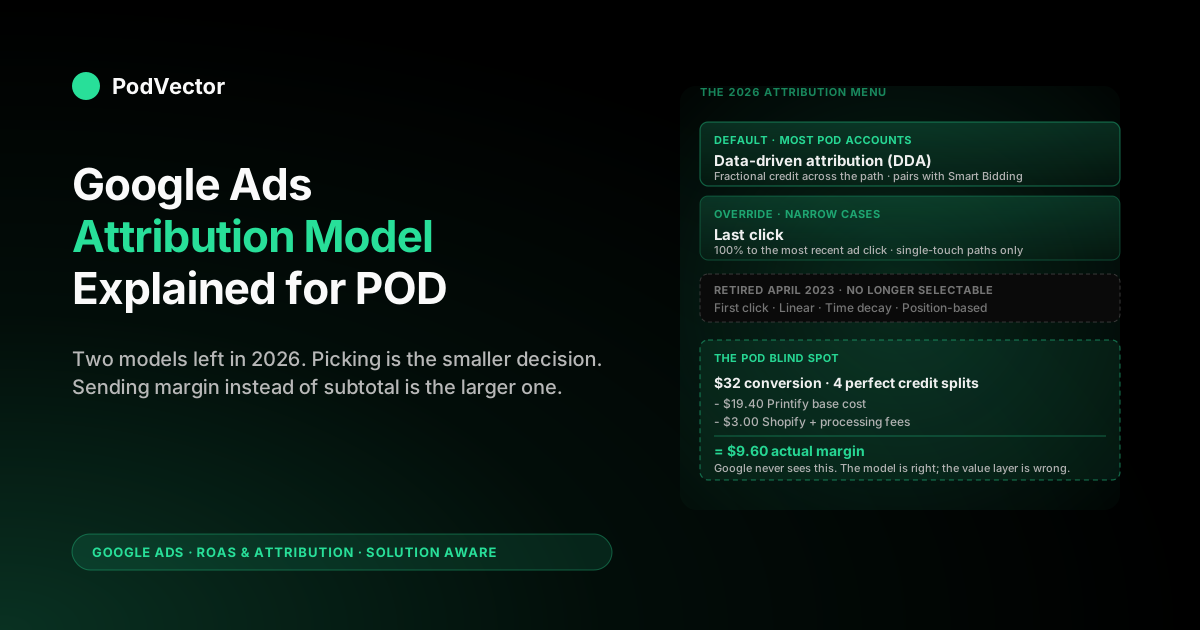
Quick Answer: A Google Ads attribution model is the rule that decides how credit for a conversion is split across the ad clicks and engagements that led to it. As of 2026, only two models exist for web conversions — data-driven attribution (DDA, the default) and last click.
The other four — first click, linear, time decay, and position-based — were retired in April 2023 and no longer apply to any active campaign. For a print-on-demand seller, choosing between DDA and last click is the smaller decision; the larger one is what conversion value you send Google in the first place.
DDA can split a $32 t-shirt conversion perfectly across four touchpoints, but if Google never knew the Printify base cost was $19.40, the resulting ROAS report is a confidently wrong revenue number, not a margin number. This guide walks through what the model does, which model to pick for a POD account, and where the model alone stops being enough.
What a Google Ads attribution model actually does
An attribution model is a rule that takes one conversion and splits it across the multiple ad interactions that came before it. It is not a tracking technology, a pixel, or a setting that determines whether a conversion is recorded — those are the conversion tag and the conversion window. The model is the math that decides, after Google Ads has already collected the path of clicks and engagements, who gets credit for the sale.
The reason this matters is that almost no POD purchase is a single-click event. Google's own help docs on attribution models describe the typical conversion path as multiple ad interactions across days.
A buyer searching "personalized birthday t-shirt" might click a Performance Max product listing on Tuesday, scroll past a YouTube preroll for the same store on Wednesday, click a generic Search ad on Thursday, and finally come back through a branded Search click on Friday before completing checkout. The conversion is one $32 sale.
The path is four ad interactions. The attribution model decides whether that branded Search click on Friday gets all $32 of credit or whether the earlier touches get a share.
This is reported back to you in two places: the Conversions column in Google Ads (what the model says happened), and Smart Bidding's optimization signal (what the bidder will pursue tomorrow). The two are linked.
The model isn't a reporting choice you can adjust without consequence; the bidder reads from the model directly. For the broader frame on how this fits with conversion windows, value tracking, and ROAS measurement, the cluster pillar at the complete guide to Google Ads ROAS and attribution for POD covers the full picture; this article zooms in on the model itself.
The two attribution models you can use in 2026
The current state of Google Ads attribution is simpler than most older guides suggest. There are exactly two models available for web conversions:
- Data-driven attribution (DDA). The default for all new conversion actions and the model most existing accounts have been auto-migrated to. DDA uses Google's machine-learning model, trained on your account's data and on broader Google data, to assign credit fractions across the touchpoints in each conversion path. The fractions vary path by path — there is no fixed weighting.
- Last click. 100% of credit goes to the most recent ad click before the conversion. Earlier clicks and engagements show in the path but receive zero credit toward conversions and conversion value.
That's the entire menu in 2026. Performance Max, Search, Shopping, Display, Demand Gen, and Video conversions all run on one of those two models. App-install conversions on Android have a slightly different attribution flow and are out of scope for a POD store; if you're not running mobile app installs, ignore the app-attribution literature.
Google's official position, repeated across the DDA help page, is that DDA is recommended for almost every advertiser. The few cases where last click remains correct — accounts with a single touchpoint per conversion, accounts under measurement validation against an external tool, accounts with extremely sparse conversion data — are real but narrow. For a typical POD store on Performance Max plus Search, the recommendation aligns with reality: DDA's redistribution of credit toward upper-funnel touches reflects what's actually happening in the path.
The four retired models (and why they still show up in old guides)
If you read any guide written before April 2023, you'll see four additional models discussed: first click, linear, time decay, and position-based. These no longer exist for new or migrated conversion actions. They were removed from Google Ads in April 2023 and are not selectable anywhere in the interface today.
The retirement happened in stages. The four rule-based models were marked deprecated in late 2022 with in-product notifications.
They were removed in April 2023, with any conversion action still using them auto-migrated to last click as a transitional state. Through 2024, those auto-migrated last-click actions were nudged toward DDA via the auto-switch mechanism, and by the end of 2024 most POD accounts that hadn't actively touched their attribution settings since 2021 ended up on DDA whether they intended it or not.
The reason this history matters: if you're comparing year-over-year ROAS in a POD account, the model under your conversion data may have changed twice — once from one of the four rule-based models to last click in 2023, then again from last click to DDA in 2023–2024. A clean year-over-year ROAS comparison across that boundary is impossible without an asterisk, because you're not comparing the same measurement standard. For a focused walkthrough of the deprecated models and what to do with old data tagged to them, see Google Ads attribution models explained for POD sellers.
Older agency blog posts still describe these four models as if they were live options. They aren't. If you're choosing an attribution model for a POD campaign in 2026, the choice is binary: DDA or last click.
How data-driven attribution decides credit splits
DDA is described as a "machine-learning model" in Google's help docs, which is technically accurate but not very illuminating. Mechanically, here's what's happening when DDA assigns credit to your touchpoints.
For each conversion in your account, DDA examines the full path of ad interactions that preceded it — every Search click, every Performance Max click, every YouTube engaged view, every Display click. It then asks a counterfactual question: how often, across paths similar to this one in the dataset, did the conversion still happen when this touchpoint was absent?
If a YouTube engaged view appeared in 200 paths and 150 of those paths converted regardless of the YouTube view's presence, DDA assigns the YouTube view a small credit fraction in the current path. If a generic Search click appeared in 200 paths and only 40 converted when the Search click wasn't present, DDA assigns the generic Search click a large credit fraction.
The model is account-specific when you have enough data. The threshold cited in the help docs is 300 conversions and 3,000 ad interactions per 30 days for "fully data-driven" credit weights.
Below that, DDA falls back on a "modeled" version that combines limited account-specific signal with broader Google data on similar advertiser categories. For a POD store doing 100–250 conversions a month, you're getting modeled DDA, not fully data-driven DDA. The credit weights are still better than last click's binary "all or nothing," but they aren't trained exclusively on your buyers' behavior.
The output, for any given conversion, is a set of fractional credits that sum to 1. A four-touch path might split as 0.10, 0.25, 0.45, 0.20.
Those fractions are applied to both conversion count (each touchpoint gets a fractional conversion) and conversion value (each touchpoint gets a fractional dollar value). When you look at a campaign's Conversions column under DDA, you're not seeing whole-number conversion attribution — you're seeing the sum of fractional credits assigned across every path that included a touch from that campaign.
How last click decides credit splits
Last click is the simpler model. The most recent ad click in the path before the conversion gets 100% of the credit. Every earlier click, view, and engagement gets 0%. There is no fractional math, no machine learning, no path comparison.
For a POD path that goes Performance Max click → YouTube engaged view → generic Search click → branded Search click → conversion, last click assigns the entire conversion to the branded Search click. The PMax click that originally introduced the buyer to your store gets nothing.
The generic Search click that brought them back during their decision phase gets nothing. The branded Search click — which usually fires when the buyer types your store name because they already knew about you — gets credit for the whole sale.
This is what most POD sellers intuitively imagine attribution to mean ("the last ad someone clicked before buying"), and it's why last click stayed the default for so long. It's also why Google moved off it: in a multi-touch world, last click systematically over-credits bottom-funnel touches and under-credits everything that introduced or re-engaged the buyer.
For a POD store running Performance Max alongside branded Search, last click can make PMax look like a money-loser when it's actually doing the work of introducing buyers who later return through branded Search to convert. The deeper walkthrough on this exact dynamic is in Google Ads attribution explained for POD sellers.
Why the model affects Smart Bidding before it affects your reports
The most common mistake in attribution-model thinking is treating the model as a reporting choice. It isn't, mostly. It's a Smart Bidding input.
If you run Target ROAS, Maximize Conversion Value, Maximize Conversions, or any of Google's automated bidding strategies, the bidder is reading the credit weights from your active attribution model directly. When DDA tells the bidder that a YouTube engaged view 12 days before purchase got 0.15 credit on a $32 sale, the bidder treats that engaged view as worth $4.80 in expected revenue.
Last click would tell the bidder that same engaged view was worth $0. The result is different: the DDA bidder bids more on YouTube placements that produce engaged views in conversion paths; the last-click bidder bids less, or zero, on them.
This is why switching from DDA to last click in a POD account doesn't just change the report. It changes which campaigns get budget tomorrow.
If you flip back to last click after a year on DDA, expect Smart Bidding to spend the next 14–30 days redistributing budget away from upper-funnel placements and toward bottom-funnel branded Search. The day-over-day ROAS in the report will look chaotic during that window because the bidder is recalibrating, not because anything has actually changed in your buyers' behavior.
The implication for POD operators: don't change the attribution model casually, and don't change it for "control" reasons without understanding what Smart Bidding will do in response. The cluster pillar at the complete guide to Google Ads ROAS and attribution for POD covers the bid-strategy implications in detail.
Which model to pick for a POD account
For most POD accounts, the right answer is to leave DDA on. The cases where last click is correct are real but narrow.
Pick DDA if:
- You're running Performance Max, especially as a primary campaign type. DDA's whole reason to exist is to redistribute credit fairly across multi-touch paths, and PMax produces the longest, most multi-touch paths in any POD account.
- You're using any Smart Bidding strategy (tROAS, Max Conversion Value, eCPC). DDA pairs with Smart Bidding cleanly; last click leaves the bidder reading a model that systematically misvalues upper-funnel touches.
- You have at least 100 conversions per month. Below that, you're on modeled DDA rather than fully data-driven DDA, but modeled DDA is still better than last click for multi-touch paths.
- You don't have a separate measurement system whose ROAS you're trying to match exactly. DDA's redistribution will make Google Ads' reported conversions look different from a last-click-based dashboard like a default GA4 view.
Pick last click if:
- Your POD account is single-channel branded Search only — one campaign, one ad group, all bottom-funnel queries. With one touchpoint per path, DDA and last click produce identical credit (100% to the only touch), and last click is simpler to reason about.
- You're in a strict comparison or audit period where ROAS numbers need to match an external last-click-only measurement tool exactly. This is rare in POD; mostly applies to agency-managed accounts in a transition window.
- Your account has fewer than 30 conversions per month and you suspect modeled DDA's broader-data fallback isn't reflecting your actual buyer behavior. This is a judgment call; in practice it's almost always still better to keep modeled DDA on than to revert.
For everyone else — which is the bulk of working POD stores — leave DDA as default. The detailed case for not overriding is in data-driven attribution default Google Ads help explained for POD sellers.
How to change the attribution model in Google Ads
The model is set per conversion action, not per campaign or per account. To change it, you change the model on the conversion action itself, and every campaign optimizing toward that conversion immediately starts reading the new model.
Path: Tools → Goals → Conversions → click the conversion action → Edit settings → Attribution model. The dropdown shows two options: Data-driven and Last click.
A few practical notes:
- The change is immediate but the recalculation of historical conversions takes hours to a day. Reports for past periods will rewrite themselves to reflect the new model.
- Smart Bidding starts reading the new model on the next bid cycle (a few minutes later). Budget redistribution takes 14–30 days to stabilize.
- If you have multiple conversion actions (Purchase, Begin checkout, Add to cart) and they're all in the same conversion goal, you can set different models per action — but in practice POD accounts should align all primary purchase-related actions on the same model to avoid the bidder receiving conflicting signals.
- The change is logged in Tools → Change history → Conversion settings with a timestamp. Use this to date your model changes when comparing pre- and post-change ROAS data.
For the granular walkthrough including screenshots and edge cases, see attribution model Google Ads explained for POD sellers.
The POD blind spot: revenue credit isn't margin credit
Here's where the attribution-model conversation usually stops, and where the POD-specific conversation should keep going.
Pick the right model and Google Ads will give you a more accurate picture of which campaigns and which touches drove the most conversion revenue. That is genuinely useful — better than the alternative of a wrong model — but it isn't margin.
The conversion value Google Ads sees is whatever you sent through the conversion tag, which for the default Shopify Google channel app is order subtotal, sometimes gross of shipping. The supplier cost from Printify or Printful, the platform fee from Shopify, the payment-processing fee from Stripe, the return rate on personalized SKUs — none of that is in Google's view.
This produces a specific failure mode that is unique to POD: a perfectly attributed bad campaign. DDA can split a $32 conversion across four touchpoints with credit weights that are exactly correct given the path.
The campaign that gets the most credit might genuinely be the campaign that did the most work to produce the sale. And that campaign can still be unprofitable, because the actual margin on that $32 sale is $9.60 after Printify's $19.40 base cost, Shopify's fee, and the processing fee — so the campaign needs not just a positive Google Ads ROAS but a Google Ads ROAS above roughly 3.3x just to break even on a contribution-margin basis.
An account running tROAS at 2.5x with default Shopify-pixel revenue tracking is, in POD terms, an account systematically losing money on every sale while reporting "profitable" in the Google Ads UI. The attribution model is correct; the value layer it's reading is wrong. The model only sees what you tell it.
Layering Printify and Printful cost on top of the model
Three approaches close the gap between Google Ads' attribution-model output and a POD store's actual margin. They differ in setup effort and in how dynamic they are.
1. Send margin in the conversion value field. The cleanest fix.
Replace the default Shopify pixel that sends order subtotal with a custom integration that calculates margin per order — subtotal minus the fulfillment cost from Printify or Printful for each line item, minus a flat estimate for Shopify and processing fees. The conversion value Google sees becomes margin, and DDA's credit distribution and Smart Bidding's tROAS targets all align to a number that reflects business reality. The downside is implementation effort; the calculation has to happen at order-fired time and needs to read live supplier costs, which differ by SKU and supplier.
2. Adjust tROAS targets manually for the gap. The accountant fix.
Leave the default Shopify-pixel revenue tracking in place, but raise your Target ROAS in Google Ads to compensate for the unseen cost. If your average POD margin is 30% of subtotal, a tROAS of 3.3x in Google Ads is roughly equivalent to a true 1.0x return on margin.
This is easy to set up and instantly applicable; the downside is that it's an account-wide flat correction that doesn't reflect SKU-level cost differences. A campaign pushing $40 sweatshirts (lower margin %) and a campaign pushing $25 mugs (higher margin %) shouldn't have the same tROAS target, and a flat correction can't differentiate them.
3. Audit ROAS in a separate margin layer outside Google Ads. The reporter fix.
Keep Google Ads' attribution model and conversion tracking as-is — DDA on, subtotal as the value field — but maintain a separate view (a warehouse, Looker Studio, a spreadsheet) that pulls Google Ads spend and joins it against actual order-level margin data from Shopify, Printify, and Printful. The Google Ads UI continues to report attributed revenue; your separate view reports attributed margin.
Decisions get made off the second number. This is the most robust setup for an account that's doing serious money, and the cleanest separation of attribution (Google's job) from profitability accounting (yours).
Most POD operators we talk to start with option 2 (the flat tROAS adjustment) because it's a 30-second change, then graduate to option 3 (the warehouse layer) once monthly ad spend crosses $5K and a 2% accounting error is real money. Option 1 (sending margin directly) is the cleanest but requires the most engineering and is the least common in practice.
For the broader frame on layering attribution, ROAS, and margin together, the cluster pillar at the complete guide to Google Ads ROAS and attribution for POD covers the trade-offs in more depth, and the topic hub at Google Ads for POD connects this to ad-type and bidding decisions. For how attribution windows interact with the model — a related but distinct setting — see Google Ads attribution window explained for POD sellers. And if your account is bigger picture and you want the playbook frame, the cross-cluster guide at the complete Google Ads playbook for print-on-demand sellers is where to start.
How Victor reads Google Ads attribution against live POD margin
Victor is PodVector AI's AI agent for POD operators. The interesting part of attribution for an agentic system isn't picking the model — that decision is mostly made — it's reading what the model produces against live margin data without manual joins.
What Victor does today: connects to your Google Ads account and your Shopify store, and to Printify or Printful for live supplier-cost data. When you ask "what's my true ROAS on Performance Max for the last 30 days, after Printify cost," Victor pulls the DDA-attributed conversion value from Google Ads, joins it against the actual order-level fulfillment cost from your supplier account, and returns the margin-based ROAS.
No spreadsheet, no scheduled warehouse job, no manual cost-of-goods column. The model's credit distribution stays Google's, but the value layer it gets compared to becomes the real one.
The same query infrastructure handles the harder questions: "which campaigns have the widest gap between reported ROAS and margin ROAS this month," "what is the DDA-vs-last-click delta on PMax over the last 90 days, and would that delta change my budget allocation," "for last week's converters, what was the average path length and how much credit did upper-funnel touches receive." These are the questions that an attribution model alone can't answer because they require the model's output joined to data the model never sees — supplier costs, return rates, SKU margin tiers.
The longer-term direction of the product is moving from answering attribution-margin questions to acting on them. Victor reports the gap between attributed revenue and margin and adjusts tROAS targets per campaign — with your approval based on the SKU mix flowing through that campaign, raises the target on lower-margin sweatshirt campaigns, lowers it on higher-margin mug campaigns, and tells you what changed and why. The attribution model stays Google's; the operational decisions that depend on it become Victor's to suggest or execute, with you in the loop.
FAQs
What is the default attribution model in Google Ads in 2026?
Data-driven attribution (DDA). New conversion actions land on DDA without a model selection step, and existing actions on last click have been auto-migrated to DDA in most accounts during 2023–2024.
Are first click, linear, time decay, and position-based attribution still available?
No. All four were retired in April 2023. They are not selectable in Google Ads today, and any guide that lists them as live options is out of date.
How do I switch from DDA back to last click?
Tools → Goals → Conversions → click the conversion action → Edit settings → Attribution model → Last click → Save. The change is immediate; Smart Bidding takes 14–30 days to rebalance budgets in response.
Does the attribution model affect my reports or only Smart Bidding?
Both, but Smart Bidding first. The bidder reads credit weights from the active model in real time and adjusts bids accordingly. The reporting view in Google Ads recalculates historical conversions to match the new model within hours of the change.
Why does DDA show more conversions than last click for the same period?
DDA gives fractional credit to engaged views (mostly YouTube) that last click ignores entirely. Those fractions sum into additional conversions on campaigns last click would have shown zero credit for. The total conversion count at the account level is roughly the same; the distribution across campaigns differs significantly.
I run a single branded Search campaign. Should I use DDA or last click?
It barely matters — single-touch paths produce identical credit under both models. Go with DDA for forward compatibility (so you don't have to reconfigure if you add Performance Max or Demand Gen later) and to avoid drifting from Google's recommended default.
Can the attribution model account for Printify or Printful base cost?
No. Google Ads' attribution model only sees what you send it through the conversion tag, which is typically order subtotal. Supplier cost has to be subtracted either at the conversion-value layer (sending margin instead of subtotal), in your tROAS target (raising it to compensate for the unseen cost), or in a separate margin reporting layer outside Google Ads.
How long does it take for a model change to stabilize?
The recalculation of historical conversion data is fast — hours to a day. Smart Bidding's budget redistribution in response to the new model takes 14–30 days. ROAS during that window will be noisier than usual; don't make additional campaign changes during the recalibration period.
Are Google Ads attribution models the same as GA4 attribution models?
No — they're separate systems, and conflating them is a common reason POD sellers see ROAS numbers that don't reconcile. Google Ads attribution (DDA or last click) governs how credit and conversion value are assigned to your ad interactions, and it feeds Smart Bidding. GA4 has its own attribution settings that apply to its reports across all traffic sources, not just paid ads. GA4 also still exposes a paid-and-organic data-driven model and a last-click model, so a number in GA4 can legitimately differ from the same metric in the Google Ads UI even when both say "data-driven." For bidding and Google Ads reporting, the model that matters is the one set on the conversion action in Google Ads, not the GA4 report setting.
Is there a way to use a custom attribution model in Google Ads?
Not within Google Ads itself. The two-model menu (DDA or last click) is the entire selection. If you need custom attribution — first-click, time-decay, or your own logic — you'd compute it externally from the conversion path data and import results via offline conversion uploads, which is operationally heavy and rarely worth the effort for a POD store.
See your true Google Ads ROAS, after Printify and Printful cost
Picking DDA or last click is the smaller decision. Knowing whether your DDA-attributed PMax ROAS is profitable after supplier cost is the larger one. Victor connects to your Google Ads, Shopify, and Printify or Printful accounts and answers margin-based ROAS questions from live data — no spreadsheets, no scheduled jobs. And ask "what's my true ROAS on Performance Max after fulfillment cost" as the first question.
Try Victor free