
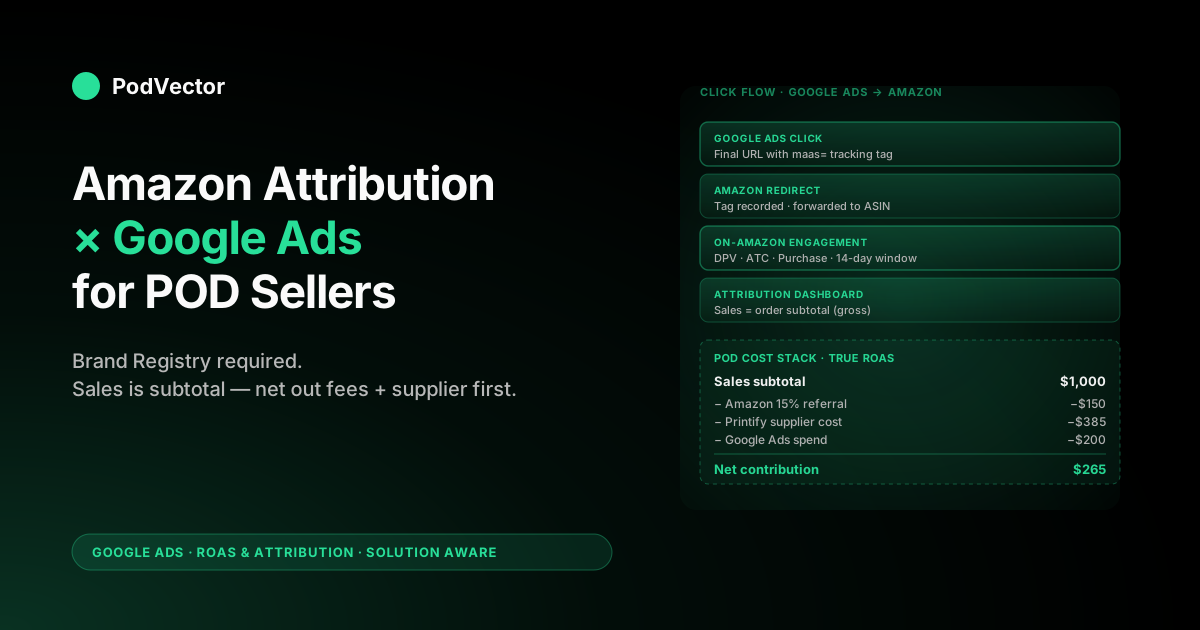
Quick Answer: Amazon Attribution is a free Amazon Ads tool that tags your Google Ads links so Amazon can credit Google clicks with the on-Amazon sales they drive — clicks, detail-page views, add-to-carts, and purchases Google Ads itself can never see, because the checkout happens inside Amazon. It's the only honest way to measure Google → Amazon ROAS.
The catch for POD sellers: it requires an Amazon Professional Seller account enrolled in Brand Registry, or a KDP author account. Merch on Demand sellers and pre-Brand-Registry FBM sellers don't qualify — so most POD operators can't use it yet.
If you do qualify, expect a two-interface setup and conversion data delayed 1–14 days. The revenue it reports is a pre-fee, pre-supplier-cost subtotal — meaningless for true ROAS until you subtract Amazon's referral fee, your Printify or Printful cost, and your Google Ads spend.
What Amazon Attribution actually is — and where Google Ads fits
Amazon Attribution is a free measurement product inside the Amazon Ads console that solves one specific problem: when a customer clicks one of your off-Amazon ads — Google Ads, Meta Ads, TikTok, an email link, anything — and lands on your Amazon product detail page, Amazon knows what happened next (page view, add-to-cart, purchase) but the ad platform that drove the click does not, because the conversion happens behind Amazon's checkout where pixels can't fire. Amazon Attribution closes that loop by issuing a tracking tag you append to every off-Amazon link, then crediting that tag with the on-Amazon engagement and revenue it produces.
For Google Ads specifically, the tag goes on the final URL of every ad in a campaign that points at Amazon. When a Google Ads click hits Amazon with the tag attached, Amazon Attribution records the click in its own dashboard and — over the next 1–14 days as Amazon's pipeline catches up — adds whatever happened on Amazon to the same tag's row.
You end up with Google Ads → Amazon attribution data that lives inside the Amazon Ads console, not inside Google Ads. The two systems don't share an account; you reconcile them yourself.
The mental model worth holding: Google Ads measures clicks-to-Google-or-Shopify, Amazon Attribution measures clicks-to-Amazon. They are non-overlapping measurement systems pointed at non-overlapping endpoints.
Most POD operators have a Shopify funnel and an Amazon funnel that they currently treat as completely separate. Amazon Attribution lets you point Google Ads at the Amazon funnel and still see what happened — without it, every Google → Amazon dollar is invisible past the click.
For the broader picture of how attribution sits inside the Google Ads measurement stack for POD operators, see the complete guide to Google Ads ROAS and attribution for POD, and the ROAS & attribution cluster hub for the full set of focused walkthroughs.
Whether you can even use Amazon Attribution as a POD seller
This is the section nobody else writes and most POD operators discover the hard way. Amazon Attribution is gated behind two requirements:
- An Amazon Professional Seller account (the $39.99/month seller tier — not Individual).
- Enrollment in Amazon Brand Registry, which itself requires a registered trademark for your brand.
Or, in lieu of selling, you need to be enrolled in Kindle Direct Publishing (KDP) as an author — the only non-seller path Amazon opens to Attribution. Vendors (1P) qualify automatically.
What this means in practice for POD sellers, by sub-segment:
- Merch on Demand sellers — not eligible. Merch on Demand is Amazon's first-party POD program; you don't have a Seller account, you have a Merch account that earns royalties. Brand Registry is not part of the Merch flow. Amazon Attribution is closed to Merch on Demand sellers; if you've been considering running Google Ads to your Merch designs, the measurement loop is structurally broken and you're flying blind on Google → Amazon ROAS.
- KDP authors — eligible. If you're publishing low-content books, journals, or activity books through KDP and want to drive Google Ads to your Amazon listings, you do qualify for Attribution as a KDP author. This is the only POD-adjacent program with first-party access.
- Amazon Custom / Pro Seller + private label POD — eligible if you've completed Brand Registry. If you're running a Pro Seller account selling POD-fulfilled apparel or print products under your own brand and you've gone through trademark registration and Brand Registry enrollment, Attribution is open to you. This is the largest eligible POD segment.
- Print-on-demand-via-FBM-without-trademark — not eligible until you complete Brand Registry. Many POD sellers dropship from Printify or Printful into Amazon as Fulfilled by Merchant on a Pro Seller account but have never registered a trademark or completed Brand Registry. Attribution is closed to you in that state. The path is: register the trademark (3–8 months on USPTO), enroll in Brand Registry, then enable Attribution. Until that's done, Google Ads to Amazon is unmeasured beyond the click.
The honest read: most POD sellers reading this article won't qualify for Amazon Attribution today. If you're in the Merch on Demand or pre-Brand-Registry FBM segment, the right answer is usually to stop pointing Google Ads at Amazon and point them at your Shopify storefront instead, where the measurement loop is closeable end-to-end. For the focused walkthrough on the Shopify-side measurement integration, see Shopify Google Ads ROAS reporting integration explained for POD sellers.
How Amazon Attribution measures Google Ads clicks
The mechanic is a click-tracking redirect plus an on-Amazon engagement pixel that fires inside Amazon's environment. Walking through the lifecycle of one click:
- You generate an Attribution tag inside the Amazon Ads console for a specific Amazon product (ASIN), tied to a "campaign" name you choose (typically the Google Ads campaign name).
- The tag becomes a tracking parameter Amazon hands you, formatted as a URL like
https://www.amazon.com/dp/B0XXXXXXX/?maas=maas_adg_.... You drop this URL into the Final URL field of every Google Ads ad in the corresponding campaign. - A customer clicks the Google Ad. Their browser hits Amazon's redirect endpoint with the tag, Amazon records "tag X received a click at timestamp Y," then forwards the customer to the actual product detail page.
- The customer browses, maybe adds to cart, maybe buys. Amazon's internal session tracking ties subsequent on-Amazon events back to the original tag click for a 14-day attribution window.
- 1–14 days later, the events show up in your Amazon Attribution dashboard rolled up by tag, with columns for Click-throughs, Detail Page Views, Add to Carts, Purchases, and Sales (revenue).
Two implementation details that catch POD operators:
- Reporting latency. Click-level data is near-real-time (a few hours). Conversion data is delayed 1–14 days because it depends on Amazon's order-finalization pipeline (orders that ship vs cancel vs return). You cannot read same-day Attribution numbers and compare them to same-day Google Ads spend; the conversion side is incomplete. Build the reconciliation 14+ days back.
- Single ASIN per tag. Each Attribution tag is bound to one ASIN. If your Google Ads campaign points at a category page, a search results page, or a multi-ASIN landing page, Attribution can't tag-match — you need a different tag for each destination ASIN. POD sellers running multi-design ad campaigns end up with a tag matrix the size of (campaigns) × (ASINs).
The 14-day attribution window is a fixed Amazon-side decision; you can't lengthen or shorten it. By contrast, Google Ads' click-through window for its own conversion actions is configurable up to 90 days.
Amazon's shorter window means longer-consideration POD purchases (high-AOV custom apparel, photo books, personalised gifts) are systematically under-attributed in Amazon Attribution relative to how Google Ads would credit the same path on a Shopify funnel. For the deeper coverage of click-through windows in attribution generally, see Google Ads attribution window explained for POD sellers.
Setting up Amazon Attribution for a Google Ads campaign
Assuming you've cleared the Brand Registry hurdle, the setup is a two-interface process. Block 30 minutes for one campaign; longer if you're tagging at the keyword level (covered in the next section).
Inside Amazon Ads console
- Sign in to advertising.amazon.com with your Pro Seller credentials. The console shows Sponsored Products, Sponsored Brands, Sponsored Display, and — if Brand Registry is verified — Amazon Attribution as a left-nav option.
- Click Measurement & Reporting → Amazon Attribution → Create campaign. Amazon's "campaign" here is a wrapper around one or more tags, not a Google Ads campaign — naming convention matters. We use
GA-{Google-campaign-name}so the Attribution view sorts naturally next to its Google Ads counterpart. - Pick the products (ASINs) the campaign points at. Search by product name or paste ASINs. One campaign can include multiple ASINs but each ASIN gets its own tag downstream. For POD sellers with a 200-design catalogue, this is where the tag matrix starts to get ugly — see the bulk-upload section below.
- Create ad groups within the campaign. Each ad group represents one publisher (Google Ads, Meta, TikTok, etc.) and one click-through type. For Google Ads, pick "Google Ads" as the publisher and "Search ads" or "Display ads" as the click-through type.
- Generate the tag. Amazon outputs a tagged URL per ASIN per ad group. Copy each one — you'll paste them into Google Ads next.
Inside Google Ads
- Open the campaign you're measuring and navigate to Ads & Assets → Ads.
- Edit each ad's Final URL field and paste the tagged Amazon URL Amazon Attribution generated. The full URL goes in Final URL — not in a tracking template, because tracking templates execute on click-through and Amazon Attribution wants the tag visible at the destination, not just on the redirect.
- Save and let the ads enter review. Google's review pass usually clears Amazon-destination ads quickly because Amazon is on the trusted-destination list, but expect a few hours.
- Verify the click is tagging through correctly by clicking your own ad in incognito mode, watching the URL bar redirect, and confirming the
maas=parameter survives to the Amazon detail page. If you see the parameter on the detail page URL, the tag is wired correctly.
One judgment call worth flagging upfront: don't tag at the ad level if you can avoid it. Tag at the campaign or ad group level by giving every ad in a campaign the same Attribution tag.
Tagging per-ad creates a maintenance problem the moment you A/B test creative. Per-keyword tagging is a different conversation — covered next.
Keyword-level tracking via bulk upload
The default Attribution flow tags at the ad-group level: every click on every ad in that ad group gets the same tag. That's fine for measuring "did Google Ads drive Amazon sales overall." It's useless for "which keywords drove which Amazon sales," because the tag doesn't differentiate.
Amazon's bulk upload is the keyword-level workaround. The flow:
- Inside Amazon Attribution, click Bulk operations → Download bulk file template. Amazon hands you an Excel/CSV template.
- Populate one row per keyword you want to track, with columns for campaign name, ad group, publisher, click-through URL (the Amazon ASIN), and the keyword text.
- Upload up to 100,000 rows in one file. Amazon generates one tag per row.
- Download the populated file with the tags and import into Google Ads. The cleanest way is to set the keyword-level tracking template in Google Ads using ValueTrack parameters so Google substitutes the keyword into the URL at click time.
The pragmatic version for POD sellers: the keyword-level approach is overkill for most ad groups under 50 keywords. The maintenance burden of regenerating tags every time you add or pause a keyword swamps the analytical value.
Where it pays off is on Search campaigns with 200+ exact-match brand or product keywords where the per-keyword cost variance is large enough to justify per-keyword ROAS calculation. For everything else, ad-group-level tagging is the right resolution.
Reading the metrics — what each column means for POD
The Attribution dashboard surfaces a fixed set of columns per tag. The POD-specific reads:
- Click-throughs. Number of clicks on tagged links that arrived at Amazon. Should approximately match Google Ads' click count for the campaign within 5–10% — discrepancies above 10% usually mean tags are missing on some ads or a tracking template is rewriting the URL en route.
- Detail Page Views (DPV). Number of Amazon detail-page sessions started from a tagged click. DPV / Click-through ratio should sit at 0.85–1.0 for direct-to-ASIN tags. Below 0.7 means a meaningful share of clickers bounced before the page rendered — either a slow Amazon listing, a mobile-experience issue, or a misleading ad expectation.
- Add to Carts (ATC). The intent signal. ATC / DPV ratio for POD apparel typically sits at 4–9% on well-targeted Amazon listings; below 3% the listing has a conversion problem (price, photos, reviews) that no amount of Google Ads spend will fix.
- Purchases. Final orders attributed to the tag within Amazon's 14-day window. Purchases / Click-through is your raw conversion rate. POD apparel from Google Ads to Amazon: 0.5–2% is typical. Below 0.5% the funnel is leaking; above 2% you're either targeting branded keywords (good) or your listing is exceptional.
- Sales (revenue). Sum of order subtotal — pre-Amazon-fee, pre-tax, pre-shipping. This is the column that tricks operators into thinking ROAS is healthy when contribution margin is negative. Treated correctly in the next section.
- New-to-brand metrics (if Brand Registry is on the most recent tier). New-to-brand Purchases and Sales are subsets of the above filtered to customers who haven't bought from your brand on Amazon in the past 12 months. These are the metrics that justify Google Ads spend on Amazon — repeat customers can find you via branded Amazon search for free.
The dashboard also exposes a Brand Halo report on Brand Registry-enrolled accounts, surfacing other ASINs the customer purchased after clicking through to the tagged ASIN. For POD sellers with a multi-design catalogue this is meaningful — a customer who clicks on your "vintage Colorado" design ad and ends up buying three other state designs should be credited to the original Google Ads click, not lost in the cross-sell.
The cost layer: turning Attribution revenue into true POD ROAS
This is where most operators stop reading the report honestly. The Sales column is order subtotal; calling it ROAS is the most common analytical mistake POD sellers make on Amazon Attribution data.
To get true POD ROAS from the Sales column you have to subtract three layers, every one of which Amazon Attribution does not show:
- Amazon referral fee. 15% on apparel and most POD categories (some categories at 8% or 17%). Amazon takes this off the top of every sale. If Attribution shows $1,000 in Sales for a tag, Amazon kept $150 of it before you saw a dollar.
- Fulfillment cost. If you're FBM (fulfilled by merchant) on POD, this is the Printify or Printful supplier cost on each unit sold — typically $8–18 for apparel — plus your shipping cost net of the customer-paid shipping subsidy Amazon collected. If you're FBA-stocked, it's the per-unit FBA fee plus the storage and inbound shipping you paid to seed the inventory. POD-FBA on apparel is rare; most POD on Amazon is FBM-via-Printify.
- Google Ads spend on the gclid that drove the click. Attribution tells you the click happened and the sale happened; it does not tell you what you paid Google for the click. You have to join Attribution's per-tag clicks against Google Ads' per-campaign cost (or per-keyword cost on bulk-tagged accounts) yourself.
The math, on a worked example with Attribution-shown revenue of $1,000 and 250 clicks at a $0.80 average CPC:
- Attribution Sales: $1,000 (gross subtotal)
- Less Amazon 15% referral fee: −$150
- Less Printify supplier cost on, say, 35 units sold at $11 each: −$385
- Net product margin: $465
- Less Google Ads spend (250 × $0.80): −$200
- Net contribution: $265, on $1,000 of "ROAS revenue"
The naive ROAS read is $1,000 / $200 = 5.0x — a number that would justify scaling the campaign 3x. The true contribution-margin read is $265 / $200 = 1.32x return on ad spend after Amazon fees and supplier cost — barely above breakeven, and one return wave away from negative. Two operators reading the same Attribution dashboard can reach completely opposite scaling conclusions depending on whether they're doing this math.
Doing this math by hand once is fine; doing it monthly across 80 ASINs and 20 Google Ads campaigns is the actual operational pain. Most POD operators rebuild a spreadsheet that exports Amazon Attribution data, joins it to a Printify or Printful supplier-cost lookup, and reconciles it against the Google Ads cost report — and the spreadsheet inevitably falls out of date within a quarter. For the deeper coverage of how the data layer ties together for Shopify-side Google Ads, see Google Ads conversions attribution explained for POD sellers.
Where Amazon Attribution falls short for POD specifically
Even with eligibility cleared and the cost layer wired, Amazon Attribution has structural gaps that hit POD operators harder than other Amazon sellers.
- Returns and refunds aren't reflected in the Sales column. Attribution records orders at placement, not at delivery-confirmed-no-return. POD apparel runs 5–12% return rates (size and fit being the dominant cause). The Sales number overstates net contribution by that share. Wire your bookkeeping to net out returns against Attribution Sales monthly; otherwise you're scaling on inflated revenue.
- Cross-device attribution is weaker than Google's. Amazon stitches device-to-device using Amazon account login as the primary identifier. A customer who clicks a Google Ad on mobile (signed out of Amazon) and then buys on desktop (signed in) often shows as a click without a downstream Purchase — the desktop session never ties back. Google Ads' enhanced conversions and GA4's user-ID stitching are tighter on this. Amazon Attribution under-reports cross-device paths systematically; expect 5–15% lift in true conversions over what the dashboard shows.
- The 14-day attribution window is fixed. Custom POD products with high consideration cycles — wedding apparel, personalised home goods, photo books — often convert past 14 days. Attribution can't see those conversions. Long-consideration POD niches systematically look worse on Amazon than they do on Shopify (where you control the click window) for this reason alone.
- Tags break silently when ASINs change. If you rotate creative variants, change a parent-child ASIN structure, or a listing gets temporarily suppressed, the tag URL still resolves but routes to a 404 or fallback page. Attribution still records the click but the on-Amazon engagement pipeline produces zero downstream events. Audit your tag-to-ASIN mapping monthly.
- No bid optimisation feedback loop. Attribution data lives in Amazon Ads. Google Ads' Smart Bidding can't read it. Unlike Google Ads conversion data — which Smart Bidding uses to optimise bids in real time — Amazon Attribution data doesn't flow back into your Google Ads bid logic. You're measuring after the fact, not optimising in the loop. The workaround is offline conversion import from Attribution into Google Ads; setup is non-trivial and many POD operators skip it.
- Brand-Halo cross-sell credit is fuzzy on POD multi-design catalogues. A customer who clicks an ad for design A and buys design B is the modal POD outcome on a 200-design catalogue. Brand Halo captures this — but the credit assignment is to the whole tag, not specifically to design A. If you're trying to figure out which designs are actually pulling traffic versus which ones are converting, the Brand Halo number conflates the two roles.
For the broader strategic context on how attribution sits in the POD measurement stack, see the complete Google Ads playbook for print-on-demand sellers. For the canonical Amazon-side reference on the product itself, the most comprehensive third-party walkthrough is LandingCube's Amazon Attribution guide.
Alternatives if you don't qualify or it's not enough
For the POD majority that doesn't qualify for Amazon Attribution — Merch on Demand sellers, pre-Brand-Registry FBM sellers, KDP authors who prefer simpler tooling — the practical options:
- Stop pointing Google Ads at Amazon. Point them at Shopify instead. Run the same designs on a Shopify storefront with Printify or Printful integration, and let your Google Ads → Shopify funnel be the measured one. Amazon then becomes the channel customers find through Amazon's own search, not Google. The measurement loop closes end-to-end on Shopify and you don't need Brand Registry.
- UTM-based proxies, accepting the loss of conversion data. If you must run Google Ads to Amazon and don't qualify for Attribution, append UTM parameters to the Amazon URL anyway. Amazon ignores them but they survive in your Google Analytics 4 referrer reports. You'll know which campaigns drove Amazon traffic; you won't know which drove Amazon sales. This is honest blindness, not measurement.
- Bookkeeping reconciliation, monthly. Pull Amazon Settlement Reports and Google Ads spend from the same period, compute Amazon-orders-by-day against Google-Ads-spend-by-day, and look for correlation. Crude but workable for sub-$10K/month Amazon revenue. Breaks down at scale or with multiple non-Google traffic sources.
- Third-party measurement platforms (Improvado, Karooya, NorthBeam-style attribution). Aggregate clicks across paid sources and orders across stores; produce a unified ROAS view that includes Amazon. These have their own setup costs and recurring fees and require you to be the kind of operator who runs $50K+/month in ad spend to justify them.
- Get into Brand Registry. If POD-on-Amazon is a meaningful share of your business, the right multi-quarter move is registering a trademark and enrolling in Brand Registry. The trademark process is 3–8 months on USPTO; Brand Registry verification is days once the trademark is live. After that, Attribution opens up.
For the focused walkthrough on attribution model choice once you're inside Google Ads' own conversion ecosystem, see Google Ads attribution models explained for POD sellers.
A monthly Amazon-Attribution-for-Google-Ads review workflow
For Brand-Registry-enrolled POD operators running Google Ads to Amazon, this is the routine that turns Attribution data into decisions. Block 90 minutes the first business day of each month.
- Set the Attribution date range to 30 days back, ending 14 days ago. The 14-day buffer lets Amazon's conversion pipeline finalise. Reading "last 30 days" today gives you 16 days of complete data and 14 days of incomplete data — that mix invariably misleads.
- Export the Campaign-level Attribution report. One row per Attribution campaign (which maps to your Google Ads campaign by your naming convention). Columns: Click-throughs, DPV, Purchases, Sales, New-to-brand Sales.
- Pull the matching Google Ads spend for the same date range, by campaign. Most painful step manually; trivial in a warehouse if your Google Ads → warehouse pipeline is on.
- Compute true contribution margin per campaign: Sales × (1 − 0.15 referral fee) − units × supplier cost − Google Ads spend. The first three pieces come from Amazon Attribution + Printify/Printful invoices; the last from Google Ads.
- Rank campaigns by net contribution dollars, not by ROAS multiple. A campaign at 1.4x net ROAS on $5K of monthly spend produces more dollars than a 4x campaign on $300 of spend. Most operators rank by ratio and ignore absolute contribution; the ratio-rank misallocates budget toward small-but-pretty campaigns.
- Compare to last month. Net contribution moving up/down month-over-month is the actual signal. Year-over-year is more useful than month-over-month for seasonal POD niches.
- Decide three things. Which campaigns to scale (positive net contribution and headroom in keyword volume), which to hold (positive but capped), and which to kill (negative net contribution after 90 days of evidence — not 30; Attribution noise is too high at 30 to call a kill).
For the focused breakdown of how data-driven attribution affects this workflow on the Google-Ads-internal side, see Google Ads data-driven attribution explained for POD sellers.
POD-specific mistakes to avoid
Six recurring patterns we see on POD account audits that include Amazon Attribution.
- Reading Sales as ROAS without subtracting Amazon's referral fee or supplier cost. The single most common analytical error. Attribution Sales is order subtotal — about 2.5–3x your true contribution margin on POD apparel. Operators who skip the cost-layer math scale campaigns to the cliff.
- Tagging at the ad level instead of the ad-group level. Per-ad tagging breaks the moment you A/B test creative; tags multiply with no measurement benefit. Tag at ad-group level unless you have a specific reason to differentiate.
- Ignoring the 14-day reporting delay. Operators who read same-day Attribution numbers see a fraction of the eventual conversion data and panic-pause campaigns that are actually performing. Wait the buffer; read the data once it's complete.
- Pointing Google Ads at multi-ASIN landing pages. Attribution tags one ASIN per tag. If your ad goes to a category page or storefront, Attribution can't credit the resulting sale to the originating click cleanly. Always send ad clicks to single-ASIN detail pages.
- Skipping Brand Halo on multi-design catalogues. POD sellers with 50+ designs see substantial cross-design purchasing. Brand Halo captures the cross-sell credit; ignoring it under-reports campaign value by 15–40% on healthy multi-design accounts.
- Killing campaigns on month-1 Attribution data. Attribution noise is high at low click volume. A campaign with 50 clicks and 0 attributed sales might be a real loser or might be sub-statistical noise; you can't tell at that volume. Wait for 200+ clicks per campaign before making a kill call. For high-spend operators that's a week; for sub-$1K/month operators that's a quarter.
For the broader picture of how AI agents compress this monthly review into a 5-minute conversation, see the complete guide to AI agents for ecommerce analytics. For the topic-level overview of all Google Ads articles for POD operators, see Google Ads for POD sellers.
FAQs
Does Amazon Attribution cost anything?
The product itself is free. There's no per-click charge, per-tag fee, or subscription. The cost is the operational time to wire it up and the Amazon Brand Registry trademark requirement (USPTO trademark filings start around $350 per class plus legal time). For Brand-Registry-enrolled POD sellers, ongoing use is free.
Can I use Amazon Attribution if I sell on Merch on Demand?
No. Merch on Demand is a separate Amazon program from the Pro Seller account that Brand Registry is built around. Attribution is closed to Merch sellers. The practical alternative is to point Google Ads at a Shopify storefront with the same designs and let the measured channel be Shopify rather than Amazon.
How long does it take for Amazon Attribution data to show up?
Click data appears within a few hours. Conversion data — Add to Carts, Purchases, Sales — has a 1–14 day reporting delay because Amazon waits for orders to finalise (ship rather than cancel or return). Practically: read Attribution data 14+ days back; data inside the 14-day window is incomplete and will keep updating.
Why don't my Google Ads click numbers match Amazon Attribution click numbers?
A 5–10% gap is normal — the two systems count clicks slightly differently and Amazon de-duplicates within sessions. Gaps above 10% usually mean tags are missing on some ads, a Google Ads tracking template is rewriting the URL en route and stripping the Amazon tag, or invalid clicks (Google's filter) aren't matching Amazon's filter. Audit which ads in the campaign have the tag and confirm no tracking template is overriding the Final URL.
Can I see keyword-level Amazon Attribution for Google Ads?
Yes, via the bulk upload flow. You generate one Attribution tag per keyword (up to 100,000 per upload) and configure Google Ads to substitute the tag at click time using ValueTrack. The maintenance cost is real — every paused or added keyword needs the tag matrix updated — so most operators only do this on top-volume Search campaigns where per-keyword cost variance justifies the work.
Does Amazon Attribution feed conversion data back into Google Ads bidding?
Not natively. Amazon Attribution data lives inside the Amazon Ads console; Google Ads' Smart Bidding can't read it directly.
The workaround is offline conversion import — exporting Attribution conversions from Amazon and importing them into Google Ads as conversion events. Setup is non-trivial and the import has its own latency. Many POD operators skip the offline import and treat Attribution as a measurement layer only, not an optimisation feedback loop.
What's the right click-through window for Amazon Attribution?
Amazon's window is fixed at 14 days post-click and isn't configurable. This is shorter than Google Ads' default 30-day click window for its own conversion actions. For long-consideration POD products (custom apparel, personalised home goods, photo books) Amazon's 14-day window systematically clips converting paths — expect 10–20% under-attribution on niches where the typical decision cycle exceeds two weeks.
How does Amazon Attribution compare to UTM parameters for Google → Amazon?
UTMs survive through to Amazon's URL but Amazon ignores them — they don't tie back to on-Amazon engagement or sales. UTMs let you see in Google Analytics that a click went to Amazon; they don't tell you what happened on Amazon.
Attribution is the only system that closes the on-Amazon side of the loop. Use UTMs as a complement (for your GA4 reporting) and Attribution as the primary measurement layer.
Let Victor run your Shopify-side Google Ads
Amazon Attribution can't optimize your bids — but on your Shopify funnel, Victor can. He pulls live order data, joins it against your Printify or Printful supplier invoices and Google Ads spend, and finds the true contribution margin by design after every cost.
Then he acts on it — reallocating spend and adjusting Google Ads bids toward the designs that actually clear margin, with your approval before anything goes live.
Try Victor free