
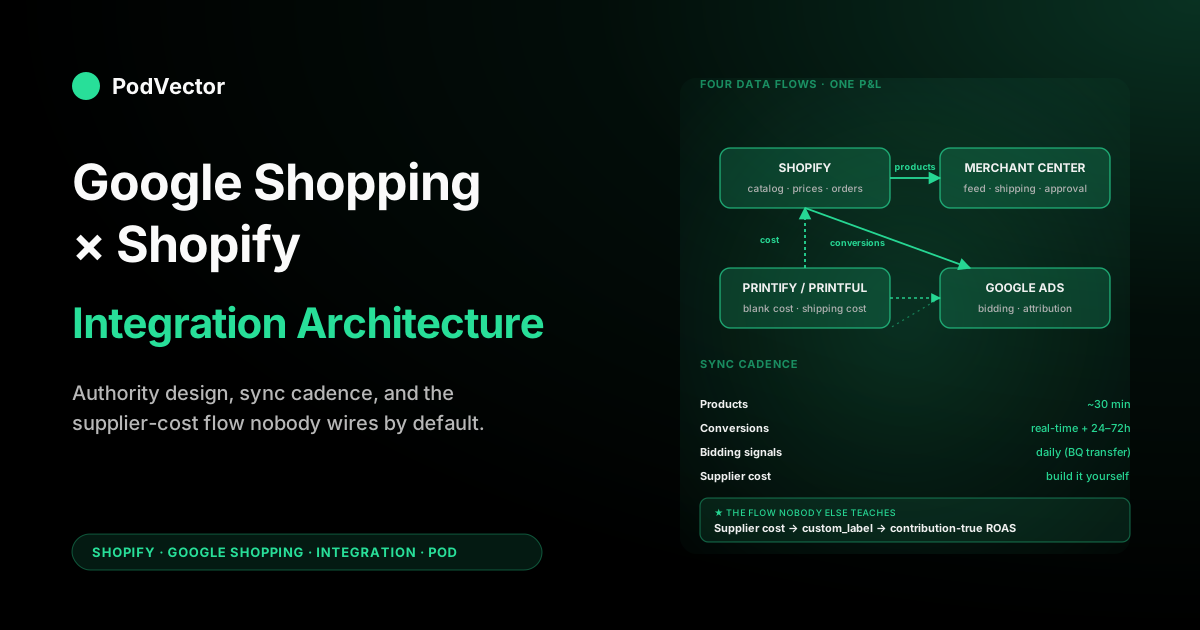
Quick Answer: You integrate Google Shopping with Shopify by installing the Google & YouTube app, which connects three things at once: your product feed to Merchant Center (free listings plus paid Shopping and Performance Max ads), conversion tracking to Google Ads, and, if you want it, GA4. That single install actually hides four data flows.
Products and prices flow Shopify → Merchant Center; conversions flow Shopify → Google Ads; bidding and search-term signals flow Google Ads → your operating dashboards; and supplier cost flows Printify or Printful → Shopify metafields → the feed. The strategy for a print-on-demand store is deciding which system owns each flow, where you transform data at the boundary, and which sync delays you build campaign cadence around.
Operators who treat the app as "set and forget" lose money on every flow because the defaults assume a wholesale retailer, not a POD seller paying $14 for a $32 shirt. This guide is the architecture; it pairs with our 12-step setup walkthrough for the click-by-click implementation.
The integration map: four data flows, three accounts, one P&L
Most "Google Shopping for Shopify" guides treat the Google & YouTube Shopify app as a single integration. It isn't.
It's a connector that hides four distinct data flows behind one install button, and each of those flows has its own authority model, its own sync cadence, and its own failure mode. Print-on-demand operators need to see the flows separately because three of the four require POD-specific overrides on the defaults.
The three accounts in play:
- Shopify — product catalog, prices, inventory, customer data, orders. The system of record for what you sell and what you sold.
- Google Merchant Center — the product feed warehouse Google's auctions bid against. Owns shipping cost, tax cost, and policy approval.
- Google Ads — the bidding engine and reporting layer. Owns campaign structure, bidding strategy, and conversion attribution.
The four flows that connect them:
- Products from Shopify into Merchant Center — up to 24 hours for the first sync, then changes within a few hours. The same feed powers free listings, paid Shopping, Performance Max, and Google's AI shopping surfaces (AI Mode, Gemini shopping).
- Conversions from Shopify checkout into Google Ads, in real-time via tag fires.
- Bidding signals from Google Ads back to your dashboards, with a 24–72 hour reporting lag.
- Supplier cost from Printify or Printful through Shopify metafields into the feed, manually or via API on whatever cadence you build.
The integration strategy for a POD store is one decision per flow: what's authoritative, where you transform data at the boundary, and how you handle the sync delay. Get those four decisions right and the campaign architecture in our Shopify Google Shopping strategy guide works. Get them wrong and no amount of bid tuning will save you.
Flow 1 — Products: Shopify → Merchant Center
Shopify is authoritative. The Google & YouTube app reads your product catalog, applies a few transformations, and pushes the result to Merchant Center. Defaults break in three places for POD.
What gets transformed at the boundary:
- Title: Shopify's product title flows through unchanged. Title is one of the strongest relevance signals in Shopping, but Shopify titles are often optimized for the storefront ("Summer Vibes Tee"), not for search ("Cottagecore Strawberry Aesthetic T-Shirt"). The integration won't fix this for you. Build a
google_titlemetafield, populate it with search-optimized titles, and configure the Google & YouTube app's "Title source" to read from the metafield instead of the product title. - Product type and Google product category: Shopify's "Product type" is freeform; Google's product taxonomy is a fixed tree. The app maps loosely. For apparel, force the mapping: set the Google product category metafield to a deep, specific path like
Apparel & Accessories > Clothing > Shirts & Tops > T-Shirtsrather than letting Shopify's "Apparel" guess. - Image: Shopify's primary product image becomes the feed image. POD mockups vary wildly in quality. Standardize: square crop, on-model lifestyle as primary, white-background flat lay as additional image. Merchant Center accepts up to 10 additional images per product; supply at least three.
What gets gated at the boundary:
- Sync scope: the app defaults to syncing the entire catalog. Override to a curated
shopping-feedcollection or tag. POD stores with 200+ designs should advertise 20–40 SKUs at first, not all 200. The integration doesn't enforce this; you do. - Feed completeness: Merchant Center silently drops products missing a description, image, price, or identifier. POD blanks rarely carry manufacturer GTINs, so set the identifier-exists attribute to false rather than leaving the field blank — otherwise Google marks the item as having an invalid identifier and it never serves. This is the single most common reason a freshly synced POD feed shows "0 active products."
- Variant rollup: by default, Shopify variants become individual feed items in Merchant Center (one entry per color × size). For T-shirts with five colors and four sizes, one product becomes 20 feed items. This is correct for Google's auction model but breaks naive reporting; build dashboards that group on parent product, not feed item.
Shopify's official guide to how Shopping ads work with Shopify covers the generic case for any merchant; the POD-specific overrides above are what differentiate a feed that gets approved from one that gets suspended within two weeks.
Sync cadence: the first full sync takes up to 24 hours; after that, any change you make in Shopify — price edit, title fix, image swap — propagates to Merchant Center within a few hours. Merchant Center then needs its own re-approval pass before the changed product serves. Plan around it: don't bulk-edit prices on a Friday afternoon if Saturday traffic matters, and don't launch a new store's campaign the same day you install the app — give the first sync a full day to complete.
Flow 2 — Conversions: Shopify → Google Ads
Shopify's order-confirmation page fires a conversion event that Google Ads ingests as the bidding signal. This flow is the most error-prone of the four because it's invisible — you can't tell the tag is broken until you see "0 conversions" two weeks into a campaign.
What gets sent at the boundary:
- Order value — almost always sent as gross revenue ($32 for a $32 shirt). This is the default, and it's wrong for POD because Google Ads will optimize bids against revenue while your real economics are about contribution. Override the conversion-value variable in Google Tag Manager to compute
order_total - supplier_cost - shippingand send contribution as the conversion value. Now a 100% target ROAS literally means "break even on margin." - Order ID — sent for deduplication. Critical: configure the conversion to use "One per click" not "Every," or refunded orders inflate your reported numbers.
- Customer email and phone (hashed) — only if you implement enhanced conversions. The basic Google & YouTube app integration doesn't include enhanced conversions. With Apple's iOS privacy changes and Chrome's third-party cookie deprecation, the difference between basic conversions and enhanced is roughly 15–25% of attribution accuracy on mobile traffic.
What can break at the boundary:
- The order-confirmation page can fire twice if the customer hits refresh. Without "One per click" deduplication, every refreshed confirmation page becomes a phantom conversion in Google Ads, inflating the bid signal and torching campaigns through over-spend.
- Currency mismatch. If Shopify's primary currency is USD and Google Ads is set to GBP, the conversion-value field flows through with no FX translation. Google Ads sees $32 as £32 and bids accordingly. Match currencies during account setup; the Ads-side currency is permanent.
- Theme updates strip the tag. Shopify theme updates regenerate
theme.liquid, which sometimes removes Google Tag Manager snippets you pasted in. After every theme update, validate the tag is firing using Google Tag Assistant on a real test order.
For the GTM-level walkthrough that gets contribution-value flowing rather than gross revenue, see our enhanced conversion setup guide for Shopify; it's the boundary code that makes Flow 2 actually report POD economics.
Flow 3 — Signals: Google Ads → your operating dashboards
Once Flows 1 and 2 are running, Google Ads is the bidding engine. But Google Ads' UI and reporting are designed for a marketing team running a portfolio of campaigns — not for a POD operator who needs to see "is this campaign actually profitable on contribution after Printify's blank, shipping, and processing." The integration here is exporting Google Ads data into a place where you can reconcile it against the rest of your P&L.
What flows out of Google Ads:
- Spend by campaign, ad group, day, product, and search query. Available via the Google Ads UI, Google Ads Editor, the Google Ads API, or the Google Ads ↔ warehouse export (free, runs daily).
- Conversions and conversion value reported back from Flow 2. Available in the same exports.
- Search terms — the actual queries that triggered your Shopping ads. Only available in Standard Shopping campaigns; Performance Max hides them. This is why the campaign architecture in the complete Google Ads playbook for POD sellers argues for spending the first 60 days in Standard Shopping.
The reporting lag: Google Ads conversion attribution reports stabilize 24–72 hours after the click. A campaign that looks like it's converting at 1.2× ROAS on Tuesday morning may settle at 2.1× ROAS by Thursday once cross-device and view-through attribution finishes resolving. Don't make bid changes inside the 72-hour window; you'll be reacting to incomplete data.
Integration choices for the dashboard layer:
- Native Google Ads UI — works for the first 90 days when you're learning. Doesn't reconcile against Shopify orders, Printify costs, or shipping fees, so it can't show real contribution.
- Looker Studio (free) — pull Google Ads, Shopify, and Printify into one report. Build it once, accept that the connectors are flaky and you'll spend 30 minutes a week debugging refresh errors.
- a warehouse paired with an operator — the Google Ads ↔ warehouse export is free; pair it with Shopify's order export and Printify's API and you have a single-source-of-truth warehouse for every order, every ad-spend dollar, and every supplier cost. This is the architecture Victor acts on: it reads contribution per ad-spend dollar across all four flows, then reallocates budget toward high-contribution SKUs and pauses the money-losers — each move gated on your approval.
Flow 4 — Supplier cost: Printify/Printful → the feed
This is the integration the Google & YouTube app does not touch and where most POD operators get burned.
Google Shopping doesn't ask Printify what a shirt costs. The bidding engine sees only what you tell it — and by default, you tell it gross revenue. The supplier-cost flow is something you build yourself, threading from the print provider's catalog through Shopify metafields and into the Google feed as a structured signal the bidder can act on.
The four-step boundary design:
- Pull supplier cost from Printify or Printful into Shopify. Printify's API exposes per-variant blank cost and print cost; Printful's API exposes the same. Run a daily script (or a Shopify app like Profit Calc that does this for you) to populate a Shopify metafield
custom.supplier_coston each variant. This metafield is now the authoritative supplier-cost field within Shopify. - Compute contribution margin in Shopify. Add a derived metafield
custom.contribution_margin= price − supplier_cost − shipping − 3% processing. For a $32 shirt with $14 supplier and $5.50 shipping, contribution_margin is $11.54. - Map contribution margin to Google's
custom_label_0— this is the field Google Ads can use as an inventory filter for ad groups. The Google & YouTube app's metafield mapping accepts custom logic. Setcustom_label_0to "high" if contribution > $15, "medium" if $8–$15, "low" if < $8. - Send contribution as conversion value (not gross revenue). In Google Tag Manager, override the conversion-value variable to fire
order_total - supplier_costas a numeric value. Now Google Ads' tROAS bidding optimizes against your real economics.
The compounding effect: once Flow 4 is wired, every subsequent campaign decision uses the right number. A 250% tROAS on a $11.54 contribution shirt allows $4.62 of acquisition cost; on a $4 contribution shirt it allows $1.60. Without Flow 4, both products bid as if they had the same economics, and the low-margin one quietly destroys your profit at scale. Our integration playbook walks through the metafield setup; this strategy guide covers why the metafield matters at the architecture level.
Authority design: which system owns which truth
An integration without clear authority is a bug nursery. For Google Shopping × Shopify in a POD context, designate authority explicitly:
- Shopify owns: product catalog, retail price, customer data, order data, inventory truth. Anything that disagrees with Shopify is wrong.
- Merchant Center owns: shipping cost (as displayed in Shopping ads), tax display, policy approval status. Don't trust Shopify's shipping profiles to flow through correctly — configure shipping directly in Merchant Center.
- Google Ads owns: campaign structure, bidding strategy, search-term data (Standard Shopping only). Don't try to control bids from Shopify; you can't, and trying creates ghost configurations.
- Printify or Printful owns: supplier cost. Pull on a schedule; don't hardcode supplier cost in Shopify and forget it.
- Your warehouse (a warehouse, Looker, or the operator Victor runs on) owns: reconciled P&L truth. Google Ads' reported ROAS isn't your real ROAS; the warehouse is where the four flows are joined and contribution is computed — and, with Victor, where the next bid and budget move gets decided and executed on your say-so.
The most common authority violation: operators edit shipping costs in Shopify hoping it'll fix Merchant Center's display. It won't.
Merchant Center is authoritative for what customers see in Shopping ads; Shopify is authoritative for what they're charged at checkout; and the two are independently configured. If they drift, customers see one price in the ad and another at checkout, and Google's "shipping mismatch" suspension hits within a week.
Sync cadence: the timings that determine campaign rhythm
The four flows run on different clocks. Map them out:
- Products (Flow 1): up to 24 hours for the first sync, then a few hours per change from Shopify to Merchant Center. Plus 4–24 hours for Merchant Center to re-approve the changed product before it serves.
- Conversions (Flow 2): real-time on tag fire. Plus 24–72 hours for Google Ads' attribution model to fully resolve cross-device and view-through credit.
- Signals (Flow 3): daily for the warehouse transfer; near-real-time in the Google Ads UI for spend, with attribution stabilizing on the same 24–72 hour curve as Flow 2.
- Supplier cost (Flow 4): daily if you script it; weekly or monthly if you don't. Printify and Printful change blank costs occasionally (typically twice a year). If your last sync was three months ago, your contribution math may be silently wrong by $1–$2 per unit.
The campaign-rhythm consequences:
- Product changes take a few hours to sync and then re-approve before they fully propagate — not minutes. Plan price tests a day ahead, at off-peak times, not on the morning of a big traffic day.
- Bid changes should never react to data inside the 72-hour attribution window. The dashboard you saw at 9am Tuesday isn't the dashboard you'll have at 9am Friday.
- Supplier-cost changes from Printify or Printful invalidate every campaign's bidding signal until Flow 4 re-runs. Build a weekly check (or automate it) to confirm the costs in your Shopify metafield match the actual print-provider invoice.
One useful mental model: think of the integration as four cron jobs, not as a single live wire. Designing campaign cadence around the slowest cron job (the 72-hour attribution lag) is the difference between disciplined optimization and panicked thrash.
Weekly reconciliation: the four numbers that must match
Once the integration is running, build a weekly check that confirms the flows are still accurate. The four numbers:
- Shopify orders attributed to Google Ads (Shopify side) — pull from Shopify's "Sales by referrer" or "Sales attributed to marketing" report. Filter to Google.
- Conversions reported in Google Ads (Ads side) — pull from Google Ads' Shopping campaign reports.
- Real cost: ad spend + supplier cost + shipping + processing — pull spend from Google Ads, supplier cost from Printify/Printful, shipping from your fulfillment data, processing from Shopify Payments.
- Real revenue: gross revenue minus refunds — pull from Shopify minus refunds in the same period.
Acceptable drift between numbers 1 and 2 is roughly 5–15% (last-touch vs. cross-device attribution differences). More than 20% drift means a flow is broken. Common culprits: Flow 2 conversion tag stripped by a theme update, Flow 4 supplier costs gone stale, or a UTM-parameter mismatch routing Google paid traffic into Shopify's "Direct" attribution bucket.
The contribution-true ROAS is (real revenue − real cost) / ad spend. Anything Google Ads reports as ROAS is the gross-revenue version of this; the warehouse-reconciled version is the one your bank account agrees with. Our complete guide to Google Ads ROAS and attribution for POD walks through the math.
When the integration architecture limits you
The Google & YouTube Shopify app is good enough to launch with. It is not good enough to scale with past about $50K/month in ad spend. The constraints you'll hit:
- Single-currency limitation. Shopify Markets supports multi-currency storefronts; the Google & YouTube app's feed sync handles only one. International POD sellers serving US, UK, and EU customers run into this within months.
- One Merchant Center per Shopify store. If you're running multiple POD brands on one Shopify Plus store with different storefronts, you can't cleanly separate them in Google's feed without leaving Shopify's app and using a third-party feed manager (DataFeedWatch, GoDataFeed) or building a custom feed.
- Limited custom-label slots. Google supports five custom labels (0–4); the app exposes mapping for all five but the metafield-to-label tooling is fiddly. Beyond contribution_margin in label 0, operators want bestseller-flag in label 1, seasonality in label 2, design-collection in label 3 — and quickly outgrow the app's mapping UI.
- Performance Max opacity. Once you graduate to PMax (covered in our Shopify Performance Max campaigns guide), the app's reporting still shows you mostly the same data. To diagnose PMax's asset-group-level performance, you need the Google Ads API or warehouse export.
The graduation path: when the app's limits start costing you real money, replace the relevant flow with a custom integration. Most POD operators replace Flow 4 (supplier cost) first because it has the highest ROI on engineering time, then Flow 3 (signals into a warehouse), then Flow 1 (a managed feed for richer attribution-and-segmentation work). Flow 2 (conversion tracking) almost never needs to leave the standard GTM-based setup — it just needs to fire contribution rather than gross revenue.
FAQs
Does the integration get me free Google listings, or only paid ads?
Both, from the same feed. Once Flow 1 is syncing, eligible products show in the free Shopping tab and Google Images at no cost — and increasingly in Google's AI shopping surfaces (AI Mode, Gemini) that read the same Merchant Center feed.
Paid Shopping and Performance Max still take the top positions, so free listings are incremental, not a replacement. The POD catch is the same as the paid one: the free surfaces pull your Shopify title and image straight through, so the google_title metafield and standardized mockups from Flow 1 do double duty.
Do I need a third-party feed manager for a POD store?
Below 100 SKUs and one Shopify storefront in one currency, no — the Google & YouTube Shopify app handles Flow 1 fine. Above 200 SKUs, multi-currency, or multi-storefront, a third-party feed (DataFeedWatch, GoDataFeed, Channable) lets you transform titles and attributes per channel without touching Shopify product data. The cost is $50–$200/month per feed.
Can the Google & YouTube Shopify app push contribution margin instead of gross revenue?
Not by default. The app's conversion tracking sends Shopify's order_total as the conversion value.
To send contribution, you install Google Tag Manager separately, override the conversion-value variable to compute order_total - supplier_cost, and disable the app's built-in conversion tag (otherwise both fire and double-count). It's an extra hour of setup and is the single biggest profit lever in the integration.
How do I integrate Printful's calculated shipping with Merchant Center's flat-rate model?
Merchant Center supports flat rates, weight-based tiers, and price-based tiers, but not Printful's "first item + each additional" formula. The cleanest approximation: $6.50 flat for Printful US apparel covers 90% of orders within $1 of actual cost. Merchant Center won't suspend on small drift — the suspension threshold is roughly $5 mismatch on a $30 order, not $0.50.
What breaks when I switch a Shopify theme?
The Google Tag Manager snippet pasted into theme.liquid can be regenerated out by some theme updates. After any theme change, validate Flow 2 with Google Tag Assistant on a real test order before assuming the integration is intact. Set a calendar reminder on every theme upgrade.
How do I integrate Google Ads conversion data with my Shopify P&L?
The free path: turn on Google Ads' daily data export, export your Shopify orders to your own data system (using Shopify's native data export on Plus, or a paid connector like Stitch on lower tiers), and match them up by order ID or customer email. The paid path: use a tool like Northbeam, Triple Whale, or Victor, PodVector AI's AI employee. Victor puts your orders and your ad spend together for you, so you don't have to do this matching yourself. Our complete guide to Google Ads Shopify integration for POD covers the matching options in depth.
What's the integration risk of switching from Printify to Printful (or vice versa)?
Mostly Flow 4. Supplier cost values change for every product, contribution margin shifts, custom_label tier assignments shift, and bidding signals are stale until Flow 4 re-syncs. Plan a 48-hour bid-change freeze around any supplier swap, re-pull supplier costs into Shopify metafields, then verify a sample of products in Merchant Center show updated custom_label_0 values before resuming normal optimization.
Why not just use Performance Max from day one?
Performance Max hides Flow 3's most useful data — search terms — and increases the cost of integration mistakes by spending faster than Standard Shopping does. Run Standard Shopping for the first 60 days while you validate that Flows 1, 2, and 4 are wired correctly; graduate to PMax once you have at least 50 conversions per ad group and your contribution-true conversion value is firing reliably. The Google Ads topic hub indexes the campaign-architecture pieces that go deeper on this trade-off.
What about Microsoft Ads or Meta Shopping integrations alongside Google?
The same four-flow model applies. Microsoft Ads' Shopping integration with Shopify is structurally similar (slightly different metafield names) and adds 10–20% incremental traffic at lower CPCs.
Meta Shopping is intent-different (discovery, not demand capture) and uses the Meta Pixel for Flow 2 instead of Google's tag. Master Google Shopping's integration first, then layer Microsoft as a near-clone, then Meta as a separate funnel-stage. The Ad Types cluster hub covers the cross-channel framework.
Wire the flows once. Let Victor run them.
Wiring Flows 1–4 is a one-time setup. The hard part is what happens every week after: acting on the numbers. Victor connects the four flows in two clicks, then runs your Shopping campaigns off contribution-true economics — shifting budget to high-margin designs, pausing the ones bleeding money on a $14 blank, and flagging when a supplier-cost change has quietly broken your bid signal.
Every material move — a bid change, a budget shift, a paused SKU — waits for your approval first. And hand your Google × Shopify ops to an employee that works in real contribution, not gross revenue.
Try Victor free