
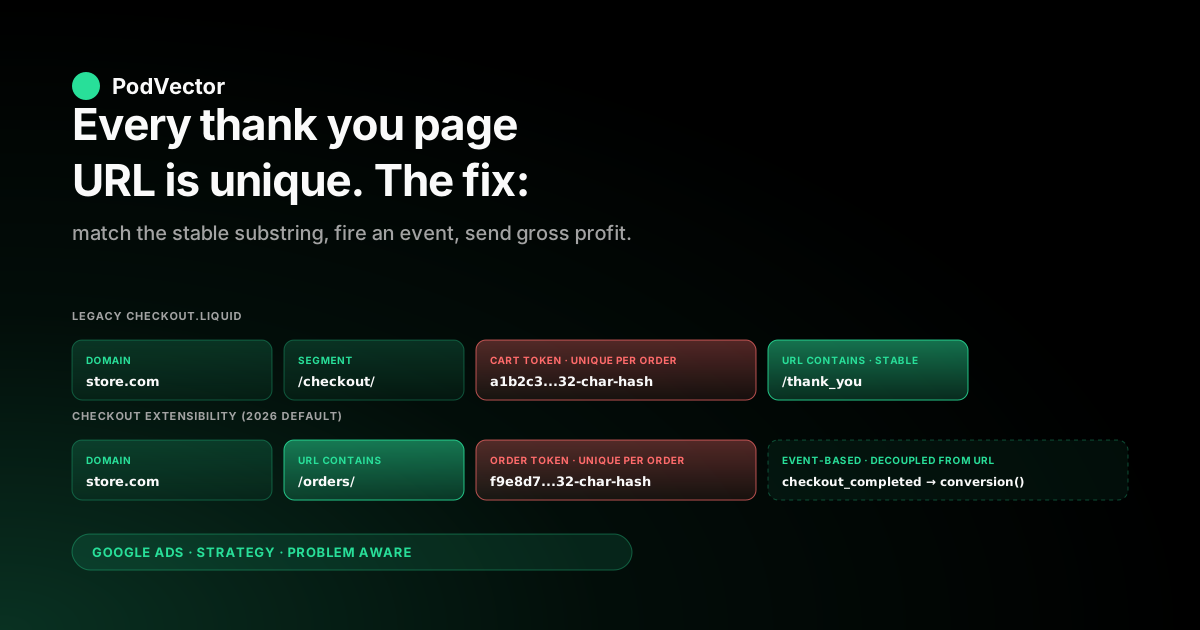
Quick Answer: Shopify's thank you page URL is /checkout/thank_you appended to a per-order checkout token, which means the full URL is unique for every order and cannot be hard-coded into a Google Ads conversion. The right Google Ads setup uses URL contains matching on /thank_you (or /orders/ for the post-purchase order status page introduced with checkout extensibility), pairs that with an event-based conversion that fires on the page, and sends order ID plus value as parameters. For POD sellers the URL pattern is the easy part — what makes Smart Bidding actually work is sending gross profit as the conversion value and posting refund adjustments back, neither of which the URL configures.
What Shopify's thank you page URL actually is
Shopify's thank you page URL is not one URL. The pattern is https://{store-domain}/{checkout-segment}/{cart-token}/thank_you, where {cart-token} is a 32-character hash that is unique to the order's checkout session.
Every successful checkout produces a different URL. Hulkapps' walkthrough shows the exact format an operator sees when they place a real order, and the path segment /thank_you is the only stable substring an external tracker can key on. This is the single fact that drives every Google Ads thank-you-page configuration choice that follows.
The reason it matters: Google Ads conversion actions can be defined either by a page-load on a URL or by an event firing on a page, and the URL-load option requires either an exact URL or a substring match. With a unique-per-order URL there is no exact match to write.
The substring match (URL contains /thank_you) is the only URL-load configuration that works on Shopify out of the box. Most setup failures we see on POD audits trace back to an employee pasting their own real test-order URL — including the cart token — into the conversion's URL field, which means it matches their one test order and then nothing afterwards.
The unique-token URL also has security implications that show up in audits: the URL is unguessable, so the thank you page is effectively private to whoever placed the order. This is fine for tracking — the tracker only needs the URL pattern, not the live URL — but it is the reason you cannot bookmark a thank you page or revisit it later. The page is one-shot, the cart token expires, and the URL becomes useless after the session ends.
Legacy thank you page vs. checkout extensibility order status page
Shopify shipped checkout extensibility as the replacement for the old checkout.liquid approach, and with it the post-purchase page changed from the legacy thank you page (path: /checkout/{token}/thank_you) to the order status page (path: /orders/{token}). Stores that have migrated to the new flow no longer have a /thank_you path on the post-purchase page — the same conversion content lives at /orders/{token} instead. As of 2026, all new Shopify Plus stores ship on extensibility by default, and Shopify is gradually deprecating the legacy checkout.liquid approach for older stores.
The Google Ads implication: a "URL contains /thank_you" rule that worked perfectly in 2023 may now match nothing on a migrated store. The fix is not to update the URL contains rule alone — the post-purchase page on extensibility is also more restricted in the scripts it allows, which means many tracking apps that injected their conversion event into the legacy thank you page no longer fire on the order status page. Shopify's customer events / pixels framework is the supported path for tags on the order status page, and Google Ads tags installed via the Google & YouTube app or via a checkout pixel are routed correctly across both flows.
Three states a POD store can be in:
- Legacy thank you page only. Older stores still on
checkout.liquid. The thank you page is at/checkout/{token}/thank_you. URL contains/thank_youworks. Custom scripts incheckout.liquidfire the conversion event. - Order status page only. Newer stores on full extensibility. The post-purchase page is at
/orders/{token}. URL contains/thank_youmatches nothing — useURL contains /orders/instead. Conversion events fire via customer events / web pixels, not theme scripts. - Hybrid (transitional). Stores mid-migration where some customers see one and some see the other depending on the checkout variant assigned. URL contains rules need both substrings (
/thank_youOR/orders/) covered, or — better — switch to event-based conversion so the URL stops mattering at all.
The hybrid state is where most damage happens. Half your conversions match the URL pattern and half do not, Google Ads sees a 50% drop in reported conversions, Smart Bidding under-bids, and the cause looks like an attribution problem rather than a URL-match problem. Always check both URLs are covered when you migrate.
Setting up "URL contains" in Google Ads conversions
The Google Ads-side configuration for a Shopify thank you page conversion has two flavors. The first is the URL-based conversion (page load triggers the count).
The second is the event-based conversion (a tag fires the event with parameters; the URL is irrelevant). Both use the same Google tag ID and the same conversion label; they differ only in how the count is triggered.
For a URL-based conversion, the configuration in Google Ads is:
- Tools → Conversions → New conversion action → Website.
- Select "I'll add the goal manually" if Smart Conversions is offered.
- For "What you'd like to track" choose Purchase. Set value to "Use different values for each conversion" and currency to your store's primary currency.
- Count: One. Click-through window: 30 days. View-through: 1 day. Attribution: data-driven (or your account's default).
- Tag setup: Use Google tag (or use Google Tag Manager). Confirm the tag is the one already on your Shopify store.
- Conversion trigger: Page load. URL: contains
/thank_youfor legacy,/orders/for extensibility, or both rules with OR logic for the hybrid state.
This works for binary "did they convert?" tracking but does not pass conversion value. The value-per-conversion in this configuration is the static value you set when you created the conversion action — typically zero or a flat assumed-AOV figure. Smart Bidding optimizing on a flat value cannot tell a $20 sticker order from a $90 hoodie order, which for a POD catalog with 4–5x AOV variance is a meaningful loss of signal.
The fix is to switch to an event-based conversion that fires the conversion event with a value parameter pulled from Shopify's Order object. The Stape walkthrough shows the GTM-side mechanics for reading checkout.totalPrice.amount from the Shopify customer event payload and writing it into the conversion event's value field.
The Google & YouTube app does this automatically; third-party tracking apps do it through their own templates. Either way, the moment value is firing as a parameter, the URL contains rule on the conversion stops mattering — the event fires regardless of URL.
Event-based vs. URL-based: when each is correct
Three questions decide which configuration to use on a Shopify POD store:
Question 1: Does the conversion need a per-order value? If yes (it almost always does for an ecommerce store), event-based is correct. URL-based conversions cannot capture a dynamic per-order value; they fire with whatever flat value was set at creation time. Smart Bidding's value-based bidding strategies (Maximize Conversion Value, target ROAS) require dynamic value to function — flat-value tracking effectively reverts them to volume-based bidding.
Question 2: Are you on checkout extensibility? If yes, event-based via customer events / web pixels is the supported path. URL-based on /orders/ still works, but the migration risk is higher — Shopify can change the order status page URL pattern again and break the rule. An event firing through Shopify's customer events API is decoupled from URL changes and survives platform updates better.
Question 3: Are duplicates a known issue? URL-based conversions can fire twice on a single page load if the user refreshes the thank you page or returns to it via browser history. Event-based conversions can de-duplicate using the order ID parameter (transaction_id) — Google Ads reads the parameter and counts only one conversion per ID even if the event fires multiple times. This is significant for POD because customers do bookmark and re-visit thank you pages occasionally to check tracking status, and refunds reopen the order page in some configurations.
The practical answer for a 2026 POD store: event-based conversion firing on the Shopify customer event checkout_completed, with transaction_id set to the order ID and value set to gross profit (not subtotal — see the next section). The URL contains rule becomes a backup safety net rather than the primary trigger. For the broader Shopify–Google Ads tracking architecture this fits into, see our Google Ads tracking ID for Shopify piece, which walks the six identifiers Shopify exposes, and our Shopify Google Ads tracking strategy piece for the end-to-end view.
Multi-store POD: one URL pattern, many stores
POD sellers run multi-store more often than fixed-catalog ecommerce — a primary general-apparel store, a niche-specific store for the seasonal push, a country-specific store. The thank-you-page question this raises: does each store need its own conversion action, or can one conversion action with a URL contains rule cover all of them?
The URL contains rule alone cannot disambiguate stores. URL contains /thank_you matches every Shopify store's thank you page, so if all three stores are wired to the same Google Ads conversion action, the action counts orders from all three. This is wrong for two reasons: Smart Bidding cannot learn per-store bidding signal because the conversion volume is pooled, and reporting cannot tell which store the order came from.
The right configuration depends on whether the stores share a Google Ads account:
- One Google Ads account, multiple stores. Create one conversion action per store with distinct conversion labels (Purchase_Store1, Purchase_Store2, Purchase_Store3 under the same account). The URL contains rule is replaced by URL contains plus a domain match —
URL contains thank_you and URL contains store1.com. This forces each conversion action to count only orders from the matching store. Each campaign targets the conversion action for its store. - One Google Ads account per store. Each Google Ads account has its own Purchase conversion action with its own conversion label. The URL contains rule per action can stay simple (just
/thank_you) because each account's tag is installed only on its own store. This is the cleaner structure for stores with $5K+ monthly spend each, where account-level Smart Bidding learning matters. - Hybrid: MCC with child accounts per store. The most common production state for POD portfolios over $20K/month total spend. Each store has its own Google Ads account (child of an MCC), each child account has its own conversion action and conversion label, and reporting rolls up at the MCC. The URL contains rule per child account stays simple.
The most common multi-store thank-you-page error: copying the conversion action from Store 1 to Stores 2 and 3 (in the same account) without changing the URL contains rule. All three stores then count Store 1's URL pattern, Stores 2 and 3 report zero conversions, and the cause is invisible until someone audits the URL contains setting. Always confirm the URL contains rule includes the store domain when running multiple stores under one account.
What to fire from the POD thank you page
The thank you page conversion event is one tag firing one moment on one page, but for a POD store it is also the only point where the order's full economic picture is locally visible. The customer paid the subtotal. The total includes shipping.
The cost-of-goods is the supplier's quote at the moment of order placement. The gross profit is subtotal minus that cost-of-goods minus the payment processing fee. Each is a different number; only one of them is the right value for Smart Bidding to optimize against.
Default behavior on Shopify's Google & YouTube app and most third-party tracking apps: send the order subtotal as the conversion value. For a fixed-margin SKU catalog this is fine.
For a POD catalog with a sticker at 70% margin and a hoodie at 18% margin in the same store, telling Smart Bidding both orders are worth their subtotal teaches it that scaling the lower-margin SKU is a good idea. The bidder ramps spend on the cheaper-product audiences, the absolute conversion volume rises, and gross profit falls because the high-volume products carry the worst margins.
Three values to consider firing instead of (or alongside) subtotal:
- Gross profit. Subtotal minus cost-of-goods (Printify or Printful supplier cost for the SKU at order time) minus payment processing fee. This is the value Smart Bidding should optimize against if your goal is ROAS net of fulfillment cost. Requires either a server-side enrichment that joins the order to a SKU-level COGS table, or a tracking app with built-in cost lookups.
- Gross profit minus shipping subsidy. If you offer free shipping, subtract the actual shipping cost charged by the supplier. The customer paid no shipping fee but the supplier still charged you — this is a real margin hit on free-shipping campaigns that subtotal-as-value hides.
- Net contribution per order. Gross profit minus the unit-level marketing cost attributed to the order. This is the closest analogue to the marginal profit of one acquisition, but it is hard to compute in real time at thank-you-page firing — the marketing-cost side requires a join you typically only have at end-of-day. Most stores use gross profit at thank-you-page firing time and reconcile to net contribution in their analytics tool.
The other thank-you-page enrichment that matters for POD: enhanced conversions. The enhanced conversions setup ships hashed first-party identifiers (email, phone) with the conversion event so Google Ads can match conversions back to users when third-party cookies are blocked.
Match rates above 70% are achievable from a thank you page where the customer has just provided email and phone for the order. Below 50%, the page is firing the event without the identifiers — usually because a checkout customization stripped the customer fields before the tag could read them. The diagnostics live in Google Ads under Tools → Conversions → diagnostics, not in Shopify.
A five-minute thank-you-page test
Five steps that take a minute each, and one that takes 24 hours. Run them whenever you make any thank-you-page or conversion-tag change.
- Place a real test order. Use your own card, smallest-priced product, smallest-budget Google Ads click. Do not use the Shopify test gateway — it can route to a different post-purchase URL than real orders. Confirm you reach the thank you page (
/checkout/{token}/thank_you) or order status page (/orders/{token}). - Open the Google Tag Assistant browser extension on the thank you page. It shows every Google tag firing including the conversion event. Confirm: Google tag ID is correct, conversion label matches the action you expect,
transaction_idis set to the Shopify order ID,valuematches what you intended to send (subtotal or gross profit, depending on configuration). - Check the Network tab for the collect request. Filter to
googleadsordoubleclickdomains. The request URL contains the conversion ID and label. The query string containstid=(transaction ID) andv=(value). Confirm both are populated. - Confirm the URL contains rule (if used) matches the test URL. Tools → Conversions → click the action → Settings → URL trigger. The rule should match the test order's URL. If it does not (typical cause: testing on a freshly-migrated extensibility store with a
/thank_yourule still in place), update the rule to match the new URL pattern. - Check enhanced conversions match rate. Tools → Conversions → click the Purchase action → Diagnostics tab → Enhanced conversions section. Match rate should be above 70%. Below 50% means hashed identifiers are not flowing — usually a checkout customization or a tag-firing-before-fields-are-read issue.
- 24 hours later, confirm the conversion appears. Tools → Conversions → click the Purchase action → recent conversions. The test order should show with the correct value and the correct order ID. If it does not, trace back through the previous five checks.
For the broader audit that catches issues upstream of the thank you page itself — wrong conversion ID, wrong account, wrong label — see the five-minute Shopify-side ID audit in our Google Ads tracking ID for Shopify piece. The thank-you-page test confirms the firing is correct given correct upstream IDs; the ID audit confirms the IDs themselves.
The thank-you-page configuration is one decision in a longer chain. The Google Ads-side conversion-action configuration that consumes the event is covered in our Shopify Google Ads conversion strategy piece.
The end-to-end Google Ads tracking architecture for Shopify lives in our Google Ads tracking on Shopify strategy piece, and the symmetric "what breaks and how to fix it" troubleshooting view is the Shopify Google Ads tracking issues piece. The strategic frame these tracking decisions serve is in the complete Google Ads playbook for POD; the integration-side install walkthrough lives in the complete guide to Google Ads + Shopify integration for POD. The Google Ads strategy cluster hub indexes related operator pieces and the Google Ads for POD topic hub ties tracking back to ad types, integrations, and ROAS analysis.
FAQs
What is the thank you page URL on Shopify?
The pattern is https://{store-domain}/{checkout-segment}/{cart-token}/thank_you on legacy checkout.liquid stores, and https://{store-domain}/orders/{token} on stores using checkout extensibility. The cart token is a 32-character per-order hash, so the full URL is unique to each order. The stable substring is /thank_you (legacy) or /orders/ (extensibility), which is what Google Ads URL contains rules key on.
How do I find my Shopify thank you page URL for Google Ads tracking?
Place a test order from your own store and watch the URL bar after checkout completes. The URL you land on is the per-order thank you page.
The substring before the cart token (/thank_you or /orders/) is what you put into Google Ads' URL contains rule, not the full URL. Pasting your test order's full URL into the rule is the most common mistake — it works for that one order and breaks for everything else.
Can I set a static thank you page URL on Shopify for Google Ads?
Not on the standard Shopify checkout. The thank you page URL is system-generated per order and cannot be made static.
The workaround that some operators reach for — redirecting the customer to a static /thank-you page after checkout — adds a load step, can lose the order data, and is not necessary for Google Ads conversion tracking. Use URL contains matching or event-based conversions instead. Both are supported configurations in Google Ads.
Should I use URL-based or event-based conversion tracking on the Shopify thank you page?
Event-based, in nearly all cases. Event-based conversions capture per-order value (which Smart Bidding's value-based strategies require), de-duplicate via order ID parameter, and survive platform URL changes.
URL-based conversions are simpler to set up but cannot capture dynamic value and break when checkout extensibility migrates the URL pattern. URL-based is acceptable as a backup safety net behind an event-based primary, not as the only configuration.
Why does my Google Ads conversion tracking not work after migrating to Shopify checkout extensibility?
Most likely the URL contains rule still references /thank_you, but the post-purchase page is now at /orders/{token} on extensibility stores. Update the URL contains rule to /orders/ or — better — switch to event-based conversion via Shopify's customer events / web pixels framework. The event-based path also handles tag firing on the order status page where script injection in the legacy checkout.liquid way is no longer supported.
Can the Shopify thank you page URL contain the order ID?
The cart token in the URL is not the order ID — it is a checkout session identifier that exists before the order is finalized. The order ID is available in the page's data layer (Shopify's checkout object exposes order.id) and should be sent as the transaction_id parameter in the conversion event.
This is what Google Ads uses to de-duplicate and for downstream reconciliation, not the URL token. Reading the order ID from the data layer at firing time is the standard pattern.
Does Shopify's Google & YouTube app handle the thank you page URL correctly?
Yes, in both legacy and extensibility configurations. The app installs the Google tag and fires the Purchase conversion event from Shopify's checkout_completed customer event, which works regardless of which post-purchase URL the customer lands on.
You do not configure a URL contains rule when using the Google & YouTube app — the conversion is event-based by default. The app is the right starting point for stores under $5K/month spend; above that, a third-party tracking app or server-side GTM gives more control over conversion value enrichment (gross profit instead of subtotal) and refund adjustments.
What value should I send from the Shopify thank you page to Google Ads?
Gross profit, not subtotal — for any POD store with margin variance across SKUs. Subtotal-as-value tells Smart Bidding to scale revenue without regard to per-SKU profitability, which on a mixed-margin POD catalog means the bidder learns to push the lowest-margin products.
Gross profit (subtotal minus cost-of-goods minus payment processing fee) is what optimizes against actual contribution. Sending it requires either a server-side enrichment with a SKU-level COGS table or a tracking app with built-in cost lookups; the Google & YouTube app defaults to subtotal.
The thank-you-page event is one moment. Knowing what it actually earned takes more than a tag.
Once your Shopify thank-you-page conversion fires correctly to Google Ads with order ID and gross profit, the next question every week is which campaigns are actually making profit ROAS, net of returns and supplier cost. Victor connects Shopify, Printify, Printful, Google Ads, and Meta into one live data warehouse view and answers that in seconds. No spreadsheet, no manual reconciliation, no Sunday-morning ROAS audit.
Try Victor free