
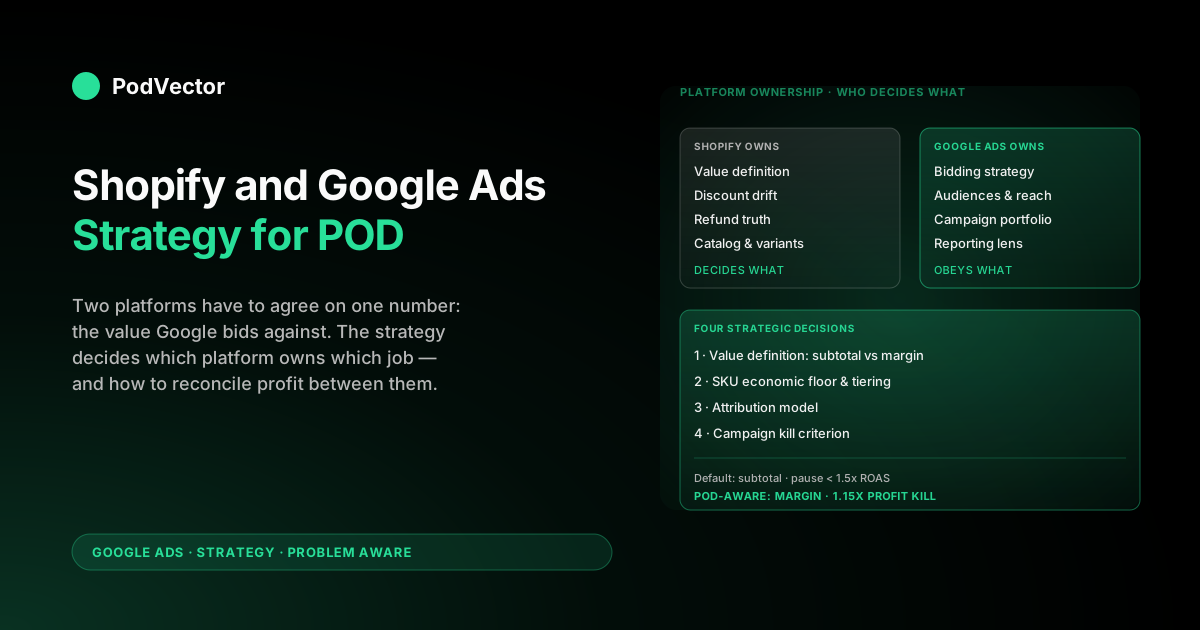
Quick Answer: Shopify and Google Ads are two platforms that have to agree on one number for a POD store to be profitable: the per-order value Google bids against. Shopify wants to send order subtotal because that's how it measures revenue; Google Ads wants whatever Shopify ships because that's its only signal; and POD economics need contribution margin after Printify or Printful supplier cost.
The strategic playbook is decided at four levels — what each platform owns, what each gets wrong for POD, how to reconcile profit measurement between them, and the campaign portfolio that fits POD margin shape. Get the four right, set target ROAS against margin not subtotal, and Shopify + Google Ads becomes a profitable acquisition stack inside 30–45 days. Skip them, and the channel app's 5-minute setup leads to 5 months of unprofitable spend.
Why POD needs a different Shopify and Google Ads playbook
Most published Shopify Google Ads strategy guides — 1into2's complete guide, Adwisely's setup walkthrough, Shopify's own budget primer — describe the same broad arc. Install the Google & YouTube channel app, link Google Ads, let Merchant Center auto-import the catalog, run Standard Shopping or Performance Max with the default conversion value, scale toward a 4x ROAS target, layer in Search and Demand Gen as creative permits.
The arc works for owned-inventory ecommerce. For print-on-demand, every step compounds a measurement error that Shopify quietly hides and Google Ads happily optimizes against.
The error is not in the integration itself. The Shopify channel app does what it claims: it installs the conversion tag at checkout, syncs your product catalog into Merchant Center, and surfaces basic Google Ads metrics in Shopify reports.
The error is in what value Shopify ships Google when an order completes. By default, Shopify sends order subtotal, which for owned-inventory ecommerce running 55–70% gross margin is a directionally honest signal. For Printify or Printful POD running 28–35% contribution margin after blank, print, payment, and shipping subsidy, subtotal over-reports the bidding signal by 200–300%.
Google's Smart Bidding reads that inflated signal as "this campaign is highly profitable" and bids harder. The campaign is not profitable; it just looks that way to a bidder reading the wrong field.
The strategic playbook below is built around that single reconciliation gap. If you came here from the cluster pillar, see the complete Google Ads playbook for print-on-demand sellers for the campaign-architecture view.
If you want the tactical-implementation companion to this strategy article — actual Customer Events code, feed disapproval fixes, app shortlist — read it in tandem with the Shopify Google Ads strategy for POD tactical guide. This article is the decision frame; that one is the keystroke walkthrough.
Shopify versus Google Ads: who owns what
The first strategic move is being clear about which platform owns which job. Most "Shopify and Google Ads strategy" advice elides the boundary, which is why so many POD operators end up trying to fix in Google Ads what is broken in Shopify, or trying to override in Shopify what only Google Ads can change.
| Job | Owned by Shopify | Owned by Google Ads |
|---|---|---|
| Product catalog and variants | Authoritative source | Read-only consumer via Merchant Center sync |
| Conversion tag firing | Channel app installs & fires it | Receives the event |
| Conversion value definition | Decides what to send | Bids against whatever it receives |
| Shipping rates shown to ad clickers | Configures customer-facing rates | Surfaces Merchant Center rates in Shopping listings |
| Discount codes and price drift | Owns the post-discount price calculation | Bids against post-discount value Shopify sends |
| Refund & cancellation events | Owns the cancellation source-of-truth | Knows nothing unless explicitly fed back |
| Campaign creation, bidding, audiences | Out of scope | Owned end-to-end |
| Audience signals from on-site behavior | Web Pixel data layer | Receives via tag and Customer Match |
Two columns matter most for POD strategy. The "conversion value definition" row is where every margin issue starts and ends — Shopify decides, Google Ads obeys.
The "refund and cancellation" row is where every bidding distortion compounds over time, because Shopify knows when an order cancels and Google Ads almost never finds out. Strategy at the platform-boundary level means deliberately choosing what to send, what to override, and what to feed back nightly via the API.
The five-minute Shopify channel app installation is, in this frame, not a strategic event. It is a default configuration that silently selects the wrong value definition and skips the refund feedback loop entirely. Treat it as a starting point, not a finish line.
The profit reconciliation problem
This is the single biggest strategic question Shopify and Google Ads force a POD operator to answer: what number am I optimizing against? Three candidate numbers, only one of which is profit:
- Shopify reported revenue — what the Shopify dashboard shows. Equals subtotal across orders, the default value the channel app ships to Google Ads. For POD, this number overstates economic value by the fully-loaded supplier cost and shipping subsidy.
- Google Ads reported revenue — the same subtotal, attributed to the campaigns Google Ads served before purchase. Same overstatement, plus Google's last-click and view-through credit assumptions on top.
- Profit after COGS and refunds — order revenue minus Printify or Printful blank-plus-print, minus payment processing, minus shipping subsidy, minus Shopify platform fees, minus the refund-adjusted return rate. The only number that pays your bills.
The reconciliation problem is that Shopify and Google Ads natively report the first two and never reconcile to the third. A POD store running on default settings sees a 4.2x reported ROAS in Google Ads, a $48,000 monthly revenue line in Shopify, and a $1,200 monthly profit in their bank account — because supplier cost ate $34,000, shipping subsidy ate $5,800, payment processing ate $1,400, refunds ate another $1,800, and the platform fees ate the rest. Reported ROAS was honest about the click-to-revenue relationship; the click-to-profit relationship was not measured anywhere except, eventually, the bank statement.
Three strategic paths to close the gap:
- Override the value Shopify sends. Edit Customer Events in Shopify Settings to ship margin-based value to Google Ads. Subtract estimated supplier cost per line item (stored in a metafield) from the line price, sum across the order. Five lines of code, one-time setup, every campaign now bids against margin instead of subtotal. The mechanics are in the Shopify Google Ads tactical guide.
- Send subtotal live, import margin-adjusted offline conversions nightly. A Cloud Function pulls real Printify cost via API, computes per-order margin and refund status, and uploads adjustments to Google Ads. More precise than estimated metafields, more infrastructure overhead. The setup is documented in connect Google Ads to Shopify: setup guide for POD sellers.
- Run a separate profit dashboard outside Google Ads. Stream Shopify orders, Printify costs, Google Ads spend, and refunds into a single warehouse and compute campaign-level profit there. Google Ads keeps optimizing against subtotal — knowingly wrong — but the operator decides what to scale based on the truthful out-of-platform number. This is a stronger strategic position than the second path because it survives Google Ads policy changes, but it requires a data layer the typical POD store has never had.
Most successful POD-on-Shopify accounts run a hybrid: Customer Events override sends margin-based value to Google Ads day-to-day (path 1), and a separate profit dashboard validates the bidder's behavior weekly (path 3). Path 2 layers in once monthly ad spend exceeds ~$15K and the precision matters. The strategic question to settle on day one is which path you're committing to — switching mid-campaign loses two weeks of bid learning each time the conversion value definition changes.
Four strategic decisions Shopify and Google Ads force you to make
Beyond the reconciliation question, four strategic choices distinguish Shopify and Google Ads accounts that profit from those that just spend. Each has a default option that the integration nudges you toward, and a different option that POD economics rewards.
1. What value definition do I optimize against?
Default: order subtotal, the channel app's choice. POD-friendly: margin-based value through Customer Events, or offline conversion adjustments. Resolution: pick one before launching the first paid campaign, document which line items contribute supplier cost, and never switch mid-quarter. Switching costs two weeks of bid learning each time.
2. What's my SKU economic floor?
Default: every Shopify product is in the Merchant Center feed, every variant is biddable. POD-friendly: tier SKUs by contribution margin (Custom Labels in Merchant Center), exclude any SKU below a $6–8 contribution-margin floor from Performance Max, and let Standard Shopping carry low-margin coverage at manual CPC. Resolution: every quarter, re-pull the SKU-level margin distribution, refresh the Custom Label tiers, and rebuild PMax asset groups around the top-margin tier only.
3. What's my attribution model?
Default: Google Ads' data-driven attribution, last-click within the platform's view. POD-friendly: data-driven attribution within Google Ads, plus a separate cross-channel attribution lens (last-click first-touch, position-based, or MTA via a tool like Triple Whale or Northbeam) once monthly spend exceeds ~$10K. Resolution: pick the cross-channel model deliberately, audit it monthly against the profit dashboard, accept that no attribution model is "right" — pick the one whose biases you understand.
4. What's my campaign-level kill criterion?
Default: pause campaigns under 1.5x reported ROAS. POD-friendly: pause campaigns under your computed breakeven margin-based ROAS (typically 1.15–1.25x against margin value) for two consecutive weeks with statistical significance.
Resolution: write the criterion down, share it with anyone who can pause campaigns, review weekly. The biggest profit leak in Shopify-on-Google Ads accounts is not a missing optimization — it's a campaign that should have been paused six weeks ago and stayed running because nobody had committed to a kill criterion.
Campaign portfolio that fits POD margin shape
The campaign-portfolio question — Search vs. Shopping vs. Performance Max vs. Demand Gen — has a different answer for POD on Shopify than for owned-inventory ecommerce because POD's margin shape is narrower, refunds are higher, and creative refresh costs are lower. The mix that consistently profits:
- Brand-defense Search (10–15% of spend). Exact match on store name and any niche-brand terms. Highest converting, cheapest CPC, defends against competitors and aggregator sites bidding on your name. The Shopify channel app does not surface Search campaign creation; build manually in Google Ads.
- Standard Shopping with manual CPC (35–45% of spend during ramp, 20–30% post-scale). The workhorse for POD. Manual CPC at $0.30–$0.50 lets you see exactly which SKU and query combinations convert, generates the first-party conversion data PMax will eventually need, and is straightforward to bid-tier by Custom Label margin band. Standard Shopping's transparency is its strategic value — you can answer "which SKU lost money this week" because the bidder shows you.
- Category Search with phrase match (10–20% of spend). Niche commercial-intent keywords in your product category, gated by the day-one POD negative-keyword list ("free," "template," "svg," "png," "mockup," "blank," "wholesale"). Convert rates 1.4–2.1x lower than brand but volume scales further.
- Performance Max restricted to top-margin SKUs (20–35% of spend, post-scale). Only after 30+ Purchases tracked with margin-based value and only against the top contribution-margin tier. PMax's loudest profit-killer behavior — bidding view-through Display credit on cheap inventory while real revenue is flat — is constrained by SKU restriction plus margin-based value. The walkthrough is in integrate Google Shopping Ads with Shopify store strategy for POD.
- Demand Gen and Display (5–15% of spend, after creative inventory exists). Worth running once you have 6–10 lifestyle creatives per top-tier SKU. Without that creative depth, Demand Gen burns budget on under-performing assets faster than Standard Shopping or PMax do.
- Skip until clearly justified. App campaigns (POD has no app), Smart Display (view-through inflation), and any third-party "AI bidding optimization" wrapper layered on top of Google's Smart Bidding (degrades signal).
The strategic move embedded in the mix is concentration. POD margin shape doesn't support a portfolio approach where every campaign type runs equal weight.
Brand and Standard Shopping carry weight on day one; PMax earns weight by week five; Demand Gen earns weight only when creative inventory permits. Spreading spend across all five campaign types from day one is the single most reliable way to fail the first ninety days. For the campaign-by-campaign budget sizing decision, see Google Ads Shopify strategy for print-on-demand and the strategy-cluster hub at /articles/google-ads/strategy.
Operating cadence: daily, weekly, monthly
Strategic playbook only matters if there is a consistent operating cadence around it. The cadence that distinguishes profitable POD-on-Shopify accounts from ones that drift:
| Cadence | Shopify check | Google Ads check | Reconciliation check |
|---|---|---|---|
| Daily (10 min) | Order count, AOV, refund rate | Spend pacing vs. budget, anomaly alerts | Sanity: ad spend < gross revenue |
| Weekly (45 min) | Variant-level margin (Printify cost vs. selling price) | Campaign-level reported ROAS, Custom Label tier performance | Profit-after-COGS-and-refunds report; pause sub-breakeven ads for 2 weeks |
| Monthly (90 min) | SKU pruning, margin-tier refresh in metafields | Target ROAS recalibration, asset-group restructure, negative-keyword audit | Cross-channel attribution review; agency & tool ROI re-evaluation |
| Quarterly (4 hours) | Refund rate by SKU, supplier-cost benchmark vs. Printful equivalents | Campaign portfolio rebalance, geo expansion decision | Strategic re-read of value-definition path: still right? |
The reconciliation column is what separates POD-on-Shopify operators who profit from operators who just observe. Daily, the question is "are we losing more than we're earning today?" Weekly, "which campaigns lost money after Printify cost and refunds?" Monthly, "is the bidder optimizing against the right number, and is the kill criterion enforced?" Most POD stores skip the reconciliation column entirely because the data lives in three places — Shopify, Printify, Google Ads — that don't natively talk. That gap is exactly the operational problem PodVector AI is built to fill.
When to scale, when to consolidate, when to call an agency
Scaling decisions on Shopify and Google Ads are easy to get wrong because the platforms reward growth-shaped behavior — adding campaigns, expanding geos, layering ad types — even when the unit economics don't support the next layer. Three checkpoints to govern decisions:
Scale signal: scale only when the profit dashboard says scale
Reported ROAS is not a scaling signal. The signal is profit-after-COGS-and-refunds for two consecutive weeks at or above target net margin. When that holds, scale daily budget by 15–20% per week and watch the next two weeks' profit number.
If it holds again, scale another 15–20%. If it dips, pause and diagnose before the next increase. Most POD accounts that crash spend $40K in a quarter on the same campaigns that were marginal at $15K — the margin shape didn't change, the volume just exposed the marginal-cost issues at scale.
Consolidation signal: consolidate when manual workload exceeds returns
If you have eight Standard Shopping campaigns differentiated by Custom Label tier and the differential bidding gain over a single tier-aware campaign with ad-group bid adjustments is <5% reported ROAS, consolidate. The simpler structure is faster to optimize, easier to audit, and cheaper to manage. Consolidation is a strategic move, not a regression — it's recognizing that the bidder doesn't need every signal you can give it.
Agency signal: bring in help only when single-digit ROAS gains clear the retainer
Shopify and Google Ads agencies become viable when monthly spend is high enough that a 5–8% improvement in ROAS clears their retainer. That threshold is usually $20K+/month in spend, corresponding roughly to $40K–$80K MRR for Shopify-on-POD stores.
Below that, you'll spend more on the agency than the agency will save you. The agency-decision walkthrough is in Shopify Google Ads agency: what POD operators should know. Above that threshold, the agency choice is less "do I hire one" and more "which one can speak about Printify supplier cost without a glossary check."
A 90-day Shopify and Google Ads strategy roadmap
If you're starting fresh on Shopify with Google Ads, or restarting a stalled account, this is the strategic-level milestone view. The tactical week-by-week version is in the Shopify Google Ads tactical guide; treat the two as a pair.
- Days 1–14 (commit to the value definition). Install the Google & YouTube channel app. Decide and implement the conversion value path — Customer Events override or offline conversion adjustments. Pause any auto-created PMax campaigns the channel app spawned. Launch brand-defense Search at $5–10/day. The strategic deliverable: the bidder is bidding against margin, not subtotal, and you can prove it via Google Tag Assistant.
- Days 15–30 (build conversion data). Launch Standard Shopping with manual CPC across the top 30–50 SKUs. Add category Search with phrase match and the day-one POD negatives. Curate the Merchant Center feed to bestseller variants only. Apply the SKU economic floor; exclude sub-margin SKUs from Shopping. Goal by day 30: 30+ purchases tracked with margin-based value, ready to seed PMax.
- Days 31–60 (calibrate and scale). Layer in Performance Max restricted to the top contribution-margin tier. Switch Standard Shopping from manual CPC to Maximize Conversion Value with target ROAS at 1.3–1.5x against margin. Run the first refund-adjusted profit reconciliation: typical gap between reported ROAS and actual profit is 15–30% in week one of reconciliation, narrowing as offline conversion adjustments backfill.
- Days 61–90 (govern the cadence). Establish the weekly profit reconciliation review and the monthly portfolio rebalance. Add Demand Gen if creative inventory supports it. Document the kill criterion in writing and enforce it. By day 90, the account should be running profitably at the target net margin, with a portfolio shape that fits POD economics rather than fighting them.
For the broader topic context — what Google Ads strategy looks like beyond Shopify specifically — the Google Ads topic hub at /articles/google-ads indexes the full cluster set. For ecommerce-generic strategy advice that the Shopify nuances above are layered on top of, see Google Ads for ecommerce strategy for print-on-demand.
FAQs
Is Shopify and Google Ads a good combination for a POD store?
Yes, with one strategic caveat: only if you reconcile profit measurement between the two platforms. The five-minute channel app installation is the easy part.
The harder, profit-determining part is overriding the value Shopify ships Google Ads from order subtotal to contribution margin. Without that reconciliation, the combination over-reports the bidding signal by 200–300% versus actual POD margin, and Google's Smart Bidding optimizes the wrong number for as long as you let it.
Should I run Performance Max from day one on a Shopify POD store?
No. PMax needs ~30 conversions in 30 days to bid intelligently. A fresh Shopify account with no first-party conversion data sees PMax bid view-through Display credit on cheap inventory, returning a phantom 6x reported ROAS while real incremental revenue is flat. Run brand-defense Search and Standard Shopping for 30–45 days first to build conversion data with margin-based value, then layer in PMax restricted to your top contribution-margin SKU tier.
What's a realistic budget for a new Shopify POD store on Google Ads?
$30–80/day during the first 30 days. Below $30/day, Smart Bidding doesn't accumulate enough signal to learn.
Above $80/day, you'll burn through more spend than your conversion data can absorb intelligently. Once 30+ conversions are logged with margin-based value, scale by 15–20% per week as long as profit-after-COGS holds at or above target net margin. The Shopify-on-POD curve is steeper at the start than owned-inventory ecommerce because the margin shape is narrower; over-budget early and the account learns expensive lessons fast.
Why does my Shopify Google Ads ROAS look great while my bank balance doesn't grow?
Almost always the conversion value reconciliation gap. Shopify ships order subtotal as conversion value to Google Ads by default.
Google Ads reports ROAS against that subtotal. Your bank statement reports profit after Printify cost, payment processing, shipping subsidy, and refunds. A 4.5x reported ROAS commonly translates to a 1.05–1.15x profit ROAS for POD apparel. The fix is at the value-definition layer, not the campaign-management layer — every additional optimization on top of subtotal-based bidding compounds the error rather than fixing it.
Do I need Shopify Plus to run Google Ads strategically for POD?
No. Standard Shopify supports every move in this strategy: Customer Events for value override, metafields for storing supplier cost, the channel app's Merchant Center bridge, and the Google Ads API for offline conversion adjustments. Shopify Plus adds per-currency conversion accounts and slightly cleaner Markets configuration, both useful at multi-region scale. The bottleneck for most POD-on-Shopify operators is not feature gaps — it's committing to a value-definition path and an operating cadence around profit reconciliation.
How do I know if my Shopify and Google Ads strategy is actually working?
Three checks, run weekly: (1) Profit-after-COGS-and-refunds is positive and trending toward your target net margin; (2) Reported ROAS is decoupled from your actual profit number by less than 15% (closer if you're running offline conversion adjustments); (3) The kill criterion is enforced — campaigns sitting under your breakeven for two consecutive weeks have been paused or restructured. If any of the three drift, the strategic loop isn't closed yet.
What's the biggest mistake new Shopify-on-POD operators make with Google Ads?
Optimizing inside Google Ads while the value definition is wrong. Tweaking bid strategies, expanding asset groups, A/B testing ad copy — none of those moves matter if Shopify is sending subtotal and Google Ads is bidding against it.
Fix the value definition first, then optimize. Most accounts spend the first three months on the wrong layer of the strategy stack.
How does PodVector AI help reconcile Shopify and Google Ads for POD?
PodVector AI connects your Shopify, Printify or Printful, and Google Ads data through a live data warehouse and runs Victor — an AI employee that answers profit-after-COGS-and-refunds questions about your campaigns in plain English. Today: "which Google Ads campaigns profited last week after Printify cost and refunds?" gets a sourced answer in seconds, against the same data-warehouse views that power your dashboards.
On the roadmap: Victor flags losing campaigns automatically, drafts pause and bid adjustments, and surfaces SKU-level margin issues before they compound into wasted spend. The reconciliation gap that the Shopify-and-Google-Ads default integration leaves open is exactly what Victor is built to close.
Reconcile Shopify, Google Ads, and Printify in one Victor query
Connect your Shopify, Printify or Printful, and Google Ads data once. Victor reads your a live unified warehouse and answers "which campaigns profited last week after supplier cost and refunds?" in plain English — sourced from the same data that powers your dashboards.
Try Victor free