
Quick Answer: Standard ecommerce promotions advice — run merchant promotions, layer price extensions, lift bids during the sale window, retarget cart abandoners with a discount — assumes 50–65% gross margin and a use case of inventory liquidation. A print-on-demand store has neither.
Printify and Printful supplier costs do not move during your sale; only your retail price shrinks, so a 20% promo can compress a 32% gross margin to 12% and a 22% gross margin to negative profit on every order. The campaign keeps reporting strong revenue ROAS while it loses money.
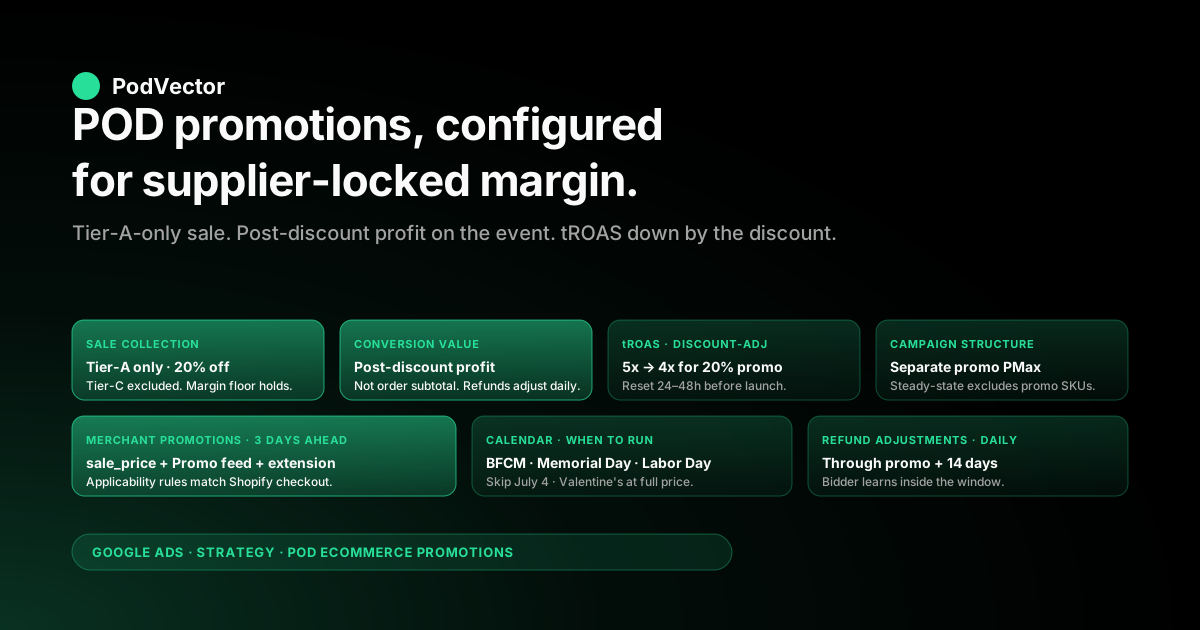
The fix is a promotion playbook configured for thin, supplier-locked POD margins: post-discount gross profit on the conversion event, margin-tier exclusions on promo SKUs, promo windows scoped to acquisition rather than inventory clearance, and a measurement loop that reads profit during the sale day rather than revenue after the week closes. This guide walks the campaign structure, feed setup, ad assets, bidding adjustments, holiday calendar, and measurement loop tuned for promotions on a POD catalog rather than for an inventory-holding ecommerce brand.
Why ecommerce promotions on Google Ads work differently for POD
The standard ecommerce promotions playbook on Google Ads — read in the genuinely useful guides from Store Growers, Optmyzr, and Omniconvert — assumes the unit economics of an inventory-holding ecommerce brand. That brand carries 50–65% gross margin per unit, holds owned inventory it occasionally needs to clear, runs promotions to convert browsers into buyers and to liquidate slow stock, and treats a 20–30% sitewide discount as a manageable margin haircut.
A Printify or Printful operator running a Shopify POD store is a different business. Three structural facts change the promotions playbook entirely:
- Supplier cost is locked, not flexible. Inventory brands have some pricing power on COGS — they can negotiate, buy ahead, or accept lower margins on overstock. Printify and Printful charge the same fulfillment cost regardless of how many units you sell or what retail price you set. A 20% off promo on a $35 hoodie that costs you $28 from Printify takes your gross profit from $7 to $0. The supplier still gets paid in full; only your margin moves.
- Margin spreads from 16% to 65% inside one catalog. A sitewide promo applied uniformly across SKUs is a uniform percentage discount on a non-uniform margin base. Tier-A products (40%+ margin — totes, mugs, posters) absorb a 20% promo and stay profitable. Tier-C products (16–22% margin — premium hoodies, joggers, fleece) flip negative. The promo "worked" on revenue and "lost money" on profit at the same time, on the same campaign, in the same week.
- POD has no inventory to liquidate. The classic ecommerce promotion use case — clear last season's stock, free up warehouse space, recover working capital — does not exist for POD. Every unit is made to order. The only legitimate reasons to run a promo on a POD store are acquisition (capture a new customer who would not otherwise have bought), list-building (email capture in exchange for first-order discount), seasonal velocity (Black Friday, Memorial Day, etc., where competitors are also discounting and you compete on the SERP), and design discovery (drive traffic to a new launch). Each of those has a different right answer for promo depth and which SKUs to include.
None of that means promotions are wrong for POD. They can be the highest-ROI lever in the calendar — when configured to your margin reality.
But the configuration that wins for an inventory-holding fashion brand misconfigures for a POD apparel catalog and will quietly burn budget for a week before the damage shows up in a profit report. The rest of this guide walks the configuration that holds. For the broader frame, the cluster hub is the Google Ads strategy cluster and the topic hub is at Google Ads for POD; the pillar is the complete Google Ads playbook for print-on-demand sellers.
Promotion types POD can actually run profitably
Not every promotion structure that works for an inventory ecommerce brand is viable for POD. Run these patterns; skip the others.
First-order percentage discount with email capture (10–15%). The strongest acquisition lever for POD. Trade a small first-order discount — typically 10% — for an email signup, then build the lifetime value over subsequent orders at full margin.
Tier-A and Tier-B SKUs absorb a 10% promo without flipping negative. Tier-C SKUs need to be excluded from this discount or capped (e.g., "10% off your first order, max $5 off") so the supplier-cost floor does not get crossed.
Free shipping over a threshold ($50, $75, or $100 minimum). Mathematically the cleanest POD promotion because the merchant is buying back the customer's shipping anxiety, not discounting the product. Set the threshold above your average order value so the offer functions as an upsell rather than a margin haircut. POD shipping costs from Printify and Printful run $4–8 for apparel and $3–5 for accessories — well below what most stores charge, and well below what the customer perceives as the savings.
Bundle discounts ("buy 2, save 15%"). Encourages additional units without sitewide margin compression. The discount applies only when the customer crosses the bundle threshold, so single-item orders pay full margin. Works especially well for tee designs (where customers genuinely want multiples), mug sets, and gift-friendly accessories.
Tier-A-only seasonal promotion. During Black Friday, Memorial Day, or comparable competitive promo windows, you have to discount something or the SERP will eat you alive — but you do not have to discount everything. Build a "Holiday Sale" collection in Shopify that includes only Tier-A SKUs (40%+ margin), apply a 20–25% discount to that collection, and exclude all other SKUs from the discount. Tier-C premium hoodies stay at full price; the customer still sees a "Sale" badge on the SERP because Tier-A items qualify; the bidder still gets the lift in conversion rate without the margin compression.
Avoid: deep sitewide discounts (25%+ off everything). Even the deepest BFCM week from a margin-disciplined POD store should ladder by margin tier, not apply uniformly. A 25% sitewide discount turns Tier-C products into a tax on the campaign. If a competitor's deep sitewide is forcing your hand, lead with Tier-A-only promotion of equivalent depth, not sitewide of equivalent depth.
Avoid: BOGO ("buy one, get one free") on apparel. The maths breaks at POD margins. Two units at $25 retail with $17 supplier cost each and one unit free means $25 in revenue against $34 in supplier cost — a guaranteed loss before ad spend. BOGO works at 60%+ margin; it does not work at 32%.
Merchant Center setup: sale_price, promotion ID, and the promotions feed
Google has three different mechanisms for surfacing promotional pricing to shoppers on Search and Shopping placements, and they do different work. Configure all three for any promotion that runs longer than 48 hours.
The sale_price attribute on the product feed. When you set a sale price on a Shopify variant, the Google & YouTube app pushes both price (regular) and sale_price (discounted) to Merchant Center. The product's Shopping ad displays the strikethrough price treatment, the discount percentage badge, and the price drop annotation if the sale_price is at least 5% below the 30-day rolling median price.
Critical: the sale price must be active in Shopify for at least 30 consecutive days within the trailing 6 months at the higher "regular" price for Google's price-drop annotation to fire — perpetually-on-sale pricing does not earn the annotation. The full Merchant Center configuration walkthrough is in Shopify Google Merchant Center strategy.
The Merchant Promotions feed (separate from product feed). For sitewide or category-level offers — "10% off first order with code WELCOME10", "Free shipping over $75" — you submit a separate Promotions feed with promotion ID, redemption code, applicability rules, and start/end dates. Promotions display as a "Special offer" badge on Shopping placements and unlock the promotion extension on Search ads. Apply at Merchant Center → Marketing → Promotions; the approval window runs 24–48 hours, so submit promotions at least 3 days before the campaign launches.
Promotion extension on the Google Ads side. Distinct from the Merchant Promotions feed. The promotion extension is an ad asset on the Google Ads account that surfaces "20% off Memorial Day Sale — Ends May 26" below the Search ad headline.
Configure at Ads → Assets → Promotions, link to a specific campaign or ad group, and schedule the start and end dates explicitly. The extension does not require a Merchant Promotions feed — it can run independently — but the most-cited promotional offers should be configured in both places so they appear on both Search and Shopping placements.
One configuration mistake costs most POD operators 20–40% of promo impression volume: the Merchant Promotions feed has applicability rules (which products qualify) that must match exactly what the storefront enforces. If your "20% off Memorial Day" promo applies only to the "Memorial Day Sale" collection in Shopify, the Merchant Promotions feed needs the same product-ID restriction or the promotion gets disapproved when Google's QA crawls the storefront and finds the discount doesn't apply at checkout. Build the Merchant Promotions submission against the actual storefront rule, not the marketing pitch.
Campaign structure for a promotional window
A 7-day promotion window is not a normal week of campaign performance — bid pacing, audience composition, and conversion lag all behave differently. Three structural decisions shape whether the promo lifts the year or wastes the week.
Do not blend promo budget into the steady-state campaign. A common mistake: doubling the budget on the always-on Performance Max during BFCM week. The bidder optimizes against the trailing data, which is the regular-price baseline; the new budget gets allocated as if regular-price economics still apply.
Build a separate "Promotion" campaign — Performance Max with one or two asset groups scoped to the promo collection in Shopify — and run it in parallel to the steady-state campaign, with its own conversion goal, its own tROAS target reflecting the discount-adjusted economics, and its own daily budget. Pause the steady-state campaign's budget on the promo SKUs (using product group exclusions) so the two do not compete on the same inventory.
Lower the tROAS target to reflect the discount. If the steady-state Performance Max runs at tROAS 5x for Tier-A SKUs, a 20% promo on those same SKUs needs tROAS 4x to produce the same gross profit per dollar of ad spend. Calculate explicitly: original tROAS × (1 − discount %) = promo tROAS. Setting the promo campaign at the steady-state tROAS during a discount window is the most common cause of "the campaign throttled itself during BFCM and we missed the volume" — the bidder cannot hit the unrealistic target and reduces impression share on the days that matter most.
Build a small Search campaign for promo-intent queries. Queries like "[brand] coupon code", "[brand] discount", "[brand] black friday" spike during the promo window and convert at 2–3x the steady-state rate because the searcher is buying. A small ($5–15/day) branded Search campaign with promo-specific ad copy ("20% off this week — code SAVE20") captures these queries and prevents coupon-aggregator sites from intercepting your branded traffic. Distinct from the year-round branded defense campaign — this one runs only during the promo window.
Demand Gen for the promotion launch announcement. If the promotion is meaningful (BFCM week, anniversary sale, year-end), a Demand Gen campaign featuring the offer creative on YouTube Shorts and Discover placements warms the audience 7–14 days ahead. Audience signal: existing customers (Customer Match), site visitors in the last 90 days, and a similar-audiences expansion. Run for the warm-up window only, not through the promo itself.
For the campaign-type tradeoffs more broadly, see the complete guide to Google ad types for POD sellers and the Google Ads for ecommerce strategy piece on the steady-state structure this promo plan layers on top of.
Bidding during the sale: tROAS, conversion value, and refund adjustments
Bidding misconfiguration is where most POD operators lose the promotion week. Three configuration changes need to happen the day before the promo starts and reverse the day after it ends.
Send post-discount gross profit as the conversion value, not pre-discount order subtotal. If your Shopify-to-Google-Ads conversion event sends the order subtotal as the value, a $35 hoodie sold at 20% off ($28 after discount, $0 gross profit at $28 supplier cost) reports as $35 of conversion value. The bidder thinks the campaign produced $35; the storefront actually produced $0 in margin.
Configure the conversion event in Shopify (or via the Google & YouTube app's enhanced setup) to send the gross profit per line item — net of supplier cost and net of any line-item discount — as the value. This single change prevents the bidder from scaling toward the deepest-discounted SKUs during a promo week.
Lower the tROAS target by the discount percentage. Already covered in the campaign structure section but worth re-stating because the timing matters. Lower the tROAS the day before the promo starts — not on day one of the promo.
Smart Bidding takes 24–48 hours to recalibrate; if you change tROAS at 6am Friday for a promo that starts Friday, the bidder spends Friday throttling and Saturday catching up. Set the new target Wednesday or Thursday for a Friday launch.
Configure refund adjustments to fire faster than the default. POD return rates run 4–8% — lower than traditional ecommerce — but refunds during a promo week are concentrated. The default Google Ads conversion adjustment window is up to 55 days.
For a 7-day promo window where the bidder needs to learn quickly, that adjustment lag is too long. Use offline conversion adjustments via the Conversions → Adjustments tab or via the Google Ads Conversion Adjustment API to post refunds back daily during the promo and the 14 days following it. The bidder learns within the campaign window rather than 6 weeks later.
For deeper detail on the conversion measurement plumbing, see the complete guide to Google Ads ROAS and attribution for POD.
Ad assets: price extensions, promotion extensions, sale price annotations
Promotional ad assets exist for one reason: to communicate the offer in the SERP without forcing the customer to click the ad to discover it. Five assets compound the click-through rate during a promo window.
Promotion extension on every Search campaign that runs during the promo. Configured at Ads → Assets → Promotions; specify offer type (percent off, money off, BOGO, free shipping), the discount value, the promotion code if any, the start and end dates, and the campaigns or ad groups it applies to. The extension renders as a callout below the headline ("20% off — Code SAVE20 — Ends May 26"). Click-through rate lift on Search ads with promotion extensions during a promo runs 15–25% in our customer cohort.
Sale price annotation on every Shopping ad for promo SKUs. Auto-generated by Google when the sale_price attribute is populated and the 30-day-prior-price rule is satisfied. The annotation is the strikethrough price plus the discount percentage badge ("Was $35 · Now $28 · -20%").
Higher visual weight than a flat Shopping ad, especially on mobile. Verify the annotation is firing in Merchant Center → Performance → Annotations report.
Price extension on Search ads. Distinct from the promotion extension — the price extension lists 3–8 specific products with prices ($25 Tee · $35 Hoodie · $14 Mug · $22 Tote). During a promo, configure the extension to show sale prices alongside the regular price. Price extensions add real estate on the SERP and qualify the click pre-arrival.
Headline 1 on Responsive Search Ads should mention the offer explicitly. "Memorial Day Sale — 20% off Tees" outperforms "Premium Cotton Tees" during the promo window. Add 2–3 promo-specific headlines to the existing RSA, pin them to position 1 for the promo window, then unpin and remove after.
Ad strength may briefly drop to "Average" because of the pinning — that is acceptable for a 7-day window. Restore the regular RSA headlines after the promo.
Image asset on Performance Max featuring the offer. Add a hero image with the offer text overlaid ("Memorial Day · 20% off Tees · Ends May 26"). Tag the image with seasonal-promo metadata so PMax routes it to the right contexts. Replace the steady-state lifestyle imagery for the promo window only.
Measurement: profit ROAS in real time, not next Monday
The defining measurement problem of POD promotions: the campaign appears to win in the Google Ads dashboard while the storefront loses money. Revenue ROAS reports the discount-inclusive top line; gross profit lives in the gap between the storefront and the supplier invoice.
By Sunday night the operator runs the spreadsheet and discovers Tier-C SKUs were 60% of the promo orders and produced negative profit per unit. By then the next week's budget allocations are already deployed against the wrong signal.
The measurement that matters during a promo week:
- Profit ROAS net of supplier cost, by campaign, by day. Not revenue ROAS. Not contribution-margin-after-the-fact. Live profit from the actual order data: order revenue net of discount, minus Printify or Printful supplier cost and shipping for each line item, minus the day's ad spend on that campaign.
- Profit per SKU, ranked. Which SKUs produced positive gross profit during the promo and which produced negative. Tier-C SKUs that flipped negative under the discount need to be excluded from the promo collection mid-week, not after the week closes.
- Refund-adjusted profit, posted back daily. A 6% return rate on a high-volume promo day translates to 4–8 refunds Monday morning that need to subtract from Sunday's reported profit. The Conversion Adjustments API handles the post-back to Google Ads; the operator dashboard needs to reflect the same adjustment so the daily reads stay accurate.
- New customer share of the promo. Acquisition is the legitimate POD promo use case. If 80% of the promo orders are existing customers using the discount on a purchase they would have made anyway, the promo subsidized the steady-state revenue rather than acquired new buyers. Customer-Match exclusion lists or first-order-only discount enforcement at checkout fix this — but you have to read the new-customer share daily to know whether it's working.
The measurement gap that this guide cannot close on the Google Ads side: Google Ads sees Google Ads. It does not see Printify supplier cost, Printful supplier cost, Shopify net order value after discount, refund posts, or new-vs-returning customer. The operator either builds the dashboard themselves (Looker Studio over your warehouse, with a daily ETL from Shopify, Printify, Printful, and Google Ads), or runs the promo blind and reconciles after.
POD promotion calendar: when to run, when to skip
Not every retail promo holiday is worth the margin compression for a POD store. The calendar below maps the windows where the SERP forces participation against the windows where you can sit it out and keep margin intact.
Black Friday / Cyber Monday (late November). Mandatory participation — the SERP is fully promotional and a non-discounted Shopping ad gets buried by ads with sale annotations. Strategy: Tier-A-only sale collection at 20–25% depth, free shipping over $50 sitewide, doubled ad budget for the 4-day window with the lower tROAS target. Promo extension live, sale price annotations live, dedicated Search campaign for promo-intent branded queries.
Memorial Day weekend (late May). Optional but recommended — Memorial Day is established as a Tier-1 promotional window in apparel ecommerce and POD competes against inventory brands' summer kickoff sales. Tier-A-only collection at 15–20% depth. Smaller budget lift than BFCM; 3-day window.
Independence Day (early July). Skip unless you have themed designs (Americana, summer-graphic). The SERP is less promo-heavy; staying at full price is fine. If you do run, narrow it to a themed collection at 15% off.
Labor Day weekend (early September). Optional — overlaps with back-to-school. If you carry tees, sweatshirts, hoodies, this is the second-best window of the year for apparel-driven POD.
Tier-A and Tier-B sweatshirts at 15–20% off, Tier-C excluded. The seasonality angle is covered in more depth in the Google Ads for ecommerce seasonal campaigns piece.
BFCM through Christmas (last week of November through December 22). The whole window is competitive, but POD's production-lead-time cutoff (December 8–10 for standard shipping) caps how far into December the promo can run profitably. After the cutoff, switch ad copy to "Order now, ships after Christmas" rather than continuing the discount — gift-card spend in late December is real volume that doesn't need a discount to convert.
Boxing Day / End-of-Year (December 26 — January 2). Optional — POD's no-inventory-to-clear means there's no internal pressure to discount. Run only if you have themed designs (New Year's, resolution-related) and want the search volume.
Valentine's Day, Mother's Day, Father's Day. Themed collection runs at full price with promo creative emphasizing the gift angle, no discount needed. POD's gift-friendly format (mugs, totes, posters) converts on the gift narrative without a price reduction.
Anniversary sale, brand-specific events. Useful as list-building events. Email-only 15% off code, valid for one week, drives existing list to a curated collection. No paid amplification needed; runs from the email channel only.
Five POD-specific promotion mistakes that drain the budget
Each of these is the single largest source of wasted spend during a POD promo week in our customer cohort.
1. Sitewide discount with no margin-tier exclusions. "20% off everything" is the default Shopify storefront promo and the default loss-maker for POD.
Tier-C SKUs flip negative; the bidder scales toward them because their conversion rate spikes; the campaign reports record revenue and produces record losses. Fix: build a "Sale" collection in Shopify, include only Tier-A and capped Tier-B SKUs, apply the discount at the collection level, and exclude the Sale collection from the steady-state PMax campaign for the promo window.
2. Conversion value still set to order subtotal. If the conversion event sends pre-discount, pre-supplier-cost revenue, the bidder optimizes for revenue and the storefront pays the difference between revenue and profit.
Reconfigure the conversion event to send line-item gross profit before the promo launches. The change takes 24–48 hours to propagate through Smart Bidding's learning, so do it the Tuesday before a Friday promo launch.
3. Steady-state tROAS unchanged during a discount week. The bidder cannot hit the unchanged tROAS at discounted unit economics, so it throttles impression share on the highest-volume days of the year. Lower the tROAS by the discount percentage 24–48 hours before the promo launches.
4. Promo campaign and steady-state campaign competing for the same SKUs. Both campaigns target the same product groups, both bid on the same auctions, the auction-time bid is whichever campaign won — usually neither at the right price for the moment. Exclude the promo SKUs from the steady-state campaign's product groups for the duration of the promo, then unexclude after.
5. No refund adjustments posted back during the promo week. Returns from the promo land in week 2 and 3 after the sale.
If those refunds never post back to Google Ads, the bidder learns from a 100%-non-refunded baseline and the next promo's tROAS calculation is structurally wrong. Daily Conversion Adjustments API posts during and 14 days after the promo close the loop. The full refund-adjustment configuration is covered in the Shopify Google Ads conversion strategy piece.
FAQs
How deep can a POD store discount before the campaign loses money?
The math is bounded by the lowest-margin SKU in the discounted collection. If the lowest-margin SKU is a Tier-C hoodie at 18% gross margin, anything deeper than 18% off flips that SKU negative and the campaign loses money on every sale of it (before ad cost).
Practical answer for most POD operators: 10% sitewide is safe, 15% is borderline if Tier-C is excluded, 20%+ requires a curated Tier-A-only sale collection. Build the discount around the margin floor of the products it applies to, not against an industry benchmark for "BFCM depth."
Should I run a Performance Max promo campaign or use ad groups inside the existing PMax?
Separate campaign during the promo window. The existing PMax has trailing data that reflects regular-price economics; the bidder will mis-calibrate against that data if you bury the promo as an ad group inside it.
Build a dedicated "Promotion — [Memorial Day 2026]" Performance Max campaign scoped to the promo collection, with its own tROAS, its own budget, its own creative. Pause it after the promo ends; build a new one for the next promo window. The campaign is disposable; the audience and asset learnings carry over to the next one.
How do Merchant Promotions interact with Shopify's automatic discounts?
The Merchant Promotions feed surfaces the offer on Google's surfaces; Shopify's automatic discount enforces the price at checkout. The two need to match exactly — same applicability rules, same discount value, same start/end dates — or the customer arrives at checkout and the discount doesn't apply, which Google's QA detects and disapproves the promotion. Configure Shopify's automatic discount first (Discounts → Create discount → Automatic), then submit the Merchant Promotion that mirrors those rules.
Do I need a different landing page for the promo or is the regular collection page enough?
A dedicated landing page outperforms the regular collection page for Search ads pointing at the promo. The reasons: you can set the H1 to match the ad copy ("Memorial Day Sale — 20% Off Tees"), include trust signals specific to the promo (countdown timer, redemption code, terms), and prevent the bounce that happens when the customer clicks "20% off Tees" and lands on a generic Tees collection that doesn't acknowledge the offer. For Shopping ads, the click goes directly to the PDP — no landing page change needed; the sale_price annotation on the ad and the strikethrough on the PDP do the work.
What's the right ad spend lift during a 7-day promo window?
2–3x the steady-state daily budget for the promo campaign, with the original daily budget on the steady-state campaign maintained in parallel. The lift comes from the promo campaign's separate budget rather than from doubling the steady-state campaign's budget.
If you have 30+ days of conversion data on the promo SKUs at the new tROAS, Smart Bidding handles pacing across the lifted budget. If you don't, run Standard Shopping with manual bid caps for the promo week — Smart Bidding without enough conversion data on the discounted economics will mis-spend the lift.
How long before a promo should I configure the Merchant Promotions feed?
3 days minimum. The approval window runs 24–48 hours and Google occasionally requests clarifications that add a day. Configure on Tuesday for a Friday launch, on Wednesday for a Saturday launch. Promotion extensions on the Google Ads side approve faster (usually within hours) but the Merchant Promotions feed is the bottleneck.
Can I run a promotion on Demand Gen and Performance Max at the same time?
Yes, with role separation. Demand Gen runs the awareness phase 7–14 days before the promo launches — videos and image creative announcing the upcoming sale to Customer Match audiences and similar-audiences expansion.
Performance Max runs the conversion phase during the promo window itself. The two reuse the same creative assets but with different campaign goals. Avoid running both simultaneously against the same audience during the promo days; let PMax own the conversion window.
How do I handle the situation where my supplier (Printify or Printful) raises costs mid-promo?
Both suppliers occasionally adjust pricing on specific products with limited notice — typically passed through from their underlying suppliers (Gildan, Bella+Canvas, etc.). If a Tier-A SKU's supplier cost increases mid-promo, the SKU may flip from Tier-A to Tier-B or worse, which means it should be excluded from the promo collection.
Without a live margin read, this catches operators off guard and the campaign quietly burns budget on the now-thin-margin SKU until the weekly reconciliation. Build the promo collection from a margin recalculation done within 24 hours of the promo launch, not from a margin tag from last quarter. For the broader cross-platform picture and how this connects to product-launch timing, see the Google Ads for ecommerce product launches piece.
Reading whether your promo week made profit on Monday morning, not 6 weeks later.
Once your POD promotion is configured the way this guide walks — Tier-A-only sale collection, post-discount gross profit on the conversion event, separate promo campaign at the lowered tROAS, refund adjustments posting back daily — the question every Monday morning is which campaigns made money on profit ROAS net of returns last week, which to scale into the next promo, which to pause. Victor connects Shopify, Printify, Printful, and Google Ads into one live data warehouse view and answers in seconds. Live margin per SKU, profit ROAS by campaign by day, refund-adjusted, new-customer share of the promo. No spreadsheet, no Looker build, no Sunday-night reconciliation. Victor answers your questions and acts on them — with your approval.
Try Victor free