
Quick Answer: Standard ecommerce product-launch advice on Google Ads — build pre-launch teaser audiences, lean on Performance Max for the cold-start, max out CPC bids in week one to gather data — was written for inventory brands launching a single hero SKU at 55%+ gross margin with a press release behind it. Print-on-demand is a different shape of launch.
A POD operator on Printify or Printful is usually launching a design drop of 10 to 60 SKUs at once, with 22–35% gross margin per unit, no review history, no organic traffic, and a Printify supplier cost that is locked from the moment the launch goes live. The profitable launch playbook is portfolio-aware and margin-disciplined: split the drop into bid tiers by margin, fund discovery on a controlled budget that the conversion-value signal can actually steer, run a small Demand Gen warm-up rather than a full pre-launch teaser, and make the kill/scale decision by gross profit per SKU within 96 hours. This guide walks the campaign structure, asset setup, budget pacing, audience strategy, and measurement loop tuned for a POD design drop rather than a single-SKU inventory launch.
Why POD product launches are not single-SKU launches
Most published Google Ads launch advice — including the genuinely useful pieces from Ajala Digital and Inflow — assumes a launch is one product, one hero SKU, one landing page, and one story to tell. That model fits an inventory brand with a press release, a buyer review cycle, and 60% gross margin.
It does not fit how a Printify or Printful operator launches. A POD launch is almost always a design drop: 10 to 60 SKUs released together, often the same garment in 12 colourways, often a single design across tee, hoodie, and tote.
The unit economics are also different. A drop of 30 designs spans 22% margin on the premium fleece and 58% on the dad caps — uniform launch budgets across that spread overspend on the worst SKUs and underspend on the best ones, then quietly burn the launch week.
Three structural facts separate POD design drops from single-SKU inventory launches and reshape the Google Ads playbook:
- Portfolio, not product. Inventory launches concentrate spend on one SKU until it works. POD launches are testing 30 designs against a single audience to find which 3 designs have product-market fit. The campaign must surface the winners fast and starve the losers fast — a structural decision that single-SKU launch advice never has to make.
- Margin spread inside one drop. A 30-SKU drop with margins from 22% to 58% cannot be bid uniformly. Tier-A SKUs (40%+ margin: tees, totes, mugs) tolerate aggressive learning-phase CPCs. Tier-C SKUs (22–28%: hoodies, joggers, fleece) flip negative under the same CPC. Single-tier bid strategies on a multi-tier catalog are how launches lose money on a winning campaign.
- No review history, no organic seed traffic. An inventory brand launching a Q2 hero usually has site traffic, email list, and an existing buyer cohort to seed pre-launch audience signal. A new POD design drop has neither. The launch starts cold for both Google's bidder and the customer, which means the trust signals on the landing page and the warm-up audience strategy have to do work that an established brand never has to think about.
This guide assumes you have already shipped the steady-state account — Performance Max running, Merchant Center connected, conversion tracking firing on gross profit, branded Search defended. If any of that is missing, start with the complete Google Ads playbook for print-on-demand sellers and the Google Ads for ecommerce strategy piece on the steady-state structure this launch plan layers on top of. The cluster hub is at Google Ads strategy for POD; the topic hub is Google Ads for POD.
When Google Ads is the right launch channel for POD (and when it isn't)
Not every POD launch belongs on Google Ads in week one. The medium has a defined fit, and pushing a launch into Google Ads outside that fit produces a tidy chart of high CPC and zero conversion that drags on the steady-state account for weeks afterward. Use Google Ads for the launch when at least two of the following are true.
Demand already exists for the design category. Google Ads excels at intercepting demand, not creating it. A "funny dad birthday tee" drop is launching into a search-volume category with measurable monthly query demand on terms like funny dad shirt, dad birthday tee, and fathers day shirt.
A "abstract minimalist line art" drop has no comparable category demand and will not earn cheap impressions on Google. Validate with Keyword Planner before committing launch budget — search volume on the head term in the 1k+/month range is a green light; sub-200/month is a yellow light that means lean harder on the audience-based campaigns and lighter on Search.
The price point and gross profit support paid-acquisition CAC. Google Ads paid-acquisition CAC for POD apparel typically runs $14–$28 per first-time buyer, depending on category competition and cold-start volume. A drop with $7 average gross profit per unit and a 1.4 average order quantity is producing $9.80 per acquisition — half the floor of the CAC range.
The launch loses money for a quarter before LTV catches up. A drop with $14 average gross profit per unit at 1.6 AOQ produces $22.40 per acquisition, which puts it in shouting distance of the CAC and within reach by month two if retention is real.
The drop has at least 8 SKUs. Performance Max needs catalog breadth to optimize across — fewer than 8 SKUs in a single asset group starves the bidder of variance and produces erratic week-one performance. A 4-SKU drop is better launched on Search alone (where each SKU can be a dedicated ad group) until the catalog reaches PMax-viable breadth.
Skip Google Ads for the launch and lean instead on organic, email, or Meta when: the drop is one or two SKUs (use Search, not PMax); the design language is novel rather than category-matched (use Meta and Pinterest where discovery is the use case); or the gross margin is below 25% across the drop (Google Ads CAC will not work — the drop needs a re-priced retail margin or a different supplier mix before paid acquisition is viable).
The pre-launch window: 14 days before the drop
The pre-launch window for a POD design drop does two specific jobs: warm an audience that the launch campaign can re-engage on day one, and build the technical scaffolding so day-one Quality Score is not catastrophic. It is not a teaser campaign in the inventory-brand sense — POD designs do not benefit from coy "something is coming" creative, because the design itself is the product and revealing it is what drives the click.
Day -14 to -7: technical scaffolding. Push the new SKUs into the Shopify catalog with full product page content (title, 3–5 lifestyle photos, alt text, sizing, return policy) but with the product status set to "draft" so the URL exists for crawl preview without going live publicly. Submit the products to Merchant Center 7 days before the launch — Merchant Center initial-review approval can take 3–5 days for new SKUs and you do not want approval delays consuming the launch week. Verify each product passes Merchant Center's image, title, and structured-data checks; new SKUs frequently fail the image-on-white-background rule for the first review cycle.
Day -7 to -3: Demand Gen warm-up. Run a small Demand Gen campaign — $10–$25/day — featuring the most visually distinct 2–3 designs from the drop. Audience signal is your existing customer-match list (last 12 months of buyers), site visitors in the last 90 days, and a similar-audiences expansion on those seeds.
Placement: YouTube Shorts and Discover feed. Goal of the warm-up is not direct conversion — it is impression frequency on warm cohorts so the launch-day campaign has retargetable signal. Track view-through impressions, not clicks. Stop the warm-up the day before the official drop so day-one budget consolidates into the launch campaigns.
Day -3 to -1: Merchant Center configuration and bidding setup. Confirm Merchant Center approval status on every drop SKU. Configure product-feed labels (custom_label_0 = "drop_2025_05", custom_label_1 = the margin tier "A", "B", or "C") so the launch campaign can target product groups by tier.
Confirm the conversion event is sending gross profit per line item, not order subtotal — if it is sending subtotal, the bidder will scale toward the cheapest, lowest-margin SKUs in the drop. Plumbing detail covered in Shopify Google Merchant Center strategy and the complete guide to Google Ads ROAS and attribution for POD.
Campaign structure for a POD design drop
The launch-week campaign structure for a POD drop departs from steady-state best practice in three specific ways: it splits the drop into margin-tier campaigns, it uses tighter tROAS targets than the steady-state account, and it pairs Performance Max with a small Search campaign on the head terms each design occupies.
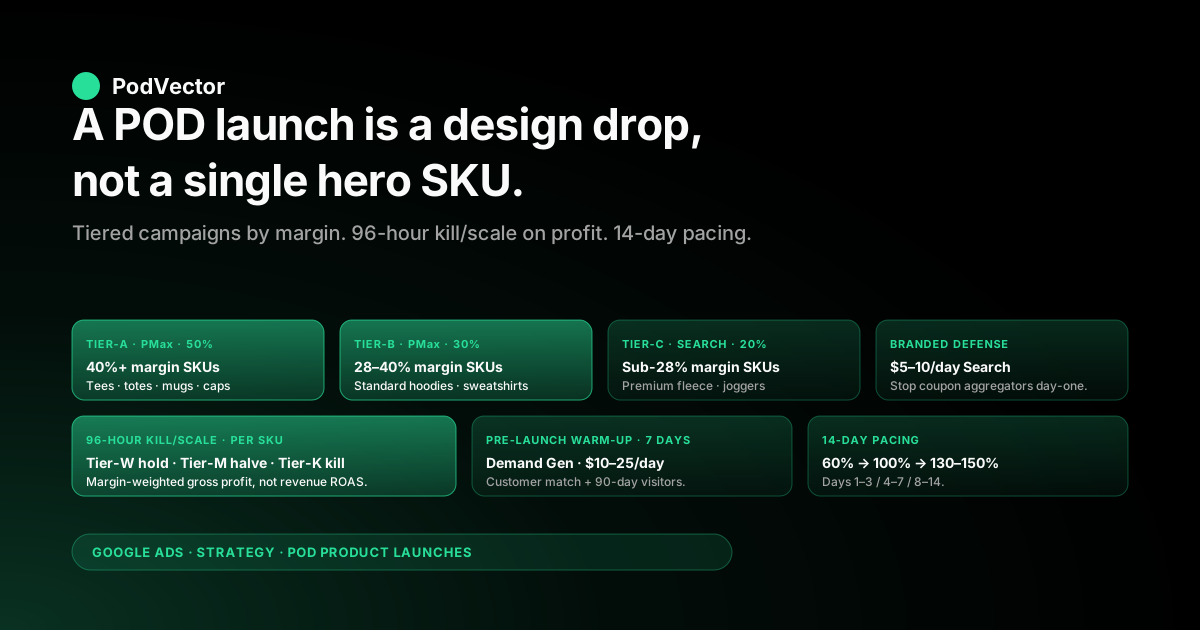
Performance Max — Tier-A drop campaign. One PMax campaign scoped to the Tier-A SKUs in the drop (40%+ margin), one asset group with 5–10 product images, 5 logos, 5 short headlines, 5 long headlines, 5 descriptions, 4 video assets if available. Audience signal on the asset group: the existing customer-match list, the last-90-day site-visitor audience, and the similar-audiences expansion. tROAS target: the steady-state Tier-A target divided by 1.15 to account for the cold-start premium (so 5x steady-state becomes ~4.3x for the launch week). Budget: 50% of the launch budget allocated here — Tier-A absorbs the most aggressive learning-phase spend without flipping to negative profit.
Performance Max — Tier-B drop campaign. Same structure, scoped to Tier-B SKUs (28–40% margin: standard hoodies, sweatshirts, mugs). tROAS target: steady-state Tier-B target divided by 1.10. Budget: 30% of the launch allocation. Tier-B is more sensitive to CPC swings than Tier-A, so the tROAS premium is smaller and the budget allocation is smaller.
Tier-C as a Search-only campaign, not PMax. Premium fleece, joggers, and any SKU under 28% margin should not be in the launch PMax. The PMax bidder cannot find efficient impressions on a 22%-margin SKU during a learning phase — it spends the budget without producing conversions, then the conversion data is too thin to teach the bidder anything. Better: run a small Search-only campaign on the 5–10 highest-intent queries for those SKUs (e.g., "premium graphic hoodie", "[design name] hoodie") with manual CPC bids set explicitly below your gross-profit-divided-by-CAC ceiling. 20% of launch budget here.
Branded Search defense around the launch. A drop with any meaningful organic or social mention attracts coupon-aggregator and reseller bidders on your branded queries within 48 hours of going live. Run a small ($5–10/day) branded Search campaign for the launch window to defend your own brand impressions.
The campaign rarely has a great ROAS in isolation, but the cost of not running it (a Honey or RetailMeNot landing page intercepting your branded clicks during peak buyer intent) is significantly higher than the campaign cost. Adjacent reading: the Google Ads for ecommerce promotions strategy piece on branded defense during high-intent windows.
For deeper background on which campaign types fit which POD use cases, see the complete guide to Google ad types for POD sellers.
Budget pacing across a 14-day launch window
The single most common POD launch budget mistake is loading the day-one budget on the assumption that the campaign needs maximum data to learn. Performance Max in the learning phase needs steady, predictable budget — not a spike — to converge. Pace the launch budget over 14 days, not 3.
Days 1–3: discovery. 60% of the daily budget cap. The bidder is learning which placements, queries, and audiences convert. Do not adjust tROAS; do not pause asset groups; do not change creative. Performance is volatile by design, and pausing or re-tuning during these 72 hours guarantees the bidder restarts learning.
Days 4–7: signal review and first kill/scale. 100% of the daily budget cap. By end of day 4 you should have 30–80 conversions across the launch campaigns — enough to read margin-weighted performance per SKU.
This is the first decision point: which SKUs in the drop produce gross profit at the target tROAS, which produce gross profit but below target, and which produce no gross profit at all? Hold winning SKUs at full budget.
Reduce non-converting SKUs to 50% of allocation. Pause SKUs producing negative gross profit using product-group exclusions in PMax (do not pause the campaign itself — exclude the bad SKUs).
Days 8–14: scale on winners. 130–150% of the original daily budget cap, redirected to the SKUs that proved out in the first kill/scale review. By day 8 the bidder has 7+ days of learning, the conversion-value signal is calibrated, and additional budget converts more efficiently.
This is also when the steady-state campaign's product-group exclusions on the drop SKUs come off, so the drop SKUs blend into the steady-state account and the launch campaign winds down on day 15. The drop is now part of the catalog rather than a launch event.
Avoid: front-loading 70% of the budget into days 1–3. The bidder cannot use that volume yet, the conversion data is too noisy to act on, and you arrive at day 4 having spent the budget on impressions that produced no useful learning. Patient pacing wins POD launches.
Ad assets, landing pages, and the cold-start trust problem
A new POD design has no reviews, no UGC, no Reddit thread, and no Google Image-search history. The cold-start trust problem is real and visible in the click-through rate gap between an established SKU and a newly-launched one — typically 30–50% lower CTR for the new SKU on the same campaign in the first week. Five asset and landing-page configurations close most of that gap.
Lifestyle photography on the product page, not flat lay only. Printify and Printful supply mockups; mockups alone do not earn the click. Source 3–5 lifestyle photos per design (model wearing the tee, mug on a desk, tote on a shoulder) and use them on both the product page and as the primary Shopping ad image.
Lifestyle Shopping ads outperform mockup-only Shopping ads by 18–35% on CTR in our customer cohort. Budget $15–30 per design for AI lifestyle photo generation or a stock-overlay shop, or amortize a single photoshoot across a 30-design drop.
Trust signals above the fold. A new product page with no reviews looks weaker than a product page with reviews. Borrow trust signals from the brand: a "5,000+ orders shipped" counter, the "ships in 2 business days" badge, the "30-day return guarantee" line, the trust-badge row in the footer. None of these compensate for a missing review, but together they raise the trust floor on the new product page enough to support the cold-start traffic.
Responsive Search Ads built around the design's intent, not the brand's name. A new SKU's Search ads should lead with the design intent ("Funny Dad Birthday Tee · Father's Day Gift") rather than the brand name (which has no search volume yet). Five headlines minimum, five descriptions minimum, sitelinks linking to the broader collection so high-intent clicks that don't convert on the launched SKU can still produce a conversion on a related SKU.
Performance Max video assets. Generate 6–10 second product videos for the top 3 designs in the drop. Phone video on a clean background works fine — the bidder uses the video on YouTube Shorts and Connected TV placements where image assets cannot serve. Drops with video assets see 40–80% higher PMax impression volume in the launch week than image-only drops.
Landing page experience on the collection page. If the launch is a 30-SKU drop, the highest-converting landing page is usually the collection page — not individual product pages — because the visitor wants to browse the drop, not buy SKU #4 specifically. Configure the PMax campaign to send traffic to the collection URL (with the drop's custom_label filter applied) and let the collection-page UX do the merchandising. Individual-SKU Search ads still deep-link to product pages where the searcher's intent is specific.
Audience signal: who Google should show the launch to first
Google's bidder will eventually figure out who buys the drop. Audience signal accelerates that learning by 2–4 days, which on a 14-day launch window is meaningful. Three audience layers compound.
Customer Match: existing buyers (12-month list). Highest-converting cohort for any POD launch. Existing buyers convert on a launch at 3–6x the rate of cold traffic and at higher AOV.
Upload a Customer Match list of all buyers in the last 12 months to Google Ads, and add it as audience signal on every launch asset group. Do not exclude this list — add it as signal so the bidder weights it positively.
Site visitors, last 90 days. Second-highest-converting cohort. Includes the Demand Gen warm-up audience from days -7 to -3, so this layer has structural overlap with the warm-up. Configure the audience in Google Ads → Audience Manager → Website visitors → "All visitors, 90 days" and add it as signal on every launch asset group.
In-market and similar-audiences expansion. Slot in two or three in-market audiences relevant to the drop category ("Apparel & Accessories: T-Shirts" for a tee drop, "Drinkware" for a mug drop) and a similar-audiences expansion seeded on the customer-match list. These are the colder layers of audience signal — do not over-weight them, but do include them as expansion signal so the bidder can find new buyers outside the existing list.
What to avoid: building demographic audiences (age, gender, income) and adding them as signal. Demographic signal narrows the bidder's reach without improving conversion quality on a POD launch. The drop's natural audience emerges from buyer behavior, not demographic overlap, and over-narrow demographic signal starves the campaign of impression volume during the most data-hungry phase of the launch.
The kill/scale decision: 96 hours, gross profit per SKU
The defining operational question on any POD launch: which designs in the drop should we keep buying clicks for, and which should we stop? The classic answer (let it run for 14 days, decide at the end) is too late — by the time the data is clean, half the launch budget is already spent on the bottom-third designs. The faster answer (kill on day 2 if no conversion) is too early — Performance Max routinely takes 72–96 hours to find the right impressions for a new SKU and a day-2 kill terminates SKUs that would have converted on day 4.
The right answer is a structured 96-hour review, applied per-SKU, on margin-weighted profit metrics rather than ad-platform revenue ROAS:
- By end of day 4, pull the per-SKU report. Per-SKU spend, per-SKU clicks, per-SKU conversions, per-SKU gross profit (post-supplier-cost, post-shipping-cost, post-platform-fee), per-SKU AOV. Most POD operators do this in a Google Sheet pulling from Shopify and Google Ads APIs; we built our own version because the manual spreadsheet was taking 90 minutes per drop and decisions were drifting later in the week as a result.
- Sort SKUs into three tiers based on the 96-hour data. Tier-W (winners): SKUs with positive gross profit and CAC under the steady-state target. Hold budget; let the bidder keep learning. Tier-M (maybes): SKUs with conversions but CAC above target. Reduce allocation to 50%; revisit on day 7. Tier-K (kill): SKUs with no conversions on $40+ spend, or negative gross profit on the conversions that did fire. Exclude from PMax via product-group exclusion immediately.
- Reallocate the killed budget to the Tier-W SKUs. Do not let the launch budget shrink overall — redirect spend toward what is working. The day-7 review repeats the same logic on the remaining SKUs.
Operators running 30+ design drops every quarter have to do this review repeatedly, and the manual labor is what most often slips. Reading per-SKU profit out of Shopify, joining it to Google Ads spend, applying margin tier weights, and sorting into Tier-W/M/K is the loop where Victor — PodVector AI's AI agent for POD operators — is built to live: it pulls the a live data feed of orders, supplier costs, and ad spend, returns the per-SKU profit ranking on demand, and can answer "which SKUs in last week's drop are scaling and which should I pause?" in seconds rather than a 90-minute spreadsheet build.
Victor answers the question and takes the action — with your approval — applying the product-group exclusion in the Google Ads account once the operator approves the kill list. For the broader measurement frame, see the Shopify Google Ads performance 2025 strategy piece.
Five POD-specific launch mistakes that drain the budget
Uniform tROAS across the drop. Setting one tROAS target for the whole launch campaign, regardless of SKU margin. Tier-A absorbs the target; Tier-C cannot. The Tier-C SKUs throttle the bidder's overall confidence, the Tier-A SKUs lose impression volume because the same campaign is being held back, and the launch underperforms a tiered structure by 25–40% on profit.
Reading revenue ROAS instead of profit ROAS. The Google Ads dashboard reports the order subtotal as conversion value by default. On a 22%-margin hoodie at $40 retail with $31 supplier cost, that subtotal flatters the campaign by $40 while the storefront banks $9.
By day 7 the bidder has scaled toward the deepest-discounted, lowest-margin SKUs in the drop because that is where the "ROAS" looks best. Send post-supplier-cost gross profit as the conversion value or repeat this mistake every launch.
Pausing campaigns mid-learning-phase. Operators who have been burned by past launches sometimes pause the campaign on day 2 because performance looks ugly. Performance Max needs 72–96 hours of continuous data to converge — a day-2 pause throws away the learning and forces a full restart, which costs 48 more hours of inflated CPC. If the launch is going badly on day 2, change the conversion-value signal or the asset group's audience signal — do not pause.
No branded Search defense during the launch window. Coupon aggregators bid on branded queries within 48 hours of any meaningful launch. Without a branded Search defense campaign, those aggregators intercept the highest-intent traffic of the launch week and earn the affiliate commission on conversions you should have owned directly. The defense campaign costs $5–10/day and recoups its cost on the first intercepted click.
Skipping the post-launch retrospective. The launch ends on day 14, the drop blends into steady-state, and the operator moves on to the next launch. The data from the launch — which audience signals worked, which margin tiers performed, which CTR ranges actually predicted conversion — is the most valuable input to the next launch's plan.
A 30-minute retrospective comparing planned-vs-actual on the launch and writing down 3 lessons makes the next launch 10–20% more efficient. Without it, every launch starts from scratch.
FAQs
How much budget do I need to launch a POD design drop on Google Ads?
For a 15–30 SKU drop with mixed margin tiers, $50–$120/day across the launch campaigns for 14 days, totaling $700–$1,700, is the working range. Below $40/day the data is too thin for Performance Max to converge in the launch window; above $200/day the bidder cannot find efficient impressions during the cold-start phase. If your steady-state account already runs at $150+/day, the launch campaigns should be additive — do not divert steady-state budget.
Can I launch a single-SKU POD product on Google Ads, or does it have to be a drop?
Yes, but use Search and Demand Gen rather than Performance Max. PMax needs catalog breadth (8+ SKUs) to optimize across — a single-SKU PMax campaign produces erratic performance because the bidder has no variance to learn from. A single-SKU launch on Search alone, with $30–$60/day for two weeks targeting the head terms the SKU occupies, is the cleaner structure.
Do I need product reviews before launching a new SKU on Google Ads?
Reviews on the SKU itself help conversion rate by 10–25%, but lack of reviews is not a blocker — the trust signals on the broader product page (lifestyle photography, brand-level reviews, return policy, shipping speed) carry most of the trust weight. Plan to seed reviews via post-purchase email in week one of sales, so by week two the SKU has 5–10 reviews and the conversion rate steps up.
How long should the pre-launch warm-up campaign run?
7 days. Shorter than 7 days does not produce enough impression frequency for the warm cohort to build retargetable signal; longer than 14 days starts producing diminishing returns and consumes budget that should fund the launch week itself. The sweet spot is a 7-day warm-up at $10–25/day on Demand Gen, ending the day before the official launch.
Should I run a discount during the launch to drive day-one volume?
Generally no for POD. Inventory brands launch with discounts because they have margin headroom (50%+) to absorb a 15% promo.
POD margins (22–35% on most SKUs) do not have that headroom; a 15% launch discount on a 28%-margin SKU compresses to 13% margin, which is below most POD operators' CAC floor. The exception is a free-shipping-over-threshold offer, which is mathematically cleaner and does not compress unit margin. For deeper detail on POD-margin promotion math, see the Google Ads for ecommerce promotions strategy piece.
How do I know within 96 hours whether a SKU in the drop is going to work?
The reliable 96-hour signal is per-SKU gross profit divided by per-SKU spend. If, by end of day 4, a SKU has produced positive gross profit at a CAC at or below your steady-state target, it is a winner — keep funding.
If it has produced no conversions on $40+ spend, it is a kill — exclude the product group. If it sits in the middle (some conversions, CAC above target), it is a maybe — half the budget, recheck on day 7. Margin-weighted gross profit, not click count or revenue ROAS, is the metric that holds.
Can Performance Max launch a drop on its own, or does it need a Search campaign alongside?
PMax handles the launch on its own for Tier-A and Tier-B SKUs. Tier-C SKUs need a dedicated Search campaign because PMax's blended cost-per-impression is higher than Tier-C margins can absorb during a learning phase.
Add branded Search defense alongside any drop with measurable organic mention. So: PMax for Tier-A and Tier-B, Search for Tier-C, branded Search for defense — three campaign structures running in parallel during the launch window.
Run the launch on profit data, not Google's revenue ROAS
The hardest part of a POD launch is the 96-hour kill/scale decision: which SKUs in the drop are actually producing gross profit, which look fine on revenue ROAS but are losing money once Printify supplier cost is netted out, and which to pause before the budget drains. PodVector AI's AI employee Victor reads your live Shopify, Printify, and Google Ads data and answers per-SKU profit questions in seconds — so the launch retrospective happens during the launch, not three weeks after.
Try Victor free