
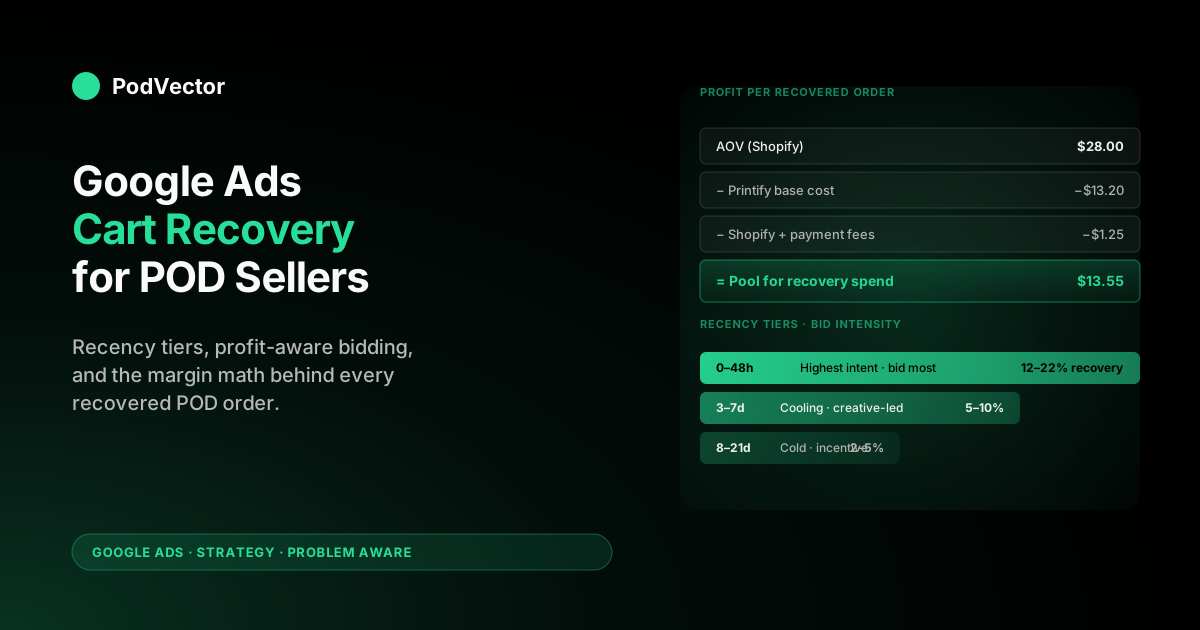
Quick Answer: Cart abandonment retargeting in Google Ads recovers 5–15% of lost POD carts when it's built right — and quietly burns budget when it isn't. The strategic frame for print-on-demand is different from generic ecommerce: with a $28 AOV and $13 Printify base cost, you have ~$15 of gross profit per recovered order to spend on the recovery.
That single number reshapes every other decision — audience recency tiers, frequency caps, creative spend, and campaign type selection. The four-step POD playbook: (1) build recency-and-cart-value audiences in GA4, (2) split traffic across Demand Gen for visual retargeting and RLSA for high-intent re-search, (3) use dynamic remarketing with the same Merchant Center feed that powers Shopping, and (4) measure recovered-cart profit (after supplier cost) instead of platform-reported ROAS. Skip step four and Google Ads will tell you the campaigns are working while your bank account says otherwise.
Why cart abandonment for POD isn't generic ecommerce
Every cart-abandonment guide written for ecommerce starts with the same statistic — about 70% of carts get abandoned, recovery is worth 5–15%, retargeting is the answer. The numbers are real. The strategy that flows from them is built for stores with $80–$200 AOVs and 60% gross margins, and applying it directly to a print-on-demand store is how POD operators discover their "winning" cart-recovery campaigns are losing money on every recovered order.
The four reasons POD cart-recovery is its own problem:
- Lower AOV. A typical POD store sells $20–$35 t-shirts and hoodies, not $150 sneakers. Recovery campaigns priced for the latter destroy unit economics on the former.
- Supplier base cost is invisible to Google. Google Ads sees the Shopify checkout value. It does not see the $11–$18 Printify or Printful charges to fulfill that order. Smart Bidding optimizes against gross revenue, which on POD is a wildly misleading proxy for profit.
- Variant explosion. A single design across 12 colors and 6 sizes is 72 SKUs. Dynamic-remarketing feeds built for this catalog show abandoners variants they didn't view, and retargeting CTRs collapse.
- Demand patterns are seasonal and design-driven. A trending design has a 2–6 week window. Retargeting an abandoner three weeks after the design's peak is selling a cold product back to a cold audience.
None of this means cart-recovery doesn't work for POD. It means generic ecommerce playbooks need three adjustments — margin-aware bidding, design-window-aware audience expiry, and feed curation that matches what the abandoner actually saw — before they earn their place in a POD ad budget.
The rest of this article is the version of the playbook that has those adjustments built in. If you want the broader ad-strategy frame this fits inside, the complete Google Ads playbook for print-on-demand sellers is the pillar this article supports.
The margin math that should drive every retargeting decision
Before any audience setup, write down your unit economics. A worked example for a representative POD t-shirt order:
- Average order value (Shopify): $28.00
- Printify base cost (shirt + print + shipping): $13.20
- Shopify transaction + payment fees (~3.4% + $0.30): $1.25
- Gross profit after supplier and fees: $13.55
That $13.55 is the pool from which every dollar of recovery ad spend has to come — including all the abandoners you retargeted and didn't recover. If your cart-recovery campaign converts one abandoner for every ten you retarget, and your CPM lands at $8 with a 1.5% CTR (typical Demand Gen), the math gets uncomfortable fast: $8 CPM × 1,000 impressions ÷ 15 clicks = $0.53 CPC, then $0.53 × 10 clicks per conversion = $5.30 to recover one cart.
Margin after supplier minus recovery cost: $13.55 − $5.30 = $8.25 of net profit per recovered order. Workable, but only with discipline on the inputs.
Now the failure mode. Same campaign, but you let frequency cap drift to 12 impressions/week (industry "best practice" is 3–7), CTR drops to 0.6% from creative fatigue, CPC rises to $1.40, and conversion rate dips to 1-in-15.
Cost per recovered cart: $21. Negative $7.45 per recovered order, after supplier cost. The campaign reports a 2.0 ROAS in Google Ads. The bank account says you lost money on every recovery.
This is the entire reason POD cart-recovery feels broken to operators who run it for the first time. The platform-reported number says it works.
The profit number says it doesn't. Until you reconcile the two, the rest of the playbook below doesn't matter — you're optimizing toward the wrong target. The attribution models explained for POD sellers walks through the reconciliation in detail; the abandoned-cart-specific version is in the measurement section below.
Building the audience segments: recency × cart value × stage
The single biggest lever in cart-recovery is who you're targeting, not what creative you show them. Generic remarketing — "everyone who hit the cart page in the last 30 days" — is what burns POD budgets. A POD store needs at minimum a 2x3 grid of audiences (recency × cart value), built in GA4, then synced to Google Ads via the GA4 ↔ Google Ads link.
The recency tiers, with the strategic logic for each:
- 0–48 hours since abandonment — highest intent, design likely still relevant, willingness-to-pay still warm. Bid most aggressively here. This is where 60–70% of recovered revenue comes from.
- 3–7 days since abandonment — cooling intent, design may still be in trend window, audience needs more visual reminder than urgency. Bid moderately, lean creative-heavy, no discount yet.
- 8–21 days since abandonment — cold-ish, typically requires an incentive (free shipping, 10% code) to convert. Bid conservatively, exclude beyond 21 days entirely. POD designs older than 21 days are usually past their trend window and the abandoner has moved on.
The cart-value tiers, with bid logic:
- Cart value < $20 (single low-priced shirt or accessory) — recovery-ad-spend tolerance is < $3 per recovered cart. Below that you're losing money. Cap CPCs aggressively.
- Cart value $20–$50 (typical POD cart, 1–2 items) — recovery-ad-spend tolerance is $4–$7 per recovered cart. This is where the bulk of your retargeting budget should sit.
- Cart value > $50 (multi-item or premium products) — recovery-ad-spend tolerance is $9–$14 per recovered cart. Bid most aggressively; these abandoners are also the highest LTV if they convert.
The third dimension, stage, is the one most operators skip — and the one that recovers the most under-attributed revenue. Three meaningful stages on a POD checkout:
- Product page viewed, no add-to-cart — usually browsing intent, low conversion potential. Don't retarget aggressively; include in broader prospecting audiences instead.
- Add-to-cart, no checkout-started — meaningful intent, recovery rates 4–8% with good retargeting. The middle of the funnel.
- Checkout-started, no purchase — highest intent, recovery rates 12–22% with good retargeting. This is where dynamic remarketing with the exact abandoned product earns its keep.
Build these as separate GA4 audiences with the relevant event conditions (add_to_cart, begin_checkout, purchase as exclusions), set membership duration to match the recency tier, then link them into Google Ads. The 18-cell matrix (3 recency × 3 cart value × ~2 useful stages) collapses in practice to 6–8 audiences worth running campaigns against, because not every cell has volume. Start with the four highest-volume cells, prove they're profitable, then expand.
Choosing campaign types: Demand Gen, RLSA, Performance Max, Display
Google Ads exposes four campaign types that can serve cart-recovery. They are not interchangeable, and POD stores get the best results from a deliberate split rather than dumping retargeting budget into whichever Google's UI suggests first.
The four campaign types, mapped to their cart-recovery role:
- Demand Gen — visual ads across YouTube, Discover, and Gmail. Strongest fit for cart-recovery on POD because the visual product nature matches the placement format. Routinely delivers 6x–10x ROAS on cart-abandonment audiences when the audience is well-segmented (per the Digital Marketing Knight retargeting playbook, which corroborates this for ecommerce broadly). Use this as your primary cart-recovery campaign type.
- RLSA (Remarketing Lists for Search Ads) — bid modifier on Search campaigns that's larger when a previous-cart-abandoner re-searches a relevant query. Catches the abandoner who's re-considering and Googling the product type again. Lower volume than Demand Gen but the highest conversion rate of any retargeting type. Run as a complement, not a replacement.
- Performance Max with retargeting audience signal — feeding your cart-abandonment audiences as audience signals into a PMax campaign lets Google use them as optimization input across all surfaces. Useful, but PMax's black-box nature makes it hard to isolate cart-recovery performance from prospecting. Use only if you've already proven Demand Gen + RLSA are profitable.
- Display retargeting (classic) — banner ads across the GDN. The traditional answer to cart-recovery. CPMs are cheap; CTRs are awful (0.2–0.5%); placement quality varies wildly. For POD, Demand Gen has eaten Display retargeting's lunch — the visual placements are better and the targeting is tighter. Use Display only as a low-budget fill-in for very large abandonment audiences.
The recommended split for a POD store with a $30/day cart-recovery budget: 60% Demand Gen, 30% RLSA, 10% PMax with audience signal. Skip Display until you've maxed out the others. As budget scales past $100/day, the same proportions hold; the Demand Gen line item just gets fatter. For deeper coverage of the campaign-type tradeoffs across the broader funnel, see the complete guide to Google Ad types for POD sellers.
Dynamic remarketing for POD: showing the abandoned design back
Dynamic remarketing is the difference between "we saw you looked at our store" and "here's the navy v-neck mountain-design tee you put in your cart, still $24, free shipping if you check out today." The conversion delta is large — typically 2–4x — because the ad is specific enough that the abandoner remembers the exact item, not just that they were on a site.
The mechanic: Google Ads pulls product data from the same Merchant Center feed that powers Shopping ads, matches the abandoner's viewed-product event to a feed item, and renders a templated ad with the right image, title, and price. Setup is documented; the strategic decisions inside it are not.
The four POD-specific configuration choices:
- Feed curation matters more than feed completeness. Your dynamic-remarketing feed should be the same curated 200–500 product feed you use for Shopping, not a full 6,000-SKU dump. Variant explosion in retargeting is worse than in prospecting because the abandoner already saw a specific variant and a different one breaks recognition. Tag the feed-eligible products in Shopify and gate the channel app feed by tag.
- Image quality is non-negotiable. Dynamic-remarketing ads render the feed image as the entire ad creative. Mockups with low-resolution garments, watermarks, or busy backgrounds will get disapproved or render badly across YouTube and Gmail. Use the same studio-quality mockup images you use on the product page.
- Pricing in the feed must match the landing page. Discrepancies trigger Merchant Center disapproval and silently break ads. POD stores running flash sales or design-specific discounts have to keep the feed and the storefront in sync — most channel apps refresh the feed every 6–12 hours, which is too slow for a 24-hour flash sale.
- Use the "exact viewed product" template, not "category-related products." Google offers both. For low-AOV POD with strong design specificity, the exact-product template outperforms category-related by 30–60% on conversion rate. The category-related template is built for catalogs where the abandoner is comparison-shopping; POD abandonment is usually about a specific design, not the category.
For the underlying Merchant Center setup that makes dynamic remarketing possible, see Shopify Google Merchant Center strategy for print-on-demand.
Frequency caps, creative rotation, and the incentive question
The fastest way to turn a profitable cart-recovery campaign into a money-losing one is to leave frequency cap on the default setting (which is effectively "no cap") and let the same abandoner see the same ad twenty times in a week. Three rules for POD:
- Cap at 3–5 impressions per user per week, not per day. Google's UI lets you set both; daily caps are useful only for very large audiences. Per-week is the meaningful unit. POD shoppers don't decide to buy a t-shirt because they saw the ad seven times — they decide because they saw it once and it caught them at the right moment. Five exposures is the saturation point; more is wasted spend and growing brand fatigue.
- Rotate at least 3 creatives per audience. Same-creative fatigue hits at impression 8–10 typically. Rotating 3 creatives extends usable lifetime to 20+ impressions. For Demand Gen, this means 3 image variants, ideally swapping background or angle while keeping the product front and center.
- Refresh creatives every 3–4 weeks. Even with rotation, audience fatigue compounds. Treat retargeting creatives as semi-perishable — schedule a refresh into the calendar, don't wait for CTR to collapse before noticing.
The harder question is when to add an incentive. The temptation on cart-recovery is to throw a 10–15% discount code at every abandoner.
The cost of doing this is severe for POD: a 10% discount on a $28 cart is $2.80 off the $13.55 gross profit, leaving $10.75 to absorb the recovery ad spend. Combine that with $5 of recovery cost and you've got $5.75 left of net profit before considering refunds, returns, or future LTV.
The rule we'd recommend for POD: no incentive in the 0–7 day window, free-shipping incentive only in the 8–14 day window, and 10% discount code only in the 15–21 day window. Most cart-recovery converts in the first 48 hours without any incentive at all. Throwing a discount at the early window is leaving money on the table and training repeat customers to wait for the discount email. For seasonal or promotional context, see Google Ads for ecommerce promotions strategy for print-on-demand.
Measurement: why platform ROAS lies on POD cart-recovery
Every other section in this article is wasted effort if you measure cart-recovery the way Google Ads reports it by default. The default report is conversions and conversion value attributed to the campaign, divided by spend, expressed as ROAS. For POD specifically, this number is wrong by 30–60% on the optimistic side, for three compounding reasons:
- Conversion value = order subtotal, not net profit. Google sees $28; your bank account sees $13.55 after supplier cost. A "4x ROAS" recovery campaign at $28 reported value is actually a 1.94x ROAS at $13.55 of true gross profit. If your ad spend per recovered order is $5, the true profit-ROAS is 2.71 — barely break-even after operations overhead.
- View-through conversions inflate the recovery count. Demand Gen and Display report view-through conversions by default — the abandoner saw the ad, didn't click, but later returned to the site and converted. Some of these would have converted anyway. POD operators routinely see view-through conversions account for 25–40% of reported recovery; the incremental share is often closer to 30–50% of that, meaning Google over-credits the campaign by 7–20%.
- Multi-touch double-counting across cart-recovery campaigns. If you run Demand Gen and RLSA both targeting the same abandonment audience, both can claim credit for the same conversion. Aggregate reported recovery exceeds actual recovery, sometimes by 15–25%.
The fix is a weekly reconciliation that sits outside the Google Ads dashboard. The components: pull Shopify orders for the period, deduct Printify or Printful base cost per order, deduct Shopify and payment fees, then attribute spend across cart-recovery campaigns at the order level (not the impression level).
The output is a single number per campaign: profit per recovered order, net of supplier cost and reconciled against Shopify ground truth. That's the number you optimize on. Everything in the Google Ads dashboard is an input to that number, not a substitute for it.
This reconciliation is the part most POD operators skip because it's manual, brittle, and breaks every time Shopify or Printify changes an export format. The work is mechanical and exactly the kind of thing an analyst-in-the-loop should automate — which is the point of Shopify-Google Ads ROAS reporting integration for POD as a category. For deeper attribution-model context, see Google Ads attribution models explained for POD sellers.
Cart-recovery anti-patterns that quietly destroy POD margin
The list of ways to lose money on POD cart-recovery is shorter than the list of ways to make money on it. The five most common:
- Targeting "all cart abandoners last 30 days" as one audience. The 30-day audience is dominated by the 8–30-day cold tail. Bidding the same on a 4-hour-old abandoner and a 26-day-old one is wasted spend on the latter and underbidding on the former. Always segment by recency.
- Optimizing toward "Add to Cart" instead of "Purchase." Smart Bidding will literally optimize toward whatever conversion you tell it is the goal. Setting Add-to-Cart as the conversion on a recovery campaign tells Smart Bidding to find more abandoners — exactly the opposite of what you want.
- Running the channel-app default Merchant Center feed for dynamic remarketing. Variant explosion + low-quality auto-generated images = ads that don't convert. Curate the feed.
- Ignoring incremental lift testing. Some share of "recovered" customers were going to come back anyway. Without occasional holdout tests (10% of the audience excluded from retargeting for two weeks, then comparing conversion rates), you don't know how much of your reported recovery is actually incremental. POD studies on holdout testing routinely find 15–35% of "recovered" revenue would have come back without the ad spend.
- Forgetting to exclude existing customers from retargeting. The Customer Match exclusion list is the single highest-impact piece of audience hygiene. Without it, you're paying to retarget your loyal repeat customers who would have come back anyway. Build a Customer Match list of all-time purchasers and add it as an exclusion to every retargeting campaign.
The weekly routine that keeps cart-recovery profitable
Cart-recovery campaigns drift. Audience sizes shift, creative fatigues, the Merchant Center feed gets out of sync, frequency caps quietly lapse when you add new ad groups. A 30-minute weekly routine catches the drift before it becomes a month of wasted spend:
- Pull profit per recovered order, by campaign, for the week. The number from the measurement section above. If any campaign is below $3 of net profit per recovered order, investigate; if below $0, pause until you've diagnosed it.
- Check audience sizes. If the 0–48-hour audience is < 200 users, bid signals are too sparse for Smart Bidding to work. Either combine with the 3–7-day audience temporarily or accept that recovery volume is a function of broader funnel health, not retargeting tuning.
- Check creative CTR by ad. If any individual creative is below 0.7% CTR, swap it out. Don't wait for the ad to collapse the audience-level CTR.
- Reconcile Merchant Center feed against Shopify product status. Disapproved or out-of-stock items in the dynamic-remarketing feed render broken ads. Catch and fix weekly.
- Refresh the Customer Match exclusion list. Add the past week's purchasers. Old lists exclude customers who haven't bought in 18 months — refresh stops the leak.
For broader weekly-cadence ad-ops context, see Google Ads strategy for ecommerce for POD.
FAQs
How much should a POD store budget for cart-recovery campaigns?
A practical floor is 10–15% of total Google Ads spend, capped by abandonment volume. Cart-recovery requires a meaningful audience size to work — if your store generates fewer than 50 abandoned carts per week, retargeting budgets above $20–$30/day will outpace audience refresh and start showing the same five users the same ad twenty times. Build prospecting and traffic first; cart-recovery scales after the funnel does.
Should I run cart-recovery in Google Ads or rely on Shopify's abandoned-checkout email instead?
Both, separately. Shopify's abandoned-checkout email recovers the abandoners who left an email at checkout, which is typically 30–50% of started checkouts.
Google Ads recovery covers the rest — the abandoners who left before email entry, or who entered email but didn't open or click the recovery email. The two channels rarely overlap and the combined recovery rate is materially higher than either alone. Cross-channel retargeting (combining Google Ads with email and social) recovers about 2.1x more abandoned orders than single-channel, per industry studies.
What's the right audience-membership duration for POD cart-recovery?
21 days, with most spend in the 0–7-day window. POD designs have a trend window measured in weeks, not months — retargeting an abandoner 45 days after they left the cart is selling a colder version of a colder product. Set GA4 audience membership to 21 days and let the audience naturally cycle.
Does Performance Max replace dedicated cart-recovery campaigns?
Not yet, in our view. PMax with cart-abandonment audience signals helps Smart Bidding, but you can't isolate the recovery performance from the broader prospecting and Shopping inside the same PMax.
For POD specifically, where you need to know the per-campaign profit number to make budget decisions, dedicated Demand Gen and RLSA cart-recovery campaigns give you the visibility PMax obscures. Run both — but don't shut down dedicated retargeting in favor of PMax alone.
How do I stop cart-recovery ads from following a customer who already bought?
Two steps. (1) Set the GA4 audience to exclude users who completed a purchase event within the audience's lookback window — this catches same-session conversions. (2) Maintain a Customer Match list of all past purchasers in Google Ads and add it as a negative audience to every retargeting campaign. The Customer Match list catches users who bought in a different browser, on a different device, or before GA4 was tracking. Without both layers, you'll keep showing recovery ads to people who completed checkout last week.
What's the realistic recovery rate I should expect from POD cart-recovery campaigns?
Industry-wide ecommerce data shows companies that actively invest in cart recovery win back about 5.9% of all abandoned orders. POD stores running the playbook above typically land in the 5–12% range, with the upper end requiring strong creative, tight audience segmentation, and the cross-channel email overlap. Below 5%, something is broken — usually feed disapprovals, audience over-segmentation that starves the campaign of volume, or a Customer Match exclusion that's blocking your actual abandoners.
Should I show a discount in my cart-recovery ad creative?
In the first 48 hours, no — the abandoner is still warm, and you're throwing margin away. In the 8–14 day window, free shipping outperforms a percent-off discount on POD because shipping is a top-three abandonment reason and the cost to you is fixed (no margin slide).
In the 15–21 day window, a 10% code is reasonable as a final-push offer. Beyond 21 days, exclude the audience entirely; the recovery economics don't work.
Can I use one Google Ads remarketing audience across multiple POD stores?
No, and you shouldn't try. Each store has its own GA4 property, its own conversion signal, and its own Merchant Center feed.
The dynamic-remarketing creative is store-specific. Sharing audiences across stores leaks signal and produces creative-product mismatches. If you operate multiple POD brands, run separate cart-recovery campaigns per brand and share only learnings, not audience lists.
How long until a new POD store has enough abandonment volume to make retargeting worthwhile?
About 50 cart-abandonment events per week is the practical floor for the 0–48-hour audience to have enough density for Smart Bidding to optimize on. At a typical 65% abandonment rate, that's roughly 80 cart-add events per week, which usually means 800–1,500 sessions per week from prospecting. Below that volume, retargeting budget is better spent on the prospecting layer — you can't retarget abandoners you don't have.
Stop guessing whether your cart-recovery campaigns are actually profitable
The hard part of POD cart-recovery isn't the campaign setup — it's answering "did this recovered order make money after Printify base cost, Shopify fees, and the ad spend that brought it back?" Doing that reconciliation by hand each week is the part most operators give up on, which is exactly when cart-recovery silently turns unprofitable. Victor is the AI employee that does the reconciliation in seconds. Connect Shopify, Printify, and Google Ads, ask "which cart-recovery campaigns are profitable after supplier cost?" and get a real answer with the numbers attached. — no credit card, connects in five minutes.
Try Victor freeFurther reading: Digital Marketing Knight on Google Ads retargeting for abandoned carts for the broader ecommerce retargeting playbook this article adapts for POD, and YRV Dynamics on add-to-cart abandonment remarketing for additional GA4 audience-setup specifics.