
Quick Answer: "Create Google Ads conversions for Shopify" is usually treated as a one-step install task — flip on the Google & YouTube channel, accept the four auto-created conversion actions (Purchase, Begin checkout, Add to cart, Page view), confirm the pixel fires. For a print-on-demand operator the install is the easy 30 minutes; the strategic work is choosing which conversion actions to count as primary, what value to send with each, how to weight the 4–6 micro-conversions Smart Bidding actually needs to learn against, and how to wire Printify or Printful supplier cost into the value layer so the bidder optimises toward gross profit rather than gross subtotal. Get the strategy right and a $1,200/mo Performance Max campaign returns 35–55% more contribution margin without any spend change.
Get it wrong and Smart Bidding will quietly steer the budget toward the thinnest-margin SKUs in the catalog. This guide walks the conversion-action design decisions a POD store should make before, during, and after the install — what to count, what to value, and how to keep the conversion graph honest as the catalog and supplier mix changes.
Why "create conversions" is a strategy decision, not an install task
Most published guides on creating Google Ads conversions for Shopify — the Shopify blog walkthrough, the Stape server-side guide, the dozens of YouTube tutorials covering the Google & YouTube channel — treat the work as a sequence of clicks. Install the channel, link the Google Ads account, accept the four standard conversion actions, paste the verification snippet, wait 24 hours.
That's the install. It is genuinely fifteen to thirty minutes of active work.
For a POD operator, the install is not what determines whether the conversion graph is worth what it costs to feed Smart Bidding. The four decisions made during the install are: which actions to mark primary, which to mark secondary, what value to send with each, and which micro-conversions to add or skip.
Get those four decisions right for POD economics and Performance Max converges on a profitable ROAS within 14 days. Get them wrong and Smart Bidding scales the campaign toward whichever SKUs have the highest revenue-per-click — which on a Printify or Printful catalog is almost never the same as the highest-profit-per-click. After 8–12 weeks of optimisation against the wrong signal, the campaign reports a healthy 4.5x ROAS while the storefront banks losses on every order the campaign attributed.
This guide skips the install mechanics — that's covered in the setup walkthrough at add Google Ads conversion tracking to Shopify: setup guide for POD sellers — and focuses on the strategy decisions a POD operator must make to make the conversion graph work for their unit economics. The strategic frame for the wider account, including Performance Max structure and Merchant Center integration, lives at the complete Google Ads playbook for print-on-demand sellers. The cluster hub at Google Ads strategy for POD indexes every strategy piece in this series; the broader topic hub is Google Ads for POD.
The conversion-action shape that fits POD economics
The default conversion-action shape Shopify pushes into Google Ads — Purchase as the only primary, Begin checkout / Add to cart / Page view as secondary or unmarked — was designed for the median DTC ecommerce store. The median DTC store buys inventory at wholesale, holds 50–70% gross margin, and has predictable per-SKU economics that make "more orders is more profit" mostly true. POD breaks that assumption in two ways the conversion-action defaults never compensate for.
- Per-SKU margin spreads from 18% to 60% inside the same catalog. A Printify Choice tee at $24 retail with $9 supplier cost runs 55%+ margin; a premium fleece hoodie at $58 retail with $42 supplier cost runs 22% margin. Counting both as a generic "Purchase = $1 of conversion value per dollar of subtotal" treats them as identical signals. Smart Bidding then optimises toward whichever gets cheaper clicks — usually the lower-margin SKUs because the broader audience converts on price-sensitive categories. The campaign scales the wrong direction.
- The conversion data set is small relative to PMax's learning needs. A POD store doing 60–200 orders per month has 8–25 conversions per week to feed Performance Max. PMax wants 30+ per week per asset group to converge with confidence. The shortfall has to be made up with secondary and micro-conversions — Begin checkout, Add to cart, viewing a product page for 30+ seconds — that the default install creates but does not weight or activate as bidding signals.
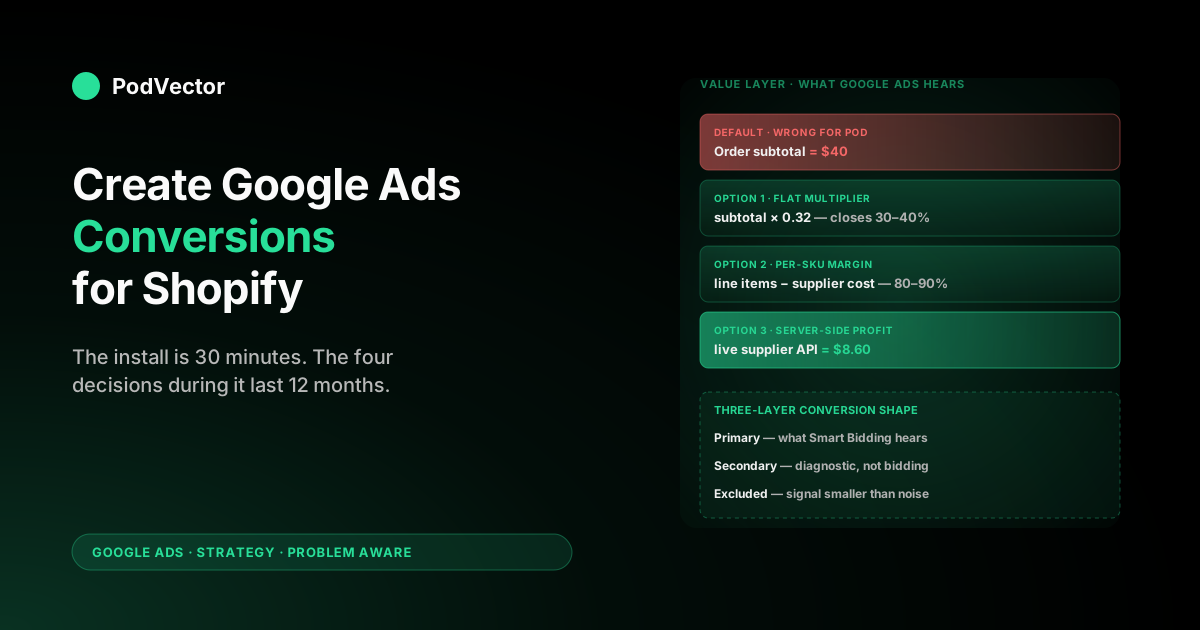
The conversion-action shape that actually fits POD has three layers, not one. Layer one is primary conversions: the actions Smart Bidding optimises toward, weighted by the value layer to reflect gross profit not gross subtotal. Layer two is secondary conversions: tracked but not optimised against, used for diagnostic reporting and audience building. Layer three is excluded actions: events that fire but are not surfaced in any reporting layer because they introduce more noise than signal. Designing those three layers is the conversion-creation work most install guides skip entirely.
Primary vs. secondary conversions: the only choice that changes bidding
Inside Google Ads, the primary/secondary distinction is the lever that decides what Smart Bidding actually optimises against. Primary conversions feed the bidder.
Secondary conversions appear in reports but do not influence bid decisions. Almost every other knob (count type, attribution window, value type) is downstream of this one binary choice — and almost every POD store leaves it on the default Shopify wizard setting, which is wrong for stores under 200 orders per month.
The right primary/secondary configuration depends on monthly purchase volume:
- 200+ purchases per month. Purchase only as primary. Begin checkout, Add to cart, Page view as secondary. Purchase volume is high enough for Smart Bidding to converge against the strongest signal, and adding lower-funnel events as primary dilutes the optimisation toward visitors who never convert. This is the configuration the default install assumes.
- 60–200 purchases per month. Purchase as primary, Begin checkout as a co-primary conversion at 25–35% of Purchase value. The lower-funnel signal supplements the conversion data without overwhelming it. The 25–35% value weighting (set inside Google Ads → Goals → Conversions → Begin checkout → Value) approximates the conditional probability of a Begin checkout becoming a Purchase, so the bidder treats them as proportional rather than identical.
- Below 60 purchases per month. Purchase as primary, Begin checkout as primary at 30% weight, Add to cart as primary at 8% weight. Three primary conversions feeding the bidder is unusual for general ecommerce and standard for early-stage POD stores. Without it, PMax never accumulates enough signal to leave the learning phase, and the campaign under-spends its budget while reporting "Limited by bid strategy."
Switching between these configurations is not a one-time decision. As the store grows past 200/mo it should consolidate back to Purchase-only primary; as it drops back below 60/mo (seasonal lull, supplier outage) it should re-add the lower-funnel primaries. Most POD stores set the configuration once at install and never revisit it, which is how a store running steady at 90 orders/mo ends up with a Performance Max campaign perpetually stuck in the learning phase.
The value layer: gross subtotal, gross revenue, or gross profit
This is the single most consequential decision in creating Shopify conversions for POD, and the one no install wizard makes for you. The Google & YouTube channel sends the order subtotal as the conversion value by default. Subtotal is gross revenue minus shipping minus tax — it is what the customer paid before shipping and tax, and crucially it is not what the storefront actually banked after Printify or Printful billed for the supplier cost.
For a generic apparel POD store, the relationship between subtotal and gross profit looks roughly like this on a typical $40 order:
- Order subtotal: $40 (this is what the default install sends as conversion value)
- Less Printify or Printful supplier cost: -$22 (varies $14–$31 by SKU)
- Less Shopify transaction fees: -$1.40
- Less ad spend allocated to this conversion: -$8 (varies)
- Gross profit: $8.60 — 21% of subtotal
The default value sent to Google Ads is roughly 5x larger than the actual contribution margin. Smart Bidding sees a 4.5x ROAS and concludes the campaign is healthy; the storefront sees an actual 0.95x return and is losing money on every conversion the bidder is celebrating. The gap closes only if every SKU in the catalog has an identical margin percentage — which on Printify or Printful is never true.
There are three viable strategies for fixing the value layer, in increasing order of implementation effort and accuracy:
- Send a flat margin-adjusted value. Apply a single multiplier (e.g., 0.32) to the order subtotal before sending it as conversion value. This treats the average margin across the catalog as the per-order margin. Implementation: edit the Additional Scripts field on the Shopify order-status page to multiply
checkout.subtotal_priceby 0.32. Accuracy: poor for catalogs with wide margin spreads (most POD), acceptable for narrow-spread niches like sticker-only stores. Active implementation time: 10 minutes. Improvement over default: about 30–40% of the gap. - Send a per-SKU margin-adjusted value via line-item iteration. Iterate through
checkout.line_items, look up the supplier cost from a static SKU-to-cost mapping you maintain (a Liquid array, a metafield, or a small JSON file), subtract it from the line item subtotal, sum across the order, and send the result as conversion value. Accuracy: high if the SKU mapping is kept current. Active implementation time: 90 minutes the first week, 30 minutes per month maintaining the mapping as new SKUs ship. Improvement over default: 80–90% of the gap. - Send a server-side conversion event from a profit attribution layer. Run a server-side tag (via Stape or a custom Cloudflare Worker) that ingests live Printify or Printful supplier cost from the supplier API, computes margin-net-of-fees on the actual fulfilled cost, and sends the post-supplier value to Google Ads via the Conversions API. Accuracy: highest available; reflects the actual cost the supplier billed rather than the cost recorded on the SKU at order time. Active implementation time: 4–8 hours initial build, near-zero maintenance. Improvement over default: closes the gap entirely, including supplier price fluctuations.
For most POD stores under $30k MRR, option 2 is the right starting point. Option 3 becomes worth the build when the store crosses $50k MRR or runs more than $5k/mo in Google Ads spend, where a 5–10% improvement in margin attribution accuracy compounds to several thousand dollars per month in better bid decisions. The detailed enhanced-conversions integration that complements the value-layer fix is covered at set up Google Ads enhanced conversions on Shopify.
Micro-conversions worth creating (and the ones to skip)
Beyond the four standard conversion actions Shopify auto-creates, Google Ads supports manually-created custom conversions for specific behaviours. POD stores should create three of them and skip the rest. Most of the published "30 conversion actions to track" lists were written for SaaS or lead-gen companies and produce nothing but reporting noise on a transactional ecommerce site.
Worth creating:
- Email signup (newsletter or pre-launch list). Captured via the Klaviyo or Mailchimp form on the storefront. Useful both as a retargeting audience seed and as a Stage-3 or Stage-4 funnel signal for Solution-Aware visitors who didn't convert on the first visit. Set to secondary, value $0.50–$1.50 (approximate LTV-discounted value of an email subscriber for POD niches).
- Account creation (if you offer Shop accounts or Shopify customer accounts). Useful primarily for Customer Match audience push. Set to secondary, value $0 — this conversion is purely for audience segmentation, not bidding signal.
- Engaged product view (45+ second time on a product page, or scroll past 75% of the product description). Implement via a small JavaScript timer in the theme or via Google Tag Manager. Useful as a tertiary primary in stores below 60/mo orders. Set to secondary by default, weight at 5–10% of Purchase value if promoted to primary.
Skip:
- Page view as a primary conversion. Default install creates this; it should never be primary. Page view as a primary tells Smart Bidding to optimise toward visits, which produces high-volume low-intent traffic that does not convert. Leave page view secondary or remove it entirely from the conversion list.
- "Time on site" as a custom conversion. Recommended in some general ecommerce guides; useless for POD because dwell time on a product page is a weaker signal than scroll depth, and PMax has no native ingestion path for it that respects intent.
- Per-collection page views. Some operators try to create conversions for "viewed Christmas collection" or "viewed best-sellers" to power audience segmentation. Use Google Analytics 4 audiences exported to Google Ads instead — that's the supported integration and it doesn't pollute the conversion graph.
- Outbound clicks to social. Negative-value action — outbound clicks are visitors leaving the funnel, not progressing through it.
The principle: every conversion action you create is a signal Smart Bidding might use or a metric a stakeholder might judge the campaign against. Both costs grow with the count. Three custom conversions on top of the four standard ones (Purchase, Begin checkout, Add to cart, Page view) is enough for most POD stores; more than seven total conversion actions starts to introduce more noise than signal.
Enhanced conversions and the 30–45% recovery POD niches need
Enhanced conversions is a separate setting on each conversion action that sends a one-way hashed first-party identifier (email, phone, name, address) alongside the conversion event. Google uses the hash to match the conversion back to the user's logged-in Google session and recover conversions lost to iOS Intelligent Tracking Prevention, ad-blockers, or third-party cookie deprecation.
For POD specifically, enhanced conversions is not a nice-to-have. Younger demographic POD niches — band merch, gaming apparel, anime, alt-fashion — show 25–40% pixel-stripping rates because the audience disproportionately uses Safari on iOS, Brave, Firefox with strict tracking protection, or ad-blockers.
Without enhanced conversions, the conversion data Smart Bidding sees is missing roughly a third of the actual purchases, and the missing third is the highest-engagement segment of the audience. PMax then learns against a sample biased toward the lower-engagement, less ad-blocker-savvy slice of the audience and underweights the ad creative that resonates with the audience that converts most reliably.
Enabling enhanced conversions on the four standard actions takes about 20 minutes once the prerequisites are in place: Customer Data Terms accepted in Google Ads → Admin → Account settings, and the Google & YouTube channel updated to its current version (the 2024+ versions ship enhanced conversions support; older installs need a re-link). Verification appears in the Diagnostics column of each conversion action within 48–72 hours of setup, and a "Recently recorded enhanced conversion" indicator confirms first-party data is flowing.
Two configuration choices matter once enhanced conversions is on:
- Which fields to send. Email is the highest-yield field; phone is second; name and address help marginally. Send email at minimum. Sending all four maximises match rate but increases the size of every conversion payload — for a low-traffic POD store this is fine, for a high-traffic store it's worth checking the impact on page-load timing.
- Consent Mode v2 alignment. If the store operates in the EU, enhanced conversions must be paired with Consent Mode v2 to remain GDPR-compliant. The Google & YouTube channel handles this if Consent Mode v2 is configured at the Shopify theme level; manual installs need to wire it up in the gtag config.
Returns, refunds, and the negative-conversion adjustment most stores never run
POD has 2–7% return rates depending on category. Apparel returns sit at 4–6%; mug and home-decor returns at 2–3%; seasonal merch can spike to 8–10% in the two weeks after a holiday.
Every refunded order is a conversion that fired in Google Ads and was never reversed, which means Smart Bidding is optimising toward conversion data that overstates revenue by the refund rate. On a 6%-return-rate store, that's a roughly 6% structural overestimate of every campaign's value — small enough to ignore on day one and large enough to matter materially after 3–6 months of bidder learning against an inflated signal.
The fix is the conversion-adjustment API: when a Shopify order is refunded, the storefront sends a negative conversion adjustment to Google Ads with the order ID and the refunded amount. PMax incorporates the adjustment into its bidding model within 24 hours, and over time the conversion graph converges to the post-refund actual revenue rather than the gross-of-refund revenue.
Three implementation paths, in increasing complexity:
- Manual monthly batch upload. Once a month, export refunded orders from Shopify, format them as a CSV with order ID and refund amount, and upload via Google Ads → Goals → Conversions → Uploads. Active time: 30–45 minutes per month. Adequate for stores under $10k MRR.
- Automated webhook to a Cloud Function. Subscribe to the Shopify
refunds/createwebhook, transform the payload, send via the Google Ads API. One-time setup of 4–6 hours. The right pattern for $10–50k MRR stores. - Server-side conversion adjustment from a profit-attribution layer. If the value layer is already running server-side (option 3 in the value-layer section above), the refund adjustment is a small extension of the same pipeline.
Stores that don't run any of the three above will see Performance Max ROAS reports overstate actual ROAS by the refund rate indefinitely. For a 5% return rate at 4x reported ROAS, the actual ROAS is closer to 3.8x — small enough that the campaign still works, large enough that the bidder is making 5% worse decisions than it could be.
A 14-day audit cadence for the conversion graph
The conversion-action configuration is not a one-time decision. SKU mix changes as new designs ship and old ones retire.
Supplier mix changes as Printify rebalances toward different fulfilment partners. Margin shifts as supplier base costs adjust.
The configuration that fit the store at install drifts away from optimal over 60–90 days. A 14-day audit cadence catches the drift before Smart Bidding has spent two months optimising against stale assumptions.
The audit covers six checks, in order:
- Conversion volume per primary action. Inside Google Ads → Goals → Conversions, sort by Volume (last 30 days). If Purchase is below the threshold for the current configuration tier (200+, 60–200, <60), promote a lower-funnel action to primary; if it's grown above the threshold, demote.
- Conversion value vs. actual gross profit. Pull the same period's gross profit from Shopify (subtract Printify/Printful supplier costs from order subtotal). Compare to the conversion value Google Ads recorded. The two should be within 10% of each other; if Google Ads is reporting more, the value layer is overstating margin and the bidder is overoptimistic.
- Enhanced conversion match rate. Inside the conversion action's Diagnostics tab, the "Recorded enhanced conversion" rate should be 65–85% of total conversions. Below 65% indicates a gap in first-party data flow (often Customer Data Terms not accepted, or Consent Mode v2 misconfigured for EU traffic).
- Refund-adjustment lag. If the negative-conversion adjustment pipeline is running, the lag between Shopify refund timestamp and Google Ads adjustment timestamp should average under 48 hours. Above that, the bidder is learning against unreversed refunds.
- Per-SKU conversion attribution. Performance Max does not surface per-SKU performance natively; pull from the Google Ads Insights tab and cross-reference with Shopify's per-SKU revenue. SKUs with high ad-driven conversions and low gross margin are the ones the campaign is structurally over-funding.
- Conversion lag distribution. Most POD purchases close within 1–3 days of the first ad click. Conversions attributed at 14+ days of lag are usually misattributed (a customer found you organically and remembered seeing an ad once). If 14+ day lag is more than 8% of total conversions, the attribution window is too generous and should be narrowed.
Running this audit cleanly takes 30–45 minutes for an operator who knows where each of the six numbers lives, and 2–3 hours for one who has to dig them out of three or four dashboards. The audit is also the work where Victor — PodVector AI's AI employee for POD sellers — is built to live: it pulls live Shopify orders, Printify and Printful supplier cost, and Google Ads conversion and spend data into a unified view, and answers "is the conversion value Google Ads recorded matching my actual gross profit?" or "which SKUs is the campaign over-funding versus their margin?" in seconds rather than the multi-tool spreadsheet build the audit otherwise requires.
Victor answers the question and takes the action — with your approval — uploading the negative-conversion adjustment, demoting a primary conversion when volume drops below threshold, recalibrating the value-layer multiplier when supplier cost shifts. For the broader steady-state account frame the audit fits inside, see the Google Ads for ecommerce strategy piece.
Five POD-specific mistakes when creating Shopify conversions
Accepting the default install without revisiting primary/secondary. The Google & YouTube channel marks Purchase as the only primary, which is right for 200+/mo stores and wrong for the 60–200/mo tier most POD stores live in. Performance Max in the wrong configuration spends 4–8 weeks stuck in the learning phase and underspends the budget by 30–50% during that period. Two minutes inside Google Ads → Goals fixes it.
Sending order subtotal as conversion value and never adjusting. Covered in detail in the value-layer section above. The single most expensive mistake on this list — for a store running $3k/mo in Google Ads with 35% average margin and the default subtotal value, the bidder over-funds low-margin SKUs by 15–25% and the actual lost margin compounds into thousands of dollars per quarter.
Skipping enhanced conversions because the install steps look annoying. Enhanced conversions is the cheapest 30–45% recovery available on the conversion graph. Twenty minutes of setup, recovers conversions lost to iOS and ad-blocker erosion. The reason most POD stores skip it is the prerequisite chain (Customer Data Terms, Consent Mode v2 for EU) — handle the prerequisites once, enable enhanced conversions across all current and future conversion actions in a single sweep.
Creating too many custom conversions. Operators who read general ecommerce guides sometimes create 12–20 conversion actions covering every funnel step, every collection view, every feature interaction. The conversion graph becomes unreadable; Smart Bidding has too many competing signals to converge cleanly; the operator can't tell which action is steering the campaign. Three custom conversions on top of the four standards is the practical ceiling for POD.
Ignoring refunds because they look small. A 5% refund rate sounds small enough to absorb. Compounded across 6 months of bidder learning against unreversed refunds, the campaign's effective optimisation target drifts 5% away from the actual revenue target — and once it's drifted, Smart Bidding takes another 4–8 weeks to recover after the refund-adjustment pipeline is wired up. Wire the negative-conversion adjustment from week one rather than as a fix later.
FAQs
How many conversions do I need before Performance Max can use them?
Performance Max nominally needs 30 conversions per asset group per week to converge with confidence; 50+ is when bid adjustments stabilise. For a POD store doing 60–80 purchases per month, that's not enough Purchase volume alone — promote Begin checkout to a co-primary conversion to supplement the signal. Stores below 30 purchases per month should run Search and Standard Shopping rather than PMax until volume builds, because PMax in low-conversion conditions oscillates rather than converges.
Should I create a separate conversion action for each Shopify channel (web, POS, mobile app)?
No. The Google Ads conversion graph should reflect the channel Google Ads can drive traffic to — usually web. POS and mobile app conversions, if they happen, are not Google Ads-attributable and including them as conversions distorts the bidding signal. Keep the four web-based standard actions and any custom actions web-only.
What conversion window should I use for Purchase on a POD store?
30 days for click-through, 1 day for view-through. POD purchase decisions for branded merch and gift-targeted niches close within 7–14 days for 85% of converters; the 30-day window covers the rest. View-through conversions in POD are mostly noise — visitors who saw an impression and bought independently — so a 1-day view-through window keeps the signal clean without losing the small fraction of view-through-driven purchases.
Can I use a conversion action created from Shopify in a separate Search or Standard Shopping campaign?
Yes. The conversion actions live at the account level inside Google Ads, not the campaign level. The same Purchase conversion feeds Performance Max, Search, Standard Shopping, and any other campaign type running in the account. The account-level setup is the right unit of work to optimise.
Do I need to recreate conversions when I move from Shopify Basic to Shopify Plus, or from one theme to another?
Generally no. The Google & YouTube channel handles theme migrations cleanly because the pixel install lives in the channel app rather than in theme.liquid.
Plan upgrades sometimes require reauthorising the channel; the conversion actions themselves persist in Google Ads. The exception is if the previous setup used a manual theme.liquid pixel install — that needs to be carried across or replaced with the channel install during the migration.
How do I know whether the value I'm sending Google Ads matches my actual gross profit?
Pull a 30-day window of conversion value from Google Ads (Goals → Conversions → Value) and a 30-day window of gross profit from Shopify (order subtotal less Printify/Printful supplier cost less Shopify fees). The two numbers should be within 10% of each other.
If Google Ads is reporting more, the value layer is sending subtotal or insufficiently-discounted subtotal, and the bidder is overoptimistic. If Google Ads is reporting less, the value layer is over-discounting and the bidder is underspending.
Is the Google & YouTube channel sufficient, or do I also need Google Tag Manager?
For 90% of POD stores, the channel is sufficient and GTM is unnecessary overhead. GTM becomes worth installing in two scenarios: you need to run server-side conversion sending (the option-3 value-layer fix), or you have multiple non-Google tags (Meta, TikTok, Pinterest) that benefit from being managed in a single container. For a single-channel Google Ads operator, the channel app alone is the simpler and more maintainable choice.
What happens to my conversion data if I uninstall the Google & YouTube channel and reinstall?
The conversion data already accumulated in Google Ads stays in Google Ads — historical reporting is unaffected. The conversion actions themselves persist as well, because they were created in Google Ads not Shopify.
What's lost is the active pixel firing during the gap between uninstall and reinstall — typically a few hours if the operator does it cleanly, days if not. Smart Bidding handles a short gap fine; multi-day gaps will throw the campaign back into the learning phase.
Conversion graph honest, decisions ready to make
Most POD stores create Google Ads conversions, send order subtotal as the value, and never check whether Smart Bidding is optimising toward profit or just toward revenue. PodVector AI's AI employee Victor reads your live Shopify orders, Printify and Printful supplier costs, and Google Ads conversion and spend data and answers "is my conversion value matching my actual gross profit?" and "which SKUs is the campaign over-funding versus their margin?" in seconds — so the conversion-graph audit happens every two weeks instead of never.
Try Victor free