
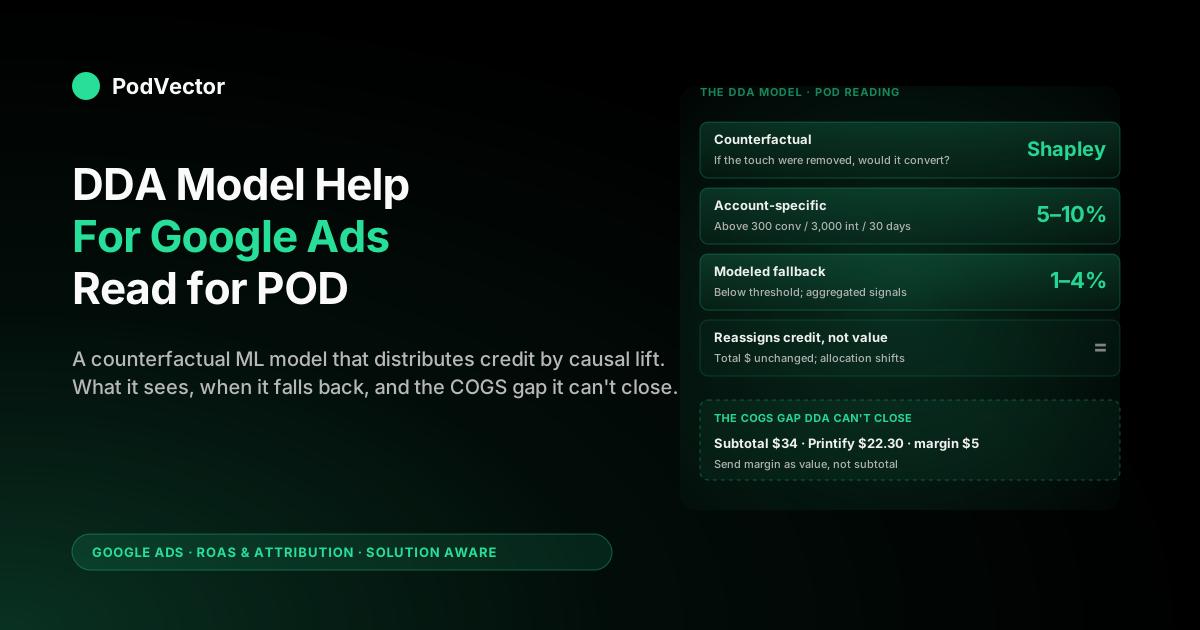
Quick Answer: Google's data-driven attribution (DDA) model is a counterfactual machine-learning system that compares the conversion paths people who converted took against paths people who didn't, and assigns each touchpoint a fractional credit reflecting how much it shifted the outcome. The Google Ads Help page on the model is about 1,100 words and covers definition, benefits, requirements (300 conversions and 3,000 ad interactions per conversion action over 30 days), and a six-step setup.
What it doesn't cover, and what every print-on-demand seller actually needs: how to evaluate whether the model is working on a POD-scale account, what the modeled fallback does when you're below the threshold, and why DDA's credit distribution is structurally right while its conversion value is structurally wrong for any POD store sending Shopify order subtotal instead of margin after Printify or Printful supplier cost. This guide reads the model help docs from a POD operator's seat.
What the model help docs actually cover
The official Google Ads Help page on data-driven attribution is the canonical "model help" reference. In about 1,100 words it documents six things, in this order: a one-paragraph definition of DDA as a machine-learning attribution model, a "benefits" section with a quoted 6% average conversion lift, a "how it works" section with one worked example, a data-requirements section listing the 300-conversion / 3,000-interaction / 30-day thresholds, a six-step setup procedure, and a related-links footer. A sister page on switching existing conversion actions to DDA covers auto-switch behaviour and bulk operations in another 450 words.
That is the entire official "model help" surface area. Everything else you find ranking for this query — the agency explainers, the analytics-vendor blog posts, the YouTube walkthroughs — paraphrases those two pages and adds context.
None of them speak to print-on-demand specifically. None of them explain what happens when your average order value is $34, your Printify supplier cost is $22.30, and you're feeding Shopify order subtotal to the model as conversion value. This article does, while staying close to the same six topic anchors the help page itself uses, so the docs and this read interleave cleanly.
If you want the strategic framing for where DDA fits among Google Ads ROAS levers (Smart Bidding, attribution windows, value tracking), start at the cluster pillar, the complete guide to Google Ads ROAS and attribution for POD. If you want the operator's reading of the help page from the decision-making side rather than the model side, see data-driven attribution Google Ads help explained for POD sellers.
How the DDA model assigns credit, in plain terms
The Google Ads Help page describes the model as one that "uses your conversion data to calculate the actual contribution of each ad interaction across the conversion path." That sentence is true but underspecified. Here is the operator-grade version of what is actually happening, drawn from Google's published academic precedent on attribution modelling and the help page combined.
The model is fundamentally a counterfactual. For every conversion path in your account, it asks: if a particular touchpoint had been removed, how likely would the conversion still have occurred?
It then assigns each touchpoint a credit weight proportional to how much its presence raised the conversion probability over the no-touch counterfactual. Touchpoints that consistently appeared in successful paths but didn't appear in unsuccessful ones get higher weights. Touchpoints that appeared in both kinds of paths roughly equally get lower weights, because their presence didn't actually shift the outcome. The credit weights for each path sum to 1 and the conversion value is multiplied by those weights to produce reported per-touchpoint conversion value.
The technical underpinning Google has cited in research papers is a Shapley-value-style algorithm — the same game-theoretic credit-allocation method used in cooperative-game theory. Touchpoints are players, the conversion is the game's payoff, and Shapley values distribute the payoff across players based on each player's marginal contribution averaged across all possible orderings.
You don't need to understand Shapley values to use DDA. You do need to understand that the credit a touchpoint receives depends on what other touchpoints it co-occurred with, which is why DDA reports look "messy" compared to last-click — they should, because they're modelling interaction effects that last-click ignores by definition.
What this looks like for a POD path: a shopper sees a YouTube ad for your custom-graphic hoodie design, then later searches "graphic hoodie" generically and clicks a Shopping ad, then searches your brand name and clicks a brand Search ad, then converts. Last-click gives the brand Search click 100% of the credit.
DDA, looking at thousands of similar paths, sees that paths starting with a YouTube view convert at 3% versus paths without one converting at 1.2%, and apportions the YouTube touch its share of the marginal lift. Numerically, the brand click might end up with 30%, the generic Shopping click with 45%, and the YouTube view with 25%. None of those numbers are stable across accounts; they depend entirely on what your specific account's path data looks like.
The signals the model uses (and the ones it ignores)
The Google Ads Help docs say DDA looks at "all the interactions — including clicks and video engagements — on your Search (including Shopping), YouTube, Display, and Demand Gen ads." That sentence is the entire treatment of input signals. There's more nuance worth knowing.
What the model sees: click events on Search, Shopping, Display, Demand Gen, and PMax surfaces; engaged-view events on YouTube (defined as 10+ seconds of an ad watched followed by a conversion within the lookback window); time elapsed between each touchpoint and the conversion; device for each touchpoint; ad format; and the conversion value you provide for the converting action. These signals enter the counterfactual model as features.
What the model doesn't see: impressions that didn't generate a click or engaged view (display impressions, in particular, get zero credit unless the user later clicked or had a 10+ second engaged view); non-Google paid channels (Meta, TikTok, Pinterest paid traffic is invisible to DDA inside Google Ads); organic search; direct traffic; email; and offline events unless you've specifically wired up offline conversion imports. The model is honest about its scope: it allocates Google Ads credit across Google Ads touches.
This matters for POD because POD media mixes are rarely Google-only. A typical POD store running Google Ads, Meta Ads, and email gets a partial truth from Google's DDA — it's correctly allocating credit within Google Ads, but it can't tell you that the customer who converted on a Search-brand click had been retargeted by a Meta carousel ad three days earlier.
For cross-channel allocation you need GA4's DDA, which sees a wider funnel. The two models will disagree on Google Ads's contribution and both will be right within their respective scopes. We unpack that in Google Ads attribution explained for POD sellers.
Eligibility, the modeled fallback, and what it means for POD
The help page is unambiguous: DDA is recommended for any conversion action with at least 300 conversions and 3,000 ad interactions on supported networks within the last 30 days. The wording matters — those are recommended minimums for the account-specific model to be reliable, not hard cutoffs. DDA still runs below those thresholds; it just runs in a different mode.
Below the threshold, Google falls back to what it calls a modeled DDA — the same algorithmic approach trained on aggregated, privacy-respecting signals across the broader Google Ads ecosystem rather than your account specifically. The modeled fallback exists because most advertisers don't meet the threshold per conversion action and Google needs a sensible default. For a POD store doing $15K monthly with a single "Purchase" conversion action, modeled DDA is what's actually running, and the help page glosses past this.
What does that mean operationally? Three things.
First, your DDA credit distribution is being inferred from accounts that look like yours statistically, not from your account's own paths. Second, the lift over last-click is smaller and more stable in modeled mode — typically 1–4% versus the 6% average Google quotes for above-threshold accounts. Third, as your account grows past the threshold, you'll see DDA "drift" because the model is gradually weighting your own data more heavily; a sudden change in reported credit distribution six months in usually means you crossed the threshold for one or more conversion actions, not that something broke.
For POD sellers, the practical eligibility map looks like this:
- Sub-$10K monthly revenue, single conversion action. Below threshold. Modeled DDA running. Use it as a directional signal, not a budget allocator.
- $10K–30K monthly, single conversion action. Likely below threshold for "Purchase" but possibly above for "Add to Cart." DDA is in mixed mode. Smart Bidding still benefits but Model Comparison reports are noisy.
- $30K–100K monthly. Generally above threshold for "Purchase." Account-specific DDA is engaged. Reports stabilise and lift over last-click reaches the quoted 5–10% range.
- $100K+ monthly. Account-specific DDA is fully engaged across all major conversion actions. The 6% average benchmark applies and individual deltas are interpretable down to ad-group level.
For more on the threshold mechanics specifically, see Google Ads data-driven attribution explained for POD sellers.
The six-step setup the help page documents
The Google Ads Help page lists six steps to set DDA on a conversion action. They are accurate as of the 2024–2026 UI:
- In your Google Ads account, click the Goals icon in the left navigation.
- Click the Conversions drop-down in the section menu.
- Click Summary.
- In the table, click the conversion action you want to edit.
- Click Edit settings, then under "Attribution model" select Data-driven from the dropdown.
- Click Save, then Done.
Three notes the help page doesn't include but POD operators need:
New conversion actions default to DDA. Since late 2024, when you create a new conversion action in Google Ads, DDA is the default model and you have to actively change it to something else. POD sellers who set up Google Ads in 2025 or 2026 are usually already on DDA and don't realise it. The setup steps above are mostly relevant for legacy accounts that were on last-click before the default flip.
The 14-day stabilisation window is real and undocumented. After switching from last-click to DDA, reported conversion numbers are noisy for roughly 14 days while the model retrains on your account's path data. Don't make budget changes inside that window. The help page does not warn about this.
Bulk switching exists. If you have multiple conversion actions to switch (typical for stores with separate Purchase, Add to Cart, and Begin Checkout actions), the sister help page on switching to DDA covers bulk selection. For POD stores with a clean account structure, switching all conversion actions at once is fine because they're all related to the same purchase funnel. For stores with separate B2B-quote and B2C-purchase actions, switch them independently.
Evaluating whether the model is working on a POD account
The Google Ads Help docs do not include an "is it working" diagnostic. They assume the model is working as long as the threshold is met and you've enabled it. POD sellers, who are usually below threshold or hovering near it, need a more rigorous check. Here's the four-test diagnostic we run on POD accounts:
Test 1: Does the Model Comparison report show a non-trivial delta? Open Goals → Conversions → click on a conversion action → Model Comparison tab. Compare DDA against last-click for the last 30 days.
If the delta on any individual campaign is less than ±3%, DDA isn't doing meaningful work on that campaign — which usually means the campaign's paths are too short (single-click conversions) for credit redistribution to matter. PMax campaigns should show double-digit deltas; pure brand-Search campaigns may show very little change. Both are normal.
Test 2: Does the credit distribution match the funnel you expect? Generic discovery touches (YouTube engaged views, Display, generic Search/Shopping) should get more DDA credit than last-click; closing touches (brand Search, brand Shopping) should get less. If the pattern is reversed, something is misconfigured — most often it's that engaged-view conversions aren't being tracked because the YouTube tag is broken, so DDA can't see the upper-funnel signal it needs.
Test 3: Is Smart Bidding's reported tROAS holding steady or improving over the 30 days post-switch? If you're running Maximize Conversion Value or tROAS, the bidder consumes DDA credit and adjusts. Within 30 days of switching, you should see tROAS hold or improve at the same spend, or spend rise at the same tROAS. If both go in the wrong direction, either DDA isn't working on your account scale or you switched during a seasonal trough; rerun the comparison after a stable month.
Test 4: Does the modeled-vs-account-specific status match your eligibility? Google Ads doesn't surface this directly, but you can infer it. If a conversion action has fewer than 300 conversions in the last 30 days, you're on modeled DDA for that action regardless of what the dropdown says.
The model still runs but the lift will be smaller. POD sellers below threshold who expect 6% lift will be disappointed; the appropriate expectation is 1–4%.
If all four tests come back positive, DDA is working on your account. If three of four come back positive, you're seeing modelled-mode behaviour and the right move is to keep DDA on while you grow conversion volume past 300 per action. If two or fewer come back positive, something is misconfigured and the issue is almost always upstream of DDA — usually broken conversion tracking, a missing YouTube tag, or zero-value conversions being sent.
The COGS gap: why DDA gets credit right and ROAS wrong for POD
Here is the part of the Google Ads Help page that POD sellers need to read most carefully and that the help page itself simply cannot address. DDA distributes credit across touches in proportion to their causal contribution.
It does not distribute or compute value. The conversion value that DDA reports for each touch is a fraction of the conversion value you sent for the converting action.
For a POD seller using the standard Shopify Google Ads conversion tag, that conversion value is order subtotal — typically $30–45 for a single-item apparel order. If your supplier cost on Printify is $22.30 for a black tri-blend tee with a single-side print, the actual margin contribution of that order is $30 − $22.30 − $1.20 (Shopify payment fee) − $1.50 (refund-rate-weighted reserve) = $5.00 before ad spend.
The DDA model has no way to know that. It allocates the $30 across touches according to causal contribution, and your tROAS bidder happily bids to whatever target you set against $30 — not against $5.00.
The result is precisely what the help page can't warn you about: DDA's credit allocation is structurally right (it's modelling causal contribution honestly) and DDA's reported ROAS is structurally wrong (it's optimising against gross subtotal, not POD margin). The numerical effect: a POD account on DDA with subtotal-as-value typically reports 4–6× ROAS while delivering 0.8–1.2× margin-ROAS.
The bidder is doing exactly what you asked it to. You asked the wrong question.
The fix is to send margin (or a clean margin proxy) to Google Ads as conversion value, not subtotal. There are three operational paths:
- Static margin multiplier in the conversion tag. If your blended margin after supplier cost and fees is consistently around 30%, multiply the order subtotal by 0.30 in the tag's value variable. This is approximate but better than subtotal. Best for POD stores with a tight catalog and low SKU variance.
- Per-product margin in the data layer. Pass the actual gross margin per product through a Shopify data-layer extension. Higher accuracy, more setup. Best for stores with diverse product mixes (apparel + posters + mugs at different margin profiles).
- Live join via your warehouse. Stream Shopify orders, Printify or Printful supplier cost, and Google Ads cost into a warehouse and join them daily; export margin-true conversion value back to Google Ads via the offline conversion adjustment API. This is what large POD operators do; it's the underpinning of how Victor connects DDA credit to true POD margin in real time.
Whichever path you take, the rule is the same: until margin is what you're sending as value, DDA is allocating credit across the right touches but the bidder is optimising for the wrong number. The model's credit distribution stays useful as a relative read; the absolute ROAS does not.
Model troubleshooting patterns the help docs don't list
Six patterns we see when POD sellers send Model Comparison report screenshots asking "is the model broken." In nearly every case the model is fine; the data feeding it is bent.
- Brand Search shows -25% under DDA. Expected. DDA is reallocating credit upstream because brand was usually a closer, not an originator. Don't pause the campaign.
- PMax shows +30% under DDA. Also expected. PMax mixes upper-funnel placements (YouTube, Display) that last-click can't credit.
- Display shows essentially zero credit under either model. Display gets credit only when followed by a click or engaged-view conversion. Most Display impressions are wasted from DDA's perspective. Not a bug.
- Engaged-view conversions column is empty under DDA. Means the YouTube conversion linkage is broken or the engaged-view conversions setting is off in conversion-action settings. Fix in Goals → Conversions → conversion action → Edit settings → "Include in Conversions" and engaged-view tracking.
- Conversion value column matches between DDA and last-click. Not a bug. DDA never invents value — it only reassigns it. Total reported value is identical across both models.
- Reported DDA conversions are dropping over time even though spend is steady. Most common cause: refund data is being pushed back via offline conversion adjustments and is now visible. DDA can't undo the original credit allocation but the net conversion count drops. Healthy behaviour for accounts wired to truth.
For more on the report-reading patterns and the broader help-page reading from the operator-decision side, see about data-driven attribution Google Ads help explained for POD sellers.
How Victor reads the DDA model against live POD margin
The DDA model help page tells you how Google distributes credit. It cannot tell you what that credit is worth in margin terms for your specific Printify or Printful supply chain. Doing that requires joining Google Ads cost and conversion data, Shopify order revenue, and supplier cost from Printify or Printful in one place — refreshed often enough to drive the next bid decision.
Victor connects to your Google Ads, Shopify, and Printify or Printful accounts, holds those three feeds in continuously refreshed a warehouse tables, and answers questions like "what is my true ROAS by PMax campaign after Printify supplier cost and refunds for the last 14 days, comparing DDA-credited conversions to last-click?" or "which DDA-credited generic Shopping keyword has actually been profitable on margin terms over the last 30 days?" The DDA distribution comes from Google. The supplier-cost reality comes from your Printify or Printful order ledger. The join is the thing most POD sellers don't have time to write themselves.
Today, that's a question Victor answers in seconds with the data behind it. The employee roadmap is to let Victor act on the answer — pause unprofitable PMax asset groups, raise generic Shopping bids that DDA over-credits but the bidder hasn't caught up to, alert you when a previously profitable keyword crossed into negative margin because supplier cost moved — once you've granted that level of trust.
The first version is reading. The next version is doing.
FAQs
What kind of model is DDA technically?
A counterfactual machine-learning credit allocation model, drawing on Shapley-value-style game-theoretic credit distribution. It compares paths that converted against paths that didn't and assigns each touchpoint a fractional credit reflecting how much its presence shifted the conversion probability. The Google Ads Help page describes it less technically as a model that "uses your conversion data to calculate the actual contribution of each ad interaction."
Does the DDA model see Meta or other non-Google touches?
No. Google Ads's DDA only sees touchpoints on Google-owned surfaces (Search, Shopping, YouTube, Display, Demand Gen, PMax). For cross-channel attribution that includes Meta, TikTok, email, and organic, you need GA4's DDA, which is a separately trained model on a wider dataset. Google Ads DDA and GA4 DDA will report different numbers; both are correct within their scopes.
What happens to my model output when I'm below the 300-conversion threshold?
Google falls back to a modeled version of DDA — the same algorithm trained on aggregated cross-account signals rather than on your account's specific paths. It still runs, still feeds Smart Bidding, and is still typically better than last-click, but lift over last-click is smaller (1–4% versus 6% average) and reports are noisier. As you grow past the threshold per conversion action, the model gradually weights your own data more heavily.
Will the DDA model's reported numbers change when I update my conversion value?
Yes. DDA's credit distribution is independent of conversion value, but the reported per-touch conversion value is conversion value × credit weight.
If you switch from sending Shopify subtotal to sending margin (subtotal minus supplier cost minus fees), every reported value number drops proportionally — because the denominator dropped. The credit distribution itself does not change. Smart Bidding will retune over the next two weeks against the new value scale.
How long does the DDA model take to retrain after a major change?
About 14 days for the credit distribution to stabilise on a new pattern, longer for Smart Bidding's tROAS to fully consume the change. The Google Ads Help page does not document this window explicitly. Treat reported numbers inside the first 14 days as directional, not actionable, after any switch into or out of DDA.
Should a POD store on $5K monthly revenue use DDA?
Yes. New conversion actions default to DDA in 2026 and the modelled fallback is still safer than last-click for guiding Smart Bidding even at low volume. The bigger lever for a $5K-monthly POD store is fixing the conversion value being sent to Google Ads — switching from order subtotal to margin after Printify or Printful cost — long before worrying about which model is allocating credit.
Does the DDA model handle returns and refunds?
Not by default. Refunds are handled separately via offline conversion adjustments uploaded to Google Ads.
If you don't push refund data back, DDA is allocating credit against gross conversions, not net. POD sellers with above-average return rates (apparel: 12–18%) need refund feedback wired up for DDA's credit distribution to reflect actual outcomes. See Google Ads attribution window explained for POD sellers for adjacent context on lookback windows.
Where do I see DDA's per-campaign credit on a campaign report?
Two places. The conversions column on the Campaigns view shows DDA-credited conversions if DDA is the conversion action's attribution model.
The Model Comparison report (Goals → Conversions → click conversion action → Model Comparison tab) shows DDA versus a comparison model side by side. Use the latter to see what DDA is actually doing differently on your account; use the former to consume the numbers in normal reporting.
Read DDA model output against true POD margin in one chat
The Google Ads Help docs explain the DDA model. Victor explains what the model's credit distribution means after Printify or Printful supplier cost, refunds, and ad spend — across PMax, Search, Shopping, and Demand Gen, refreshed live from your accounts. Ask "what is my margin-true ROAS by DDA-credited campaign for the last 14 days?" and you get the answer with the join behind it.
Try Victor free