
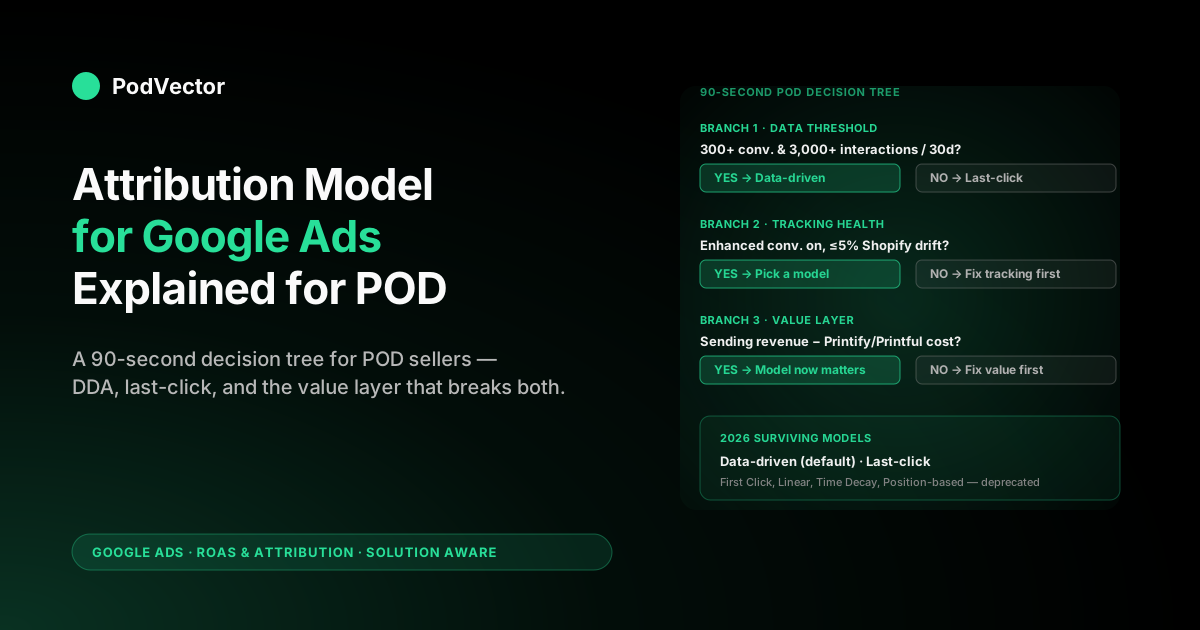
Quick Answer: Picking an attribution model for Google Ads is a decision about which ad interaction gets credit when a buyer touched several ads before converting. As of June 2026, you have only two choices on a new conversion action — data-driven attribution (DDA), which is the default, and last-click — after Google retired First Click, Linear, Time Decay, and Position-based in September 2023, when fewer than 3% of conversions still used them.
For a print-on-demand operator, the right model is almost always DDA, and last-click only for very small or tracking-broken accounts. Google no longer enforces a hard data threshold to switch a conversion action to DDA — the old 300-conversion / 3,000-interaction minimum is gone, and DDA is the default on every new action. What survives is a practical rule of thumb: until a conversion action sees roughly 300 conversions in 30 days, DDA has too little data to distribute credit any differently than last-click would. The model choice itself is the easy decision; the harder one is the conversion value you send Smart Bidding.
Send Shopify subtotal and DDA optimises against revenue your business will never see; send revenue minus Printify or Printful supplier cost and the same model finally optimises against profit. This guide treats the model choice as a five-minute decision and spends the rest of the page on the operational decisions around it that actually move ROAS.
What an attribution model in Google Ads actually decides
An attribution model is the rule that splits credit for a conversion across the ad interactions that preceded it. It is a distribution rule, not a measurement rule.
It does not decide whether a conversion happened, when it happened, or how much it was worth. It decides only this: given that a conversion happened and that several eligible ad interactions sat inside the attribution window, how should the conversion's count and value be assigned across those interactions in your reporting and in the signal sent to Smart Bidding.
Three things are commonly conflated with the attribution model and are worth separating before you make a decision:
The attribution window decides which interactions are even eligible for credit. The default 30-day click-through window means an interaction more than 30 days before the conversion is invisible to the model. We cover the window in detail in the Google Ads attribution window explained for POD sellers piece — the headline for POD operators is that the 30-day default is usually too long for a $34 hoodie purchase cycle.
The conversion value decides what dollar number gets distributed. Most POD accounts pass Shopify subtotal as the value, which is gross revenue before supplier cost and fees. The model distributes whatever number you send. It does not, on its own, know that a $34 mug only earned you $9 of profit.
The bid strategy decides how the distributed signal becomes ad spend. Target ROAS, Maximise Conversion Value, and Maximise Conversions all consume the model's output as input but apply different optimisation logic on top.
The model sits in the middle of these three. Get the window right, get the value right, and pick a model — in that order.
Skip ahead to the model question without sorting the other two and you are tuning the wrong knob. The cluster hub at Google Ads ROAS and attribution for POD walks through how all three layers interact for a POD account.
Which models still exist in 2026 and why
Until September 2023 Google offered six attribution models for Google Ads conversion actions: Last Click, First Click, Linear, Time Decay, Position-based, and Data-driven. Google retired the four rules-based models in that month — they accounted for under 3% of conversions — and migration of existing actions ran through 2024. By June 2026 only two remain on a new conversion action.
- Data-driven attribution (DDA, default). Distributes credit across eligible interactions using a machine-learning model trained on your account's own conversion paths — it compares the click paths of shoppers who bought against the paths of shoppers who didn't, then hands more credit to the interactions that actually moved buyers toward a purchase. Google removed the old hard eligibility minimum, so DDA is now selectable as the default on every new conversion action regardless of volume — but it needs enough data (roughly 300 conversions and 3,000 ad interactions over the trailing 30 days) before its credit distribution diverges meaningfully from last-click.
- Last click. Assigns 100% of the credit to the final ad interaction inside the window.
The deprecated four — First Click, Linear, Time Decay, Position-based — still appear in older third-party guides like the KlientBoost and DataFeedWatch articles you may have landed on while researching this. Those guides are not wrong; they are just out of date. Google's own About attribution models reference now lists only data-driven and last-click.
If you set up a conversion action in 2026 and pick "Linear," the system will refuse and route you to one of the two surviving models. Existing conversion actions that were set up under the deprecated models were migrated to data-driven during 2024 unless their owners explicitly switched them to last-click.
Why the consolidation? Google's stated reason was that machine-learned credit beats static rules in head-to-head measurement on the average account, and that maintaining four rule-based models was operationally expensive.
The unstated reason was that data-driven credit produces better feedback to Smart Bidding, which produces better revenue for the platform. Both reasons happen to be true.
For a POD account, the deprecation is mostly good news: the deprecated models — particularly Linear and Position-based — were prone to over-crediting view-heavy YouTube touches that POD margins cannot support. The Google Ads attribution models explained for POD sellers guide expands on the historical models if you need the lineage; for the active decision, only DDA and last-click matter.
The 90-second decision tree for a POD account
Most POD accounts can pick a model in under two minutes by walking three branches. The full enumeration of edge cases lives in our attribution model Google Ads explained for POD sellers companion piece; the streamlined version:
Branch 1 — does your conversion action have at least 300 conversions and 3,000 ad interactions in the last 30 days? If yes, DDA. If no, Google will still let you select DDA — the hard eligibility gate is gone — but with that little data its credit distribution barely differs from last-click, so run last-click for simplicity and defensible reporting while you scale spend.
Branch 2 — is your conversion tracking healthy? Healthy means: enhanced conversions on, the Google Ads tag firing on the order-confirmation page, conversions matching Shopify orders within 5%, and no obvious double-counting from a duplicate GTM tag. If tracking is broken, the model decision is moot — fix tracking first. DDA on broken tracking will train Smart Bidding on noise faster than last-click will, because DDA distributes credit further across the funnel and amplifies any upstream tracking error.
Branch 3 — are you sending a profit-aware conversion value? If you are sending Shopify subtotal, DDA is making accurate distribution decisions on a wrong number. The fix is not to change the model; it is to switch the conversion value to revenue minus supplier cost. The model decision then sits on top of a profit-aware signal and DDA does what it is designed to do — distribute profit credit across the touchpoints that produced it.
For a POD account that clears all three branches, the answer is DDA. For an account that fails Branch 1, last-click. For an account that fails Branch 2 or 3, fix the upstream issue before deciding on a model.
DDA data sufficiency and what to do if you're under it
Google dropped the formal data minimum that used to lock DDA out of low-volume accounts, so you can set any conversion action to DDA today. But the old 300-conversion / 3,000-ad-interaction figure still matters as a data-sufficiency benchmark, measured per conversion action, not per account. A POD account spending $4,000 a month on Shopping with a 2.5% conversion rate will see roughly 100 purchases a month — well under that benchmark for the purchase conversion, so DDA on it has thin data to learn from.
The same account may have 800 add-to-cart events a month from the same traffic, which clears the benchmark comfortably for an add-to-cart conversion action. Because the model is set per action, a single account can sensibly run DDA on add-to-cart and last-click on purchase.
That split is awkward but useful. The right tactical move on a low-volume POD account is usually:
- Purchase action: last-click until you cross ~300 purchases in 30 days, then switch to DDA. Use the purchase action as the optimisation target for Target ROAS bidding because it is the closest signal to actual profit.
- Add-to-cart action: DDA once it has the volume. Use it as a secondary "observation" conversion in Google Ads — it does not feed bidding directly but trains your understanding of which campaigns are producing intent versus conversion.
- View-content / engaged-page action: last-click and observation only. DDA on shallow events tends to over-credit Display impressions on a POD account.
If you want DDA to have enough data to behave well on the purchase conversion sooner, the cleanest moves are: consolidate to fewer Shopping campaigns so credit and learning concentrate on one optimisation target; ensure enhanced conversions are on so first-party, cookieless modeling boosts your measured conversion count; and turn off conversion actions that are duplicates or shallow events. Trying to get to 300 purchases by adding more spend to an unprofitable campaign is a worse outcome than being patient on last-click.
When last-click is still the right call
Last-click is the simpler, more defensible model on a small or noisy account. The cases where it is the right pick on a POD account:
Low-volume accounts. Below roughly 300 conversions in 30 days, DDA has too little data to distribute credit differently than last-click would, so last-click is the simpler, more transparent pick even though Google now technically lets you select DDA. This is the default scenario for most POD accounts in the first six months of running paid traffic.
Accounts with broken or partial tracking. If enhanced conversions are off, if you are running on Universal Analytics holdover tags, if your conversion count differs from Shopify by more than 10%, last-click is the model that is least likely to amplify the underlying tracking error. DDA will amplify it. Fix the tracking and move to DDA.
Accounts dominated by one channel. If 90%+ of your spend is on a single Branded Search campaign and the other campaigns barely fire, the multi-touch path that DDA is designed to model does not really exist on your account. Last-click and DDA will produce nearly identical credit assignments. Pick last-click for simplicity.
Accounts where you need stable historical reporting. If you are presenting numbers to a client or co-founder who tracks ROAS week-over-week, switching to DDA part-way through the year produces a step-change in reported ROAS that is hard to explain. Last-click is more boring but more comparable across periods. The agency-shopping side of this trade-off is covered in Google Ads services for POD: the complete buyer's guide.
Outside those four cases — qualifying account, healthy tracking, multi-touch path, no reporting-stability concern — DDA is the better pick.
The conversion-value question that breaks any model
The single most common attribution mistake on a POD account is not the model choice. It is the conversion value. The model decides distribution; the value decides what is being distributed. Most Shopify-Google Ads integrations pass checkout.subtotal_price or order.total_price as the conversion value. Both are revenue numbers. Neither is profit.
For a POD seller using Printify, the supplier cost on a $34 hoodie is typically $14 for the blank shirt plus the print, plus shipping you absorb in the price. Shopify takes about 4.4% in payment processing on a $34 order — call it $1.50.
Your actual profit on that hoodie is roughly $34 − $14 − $1.50 = $18.50, which is a 54% gross margin on an unusually well-priced product. On a $24 mug with $11 supplier cost, profit is closer to $11.50 — 48%. On a $19 t-shirt at thinner pricing, profit can be under 30%.
If you send Shopify subtotal as the conversion value, Smart Bidding sees the same $34 from every product line and optimises for revenue. It will happily double down on a campaign that drives $19 t-shirt sales — high revenue per click but low margin — and starve a campaign driving $48 hoodie sales with much higher per-unit profit.
DDA on subtotal distributes the wrong number perfectly. Last-click on subtotal makes the same mistake more bluntly. The model is innocent; the input is wrong.
The fix is to pass profit-aware values. Two patterns work:
- Static line-item profit map. Maintain a Shopify metafield for each product that stores the supplier cost (Printify or Printful price) and a Liquid template that calculates
line_total - supplier_cost - estimated_feesat checkout. Pass that profit number as the conversion value. - Live profit calculation via offline conversions or a warehouse. Use Shopify webhooks and a Printify API call to compute true margin per order, then push it back to Google Ads via an offline conversion adjustment within 24 hours. This is more accurate but more operational; covered in the complete guide to Google Ads + Shopify integration for POD.
Either pattern, paired with DDA, gives you a model that is finally distributing the right thing. Without the value fix, the model decision is theatre.
How the model interacts with the attribution window
The model and the window are configured independently but operate as a pair. The window decides which interactions are eligible. The model distributes credit across the eligible set.
Three combinations matter for POD:
30-day window + DDA (default). Wide eligibility, smart distribution. The risk is that DDA gets to distribute credit to interactions 25 days before the conversion that are mostly noise on a POD purchase cycle of 1–7 days. DDA is good but not magical — it will assign small but non-zero credit to weak associations because the alternative is to assign zero, and the model is biased against that.
7-day window + DDA. Tighter eligibility, smart distribution within it. This is the configuration we recommend for most POD accounts: the window matches the actual purchase cycle, and DDA distributes credit only across interactions that plausibly contributed. The cleaner eligibility set produces a cleaner training signal for Smart Bidding.
30-day window + last-click. Wide eligibility, blunt distribution. The window matters less because last-click ignores everything except the final interaction anyway. This combination is fine on small accounts and produces stable, defensible reporting. It does, however, throw away the multi-touch information that DDA could use.
The choice between configurations is rarely about the model in isolation. Tighten the window first to match your actual cycle, then choose the model on top of it.
Most POD accounts end up at 7-day click + DDA once they clear the data threshold. Operators stuck at 30-day click + DDA out of inertia are typically over-attributing to YouTube and Demand Gen touches that did not really cause the purchase.
What changes for Smart Bidding when you switch
Smart Bidding consumes the attribution model's output as its training signal. Switching models is therefore a Smart Bidding event, not just a reporting event. The platform formally requires a 14-day relearning period after a model change on a campaign that is using Target ROAS or Maximise Conversion Value. In practice, the noise period on a POD account is closer to 21 days for the bidder to fully restabilise.
What you typically see during the relearning window:
- Days 0–3: Reported conversions appear stable because the model change is not yet retroactive in the bidder's training data.
- Days 4–10: Bid behaviour shifts as Smart Bidding incorporates the new credit signal. Cost-per-conversion can move 15–30% in either direction. Reported ROAS often drops temporarily because the bidder is exploring rather than exploiting.
- Days 11–21: Bidder converges on the new credit-signal pattern. ROAS typically returns to or slightly above the pre-switch baseline if the new model is correct for the account.
The operational implication for POD: do not switch the attribution model in the run-up to a major sales event (Q4 holiday, Mother's Day, back-to-school) or during a product launch. Pick a quiet period.
Do not also change the bid strategy or the conversion value at the same time as the model change — separate the variables so you can attribute any ROAS shift to the right cause. The Google Ads playbook at the complete Google Ads playbook for print-on-demand sellers covers the broader release-management discipline this fits inside.
Switching models safely on a live POD account
If you have decided to switch — typically last-click to DDA after crossing the data threshold — the safe sequence is:
- Pre-flight checks. Confirm the conversion action has roughly 300+ conversions and 3,000+ interactions in the last 30 days (Tools → Conversions → conversion action) so DDA has the data to behave differently than last-click. Confirm enhanced conversions are on. Confirm the conversion value is profit-aware, or accept that you are switching the model on a revenue signal and fixing value next.
- Document the baseline. Pull the last 14 days of campaign-level CPA, conversion volume, and ROAS. Save it. You need a baseline to evaluate the switch against.
- Use the Model Comparison report. Tools → Measurement → Attribution → Model comparison. Compare last-click against data-driven for the same date range. The report shows you which campaigns gain credit and which lose credit under the switch. Campaigns that gain credit will see their ROAS improve in reporting after the switch; campaigns that lose credit will see it worsen. This preview lets you set expectations before you flip the switch.
- Switch one conversion action at a time. If you have purchase, add-to-cart, and view-content actions, switch the purchase action first because it is the optimisation target. Leave the others on last-click for one full reporting period before switching them.
- Hold all other variables. Don't change the bid strategy, the daily budget, the conversion value, or the campaign structure during the switch period. Isolate the variable.
- Watch for 14–21 days. Compare the post-switch period against the documented baseline. Expect noise; expect ROAS to dip and recover. The honest comparison is at day 21, not day 7.
Diagnosing whether your current model is wrong
Three signals suggest the current attribution model is misaligned with the account:
The Model Comparison report shows large divergence. If switching from last-click to DDA would shift conversion credit by more than 25% on your top three campaigns, the current model is materially mispricing your touchpoints. Either switch (if eligible) or accept that you are running on a model the data disagrees with.
YouTube and Demand Gen ROAS look implausible. If your YouTube campaigns are showing 4× ROAS while your Branded Search shows 12× ROAS, and YouTube spend is small, the YouTube ROAS is probably real-ish. If YouTube shows 8× ROAS while your overall blended ROAS is 4×, the model is probably over-crediting view-through to YouTube. The fix is usually to tighten the engaged-view window to 1 day rather than to switch the attribution model itself.
Smart Bidding is hyper-allocating to a single campaign. If Target ROAS is funnelling 70% of the daily budget into one campaign that wasn't getting that share a month ago, and you didn't change anything structurally, the credit signal has shifted under you — usually because DDA found a high-credit pattern in a campaign that may or may not be sustainably the right place to spend. Pull the Model Comparison report to confirm whether DDA actually credits that campaign more than last-click would, or whether something else is going on.
None of these signals on their own justify a model switch. They justify investigation. The switch decision still goes back through the decision tree.
Reading the model against live POD margin
The honest answer to "is my attribution model correct" requires comparing what Google Ads says about each campaign against what your bank account says about profit. That comparison is operationally tedious.
You pull a campaign-level export from Google Ads, you pull an order export from Shopify, you pull a fulfillment-cost export from Printify or Printful, you join them, you compute true ROAS by campaign, and then you compare it to the model-attributed ROAS. The work is straightforward and almost no POD operator does it routinely because it takes half a day per pull.
This is the kind of work Victor — PodVector AI's AI employee for POD sellers — handles end to end. Victor runs on a live data layer that joins your Google Ads spend, Shopify orders, and Printify or Printful fulfillment costs, so when you ask "what's my profit-true ROAS by campaign for the last 30 days under DDA versus last-click," he computes it from your actual numbers rather than a theoretical answer — then acts on it.
When the model-versus-actuals divergence crosses a line you set, Victor flags it and drafts the budget reallocation across your campaigns, holding it at an approval gate for your sign-off before he moves spend. The model decision is still yours; Victor closes the loop from "the data shifted" to "the spend has been re-pointed" on the same day, instead of waiting for a half-day manual pull.
FAQs
Is data-driven attribution actually better than last-click for a POD account?
Yes, on accounts with enough volume (roughly 300 conversions and 3,000 ad interactions per 30 days on the conversion action) and healthy tracking. DDA distributes credit across the multi-touch path that POD buyers actually take, which feeds Smart Bidding a richer signal than last-click. On low-volume or tracking-broken accounts, last-click is the safer pick — Google will let you select DDA there, but it has too little data to beat last-click.
Can I still pick Linear or Position-based attribution in 2026?
No. First Click, Linear, Time Decay, and Position-based were all retired in September 2023, when fewer than 3% of conversions still used them. New conversion actions can only use data-driven or last-click. Existing actions on the deprecated models were migrated to data-driven through 2024 unless explicitly switched to last-click.
Does the attribution model change my reported revenue?
It changes how revenue is split across campaigns and keywords, not the total. Total reported conversions and conversion value should stay roughly the same after a model switch — what changes is which campaigns get credit. Use the Model Comparison report to preview the redistribution before switching.
How long after switching attribution models should I wait before evaluating ROAS?
Smart Bidding officially relearns in 14 days; on a POD account, give it 21 days before drawing conclusions. During days 4–10 you will see bid behaviour shift and ROAS likely dip. The honest comparison is at day 21 against a documented pre-switch baseline.
Should I switch attribution models during Q4?
No. The 14–21 day relearning period overlaps directly with your highest-stakes selling window. Switch in January or in a quiet shoulder month. Lock the model down for Q4 and revisit in the new year.
Does the model affect Performance Max campaigns?
Yes — Performance Max uses the same conversion action's attribution model as everything else. If you are on data-driven for the purchase conversion, Performance Max bids against DDA-distributed credit. The model is set at the conversion action level, not the campaign level.
Do cookie loss and privacy changes affect which attribution model I should pick?
Indirectly, yes. Google ended its Privacy Sandbox cookie-deprecation plan in late 2025, so third-party cookies persist in Chrome for now — but the platform has shifted decisively to first-party measurement regardless. DDA leans on modeled, cross-device conversion paths, so it degrades faster than last-click when tracking is thin. The fix is the same either way: turn on enhanced conversions (hashed first-party email/phone at checkout) and consent mode so Google can model conversions it can no longer observe directly. With enhanced conversions on, DDA stays well-fed; without it, your measured volume drops and DDA loses the data it needs to beat last-click.
Can I have different attribution models on different conversion actions?
Yes, and you usually should. The purchase action is the highest-stakes one and deserves DDA once eligible. Add-to-cart, view-content, and other shallow events can sit on last-click as observation actions without affecting bidding. Setting them all to the same model is convenient but rarely optimal on a POD account.
See the model decision against your real POD margin
Picking an attribution model is a five-minute decision. Knowing whether it is working takes a half-day data pull every week. Victor answers questions like "what's my profit-true ROAS by campaign under DDA versus last-click" in a sentence — joining live Google Ads, Shopify, and Printify or Printful data so the model decision sits on top of real numbers rather than theoretical ones. And run the comparison on your own account before your next attribution decision.
Try Victor free