
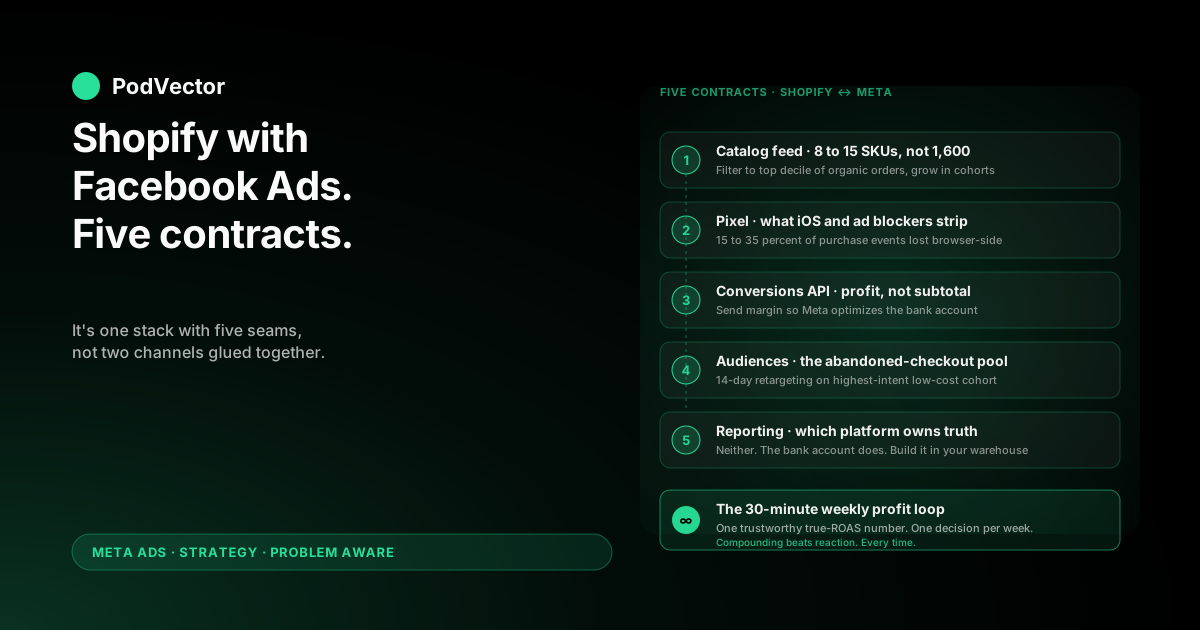
Quick Answer: Running Shopify with Facebook Ads is not two channels glued together. It's a single system with five hand-offs between Shopify and Meta — catalog, pixel, server-side conversions, audiences, and reporting — and most print-on-demand accounts leak money at the seams, not inside either platform.
This playbook walks through each hand-off as a contract: what Shopify sends, what Meta does with it, and where the POD-specific gap shows up. Get the contracts right and a $50/day prospecting campaign starts producing trustworthy decisions inside three weeks.
Get them wrong and Meta optimizes toward the prettiest revenue numbers while your Printify or Printful invoice quietly absorbs the margin. Both outcomes look the same on day three. They diverge sharply by day thirty.
Shopify with Facebook Ads is a stack, not two channels
Most published Shopify Facebook Ads guides — including OptiMonk's beginner's guide for 2026 and Shopify's own Meta Ads Manager walkthrough — treat the integration as a setup task. Click "connect," install the channel app, and the work is supposedly done.
That framing hides the actual problem. Shopify and Meta are two systems with two different jobs, two different data models, and two different ideas of what a "purchase" is worth.
Shopify knows the order subtotal, the supplier cost, the shipping margin, and the refund. Meta knows the click, the impression, the audience, and the campaign that surfaced the ad. Neither platform knows the full economics of the order without the other handing data over correctly.
For an owned-inventory store at 50–60% gross margin, sloppy hand-offs hurt but don't break the business. Almost any campaign that drives revenue is profitable enough to keep running.
For print-on-demand at 28–35% contribution margin after Printify or Printful supplier cost, every hand-off matters. A 10% reporting error is the difference between scaling a campaign and quietly losing $4,000 a month.
The five contracts below are the seams between Shopify and Meta. Treat each one as a deliberate decision — not a default.
Contract 1: the product catalog feed
The catalog feed is the product list Shopify exposes to Meta. It powers dynamic ads, Advantage+ Shopping (Meta's all-in-one auto-targeted campaign type), and the Instagram Shop tab.
By default, Shopify's Facebook & Instagram channel app syncs every published product. For a POD store with 200 designs across 8 garment colors, that's 1,600 SKUs Meta will try to learn against on a small budget. Most of them have never produced an organic order.
What Shopify sends
Title, description, retail price, images, availability, variant data, and a product type. Shopify does not send supplier cost, profit margin, or POD-specific tags out of the box.
That last gap matters. A $24 mug with 70% margin and a $32 hoodie with 18% margin look identical to Meta's algorithm. Without an external signal, Meta will spend toward whichever generates the highest revenue per click — usually the hoodie.
What to actually do
Three moves before launch:
- Filter the feed to your top 8–15 SKUs. Use Shopify's catalog filtering or product collections to send Meta only the SKUs in the top decile of your last 90 days of organic orders. Add new cohorts of 5–10 every two weeks once the initial group has stabilized.
- Tag SKUs by margin tier in Shopify metafields. Create a custom field (e.g.,
margin_tier: high|mid|low) so you can later split campaigns or budgets by tier. The catalog app will sync this field if you add it to the product feed mapping. - Strip catalog noise. Remove inactive product variants, drafts, and unpublished collections from the feed. Meta will count every variant against the learning floor whether it sells or not.
Spending an hour pruning the feed before launch typically saves the first $500 of wasted spend on irrelevant SKUs the algorithm couldn't have known to skip.
Contract 2: the Pixel and what it cannot see
The Meta Pixel is a JavaScript snippet on your Shopify theme that fires browser-side events: page views, add-to-cart, initiate-checkout, purchase. It's the legacy half of Meta's tracking stack and the part most setup guides stop at.
For POD on Shopify in 2026, the Pixel alone is no longer enough. iOS privacy restrictions, browser tracking-protection settings, and ad blockers swallow somewhere between 15% and 35% of pixel events depending on your audience. Mobile-heavy POD audiences (gift buyers on Instagram, often 70%+ mobile traffic) sit at the worse end of that range.
What Pixel-only setups miss
Three categories of conversion routinely don't fire pixel events:
- iOS 17+ Mail and Safari Private Relay traffic. The pixel may load but the purchase event gets stripped before reaching Meta.
- Ad-blocker users. Roughly 25–30% of US desktop traffic and 5–10% of mobile blocks pixel scripts at the network level.
- Cross-device purchases. Click on Instagram on phone, complete checkout on laptop the next day — the pixel sees a "new" purchase on a device it doesn't recognize.
The result is a systematic undercount of conversions that flatters cost-per-purchase upward by 20–40%. Meta thinks the campaign is performing worse than it is, lowers delivery, and the campaign quietly stalls.
Don't try to fix this in the Pixel
The fix is the Conversions API, not better pixel hygiene. Get the basic pixel install correct (one pixel per Shopify store, all standard events firing, no double-firing across the channel app and a manually pasted snippet), then move on.
For the mechanical install, see the complete guide to Meta Ads + Shopify integration for POD. The same article covers double-firing, which is the most common pixel diagnostic miss on Shopify.
Contract 3: the Conversions API as your second source of truth
The Conversions API (CAPI) is Meta's server-to-server channel. Shopify sends the purchase event from its own server directly to Meta, completely independent of whether the buyer's browser ever loaded a pixel script.
Shopify's native Facebook & Instagram channel app turns CAPI on by default in 2026. That covers the basic case: every purchase Shopify processes also flows to Meta as a server event with the customer's hashed email and phone number.
The POD-specific upgrade: profit as conversion value
Default CAPI sends the order subtotal as the purchase event value. For POD this is the wrong signal.
If a $30 t-shirt has $9.50 of contribution margin after Printify supplier cost, fees, and shipping, the conversion value Meta sees should be $9.50 — not $30. When you train Meta on subtotal, the algorithm correctly optimizes toward orders that maximize subtotal, which for POD is often a chase toward low-margin, high-retail items (oversized hoodies, full-color all-overs, multi-piece bundles).
Send the profit number instead and Meta optimizes toward the orders that actually pay your rent. The same campaign budget, two different signals, two different outcomes after 90 days.
How to override the value
Two implementation paths. Pick one based on engineering capacity:
- Shopify Function or webhook → CAPI. A Shopify webhook fires on order creation, a small server enriches the payload with supplier cost (looked up from Printify or Printful order metadata), computes margin, and forwards a custom
Purchaseevent to Meta withvalue = profit. This is the cleanest setup but requires either a developer or a third-party app. - Estimated profit multiplier. If your catalog has consistent margin per SKU type, set the conversion value to
subtotal × margin_factorvia a tag-based rule in the channel app. Less precise, but materially better than raw subtotal and doable in an afternoon.
Whichever path, document the decision so the value you send Meta is reproducible. The cluster's complete guide to Meta Ads ROAS and attribution for POD covers the math behind why this single signal change reshapes 30-day spend allocation.
Contract 4: audiences, customer lists, and lookalikes
Shopify's customer database is your highest-quality audience source. Meta's audience tools — saved audiences, custom audiences, lookalikes — are only as good as the data Shopify hands them.
What Shopify can send to Meta
Through the Facebook & Instagram channel app and Shopify Audiences (Shopify's first-party data network for Plus merchants), Shopify can push:
- Customer lists hashed and matched to Facebook profiles for custom audiences.
- Engagement audiences derived from store visits, viewed-product, add-to-cart, and abandoned-checkout events.
- Lifetime-value cohorts that Meta can use as lookalike seeds.
For a POD store, the most underused of these is the LTV cohort. Most operators build lookalikes from "all purchasers." A lookalike from your top-quartile-margin purchasers — the ones who bought multiple high-margin SKUs — produces a meaningfully different (and better) prospecting audience.
The retargeting pool POD operators usually skip
Abandoned-checkout audiences on Shopify often sit at 4–6× the size of the purchaser audience after three months of paid traffic. They're a high-intent, low-cost retargeting pool that most POD operators leave on the floor because the channel app's retargeting setup defaults are conservative.
Build a dedicated retargeting campaign on the abandoned-checkout audience with a 14-day window, swap creative weekly, and most POD stores recover an extra $0.40–$0.80 of profit per dollar of spend versus prospecting alone.
The pillar piece on the complete Meta Ads playbook for print-on-demand sellers covers the broader cold-warm-hot structure. For sibling specifics, see scaling Facebook Ads + Shopify strategy for POD and the broader Shopify Facebook Ads strategy.
Contract 5: reporting, and which platform owns the truth
This is the contract POD operators most often get wrong, and it costs the most.
Meta's Ads Manager reports a ROAS number. Shopify's analytics reports a ROAS number. The Facebook & Instagram channel app reports yet a third number. None of them match. None of them are wrong, exactly. They're answering different questions.
What each platform actually reports
- Meta Ads Manager: revenue from purchase events Meta thinks it caused, attributed within Meta's selected window (default 7-day click + 1-day view), counting clicks and view-throughs.
- Shopify analytics: revenue from orders where the last-click referral was Facebook or Instagram. Last-click only. View-throughs invisible.
- Channel app: a hybrid Meta-attributed view, often closer to Meta's number than Shopify's.
The honest answer is that none of these is your operating ROAS. Your operating ROAS is the number you can verify against your bank account: orders Shopify processed, minus refunds, minus Printify or Printful supplier costs, minus payment fees, minus shipping subsidy, divided by the spend Meta charged your card.
One number, weekly, in writing
Pick one source of truth and stick to it. The discipline that separates POD operators who scale from ones who churn through ad agencies is having a single profit-aware ROAS number, computed weekly, that everyone on the team trusts.
That number lives in your warehouse — Shopify orders joined to Printify or Printful supplier-cost feeds joined to Meta spend. It is not a number any of the three platforms can give you on their own.
For POD operators in the Problem Aware stage of building this measurement layer, the complete ROAS and attribution guide for POD walks through how to assemble it.
The weekly profit loop between Shopify and Meta
Once the five contracts are in place, the weekly cadence between Shopify and Meta is what compounds. Most POD operators don't have one. They check Meta on Monday, sales on Friday, and try to reconcile the two from memory at month-end.
The 30-minute weekly review
Same time, same day, every week:
- Pull Shopify orders for the prior 7 days, joined to supplier costs. Compute contribution margin per order, then aggregate by referring source where available.
- Pull Meta spend by campaign for the same 7 days. Compute true ROAS = (POD-margin from Meta-attributed orders) / (Meta spend).
- Compare to last week's true ROAS. If trending down, identify whether the cause is creative fatigue (CTR dropped), audience saturation (frequency above 3.5), or margin compression (supplier cost shifted on a SKU mix change).
- Write one decision. Pause one campaign, raise one budget, or test one new creative. Not three. Not five. One.
The "one decision per week" rule sounds slow. In practice, an account with one well-chosen change per week outperforms an account with five impulsive changes by month three, because Meta's learning phase resets every time you materially change a campaign.
A 30-60-90 day sequencing plan
The point of the integration is to build a decision-making system, not a launch. Here's the sequencing most successful POD-on-Shopify accounts follow.
Days 1–30: install and prove the contracts
Get the five contracts above into place. Run one prospecting campaign and one retargeting campaign, both on broad targeting, both at modest budget ($40–60/day prospecting, $15–25/day retargeting). Don't try to scale.
The deliverable at day 30 is not revenue. It's a working profit-aware ROAS number you trust, computed against your bank account. If you don't have that, there's nothing to scale.
Days 31–60: pressure-test SKU and creative selection
With trustworthy reporting, start running margin-tier-aware experiments. Split a $50/day prospecting campaign across two ad sets — one filtered to high-margin SKUs, one to mid-margin — and let them run for 14 days each.
You're not testing creative yet. You're testing whether the catalog filter improves true ROAS by enough to justify the operational cost. The answer is usually yes by 10–25%.
Days 61–90: scale the winners, kill the losers
By day 60 you'll have two to four campaigns with stable, trustworthy true-ROAS numbers and a clear winner. Increase budgets in 20% increments every 5–7 days on winners, and pause anything below break-even.
By day 90 the account is producing decisions, not just spend. That's the bar. For step-by-step launch mechanics, see how to run Facebook Ads for Shopify, step by step.
Six integration mistakes that quietly burn budget
Each of these costs four-figure money over a 90-day window and almost never surfaces as a "bug." The campaigns just underperform without an obvious cause.
1. Trusting the channel app's default conversion value
Shopify's Facebook & Instagram channel app sends order subtotal as the purchase event value. For POD this trains Meta on the wrong signal from day one. Override with profit-aware values, even imperfect ones.
2. Letting the catalog feed sync everything
Every variant the channel app syncs counts against the learning phase floor on a $40/day budget. Filter aggressively to the top 8–15 SKUs and grow the feed in cohorts.
3. Reading Meta's Ads Manager ROAS as if it were truth
Meta's reported ROAS is a Meta-attribution number, not a profit number. POD operators who optimize against it scale toward higher-revenue, lower-margin SKUs and wonder why the bank account doesn't grow.
4. Ignoring the abandoned-checkout audience
This is the largest cheap-to-reach high-intent retargeting pool a POD store has, and the channel app's defaults underuse it. A dedicated 14-day retargeting campaign on this audience compounds quickly.
5. Skipping the Conversions API setup quality check
The channel app turns CAPI on, but doesn't verify event match quality. Check Events Manager weekly for the Event Match Quality score on Purchase events. Below 7.0 means you're losing 20%+ of optimization signal even with CAPI on.
6. Optimizing on day 3 against a 7-day attribution window
Meta's default attribution is 7-day click. Printify and Printful fulfillment runs 5–9 business days. Decisions made on day-3 reported ROAS are noise. Wait until day 14 to interpret a campaign's signal, and write that rule down before you can talk yourself out of it.
FAQs
Do I need both Pixel and Conversions API, or is CAPI alone enough?
Both. Meta uses pixel data for cross-device matching and behavioral signals (scroll depth, viewed-product), while CAPI handles purchase-event accuracy. A pixel-only setup undercounts conversions; a CAPI-only setup loses upper-funnel optimization signal. Run both via the Shopify channel app, which deduplicates events automatically when configured correctly.
How long should I wait before changing a campaign?
For POD, 14 days minimum. The combination of Meta's 7-day click attribution window and Printify/Printful's 5–9 day fulfillment lag means anything earlier is noise. Set this rule in writing before launch.
What's the minimum daily budget that actually works for Shopify with Facebook Ads on POD?
$40/day for 14 days as a hard floor for a single prospecting campaign. Below that, Meta's algorithm doesn't accumulate enough purchase events to exit learning. Realistically, plan for $60–90/day across prospecting and retargeting for the first 30 days. Sub-$20 daily budgets reliably produce worse-than-no-ads outcomes on POD margins.
Should I use Advantage+ Shopping or manual campaigns when starting fresh?
Manual prospecting plus manual retargeting on a cold ad account. Advantage+ Shopping needs roughly 50 conversions per ad set per week to escape learning, and you won't hit that floor on a POD launch budget for three to four weeks. Once the pixel has 40–50 purchase conversions of training data, layer Advantage+ Shopping in parallel as a third campaign.
How do I handle the difference between Meta's reported revenue and Shopify's reported revenue?
Don't try to reconcile them inside either platform. Build a single profit-aware ROAS number in your warehouse — Shopify orders joined to supplier costs joined to Meta spend — and treat that as the truth. Use Meta's number for in-platform optimization, Shopify's for last-click trends, and your warehouse number for budget decisions.
What about iOS users and ad blockers in 2026?
iOS 17+ and ad blockers strip 15–35% of pixel events. The Conversions API recovers most of the missing purchase events because it fires server-side, independent of the buyer's browser or device privacy settings. If CAPI is on and Event Match Quality scores above 7.0, the iOS gap is largely closed.
Is Shopify Audiences worth turning on?
For Shopify Plus merchants, yes. The first-party data network produces lookalike seeds materially stronger than purchase-list lookalikes built inside Meta. For non-Plus stores, focus on the abandoned-checkout custom audience and LTV-cohort lookalikes built from Shopify's customer export.
Should I run separate campaigns for Facebook and Instagram placements?
Not in 2026. Meta's algorithm allocates across placements better than manual splitting once Advantage Placements (formerly Automatic Placements) is on. The exception is creative format — vertical video performs differently across feed and Reels — which is a creative-asset decision, not a campaign-structure decision.
The number Shopify and Meta won't give you on their own
Shopify shows last-click revenue. Meta shows attributed ROAS. Neither shows you contribution margin per campaign after Printify or Printful supplier cost — the number that actually decides whether to scale.
Victor is the AI employee POD operators ask "is this creative working on profit, not just spend?" and get a live, warehouse-grounded answer. Your Shopify orders, your supplier costs, your Meta spend, joined and reasoned over in plain English.
No dashboards to learn. No SQL to write. Ask the question, get the number.
Try Victor free