
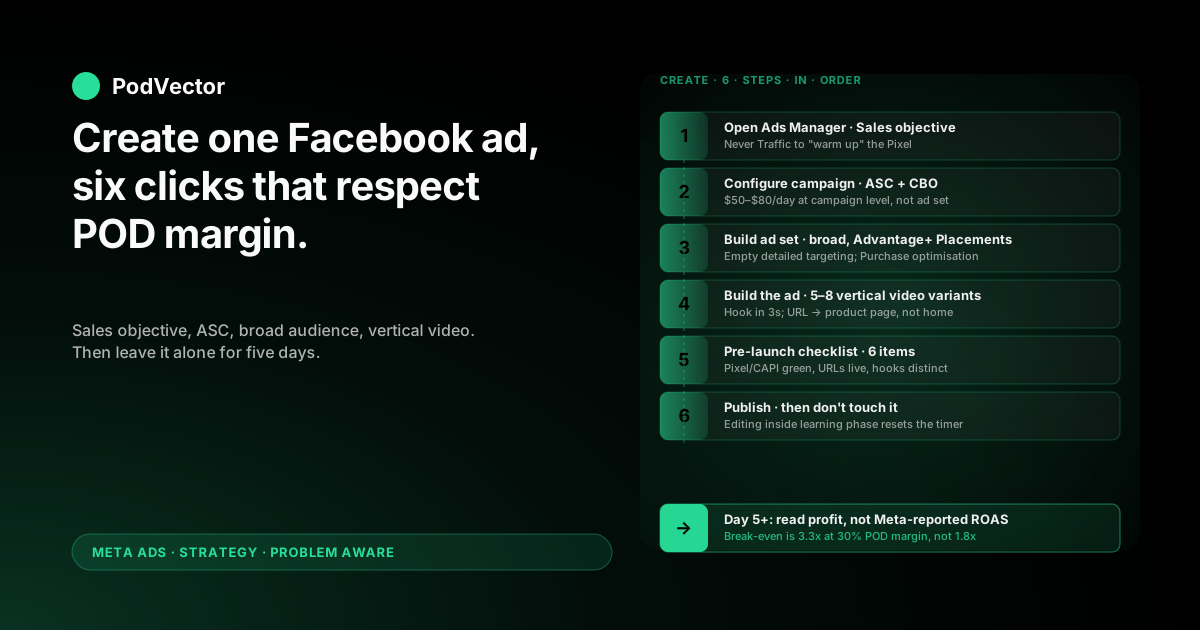
Quick Answer: Creating a Facebook ad for an ecommerce store is a six-step build inside Meta Ads Manager: pick the Sales objective, set the campaign-level budget, build one broad ad set, upload 5–8 creative variants, run a pre-launch checklist, then publish.
The Meta steps are identical whether you're on Shopify, WooCommerce, or BigCommerce. The judgment calls are not — and for print-on-demand stores, the defaults Meta nudges you toward are tuned for owned-inventory ecommerce that breaks even at 1.8x ROAS.
POD breaks even closer to 3.3x ROAS at a 30% margin after Printify or Printful supplier costs. Every choice below is the print-on-demand answer to the click in front of you, not the generic one.
Before you click "Create" — five prerequisites
Most "how to create Facebook ads" guides start at the Ads Manager screen. The honest version starts ten minutes earlier, because the wrong prep guarantees a wasted ad spend.
Before you open Ads Manager, you need:
- A Meta Business Suite account with your Facebook Page, Ad Account, and ecommerce store wired together. The complete wiring sequence sits in the seven-phase Facebook Ads setup guide for POD ecommerce.
- The Pixel and the Conversions API both firing — verified green in Events Manager. Pixel-only setups lose 25–40% of Purchase events to iOS opt-outs, which inflates your real cost-per-purchase by the same amount.
- A verified domain with eight prioritised conversion events configured (Purchase first). Without domain verification, Meta caps you at three priorities and quietly hobbles the campaign.
- One creative concept with 5–8 variants — different hooks, same product. One ad almost never wins. Eight gives Meta enough variance to find the winner.
- Your contribution margin written down. For a $30 t-shirt with $11 supplier cost, $1 in fees, and $2 in shipping subsidy, that's roughly $16 / $30 = 53% gross margin, dropping to 28–35% contribution margin after returns and processing. This number drives every "is the campaign working" decision after launch.
If any of those are missing, fix them first. Creating a Facebook ad on top of a broken tracking setup is the single most common way POD operators burn $500–$1,500 before noticing.
The "creative" you actually need at this stage
You don't need a polished agency edit. You need eight short videos or images that look different from each other.
For each variant, change one of: the opening visual, the hook (first 3 seconds of voiceover or text), or the format (vertical video vs. carousel vs. static). Same product page, same offer, different presentation.
POD operators routinely over-invest in production quality and under-invest in variant count. Meta's algorithm rewards the second far more than the first.
Step 1 — Open Ads Manager and pick the Sales objective
Go to business.facebook.com, switch to your Ad Account, and open Ads Manager. Click the green Create button in the top-left of the Campaigns tab.
Meta will ask you to choose a campaign objective. There are six options. For ecommerce, the answer is always Sales.
Why Sales is the only correct choice
Sales is the only objective that optimises toward Purchase events on your Pixel and CAPI feed. Every other objective optimises for the metric in its name:
- Awareness — optimises for reach. Useful for brand campaigns, useless for selling t-shirts.
- Traffic — optimises for clicks. Recruits clickers, not buyers, and pollutes retargeting audiences with people who'll never convert.
- Engagement — optimises for likes and comments. Moves the wrong needle.
- Leads — only relevant if you're collecting emails before checkout, which most POD stores aren't.
- App Promotion — irrelevant unless you have a mobile app.
The classic mistake is starting with Traffic to "warm up the Pixel" before switching to Sales. Don't. The Pixel doesn't need warming. The Sales objective will start optimising the moment a Purchase event fires.
Name the campaign so future-you can find it
Use a naming convention now or you'll regret it in a month. A useful pattern:
[Date] · [Product/Collection] · [Audience] · [Format]
Example: 2026-05 · Mom-tee · Broad-US · Video-9x16. Three months later when you have twelve campaigns, this is the only thing that lets you find anything.
Step 2 — Configure the campaign (ASC vs manual, CBO budget)
After picking Sales, Meta drops you onto the Campaign settings page. Two decisions matter here.
Use Advantage+ Shopping Campaign for new accounts
Advantage+ Shopping Campaign (ASC) is Meta's automated campaign type. It collapses audience and placement decisions into one bidding system, which is exactly what you want when the Pixel has limited purchase data to work with.
For accounts under 30 purchases per week, ASC outperforms manual ad sets in the large majority of POD tests. Once you cross 30 purchases/week and want to test specific cold audiences, you can layer manual campaigns alongside — but never replace ASC, supplement it.
The full decision tree on when to graduate from ASC to manual sits in the scaling Facebook ads playbook for POD.
Set the budget at the campaign level, not the ad set level
Toggle Campaign Budget Optimisation (CBO) on. CBO lets Meta shift spend between ad sets based on which one is winning, instead of locking equal budget into each.
For POD, start with $50–$80/day at the campaign level. Below $50/day, Meta can't accumulate purchase signal fast enough to exit the learning phase inside its 50-conversion threshold — which means you're paying full CPM for half the optimisation.
For ASC specifically, this is the only budget control you have, which is fine. The whole point of ASC is to delegate the granular controls to Meta's algorithm.
Don't toggle on "Special Ad Categories"
Special Ad Categories restricts targeting for housing, employment, credit, and political ads. Selling apparel doesn't qualify. If you toggle it on by mistake, Meta limits your audience options and your campaign underperforms for reasons that look mysterious from the dashboard.
Step 3 — Build the ad set (audience, placements, optimisation event)
The ad set is where most ecommerce tutorials get fancy with interest stacks and lookalikes. POD operators lose money there. Keep it boring.
Audience: broad first, narrow only after data
For ASC, audience selection is automated — let it run. For manual campaigns, start with:
- Country: US, UK, CA, AU. These are the markets where Printify and Printful ship cheaply and customers expect English-language ads.
- Age: 25–55. POD apparel buyer skew sits in this band.
- Gender: match the design's intended audience. A "Best Mom Ever" mug is a Female-only test for week one.
- Detailed targeting: empty. Yes, empty.
Empty detailed targeting feels wrong. It is correct. Meta's algorithm finds buyers faster than your interest stack does, and interest stacks add CPM premiums in the bidding auction without buying you better targeting.
Layer Lookalike audiences only after the Pixel has accumulated 1,000+ Purchase events. Below that threshold, Lookalikes are statistically unstable and routinely underperform the broad audience they were built from.
Placements: Advantage+, never manual
Set Advantage+ Placements. This lets Meta auction your ad across Facebook Feed, Instagram Feed, Stories, Reels, Messenger, and the Audience Network simultaneously, picking the placement with the best cost-per-conversion in real time.
Manual placement selection ("Facebook Feed only" or "Instagram Stories only") is the second most common ad-set mistake after Traffic-objective warm-ups. It restricts Meta's auction options and inflates CPM by 20–40%.
The single exception: if your creative is a horizontal static image and would crop unreadable on Stories or Reels, exclude those specific placements only. The better answer is to reshoot or recompose the creative as vertical video.
Optimisation event: Purchase, always
Set the optimisation event to Purchase. Never AddToCart, never ViewContent, never InitiateCheckout — regardless of how many older guides recommend "starting with a softer event because the Pixel is new."
That advice predates Aggregated Event Measurement (AEM — Meta's framework for handling iOS opt-outs). Today, only the optimisation event you select is allowed to influence delivery, and softer events recruit softer-intent users. Purchase recruits buyers.
Switch off Value Optimisation until your AOV is stable
Value Optimisation tells Meta to bid more aggressively on customers likely to spend more per order. With POD's mix of mugs, hoodies, and posters at very different price points, Meta misreads the value signal and over-bids on high-receipt orders that often have lower margin.
Switch it on once your average order value is consistent across SKUs — usually after the first few hundred orders.
Step 4 — Build the ad (format, media, copy, link)
Creative is where 70% of campaign performance is decided. The setup steps above just stop you from sabotaging it.
Lead with vertical short-form video
Vertical 9:16 video wins almost every POD ad test in 2026. It plays full-screen on Stories and Reels, stacks well in feed, and Meta's algorithm currently favours it in the auction.
Build 5–8 creative variants per concept before launch. Same product, different hooks. The goal is creative diversity wide enough that Meta can find the variant that resonates with the broad audience — not five backup options for you to manually rotate.
The hook in the first 3 seconds is the single highest-leverage element. Test:
- Pattern interrupt — a striking visual: colour flash, unexpected zoom, abrupt cut
- Direct call-out — "If you have a [specific identity] in your life…"
- Problem statement — "You can never find a [niche] gift that doesn't look generic"
- Social proof — "Over 12,000 of these shipped this year"
Image and carousel as backup formats
Static images are rarely the top-performing POD format, but they're the cheapest to produce. Use them as the third or fourth variant in an ad set, not as the only ad type.
Carousels work for showcasing variant ranges — one design across multiple products, or one product across multiple designs. They underperform single video ads for cold traffic but recover ground in retargeting. The full breakdown of which format wins where lives in the complete guide to Meta ad types for POD sellers.
Copy structure that doesn't feel like an ad
Three short paragraphs, in this order:
- Identity hook — open with who the product is for. "For people who can't find a [niche] gift that isn't generic."
- Product specifics — material, sizing, fit. POD buyers are skeptical about quality; specifics build trust.
- Soft CTA — "See the full collection" tends to beat "Buy now" for cold traffic by a meaningful margin.
Headline (the bold one-liner under the media): keep it under 40 characters and lead with the benefit, not the brand. "A mug she'll actually use" beats "MyBrand Premium Ceramic 11oz Mug" every time.
Destination URL: product page, not homepage
Send the click to the specific product page that matches the ad creative. Sending cold traffic to the homepage and asking them to navigate is the third most common reason POD ads underperform — the bounce rate doubles and Meta reads the lower conversion rate as a signal to pull back delivery.
Append UTM parameters so your store analytics can attribute sessions back to the specific ad. A workable convention:
?utm_source=facebook&utm_medium=paid&utm_campaign=[campaign-name]&utm_content=[ad-name]
Call-to-action button
For ecommerce, "Shop Now" outperforms "Learn More" for cold traffic that's already mid-intent. "Learn More" wins for higher-consideration purchases (custom orders, pre-launches, sign-up-required offers).
Step 5 — Run the pre-launch checklist
Before you click Publish, walk through this six-item check. Each item catches a specific failure mode that's expensive to fix after the campaign goes live.
The pre-launch checklist
- Pixel + CAPI both green in Events Manager. Server and Browser Purchase counts within 10% of each other over the last 7 days.
- Optimisation event set to Purchase, not the default Meta sometimes nudges you toward.
- Placements set to Advantage+, not "manual placements."
- Detailed targeting empty for ASC; minimal for manual.
- 5–8 creative variants uploaded, each with a different hook in the first 3 seconds.
- Destination URLs hit live product pages, not 404s, not homepages, not collection pages without filtering.
Click through each ad's preview link to verify the URL loads. Three minutes here saves an entire day's spend driving traffic to a broken page.
Step 6 — Publish, then leave it alone
Click Publish. Meta will run an automated review that takes anywhere from 15 minutes to a few hours.
Once the campaign goes live, the most expensive thing you can do is touch it.
Don't edit anything for 4–5 days
Meta's learning phase needs ~50 conversion events at the ad set level (or campaign level for ASC) to exit. At $50–$80/day with a $40–$60 cost-per-purchase, that's 4–5 days of stable spend before the algorithm has enough data to optimise reliably.
Editing budget, audience, or creative inside the learning phase resets the timer. So does pausing and re-enabling. So does duplicating the ad set "to test something." Hold the line.
Read the result on profit, not on Meta-reported ROAS
This is the operational difference between POD and owned-inventory ecommerce. After 4–5 days, open your store's order list and Ads Manager spend side by side, then calculate:
- Revenue from Meta ads (Meta-reported or UTM-attributed, whichever you trust more)
- Minus Printify or Printful supplier cost on those orders
- Minus payment processing fees (~2.9% + $0.30/order on Stripe or Shopify Payments)
- Minus ad spend
- Equals contribution profit from Meta ads
If contribution profit is positive, the campaign is working — even if Ads Manager shows 2.5x ROAS that looks "average" in a generic ecommerce guide. If contribution profit is negative at 3x ROAS, your supplier cost ratio is higher than you assumed and the campaign needs creative work, not budget. The full ROAS-to-profit translation framework lives in the complete guide to Meta Ads ROAS and attribution for POD.
Five POD-specific mistakes operators make at creation time
1. Picking Traffic objective to "warm up" the Pixel
The Pixel doesn't need warming. Traffic optimises toward clickers, not buyers, and pollutes retargeting audiences with people who'll never convert. Skip it. Go straight to Sales.
2. Stacking interests in detailed targeting
Interest stacks ("Yoga + Mindfulness + Sustainable Living") feel precise but cost more in the auction without buying you better customers than empty targeting. Meta's algorithm finds buyers faster than your interest map does. Leave it empty.
3. Uploading two creative variants instead of eight
Two ads gives Meta a coin flip. Eight gives the algorithm enough variance to find the one that resonates with the broad audience. The marginal cost of variant 5 through 8 is a few minutes of edit time. The marginal value is the difference between a flat campaign and a winning one.
4. Sending cold traffic to the homepage
Cold buyers don't navigate. They bounce. Always link the ad to the specific product page, with UTM tracking, and ideally a single dominant call-to-action above the fold.
5. Editing the campaign on day 2 because "it's not working"
Day 2 ROAS is noise. Day 3 ROAS is noise. Day 5+ rolling 7-day ROAS is signal. Editing inside the learning phase resets the algorithm to zero and you start the cold-start curve over again. Patience is cheaper than re-tests.
FAQs
How much budget do I need to start running my first Facebook ad for an ecommerce POD store?
The honest minimum is roughly $1,500 over 30 days — about $50/day on one ASC campaign. Below that, the Pixel never accumulates enough purchase signal to exit Meta's learning phase, and you're paying for tests without enough data to act on.
Can I create a Facebook ad before my store has any sales?
Yes, but ASC will spend more per purchase in the first 2–3 weeks because Meta has no Pixel data to optimise on. Plan for $200–$400 cost-per-acquisition during the cold-start period, then expect it to roughly halve as Purchase events accumulate. Generic ecommerce CPA benchmarks don't apply to POD's cold-start curve.
How long does it take to actually create one Facebook ad inside Ads Manager?
The clicks themselves take 15–25 minutes for a single ad set with 5–8 variants. The prep — creative production, audience research, UTM tagging, pre-launch checks — usually takes 2–4 hours for the first ad and 30–45 minutes for each subsequent one. The bottleneck is creative variants, not Meta's interface.
Should I use Advantage+ Shopping Campaign or build a manual ad set for my first ad?
Start with ASC. It needs less structure, runs better with limited Pixel data, and abstracts away the audience and placement decisions that new operators most often get wrong. Add manual ad sets once ASC clears 30 purchases/week and you want to test specific cold audiences alongside.
Does the platform matter for creating Facebook ads — Shopify vs WooCommerce vs BigCommerce?
Not for the Meta side. The ad creation flow inside Ads Manager is identical across platforms. The only differences are upstream: integration polish (Shopify's official "Facebook & Instagram by Meta" channel app is the smoothest, WooCommerce takes more manual config) and reporting depth in your store admin. Pick the platform on store-side reasons, not on Facebook ad mechanics.
How many ads should I create on day one?
One campaign, one ad set, 5–8 ads. That's it. The instinct to launch three campaigns in parallel "to compare" is the fastest way to spread your budget too thin to exit learning on any of them. One concentrated build, then iterate weekly.
What does the top 3 in Google's results recommend differently?
The major step-by-step guides — Nostra's guide, Madgicx's 6 pro tips, and AdNabu's deep-dive — all cover the same Meta surface area: account setup, Pixel, catalog, campaign objective, audience, creative, optimisation. They're written for owned-inventory ecommerce. The piece they don't cover is what to do differently when your contribution margin is 30% instead of 55% — which is the exact gap this guide is built to fill. The full Meta strategy library for POD lives at the Meta Ads strategy hub, which sits inside the Meta Ads topic hub.
You created the ad. Now find out if it's making money.
Meta Ads Manager shows you ROAS on subtotal. Printify shows you the supplier invoice. Your store shows you the order revenue. The margin sits in the gap between three dashboards — and most POD operators never close it.
Victor is the AI employee that pulls your store, suppliers, and Meta into one live data warehouse and answers the question Ads Manager can't: is this campaign making me money on profit, not on receipt size? Ask in plain English, get the number from your real data, decide on the right one.
Try Victor free