
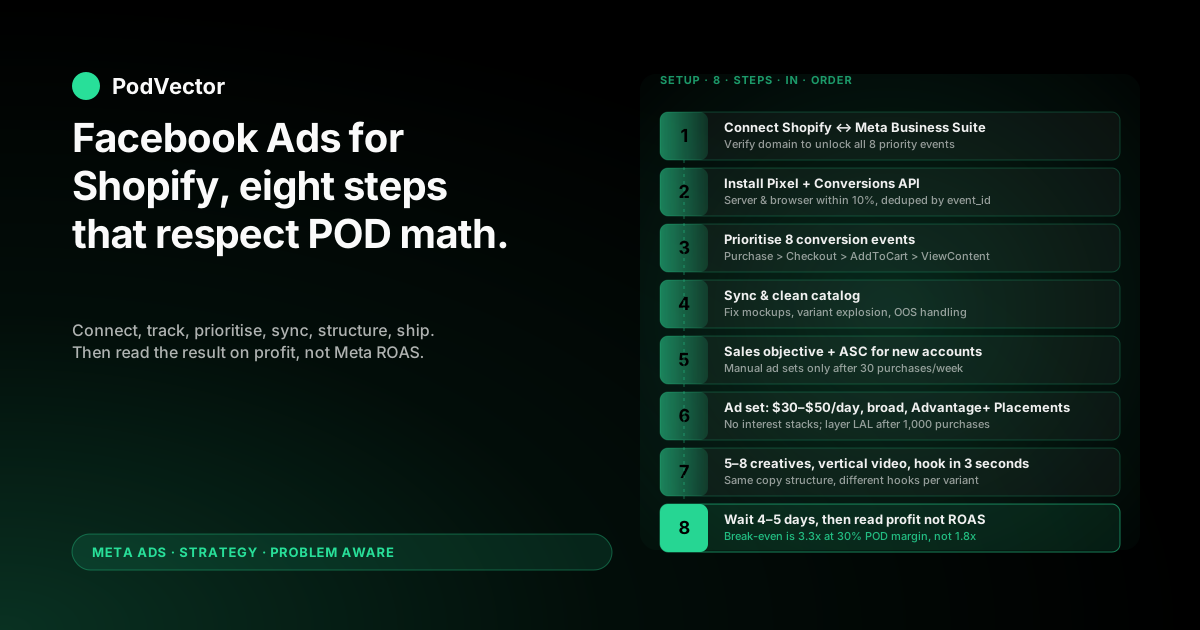
Quick Answer: Running Facebook ads for a Shopify print-on-demand store is an eight-step setup, not a one-evening tutorial. The platform mechanics are the same as any Shopify store; the profit math is not.
Connect Meta Business Suite, install the Pixel plus the Conversions API (CAPI — Meta's server-side event channel that survives iOS opt-outs), sync your catalog, prioritise your eight conversion events, build the campaign on the Sales objective, structure ad sets around audiences you can afford to lose money on while learning, ship 5–8 creative variants per concept, and only then turn it on.
The piece nobody else writes: at 28–35% contribution margin after Printify or Printful supplier costs, your break-even ROAS is roughly 3.3x — almost double what generic Shopify guides assume. Every step below is sequenced so you don't burn through learning budget on math that was never going to work.
Why running Facebook ads for Shopify is different in POD
Search "how to run Facebook ads for Shopify" and you'll find dozens of solid guides. Lebesgue's walkthrough, OptiMonk's beginner guide, and AdRoll's 101 piece all cover the same eight or so setup steps. They're correct.
They're written for stores that own their inventory at 50–60% gross margin. Print-on-demand doesn't.
After Printify or Printful supplier costs, your contribution margin lives between 28% and 35%. That changes which ROAS counts as profitable, which campaign objective is safe to scale on, and what "good" looks like inside Meta Ads Manager.
Break-even ROAS is roughly twice the generic guide assumption
An owned-inventory Shopify store at 55% margin breaks even around 1.8x ROAS. A POD store at 30% margin breaks even around 3.3x.
So when a tutorial says "anything above 2x is healthy," that's true for them. For you, 2x ROAS is the algorithm charging a premium to manufacture a small loss.
Meta optimises on receipt size, not your profit
Meta's purchase optimisation reads order subtotal from the Pixel and CAPI events. That subtotal includes the part you owe Printify or Printful — so Meta will happily push budget toward the orders that look biggest to it, regardless of how much margin sits underneath.
Every step below assumes you'll measure the campaign on profit-after-supplier-cost, not the ROAS Meta reports back.
Step 1 — Connect Shopify to Meta Business Suite
Before you touch Ads Manager, you need three accounts wired together: Meta Business Suite, your Facebook Page, and your Shopify store.
Create or claim Meta Business Suite
Go to business.facebook.com and either create a new Business Manager or open the one tied to your personal Facebook. Add your Facebook Page as a managed asset, then create an Ad Account inside the Business if you don't already have one.
Keep the Ad Account currency set to whatever your Shopify store transacts in. Mismatched currencies break ROAS math without an obvious error.
Install the Facebook & Instagram channel app in Shopify
In your Shopify admin, go to Settings → Apps and sales channels → Shopify App Store and install the official "Facebook & Instagram by Meta" app. Open it, click Start setup, and walk through the prompts.
You'll connect the Facebook Page, Business Manager, Ad Account, and Pixel in one flow. Grant every permission it requests — half-granted permissions are the most common cause of "events not firing" tickets a week later.
Verify your domain
Inside Business Settings, go to Brand Safety → Domains, add your Shopify domain, and verify with the meta-tag method through Shopify's Online Store → Themes → Edit code → theme.liquid. Drop the verification tag in the <head>.
Domain verification is what lets you control which conversion events Meta is allowed to optimise toward. Skip it and you cap out at three priority events instead of eight.
Step 2 — Install the Pixel and Conversions API
Two trackers, both required, doing different jobs.
The Pixel handles browser-side events
The Shopify Facebook channel app installs the Pixel automatically once you grant permissions. Verify it works with the free Meta Pixel Helper Chrome extension — load your home page, a product page, the cart, and the checkout, and watch the helper count PageView, ViewContent, AddToCart, InitiateCheckout, and Purchase in turn.
If any event is missing, Meta won't optimise toward it, and retargeting audiences built on it will be empty.
CAPI handles server-side events
Conversions API (CAPI) sends purchase events directly from Shopify's server to Meta's server, bypassing the browser. After iOS 14.5, somewhere between 25% and 40% of Pixel purchase events fail to fire because of opt-outs and ad blockers. CAPI catches those.
The Shopify Facebook channel app turns CAPI on by default in newer setups, but verify in Meta Events Manager → Data Sources → your Pixel → Settings. Look for the green "Receiving server events" status. The Server column on the Overview tab should land within 10% of the Browser column for Purchase events over a 7-day window.
If Server is blank, the channel app didn't push the integration through — uninstall and reinstall the app, or check the Shopify integration guides covered in the complete Meta Ads + Shopify integration guide for POD.
Deduplicate Pixel and CAPI events
Both trackers fire on the same purchase. Meta deduplicates them by event_id, but only if Shopify is sending the same ID through both channels. The official channel app handles this. Custom Pixel installs and third-party tracker apps frequently don't — and the result is double-counted Purchase events that inflate ROAS by 1.5–2x in your Ads Manager dashboard.
Spot it by comparing Events Manager Purchase count to Shopify Orders for the same 7-day window. If Meta shows materially more, deduplication is broken.
Step 3 — Prioritise your 8 conversion events
iOS 14.5's Aggregated Event Measurement caps each verified domain at eight prioritised conversion events. Meta will only optimise toward an event that's on the list.
The POD priority order
Set this order in Events Manager → Aggregated Event Measurement → Configure web events:
- Purchase — the only event Meta should optimise prospecting on
- InitiateCheckout — high-quality signal, used as a backup optimisation when Purchase volume is too low to exit learning
- AddToCart — retargeting trigger, also a creative-quality readout
- ViewContent — broad retargeting and lookalike seed
- Lead — only if you run pre-launch lead capture
- CompleteRegistration — if you have an account-creation flow
- Subscribe — if you sell subscription POD bundles
- Search — lowest-priority diagnostic event
Most POD stores can ignore everything below position 4. The first four are the events you'll actually use.
Value optimisation off, for now
Value optimisation tells Meta to chase the highest order value, which sounds great until you remember Meta sees subtotal including supplier cost. It will push budget toward higher-priced products that often carry lower contribution margin in POD — premium hoodies look like a $60 win to Meta when only $15 of that is yours.
Optimise on Purchase event count first. Switch on Value optimisation only after 60+ days of stable Purchase volume, and only if your contribution margin is consistent across SKUs.
Step 4 — Sync and clean your product catalog
Shopify pushes your full product catalog into a Meta Catalog through the channel app. The sync is automatic. The cleanliness is not.
What POD operators usually fix on first sync
Open Commerce Manager → Catalog → Items and check three things:
- Image quality. Mockup-only product photos under 500×500 pixels get downranked in dynamic ads. Replace flat mockups with lifestyle or model shots where possible.
- Variant explosion. A single t-shirt design with 12 colours × 5 sizes = 60 catalog items. Meta treats each as a separate ad unit. Either consolidate variants in Shopify, or use the catalog's product set rules to group by parent product.
- Out-of-stock items. POD providers occasionally pause SKUs (a Printify supplier going offline for a week is normal). Meta keeps showing those ads unless availability is set to
out_of_stockin the feed. The Shopify channel app handles this if your Shopify inventory tracking is on; if you sell pure POD with no inventory tracking, manually set the field.
Catalog hygiene is what makes Advantage+ Catalog Ads work. Skip it and your dynamic retargeting will surface broken images and unavailable products to your warmest audience.
Step 5 — Create the campaign (objective and structure)
Open Ads Manager. Click Create. The objective decision frames everything that follows.
Sales objective, every time, for prospecting
Pick Sales. The Sales objective optimises toward the Purchase event you set in step 3. Traffic, Engagement, and Awareness objectives will deliver cheaper clicks and cheaper impressions; they will not deliver cheaper customers.
For POD margin, the only objective that returns positive contribution is one optimised on Purchase. Anything else is the algorithm finding people who like clicking, not people who buy.
Advantage+ Shopping Campaign (ASC) vs manual structure
You'll choose between Advantage+ Shopping Campaign (Meta picks audiences, placements, and creative rotation for you) and a manual campaign (you control ad sets and audiences directly).
For a brand-new account with under 30 purchases per week, start with one ASC campaign at $50–$100/day. ASC needs less structure to exit learning, and Meta's algorithm has gotten genuinely good at finding POD buyers when fed clean catalog data and 5–8 creative variants.
Add a manual prospecting campaign once your ASC clears 30 purchases/week and you want to test specific cold audiences ASC isn't reaching. The decision tree for when to layer in manual structure is covered in the complete Meta Ads playbook for POD sellers.
Campaign budget vs ad-set budget
For ASC, leave the budget at the campaign level — Advantage+ is designed for it.
For manual campaigns, use ad-set-level budgets when you have one or two ad sets you want to control independently. Switch to campaign-level (CBO — Campaign Budget Optimization) when you have 3+ ad sets and want Meta to redistribute budget toward the winner automatically.
Step 6 — Build the ad set (budget, audience, placements)
The ad set is where most POD operators overspend on testing.
Daily budget: $30–$50 to start, per ad set
Meta's learning phase needs about 50 conversions per ad set per week to exit. POD AOV averages $30–$50, so an ad set running below $30/day rarely generates enough purchase signal to exit learning.
Budget too low and the ad set never stabilises. Budget too high before you know which creative wins and you're paying tuition. $30–$50/day per ad set is the bottom of the range that actually graduates.
Audience: broad first, narrow only if broad fails
Meta's algorithm is now strong enough that broad targeting usually outperforms layered interest stacks. Start with:
- Country/region — your top-converting Shopify region only, not "worldwide"
- Age — the age band that holds 70%+ of your existing Shopify customers
- Gender — match your Shopify data, or "All" if your customer base is mixed
- No interests, no behaviours on the prospecting ad set
Build interest-stacked ad sets only if the broad ad set fails to exit learning after $1,500 spent. Layered interests usually constrain Meta's algorithm more than they help it find buyers.
Lookalikes for the second prospecting ad set
Once your Pixel has 1,000+ Purchase events, build a 1% lookalike of your customer list (export Shopify customers, upload as a custom audience, generate a 1% LAL). That becomes your second prospecting ad set.
Don't build lookalikes from low-quality seeds — ViewContent or AddToCart audiences are too noisy. Purchaser-only is the seed worth using.
Placements: Advantage+ Placements, then audit
Pick Advantage+ Placements (Meta automatically distributes across Feed, Reels, Stories, etc.). Run for 14 days. Pull the placement breakdown and look at cost-per-purchase by placement.
If one placement is consuming 60%+ of spend at 2x worse cost-per-purchase than the others, switch to Manual Placements and exclude it. The most common offender for POD is Audience Network, which delivers cheap impressions on low-intent inventory.
Step 7 — Build the ads (formats, hooks, copy)
Creative is where the campaign actually lives or dies. Targeting decides who sees the ad; creative decides whether they buy.
Formats: video first, single image second, carousel third
For POD prospecting, lead with vertical 9:16 video. Short-form video — even mobile-shot, UGC-style — converts better than polished brand video for cold audiences on Reels and Feed.
Static single-image ads are the cheap workhorse for retargeting and product-detail messaging.
Carousel ads are useful for showcasing variants of one design (a t-shirt graphic on a hoodie, a mug, a tote) — but only after you have one winning concept. Carousels burn creative budget faster than they earn it on cold audiences.
The first 3 seconds rule
Meta's view-time data shows ad watch time decisions happen in the first 3 seconds. Open with the strongest visual hook — your hero design at full frame, or a customer reaction shot. Don't open with the brand logo, the product packaging, or a "Hey guys" voiceover.
Copy structure that works for POD
Three lines on top, one CTA at the bottom:
- Line 1 — the audience hook ("For dog moms who can't fit one more mug into the cabinet")
- Line 2 — the design promise (what makes your design different from the 50 other dog mom mugs)
- Line 3 — the offer or proof (free shipping, 4.8★ rating, "10,000+ shipped")
- CTA — "Shop the design" / "Get yours"
Five to eight creative variants per concept. Same copy structure, different hooks. Let Meta pick the winner.
Step 8 — Launch, wait, then read on profit not ROAS
The hardest step is the next four days.
Wait 4–5 days before optimising
Meta's learning phase is real. Pausing ads, raising budget, swapping creatives, or adjusting audiences in the first 96 hours resets the phase and burns the budget you already spent.
Set the campaign live at 9 AM Monday. Don't open Ads Manager until Friday. Use the time to clean catalog images, write new creative variants for the next test, and pull your Shopify cost data for analysis.
Read results on profit, not Meta-reported ROAS
This is where POD operators differ from owned-inventory stores. Open Shopify orders and Ads Manager spend side by side, and calculate:
- Revenue from Meta ads (Shopify orders attributed via UTM or Meta-reported, whichever you trust more)
- Minus Printify/Printful supplier cost on those orders
- Minus Shopify payment processing fees (~2.9% + $0.30/order)
- Minus ad spend
- Equals contribution profit from Meta ads
If contribution profit is positive, the campaign is working — even if Ads Manager shows 2.5x ROAS that looks "average" in a generic guide.
If contribution profit is negative at 3x ROAS, your supplier cost ratio is higher than you assumed and the campaign needs creative work, not budget. The ROAS-to-profit translation is unpacked further in the complete guide to Meta Ads ROAS and attribution for POD.
Five POD-specific mistakes that drain margin
1. Reading Meta-reported ROAS as if it were profit
Ads Manager doesn't know your Printify cost. A 2.5x ROAS with 30% margin is a 25% loss. Always translate to contribution profit before deciding to scale, pause, or duplicate.
2. Scaling on the daily ROAS spike
POD daily ROAS bounces hard — a single $80 hoodie order on a $50/day ad set looks like a 5x day. The next day at 1.2x looks like the campaign died. Neither is true. Scale and cut on rolling 7-day blended ROAS, never on the last 24 hours.
3. Letting catalog feed errors quietly compound
A Printify supplier pauses a SKU. The Shopify product stays "in stock" because POD doesn't track inventory. Meta keeps running Advantage+ Catalog Ads on the unavailable item. You discover it 14 days later when refunds spike. Audit Commerce Manager weekly.
4. Running Traffic objective to "warm up" the Pixel
Common advice in older Shopify Facebook tutorials. The Pixel doesn't need warming. Traffic objective optimises toward clickers, not buyers, and pollutes your retargeting audiences with people who will never convert. Skip it. Go straight to Sales.
5. Killing ad sets at the 3-day mark
The learning phase needs 7 full days of stable budget to exit. Operators kill ad sets on day 3 because the ROAS looks weak, then re-launch a near-identical ad set three days later — restarting the learning phase from zero. Patience is cheaper than re-tests. Hold the line for 7 days.
FAQs
How much budget do I need to start running Facebook ads for a Shopify POD store?
The honest minimum is $1,500 over 30 days — roughly $50/day across one ASC campaign. Below that, the Pixel never accumulates enough purchase signal to exit learning, and you're paying for testing without the data to act on it.
Can I run Facebook ads before my Shopify store has any sales?
Yes, but ASC will spend more per purchase in the first 2–3 weeks because Meta has no Pixel data to optimise on. Plan for $200–$400 cost-per-acquisition during the cold-start period, then expect it to halve as Purchase events accumulate. Generic ecommerce CPA benchmarks don't apply to POD's cold-start curve.
Do I need the Conversions API if Shopify already has the Pixel installed?
Yes. Pixel-only setups lose 25–40% of Purchase events to iOS opt-outs and browser blockers, which inflates your real cost-per-purchase by the same amount inside Ads Manager. CAPI is what makes the data accurate enough to scale on. The Shopify Facebook channel app turns it on by default — just verify it's actually firing in Events Manager.
Should I use Advantage+ Shopping Campaign or build manual ad sets?
Start with ASC. It needs less structure and runs better with limited Pixel data, which is where every POD store starts. Add manual campaigns once ASC clears 30 purchases/week and you want to test specific cold audiences. The detailed decision logic sits in the scaling Facebook ads for Shopify playbook for POD.
How long until I should expect profitable ROAS?
Plan for 30 days at break-even or below while Meta's algorithm learns who buys your designs. Profitable contribution margin usually shows up in week 4–6 if creative and catalog hygiene are solid. If you're still negative after 60 days at $1,500+ in spend, the issue is product-market fit or unit economics, not Facebook ads.
Should I retarget separately or let ASC handle it?
For under $5,000/month in ad spend, let ASC's bidding handle retargeting — it's already pulling warm audiences. Above $5,000/month, layer in a dedicated retargeting campaign on AddToCart and InitiateCheckout audiences. The retargeting setup is covered in the Facebook retargeting ads for Shopify guide.
Where do most Shopify POD Facebook ads campaigns fail?
Three places: tracking (Pixel/CAPI half-installed), measurement (reading Meta ROAS as if it were profit), and patience (killing ad sets before learning exits). Solve those three and the rest of the playbook does its job. The full account architecture for POD sits inside the Meta Ads topic hub, and the broader strategy cluster is at the Meta Ads strategy hub.
Stop reading Meta-reported ROAS as if it were profit.
Meta Ads Manager shows you ROAS on subtotal. Printify shows you the supplier invoice. Shopify shows you the order revenue. The margin sits in the gap between three dashboards — and most POD operators never close it.
Victor is the AI employee that pulls Shopify, Printify, and Meta into one live data warehouse and answers the question Ads Manager won't: is this campaign making me money on profit, not on receipt size? Ask in plain English, get the number from your real data, decide on the right one.
Try Victor free