
Quick Answer: A Shopify Facebook Ads strategy for print-on-demand is a margin problem before it's a creative problem. The mechanics — install Meta Pixel, connect the Conversions API, sync your catalog, launch a couple of campaigns — take an afternoon.
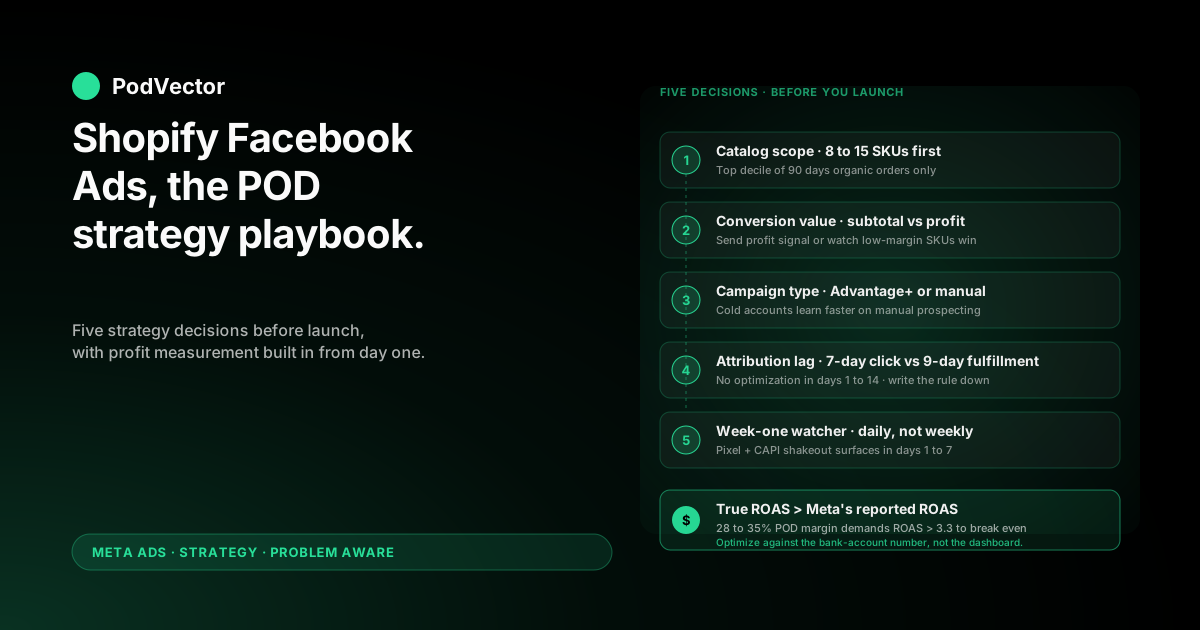
The strategic decisions made before launch determine whether the account compounds or quietly burns: which 8–15 SKUs get the early budget, what conversion value Meta sees (subtotal vs. profit after Printify or Printful supplier cost), how much daily budget is realistic at 28–35% contribution margin, and which campaign objective fits your account maturity.
This playbook walks through those decisions in order, then the install, then the first 30 days of profit-aware monitoring. Print-on-demand is not generic ecommerce on the cost side, so the generic Shopify Facebook Ads playbook misses where POD accounts actually fail.
Why POD on Shopify needs a different Facebook Ads strategy
Most published guides — Shopify's own 5 winning Facebook ad strategies, AdRoll's scaling guide, and JoinBrands' 16-step playbook — assume an owned-inventory ecommerce business at 50–60% gross margin.
That assumption changes the math. For owned inventory, Meta optimizing toward order subtotal still optimizes toward profitable customers. Almost any well-built campaign survives the margin bar.
Print-on-demand is not that. Printify or Printful supplier costs run 50–65% of retail before you spend a dollar on ads. A typical $30 t-shirt has $9.50 of contribution margin once you net out fulfillment, payment fees, and shipping subsidy.
That ~$9.50 has to cover Meta cost-per-purchase. On owned inventory you can spend $12–$15 to acquire an order and grow. On POD you can spend $4–$7 to acquire that same order before you're underwater.
Everything below — the SKU selection, the budget floor, the campaign structure, the conversion value override — falls out of that one number. Get the margin math right and the rest is execution.
Five decisions to make before launching
The install is reversible. The strategy choices encoded during the install are not — once Meta's Advantage+ algorithm has trained on the wrong signal for two weeks, you're rebuilding the campaign rather than tuning it. Make these in writing before you open Shopify's Meta channel app.
Decision 1: Which 8–15 SKUs go in the catalog feed
Don't sync your full catalog on day one. Advantage+ Shopping with 200 SKUs and a $40/day budget spreads learning data so thin that no SKU gets enough signal to earn a budget allocation.
Pick the 8–15 SKUs that account for the top decile of your last 90 days of organic Shopify orders. Submit only those. Add the rest in cohorts of 5–10 every two weeks once the initial group has stabilized.
Decision 2: Subtotal or profit as the conversion value
Default Shopify-to-Meta integrations send the order subtotal as the purchase event value. For owned inventory at 60% gross margin, that's tolerable.
For POD it means Meta's algorithm chases the highest-revenue SKUs, which are often the lowest-margin ones (oversized hoodies, full-color all-overs). The right signal is profit after supplier cost.
Decide now whether you'll set up a profit-value override (covered in section 7) or accept the default and absorb the misallocation. Either is defensible. Mixing them across campaigns is not.
Decision 3: Advantage+ Shopping or manual structure
Advantage+ Shopping (Meta's all-in-one auto-targeted campaign type) is what every Shopify Facebook Ads guide recommends because it's Meta's marquee 2025–2026 product and the easiest path through the channel app.
For POD on a cold ad account, Advantage+ Shopping is also where most early budget gets wasted. It needs roughly 50 conversions per ad set per week to escape the learning phase, and on a $40/day POD budget you'll hit that floor in the third or fourth week — not the first.
Many POD operators do better starting with one manual prospecting campaign on a broad interest stack plus a dedicated retargeting campaign, then layering Advantage+ Shopping once the pixel has 40–50 purchase conversions of training data. Decide your launch path now.
Decision 4: How attribution lag interacts with reporting
Meta's default attribution window is 7-day click. POD orders fulfilled by Printify or Printful take 5–9 business days to ship and another 1–2 days for delivery confirmation.
If you're checking ROAS three days after launch, you're seeing a partial number. The conversion that fired today will keep crediting itself against today's clicks for another six days.
Decide upfront that you will not make optimization decisions in the first 14 days based on reported ROAS. Write that rule down before you can talk yourself out of it.
Decision 5: Who watches the account in week one
Launching Facebook Ads on a Shopify POD store is not "set and forget," especially in the first seven days when ad rejections, catalog sync errors, and missing CAPI events surface.
Decide who looks at Ads Manager, Shopify's sales channel diagnostics, and your profit dashboard daily for the first week. If the answer is "I'll check when I remember," budget another $200–400 of avoidable spend into the launch as a tax for inattention.
Budget reality at print-on-demand margins
Generic guides quote $30–$50 per day as a "minimum meaningful budget" for Shopify Facebook Ads. That number assumes 50%+ gross margins. For POD the math has to start from contribution margin per order and work backward.
Take a typical $30 t-shirt sold via Printify Premium ($15.20 supplier cost), fulfilled with Shopify Payments ($1.05 transaction fee at 2.9% + $0.30), with $4 of average shipping markup margin and a 1% return rate. True contribution margin per order: roughly $9.50.
To break even on ads, you need a cost-per-purchase below $9.50. On a typical apparel CPM in the $14–$22 range and a 1.2% link CTR, break-even sits at a 4–5% landing-page conversion rate — achievable but at the upper end of POD store benchmarks.
The honest budget framework:
- Floor: $40/day for 14 days ($560). Below this, Meta's algorithm doesn't accumulate enough purchase events to exit the learning phase. Halving the budget doesn't halve the cost — it eliminates the chance of useful learning.
- Realistic: $60–$90/day for the first 30 days ($1,800–$2,700). Enough headroom for one prospecting and one retargeting campaign to find profitable placements, with margin to absorb the inevitable bad-placement spend in week one.
- Aspirational: $150+/day, only if you've already validated organic demand on the chosen SKUs and have working capital for 30–45 days of negative ROAS while the account trains.
If those numbers feel uncomfortable, the right move is not halving the budget. It's deferring the launch until margin or working capital improves. POD operators who launch on $20/day reliably report worse-than-no-ads outcomes because the spend depletes runway without producing data.
The pillar piece on the complete Meta Ads playbook for print-on-demand sellers covers the broader sequencing question; this article assumes you've passed the readiness bar.
The install, compressed to what actually matters
The mechanical install is well-covered elsewhere — see the complete guide to Meta Ads + Shopify integration for POD and the step-by-step how do I connect my Shopify store to Meta Ads. The compressed version is six steps:
- Install the Facebook & Instagram channel app from the Shopify App Store, connect your Facebook Business Manager, and pick the Page and ad account that will run the campaigns.
- Verify the Meta Pixel fires Purchase events on your test order. Use the Meta Pixel Helper Chrome extension. If Purchase doesn't fire, nothing else matters — fix this first.
- Enable the Conversions API (CAPI — Meta's server-side event channel) through the channel app's automatic CAPI option. Browser-only pixel data has been functionally degraded since iOS 14.5; CAPI is the floor, not the upgrade.
- Configure the catalog sync to a manual SKU list, not "all products." Shopify's default is the entire catalog. Override that to your 8–15 chosen SKUs from Decision 1.
- Set domain verification and aggregated event measurement in Business Manager. Pick Purchase as your top-priority event in the eight-event slot. Without this, iOS 14.5+ users won't generate optimization signal.
- Tag your URLs with UTMs so GA4, your profit dashboard, and Meta's reporting can be reconciled later. Don't rely on Meta-native reporting alone.
That's the install. Anything beyond these six steps is either troubleshooting a specific failure or premature optimization.
Campaign structure: cold, warm, hot
Build three campaigns in week one, even on a $60/day budget. The goal is not three sources of scale on day one — it's three feedback loops that each measure something different.
Cold prospecting (60–70% of budget)
One campaign optimizing for Purchase events, with a single broad audience: your shipping countries, your age range, no interest layering, no detailed targeting. Meta's algorithm will find buyers faster on a broad audience than on a hand-curated interest stack — a counterintuitive result that's been replicated across hundreds of POD accounts since the iOS 14.5 attribution shift.
Run two ad sets here: one with your strongest mockup-on-model creative, one with a 15-second motion ad. Don't add more creative variants until you have 20+ purchases to compare.
Retargeting (20–30% of budget)
One campaign targeting visitors from the last 14 days who didn't purchase, plus add-to-cart and initiate-checkout abandoners. Different ad — usually a discount, urgency, or social proof angle — not the same prospecting creative.
Retargeting is where POD's margin math gets the most leverage. A retargeted buyer is closer to a captured-intent customer; a $4 cost-per-purchase here is realistic and the math works at POD margins.
Brand search defense (5–10% of budget)
If your store has any organic demand, run a small brand-search campaign on Meta's Search Results placement. The intent is high and CPCs are low. Without it, competitors and lookalike POD stores will buy your branded interest traffic.
Skip this one if your store is brand-new and has no organic search demand yet.
Creative for POD: mockups, lifestyle, motion
Creative beats targeting. Every guide says it; for POD it's literally true because Meta's algorithm has so little signal to work with on a small account that the creative does most of the audience-finding.
The hierarchy that works for POD on Shopify:
- Lifestyle photography of the design on a real human — not a flat mockup. Order a sample, photograph it on a person, post in 4:5 portrait. This single change usually doubles CTR vs. Printify's stock mockups.
- 15-second motion ads — a Reels-native vertical video showing the design in three or four contexts. Doesn't need to be high-production; it needs to be human and to load fast.
- Carousel ads of design variants — useful when one design has 4–6 SKU options (colors, garment types). The carousel lets the algorithm test which combination earns the click.
- Catalog-sourced dynamic ads for retargeting only. Dynamic ads need a working product feed and meaningful catalog signal — they're not where to start.
Avoid: any ad that opens with "BUY NOW" or "LIMITED TIME OFFER." POD has been associated with low-quality dropship-style creative for so long that hard-sell openers tank the relevance score on impression one.
Profit-aware measurement: the gap nobody covers
This is where every other Shopify Facebook Ads guide stops short. Meta's reported ROAS is the ratio of attributed revenue to ad spend. For owned inventory at 60% margin, ROAS > 1.7 is roughly profitable. For POD at 30% contribution margin, ROAS > 3.3 is roughly profitable.
That 3.3x bar is not a Meta-displayed metric. You have to compute it from per-SKU supplier cost data that lives in Shopify metafields and is not natively visible to Meta.
Three approaches, ranked:
- Profit-value conversion override. Modify the Pixel + CAPI Purchase event to send profit (subtotal minus per-line-item supplier cost) as the value parameter, not subtotal. Meta's algorithm then optimizes toward profit-weighted purchases natively. This is the highest-leverage change you can make and almost no Shopify POD store has done it.
- Daily profit reconciliation in a dashboard. Pull Meta spend, Shopify orders, and Printify/Printful supplier cost into a single view that calculates true profit per campaign each morning. Optimization decisions key off the dashboard, not Ads Manager.
- Manual weekly review of top-spending ad sets. Pull the top 5 ad sets by spend, look up the SKUs they drove, and calculate profit by hand. Low-effort but slow — works only if you check weekly.
The pillar on the complete guide to Meta Ads ROAS and attribution for POD covers the math in detail. The shorter Meta Ads ROAS definition piece explains how Meta's reported number is constructed, which is helpful before you decide how much to trust it.
This is also where Victor — PodVector AI's AI employee — does the work most operators end up doing in spreadsheets at 11pm. Victor pulls Shopify, Printify or Printful, and Meta together into one live data warehouse and answers "is this campaign profitable on margin, not just spend?" with a number that already accounts for supplier cost. The point isn't the tool; the point is that the question above is the one that matters and most POD operators don't have a fast way to answer it.
The first 30 days: what to monitor and what to ignore
Days 1–3: Watch for technical breakage only. Pixel firing, CAPI events landing in Events Manager, ads approved, daily spend pacing. Ignore ROAS — the number is meaningless this early.
Days 4–7: Confirm purchases are attributing correctly. Cross-check Meta's reported orders against Shopify's order export. A 10–25% gap is normal; a 50%+ gap means CAPI isn't working and you're flying blind.
Days 8–14: First creative read. Pause clearly losing creatives (no purchases, CTR < 0.6%, landing-page rate < 30%). Don't pause an ad set with one purchase yet — variance dominates this early.
Days 15–21: Budget reallocation. Shift budget from underperforming ad sets to top performers, but no more than 20% per day to avoid resetting the learning phase.
Days 22–30: First profit read. With ~25–40 purchases on the books, you can compute true contribution margin per campaign and decide whether to scale, hold, or kill. This is also when Advantage+ Shopping becomes viable to layer on, if you held it back per Decision 3.
Six mistakes that turn this strategy into a money pit
- Sending order subtotal as conversion value. Meta optimizes toward your highest-revenue SKUs, which for POD are usually your lowest-margin ones. Fix in week one or accept the loss.
- Launching with the full catalog synced. 200 SKUs at $40/day produces zero learning. Restrict to 8–15 SKUs.
- Optimizing on ROAS in week one. Attribution lag means the number you see is wrong. Decision-making this early is gambling on noise.
- Skipping the Conversions API. Browser-only Pixel has been functionally degraded since iOS 14.5. CAPI is the floor, not the upgrade.
- Running stock Printify mockups as creative. They underperform real-human lifestyle shots by 1.5–2x on CTR. The sample order pays for itself in the first week.
- Treating ad spend as the only cost. Forgetting payment fees, shipping subsidy, and 1–3% returns understates true cost-per-order by $2–$4. That's the entire margin on a $30 t-shirt.
FAQs
How much should a POD store spend on Facebook Ads to start?
$40/day for 14 days as the floor, $60–$90/day for the first 30 days as realistic. Below $40/day, Meta's algorithm can't accumulate enough purchase events to exit the learning phase, so the spend produces no useful data.
Should I use Advantage+ Shopping or a manual campaign first?
For a cold ad account, manual prospecting + retargeting first, then layer Advantage+ Shopping once the Pixel has 40–50 purchase conversions. Advantage+ Shopping needs ~50 conversions per ad set per week to optimize well, which a new POD account won't hit in the first three weeks.
What ROAS should I target for Shopify POD on Facebook?
Roughly ROAS > 3.3 to be marginally profitable at typical POD economics (28–35% contribution margin). The bar is higher than the 1.7–2.0x that owned-inventory ecommerce uses, because Printify or Printful supplier cost eats most of the gross margin before Meta sees the order.
Is Advantage+ Shopping worth using on a small POD account?
Eventually, not initially. Advantage+ Shopping is most powerful with a strong purchase-event history and a clean, profit-weighted catalog feed. New POD accounts have neither, so it underperforms a simple manual prospecting + retargeting structure for the first 3–4 weeks.
How do I track true profit on Facebook Ads for a Shopify POD store?
Best path: send profit (subtotal minus Printify/Printful supplier cost) as the conversion value to Meta via Pixel + CAPI, instead of order subtotal. Second-best: reconcile Meta spend, Shopify orders, and supplier costs in a daily dashboard. Either way, you cannot trust Ads Manager's reported ROAS in isolation for POD.
Do I need the Conversions API or is the Pixel enough?
You need both. iOS 14.5+ broke the browser-only Pixel for opt-out users (typically 30–50% of iOS traffic). CAPI restores server-side event delivery so Meta still sees the purchase event. Without CAPI, you're optimizing on a 50–70% sample of true conversions.
How long until I should expect profitable Shopify Facebook Ads?
Realistically, days 25–45 is when most POD accounts that are going to work start to look profitable. Earlier than that is usually the learning phase masking truth; later than that means the strategy needs structural change, not more time.
Stop optimizing on Meta's ROAS. Start optimizing on profit.
Meta sees subtotal. Printify takes its cut. Shopify takes its cut. Returns happen. The number Meta reports as ROAS is not the number that lands in your bank account.
Victor connects Shopify, Printify or Printful, and your Meta ad account into one live data warehouse and tells you which campaigns are profitable on margin, not spend. The same playbook above runs better when the measurement layer underneath is honest.
Try Victor free