
Quick Answer: A complete Meta Ads + Shopify integration for a print-on-demand store is four layers, not one app install: the Facebook & Instagram sales channel for catalog sync, a Commerce Manager catalog with POD-aware feed rules, a tracking layer combining the Meta Pixel with the Conversions API for server-side signals, and a Custom Audience pipeline for retargeting and lookalikes. Most POD sellers click through the sales-channel onboarding in ten minutes, see "connected" in the dashboard, and assume the job is done.
It isn't. The default setup sends Shopify's gross sale price as the purchase event value, which on a Printify or Printful product is roughly double the actual profit once supplier cost, shipping, and returns are netted out.
Meta's Advantage+ Shopping algorithm then optimizes toward the wrong number — you see 4× ROAS in Ads Manager while Stripe deposits stagnate. This guide walks every layer, the POD-specific configuration the Shopify and Meta docs quietly skip, and the cost-of-goods signals you need to wire in so Advantage+ bids toward profit instead of revenue.
Why POD changes the Shopify-Meta integration playbook
Every generic "how to connect Shopify to Facebook Ads" tutorial is written for a DTC brand with fixed cost of goods, a warehouse, static variant counts, and studio product photography. Print-on-demand stores break every one of those assumptions.
Your cost of goods floats with supplier tier, garment color, print method, and sometimes destination country. Your "warehouse" is Printify's or Printful's fulfillment network, each with its own shipping calculator, refund mechanics, and restock policy.
Your variant count on a single hoodie can explode to 120 SKUs once you multiply colors, sizes, and print sides. Your product images are mockups generated from print files, not photographs — which matters to Meta's catalog review process in ways most generic guides never mention.
These differences cascade through every integration decision. The default Shopify-Meta connection treats your store like any other DTC shop.
It pushes every variant to Commerce Manager as a distinct product. It fires the Purchase event with Shopify's gross sale price as value.
It skips the Conversions API unless you turn it on. It passes customer data to Meta's servers with whatever hashing the default integration defines, which may or may not match the Advanced Matching fields that actually improve post-iOS attribution. Each of these defaults works fine for a DTC brand selling one product at one margin and bleeds POD accounts in ways that stay invisible until you reconcile Ads Manager's reported revenue against your actual bank deposits and realize Meta's been spending $1,800 to generate $900 of profit on $2,000 of gross revenue.
The goal of this guide is to get the integration correct the first time. Not "connected" — configured, with POD-specific catalog rules, cost-aware purchase values, a server-side tracking layer that survives iOS, and Custom Audiences seeded by the data that actually predicts repeat purchase on a POD catalog. The difference between the default setup and the correct one is frequently the difference between a store that scales to $50K MRR and one that plateaus at $8K because Advantage+ Shopping is optimizing toward revenue that never reaches the bank.
The 4 layers of a complete integration
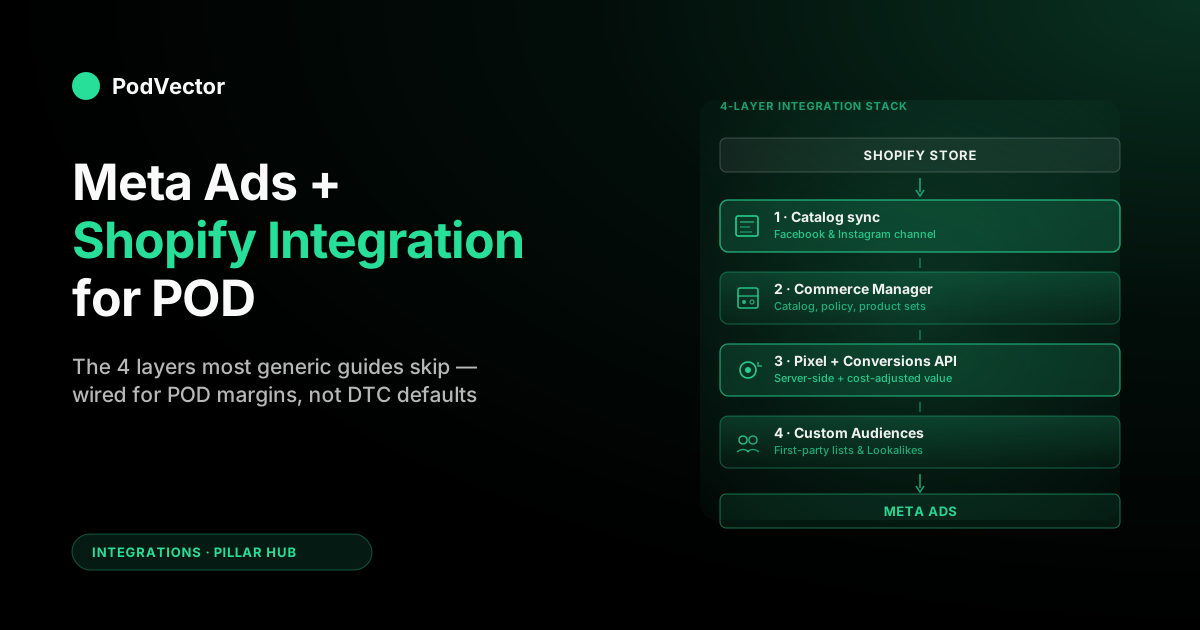
Think of Shopify-to-Meta as four distinct integration layers, each with its own configuration surface, its own failure modes, and its own POD-specific requirements. Installing the Facebook & Instagram sales channel is Layer 1 of four — it starts the integration but does not finish it.
- Layer 1 — Catalog sync. The Facebook & Instagram sales channel pipes your product catalog from Shopify into a Meta Commerce Manager catalog, which then feeds Advantage+ Shopping, catalog sales campaigns, and dynamic product ads. Without this layer, you have no Shopping inventory in Meta.
- Layer 2 — Commerce Manager configuration. The catalog arrives in Commerce Manager raw; Commerce Manager then decides which products are eligible under Meta commerce policies, enforces constraints (trademark, mockup imagery, shipping profiles), and exposes the catalog to Ads Manager. Most POD-specific rejection issues live in this layer.
- Layer 3 — Pixel + Conversions API. Page views, add-to-carts, initiate-checkouts, and purchases must fire back to Meta with accurate values and matched identity. The Pixel covers browser-side; the Conversions API (CAPI) covers server-side. Post-iOS, the Pixel alone is not enough — you need CAPI, and you need it sending cost-of-goods-adjusted purchase values for POD to work.
- Layer 4 — Custom Audiences and first-party data. Customer lists, purchase-cohort audiences, lifetime-value uploads, and website-engagement audiences feed retargeting and Lookalike expansion. This is the layer most POD sellers install last, usually six months after everything else, which is why their Lookalikes underperform the first year.
The rest of this guide walks each layer in order, because the failures compound. A broken Layer 1 makes Layer 2 impossible.
A misconfigured Layer 2 sends garbage identity data to Layer 3's matching. A blind Layer 3 makes Layer 4 statistically useless — Lookalikes built on mismatched purchase events are Lookalikes of strangers. Skipping any one of them is how an integration ends up "connected" but non-functional.
If you came here looking for the Google equivalent, we cover that separately in The Complete Guide to Google Ads + Shopify Integration for POD. The two platforms rhyme at the architectural level but diverge at every implementation detail.
Layer 1: The Facebook & Instagram sales channel
The Facebook & Instagram sales channel is a free Shopify-published app that handles four jobs: it creates or links your Meta Business Manager, Commerce Manager catalog, and Ad Account; it pushes your product catalog to Commerce Manager with a daily sync; it installs the Meta Pixel on your storefront; and it offers a checkbox to enable the Conversions API via Shopify's native integration. For the vast majority of POD stores this is the correct starting point — it is faster, cleaner, and better-maintained than a manual catalog feed or a third-party feed tool at your current scale.
Installation in ~10 minutes
From Shopify admin, the sequence is:
- Sales channels → Add apps → search "Facebook & Instagram" and install
- Sign in with the personal Facebook account that has admin access to your Business Manager
- Select (or create) the Business Manager, Commerce Manager catalog, Meta Pixel, and Ad Account that will be linked. Name them explicitly — "Store Name — Catalog," "Store Name — Pixel" — so when you inevitably hand access to an agency or freelancer the objects are identifiable
- Confirm data-sharing level: choose Maximum to enable Shopify's native Conversions API forwarding. Standard-only is the old default and throws away most of the attribution you're about to spend on Layer 3
- Select which products to sync — start with "all active products" for a small catalog, or build a sync collection from day one (recommended for POD, see below)
- Accept commerce policies and submit the catalog for review
What the sales channel actually does and doesn't do
The channel handles the parts of integration that would otherwise take a developer:
- Creates and links Commerce Manager, Pixel, and Ad Account under a Business Manager
- Installs the Meta Pixel base code in Shopify's theme with storefront events (PageView, ViewContent, AddToCart, InitiateCheckout, Purchase)
- Pushes product data via Shopify's product API daily, with on-demand refresh on product edits
- Forwards events server-side via Conversions API when "Maximum" data-sharing is selected
- Creates baseline Custom Audiences (website visitors, past purchasers) accessible in Ads Manager
What the channel does not do, and what you still have to configure yourself:
- CAPI deduplication headers when you layer a server-side tool like Stape or a custom Conversions API Gateway on top (important if you want double-sending immunity)
- Cost-of-goods-adjusted purchase value — the Shopify CAPI forwarder sends gross sale price, not net margin (see the cost-of-goods section for the fix)
- Catalog title and description optimization for Advantage+ (mockup-image and niche-keyword rewrites belong in Commerce Manager or a supplemental feed)
- Variant exclusion for thin-margin SKUs (the default syncs everything published)
- Customer list uploads and Lookalike construction (Layer 4)
- Domain verification and iOS 14 event prioritization (done inside Events Manager, not the channel)
Shopify sync collection: the best POD-specific Layer 1 tip
Rather than syncing every published product, build a Shopify collection called "Meta — Eligible" and point the channel at that collection. POD stores accumulate test products, retired designs, and experimental SKUs over time.
Most of those products have weak sales velocity and poor mockups — exactly the products that drag your catalog's policy review, waste Advantage+ learning spend, and pollute Lookalike seed audiences. A sync collection gives you a single switch to include or exclude products from Meta without unpublishing them from your store. This is the one Shopify-side configuration that separates POD sellers with clean catalogs from ones with 800 SKUs and a 62% product-rejection rate.
Layer 2: Commerce Manager catalog for POD
Once the channel pushes products to Commerce Manager, you still need to configure the catalog itself. The defaults are lenient enough to let products show up in Commerce Manager and strict enough that roughly a third of POD products will sit in "Rejected" or "Pending" status if you don't know what to fix.
The three catalog failure modes for POD
1. Mockup image rejections. Meta's automated image review looks for off-model photography, watermarks, and "gallery mockup" compositions that are common on Printify and Printful templates.
A hoodie mockup with a flat-lay gray background and no model is fine. A mockup with "Printify" faintly visible in a corner, a collage of six colorway swatches, or an aggressive ghost-mannequin composition will get flagged. Fix: swap to clean single-color, single-variant mockups in Shopify, or set up a supplemental feed that overrides the image URL just for Meta.
2. Trademark and IP flags. POD sellers push "inspired by" designs, niche fandom slogans, and typographic treatments that sit in policy gray zones.
Meta's catalog reviewers are looking for registered trademarks in product titles, descriptions, and image overlays. A single clear infringement can freeze your entire Commerce Manager account while the policy team reviews. Fix: run titles through a basic trademark scan before push, audit descriptions quarterly, and keep your catalog under 500 active products so a single rejection doesn't cascade.
3. Missing or mismatched shipping profiles. Meta requires shipping time estimates in the catalog.
POD's reality — Printify quoting 2–7 business days production plus 3–8 days shipping for US orders — frequently lands in the "longer than 5 business days" policy bucket, which reduces delivery-speed badges and sometimes Shopping eligibility. Fix: set shipping profiles in Shopify that reflect realistic POD timelines and map them explicitly in Commerce Manager; don't leave it to Meta's auto-detection.
Title and description optimization for Advantage+
Advantage+ Shopping uses your catalog's titles, descriptions, and image alt text to decide which products to show which users. Shopify's default product title — frequently "Unisex Heavy Cotton Tee" on a Printify product — is functionally invisible in Meta's catalog ranking. The products that pull impressions are the ones with titles that encode audience signal.
- Bad title: "Unisex Heavy Blend Crewneck Sweatshirt"
- Good title: "Retro Vintage Sunset Mountain Hiking Graphic Crewneck Sweatshirt for Outdoor Enthusiasts"
The good title is keyword-stuffed by DTC ecommerce standards and exactly right for Meta's catalog. It encodes niche (hiking, outdoor), aesthetic (retro, vintage, sunset, mountain), garment type (crewneck sweatshirt), and persona (outdoor enthusiasts).
Advantage+ takes all of that as targeting signal without you having to define interest audiences. For a deeper breakdown of how each Meta ad type consumes this catalog data, see The Complete Guide to Meta Ad Types for POD Sellers.
Product sets for segmented campaigns
Inside Commerce Manager, build product sets that group catalog items by margin tier, seasonality, or niche. A $35 Printify hoodie with a $14 supplier cost is a different economic product than a $22 T-shirt with a $6 supplier cost — they should live in separate product sets so you can run separate Advantage+ Shopping campaigns with different ROAS targets. POD sellers who run a single "All Products" catalog campaign blend these margins into a meaningless average and let Meta chase whatever sells most, which is usually the lowest-margin SKU.
Layer 3: Meta Pixel + Conversions API
This is the layer where most POD accounts quietly bleed measurement quality after iOS 14.5 and now iOS 17. The Pixel alone is not enough. Here is what a complete Layer 3 looks like in 2026.
The Pixel still matters — but as one half of the signal
The browser-side Meta Pixel fires events from the user's device. Apple's ATT, Safari's ITP, ad blockers, and increasingly hostile cookie policies all erode Pixel firing to roughly 40–70% of actual events for a typical POD store. The Pixel's job in 2026 is to capture everything it can capture, send it to Meta as the baseline signal, and rely on the Conversions API to fill the gap from the server.
Confirm the Pixel is installed correctly by running Meta's Pixel Helper browser extension on your product, cart, and thank-you pages. You should see PageView, ViewContent (product pages), AddToCart, InitiateCheckout, and Purchase firing without duplicates and without missing parameters. If Purchase is missing value or content_ids, Advantage+ is flying blind on that event.
The Conversions API is no longer optional
The Conversions API sends events directly from Shopify's servers to Meta's servers, bypassing the browser entirely. Shopify's native CAPI integration (enabled when you pick "Maximum" data sharing in the sales channel) covers 80% of what you need out of the box. What it doesn't handle gracefully:
- Deduplication between Pixel and CAPI events. If both fire, Meta needs an
event_idto know they're the same event. Shopify's integration sets this, but if you later add a server-side tag manager (Stape, Addingwell) without updating the Pixel, you can double-count or double-miss. Test with Events Manager → Test Events. - Advanced Matching parameters. CAPI can pass hashed email, phone, external ID, first/last name, and city. Shopify passes what's available in the order, but for pre-checkout events like AddToCart you need a logged-in session or an email captured via newsletter popup. Every additional matching parameter lifts post-iOS match rate by a few percentage points.
- Custom purchase value. The default
valueis the Shopify order total. For POD sellers, the rightvalueis net profit, which Shopify's stock CAPI forwarder does not calculate (see the cost-of-goods section).
Event prioritization under iOS 14 ATT
Inside Events Manager, go to Aggregated Event Measurement → Configure Web Events and set your priority order for your domain. For POD, the default priority of Purchase → AddToCart → ViewContent → PageView is fine — but you get eight slots, and POD sellers should use them.
Push a custom "ViewCart," "InitiateCheckout," and segmented purchase events (Purchase — High Margin, Purchase — Low Margin) into the higher slots if you want Meta to optimize toward margin tier rather than undifferentiated purchases. The constraint is that only one event per session transmits for iOS-opted-out users, and it's always the highest-priority event that fired — so order matters.
Layer 4: Custom Audiences & first-party data
The attribution post-iOS isn't going back to 2019. What it is doing is shifting the leverage from Meta's interest targeting to your first-party data.
Layer 4 is where POD sellers build that leverage. Most skip this entirely for the first year of running ads; the ones who treat it as table stakes from day one compound results quietly while competitors wonder why their Lookalikes stop scaling.
The five Custom Audiences every POD store should have live
- Past purchasers (lifetime). Seeded from your Shopify Customer list uploaded to Meta as a Custom Audience via file upload, or synced automatically from the sales channel. Refresh weekly.
- Past purchasers — last 180 days. Tighter cohort, closer to current buying behavior. Use as a Lookalike seed and as a retargeting exclusion.
- Engaged but unpurchased — last 30 days. Website visitors who hit AddToCart or InitiateCheckout but did not purchase. Retarget with creative that addresses the top POD purchase objections (fit uncertainty, shipping time, print quality).
- Instagram and Facebook video viewers — 75% completion. Built from engagement audiences; signals real intent even when purchase attribution drops. Cheap to build, high-quality for prospecting.
- Email subscribers (uploaded). Upload your Klaviyo or Shopify Email list as a Customer File audience. Lifts match rate on retargeting and feeds Lookalikes from your best non-purchaser signal.
Lookalike audiences that actually scale
The default Lookalike recipe — 1% of "past purchasers" in your top country — is fine as a baseline but will stop scaling around $5K monthly spend for most POD catalogs. Two upgrades:
- Value-based Lookalikes. Upload a customer file that includes a
valuecolumn (lifetime spend, or first-order profit). Meta weighs high-value customers more heavily in the Lookalike seed, producing a prospecting audience that skews to higher LTV buyers. For POD, this is the single highest-leverage Lookalike variant. - Stacked expansion Lookalikes. Run 1–3%, 3–5%, and 5–10% Lookalikes simultaneously with audience overlap exclusion. Advantage+ will find pockets in the wider percentiles that a narrow 1% misses, and the overlap exclusion prevents audience cannibalization inside your account.
The Customer Match sync problem
Shopify's sales channel does not automatically sync new customers to your Custom Audiences file upload. You either need a weekly manual CSV export from Shopify and re-upload to Meta, a Zap or similar automation that writes to a Meta Customer File audience on each new order, or a third-party integration (Klaviyo's Meta sync is the cleanest for most POD shops). Without one of these, your Custom Audiences go stale and your Lookalikes drift from current buyer behavior.
What iOS 14.5 and 17 actually broke
A lot of POD sellers have a vague sense that "iOS broke Facebook ads" without a clear picture of what specifically changed. Here's the ground truth, because the fix for each break is different.
iOS 14.5 (2021) — App Tracking Transparency. iOS users must opt in to cross-app tracking. Most don't.
Meta can no longer track iOS users across the app ecosystem, which mostly affects app-install campaigns and cross-property attribution. For a Shopify-to-Meta web ads flow, ATT's impact on web tracking is smaller than people think — the Pixel still fires in Safari, and CAPI fires server-side regardless of ATT.
iOS 14.5 — Aggregated Event Measurement. The bigger deal for web advertisers. Meta is limited to 8 configured conversion events per domain, only one event per session transmits for opted-out users, and conversion data is delayed and aggregated. This is why Event Prioritization (Layer 3) matters so much.
iOS 17 (2023) — Link tracking removal. Safari now strips URL query parameters on links from Messages, Mail, and private browsing. Click IDs like fbclid can be stripped, breaking click-to-purchase attribution through those paths. The countermeasure is first-party cookies, server-side tagging with the Conversions API, and rigorous UTM parameters that survive the strip.
What actually works in 2026. The Conversions API sending every major event with hashed email, phone, IP, and user agent. Pixel deduplication set up correctly so you don't double-count.
Event prioritization reflecting your margin reality. First-party Custom Audiences refreshed weekly.
Treat Meta's reported ROAS as a directional signal, not gospel, and reconcile against your actual P&L monthly. For the measurement half of this conversation, see The Complete Guide to Meta Ads ROAS and Attribution for POD.
Sending cost-of-goods so Advantage+ bids toward profit
This is the single most leveraged change in the entire integration for a POD store, and the one almost no generic guide covers.
Here's the problem in plain numbers. You sell a T-shirt on Shopify for $24.99.
Printify charges you $9.20 for the base tee + $3.95 shipping = $13.15 supplier cost. Shopify transaction fees, taxes, and returns shave another $2.40.
Your actual profit per sale is $9.44. But the default Shopify → Meta integration fires Purchase with value: 24.99.
Advantage+ sees that as the number to maximize and bids accordingly. If your CPA is $14, Advantage+ thinks you're profitable at 1.78× ROAS (meaningless for POD) and will happily push you to campaigns that lose money on every conversion because its internal math says you're winning.
The fix is to send the net value to Meta. Three approaches, in increasing order of accuracy:
- Flat margin multiplier. In a Shopify CAPI customization (via Shopify Functions, a custom pixel, or a tag manager like GTM with server-side), multiply every Purchase value by your blended margin rate. If your store's average net margin is 38%, fire
value: 0.38 × order_total. Crude but directionally correct; takes 30 minutes to implement. - Per-SKU cost lookup. Maintain a table of supplier costs per SKU (Printify's Products API will give you these), and at purchase event construct
value = sum(line_item.price - line_item.cost)minus shipping. Significantly more accurate; requires an intermediate layer. - Live reconciliation with your analytics layer. This is the model PodVector AI's Victor exposes — the moment a Shopify order lands, we pull the matched Printify supplier cost from your warehouse, compute net profit including refund probability and shipping, and make that number available to send as the CAPI
value. You're training Advantage+ on actual dollars-in-your-bank, not Shopify's gross.
All three beat the default. If you only do one integration change after reading this guide, do this one.
The compounding effect of Advantage+ optimizing toward real profit instead of inflated revenue reshapes your entire account economics within a month. If you need a refresher on what ROAS number actually keeps a POD store profitable, we work the math in Break-even ROAS in POD: How to calculate it and why it matters.
POD-specific integration gotchas
A running list of the issues POD sellers consistently hit that DTC-focused guides don't warn you about.
Variant-level catalog explosion
A single Printify hoodie with 10 colors, 6 sizes, and 2 print positions is 120 variants. Meta's catalog treats each as an independent product by default, inflating your catalog from 40 "products" in Shopify to 4,800 rows in Commerce Manager.
This hurts catalog review speed, makes product-set management a nightmare, and dilutes Advantage+ Shopping's learning signal. Fix: use Shopify's "item groups" metadata so Meta collapses variants into a parent product with variation axes. The sales channel supports this if you enable the "Group variants" toggle during setup.
Printify/Printful image source switching
When you swap a design file in Printify, the mockup URL changes. Shopify propagates that within a sync cycle; Meta's catalog typically takes another 24–48 hours to reingest.
If you edit a product mid-campaign, expect a day where Advantage+ is serving a mix of old-image and new-image creatives. Don't panic — it resolves. For deeper Printify-side setup, see The Complete Guide to Printify Integrations for POD Sellers.
Printful's dual-US/EU fulfillment regions
Printful fulfills from both US and EU facilities; orders auto-route based on customer address. This breaks Meta's shipping-time estimate if you've configured a single flat shipping profile.
Fix: set separate shipping profiles in Shopify per fulfillment region and expose both in Commerce Manager so delivery-speed badges match reality in both regions. More on this in The Complete Guide to Printful Integrations for POD Sellers.
Refund event timing
POD refunds frequently lag the original purchase by 7–30 days (customer receives product, complains about print quality, gets refunded). Meta's default setup does not subtract refunds from the original Purchase event's attributed value.
Advantage+ sees a purchase, counts the ROAS, and never revises downward when the refund lands. For POD categories with 4–7% refund rates, this is a non-trivial ROAS overstatement. Fix: fire a custom Refund event via CAPI with negative value when Shopify logs a refund; use that in Looker Studio or your own reporting to back-adjust Ads Manager's ROAS number monthly.
Seasonal catalog churn
Holiday designs, drop-based niches, and seasonal collections go live and dark in 4–8 week cycles. Each launch-and-retire cycle resets Advantage+ Shopping's learning on those products. Fix: maintain a stable core of 30–50 evergreen SKUs that stay in the catalog year-round, and run seasonal products through a separate campaign so the core campaign's learning isn't disrupted.
Campaign-readiness checklist
Before you push your first dollar of ad spend, run this integration-completeness check. A "yes" to all twelve is the bar; a "no" to any one is a leak that will silently cost you money until fixed.
- Facebook & Instagram sales channel installed with Maximum data-sharing selected
- Commerce Manager catalog approved with fewer than 5% of active products rejected
- Mockup images cleaned — no watermarks, no collage compositions, no supplier branding
- Meta Pixel Helper confirms PageView, ViewContent, AddToCart, InitiateCheckout, and Purchase fire on appropriate pages without duplicates
- Events Manager → Test Events shows matched Pixel + CAPI events with deduplication working
- Advanced Matching parameters (email, phone, first/last name, external ID) passed on purchase events
- Purchase
valueadjusted for cost-of-goods (at minimum a flat margin multiplier, ideally per-SKU) - Domain verified in Events Manager under your Business Manager
- Aggregated Event Measurement prioritization configured for your 8 events
- Five Custom Audiences live: lifetime purchasers, 180-day purchasers, 30-day engaged non-purchasers, 75% video viewers, uploaded email subscribers
- At least one value-based Lookalike audience built from a customer file with LTV column
- Product sets segmented by margin tier so you can run campaigns with different ROAS targets
Common failure modes and fixes
"My catalog is stuck in review for more than 72 hours."
Usually one of three things: an image-policy flag on a mockup, a trademark flag in a title, or a Business Manager verification lag. Open Commerce Manager → Issues and read the specific flag.
Fix the flagged product (or remove it from the sync collection temporarily) and resubmit. If the whole account is in "Under Review" state, you may be waiting on Business Manager domain verification — check Business Settings.
"My Pixel shows events firing but Advantage+ won't leave learning phase."
Advantage+ needs around 50 purchase events in the optimization window (7 days typical) to exit learning. POD stores at sub-$3K monthly spend frequently can't hit that volume on a per-campaign basis. Fix: consolidate to one Advantage+ Shopping campaign with a product set that spans your core SKUs, widen the attribution window to 7-day click / 1-day view if you aren't already, and keep budget stable for at least 14 days.
"My ROAS in Ads Manager is way higher than my Shopify revenue."
Three likely causes: (1) you're using 7-day click attribution and Ads Manager is counting cross-device purchases Shopify attributes to organic, (2) your Purchase event value is the gross sale price and your effective ROAS on profit is 40% of what Meta reports, or (3) refund events aren't being subtracted. Fix: reconcile monthly against Shopify reports, implement cost-of-goods value adjustment (see above), and fire a Refund custom event via CAPI.
"My Lookalike audiences are underperforming."
Almost always a seed-quality problem. Lookalikes from a seed audience of 500 recent purchasers will barely hold their shape.
Lookalikes from a seed of 500 purchasers where 200 of those records are mismatched (bad email, missing phone) are worse. Fix: grow the seed to at least 1,000 matched records, enable Advanced Matching so more records match Meta's graph, and use value-based seeds where possible.
"Advantage+ keeps pushing my lowest-margin products."
Because that's what it sees the most sales on, because that's what you've priced the most aggressively, because that's what Meta's algorithm is rewarded for. Fix: segment your catalog into product sets by margin tier and run separate Advantage+ Shopping campaigns per set with distinct ROAS targets, and implement cost-of-goods value so Meta understands "$24 hoodie at 38% margin" versus "$18 tee at 52% margin" are not interchangeable.
Ongoing maintenance cadence
The integration is not set-and-forget. Here's the cadence that keeps it healthy:
- Weekly. Events Manager health check — any new diagnostic warnings? Any drop in matched-event rate? Refresh Custom Audiences that rely on file upload (email lists, customer files).
- Monthly. Reconcile Ads Manager ROAS against Shopify and Printify/Printful P&L. Any gap above 25% is a tracking leak. Audit Commerce Manager for rejected products and either fix or remove from the sync collection.
- Quarterly. Re-audit Advanced Matching parameters; supplier API changes or Shopify app updates occasionally drop fields silently. Re-run the campaign-readiness checklist above. Review Aggregated Event Measurement priorities — if your margin mix has shifted, update priorities accordingly.
- On significant product changes. New supplier (adding Gelato alongside Printify), new design drop, or a niche pivot each warrant a focused integration audit rather than assuming the existing config will handle it. New suppliers in particular frequently break shipping profiles until you explicitly map them.
If you run Meta alongside Google or are comparing platforms entirely, our Meta Ads vs Alternatives comparison for POD covers how the integration work you've done here translates (and doesn't) across platforms. If you're evaluating whether to hand integration work to an agency or learn it yourself, our agencies and courses guide walks both paths with POD-specific criteria. And the underlying platform playbook sits in The Complete Meta Ads Playbook for Print-on-Demand Sellers.
FAQs
Do I need both the Meta Pixel and the Conversions API?
Yes. The Pixel captures browser-side events as they happen and provides fast feedback. The Conversions API captures server-side events that survive ad blockers, iOS restrictions, and cross-device sessions. You need both, wired with deduplication so a single purchase counts once.
Is the Facebook & Instagram sales channel enough, or do I need a third-party tool?
For most POD stores doing under $50K monthly revenue, the Shopify sales channel with "Maximum" data-sharing is enough for Layers 1 and part of Layer 3. You still need to configure Layer 2 (catalog), finish Layer 3 (cost-of-goods value, Advanced Matching, event prioritization), and build Layer 4 (Custom Audiences) manually. Above $50K/month, many sellers add a server-side tag manager (Stape, Addingwell) for more control over CAPI payloads.
How long does Advantage+ Shopping need to learn?
Around 50 purchase events in the optimization window, which for most POD accounts is 7–14 days of steady spend. Don't kill campaigns inside the learning phase; the early days are noisy by design.
Should I run Advantage+ Shopping or traditional campaigns on a POD catalog?
Advantage+ Shopping for prospecting and broad reach because it uses catalog signals better than manual targeting. Traditional campaigns with narrower audiences for retargeting and for testing specific creative-audience combinations. Most scaled POD accounts run both.
Can I use the same Meta Pixel across multiple Shopify stores?
Technically yes, but don't. Each store should have its own Pixel, catalog, and event configuration — shared Pixels pollute learning signals across stores and make attribution reporting useless.
What if my catalog keeps getting products rejected?
Open the specific rejection reason in Commerce Manager — it's almost always one of three: image policy (watermarks, collage mockups), text policy (trademarks, prohibited claims), or shipping/price mismatch. Fix the underlying Shopify product, resubmit, and if a product keeps bouncing remove it from your sync collection and sell it through organic channels only.
Do I need domain verification?
Yes. Without verified domain ownership in Meta Business Manager, you can't configure Aggregated Event Measurement, which means you lose most of the Layer 3 control this guide walks through. Domain verification takes 5 minutes and should be the first thing you do after installing the sales channel.
How do I handle returns in Meta's attribution?
Fire a custom Refund event via the Conversions API when a Shopify order is refunded, with a negative value. Ads Manager won't natively net this out of ROAS, but you can use it in Looker Studio or your own analytics layer to compute adjusted ROAS. POD sellers with 4–7% refund rates should build this into their tracking from day one.
Will Victor help me set this up?
Victor's job today is to answer questions using your store's connected data — matching Shopify orders to Printify or Printful supplier costs, checking true margins, adjusting ROAS for refunds, and checking the quality of your Custom Audience seeds — so you can make the setup decisions this guide calls for. Victor can also act on your Meta Ads account, like pausing a campaign or changing a budget, once you approve it.
Train Advantage+ on profit, not revenue
The cost-of-goods value fix is the single highest-leverage change in this guide and almost nobody runs the math. Victor pulls your Shopify orders and Printify or Printful supplier costs live from your warehouse, computes real net profit per order, and makes that number available to send as your Meta Purchase event value. Same Advantage+ Shopping campaign, trained on dollars in your bank instead of gross on Shopify.