
Quick Answer: A Shopify Meta Ads strategy for print-on-demand has to start from contribution margin, not creative. Printify or Printful supplier cost eats 50–65% of retail before a dollar of ad spend, so the cost-per-purchase ceiling is roughly half of generic Shopify ecommerce.
The right approach: pick 8–15 SKUs for the catalog, override the conversion value to send profit instead of subtotal, run one Advantage+ Shopping campaign and one retargeting campaign across Facebook plus Instagram placements, and refuse to make optimization calls in the first 14 days while supplier fulfillment lag distorts the numbers.
This playbook walks through SKU selection, the install, campaign structure across Meta's placement family, creative for POD, and the first 30 days of profit-aware monitoring.
Why Meta Ads (not just Facebook) is the right framing in 2026
Most "Shopify Facebook Ads" guides still write as if Facebook Feed is the campaign. It isn't. Meta's automated placement system runs the same ad across Facebook Feed, Instagram Feed, Reels, Stories, Marketplace, Audience Network, and Threads — and decides where each impression lands based on predicted conversion probability.
For POD specifically, Instagram now drives more profitable conversions than Facebook on most apparel and accessory accounts. Reels and Stories show your design at full-bleed, which is where mockups and lifestyle photos earn their click. Facebook Feed still works, but as one placement inside the Meta network, not the whole campaign.
Treat the campaign as a Meta campaign with all placements live by default. The setup, audience structure, and creative all assume that frame.
Why POD on Shopify needs a different Meta Ads strategy
Generic Shopify Meta Ads guides — including Shopify's own Meta Ads Manager guide — assume an owned-inventory ecommerce business at 50–60% gross margin. POD changes the math.
Printify or Printful supplier costs run 50–65% of retail before any ad spend. A $30 t-shirt sold through Printify has roughly $9.50 of contribution margin once you net out fulfillment, payment fees, and shipping subsidy.
That ~$9.50 has to cover Meta cost-per-purchase. Owned-inventory ecommerce can spend $12–$15 to acquire an order and grow. POD can spend $4–$7 before going underwater.
Every choice that follows — SKU selection, conversion value override, budget floor, campaign structure — falls out of that one number. The mistake most POD operators make is following an owned-inventory strategy and concluding that "Meta Ads don't work for POD." Meta Ads work fine. The strategy was wrong for the margin profile.
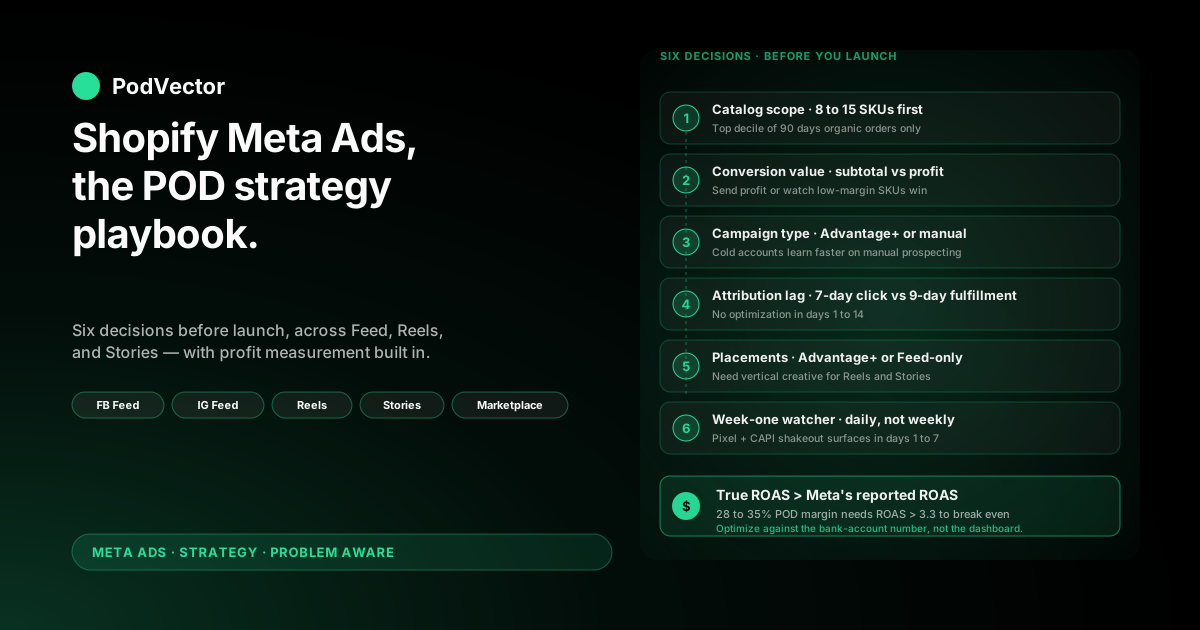
Six decisions to make before launching
The mechanical install is reversible. The strategy choices encoded into the install are not. Once Meta's algorithm has trained on the wrong signal for two weeks, you're rebuilding the campaign rather than tuning it.
Decision 1: Which 8–15 SKUs go in the catalog
Don't sync your full Shopify catalog. Advantage+ Shopping (Meta's all-in-one auto-targeted campaign) with 200 SKUs and a $50/day budget spreads learning data so thin that no SKU earns enough signal to get a budget allocation.
Pick the 8–15 SKUs that account for the top decile of your last 90 days of organic Shopify orders. Submit only those. Add the rest in cohorts of 5–10 every two weeks once the initial group has stabilized.
Decision 2: Subtotal or profit as the conversion value
The default Shopify-to-Meta integration sends order subtotal as the purchase event value. For owned inventory at 60% margin, that's tolerable.
For POD it means Meta chases the highest-revenue SKUs, which are often the lowest-margin ones — oversized hoodies, full-color all-over prints, products with steep blank costs. The right signal is profit after supplier cost.
Decide now whether you'll set up a profit-value override (covered in section 8) or accept the default and absorb the misallocation.
Decision 3: Advantage+ Shopping or manual structure
Advantage+ Shopping is what every guide recommends because it's Meta's marquee product and the path of least resistance through the Shopify channel app. Meta's own data shows roughly 17% higher ROAS versus manual campaigns on average.
For POD on a cold ad account, Advantage+ Shopping is also where early budget gets wasted. It needs around 50 conversions per ad set per week to exit the learning phase. On $50/day at POD margins, you hit that floor in week three or four — not week one.
Many POD operators do better starting with one manual prospecting campaign on broad targeting plus a retargeting campaign, then layering Advantage+ Shopping once the pixel has 40–50 purchase conversions of training data.
Decision 4: How attribution lag interacts with reporting
Meta's default attribution window is 7-day click. POD orders fulfilled by Printify or Printful take 5–9 business days to ship and 1–2 days for delivery confirmation. Reported ROAS in week one is a partial number.
Decide upfront that you will not make optimization calls in the first 14 days based on reported ROAS. Write that rule down before you can talk yourself out of it.
Decision 5: Placement strategy — auto or manual
Meta defaults to Advantage+ Placements (auto-distribute across Feed, Reels, Stories, Marketplace, Audience Network). For POD this is usually correct because creative built once gets repurposed across formats.
The exception: if you have only static product photos and no vertical-format creative, manual placements limited to Feed will outperform auto-placements that try to serve a 1:1 image into a 9:16 Reel slot. Build vertical creative or restrict placements until you have it.
Decision 6: Who watches the account in week one
The first seven days surface ad rejections, catalog sync errors, missing Conversions API events, and broken UTMs. If nobody is checking Ads Manager, Shopify's channel diagnostics, and a profit view daily, budget another $200–400 of avoidable spend as a tax for inattention.
The install: Pixel, Conversions API, catalog
The mechanical install is covered in detail in the complete guide to Meta Ads and Shopify integration for POD. The compressed version:
- Install Shopify's Facebook & Instagram channel app. Connect your Meta Business Manager. Pick the Page, Instagram account, and ad account that will run the campaigns.
- Connect the Meta Pixel. Verify it fires on PageView, ViewContent, AddToCart, InitiateCheckout, and Purchase. Use the Meta Pixel Helper extension to confirm.
- Enable the Conversions API (CAPI). The Pixel alone misses 15–30% of purchase events because of iOS tracking prevention and ad blockers. CAPI sends the same events server-side from Shopify's backend. Run both — industry standard.
- Submit the catalog feed. Only the 8–15 SKUs from Decision 1, not the full catalog.
- Set the conversion value override if you decided to send profit instead of subtotal (Decision 2). This is a Shopify metafield change that the channel app reads.
- Verify event match quality. Meta Events Manager scores match quality 0–10. Below 6 means audiences are noisier than they should be. Check email, phone, and external_id are flowing.
The install is the easy part. Most failures come from skipping CAPI ("the Pixel works fine") or syncing the full catalog ("I'll let Meta figure it out").
Campaign structure across Meta placements
For a new POD account on Shopify, the right starting structure is two campaigns running in parallel:
Campaign 1: Prospecting
One Advantage+ Shopping campaign with broad targeting (Advantage+ Audience), all placements enabled, 4–6 ad creatives in a single ad set. Budget: $40–$70/day to start. Conversion goal: Purchase.
Creative mix should cover format diversity — at least one vertical video for Reels and Stories, two static images sized 1:1 for Feed, and one carousel showing 3–5 designs. Meta's algorithm will favor whichever format converts.
Campaign 2: Retargeting
One sales-objective campaign targeting:
- Website visitors, last 30 days who viewed product or added to cart but did not purchase
- Engagers who interacted with your Instagram or Facebook Page in the last 30 days
- Customer list lookalike (1–3%) built from your Shopify customer email list of past purchasers
Budget: $15–$25/day. Creative should be testimonial-led, UGC, or specific to the product they viewed. Use Dynamic Product Ads to auto-show the SKU from their browsing history when audience size allows.
What to skip on day one
Don't run a separate awareness or video-views campaign for "top of funnel." On POD margins you can't afford to optimize toward a non-purchase event. If brand awareness matters to the broader business, run it from a separate budget and don't measure it against Meta Ads ROAS.
For deeper structural variations and how this evolves as you scale, see the complete Meta Ads playbook for print-on-demand sellers.
Audiences: cold, warm, and lookalike on POD margins
The 2026 audience reality on Meta: detailed-interest targeting has lost most of its edge. The platform's machine learning beats hand-built interest stacks on every test, especially for a POD account where audience seed data is small.
Cold prospecting
Default to Advantage+ Audience — Meta's broad AI-targeting that uses your Pixel and customer data to model lookalikes automatically. Don't add interest restrictions unless you've tested with and without and seen a clear ROAS improvement.
If your niche is narrow (e.g., a specific occupation or fandom), one interest stack is fine as a parallel ad set, not the only one. Let it compete.
Warm: customer list lookalikes
Upload your Shopify customer email list. Build a 1–3% lookalike of purchasers (not all customers — purchasers only). This is typically the highest-quality cold audience you can build for a POD store.
If you have under 500 past purchasers, the lookalike will be too noisy to use. Run prospecting on Advantage+ Audience until your customer list reaches that floor.
Hot: site retargeting and engagers
Past 30-day site visitors and Instagram engagers are the highest-intent audience you have. Retargeting a 30-day window is standard; extending to 60 or 90 days starts to dilute quality on POD because design preferences shift.
Exclude past purchasers from prospecting and retargeting unless you have a clear repeat-purchase product.
Creative for POD: Reels, Stories, Feed
POD creative has one structural advantage and one structural disadvantage. The advantage: every product is visual by default — the design is the value proposition. The disadvantage: most POD operators ship with mockup images only, and pure mockups underperform on every Meta placement that isn't Feed.
What works on Reels and Stories (vertical, full-bleed)
Reels and Stories serve in 9:16. Mockup-only ads die here because the product fills 30% of screen. What works:
- Lifestyle video — someone wearing the product in a real setting, 8–15 seconds, hook in the first 1.5 seconds
- Design reveal animations — fast cuts showing 3–5 designs from your collection, on-brand text overlay
- UGC-style testimonial clips — phone-shot, voice-over, the customer wearing the product. Authenticity beats production value.
What works on Feed (1:1 or 4:5)
Static mockup images do work on Feed if the design is the headline. Use clean photography or generated mockups against a neutral background. Test 1:1 against 4:5 — 4:5 occupies more vertical pixels and typically wins.
Carousel ads showing 3–5 designs from a collection let one ad cover multiple SKUs without splitting the budget.
What to test, in order
Start with three to five creative concepts at the campaign level. Iterate weekly. Once a creative beats the average ROAS by 20%+ for two weeks, scale its budget. Once another underperforms by 30%+ for two weeks, kill it.
For a deeper breakdown of which Meta ad formats fit POD and how to brief creative, see the complete guide to Meta ad types for POD sellers.
Profit-aware measurement: the gap nobody covers
This is where the Shopify Meta Ads playbook diverges hardest from generic ecommerce advice. Reported ROAS in Ads Manager uses order subtotal. For POD that number is a fiction — it doesn't subtract Printify or Printful supplier cost, fulfillment fee, payment processing, or shipping subsidy.
A campaign showing 2.8x reported ROAS on $30 t-shirts is actually losing money once you net out roughly $20 of variable cost per order. The break-even ROAS at POD margins is closer to 3.2x–3.5x, not the 2.0x you'll see quoted in generic guides.
Two ways to fix this
Option A: Profit-value override at the Pixel. Configure the Shopify channel app to send profit (retail minus supplier cost) as the purchase event value rather than subtotal. Meta then optimizes toward profit and the ROAS column in Ads Manager reads as profit-on-spend. This requires per-SKU cost data in Shopify metafields and a one-time setup of the value override.
Option B: External profit dashboard. Keep Meta sending subtotal (the default), but pull spend, orders, and supplier cost into a single view that calculates contribution margin per ad set per day. Most POD operators end up here because the metafield setup for Option A is fragile across product variants.
This is the layer that Victor — PodVector AI's AI employee — was built for. Victor connects your Shopify, Meta Ads, and Printify or Printful data into a live data warehouse and answers "which ad set is profitable after supplier cost on the last 14 days?" with the actual number, not Ads Manager's subtotal-based estimate.
Either option is defensible. Running neither — accepting Meta's subtotal-based ROAS as truth — is the path most POD operators take and the most common reason "my campaigns are profitable on paper but my bank account disagrees."
For the broader attribution picture, see the complete guide to Meta Ads ROAS and attribution for POD.
The first 30 days: what to monitor and what to ignore
The 30-day window is where most accounts are abandoned prematurely. POD operators panic at week-one ROAS, halve the budget, watch performance get worse as learning data thins, and conclude Meta doesn't work.
Days 1–7: launch and stabilization
Watch for technical failures only — ad rejections, Pixel events not firing, CAPI mismatches, broken catalog sync. Do not optimize on ROAS. Confirm spend pacing matches budget and that creatives are getting impressions across placements.
Days 8–14: pattern emergence
Meta's algorithm starts converging. Look for which creative-placement combinations are getting the most impressions (Meta's vote on what's working). Cost-per-purchase should stabilize, even if ROAS is still misleading because of POD fulfillment lag.
Days 15–21: first real read
Now reported ROAS is closer to true. Compare it against your profit-on-spend break-even (3.2–3.5x for typical POD apparel). Kill creatives 30%+ below average. Increase budget on creatives 20%+ above. Don't change campaign structure yet.
Days 22–30: scale or rebuild
If profit-on-spend is at or above break-even, increase budget by 20% week-over-week. Larger budget jumps push the campaign back into learning phase. If profit-on-spend is below break-even with a clear winning creative, rebuild around it. If nothing is working, don't add budget — review SKU selection and creative quality before spending more.
Five mistakes that turn this strategy into a money pit
1. Running a $20/day budget on POD margins
Halving the budget doesn't halve the cost. It eliminates the chance of useful learning. Below $40/day for 14 days, Meta doesn't accumulate enough purchase events to exit learning phase. Wait until you can fund the floor.
2. Syncing the full Shopify catalog
Three hundred SKUs in the catalog feed and a $50/day budget produces zero meaningful signal per SKU. Pick 8–15. Add more in cohorts after the first group stabilizes.
3. Optimizing on Meta-reported ROAS without subtracting supplier cost
2.8x reported ROAS on POD apparel is usually unprofitable. Override the conversion value to send profit, or pull the data into a profit-aware dashboard. Don't trust Ads Manager's ROAS column at face value.
4. Killing campaigns at day seven
Week one is technical. Week two is pattern emergence. Week three is the first real read. Pulling the plug at day seven is throwing away the data you spent the first $400 buying.
5. Treating Meta as Facebook only
If you've manually disabled Instagram, Reels, and Stories placements out of habit, you're cutting off most of the placements where POD apparel actually converts. Default to Advantage+ Placements unless you have a specific reason not to.
For sibling strategies on the same cluster, see the Shopify Facebook Ads strategy, Facebook Ads Shopify strategy, and the cluster hub at Meta Ads strategy for POD.
FAQs
What's the minimum monthly budget to run Meta Ads on a Shopify POD store?
$1,200/month is a realistic floor — $40/day for 30 days. Below that, Meta's algorithm doesn't accumulate enough purchase events to exit learning phase, and you'll spend the budget without producing useful data. If $1,200 isn't available, defer the launch and focus on organic Shopify and email until working capital improves.
Should I use Advantage+ Shopping campaigns from day one?
Probably not on a cold ad account. Advantage+ Shopping needs roughly 50 conversions per week to exit learning, and POD margins make hitting that floor in week one unrealistic. Start with one manual prospecting and one retargeting campaign. Layer Advantage+ Shopping after the pixel has 40–50 purchase conversions of training data.
How do I track true profit per ad set when Meta only sees subtotal?
Two options. Set up a Shopify-side conversion-value override that sends retail-minus-supplier-cost as the purchase event value, so Meta optimizes toward profit. Or pull Meta spend, Shopify orders, and Printify or Printful supplier cost into a single profit-aware dashboard outside Ads Manager. Most POD operators end up using a dashboard because the metafield override breaks across product variants.
Why does my Shopify-reported ROAS differ from Meta-reported ROAS?
Three reasons. Meta uses 7-day click attribution by default; Shopify uses last-click. Meta counts conversions through both Pixel and Conversions API, which can deduplicate imperfectly. And Meta's view-through window can credit conversions that Shopify attributes to other channels. A 15–25% gap between the two is normal. A 50%+ gap signals tracking misconfiguration — usually missing or duplicate CAPI events.
Should I run Facebook and Instagram as separate campaigns?
No. Run one Meta campaign with Advantage+ Placements enabled and let the algorithm distribute spend across Facebook Feed, Instagram Feed, Reels, Stories, and Marketplace. Splitting them by hand throws away the optimization signal Meta uses to allocate budget toward whichever placement is converting best for your creative.
What ROAS should I target for a POD store on Shopify?
Reported ROAS (Ads Manager, subtotal-based) of 3.2x–3.5x is roughly break-even for typical POD apparel after supplier cost, fulfillment, payment, and shipping. Profitable scale starts at 4.0x reported ROAS. If you've configured a profit-value override, the same break-even shows as 1.0x and profitable scale as 1.3x+ in Ads Manager — same reality, different denominator.
See your real ROAS, not Meta's version of it
Meta's ROAS column shows revenue divided by spend. Your bank balance shows revenue minus supplier cost minus payment fees minus shipping subsidy minus spend. Those are different numbers.
Victor connects your Shopify, Meta Ads, and Printify or Printful data into a live data warehouse and answers "which ad set is actually profitable after supplier cost?" in plain English. No SQL required, no nightly export, no spreadsheet.
Try Victor free