
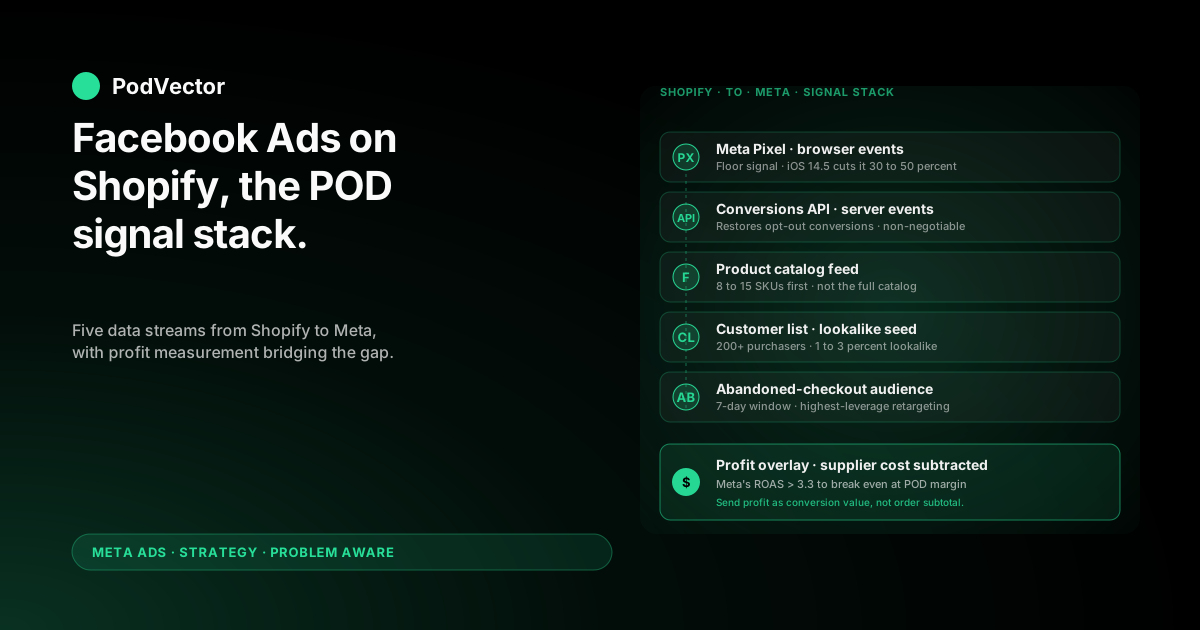
Quick Answer: A Facebook Ads Shopify strategy for print-on-demand wins or loses on the data layer, not the creative. Shopify already exports more high-quality signal to Meta than most operators use — purchase events with order subtotal, customer lists for lookalikes, abandoned-checkout audiences, and a product catalog Meta can drive Advantage+ Shopping with.
The catch: every one of those signals is calibrated for a 50–60% gross margin owned-inventory business. POD operates at 28–35% contribution margin after Printify or Printful supplier costs. That gap is the entire problem this playbook solves.
Below: the Shopify-to-Meta signal stack, the audience seeds Shopify gives you for free, the campaign architecture that fits POD margins, and the scaling rules that don't blow up the account in week three.
Why "Facebook Ads on Shopify" looks different for POD
Most published guides — including OptiMonk's beginner playbook, AdCreate's comprehensive 2026 guide, and EasyApps' Meta strategy guide — assume Shopify means owned inventory at 50–60% gross margin. Their math survives almost any well-built campaign.
Print-on-demand on Shopify breaks that assumption in one specific place: the order subtotal Meta sees is not your revenue. Printify or Printful takes 50–65% of that subtotal as supplier cost, before you've spent a dollar on ads.
That changes everything downstream. The break-even ROAS bar is roughly 3.3x, not 1.7x. The cost-per-purchase ceiling is $4–$7, not $12–$15. The campaign objectives Meta defaults to (revenue-weighted) optimize toward your worst SKUs unless you intervene.
Generic "Facebook Ads Shopify" advice doesn't fail because it's wrong. It fails because it's calibrated for a different cost structure than POD has. The fix is not "more creative" — it's wiring Shopify's signal stack to Meta in a way that respects POD economics.
For the broader Meta sequencing question, see our pillar on the complete Meta Ads playbook for print-on-demand sellers. This article assumes you're past the readiness bar and ready to operate.
The Shopify-to-Meta signal stack
Shopify exports five distinct data streams to Meta. Most operators wire up one or two and leave the rest dormant. For POD, the dormant ones often matter more than the headline Pixel install.
1. The Meta Pixel (browser-side events)
Standard install via the Facebook & Instagram channel app. Fires PageView, ViewContent, AddToCart, InitiateCheckout, and Purchase from the visitor's browser.
iOS 14.5+ broke browser-only events for opt-out users — typically 30–50% of iOS traffic. The Pixel still has a job (it powers the Meta Pixel Helper and provides a fallback), but on its own it's seeing roughly half the conversions actually happening on your store.
2. The Conversions API (server-side events)
CAPI (Meta's server-side event channel) fires the same events from Shopify's servers, bypassing the iOS opt-out problem. Shopify's Facebook channel app enables CAPI automatically once you toggle it.
For POD this is non-negotiable. A 50% conversion sample on a $40/day budget produces noise, not learning. Verify in Events Manager that the Server column shows numbers comparable to the Browser column on every event.
3. The product catalog feed
Shopify auto-generates a Meta-compatible product feed and syncs it to Commerce Manager. This is what powers Advantage+ Shopping, dynamic retargeting, and Advantage+ Catalog Ads.
The default sync is "all active products." For POD that's a mistake. A 200-SKU catalog at $40–$80/day spreads learning so thin that no SKU earns enough signal to break out. Override the sync to a manually curated 8–15 SKU list, drawn from your top organic-orders decile of the last 90 days.
4. Customer lists (Custom Audiences)
Shopify exports your customer email + phone list to Meta as a Custom Audience, hashed for privacy. Meta then matches those identities to its user graph to seed the audience.
For a POD store with 200+ past customers this is the single most valuable lookalike seed you have. A 1% lookalike of past purchasers outperforms any interest stack on a cold account, because Meta is matching on real conversion behavior, not declared affinities.
5. Abandoned-checkout and event audiences
Shopify can build audiences from cart abandoners, checkout abandoners, and 30/60/180-day visitors. These power retargeting without any custom pixel code.
The 7-day cart-abandonment audience is the highest-leverage retargeting segment for POD. Intent is captured but the buyer hasn't committed; a reminder ad with social proof or a small free-shipping nudge converts at multiples of cold prospecting.
Wire all five. Most POD operators have only the first three. The fourth and fifth are where the easy retargeting and lookalike wins live.
Three audience seeds Shopify gives you for free
Shopify hands Meta three high-quality audience inputs without any custom configuration. POD operators who use all three start with a meaningful prospecting advantage.
Seed 1: Past purchasers (the lookalike anchor)
Once you have 200+ Shopify orders, export the customer list as a Meta Custom Audience and build a 1–3% Lookalike from it. This is the closest thing to "Meta's algorithm seeing the customer profile that already converted on your store."
For POD specifically, this beats interest-targeting because POD buyers don't share interests; they share design taste, which interest-targeting can't surface. Buyer behavior surfaces it implicitly through the lookalike model.
Update the seed monthly. The lookalike re-builds against a fresh purchaser cohort, which keeps it tracking your actual catalog rather than the catalog you sold a year ago.
Seed 2: 90-day add-to-cart audience
Shopify pushes AddToCart events through Pixel and CAPI. Build a Custom Audience of "anyone who added to cart in the last 90 days, didn't purchase," then a 1% Lookalike from it.
This catches the high-intent shoppers Meta hasn't fully credited because the conversion happened post-attribution-window. Those people demonstrate the same buying signal as purchasers but haven't yet completed — feeding them into a lookalike model surfaces nearby buyers earlier.
Seed 3: Email subscriber list (extended)
If you have a Shopify newsletter list that's larger than your buyer list — typical for any store with a popup — export it as a Custom Audience too. The match rate is lower (these aren't all customers), but the lookalike still surfaces a brand-affinity signal Meta can use.
Use this as your third lookalike, not your first. It's broader and noisier than the purchaser seed, but it's free incremental reach for a small ad account.
Stack all three lookalikes in one prospecting ad set as audience inputs. Meta's algorithm picks among them as it accumulates conversion data. You don't have to choose.
Campaign architecture: four lanes, not three
Most Facebook Ads Shopify guides describe a three-lane funnel: cold prospecting, warm retargeting, hot retargeting. For POD that misses a lane that punches above its weight.
Lane 1: Cold prospecting (55–65% of budget)
One campaign optimizing for Purchase, broad targeting plus the three lookalikes from above as inputs. Single ad set if budget is below $80/day; two ad sets (one lookalike-heavy, one Advantage+ Audience) above that.
Two ads inside the ad set: one mockup-on-real-human image, one 15-second motion ad. Don't add a third ad until each of the first two has 10+ purchases attributed.
Lane 2: Dynamic retargeting (15–20% of budget)
Advantage+ Catalog Ads (formerly Dynamic Product Ads) targeting 14-day site visitors and cart abandoners. Meta serves the exact SKU each visitor viewed. Conversion rates are 3–5x cold prospecting, but the audience is small — capping budget here prevents over-saturation.
For deeper detail, see our piece on Facebook dynamic product ads on Shopify.
Lane 3: Engagement retargeting (10–15% of budget)
The lane most playbooks skip. Targets people who engaged with your Instagram or Facebook content in the last 30 days but never visited the store. POD apparel ads generate a lot of "saved this for later" engagement that never converts to a click — this lane catches them.
Use a different creative angle here: social proof, customer photo gallery, or the design's backstory. Don't reuse the prospecting creative they already saw.
Lane 4: Brand-defense search (5–10% of budget)
If your store has any organic search demand on its name, run a small campaign on Meta's Search Results placement targeting your brand keywords. CPCs are low and intent is captured. Without it, lookalike POD stores buy your branded interest traffic.
Skip this lane if your store is brand-new with no organic demand — there's nothing to defend yet.
The four-lane structure works on budgets as low as $60/day if you allocate proportionally. Below $60/day, collapse Lanes 3 and 4 into Lane 1 until volume justifies separation.
Creative system: from product photos to ad-ready
POD on Shopify has one structural creative advantage: the catalog is large and visual. The disadvantage: stock Printify or Printful mockups look like every other dropship store on Meta.
The system that closes that gap, in priority order:
Real-human lifestyle photos (the workhorse)
Order a sample of your top 3 designs. Photograph each on a real person — friend, family, paid model — in 4:5 portrait. Outdoor or natural-light interior. No studio backdrop.
This single change typically doubles CTR vs. Printify's stock mockups and is the highest-ROI creative move a POD store can make. Cost: $30–$60 per design + an afternoon. The first 5 ad-attributed orders pay for it.
15-second vertical motion ads (the scale lever)
Three or four contexts of the design in 15 seconds, vertical Reels-native format. Doesn't need to be high-production; needs to feel native to the platform.
For POD, motion ads outperform static in cold prospecting once an account has any conversion data, because Reels and Stories placements dominate cheap impressions and static doesn't run there as effectively.
Carousel ads of variants (the catalog lever)
Useful when one design has 4–6 SKU options — colors, garment types, sizes. Carousel lets the algorithm test which combination earns the click without you guessing.
This format also works when retargeting cart abandoners who didn't pick a variant. Showing all variants at once recovers some of the indecision that caused the abandonment.
UGC stitches (the social proof lever)
Once you have 5+ customer photos, stitch them into a 20-second compilation. Add captions naming what each customer wrote in the review. This is the highest-conversion creative format for engagement-retargeting (Lane 3) but underperforms in cold prospecting until you have enough volume to make the photos look diverse.
Avoid
Hard-sell openers ("BUY NOW," "LIMITED TIME OFFER") tank relevance score immediately on POD ads — Meta has classifiers tuned to flag low-quality dropship-style creative, and these phrases trip them. Lead with the design or the wearer, not the offer.
Scaling rules: four signals to raise, three to cut
Scaling Facebook Ads on a Shopify POD store is mostly about not making the wrong move on a noisy week. The rules below are quantitative because gut-feel scaling reliably blows up the account on a $80/day budget.
Raise budget (max +20% per day) when:
- True ROAS > 4.0x for 7 consecutive days on the campaign you're scaling. "True" = Meta's reported revenue minus per-line-item supplier cost. 4.0x leaves headroom above the 3.3x break-even bar.
- CPM is stable or declining over the same 7-day window. Rising CPM with stable ROAS means a creative-fatigue cliff is coming; raising budget then accelerates the crash.
- Cost-per-purchase is below $7 on cold prospecting (Lane 1). Above $7, scaling pushes cost higher because you're feeding the algorithm a marginal-buyer signal.
- You have 30+ days of working capital cushion. Scaling means longer attribution lag and more cash tied up in fulfillment. If you don't have the runway, hold the budget where it is.
Cut budget (or pause) when:
- True ROAS < 2.5x for 5 consecutive days after the learning phase has cleared. You're below break-even and the trend isn't reversing on its own.
- Frequency > 4.5 inside the prospecting audience. Same audience, same creative, fifth showing — fatigue is now the dominant signal and you're paying full CPM for diminishing-return impressions.
- Customer return rate exceeds 5% on the SKUs the campaign drove. Meta scaled an ad to a low-quality buyer cohort. Pull spend, examine the targeting, ship the next campaign without that audience input.
For more on the metric layer that supports these rules, see the complete guide to Meta Ads ROAS and attribution for POD and the focused how to boost ROAS on Meta Ads in 2026 piece.
Profit-aware reporting that bridges Meta and Shopify
Meta reports revenue. Shopify reports orders. Printify or Printful reports supplier cost on a different cadence. Reconciling those three is where most POD operators give up and just trust Meta's number — which is the most expensive trust mistake in the playbook.
Three approaches to closing the gap, ranked by leverage:
Approach 1: Profit as the conversion value (highest leverage)
Modify the Pixel + CAPI Purchase event to send profit — order subtotal minus per-line-item Printify or Printful supplier cost — as the value parameter, not subtotal.
Meta's algorithm then natively optimizes toward profit-weighted purchases. A campaign that drives $30 oversized hoodies (low margin) gets less weight than one driving $30 standard tees (higher margin), even though Meta's revenue number is identical.
Almost no Shopify POD store has done this. It's a one-time engineering job that rewires every campaign downstream.
Approach 2: Daily profit reconciliation dashboard
Pull Meta spend, Shopify orders, and Printify or Printful supplier costs into one view that calculates true contribution margin per campaign each morning. Optimization decisions key off the dashboard, not Ads Manager.
This is what most POD operators end up doing in spreadsheets at 11pm — and what tools designed for this collapse to a single dashboard. Either way, the dashboard is the source of truth, not Meta's reported ROAS.
Approach 3: Manual weekly review
Pull the top 5 ad sets by spend, look up the SKUs each drove, calculate true profit by hand. Lowest-effort but slow. Works only if you stick to the weekly cadence — operators who skip even one week miss the moment a creative starts fatiguing.
This is also where Victor — PodVector AI's AI employee for POD sellers — does the work most teams end up doing in spreadsheets. Victor pulls Shopify, Printify or Printful, and your Meta ad account into one live data warehouse and answers "is this campaign profitable on margin, not just spend?" with a number that already accounts for supplier cost. The point isn't the specific tool; the point is that the question is the one that matters and most POD operators don't have a fast way to answer it.
Seven things that quietly break the integration
The Shopify-Meta integration breaks more often than the Shopify-Google one because there are more moving parts. The break is rarely loud — usually it's a 30–50% drop in attributed conversions over a week, blamed on creative fatigue when it's actually a CAPI failure.
- CAPI events stop firing after a Shopify theme update. The Facebook channel app re-installs CAPI, but custom theme code that fires duplicate events can put it into a deduplication loop. Verify in Events Manager weekly.
- Catalog feed drifts when a SKU is paused in Shopify but stays in the active feed. Meta serves an ad pointing to a 404 page. Audit the feed monthly.
- Customer audience match rate drops when iOS users update past iOS 17. The hashed identity match degrades; refresh the customer Custom Audience export every 60 days to rebuild the match.
- Aggregated event measurement priority order gets reset when Meta launches a new event type. Verify Purchase is still the #1 priority in your eight-event slot in Business Manager. Without it, iOS opt-out users contribute zero optimization signal.
- Domain verification expires if you change your store's primary domain or add a subdomain. Re-verify in Business Manager. Until you do, you can't run optimization on Purchase events.
- Pixel and CAPI deduplicate incorrectly if the event_id field isn't matching between browser and server. Shopify's channel app handles this for stock themes; custom themes often break it. Spot-check by comparing Browser+Server event totals in Events Manager.
- Currency mismatch between Shopify's storefront currency and Meta's ad account currency causes Meta to read the value parameter as ad-account-currency-denominated. A $30 USD subtotal becomes $30 EUR if your ad account is in EUR. Set both to the same currency at install or every ROAS number is silently wrong.
FAQs
What's the difference between "Facebook Ads Shopify" and "Meta Ads Shopify"?
None operationally. Meta is the parent company; Facebook Ads now means Meta Ads (Facebook + Instagram + Audience Network + Threads placements). Older guides still say "Facebook Ads"; newer ones say "Meta Ads." Same product, same channel, same setup.
Do I need both the Pixel and the Conversions API on Shopify?
Yes. The Pixel handles browser-side events; CAPI handles server-side. iOS 14.5+ broke browser-only events for opt-out users (30–50% of iOS traffic). Running both with proper deduplication restores roughly 90%+ of the conversion signal Meta can optimize against.
Can I run Facebook Ads on Shopify without using the Facebook channel app?
Technically yes — install the Pixel manually, connect a feed manually, configure CAPI manually. Practically, no — the channel app does in 10 minutes what manual setup takes 2–3 hours, and the manual path skips features (automatic deduplication, easy catalog sync) that come standard.
How big does my Shopify customer list need to be for a useful Lookalike?
Meta's documented minimum is 100; the practical minimum where the lookalike outperforms broad targeting is around 200–300 actual purchasers. Below that, the seed is too small for the model to find a strong pattern, and broad targeting + Advantage+ Audience tends to win.
What budget should I start with for Facebook Ads on a Shopify POD store?
$40/day for 14 days as the minimum that produces useful learning data. $60–$90/day for the first 30 days as a realistic starting point. Below $40/day, Meta's algorithm doesn't accumulate enough purchase events to exit the learning phase, so the spend produces noise rather than signal.
How long until Facebook Ads start performing on Shopify POD?
Days 25–45 is when most accounts that are going to work start producing reliable profit. Earlier than that is usually the learning phase masking the truth; later than that means structural change is needed (creative, audience seeds, or SKU mix), not more time.
Why does Meta's reported ROAS look great but my bank account doesn't?
Meta reports revenue ROAS, not profit ROAS. For owned inventory at 60% margin, the gap is small. For POD at 28–35% contribution margin after Printify or Printful supplier cost, Meta can show 3.0x ROAS while your actual margin is negative. Either send profit as the conversion value, or maintain a daily profit dashboard that overlays supplier cost on Meta's revenue.
Should I run Advantage+ Shopping Campaigns on a small POD account?
Eventually, not initially. Advantage+ Shopping needs roughly 50 conversions per ad set per week to optimize well, which a new POD account on $60/day won't hit until week three or four. Start with manual prospecting plus dynamic retargeting, then layer Advantage+ Shopping once the Pixel has 40–50 purchase conversions of training data.
Run Facebook Ads on profit, not Meta's ROAS.
Meta sees subtotal. Printify takes its cut. Shopify takes its cut. Returns happen. The number Meta reports as ROAS is rarely the number that lands in your bank account.
Victor connects Shopify, Printify or Printful, and your Meta ad account into one live data warehouse and tells you which campaigns are profitable on margin, not spend. The same playbook above runs better when the measurement underneath is honest.
Try Victor free