
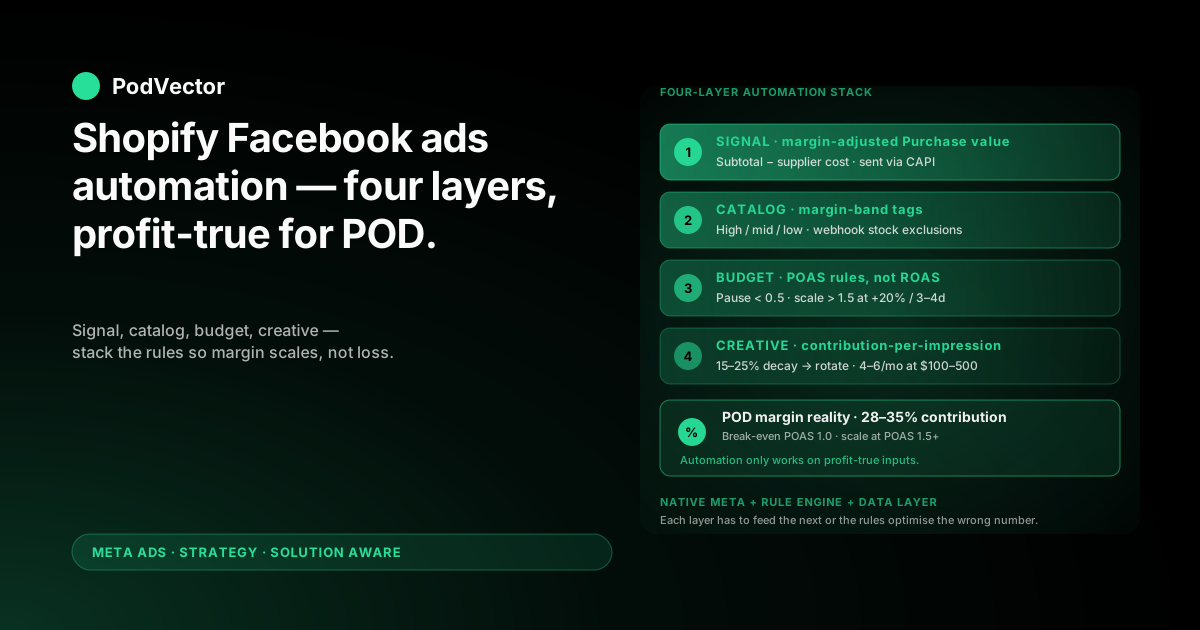
Quick Answer: Shopify Facebook ads automation for POD is not "set Advantage+ Shopping and walk away." Generic ecommerce automation playbooks assume a 50–70% margin brand. POD operates at 28–35% after the supplier (Printify or Printful) takes their cut.
Every layer of automation — signal, catalog, budget, creative — has to be tuned for that margin gap. Otherwise the rules you set will scale your worst-margin orders fastest, because Meta only sees revenue, not profit.
The automation stack that works has four layers: a profit-true Purchase signal, margin-aware catalog rules, budget rules pegged to break-even POAS instead of ROAS, and creative rotation triggered by net contribution decay. Stack them in that order and Advantage+ stops running your worst SKUs at scale.
What Shopify Facebook ads automation actually means in 2026
Most articles on this topic conflate two very different things. "Automation" can mean Meta's own algorithmic features — Advantage+ Shopping Campaigns, Advantage+ Audience, dynamic product ads. Or it can mean third-party rule engines that watch your campaigns and act on triggers — pause, scale, swap creative.
You need both. They solve different problems.
Meta's native automation is good at the inside-the-ad-set decisions — bidding, audience expansion, placement selection, creative variant choice. It is bad at the outside-the-ad-set decisions, like "stop spending on a campaign whose net contribution turned negative three days ago."
Third-party rule engines and custom scripts close that gap. They watch the metrics Meta does not optimise for — POAS (profit-on-ad-spend), supplier-cost-adjusted CPA, creative fatigue measured against margin — and act when thresholds break.
For POD specifically, the gap is wider than for a typical ecommerce brand. The 28–35% contribution margin after Printify or Printful supplier cost means the metrics Meta optimises against (revenue ROAS) are systematically misleading. The automation has to compensate.
If you want the wider Meta strategy context first, our complete Meta Ads playbook for POD covers the full strategic frame. The Meta Ads topic hub indexes everything across ad types, attribution, and integrations.
The four layers POD automation must cover
Think of automation as a stack, not a switch. Each layer feeds the next, and a weak layer downstream poisons every layer below it.
Layer 1 — Signal. What Purchase value does Meta see? If it is the order subtotal (Shopify's default), every layer above is optimising the wrong number.
Layer 2 — Catalog. Which SKUs and variants are eligible for Advantage+ and dynamic product ads? Without margin-aware filtering, Meta will happily run your lowest-margin variants because they have the highest revenue per click.
Layer 3 — Budget. When and how should spend scale or pull back? POD margins make standard ROAS rules dangerous — a "good" 3x ROAS rule scales losses at 30% margin.
Layer 4 — Creative. When is a creative tired enough to rotate? Fatigue measured by frequency or CTR misses the early-stage decay you can see in margin terms.
The order matters. Build Layer 1 first or the automation that follows is operating on the wrong inputs. Most "my Facebook ads automation does not work for POD" complaints trace back to a missing or broken Layer 1.
Layer 1: Profit-true signal automation
This is the foundation. If Meta sees the wrong Purchase value, every automation rule downstream — yours or Meta's — is optimising the wrong thing.
What Shopify sends Meta by default
Out of the box, Shopify's Facebook & Instagram channel sends the Purchase event with value = order subtotal. That number includes the supplier cost you have not paid yet.
Concrete example. A customer buys a $25 t-shirt. Shopify sends Meta value: 25. Printify charges you $11.50 for the shirt. Your actual contribution is $13.50, not $25.
Meta's optimiser learns from value: 25. It looks for more audiences and creatives that drive $25 orders. Some of those orders will be lower-margin SKUs (a hoodie at $35 with $24 supplier cost = $11 contribution, lower than the t-shirt). The optimiser cannot tell the difference because it never sees the supplier cost line.
Three ways to fix the signal
You have three options, in order of effort and accuracy.
Option 1: Send a flat margin multiplier. Override the Purchase value to order_subtotal × 0.30 (or whatever your blended margin is). Crude, fast, directionally correct. Good for stores with a tight SKU mix where margin variance is low.
Option 2: Send per-SKU margin-adjusted value. Use a Shopify Liquid script or a server-side tool (Stape, Elevar, or a custom CAPI gateway) to compute line_subtotal − line_supplier_cost for each line item, sum them, send that as the Purchase value. Accurate per-order, requires you to maintain a supplier-cost lookup.
Option 3: Pipe orders through a data layer. Stream Shopify orders, supplier costs from Printify or Printful, and shipping subsidies into a unified data warehouse. Compute net contribution there, then push back to Meta via CAPI. Most accurate; highest setup cost.
Option 2 is the right answer for most stores past the $5k/month threshold. Option 3 becomes worth it when you are running across multiple ad platforms, multiple POD suppliers, or both.
Validate the fix in Events Manager
Once you adjust the Purchase value, verify it in Meta Events Manager. Check the average Purchase value over the last 7 days against your Shopify dashboard's average order value times your blended margin.
They should roughly match. If Meta's average is still close to AOV, the override is not actually firing — most often because Shopify's native channel is overwriting your custom value, in which case you need to disable the native Purchase event and rely on a server-side CAPI gateway.
For the deeper attribution context, our complete guide to Meta Ads ROAS and attribution for POD walks through the reconciliation work end-to-end.
Layer 2: Margin-aware catalog automation
The Shopify-Meta product catalog is the second-largest automation lever for POD. Most operators set it up once during install and forget about it. The few who automate it well get 20–40% better Advantage+ and DPA performance.
Tag SKUs by margin band, not by collection
The pattern that works: in Shopify, tag each product with a margin band — margin_high (40%+ contribution), margin_mid (25–40%), margin_low (under 25%).
Use a script that runs nightly. Pull each SKU's price, supplier cost from Printify or Printful, and shipping cost. Compute contribution margin. Apply the right tag. Tag changes flow through to Meta's catalog as custom labels within hours.
Inside an ad set, you can then filter dynamic product ads to only margin_high or to margin_high + margin_mid. Advantage+ Shopping Campaigns can also use catalog filters. Either way, you stop subsidising Meta's optimiser to scale your worst SKUs.
Automate stock-driven exclusions
Printify and Printful both have supplier-side stock issues that flip variants to "unavailable" without warning. The Shopify-Meta catalog sync picks this up, but only on its sync schedule (default daily, configurable to every 2 hours).
For active campaigns, even 2 hours is too slow. A dynamic product ad showing an out-of-stock variant burns 1–4 hours of click spend on traffic that cannot convert.
The fix is webhook-driven. Connect Printify or Printful's stock webhook to a small script that immediately tags affected SKUs excluded_from_ads in Shopify, which then propagates to Meta's catalog filter. The few minutes saved per stock-out compound across 50+ such events per month at scale.
Automate creative-image swaps
Default Printify and Printful mockups perform 30–50% worse than lifestyle photography in feed placements. You cannot manually swap mockup-to-lifestyle for every SKU at scale, but you can automate the priority.
Set up a rule that promotes any SKU that hits 25+ orders in 30 days to a "needs lifestyle photography" queue. Either schedule a UGC creator shoot, run a cheap product-on-model AI generation, or pull from your customer photo library on Shopify. Once a lifestyle image lands, it replaces the primary catalog image automatically via the Shopify product image hierarchy.
For the dynamic-ads side specifically, our piece on the Shopify dynamic Facebook ads product feed covers feed configuration in depth.
Layer 3: Budget automation pegged to break-even POAS
Most automation tools (Revealbot, Madgicx, AdEspresso, Hootsuite Ads) ship with default ROAS-based rules. Pause if ROAS < 2.0. Scale 20% if ROAS > 4.0. Those defaults are written for 50% margin businesses.
For a 30% margin POD store, those rules are catastrophic. ROAS of 3.0 is break-even on revenue but meaningless on profit. A "scale at 4.0" rule scales orders that net $0.30 on the dollar — fine if you have working capital, terrible if you do not.
Rewrite every ROAS rule as a POAS rule
POAS = profit on ad spend = (revenue − supplier cost − shipping cost − ad spend) ÷ ad spend.
It is the only number that tells you whether the campaign made money. ROAS tells you whether it made revenue, which for POD is a different question.
The conversion is mechanical. If your blended margin is 30%, multiply every ROAS threshold by 1/0.30 = 3.33x. A 2.0 ROAS pause rule becomes a 6.66 ROAS pause rule on revenue, which is roughly 2.0 POAS.
Most rule engines do not have native POAS support. Two workarounds: feed them margin-adjusted Purchase values from Layer 1 (then their "ROAS" is really POAS), or compute POAS in a separate dashboard and write the rules there.
The four budget rules every POD store should automate
Rule 1: Pause underperformers fast. If an ad set has spent > $50 and has a POAS < 0.5 (losing more than half on every ad dollar), pause it. Do not wait for "the optimiser to learn" — at $50 with no signal, the optimiser has nothing to learn from.
Rule 2: Scale conservatively. If an ad set has POAS > 1.5 over the last 3 days and has spent at least $200, increase budget by 20%. Cap increases at every 3 days. Bigger jumps trigger Meta's learning-phase reset and tank performance for 3–5 days.
Rule 3: Defend the catalog. If a SKU's last 14 days of dynamic-ad-driven orders has a POAS < 0.7, tag it excluded_from_ads in Shopify. The tag flows to Meta's catalog filter and the SKU stops appearing in DPAs until you fix the creative or the price.
Rule 4: Cap daily downside. Set an account-level rule that pauses all campaigns if total daily spend exceeds 1.3x the planned budget without a corresponding revenue match. Meta has been known to over-pace by 30%+ on Advantage+ campaigns when the optimiser thinks it has signal.
Why dayparting rules rarely matter for POD
One automation that gets recommended a lot but rarely helps for POD: dayparting (limiting ads to specific hours). Most POD stores see only a 10–15% performance variance across the day, not enough to justify the optimiser-disruption cost of pausing-and-resuming.
Skip dayparting. Spend the rule slots on margin and POAS rules instead.
For the deeper scaling cadence, our scaling Facebook ads on Shopify for POD piece covers when to break out a second campaign for incremental reach.
Layer 4: Creative rotation by net contribution decay
Standard creative-fatigue automation watches frequency (pause when frequency > 3) or CTR decay (pause when CTR drops 25% from peak). Both are revenue-blind and miss the early decay that matters for POD margins.
The earlier signal: net contribution per impression
Track contribution per impression for each creative. The metric is (net profit on orders attributed to this creative) ÷ (impressions served). It is your real margin yield at the creative level.
What you watch for: a 15–25% drop from the creative's first-week peak. That signal usually appears 4–7 days before frequency or CTR alarms fire — early enough to swap in a fresh variant before the campaign actually starts losing money.
This is hard to compute inside Meta Ads Manager. Meta does not show net contribution because it never knew supplier cost. You need a side-system that joins ad-level performance to order-level margin and surfaces the per-creative decay.
The 4-week creative pipeline rule
For stores spending more than $100/day, automate a creative pipeline cadence. Every Monday, surface the bottom-performing creative by net contribution per impression and queue it for replacement. Every Tuesday, launch the new creative variant queued the prior week.
The cadence ensures you always have one creative entering testing, two in scaling, one in retirement queue. Meta's optimiser performs best when there are at least 3–5 active creative variants per ad set — automate the inflow to keep the count up without manual triage.
Volume targets by stage: $30–$100/day stores need 2–3 new creatives per month, $100–$500/day stores need 4–6, $500+/day stores need 8–12. Automation does not write the creatives, but it can keep them flowing through the pipeline reliably.
Native Meta automation vs. third-party tools
The market for "Facebook ads automation tools" is loud. Madgicx, Revealbot, AdEspresso, Hootsuite Ads, Smartly, Pencil, AdStellar, Adyogi — the list keeps growing. Most operators do not need the majority of what they sell.
What Meta's native automation already does well
Advantage+ Shopping Campaigns, Advantage+ Audience, Advantage+ Creative, dynamic product ads. These are excellent when fed clean inputs. They handle bidding, audience expansion, placement, and creative-variant selection inside an ad set.
If you have wired Layer 1 (profit-true signal) and Layer 2 (margin-aware catalog), Meta's native automation handles 70–80% of the optimisation work for free. The remaining 20–30% — outside-the-ad-set decisions on budget rules and creative rotation — is what you need outside tooling for.
When a third-party rule engine is worth the cost
Three signals you have outgrown native: total monthly ad spend > $5,000 (the time saved on manual rules pays for the tool), more than 5 active campaigns at once (the rule complexity grows quadratically), or a documented incident where a campaign ran negative for > 24 hours before a human noticed (you need automated guardrails).
If you have any of those, evaluate Revealbot or AdEspresso for rule-based automation, Madgicx for AI-assisted insights with weaker but workable rule support. Skip the all-in-one platforms (Smartly, Adyogi) until you are spending > $20k/month — they price for that tier and the lower tiers feel underpowered.
For the broader app comparison, our best Facebook ads apps for Shopify roundup compares the leading Shopify-integrated options.
The custom-script tier (and why most stores should not start there)
You can also write Meta Marketing API scripts yourself — pull spend, push budget changes, mutate catalogs. Cheaper than a tool subscription. Higher engineering cost.
The pattern that breaks: a $200/month tool replaces 4 hours/week of operator time. A custom script replaces the $200/month tool but creates 8 hours/month of maintenance debt as Meta's API changes. Most POD operators come out behind on the custom path until ad spend is north of $50k/month.
The automation stack by store stage
What automation makes sense depends entirely on store stage. The same rules that protect a scaling store starve a starting store of signal.
Starting (under $5k/month revenue, <$50/day spend)
Layer 1 (signal): yes, even at this stage. Send a flat margin multiplier on Purchase value. 5 minutes of work.
Layer 2 (catalog): basic. Tag your top 10–20 SKUs and limit Advantage+/DPA to that subset. Skip margin-band tagging until you have enough order data to compute margin per SKU reliably.
Layer 3 (budget): manual. At $30–$50/day, automation rules trigger too rarely to be worth setting up. Check the dashboard daily, pause obvious losers manually.
Layer 4 (creative): minimal. You need to be testing creatives, not rotating them — automation here is premature.
For the integration setup at this stage, our complete guide to Meta Ads + Shopify integration for POD covers the wiring step-by-step.
Growth ($5k–$50k/month revenue, $100–$500/day spend)
Layer 1: per-SKU margin-adjusted Purchase value via a server-side CAPI gateway. The flat multiplier starts to be too coarse — your margin variance across SKUs is now wide enough to matter.
Layer 2: full margin-band tagging with nightly script. Webhook-driven stock exclusions. Lifestyle-photo automation for top 25% of SKUs by velocity.
Layer 3: rule engine in place (Revealbot or equivalent). Four POAS-based rules from Layer 3 above. Daily downside cap.
Layer 4: creative pipeline automated. 4–6 new creatives per month entering testing.
This is the stage where automation pays for itself most clearly. The rules close the manual-attention gap before it shows up as wasted spend.
Scaling ($50k+/month revenue, $1,000+/day spend)
Layer 1: full data-warehouse pipeline. Shopify, Printify or Printful, Meta, plus Klaviyo and any other tracked channel feeding into one model. Margin computed per order, propagated back to Meta via CAPI within the daily window.
Layer 2: margin-band tagging refreshed every 4–6 hours. Real-time stock webhook exclusions. Programmatic creative-asset generation feeding fresh visuals into the catalog.
Layer 3: rule engine with 10+ rules. Account-level budget guardrails. Channel-level rebalancing rules that move spend between Meta and Google daily based on incremental contribution.
Layer 4: 8–12 new creatives per month. Automated retirement queue. Creative-fatigue alerts that surface within hours, not days.
At this stage, most operators also bring in agency support or hire a dedicated paid-media manager — automation handles the rules but the strategic decisions on creative angles and audience strategy still benefit from human judgment.
Where POD automation breaks down (and what to do)
Even a well-stacked automation system fails in three predictable ways. Knowing the failure modes is half the fix.
Supplier-side margin compression
Printify or Printful raises supplier prices 5–8% across a category. Your old margin-band tags are now wrong — SKUs that were margin_mid are now margin_low. If your nightly tag refresh is the only safeguard, it takes 24 hours to catch up. In those 24 hours, automation scales SKUs that just turned unprofitable.
Fix: trigger a tag refresh whenever the supplier's price-change webhook fires (Printful supports this; Printify requires a polling shim). Add a manual review trigger when more than 10% of SKUs cross a margin-band boundary in a single refresh.
Seasonal creative collapse
What worked in October stops working in February. Automation rotates creatives, but the new variants you queue are pulled from a list written months earlier. They do not match current cultural context, weather, or buying mood.
Fix: a quarterly creative-strategy review that overrides automation. Ten minutes of human judgement to refresh the queue beats six weeks of automation drift.
Attribution-window invisibility
Automation rules read Meta's reported revenue. Meta's reported revenue is click-attributed within a 7-day window. For POD, where consideration cycles can be 1–14 days for higher-AOV apparel, that window misses real conversions and over-credits assists.
Symptom: the rule engine says a campaign is performing well, but Shopify's actual revenue is flat. The campaign is claiming credit for orders that came from email or organic.
Fix: run all automation rules against a reconciled-revenue source (Shopify last-touch + Meta click-attributed, weighted at 70:30 or 60:40 depending on your store's mix), not raw Meta-reported revenue. This is the work that stitches across data sources — and the work Victor handles natively.
Where Victor fits in the automation stack
Most of the layers above need a profit-true data layer to work. That is what Victor builds: a unified live data warehouse pulling Shopify orders, Printify or Printful supplier costs, Meta ad spend, and any other channel into one model. Once that exists, every automation rule downstream has a clean input.
Today, you ask Victor in plain English — "which creative has the worst contribution per impression this week?" — and get the answer. Tomorrow, Victor acts on that answer: pauses the creative, queues a replacement, alerts you only when a human decision is needed.
The automation stack you build for Facebook ads is the same data layer that answers every other profit question across your store. Build it once, get the rule engine out of the way, focus operator time on creative strategy and product mix.
FAQs
Can I just use Advantage+ Shopping Campaigns and skip the rest?
Only if your margin variance is narrow and your Purchase signal is profit-true. Most POD stores fail both tests. ASC will scale revenue, but it will scale your worst-margin orders just as fast as your best — because Meta cannot see the margin difference. Wire Layer 1 first, then ASC works as designed.
What is POAS and why should I care more about it than ROAS?
POAS is profit-on-ad-spend: (revenue − supplier cost − shipping cost − ad spend) ÷ ad spend. It is the only metric that tells you the campaign made money. ROAS tells you the campaign made revenue, which for POD's 28–35% margins is a misleading proxy. A 3.0 ROAS is break-even at 33% margin — a "great" 4.0 ROAS is only 1.33 POAS, which is fine but not the runaway success the dashboard implies.
How do I send a margin-adjusted Purchase value to Meta from Shopify?
Three options. Easiest: a Shopify Liquid script that sends Purchase value as order_subtotal × your_blended_margin. More accurate: a server-side CAPI gateway (Stape, Elevar, or custom) that computes per-SKU contribution and sends that. Most accurate: pipe orders into a unified data warehouse, compute net contribution there, push back to Meta. Pick by store stage and engineering bandwidth.
Which Facebook ads automation tool is best for Shopify POD stores?
It depends on monthly spend. Under $5k/month: Meta's native automation plus manual rule-checking is enough. $5k–$20k/month: Revealbot or AdEspresso for rule-based automation. $20k+/month: evaluate Madgicx, Smartly, or a custom rule engine. None of them have native POAS support — you will still need to feed them margin-adjusted Purchase values from upstream.
How fast should I scale a campaign that is hitting my POAS target?
20% budget increase every 3–4 days. Bigger jumps reset Meta's learning phase and burn 3–5 days of performance. Some operators advocate "scale by ROAS curve" (10% if ROAS > 2x target, 30% if > 3x target). The simpler version works fine; complexity adds risk without reliable reward.
Should I automate creative testing too?
Partially. Automate the workflow (queue, launch, monitor, retire) but not the strategy (which angle to test next). Algorithmic creative selection inside an ad set works well — Meta's Advantage+ Creative does this. Algorithmic creative concept generation (which jokes, which hooks, which characters) does not yet beat human judgment on POD niches that depend on cultural specificity.
Is my ROAS rule wrong if my margin is 25%?
Probably yes. Break-even ROAS at 25% margin is 4.0 (because 1/0.25 = 4.0). A "pause if ROAS < 2.0" rule at 25% margin is paused-only-when-already-bleeding-50%. For 25% margin POD, your pause threshold should be ROAS < 4.0 on revenue (or POAS < 1.0). Tighter still: pause at POAS < 0.5 to limit per-ad-set damage.
How do I know if my automation is actually working?
Check three numbers monthly: (1) total ad spend vs. net contribution from ads — automation should improve the ratio over time, (2) hours per week spent manually managing campaigns — automation should bring this down, (3) frequency of "I caught a problem before it cost me" moments vs. "I found out three days later" moments. The first should grow, the second should shrink.
Automation only works on profit-true inputs
Every automation rule above assumes Meta sees margin, not revenue. Without that signal, the rules scale your worst-margin orders fastest. With it, the rules do exactly what you want — protect the downside, scale the upside, free your weekends.
Victor is the AI employee that builds that data layer for you. Connect Shopify, Printify or Printful, and Meta in minutes. Ask "what is my POAS by creative this week?" or "which SKUs should I exclude from DPAs?" and get the answer in plain English. Then feed the answer back into your rule engine and let automation do its job.
Start free, ask your first question, and see what your real Facebook ads margin looks like.
Try Victor free