
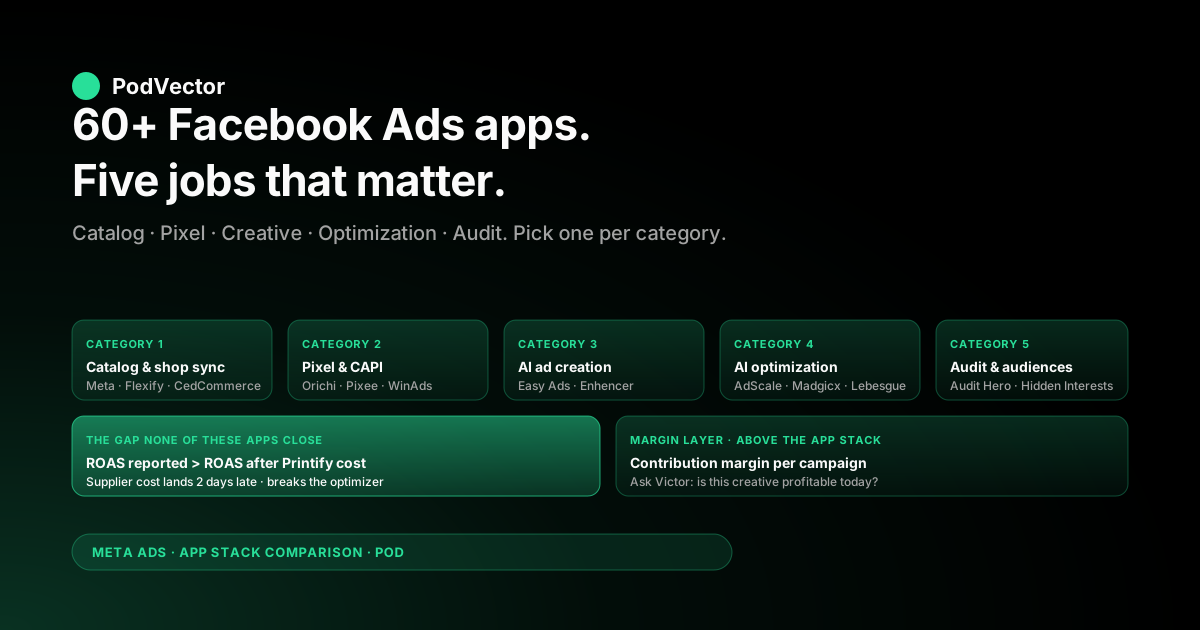
Quick Answer: The Shopify App Store lists 60+ Facebook Ads apps, but they cluster into five jobs: catalog and shop sync, pixel and Conversions API tracking, AI ad creation, AI campaign optimization, and audit or audience research. Pick one app per job — not five overlapping ones.
For print-on-demand sellers, the right stack starts with the official Meta app for catalog sync, a multi-pixel tool if you run more than one shop, an AI creative tool to compress design-to-ad time, and one optimization or audit tool. The trap is paying for "AI optimization" before your tracking and margin data are clean.
The category-by-category breakdown below names the apps worth installing, the ones that overlap, and the gap none of them close: profit-aware measurement that subtracts Printify and Printful supplier cost from the ROAS Meta reports.
How we evaluated these apps
Most Facebook Ads app roundups score apps on review count and pricing. That misses what actually matters once a POD store is spending real money on Meta.
The five criteria below are the ones that hold up after the first invoice from Printify or Printful lands and the dashboard ROAS stops matching the bank balance.
- Tracking fidelity. Does the app fix the iOS, ad-blocker, and consent-banner gaps that cut browser-side Pixel signal by 18–35%?
- Margin awareness. Does any cost or ROAS number the app reports include supplier cost, or is everything pre-COGS revenue?
- Catalog accuracy. POD shops with 200+ designs need feeds that don't break when a SKU goes out of stock at one supplier and stays in stock at another.
- Workflow fit. Does the app's automation respect a small-team operator's veto, or does it auto-pause campaigns based on a metric that ignores margin?
- Honest pricing. "Free" apps that nag for upgrades on every screen cost real attention. Worth flagging.
None of the apps listed below score 5/5 on all five. The point of the categories is to assemble a stack that does, instead of looking for a single tool that doesn't exist.
The five categories every Facebook Ads stack covers
The 60+ Shopify apps tagged "Facebook Ads" do roughly five distinct jobs. Most stores need one app per job. Stacking two apps in the same category usually creates duplicate events, conflicting recommendations, or wasted budget.
| Category | What it does | Why POD stores need it |
|---|---|---|
| Catalog and shop sync | Pushes Shopify products to Facebook Shop, Instagram Shop, and Meta product feeds | Dynamic Product Ads (DPA — automated retargeting from your catalog) only work if the feed is current |
| Pixel and Conversions API | Installs and maintains tracking code, often with multi-pixel and server-side support | Browser-only Pixel under-reports POD conversions because the audience is mobile-heavy |
| AI ad creation | Generates Meta-compliant ad creatives from product images and copy | POD stores ship dozens of new designs a month and can't manually build ads for each |
| AI campaign optimization | Auto-bids, auto-allocates budget, or recommends scaling and killing decisions | Operators with no in-house media buyer need a second opinion that runs 24/7 |
| Audit and audience research | Diagnoses underperforming accounts, surfaces interests, runs creative tests | Cheap way to spot tracking gaps and creative fatigue before they drain budget |
The rest of this article walks each category, names the apps worth shortlisting, and flags what each one misses for a POD store specifically.
Category 1: Catalog and shop sync
This is the foundation layer. If your product feed is wrong, every Dynamic Product Ad and Advantage+ campaign downstream runs against bad data.
Facebook & Instagram by Meta
The official Meta app. Free. Required for almost every other Facebook Ads workflow on Shopify because it sets up the Commerce Manager connection and keeps the product feed in sync.
What it does well: connects Shopify catalog to Meta Commerce, supports Conversions API setup, and handles Facebook Shop and Instagram Shop publishing. It's the baseline.
What it misses: feed control is shallow. If you need per-variant pricing rules, custom labels for campaign segmentation, or multi-store catalog management, you'll outgrow it within the first six months of scaling.
Facebook Product Feed by Flexify
The upgrade when the official Meta app stops being enough. Flexify lets you map Shopify variants to Meta catalog fields with custom rules, exclude SKUs by tag, and split a single Shopify store into multiple Meta catalogs.
POD-specific value: when a Printify SKU goes out of stock at one print provider but stays in stock at another, Flexify can route around it instead of disabling the entire variant in Meta's eyes.
Pricing tier sits in the $20–$50 per month range depending on catalog size. Worth it once you cross 100 designs.
CedCommerce Social Connector
Multichannel feed manager. Pushes Shopify products to Facebook, Instagram, and a long list of marketplaces from one configuration.
The strength is breadth. The weakness is that breadth means the Facebook-specific feature set isn't as deep as Flexify's. Pick this if you're already syndicating to TikTok Shop, Google Shopping, and Amazon. Pick Flexify if you're Meta-first.
Category 2: Pixel and Conversions API tracking
The browser-side Pixel alone misses 18–35% of conversions in 2026. Every store running real ad spend needs Conversions API (CAPI — Meta's server-side tracking endpoint that catches what the browser misses) wired in.
The official Meta app handles basic CAPI for one pixel. The dedicated apps below are for stores running more than one pixel, multiple Shopify storefronts, or wanting deeper event customization.
Multi Facebook Pixels by Orichi
Free. Installs multiple Pixels on one Shopify store and routes events to each. Useful for agencies managing client stores, brands testing two ad accounts in parallel, or POD operators who run a brand split (one pixel per niche store under one Shopify backend).
The free tier covers most use cases. The paid tier adds CAPI on all pixels and event customization.
Pixee
Pixel and Conversions API setup with an emphasis on event accuracy. Supports custom event mapping (so an upsell or post-purchase event fires correctly to Meta) and server-side deduplication.
POD-specific value: if you sell on multiple ad accounts (say, one for evergreen products and one for seasonal launches), Pixee handles the multi-account routing without breaking event match quality scores. The full setup walkthrough lives in our complete guide to Meta Ads + Shopify integration for POD.
WinAds: Facebook Pixels
Lighter alternative in the same category. Free tier installs a single Pixel; paid tier covers multi-pixel and CAPI. Reviews are strong on customer support, which matters when a tracking issue surfaces at 2 AM during a Black Friday push.
Category 3: AI ad creation
POD stores ship more new designs per quarter than most ecommerce brands ship per year. Manually building three creatives per design across image, video, and carousel formats doesn't scale past 30 designs a month.
This category compresses design-to-ad time. The trade-off: AI-generated creative still loses to handcrafted creative on hook quality, so use these to cover the long tail, not the hero designs.
Easy Ads (AI ‑ Easy Ads for Facebook Ads)
Walks you through a Facebook and Instagram funnel build in minutes — prospecting, retargeting, and remarketing layers — using your product catalog. Generates ad variations automatically and drops them into Ads Manager.
What it does well: the funnel template. New POD operators who don't know how to structure a 3-tier campaign get the structure for free, and the structure itself is sound.
What it misses: the targeting and budget defaults assume owned-inventory unit economics. POD stores need to override the prospecting budget allocation downward — supplier cost makes cold prospecting riskier on POD margins. The why behind that override is in our scaling Facebook Ads on Shopify for POD guide.
Enhencer (AI Ads on Facebook & Google)
Builds full-funnel AI campaigns and converts product catalog items into video creatives automatically. Heavier emphasis on video than Easy Ads.
POD-specific value: video ads outperform static for apparel and home decor categories where the product looks better in motion. Enhencer's auto-video generation is shallow but acceptable for the long-tail SKUs a POD store can't shoot manually.
AdCreative.ai (and similar generative apps)
The category of pure-play generative-creative apps. Upload a product image, get back 50 ad variations sized for Meta and Google. No campaign management — just creative output.
Use these when your in-house design pipeline is the bottleneck and Meta's Advantage+ Creative tools aren't cutting it. Don't use them as a replacement for the official Meta app — these tools sit upstream of Ads Manager, not in place of it.
Category 4: AI campaign optimization
The most expensive category, and the one where POD operators most often overspend. The pattern: an operator without a media buyer pays $99–$299 a month for an "AI optimizer" that auto-pauses campaigns based on ROAS — except the ROAS the optimizer sees is pre-supplier-cost, so it scales the wrong campaigns and kills the right ones.
That's not the apps' fault. They optimize against the data Meta gives them. It is, however, why this category needs a margin layer above it before it earns its monthly fee.
AdScale
Multichannel optimizer covering Facebook, Instagram, Google, SMS, and email from one dashboard. Auto-bids, generates personalized creative, and manages budget allocation across platforms.
What it does well: the cross-channel view. If you're running Meta and Google in tandem, AdScale's unified attribution is genuinely useful for spotting where the same customer touched both before converting.
What it misses: the optimizer assumes you trust its ROAS number. If your supplier cost varies 5–15% per order (common with Printify production-time premiums), AdScale's "winning campaign" is sometimes your worst margin campaign.
Madgicx
One-click ad strategies, audience builder, and AI bidder. Long-running app with a strong reviewer base. Free tier is genuine; paid tiers unlock the AI bidder and creative testing tools.
POD-specific value: the audience builder includes a "buyer lookalike" generator that uses your top-paying customers as the seed. For POD, that often outperforms broad lookalikes because it filters out the freebie-hunters.
Lebesgue: AI Marketing & LTV
Marketing-mix modeling and LTV (lifetime value) forecasting. Less an "ad optimizer" and more a measurement and benchmarking layer that flags when a campaign or audience is drifting from the historical winners.
POD-specific value: the benchmarking tells you when your CPA is high not because the campaign is broken but because the whole category just got more expensive. Stops the impulse to kill a campaign that's actually doing fine relative to the auction.
Category 5: Audit and audience research
The cheapest category and often the highest-leverage. Free or near-free apps that surface what's broken in an account before you spend money fixing the wrong thing.
Facebook Ads Audit Hero (Storeya)
Free audit tool. Connects to your ad account and surfaces structural issues: missing CAPI events, low event match quality, broken catalog feed entries, and misconfigured Advantage+ settings.
POD-specific value: catches the supplier-feed-out-of-sync problem before it costs a week of bad spend. Run this once a month at minimum.
Hidden Interests (Roboshop)
Audience research tool. Surfaces Facebook interests that don't appear in Ads Manager's default suggester. Mostly useful for stores where broad targeting and Advantage+ aren't converting and you need to prove a niche exists before doubling down.
POD-specific value: useful for new design launches in a niche you haven't advertised before. Less useful for evergreen design libraries where broad has already learned your buyer.
AdSimpli: Facebook Ads Decoded
Free audit-style tool that breaks down a Facebook ad account into simple performance views. Best for first-time advertisers who haven't internalized Ads Manager's reporting yet.
If you're already comfortable in Ads Manager, this one's redundant. If you're not, it's a gentler on-ramp than Meta's native UI.
Side-by-side comparison table
The table below is the shortlist version. Free vs paid, category, and the one POD-specific note that matters per app.
| App | Category | Pricing (starting) | POD note |
|---|---|---|---|
| Facebook & Instagram by Meta | Catalog sync | Free | Required baseline; outgrown past 100 designs |
| Flexify | Catalog sync | ~$20–$50/mo | Multi-supplier feed routing |
| CedCommerce Social Connector | Catalog sync | Free + paid tiers | Pick if multichannel; otherwise Flexify |
| Multi Facebook Pixels (Orichi) | Pixel/CAPI | Free + paid | Best for multi-store or multi-pixel setups |
| Pixee | Pixel/CAPI | Paid | Strongest event-match quality |
| WinAds | Pixel/CAPI | Free + paid | Light alternative; strong support |
| Easy Ads | AI ad creation | Free trial, then paid | Funnel template solid; override prospecting budget |
| Enhencer | AI ad creation | Paid | Auto-video for long-tail SKUs |
| AdScale | AI optimization | From $99/mo | Cross-channel; needs margin layer above |
| Madgicx | AI optimization | Free + paid | Buyer lookalikes filter freebie hunters |
| Lebesgue | AI optimization | Free + paid | LTV benchmarking, not just ROAS |
| Facebook Ads Audit Hero | Audit | Free | Run monthly; catches catalog drift |
| Hidden Interests | Audience research | Free | For new niche launches only |
The gap none of these apps close
Every app above optimizes against the ROAS Meta reports. None of them subtract Printify or Printful supplier cost from that ROAS before deciding what to scale.
That gap is where POD stores quietly bleed margin. A campaign showing 3.2x ROAS in Ads Manager looks like a winner. After supplier cost lands two days later, the same campaign cleared 0.4x contribution margin.
The deeper version of why ROAS misleads on POD lives in our complete guide to Meta Ads ROAS and attribution for POD. The short version: optimization apps amplify whatever signal you feed them. If the signal is pre-supplier-cost revenue, the optimizer is helping you scale unprofitable campaigns faster.
Closing the gap requires a layer above the apps in this list — one that pulls Printify and Printful invoices, joins them to Shopify orders by line-item ID, and recomputes campaign-level contribution margin. That's not a Facebook Ads app. It's an AI employee layer that sits above your ad stack.
Recommended stack for a POD store
The minimum viable stack for a POD store running Meta Ads:
- Catalog sync: Facebook & Instagram by Meta (free) — upgrade to Flexify when you cross 100 designs or run multiple suppliers.
- Pixel/CAPI: The official Meta app handles single-pixel CAPI. Add Multi Facebook Pixels (Orichi) only if you run multiple stores or pixels.
- AI creation: Easy Ads or Enhencer. One, not both.
- Audit: Facebook Ads Audit Hero, run monthly. Free.
Skip the AI optimization category until your tracking and margin data are clean. Adding AdScale or Madgicx on top of a broken supplier-cost feed multiplies the loss instead of fixing it.
For the broader question of how this stack fits into a profitable POD ad strategy, the complete Meta Ads playbook for print-on-demand sellers walks the full system. For tool comparisons across the broader Meta Ads stack, the Meta Ads topic hub indexes every guide we've published.
External reference: DelightChat's broader 13-app roundup covers a wider catalog if you want to compare against this shorter, POD-filtered list.
FAQs
What's the single most important Facebook Ads app for a Shopify store?
The official Facebook & Instagram by Meta app. It's free, required for catalog sync and Conversions API setup, and the foundation every other app in the category builds on top of.
Do I need a paid Facebook Ads app if I'm running <$1k/month in spend?
Probably not. At sub-$1k spend, the official Meta app plus a free audit tool covers what you need. Paid optimizers don't earn their fee until you're spending enough that a 5–10% efficiency gain pays for the subscription.
Can AI Facebook Ads apps replace a media buyer?
Not yet. They can replace a junior media buyer's repetitive work — campaign builds, budget shifts, creative variants. The strategic decisions (what to launch, when to scale, when to kill, what margin floor to defend) still need an operator who understands the business.
What's the difference between an AI ad creation app and an AI optimization app?
Creation apps make the ads — images, videos, copy. Optimization apps decide what to do with the ads once they're live — bid, budget, audience, when to pause. Most stores need one of each, not two of the same.
Why does ROAS look high in these apps but low in my bank account?
Because the apps report ROAS on revenue, not contribution margin. Printify and Printful supplier costs land two days after the click and cut 35–55% off that revenue before it's actually yours. Every app in the list above shows the gross number; the bank shows the net.
How many Facebook Ads apps should a POD store run at once?
Three to four total. One catalog tool, one pixel/CAPI tool (often the same as the catalog tool), one AI creative tool, and one audit tool. More than that creates duplicate events, conflicting recommendations, and bills that outgrow the value.
Are the free Facebook Ads apps actually free?
Most have a meaningful free tier and a paid upgrade path. The honest free apps in this list — Multi Facebook Pixels (Orichi free tier), Hidden Interests, and Facebook Ads Audit Hero — don't gate the core feature behind a paywall. Easy Ads and Madgicx have free trials but expect upgrades for full use.
Do Shopify Facebook Ads apps work with print-on-demand suppliers?
The apps don't connect to Printify or Printful directly. They connect to Shopify's order data, which already includes the line items the suppliers will fulfill. The gap is that none of the apps pull supplier cost back from Printify or Printful — that's a separate data layer your reporting needs.
The app picks the campaign. The margin layer picks the winner.
Every app on this list optimizes the ROAS Meta reports. None of them subtract supplier cost. That's why the dashboard winner is sometimes the bank-balance loser.
Victor is the AI employee that sits on top of your existing Facebook Ads stack and answers the question those apps can't: "Is this creative working on profit, not just spend?" Live numbers from Shopify, Meta, and your supplier invoices, joined into a single source of truth.
Keep the apps. Add the margin layer.
Try Victor free