
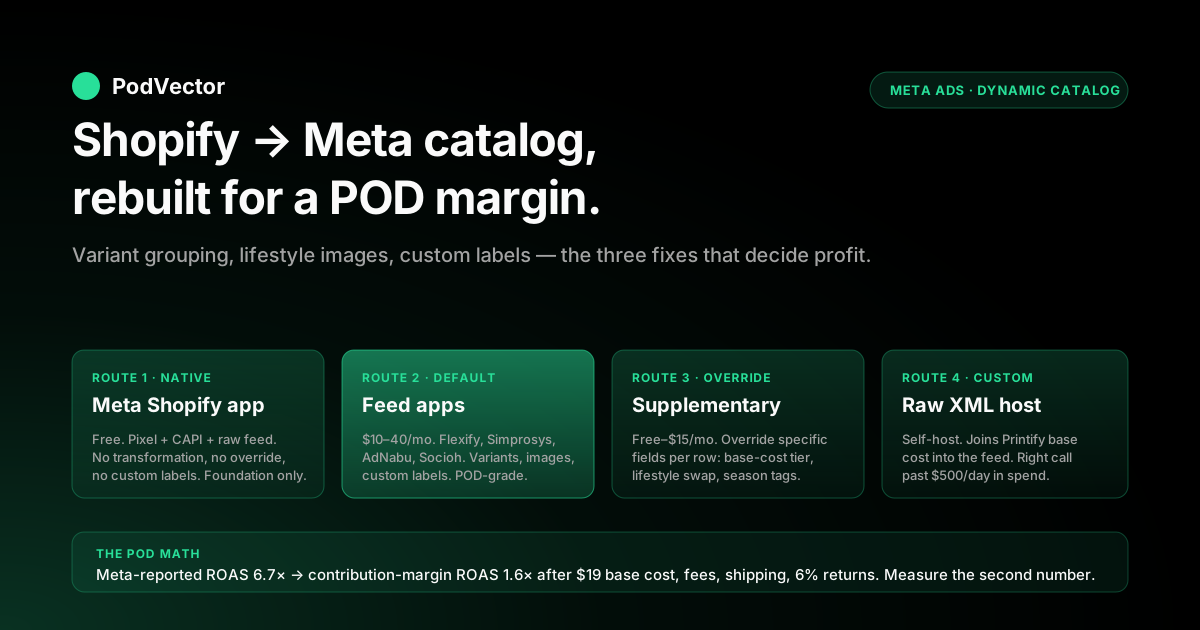
Quick Answer: A Shopify dynamic Facebook ads product feed is the live catalog that powers Meta Advantage+ catalog ads — Shopify pushes products, prices, images, and inventory into a Meta-readable feed, and Meta serves whichever item from the feed is most relevant to each viewer. The native Facebook & Instagram by Meta Shopify app handles the basic sync for free, but for a POD store the native feed is structurally wrong on three counts: it pushes mockups instead of lifestyle images, it explodes one design across dozens of variant rows that compete with each other in the auction, and it never reflects the Printify or Printful base cost that decides whether a clicked item is profitable. This piece is the POD-specific rebuild — what to fix in the feed, which third-party app to layer on top, how to use custom labels to hide loss-leader SKUs, and the profit-per-creative math that turns a dynamic-ads campaign from a top-of-funnel ROAS chart into a measurable contribution-margin engine.
Why dynamic feeds matter for a POD store (and where they fail by default)
Dynamic Facebook ads — Meta's Advantage+ catalog ads — solve the problem that a POD store has 200 to 2,000 SKUs and no human can hand-build a static creative for each one. The catalog feeds Meta a structured list of products, the pixel tells Meta who viewed which item, and the auction picks whichever product from the catalog is most likely to convert for each viewer.
Shopify's official Advantage+ catalog ads guide walks through the standard setup, and Marpipe's Shopify product feed guide covers the platform-agnostic optimization rules. Both miss what breaks for POD specifically.
The default Shopify-to-Meta feed is built for retailers who hold inventory of distinct SKUs with margin-priced items. POD inverts every one of those assumptions.
The same shirt design exists in 6 sizes × 4 colors × 2 brand options, generating 48 catalog rows that all compete with each other in the same auction. The product image is a flat mockup against a white background — exactly the asset that Meta's machine-learning ranker downweights because it does not pattern-match to the lifestyle imagery that performs in the feed. The price field reflects the customer-facing retail figure but never the Printify or Printful base cost, so the feed-level ROAS Meta reports is a top-line revenue number that has no bearing on whether the campaign clears contribution margin.
Three structural fixes turn a default feed into a POD-grade feed. The rest of this guide walks each one. For broader Meta context, the Meta Ads for POD topic hub is the entry point, and the Meta ad types cluster is where this piece sits alongside the complete guide to Meta ad types for POD sellers that frames how dynamic ads fit into the wider campaign mix.
What Meta actually needs from a Shopify product feed
Meta's catalog accepts feeds in several formats — XML, CSV, TSV, Google Sheets, or live API push from a partner platform like Shopify. The required fields are short; the optional fields are where every dynamic-ads campaign is won or lost. The schema, with the POD-relevant fields flagged:
- id — unique identifier per row. For POD, the variant ID is what Shopify exports by default, which produces the variant-explosion problem covered below. Many POD stores override this to the parent product ID.
- title — product title. The default Shopify field is the storefront title; for the feed, the title should front-load the niche keyword and the apparel type ("Vintage Motorcycle Hoodie — Indian Chief Edition" beats "Indian Chief Hoodie").
- description — product description. Meta caps display at ~90 characters; longer descriptions are truncated. Write the first 90 characters as standalone copy.
- availability — in stock / out of stock. POD products are technically always in stock until the print provider drops the blank; this field has to reflect Printify or Printful real-time fulfillment status, not Shopify's "always available" default.
- price — customer-facing retail price including tax where applicable.
- condition — usually "new" for POD.
- image_link — primary product image. The single biggest performance lever in the entire feed.
- additional_image_link — up to 10 supplementary images. Where lifestyle, alternate-color, and detail shots get added.
- brand — brand name. For POD this is the store name, not Printify or Printful.
- custom_label_0 through custom_label_4 — five free-text fields the operator controls. The single most underused fields in POD feeds and the ones that unlock cost-tier filtering, margin segmentation, and seasonal campaigns.
- google_product_category — taxonomy category. Required for Google Shopping; recommended for Meta because some optimization signals share the taxonomy graph.
- item_group_id — links variants to a parent product. The fix for variant explosion when the parent-product approach is not viable.
The minimum viable POD feed gets every required field plus image_link, additional_image_link, item_group_id, and at least three of the five custom_label slots populated with margin-tier, base-cost, and niche segmentation. Anything less leaves performance on the table.
The four feed-build routes (and which one fits POD)
Four routes, ranked from native-but-rigid to flexible-but-paid:
- Facebook & Instagram by Meta Shopify app (free). Auto-syncs the catalog from Shopify to Meta. Pushes the storefront fields as-is. No transformation, no override of mockup-as-primary-image, no custom labels. Acceptable starting point; never the final feed.
- Third-party feed apps (Flexify, Simprosys, AdNabu, Socioh — $10–40/month). Sit between Shopify and Meta, transform the feed during sync. Custom title templates, image swapping, variant grouping, custom labels. The right default for a POD store running over $30/day in dynamic-ads spend.
- Supplementary feeds (free if you build the spreadsheet, ~$15/month if app-managed). Layered on top of the native feed; only override specific fields per row. Useful when the native feed is mostly right but a few fields — usually image_link and a custom_label — need to be replaced. Socioh's supplementary-feed guide is the clearest writeup of the pattern.
- Raw Shopify feed URL or custom XML host (free if you self-host, ~$10–30/month for a feed-host service). The full-control route. Pulls Shopify products via the GraphQL Admin API, transforms the JSON into Meta-compliant XML, hosts the file at a public URL, points Meta at it. The right call only when an app cannot do what you need — usually because the transformation logic depends on data outside Shopify, like Printify base costs from a separate spreadsheet.
For a typical POD operator running one Shopify store at $20–100/day in Meta spend, route 2 is the right default: a feed app like Flexify or Simprosys gets the variant grouping and custom labels right at $10–25/month. Stores running multi-niche catalogs at $200+/day often combine routes 2 and 3 — feed app for the bulk transformation, supplementary feed for the seasonal-campaign overrides that change weekly.
Setup, route 1: the native Facebook & Instagram Shopify app
This is the foundation regardless of which transformation layer you add on top. Install it first, get the pixel and Conversions API wired, and verify the catalog appears in Meta before deciding whether the native feed is enough.
- Install the app. Shopify admin → Apps → search "Facebook & Instagram by Meta" → Install. Authorize the connection to the Page and the Business Manager that owns the ad account.
- Connect the Meta Pixel and Conversions API. Inside the app's Settings, select an existing pixel or create a new one. The app automatically wires the Conversions API on the Shopify side. Verify by opening the storefront in a private window, viewing a product, and checking the Events Manager test tab in Meta — you should see a ViewContent event fire with the matching product ID. Without the pixel firing on ViewContent, AddToCart, and Purchase, dynamic ads have no signal to retarget on.
- Sync the product catalog. The app pushes Shopify products to a Meta catalog automatically on a 24-hour cycle (and faster for inventory and price changes). Wait 30–60 minutes after install for the first sync to complete, then open Commerce Manager → Catalog → Items to verify the products appear with images, prices, and availability.
- Inspect the feed quality. This is the diagnostic step every POD operator skips. In Commerce Manager, sort the catalog by item ID and look at the first 20 rows. If the same design appears 10+ times across size and color variants, the variant-explosion problem is live. If the primary image for every row is a flat mockup against white, the lifestyle-image problem is live. If item_group_id is empty, no parent grouping is happening. These are the signals that trigger the upgrade to route 2.
- Enable Advantage+ catalog ads in Ads Manager. Campaign objective → Sales → Catalog ads → select the Meta catalog the app populated. The campaign is now eligible to serve dynamic ads from the feed.
What the native app does not do: it does not let you transform titles or descriptions per the feed, it does not swap the primary image to a lifestyle shot, it does not group variants under a parent item_group_id by design, and it does not populate custom_label fields. For a POD catalog, those four omissions are the difference between a feed that performs and a feed that loses to a hand-built static ad.
Setup, route 2: third-party feed apps for variant and image control
Feed apps sit between Shopify and Meta and transform the feed during sync. The four most commonly recommended for POD stores are Flexify (~$10–25/month, the simplest of the four), Simprosys ($14.99/month, multi-platform), AdNabu (variable pricing, deepest custom-labels support), and Socioh (free tier, paid plans for advanced features). The setup is conceptually identical across all four; the differences are in the rule-builder UI and in which fields are exposed for transformation.
- Install the feed app from the Shopify App Store. Authorize access to products, variants, collections, and metafields. Most apps need write access to a private collection or tag set so they can mark which products to include in the feed.
- Disconnect or override the native catalog. The native Facebook & Instagram Shopify app and a third-party feed app cannot both push to the same Meta catalog without producing duplicate or conflicting rows. Either disable the native app's catalog sync (keep its pixel and audience features) or create a second Meta catalog and point the feed app there. Most POD operators take the second approach because it lets them A/B the transformed feed against the raw feed for a week before fully cutting over.
- Configure title transformation. The app should accept a template like
{niche} {apparel_type} — {design_name}that pulls from product tags, metafields, or collection names. Test with five sample products and verify the output reads as cleanly as a hand-written ad headline. Front-load the niche keyword: "Vintage Motorcycle Hoodie — Bonneville Edition" outperforms "Bonneville Edition Hoodie" because Meta's relevance ranker matches on early-token match within the title. - Configure variant grouping with item_group_id. Set the feed app to group all size and color variants of the same parent product under a single item_group_id (the parent product handle is the most stable choice). Meta's auction picks one variant per group to serve, eliminating the self-bidding problem where 48 variant rows of the same hoodie compete against each other for the same impression.
- Swap the primary image to a lifestyle shot. If product images are stored in Shopify's media library as
mockup-front.jpg,mockup-back.jpg,lifestyle-1.jpg, configure the feed app to uselifestyle-1.jpgas image_link and the mockups as additional_image_link. If lifestyle shots do not exist for every product, generate them via Printify's mockup generator using its lifestyle template (it ships with stock-model and on-figure rendering options) or pay $5–10/product for AI-generated lifestyle composites. The image swap typically lifts catalog-ad CTR 30–80% in our observations of POD store benchmarks; nothing else in the feed stack moves the needle as far. - Populate custom_label_0 through custom_label_4. The single most underused fields in POD feeds. Recommended POD allocation:
custom_label_0= base cost tier (under-$10, $10–15, $15–20, over-$20);custom_label_1= niche identity (motorcycle, plant-parent, dog-dad, etc.);custom_label_2= apparel type (tee, hoodie, mug, sticker);custom_label_3= season or campaign tag;custom_label_4= bestseller flag (top-10, top-50, longtail). Filtering campaigns by these labels — running ad sets only against the high-margin / high-niche-fit / bestseller subset — is the single biggest profitability lever the feed unlocks. - Verify and activate. Re-sync, then open Commerce Manager and confirm titles, images, item_group_id, and custom labels populated correctly across a sample of 20 rows. If everything looks right, switch the dynamic-ads campaign to the new catalog and start spending against it.
Setup, route 3: supplementary feeds for POD-specific overrides
A supplementary feed is a second feed that overrides specific fields of the primary feed without replacing it. The use case for POD: the native or third-party feed is mostly right, but a few products need a different image, a custom label needs to update weekly for a seasonal campaign, or a price-rounding rule needs to apply to a subset of SKUs. Building a full second feed app for one of those is overkill; supplementary feeds are the lightweight fix.
The build pattern: a Google Sheet (or hosted CSV) with two columns at minimum — id and the field being overridden. Upload via Commerce Manager → Catalog → Data Sources → Add → Supplementary Feed. Schedule daily refresh from the sheet URL. Meta merges the supplementary feed onto the primary feed; the supplementary value wins for any row where both feeds have a value.
Three POD-specific supplementary feeds worth building:
- Cost-tier override. A weekly export of Printify or Printful base costs joined to Shopify variant IDs, populating custom_label_0 with the current base-cost tier. Base costs change with provider promotions and SKU swaps; baking them into the primary feed app's transformation is fragile, but a weekly supplementary feed refresh is robust.
- Lifestyle-image swap. When new lifestyle photography is available for a subset of bestsellers, a supplementary feed pointing image_link to the new image hosted on Cloudinary or a Shopify-served URL upgrades the imagery without touching the primary feed app's logic.
- Seasonal campaign tag. A weekly-refreshed supplementary feed populating custom_label_3 with the current campaign — "spring-sale-2026", "fathers-day-2026" — lets ad sets filter by campaign without a feed-app rule rebuild every quarter.
Setup, route 4: the raw Shopify feed URL for full control
Shopify exposes a JSON feed of all products at /products.json on every storefront. With pagination it is the full catalog, including variants, images, and metafields.
The full-control feed-build pattern: a small server-side job (Cloudflare Worker, Vercel function, AWS Lambda, or a self-hosted script) fetches the JSON, transforms it into Meta-compliant XML, applies any custom logic — Printify base-cost lookup, lifestyle-image override, multi-niche tagging — and hosts the resulting XML at a public URL. Meta's catalog is then configured to pull from that URL on a scheduled cycle.
The case for this route: the transformation logic depends on data Shopify does not hold. Printify's base costs sit in Printify, not Shopify.
Margin tiers depend on a join between Shopify variants, Printify SKUs, and a base-cost lookup. Inventory-status flags from Printful's blanks-availability endpoint do not surface in Shopify. Any of those data joins can be expressed in a feed-app rule for some apps, but not all — and at scale, owning the feed pipeline directly is what unlocks per-creative profit measurement instead of feed-level ROAS.
The case against: maintenance overhead. The script is now a piece of infrastructure that has to stay live, has to handle Shopify pagination correctly, has to refresh access tokens, and has to fail gracefully when Printify's API rate-limits.
Most POD operators are better served by route 2 plus a route 3 supplementary feed for the parts that need it. Route 4 is the right call when route 2 stops being expressive enough — typically at multi-store, multi-provider operations running over $500/day.
POD-specific feed optimizations the standard guides miss
Six optimizations specific to print-on-demand that the Shopify, Marpipe, and Socioh guides do not address:
- Filter the feed to top-decile SKUs only. A POD catalog typically has 80% of revenue concentrated in 10–15% of SKUs. The other 85% are longtail products that Meta will sometimes serve into the auction and that perform 3–5× worse on conversion rate than the bestsellers. Using
custom_label_4 = bestseller-top-10as an ad-set filter restricts dynamic ads to the SKUs that have already proven they convert. Most operators forget this and let the longtail dilute campaign ROAS. - Hide loss-leader SKUs from the catalog entirely. Some POD products carry negative contribution margin at retail price — a $14.99 mug with a $9 Printify base cost, $0.45 Shopify processing, $3.20 average shipping cost, and 6% return rate has a -$0.34 contribution per net order. These SKUs exist in the catalog because they fill price-anchor slots on the storefront, but they should never serve as a dynamic ad. The fix: tag them with
excluded-from-adsand configure the feed to drop those rows entirely. - Override the storefront title with a niche-front-loaded ad title. Shopify storefronts often title products for SEO ("Indian Chief Vintage Motorcycle Hoodie - Heritage Edition - Free Shipping"). Meta truncates after ~50 characters and the relevance ranker matches early tokens. A feed-only title transformation that produces "Vintage Motorcycle Hoodie — Indian Chief" runs cleaner in the auction without changing the storefront experience.
- Treat mockups as additional_image_link, not image_link. Already covered above but worth restating: the single biggest performance lever in the feed is the primary image. White-background mockups underperform lifestyle composites by 30–80% on CTR.
- Match the feed price to the post-discount price during promotion windows. When a 25% storefront discount is active, the feed should reflect the post-discount price (the
sale_pricefield), not the pre-discount price. Meta's relevance ranker uses the displayed price as a signal; a $32 hoodie that is actually $24 at checkout but listed at $32 in the feed underperforms in the auction relative to its peers. Most feed apps handle this automatically when Shopify discounts are configured as price-rule discounts; the failure mode is when discounts are applied at checkout via an automatic-discount or cart-script rule, in which case the feed never sees the discounted price. - Refresh the feed every 2–4 hours, not every 24 hours. The default Shopify-to-Meta sync cycle is 24 hours. For a POD store where Printify drops a blank or a print provider goes offline mid-day, 24-hour staleness means dynamic ads keep serving products that are now unfulfillable. A 2–4 hour refresh — most feed apps support it on paid tiers — eliminates the in-stock/out-of-stock lag.
Measuring profit-per-creative, not feed-level ROAS
The metrics every Meta dashboard surfaces by default — feed-level ROAS, click-through rate, cost-per-purchase — measure top-line revenue against ad spend. A POD operator measuring only those metrics scales whichever creatives produce the highest top-line ROAS, which is usually whichever creatives push the highest-priced SKUs. The metric that matters is profit-per-creative, computed as net contribution after Printify or Printful base cost, Shopify payment processing, average shipping cost, return rate, and the ad spend attributed to that creative.
The math, walked: a $32 hoodie at $19 Printify base cost, $0.85 Shopify processing, $4.20 average shipping cost (free-shipping campaigns absorb this on the merchant side), and a 6% return rate yields $7.85 contribution margin per net order. A dynamic-ads creative driving 100 purchases at $480 ad spend reports a feed-level ROAS of 6.7× ($3,200 / $480).
The contribution-margin reality: $7.85 × 100 = $785 net contribution, against $480 ad spend, a contribution-margin ROAS of 1.6× — barely above breakeven, and well below the 2.5–3× threshold most POD operators need to cover storefront overhead and profit. The Meta-reported ROAS and the actual profit ROAS differ by a factor of 4.
The campaign becomes profitable only when the creative selection bias toward high-margin SKUs is enforced at the feed level — via custom_label_0 base-cost-tier filtering — and when each creative is measured on its own contribution-margin ROAS. The full attribution stack is in the complete guide to Meta Ads ROAS and attribution for POD; the Shopify-side instrumentation (Conversions API, deterministic ID match, refund posting) is in the complete guide to Meta Ads + Shopify integration for POD. The cluster-pillar framing of how dynamic ads slot into the wider Meta strategy lives in the complete Meta Ads playbook for print-on-demand sellers.
Common pitfalls (and the POD-specific ones)
The pitfalls every dynamic-ads guide warns about — broken pixel, missing fields, no Conversions API — are real, and the steps above prevent them. Four pitfalls specific to POD that none of the standard guides cover:
- Variant-row cannibalization in the auction. Without item_group_id, the same hoodie design serves 48 separate catalog rows into the auction. Meta is forced to choose between them per impression, and the optimizer fragments learning across rows that are functionally identical. The fix is the parent-product or item_group_id grouping in route 2; the symptom is a catalog with hundreds of rows but only a handful of "winning" creatives, with most rows showing fewer than 100 impressions over a campaign lifetime.
- Mockup-as-primary-image dragging CTR. Already covered above. The failure mode is subtle: the campaign technically works, the dashboard shows positive ROAS, but every CTR metric is 30–50% below benchmark and the operator cannot identify why. The cause is the white-background mockup not pattern-matching to the lifestyle imagery the algorithm has learned to rank highly.
- Refunds never feeding back into the feed-level math. POD apparel returns at 4–8% versus the 2–3% ecommerce baseline, partly because sizing is inconsistent across providers and partly because color-on-shirt looks different than color-on-mockup. If those refunds are not posted back as offline conversions to Meta and not subtracted from the contribution-margin per-creative figure, the operator overestimates dynamic-ads profitability by 10–20% and overbids against bad creative. The fix is operationally annoying — most stores skip it — and it is the single biggest reason a healthy-looking dynamic-ads campaign quietly loses money.
- Free-shipping promises absorbing margin invisibly. A "free shipping over $40" campaign on a $32 hoodie that gets bumped to a $52 two-pack via dynamic ads cross-sell looks like it doubled AOV. It also absorbs $6–9 of shipping cost into the merchant side, which the feed price never reflects and the dashboard ROAS never subtracts. The contribution-margin ROAS for that two-pack is materially worse than the single hoodie even at 1.6× the revenue.
FAQs
Do I need a third-party feed app, or is the native Facebook & Instagram Shopify app enough?
For a hobby store under $20/day in Meta spend, the native app is fine — the variant-explosion and mockup-image problems exist but the spend is too low for the optimization gap to matter. For any store running over $30/day in dynamic-ads spend, a third-party feed app pays back within the first month via the lift from variant grouping (item_group_id), lifestyle-image swap, and custom_label filtering. Flexify, Simprosys, AdNabu, and Socioh are the four most commonly used for POD; Flexify and Simprosys are the simplest setups for stores that just need the basics right.
How often should the feed refresh?
Default Shopify-to-Meta sync runs every 24 hours. For POD that is too slow — Printify drops blanks mid-day, Printful goes out of stock on specific colors without warning, and a 24-hour-stale feed serves dynamic ads for products that are now unfulfillable.
Most paid feed apps support a 2–4 hour refresh cycle on their mid-tier plans. That is the right cadence for a POD store; faster than 2 hours adds API call overhead without measurable benefit.
What custom_label values should I use for a POD store?
The most useful POD allocation we have seen consistently work is: custom_label_0 = base-cost tier (under-$10, $10–15, $15–20, over-$20), custom_label_1 = niche identity (motorcycle, plant-parent, dog-dad, etc.), custom_label_2 = apparel type (tee, hoodie, mug, sticker), custom_label_3 = season or campaign tag, custom_label_4 = bestseller flag (top-10, top-50, longtail). Each ad set then filters the feed by some combination of these labels — for instance, "high-margin bestsellers in the motorcycle niche for the spring campaign" — restricting the dynamic creative pool to the SKUs most likely to convert profitably.
Why does my dynamic-ads campaign show high ROAS in Meta but low contribution margin in my P&L?
Meta's reported ROAS is gross revenue divided by ad spend. The contribution margin you see in your P&L is net of Printify or Printful base cost, Shopify payment processing, average shipping cost, and return rate — none of which Meta knows about.
For a typical POD store, Meta-reported ROAS overstates contribution-margin ROAS by 3–5×. The fix is computing contribution-margin ROAS per creative outside Meta, which requires joining Shopify orders to Printify or Printful base costs to Meta ad spend — exactly the kind of cross-system math that takes 10–20 hours per month in a spreadsheet stack.
Should I include all my products in the feed or only bestsellers?
Include all products in the catalog so Meta has the full inventory to choose from in viewer-personalized retargeting flows. But filter the campaign-level ad sets to only bestseller-tagged products via custom_label_4 — that way prospecting campaigns serve the SKUs with proven conversion rates, while retargeting campaigns can still serve the longtail to viewers who have already shown interest in those specific products.
How do I handle Shopify variants without producing a row-explosion in the feed?
Set the feed to use the parent product handle as item_group_id, which tells Meta that all the size and color variants belong to the same logical product. Meta's auction picks one variant per group to serve, eliminating the self-bidding cannibalization. Most feed apps configure this automatically on install; if your feed shows 50 rows for one design, item_group_id is missing and the fix is in the feed-app rules.
Can I run dynamic Facebook ads without a Shopify product feed?
No — dynamic ads require a Meta product catalog, and the catalog requires a feed of some kind. The feed can come from the native Shopify app, a third-party app, a supplementary feed, or a custom-built XML — but a feed is non-optional. The closest workaround is running static-creative carousel ads against a prospecting audience without dynamic personalization, which performs well for some POD niches but loses the 30–60% lift dynamic ads typically deliver versus static creatives at scale.
Does iOS 14.5+ break dynamic Facebook ads for Shopify?
It degraded but did not break them. The Conversions API setup the native Shopify app provides restores most of the signal that browser-side pixel tracking lost, but match rates dropped from ~90% to ~70% for many stores, which means dynamic-ads retargeting is somewhat less precise than it was pre-iOS-14.5.
The fix is making sure Conversions API is firing correctly (Events Manager → Test Events tab), enabling Advanced Matching with hashed email and phone where available, and using deterministic external_id from Shopify customer ID to maximize match rate. Full instrumentation walk-through is in the complete Meta Ads + Shopify integration guide.
How does this dynamic-ads strategy compare to the Lead Ads or video-ads approach?
Different stages of the funnel. Dynamic ads serve known-product retargeting and personalized prospecting against catalog inventory.
Lead Ads (covered in the Facebook Lead Ads Shopify integration strategy) build top-of-funnel email lists. Video ads (the Facebook video ads for ecommerce strategy piece) build niche identity at the cold-prospecting stage. A mature POD Meta stack runs all three in parallel, with budget allocations that tilt toward dynamic ads as the store gets enough pixel data to support a personalized retargeting layer.
The shortest path to "is this dynamic-ads creative actually profitable?"
The feed setup above is the easy part — a weekend of configuration. The hard part is knowing, two weeks in, which dynamic-ads creatives are clearing contribution margin after Printify or Printful base cost, Shopify fees, shipping, and refunds, broken down by audience, custom_label tier, and campaign. Spreadsheet-stacking that math across Meta Ads Manager, Shopify, and your POD provider is what most operators give up on by month two. That is exactly where Victor comes in. Victor is the AI analyst built specifically for POD sellers: it queries your live Shopify, Printify or Printful, and Meta Ads data in a warehouse and answers "which dynamic-ads creatives are profitable, net of base cost, fees, shipping, and refunds, broken down by custom_label and audience" in seconds. Today Victor answers — tomorrow it acts. And see your dynamic-ads campaigns turned into one number.
Try Victor free