
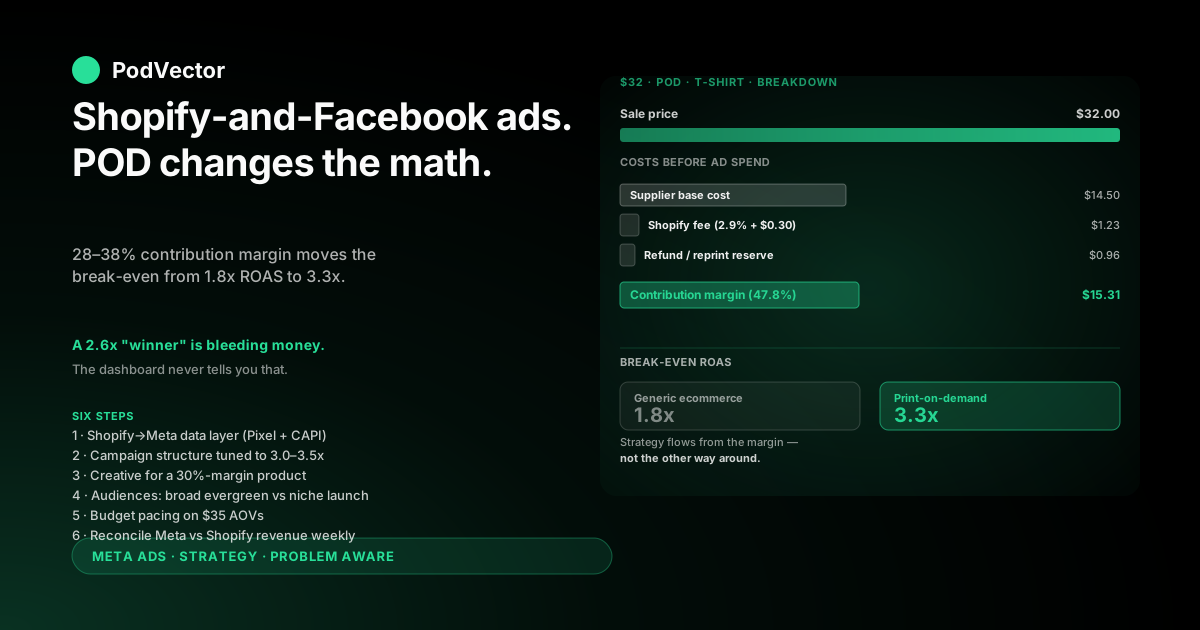
Quick Answer: A Shopify-and-Facebook ads strategy that actually works for print-on-demand starts from the margin, not the campaign. POD stores live on 28–38% contribution margins after supplier costs, which means a 2.5x ROAS that looks healthy in Ads Manager often loses money once base costs and Shopify fees clear.
The strategy that works has three pieces: a clean Shopify-to-Meta data layer (Pixel, Conversions API, product catalog), a campaign structure tuned to a 3.0–3.5x break-even ROAS instead of the 1.8x most ecommerce guides assume, and a measurement loop that compares Meta's reported revenue against what Shopify actually banked.
Get those three right and the rest — creative, audiences, budgets — slot into a system instead of a stack of guesses.
Why POD changes the Shopify-Facebook ads playbook
Most "Facebook ads for Shopify" guides treat all Shopify stores the same. They don't have to be careful about it because the math forgives them — a typical owned-inventory ecommerce store has 50–60% gross margins, so a 2.0x ROAS still pays for fulfillment and clears a profit.
Print-on-demand breaks that math. The supplier (Printify, Printful, Gelato, or similar) takes 55–70% of the sale price as base cost. After Shopify's transaction fee and Meta's CPC bidding, you're left with 28–38% to cover acquisition and profit.
The break-even ROAS for a POD store usually lands between 3.0x and 3.5x, not 1.8x. A campaign delivering a 2.6x ROAS — which Meta's algorithm will happily call a winner and scale — is losing money on every order.
The numbers, on a real POD t-shirt
A $32 t-shirt sold through Shopify and fulfilled by Printify usually breaks down like this:
- Sale price: $32.00
- Printify base cost (shirt + print + shipping): $14.50
- Shopify transaction fee (2.9% + $0.30): $1.23
- Refund / reprint reserve (3% of sales): $0.96
- Contribution margin available for ads + profit: $15.31, or 47.8%
That 47.8% is the absolute ceiling. After ad spend, you want at least 12–18% net margin remaining, which means ad spend can't exceed about 30% of sale price — a 3.3x ROAS floor.
If your Facebook ads are running at a "great" 2.5x ROAS on this product, you're spending $12.80 to acquire $32 in revenue, leaving $2.51 of contribution margin against your fixed costs. That's bleeding money disguised as growth.
The strategic implication
Every decision in your Shopify-Facebook ads strategy has to flow from that margin reality: which campaigns to scale, which creative to test, what audiences to chase, and what number to celebrate. The full topic is mapped in the complete Meta Ads playbook for print-on-demand sellers, which sits as the hub for this cluster.
For the broader picture across ad types, attribution, and integrations, the Meta Ads topic hub indexes every related guide, and the strategy cluster collects the campaign-level work in one place.
The rest of this guide walks through the six steps that build a system tuned for those margins.
Step 1: Build a clean Shopify-to-Meta data layer
Before any campaign launches, the data flowing between Shopify and Meta has to be trustworthy. Without that, every dashboard number you see is fiction, and the entire strategy collapses.
Three pieces matter, in this order: the Meta Pixel, the Conversions API, and the product catalog.
Meta Pixel: the browser-side signal
The Pixel fires from your customer's browser when they view a product, add to cart, initiate checkout, or buy. It's the foundation, but it's also degraded — iOS 14.5+, ad blockers, and ITP (Apple's tracking prevention) silently drop 25–40% of Pixel events for typical Shopify stores.
Install the Pixel through Shopify's official Meta sales channel rather than pasting code into your theme. The sales channel keeps it updated when Shopify changes its checkout flow, which has happened twice in the last year.
Verify with Meta's Pixel Helper Chrome extension on a fresh browser. You should see PageView, ViewContent, AddToCart, InitiateCheckout, and Purchase events all firing correctly.
Conversions API (CAPI): the server-side recovery layer
CAPI is Meta's name for sending conversion events directly from Shopify's server to Meta, bypassing the customer's browser entirely. It recovers most of the events the Pixel loses, especially on iOS, and has become the single most important technical setup for Facebook advertising on a Shopify store.
Shopify's Meta channel ships with native CAPI integration as of 2025, so the setup is mostly clicks rather than code. The job is to verify it works.
In Meta Events Manager, open the Purchase event and confirm "Server" activity is showing the same volume — within 10–15% — as "Browser." If Server is significantly lower, Shopify isn't sending events through correctly and you're flying blind.
The product catalog
The catalog feeds every dynamic product ad you'll run. For POD, that means making sure your Shopify product images, prices, and inventory states are pushing through cleanly.
Common breakages: out-of-stock variants showing as available, mockup images at low resolution, product titles longer than Meta's 65-character display limit. Each one quietly suppresses delivery on dynamic campaigns.
Walk the full catalog data flow in the complete guide to Meta Ads + Shopify integration for POD. The integration is where most measurement problems start, and the cluster has dedicated coverage.
Step 2: A campaign structure built around POD margins
Most ecommerce campaign structures recommend a three-stage funnel: prospecting, retargeting, retention. The structure is right for POD too — but the budget split and the success thresholds are different.
The three campaigns POD stores actually need
- Prospecting (60–65% of spend). Broad audiences, single-image and short-video creative, optimized for Purchase. The job is to find new buyers cheaply enough that the math still clears at a 3.0x+ ROAS. Niche-locked POD stores (a designs-for-nurses store, a pickleball store) often run prospecting at 70%+ because the audience itself is already qualified.
- Retargeting (25–30% of spend). Pixel-engaged visitors and add-to-cart abandoners in the last 14 days. Higher-intent traffic, so a 4.0–5.0x ROAS is achievable. Run dynamic product ads pulling from your Shopify catalog so each visitor sees the specific product they viewed.
- Retention (10–15% of spend). Past customers — people who bought from you in the last 60 days. New designs, related-niche products, or seasonal launches. Highest ROAS of the three, often 6.0x+, because you've already paid the acquisition cost once.
Why the standard "60/30/10" doesn't quite work for POD
The standard ecommerce split assumes a re-purchase rhythm. POD repeat rates are typically lower than commodity ecommerce — most niches have a 90-day re-purchase rate of 8–18% versus 25–35% for owned-inventory ecommerce.
That smaller retention pool means retention dollars run out of incremental audience faster. POD operators usually find the bottom of their retention list around the 10–15% spend mark and have to push the rest into prospecting.
The flip side: prospecting has to work harder, and the creative pipeline matters more. We cover the design pace problem in scaling Facebook ads on Shopify for print-on-demand.
Step 3: Creative that converts on a 30%-margin product
Creative is where most POD operators either win or lose the entire ads program. With a 30% contribution margin, you can't afford the cost-per-purchase that mediocre creative produces.
Three creative formats consistently outperform on Shopify-Facebook ads for POD in 2026.
Format 1: Mockup-first product card
Single image. Clean lifestyle mockup of the design on the product, on a model or plain background, with the product name in 1–3 words across the top.
This format works because it answers the only question a scrolling viewer has: "what is this and would I wear it." For niche-locked stores, the mockup itself does the targeting — the right design in the right niche pre-qualifies the click.
Cost per click is usually higher than video, but conversion rate from click compensates because the product expectation is set on the ad, not the landing page.
Format 2: 9-second product video
One product, one outfit, one rotation. Hold for 3 seconds on the design close-up, pan to the model, end on the product page CTA. Vertical 9:16 for Reels and Stories placement.
Use existing supplier mockup templates as the base, then layer the design onto a quick rotating shot. Tools like Printify's mockup generator or Placeit make this a 15-minute task per design.
Vertical video creative consistently produces 30–50% lower cost-per-purchase than static for POD apparel in our internal benchmarks, mostly because it earns the impression on the algorithmic side.
Format 3: Niche-quote carousel
Five-card carousel. Card 1 is a niche-specific quote ("If you can't be good, be on time" for a teacher store). Cards 2–4 show the design across three product types — tee, hoodie, mug. Card 5 is a value-stacked offer (free shipping over $50, e.g.).
Carousels work because they let one ad serve a niche audience that buys across product types. The same teacher buyer might convert on the mug who wouldn't on the tee, and the carousel surfaces both inside one click.
The format is also resistant to creative fatigue — Meta will rotate which card it serves first, extending the useful life of a single carousel by 2–3x compared to a single image.
The creative pipeline question
One creative isn't enough. Facebook ads on Shopify for POD work when you have 4–6 fresh creative variants entering the account every week, and the worst-performing two getting paused.
Most POD operators underestimate this and run the same three ads for six weeks. Frequency climbs past 3.5, CTR drops, cost-per-purchase doubles, and the campaign quietly turns unprofitable.
Step 4: Audiences for POD niches in 2026
Meta's algorithm in 2026 prefers broad audiences. The shift away from interest-stack targeting started in 2022 and is now near-complete — Advantage+ Audiences usually outperforms manually-selected interests by 15–25% on cost-per-purchase for stores that have CAPI working.
That said, POD has one specific audience play that still beats broad: the narrow niche launch.
Broad: the default for evergreen catalogs
Use Advantage+ Audiences with a country target, a $30–60 minimum order value floor, and no interest layer. Let the algorithm find buyers from the conversion signal.
This works well once you have 50+ conversions per week feeding the Pixel and CAPI. Below that volume, the algorithm hasn't learned what your buyers look like, and broad targeting wastes spend on bad fits.
Narrow niche: the launch and re-launch lever
For a designs-for-pickleball-players store, a narrow audience built on "pickleball" + "USA Pickleball Association" + relevant pickleball publications consistently delivers a lower cost-per-purchase than broad — because the niche match itself qualifies the user.
Narrow works at the launch of a new design, the seasonal peak of a niche (think "ugly sweater" stores in November), or when expanding into adjacent niches with no Pixel data.
Switch to broad once you have 30–50 purchases logged in that audience pocket — the algorithm will then find lookalikes the manual target missed.
Lookalikes: 1% of past customers, not Pixel viewers
If you build a single lookalike audience, build it from your last 90 days of Shopify customers, not Pixel viewers. The customer list is the cleanest signal and produces the highest-quality lookalike.
Upload the customer list through Shopify's Meta integration (it auto-syncs hashed) rather than a CSV export. The auto-sync stays current as new customers buy, so your lookalike refreshes weekly without manual work.
Step 5: Budget and pacing on POD AOVs
POD AOVs typically sit between $28 and $48 — well below the $80–120 range most "Facebook ads for Shopify" guides assume. Lower AOV changes how much daily budget each ad set actually needs to exit the learning phase.
The minimum daily budget that exits learning
Meta's learning phase needs about 50 conversion events in 7 days to stabilize. At a $35 AOV and a 2.5% landing page conversion rate, that's 50 ÷ 0.025 = 2,000 clicks per ad set per week.
At a typical $0.80–$1.20 cost per click for prospecting on POD niches, that's $1,600–$2,400 in spend per ad set per week, or roughly $230–$345 per day. Below that, the algorithm never has enough data to optimize.
The practical implication: don't run more than 2–3 ad sets in prospecting at a time. Spreading $200/day across six ad sets gives every one of them 8 conversions and learning never finishes.
The 20% scaling rule, applied weekly not daily
When a campaign clears your break-even ROAS for two consecutive weeks, increase its daily budget by 20%. Wait a full 7 days before the next increase.
The temptation is to scale faster. Don't. Each budget increase resets a portion of Meta's learning, and aggressive scaling produces the classic POD experience where week one ROAS was 3.8x, week two became 2.1x, and you've lost a month of profit.
The kill rule
Kill any campaign that has spent 2x your target cost-per-purchase across 50+ purchases without a clear upward trend in profit. The data is statistically significant at 50 conversions; below that, you're killing on noise.
Document the kills. Most POD operators discover the same 2–3 creative tropes keep failing — a pattern you only see by tracking pauses across a quarter.
Step 6: The measurement loop Meta won't build for you
This is the step that separates Shopify-Facebook ads strategies that scale from ones that quietly burn cash. Meta reports ROAS in Ads Manager. Shopify reports revenue in its dashboard. The two numbers almost never agree, and for POD the difference is often the difference between profit and loss.
Why Meta and Shopify disagree
Meta uses a 7-day click and 1-day view attribution window by default, then claims credit for purchases that fit either bucket. Shopify uses last-click attribution and only counts the most recent UTM source.
The result: Meta routinely over-reports revenue by 18–35% for POD stores, especially those running broad Advantage+ campaigns. A campaign Meta says delivered $4,800 in revenue may have actually banked $3,400 in Shopify.
The discrepancy itself is well covered in discrepancy between Facebook ads and Shopify for POD. The strategic move is to never trust Meta's number alone.
The weekly reconciliation, in plain steps
- Pull Meta's reported revenue per campaign for the last 7 days.
- Pull Shopify's "sales by traffic source" report, filtered to Meta-attributed UTMs, for the same window.
- Calculate the discrepancy ratio: Shopify revenue ÷ Meta revenue. If it's above 0.85, attribution is reasonably aligned. If below 0.70, Meta is overstating significantly and your effective ROAS is materially lower than the dashboard.
- Adjust your decision threshold. If the discrepancy ratio is 0.75, treat a Meta-reported 3.5x ROAS as a real 2.6x — and decide whether that still clears your POD margin floor.
The deeper question: did this creative actually make money?
Even reconciled ROAS hides one more layer for POD. Two creative variants in the same campaign can show identical ROAS while producing very different profit, because they sold different SKUs at different supplier base costs.
A creative that drives sales of a $14.50-base-cost t-shirt produces 47% gross margin. A creative driving sales of a $22 base-cost hoodie produces 31%. Both look the same in Ads Manager.
This is where most operators end up either (a) building a manual spreadsheet that joins Meta, Shopify, and Printify data weekly, or (b) running an AI employee against a unified data warehouse that already has all three connected. Victor — the AI employee PodVector AI ships — is the second path: ask "which creative made the most actual profit last week" and get the joined-margin answer in seconds, not a Tuesday afternoon spent in spreadsheets.
Either way, the principle is the same: don't trust dashboard ROAS as the final number. The measurement loop has to close on real margin, not reported revenue.
Common Shopify-and-Facebook ads mistakes for POD
Across hundreds of POD store accounts we've reviewed, the same five mistakes account for most of the lost spend.
- Treating reported ROAS as real ROAS. The single most expensive mistake. A 2.8x ROAS POD store thinks it's profitable; once supplier costs and reconciled attribution are layered in, it's losing 6–9% on every sale.
- Running too many ad sets on too little spend. Six ad sets at $50/day each will all sit in learning forever. Two ad sets at $150/day each will exit learning in 7 days and start producing decisions.
- Refreshing creative reactively, not on a schedule. Waiting until cost-per-purchase doubles before refreshing creative means the previous two weeks were already unprofitable. New creative entering weekly, before fatigue, is cheaper than the alternative.
- Skipping CAPI because the Pixel "looks fine." Pixel-only setups under-report iOS purchases by 25–40%. The dashboard looks fine because the events that didn't fire are invisible — but Meta's algorithm is also learning on bad data, which compounds the problem.
- Scaling on noise. Doubling a campaign's budget after three good days. Three days isn't a signal; it's a coin flip. The 20% weekly rule isn't conservative — it's the floor for not destroying your own learning phase.
Step-by-step setup walkthroughs sit in how to set up Facebook ads for Shopify and Facebook ads best practices for Shopify and POD if you want the full setup-side detail. For a deeper look at any of these, see Shopify's official Meta Ads Manager guide for the platform basics.
FAQs
What's the minimum daily budget to start running Facebook ads for a Shopify POD store?
$50/day is technically possible but rarely productive. The math says you need about $230/day per ad set to exit Meta's learning phase within a week. Practically, $300–$500/day total — split between one prospecting ad set, one retargeting, and a small retention budget — is the floor where the data gets useful.
Should I use Advantage+ Shopping Campaigns or manual campaigns for a POD store?
Advantage+ Shopping Campaigns (ASC) outperform manual setups for most POD stores once your Pixel and CAPI have been logging 50+ weekly conversions for at least 4 weeks. Below that, the algorithm hasn't learned your buyer profile and manual campaigns with mid-tier interest layers usually win.
How long should I let a new Facebook ad campaign run before deciding it's working?
Seven days minimum, ideally 14, with at least 50 conversions in the window. Day 3 data is statistical noise. Day 14 with 50+ conversions tells you whether the audience-creative-product combination is real.
What ROAS should I aim for on Facebook ads for a POD Shopify store?
3.0–3.5x as the break-even floor for most POD stores running on Printify or similar. Above 3.5x reported (or 2.8x reconciled) means the campaign is profitably scaleable. Below 3.0x reported means you're losing money even if Ads Manager calls it a winner.
Do I need a separate ad account for my POD store, or can I use a personal Meta account?
Always use a Business Manager account, not a personal one. Personal-account ad spend is harder to scale (ad account spending limits cap aggressively), harder to recover if Meta suspends it, and creates messy attribution if you ever sell the store.
How often should I refresh creative on Facebook ads for a Shopify POD store?
Add 4–6 fresh creative variants per week to the active campaigns. Pause the bottom two performers after 7 days of data. The goal is for no single creative to run more than 21 days unless ROAS is still above 4.0x — fatigue compounds quietly otherwise.
Why does Meta's Ads Manager say my campaign is profitable when Shopify says I'm losing money?
Two reasons stacked together. First, Meta uses a 7-day-click + 1-day-view attribution window that claims credit for sales Shopify attributes elsewhere. Second, Ads Manager's ROAS doesn't subtract supplier base costs, Shopify fees, or refund reserves — so a 2.6x reported ROAS on a 35%-margin POD product is a loss the dashboard can't see.
Stop guessing whether your Facebook ads are actually profitable.
Meta says one number. Shopify says another. Printify takes its cut. By the time you've reconciled, the campaign already spent another $800.
Victor connects your Shopify, Meta, and supplier data into a single source of truth and answers the questions that matter — "which creative made the most profit last week," "which campaigns are losing money after base costs," "what's my real ROAS by SKU" — in seconds. Ask in plain English. Get the joined-margin answer.
Try Victor free