
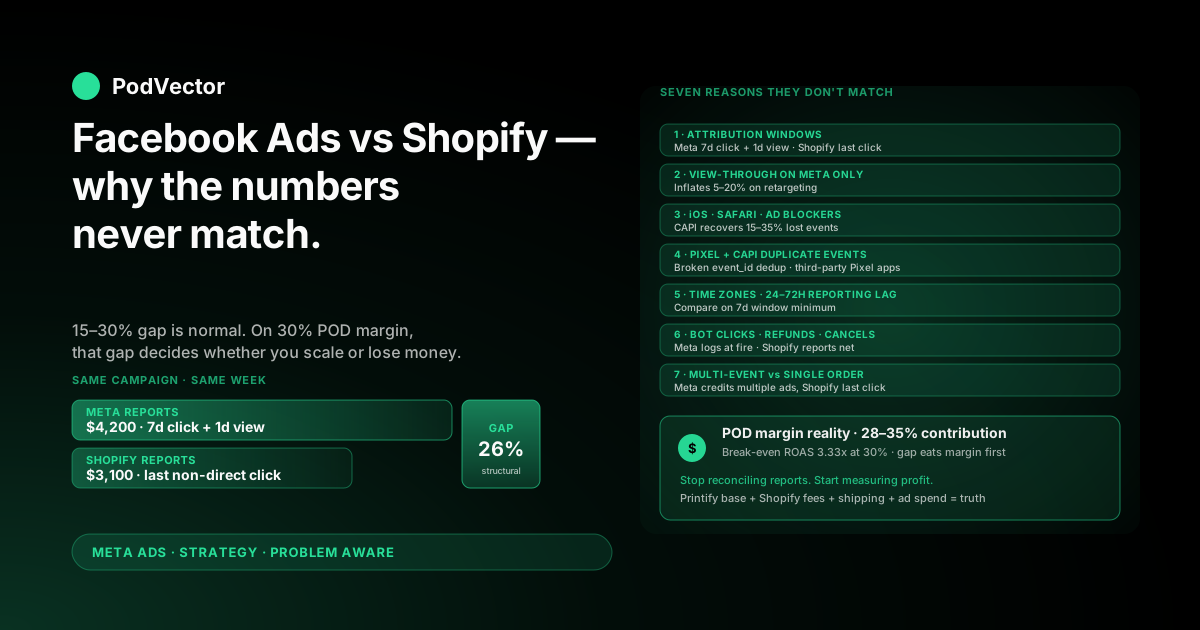
Quick Answer: Facebook Ads and Shopify will never match. They count different events, on different timelines, with different attribution rules — a 15–30% gap is normal, even on a perfectly wired stack.
For a print-on-demand store the gap matters more than for a 60% margin brand. POD sits at 28–35% net margin after the supplier takes their cut, so a Meta-reported number that overstates revenue by 20% can flip a "scaling" campaign into a money loser without you noticing for two weeks.
The fix is not to make the platforms agree. The fix is to know which number to trust for which decision — and to layer your real Printify or Printful costs on top so you make budget calls on profit, not on either platform's revenue.
Why Facebook Ads and Shopify never match
Open Meta Ads Manager. It says the campaign drove $4,200 in revenue this week. Open Shopify. It says ads drove $3,100. Same campaign, same week, two different numbers.
This is not a bug. This is the architecture.
Facebook Ads counts purchases it believes were caused by an ad — based on its own attribution model, lookback window, and view-through tracking. Shopify counts orders that actually happened in your store, with its own last-click attribution to whatever marketing channel referred the visitor.
The two systems are answering different questions. Meta is answering "did my ad influence this purchase?" Shopify is answering "where did the order that was just placed come from?" You will never get them to agree, and frankly, you should not want them to.
The goal is to know the gap, understand why it exists, and stop letting it bleed into bad budget decisions.
The seven real reasons your numbers don't match
The discrepancy is rarely one cause. It is the compounding of seven structural differences. Walk through them in order — most stores have at least four of these going at once.
1. Attribution windows count different days
Meta's default attribution is 7-day click + 1-day view. That means if someone clicked your ad on Monday and bought on Sunday, Meta credits the ad. If they only saw the ad on Sunday and bought 23 hours later, Meta still credits the ad.
Shopify uses last non-direct click, no lookback window. The order is credited to whatever channel referred the most recent session before checkout. If that customer's last click before buying was a Google search for your brand name, Shopify credits Google — even if Meta's ad started the journey six days earlier.
This single mismatch typically explains 40–60% of the total gap on most POD accounts.
2. View-through conversions only exist on Meta's side
Meta counts a purchase as ad-driven if the customer saw the ad in the last 24 hours, even without clicking. Shopify has no concept of view-through — if the customer never clicked, the order is attributed to whatever they did click (organic search, direct, email).
View-through can inflate Meta's reported conversions by 5–20%, especially on retargeting campaigns where you are reaching people who were already going to buy.
3. Meta counts events. Shopify counts orders.
If a customer buys two items in two separate transactions in the same session, Shopify counts two orders and the same revenue Meta sees. But if the customer bounces back in via a different ad and buys again later that week, Meta may credit both purchases to ads — sometimes to two different ad sets — while Shopify credits the second to the actual referring channel.
Meta can also assign the same conversion to multiple ads inside the same campaign for measurement, then deduplicate at the campaign level. Manage that data carelessly and the gap looks bigger than it is.
4. iOS, Safari, and ad blockers cut Meta's visibility
This is the post-iOS-14 reality. When a customer opts out of tracking, Meta loses the deterministic link between the ad they saw and the eventual purchase. Apple's Intelligent Tracking Prevention (ITP) on Safari blocks third-party cookies entirely. Ad blockers stop the Pixel from firing.
Shopify still records the sale — its own server is logging the order — but Meta never gets the conversion event. Result: Shopify shows the revenue, Meta does not. This causes the opposite direction of gap from attribution windows. It is why some campaigns look worse on Meta than they actually are.
The Conversions API (CAPI — Meta's server-to-server tracking that bypasses the browser) recovers 15–35% of these missing events on a properly configured Shopify install. If you have not turned on CAPI, do that first before you spend another hour reconciling reports.
5. Pixel and Conversions API send the same event twice
The flip side of CAPI: when Pixel and CAPI both fire on the same Purchase event without proper deduplication, Meta counts the order twice. Now the gap goes the other way — Meta over-reports because it is double-counting.
Shopify's native Facebook & Instagram channel handles event_id deduplication automatically. But if you also installed a third-party Pixel manager (Trackify, Pixel Perfect, Aelia) without disabling the native one, you have two Pixels firing on the same event with different IDs. Meta has no way to deduplicate that.
Pick one Pixel. Disable the rest.
6. Time zones and reporting lag
Meta reports in your ad account's time zone. Shopify reports in your store's time zone. If those two are set differently — and they often are when an account was set up by an agency in a different region — your "Monday" numbers are not the same eight hours.
Add a 24–72 hour reporting lag on Meta (the platform takes that long to fully attribute conversions, especially view-throughs and CAPI events) and a same-day Shopify-vs-Meta comparison will always be wrong. Compare on a 7-day lookback minimum.
7. Bot clicks, refunds, and canceled orders
Meta records ad clicks. Some of those clicks are bots that never actually visit your Shopify store. They show up in Meta's "link clicks" but produce no Shopify session. Tiny effect on revenue, but it widens the apparent click-to-purchase ratio.
Refunds and canceled orders are the bigger one. Meta records the Purchase event the moment it fires. If the customer refunds 12 hours later, Shopify reports net revenue, Meta still reports the original conversion. POD stores see this disproportionately because of supplier fulfillment delays causing cancellations.
How much discrepancy is normal for a POD store?
There is no universal answer, but there are realistic ranges based on stack health.
Well-configured stack (Pixel + CAPI + clean catalog + matched time zones): Meta reports 10–20% higher revenue than Shopify for the same period. This is the normal floor. Most of it is view-through and attribution window differences.
Average stack (Pixel only, no CAPI, mismatched zones, third-party app conflicts): Gap of 25–50%, in either direction. CAPI gaps tend to make Meta under-report; Pixel double-fires push it the other way.
Broken stack (multiple Pixels, no deduplication, broken catalog): Anything is possible. We have seen 70%+ gaps. At that point you are not measuring anything — fix the plumbing before drawing any conclusion.
For a POD store specifically, target the well-configured zone. Margins are too tight to absorb measurement noise. If you are above 30% gap and have CAPI on, something else is broken — usually a duplicate Pixel from an old app you forgot to uninstall.
The POD-specific problem: revenue gap becomes margin chaos
For a 60-margin direct-to-consumer brand, a 20% revenue mismatch is annoying but survivable. The brand still has plenty of room for the optimiser to chase aggressive ROAS targets.
For POD, that same 20% gap is existential.
Run the math. A POD shirt sells at $24.99. Printify base cost is $11.50. Shopify and payment fees take another $1.20. Shipping eats $4.99 (paid by you when you offer free shipping). Net revenue per order, before ad spend: $7.30. That is roughly a 29% margin.
If Meta says you spent $1,000 and made $4,000 (4x ROAS), the optimiser is calling that a winner. But if Shopify shows the actual ads-driven revenue was $3,200 — and your real margin on that revenue is 29%, or $928 — you spent $1,000 to net $928. You lost money on a campaign Meta is happily scaling.
Worse, the default Shopify-Meta integration sends Meta the full order value as the conversion value, not the margin. The optimiser is bidding on revenue, not profit. On a high-margin DTC brand, those line up reasonably well. On POD, they are completely different optimization targets.
This is why our Facebook Ads with Shopify strategy guide spends so much time on margin-true conversion values. The reporting gap is downstream of that core problem.
How to reconcile Facebook Ads and Shopify data
If you need to reconcile — for monthly reporting, for an investor update, for sanity — here is the clean order of operations.
Step 1: Match the time windows
Set both platforms to the same date range, same time zone, and use a 7-day lookback minimum. Same-day comparisons are useless because of Meta's reporting lag.
In Meta Ads Manager, set the attribution model explicitly to "7-day click" only — turn off view-through. This is now the closest apples-to-apples baseline you can get versus Shopify's last-click attribution.
Step 2: Audit the Pixel and CAPI deduplication
Open Meta Events Manager. Find the Purchase event. Confirm two source columns: "Browser" and "Server." If only one shows, your CAPI is not connected. If both show but the deduplication rate is below 80%, you have a duplicate event_id problem — usually a third-party Pixel app firing alongside the native channel.
The integration mechanics are covered end-to-end in our complete guide to Meta Ads + Shopify integration for POD. Fix this before you do anything else.
Step 3: Filter out non-ad Shopify revenue
In Shopify Analytics, filter the report to "Sales by traffic source" and look only at the Facebook and Instagram referrer rows. Add Meta's "paid social" UTM-tagged sessions if you tag your ads with UTMs (you should). This is the Shopify-side number that should match Meta.
Step 4: Calculate the expected gap
Take the Shopify number from Step 3. Multiply by 1.15. That is the floor of where Meta should land if your stack is healthy. Multiply by 1.30 for the ceiling.
If Meta is inside that band, your stack is working. The gap is structural, not a problem. If Meta is outside the band — too low (CAPI broken, ad blockers eating Pixel) or too high (duplicate events, view-through inflation) — you have a fixable issue.
Step 5: Document the gap and move on
The gap is permanent. Document the typical range for your stack. Then stop relitigating it every monthly report. Wasting hours making the numbers match exactly is hours not spent on creative testing or supplier negotiation.
Which number to use for which decision
The truce between Meta and Shopify reporting is simple. Each platform answers a different question. Use whichever one matches the question you are actually asking.
Use Meta's numbers for: Which ad creative is winning. Which audience is converting. Whether to pause an ad set. Which campaign to scale. The optimiser needs Meta's signal to do its job — second-guessing every Meta-reported conversion against Shopify will paralyze you.
Use Shopify's numbers for: Total store revenue. Refund rates. AOV trends. Customer lifetime value. New vs returning customer mix. The financial truth of your business lives in Shopify, not Meta.
Use neither for the most important number — profit. Neither platform knows your real Printify or Printful base cost. Neither knows your fulfillment shipping cost. Neither knows whether the customer used a discount code that Shopify applied but the catalog ad showed full price.
Profit lives in a third layer that you have to build yourself — or that an analyst has to build for you. Which is exactly the gap Victor closes.
Stop reconciling. Start measuring profit.
The deeper truth about Meta-vs-Shopify reconciliation is that you are arguing about which platform's revenue number is more correct. Both are wrong for the only number that matters: how much you actually made.
Real ad-driven profit on a POD store is a four-layer calculation. Meta's reported revenue. Shopify's confirmed revenue. Subtract Printify or Printful supplier costs (per order, including supplier shipping). Subtract Shopify fees, payment processing, and your fulfillment shipping. Then subtract ad spend.
That number is impossible to pull from any single dashboard. You either build it manually in a spreadsheet — re-pulling each platform's CSV every Monday morning — or you connect everything to a live data warehouse where the math runs itself.
Victor sits on top of that warehouse. You ask "what was my actual profit on Meta ads last week, after Printify costs and shipping?" and you get a number that includes every layer. No more reconciling Meta against Shopify. The thing you should have been measuring all along comes out the other side.
For the broader attribution layer — including how server-side tracking changes what the optimiser sees — read our complete guide to Meta Ads ROAS and attribution for POD.
Five mistakes that make the gap worse
If your gap is bigger than the well-configured 10–20% range, one of these is the culprit.
1. Multiple Pixels firing on the same event. Old apps you forgot to uninstall. A third-party Pixel manager you tested last year. Disable everything except the native Shopify Facebook & Instagram channel.
2. CAPI never enabled. Genuinely common — the toggle is buried in the channel settings and a lot of stores skip it. Without CAPI, you lose 15–35% of conversions to ad blockers and iOS opt-outs, making Meta under-report.
3. Time zones mismatched. Ad account in PST, Shopify store in UTC. Compare a Monday and you are comparing two different 8-hour windows. Set both to the same zone. Meta's at the ad account level, Shopify's in store settings.
4. UTM tags missing on ad URLs. Without UTMs, Shopify can only track Facebook traffic when the referrer string survives — which it often does not, especially through Shop Pay's accelerated checkout. Add UTMs to every ad URL: ?utm_source=facebook&utm_medium=paid_social&utm_campaign={{campaign.name}}.
5. Comparing total Shopify revenue against Meta revenue. Meta only sees ad-driven sales. Shopify sees everything — organic, email, direct, ads. Filter Shopify to the paid social channel before comparing, or you are comparing apples to a fruit basket.
Five fixes. Probably one weekend of work. Enough to take a 40% gap down to the structural 15–20% floor where your stack is working as designed.
FAQs
Why does Facebook Ads show more revenue than Shopify?
Three reasons compounding: Meta uses a 7-day click + 1-day view attribution window, Shopify uses last non-direct click; Meta counts view-through purchases, Shopify does not; and if Pixel and CAPI both fire without deduplication, Meta double-counts. The combined effect typically inflates Meta's reported revenue by 15–30% over Shopify.
Why does Shopify show more revenue than Facebook Ads?
The opposite scenario, usually caused by ad blockers, Safari ITP, or iOS opt-outs preventing the Pixel from firing. Shopify still records the order via its own server, but Meta never gets the Purchase event. Turning on Conversions API recovers 15–35% of these missing events.
How much discrepancy between Facebook Ads and Shopify is normal?
10–20% with a healthy stack (Pixel + CAPI + clean catalog + matched time zones). 25–50% with an average stack. Above 50%, something is broken — usually duplicate Pixels, missing CAPI, or a third-party app interfering. POD stores especially should keep the gap below 30% because tight margins amplify reporting errors into real profit errors.
Should I trust Facebook Ads or Shopify reporting more?
Neither. Trust Meta for ad-creative and audience decisions because that is what the optimiser uses. Trust Shopify for total revenue and refunds because it is the system of record. Trust neither for profit — that requires layering Printify or Printful costs on top of the revenue numbers, which neither platform sees.
Does Conversions API close the gap completely?
No, and it is not supposed to. CAPI recovers 15–35% of the conversions Pixel misses on Safari and iOS, but the structural gap from attribution windows and view-through tracking remains. CAPI takes your gap from "broken" to "structural normal."
Why does the same campaign show different ROAS in Facebook vs Shopify?
Because they are dividing different revenue numbers by the same ad spend. Meta's ROAS uses Meta-attributed revenue (with view-through and longer lookback). Shopify's ROAS uses last-click revenue. Same denominator, different numerator. A 4x ROAS on Meta can be a 3x ROAS on Shopify on the same campaign — both can be correct under their own model.
Will server-side tracking fix the discrepancy?
Server-side tracking (Conversions API or a customer data platform) closes the Pixel-loss side of the gap. It does not change the attribution model differences between Meta and Shopify, which are the bigger driver of the gap. Server-side fixes 30–40% of the problem; it does not fix the other 60–70%.
How does this play differently for print-on-demand stores?
POD margins are tight — 28–35% net after supplier costs and fees, versus 50–70% for direct-to-consumer brands. A 20% revenue gap that a high-margin brand can absorb will turn a "scaling" POD campaign into a money loser. POD stores need profit-true measurement layered on top of either platform's revenue numbers, not just better reporting reconciliation. For broader context on the full ad strategy, see the complete Meta Ads playbook for POD sellers or the wider Meta Ads topic hub.
How do I track the discrepancy over time?
Build a weekly reconciliation report: Meta-reported revenue, Shopify ads-attributed revenue, and the percentage gap. Track the gap as a metric. A gap that is widening month-over-month is a stack health alert — something broke (a duplicate Pixel, a CAPI disconnect, an ad blocker spike). For an external second opinion, Analyzify's reconciliation guide has good diagnostic flow charts. Within our cluster, the Meta Ads strategy hub indexes related playbooks.
Stop reconciling reports. Start seeing profit.
Meta says one number. Shopify says another. Neither knows your Printify base cost, your shipping, or your real margin. Victor connects all three to a single live data layer and answers the question that actually matters: what was my profit on this ad spend, after every cost?
You ask in plain English. The answer comes back in seconds — not next quarter when your accountant ties out the books.
Try Victor free