
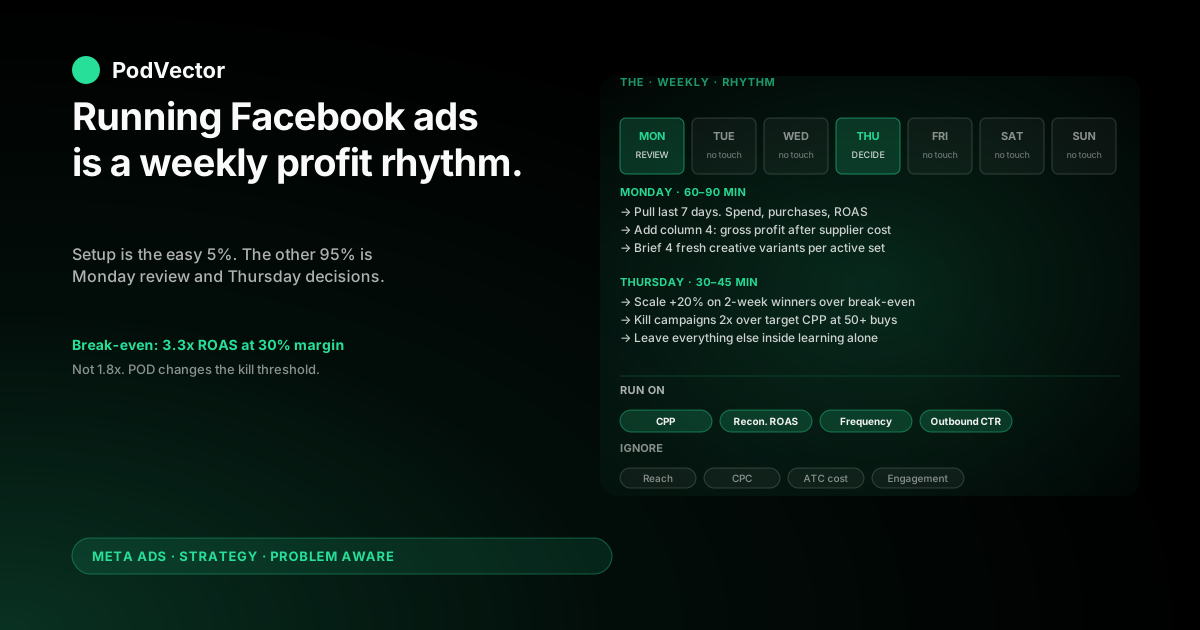
Quick Answer: Running Facebook ads for a Shopify store means three things repeating on a weekly cycle: refreshing creative before fatigue, scaling budgets on winners by 20% every 3–4 days, and reconciling Meta's reported ROAS against what your store actually banked.
Most "how to run Facebook ads" guides stop at setup. The setup is the easy 5%. The other 95% is the rhythm — what you check on Monday, what you change on Thursday, and what you ignore the rest of the week.
For print-on-demand, that rhythm has to account for a 3.3x break-even ROAS instead of the 1.8x most ecommerce guides assume — which changes when you scale, when you kill, and how many SKUs you can afford to test at once.
What "running" Facebook ads actually means
Most articles called "How to run Facebook ads for Shopify" are really setup guides. They walk you through Meta Business Suite, the Pixel, the catalog, and the first campaign launch — then end at "click publish."
That's day one. The job starts on day two, when the campaign is live and Meta starts spending your money whether you're paying attention or not.
Running Facebook ads is the recurring work of keeping a live ad account profitable: deciding which campaigns get more budget, which get killed, when to swap creative, and how to tell Meta's reported numbers apart from what your store actually banked. That last one matters more for print-on-demand than for any other ecommerce model — and it's the part the SERP almost never covers.
Why the running phase is where most POD stores fail
Setup mistakes are obvious — the Pixel doesn't fire, the catalog doesn't sync, the first campaign delivers no impressions. You catch them on day one.
Running mistakes are silent. A campaign with a "good" 2.6x ROAS in Ads Manager looks fine in the dashboard. For an owned-inventory store with 50% margins, it is fine. For a POD store on Printify with 30% margins, that same 2.6x ROAS is losing money on every order — but the dashboard never tells you that.
The cost of running mistakes compounds across weeks before you notice. By the time you do, you've burned through several thousand dollars of ad spend on a campaign you should have killed in week two.
What needs to be in place before you spend a dollar
This guide assumes the setup is done. If it isn't, fix these four things first — running ads on top of broken plumbing wastes spend faster than any other mistake on the list.
The four-item pre-flight checklist
- Meta Pixel + Conversions API both verified. Open Events Manager, find the Purchase event, confirm "Server" and "Browser" both show recent activity. Pixel-only setups under-report iOS purchases by 25–40%, which inflates your reported cost-per-purchase and hides the real economics.
- Product catalog synced through Shopify's Meta channel. Each product needs a clean lifestyle image, accurate price, and live inventory status. A broken catalog kills dynamic product ads before they get a fair test.
- UTM parameters on every Meta ad URL. Without UTMs, Shopify can't tell Meta-driven sessions apart from organic ones, and you lose the attribution check on the store side.
- A clear definition of "profitable" in dollars, not multiples. Write down: per-SKU contribution margin, target margin-after-marketing, allowable customer acquisition cost. This is the spreadsheet the dashboard can't show you.
Step-by-step setup walkthroughs sit in how to set up Facebook ads for Shopify and the complete Meta Ads + Shopify integration guide for POD. This article assumes those are done.
The weekly rhythm: Monday review, Thursday decisions
The single most useful change most POD operators can make is to stop checking Ads Manager every day. Daily checking trains anxious decisions on noisy data and burns the working hours that should go into creative.
Two reviews a week is enough for accounts under $25K/month spend. The structure that works in practice:
Monday: review last week, refresh creative
Spend 60–90 minutes. Pull the last 7 days of campaign-level data. For each active campaign, write down three numbers in a spreadsheet: spend, purchases, and reported ROAS. Then add a fourth number Ads Manager can't give you — gross profit on those purchases after supplier costs, calculated from your store and supplier reports.
That gross-profit number is what tells you whether each campaign earned the spend. If a 2.4x ROAS campaign is running on a SKU with 38% contribution margin, it's barely profitable. If a 2.4x ROAS campaign is running on a SKU with 28% margin, it's losing money. The dashboard ROAS treats them the same.
Use the rest of the Monday block to brief next week's creative. Pick the two or three concepts that lost performance (rising cost-per-purchase, falling click-through rate) and queue replacements.
Thursday: scale winners, kill losers, leave the rest alone
Spend 30–45 minutes. Look at campaigns with at least 7 days of data and 50+ purchases. Apply two rules:
- Scale any campaign whose actual gross profit per dollar of ad spend has cleared your break-even target for two consecutive weeks. Increase the daily budget by 20% — never more.
- Kill any campaign that has spent more than 2x your target cost-per-purchase across 50+ purchases without a clear upward profit trend. The trap is killing on day three; the equally bad trap is keeping a loser alive at week four hoping it turns.
Leave everything else alone. Mid-week budget tweaks reset Meta's learning phase and tank performance for 7–10 days. The discipline is doing nothing on the campaigns that are still inside their statistical confidence window.
The four metrics that matter, and the four that lie
Ads Manager exposes 60+ columns. Most of them are vanity. The four that drive profit decisions for POD:
The four to actually run on
- Cost per Purchase (CPP). The single most important number. Track per-campaign and per-SKU. Compare against your allowable CAC for that SKU's margin tier.
- Purchase ROAS — but only after reconciling with your store. Meta's reported ROAS is overstated for POD because of attribution defaults. Adjust against Shopify's actual Meta-attributed revenue (UTMs + the store's own attribution view) before treating it as truth.
- Frequency. Average impressions per person in your audience. Above 3.5 in a 7-day window on prospecting, you're saturating the audience and CPP starts climbing. Time to refresh creative or expand targeting.
- Click-through rate (CTR — outbound, not all clicks). The honest engagement signal. Below 0.8% on prospecting means the creative isn't earning attention; below 1.2% on retargeting means the offer isn't strong enough.
The four to ignore (or strongly discount)
- Reach. Inventory-driven, not performance-driven. Big number, no decision attached.
- Cost per click. Optimisation event is Purchase, not Link Click. Low CPC with high CPP is worse than the reverse.
- "Add to Cart" cost. Easily inflated by curiosity clicks. Reading ATC cost as a leading indicator of Purchase cost has misled more POD ad accounts than any other vanity metric.
- Engagement (likes, comments, shares). Doesn't correlate with purchase intent for POD. A meme-style design ad can collect thousands of laughing reactions and zero sales.
A deeper breakdown of attribution-window tradeoffs lives in the Meta Ads ROAS and attribution guide for POD.
Scaling winners and killing losers without breaking learning
Meta's algorithm needs roughly 50 conversions per ad set per week to exit the "learning phase" and start optimising on stable signal. Every change you make — budget, audience, creative, optimisation event — resets that clock.
That means scaling has to be slow and killing has to be decisive. The two failure modes:
Failure mode 1: scaling too fast
You see a 4.0x ROAS campaign on day five. Excited, you double the daily budget overnight. Meta resets learning, the algorithm starts re-finding the audience at the higher spend level, and ROAS collapses for 7–10 days while the campaign re-stabilises. By the time it recovers, you've lost the equivalent of two weeks of profit.
The discipline: 20% budget increases every 3–4 days on a campaign that's been profitable for at least two weeks. Compounding 20% increases doubles the budget in roughly 17 days — and the campaign stays out of learning the entire time.
Failure mode 2: killing too early
POD CPMs swing 20–40% across the first week as Meta's algorithm finds the audience. A campaign that looks dead on day three often turns positive by day six. The fix is a hard rule: no campaign gets killed before day seven and 50+ link clicks, no matter how bad the day-three numbers look.
After day seven, kill decisively. Cost per Purchase 2x above target across 50+ purchases is a dead campaign — keeping it alive in the hope that "creative four" will turn it around is the most common way POD operators bleed budget across a quarter.
The detailed scaling playbook — including when to graduate from Advantage+ to manual ad sets — lives in scaling Facebook ads for Shopify, the POD playbook.
The creative refresh problem (and the volume answer)
Every Facebook ad eventually fatigues. The audience sees it too many times, the click-through rate falls, and cost per Purchase climbs. For POD, this happens faster than for branded ecommerce — design-led products live or die on visual novelty.
The honest cadence: every active prospecting ad set needs new creative variants every 7–14 days. Retargeting can stretch to 21 days because the audience is smaller and warmer.
How many variants per refresh
Ship at least four new variants per refresh, structured like this:
- One vertical video (9:16, 15–30 seconds) — close-up product shot with a 3-second hook
- One vertical video — lifestyle/UGC-style scene
- One static image — clean product on neutral background
- One static or carousel — social proof (review quote, customer photo)
Half of those variants will under-perform. That's the point. The two that work get scaled in next Thursday's review; the two that don't get retired and replaced. Meta's algorithm rewards variant count more than variant polish — operators shipping eight modest variants per week consistently beat operators shipping one polished agency edit per month.
The mistake of pausing fatigued ads instead of refreshing
Pausing a fatigued ad without queueing a replacement is how an account quietly shrinks. The ad set's daily budget stays committed but the algorithm has nothing fresh to spend it on, so it spends harder on whatever's left — usually the next-most-fatigued ad. CPP climbs, ROAS falls, and within two weeks the whole campaign is under water.
The fix is a creative pipeline: at any moment, you should have at least 4 fresh variants in production for every active prospecting ad set, ready to swap in the moment frequency or CTR signals fatigue.
When Shopify and Meta disagree on what happened
This is the part of running ads for Shopify that catches every POD operator at some point: Meta says the campaign drove 100 purchases at $3,200 revenue, but Shopify's analytics shows 73 Meta-attributed purchases at $2,340 revenue. Which one's right?
Both are partially right. They're answering different questions.
Why the numbers diverge
- Attribution windows. Meta defaults to a 7-day click + 1-day view window. Shopify's native attribution is closer to last-click-only with no view-through. Same purchase, different credit.
- Cross-device. Meta tracks an ad click on mobile that converts to a purchase on desktop hours later. Shopify, without UTMs and a logged-in customer, treats the desktop purchase as direct.
- iOS opt-outs. Pixel-only events from iOS users are missing from Meta's reporting. Conversions API recovers most of them, but server-side timestamps don't always line up with browser-side ones.
The result is a structural gap of 15–30% between Meta-reported revenue and Shopify-attributed Meta revenue. The gap isn't a bug — it's how attribution math works across two systems with different rules.
Which number to trust for which decision
Use Meta's number to optimise campaigns inside Ads Manager. Use Shopify's number to decide what your store actually banked.
If Meta says you spent $1,000 to drive $3,200 in revenue (3.2x ROAS) and Shopify says Meta drove $2,400 (2.4x), the honest reading is somewhere in between — but closer to Shopify's number for cash-flow purposes, and closer to Meta's number for "should I scale this campaign" purposes.
The deeper diagnostic playbook for this gap is in discrepancy between Facebook Ads and Shopify, explained for POD.
POD-specific adjustments to the standard playbook
Most "running Facebook ads" guides are written for owned-inventory stores. Their assumptions don't survive contact with Printify or Printful supplier costs. Five adjustments to make:
1. Use a 3.3x break-even ROAS, not 1.8x
Generic ecommerce break-even ROAS calcs assume 50%+ contribution margin. POD on a $30 t-shirt nets closer to 28–35% after supplier cost, payment processing, returns, and shipping subsidies. The break-even ROAS that matters for POD is roughly 3.3x — which means a 2.5x ROAS campaign is losing money even though every generic guide calls it a winner.
2. Track per-SKU profit, not blended store ROAS
A blended 3.0x store-wide ROAS often hides a 4.5x mug campaign carrying a 1.8x hoodie campaign. The SKUs have different supplier costs, different sale prices, and different margins — they have to be looked at separately. Per-SKU is the only honest unit of analysis for POD.
3. Test fewer SKUs at once
An owned-inventory store can run 30 products in active testing. POD can't, because each new SKU needs its own creative pipeline and its own profit math. Three to five SKUs in active Facebook testing is the realistic limit for a one-person operation.
4. Build retargeting around design themes, not just products
Generic retargeting splits by intent (cart abandoners, page viewers). POD-aware retargeting also splits by design theme — someone who viewed five floral-pattern shirts is a different audience from someone who viewed five gym-quote shirts, even though both are "page viewers." Dynamic product ads handle the matching automatically once your catalog is grouped properly.
5. Reserve budget for the post-purchase data lag
POD orders take 7–14 days to fulfill. Returns and refunds appear in your supplier reports 2–4 weeks after the original purchase. A campaign that looks profitable on day 14 might be 6% less profitable on day 35 once returns settle. Leave a margin of safety — don't scale to the absolute edge of allowable CAC.
Operational mistakes that quietly kill performance
The strategies above only matter if you don't undermine them with the running-the-account mistakes below. The five most common in POD ad accounts:
- Editing campaigns mid-week. Every budget tweak, audience change, or creative swap resets learning. The Tuesday "let me just bump this 50%" decision costs more than the original problem.
- Running too many ad sets at sub-$300/day spend. Three ad sets at $30/day each is worse than one ad set at $90/day. Concentration beats diversification when budget is small.
- Reading 3-day windows on noisy data. CPP swings 30–50% on any given 72-hour window. Decisions made on 3-day data are decisions made on noise. Use 7-day rolling windows for everything except spend caps.
- Trusting blended store ROAS as the profit number. Already covered above, but worth repeating — it's the single most common reason POD operators think a campaign is profitable when it isn't.
- Spending an hour a day in Ads Manager. Daily checking trains anxious decisions and steals from creative time. Twice-weekly reviews produce better numbers in less than a third of the hours.
The general principles behind these mistakes — and the broader strategy frame — sit in the 9 best Facebook ads strategies for ecommerce, ranked by store stage for POD, and the full strategy library lives at the complete Meta Ads strategy hub for POD. The broader Meta Ads topic — covering ad types, integrations, and platform comparisons — lives at the Meta Ads topic hub.
FAQs
How often should I check Facebook Ads for a Shopify store?
Twice a week. Monday for the previous week's review and creative briefing, Thursday for budget scaling and kill decisions. Daily checking burns hours and trains anxious mid-week edits that reset Meta's learning phase. Below $25K/month spend, twice-weekly is enough; above that, add a Wednesday creative refresh check.
What's a "good" ROAS to run Facebook ads at for a Shopify POD store?
It depends on contribution margin, but for a typical POD store, break-even ROAS sits around 3.3x. Anything below that is losing money even if Ads Manager shows a "positive" return. Generic ecommerce guides quoting 2x as healthy are written for stores with double POD's margin headroom — don't apply their thresholds.
How long does it take a Facebook ad campaign to start working?
Plan for 7–14 days before the data is reliable enough to make scaling or killing decisions. The first 3–4 days are pure learning-phase noise. By day seven, with at least 50 link clicks, you'll have a stable read on whether the creative is earning attention. By day 14, with 50+ purchases, you'll know whether to scale.
Why does Shopify show fewer Meta-driven purchases than Ads Manager?
Different attribution models. Meta uses a 7-day click + 1-day view window; Shopify defaults to last-click only. Add iOS opt-outs and cross-device journeys and you get a structural 15–30% gap between the two numbers. Both are partially right — neither is complete. For decisions inside Ads Manager use Meta's number; for cash-flow planning use Shopify's.
Should I run multiple campaigns or one big campaign with many ad sets?
Below $200/day total spend, run one Advantage+ Shopping Campaign and let Meta's algorithm allocate. Above $200/day, you can layer a manual prospecting campaign and a separate retargeting campaign. Above $500/day, add a third campaign for mid-funnel engagement audiences. The mistake is going to four or five campaigns before the spend can support each one's learning phase.
How much creative do I need to keep an active campaign performing?
At minimum, 4 fresh variants in rotation per active prospecting ad set, refreshed every 7–14 days. Half of new variants will under-perform — that's the math working as intended. The two that win get scaled, the two that don't get retired. Operators shipping 4–8 variants per week beat operators shipping one polished edit per month, almost every time.
What's the smallest budget that can actually run a Facebook ads test for a Shopify store?
$50/day for 14 days is the realistic floor — about $700 to get a clean read. Below $30/day, Meta can't accumulate enough Purchase signal in a reasonable window to optimise. Above $150/day on a brand-new account, you're paying for clicks faster than you're learning. The test works cleanly in the $50–$100/day range.
What does Shopify's own guide on running Facebook ads cover that this one doesn't?
Shopify's official Facebook advertising guide covers the setup-side mechanics in detail — Meta Business Suite walkthrough, Pixel installation, ad-spec sheets, and a 7-task launch framework. It's the right starting point if the account doesn't exist yet. This guide picks up after launch, when the recurring weekly work starts and the POD-specific profit math kicks in. The two are complementary, not competing.
Running Facebook ads is a weekly profit decision. Make it on real numbers, not Ads Manager defaults.
Meta tells you ROAS on subtotal. Printify tells you the supplier invoice. Shopify tells you what the customer actually paid. The profit lives in the gap between three dashboards — and it's the reason most POD operators can't answer "is this campaign making money?" in under twenty minutes.
Victor is the AI employee that pulls your store, suppliers, and Meta into one live data warehouse and answers the question Ads Manager can't: after supplier cost, fees, and returns — what did this campaign actually earn? Ask in plain English on Monday morning, get the number from your real data, decide which campaign to scale on Thursday.
Try Victor free