
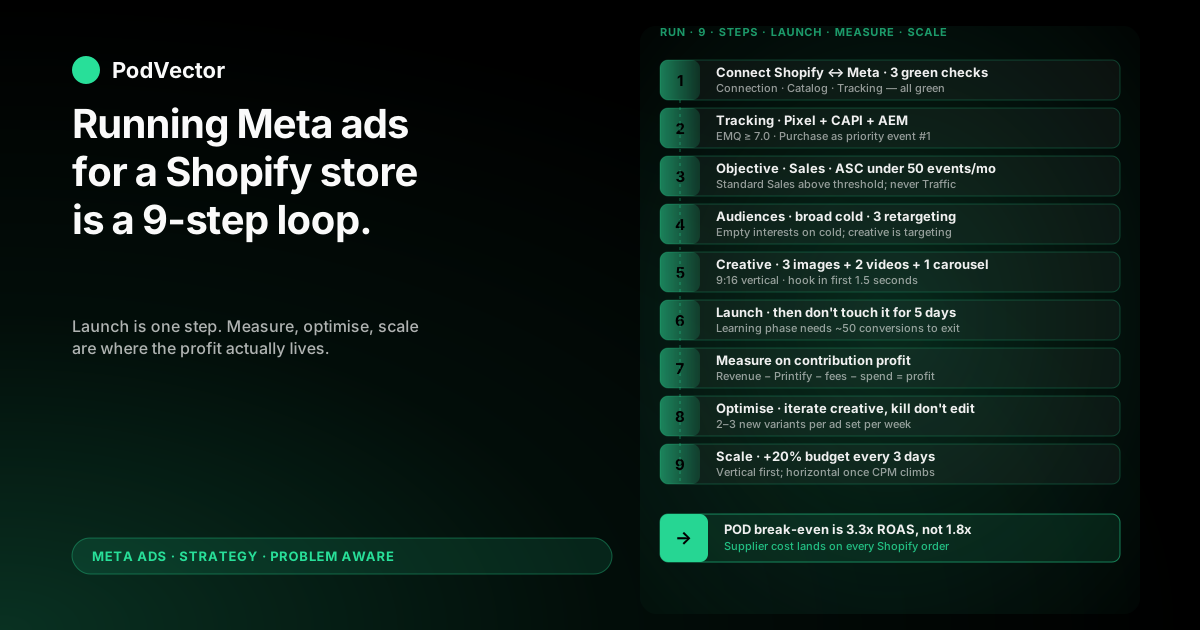
Quick Answer: Running Meta ads for a Shopify store is a nine-step loop — connect, track, build, launch, learn, measure, optimize, scale, repeat — that lives across Shopify Admin and Meta Ads Manager.
The mechanics are the same as any ecommerce store. The numbers are not. A print-on-demand Shopify store breaks even closer to 3.3x ROAS, not the 1.8x the generic guides assume, because Printify or Printful supplier cost lands on every order Shopify never reports back to Meta.
This guide walks the full run-the-campaign sequence with the POD answer at every step — from the first $50/day test through the day-30 scale decision.
Why running Meta ads is a loop, not a launch
Most "how to run Meta ads" tutorials end the day the campaign goes live. The clicks are bought. The screenshots are taken. The article is done.
That's the wrong frame. Launching is one step in a nine-step loop. The campaigns that actually make money for Shopify POD stores get most of their lift in steps 6–9 — the post-launch measure, optimize, scale work that the SERP usually skips or hand-waves.
This guide front-loads the setup steps so the running steps get the depth they deserve. If you need the foundational connection work in more detail, the wiring side lives in how to set up Facebook ads for Shopify, step-by-step.
Print-on-demand changes the running math
Owned-inventory Shopify stores break even around 1.8x ROAS because their cost of goods is locked in at bulk pricing. Print-on-demand is different. Every Shopify order Meta sends you triggers a fresh supplier invoice from Printify or Printful — base cost plus shipping, per unit, in real time.
That changes break-even ROAS to roughly 3.3x at a 30% contribution margin. Run a Meta campaign at the generic 2x target and you're losing money on every conversion. The gap between Shopify-reported ROAS and POD profit shows up in where Facebook Ads and Shopify numbers diverge for POD — worth a read before you decide what "good" looks like.
Step 1 — Connect Shopify to Meta the right way
Open your Shopify Admin, go to Settings → Apps and sales channels → Shopify App Store, and install the official "Facebook & Instagram by Meta" sales channel. Skip the third-party connectors that promise "better tracking." For POD, the official app is the only one Meta updates in step with Pixel and CAPI changes.
Once installed, the channel app walks you through linking three things to your Shopify store: a Meta Business Suite account, a Facebook Page, and an Ad Account. If any of those don't exist yet, the app creates them. Confirm all three end up in the same Business Suite — split assets are the leading cause of "I can't see my catalog" tickets later.
The connection is correct when the channel app status page shows three green checks: Connection Active, Catalog Synced, Tracking Enabled. Anything yellow or pending blocks the rest of the build.
Sync the catalog before you sync anything else
The first sync usually pulls all your live Shopify products into Meta's Catalog Manager within 15–30 minutes. Open Catalog Manager and verify the product count matches Shopify's product count to within ~5%.
A larger gap usually means draft products, hidden variants, or a Printify sync stall. Fix the source — don't try to manually upload anything. The detail on POD-specific feed hygiene lives in the Shopify dynamic Facebook ads product feed playbook.
Step 2 — Lock down Pixel + Conversions API + AEM
Tracking is where most POD Shopify campaigns lose money before the first ad serves. iOS opt-outs and ad blockers eat 25–40% of Pixel-only Purchase events, which makes Meta's optimization run on a half-empty signal.
The fix is a three-piece tracking stack — and the Shopify Facebook channel app sets up all three if you let it.
Meta Pixel (browser-side)
The classic JavaScript Pixel fires from the browser. It catches roughly 60–70% of events on iOS in 2026. Verify it's firing on PageView, AddToCart, InitiateCheckout, and Purchase by opening the Meta Pixel Helper Chrome extension on your Shopify product page and clicking through to the cart. All four events should show "1 fired."
Conversions API (server-side)
CAPI fires from Shopify's servers to Meta's, after the order is placed. It recovers most of the events the browser Pixel loses. Inside the channel app, toggle Conversions API to On and verify the EMQ score (Event Match Quality) on Purchase events is at least 7.0 — anything below means Meta isn't matching server events back to user profiles.
Aggregated Event Measurement (the priority order)
Open Meta Events Manager → your Pixel → Aggregated Event Measurement, and order your eight priority events with Purchase as #1. The other seven should be the funnel steps in order: InitiateCheckout, AddToCart, AddPaymentInfo, ViewContent, Lead, Subscribe, CompleteRegistration.
For thin-margin POD, getting Purchase as the #1 priority event is non-negotiable. AEM lets Meta optimize on only your top priority for iOS users — anything other than Purchase costs you optimization budget every day.
Step 3 — Pick the campaign objective POD actually needs
Meta gives you six objectives. For a Shopify POD store running paid acquisition, only one is correct: Sales (the post-2022 rename of Conversions).
Within Sales, you'll see two campaign types: standard Sales and Advantage+ Shopping Campaigns (ASC). ASC is Meta's all-in-one auto-targeted version where you upload up to 150 creatives and let Meta pick the audience and placement.
When to start with ASC
If your Pixel has fewer than 50 Purchase events in the last 28 days, start with ASC. The auto-targeted setup gets the algorithm exit-from-learning faster than a manually segmented ad set structure. Budget the campaign at $50–$80/day to give Meta enough volume to find buyers.
When to use standard Sales instead
Once your Pixel has 50+ monthly Purchase events and you've validated which creative themes convert, move to standard Sales with manual ad sets. The control gain — explicit audience definitions, separate cold and retargeting budgets, custom placement choices — pays for the extra setup work.
Don't run both campaign types against the same audience at the same time. They auction against each other and inflate your CPM.
Step 4 — Set audiences (broad first, retargeting later)
Detailed targeting on Meta has been mostly automated since 2022. The interest categories still exist in the UI, but Meta's algorithm largely ignores them unless your starting audience is unusably small.
For a Shopify POD store, that means two audience setups in the first 30 days.
Cold acquisition: leave detailed targeting blank
For your prospecting campaign, set Location to your shipping countries (usually US, plus Canada, UK, AU if you ship there), Age to the natural buyer range for your niche (don't over-narrow), and Detailed targeting to nothing. Let Meta's auction find the buyers using Pixel signal.
Counter-intuitive for veteran direct-response operators, but the data has been clear since 2023 — broader cold audiences with strong creative outperform narrow interest stacks for low-AOV ecommerce. Your creative is the targeting now.
Retargeting: build three custom audiences
Build these three from the Pixel + Customer File:
- Engaged shoppers, 14 days — viewed a product page or added to cart, didn't purchase
- Past purchasers, 180 days — uploaded from your Shopify Customer export
- 1% Lookalike of past purchasers — Meta builds this off the customer file
Run a separate retargeting campaign at $20–$30/day against audience #1 once your cold campaign is producing Purchase events. Don't enable retargeting on day one — without enough cold-acquisition volume, the retargeting audience is too small to matter.
Step 5 — Build the creatives the auction will reward
Creative is now ~70% of paid social performance. Targeting and bidding sit at maybe 15–20%. The campaign that wins is the one with creative variety the algorithm can pick from.
Minimum creative slate for a POD launch
Per ad set, ship at least:
- 3 image ads in different formats — flat-lay product, lifestyle/model, mockup-on-context
- 2 short videos at 9:16 vertical for Reels/Stories — 6–15 seconds, hook in the first 1.5 seconds
- 1 carousel with 4–8 cards if you're running multiple SKUs from the same niche
For ASC campaigns, upload all of them as separate creatives in one ad set. Meta will allocate impressions to the winners within 48–72 hours.
POD-specific creative hooks
Generic ecommerce creative tropes — discount codes, free shipping, urgency timers — work less well for POD because most buyers are buying on identity, not deal-seeking. The hooks that move POD buyers cluster around four themes:
- Niche identity — "Designed for [specific community]"
- Designer story — independent designer, small operation, made-on-demand
- Visual humor — that screenshots well from Reels into share-with-friends moments
- Customization angle — "your name on the design," "your favorite color," anything that signals not-mass-produced
The library deep-dive on creative strategy lives in the broader complete Meta Ads playbook for POD.
Step 6 — Launch, then leave the campaign alone for 5 days
Click Publish. Meta runs an automated review (15 minutes to a few hours). Once the campaign goes live, the most expensive thing you can do is touch it.
The learning phase, in real numbers
Meta needs ~50 conversion events at the optimization level (ad set for standard Sales, campaign for ASC) before the algorithm exits the learning phase. At a $50–$80/day budget with a $40–$60 cost-per-purchase, that's 4–7 days of stable spend.
Editing budget by more than 20%, swapping audiences, swapping creatives, or pausing and re-enabling the campaign all reset the learning phase to zero. So does duplicating an ad set "to test something." The math is simple: if you reset on day 3, you've wasted half a learning cycle and burned the budget that funds it.
What you can safely do during the learning phase
Watch Frequency, CTR, and the Pixel Helper. Frequency above 2.0 in week one signals an audience that's too narrow. CTR below 0.8% on cold traffic signals creative that isn't earning attention. Pixel Helper showing "0 fired" on Purchase signals a tracking break that overrides everything else and demands an immediate fix.
Note the issues. Don't act on them yet — except the tracking break, which is a stop-the-world fix.
Step 7 — Measure on contribution profit, not Shopify ROAS
This is the operational difference between POD and owned-inventory ecommerce. Run-the-campaign success doesn't end at "Ads Manager shows 2.5x ROAS." It ends at "the campaign produced positive contribution profit after Printify supplier cost."
The five-line POD profit ledger
After 5 days, open Shopify Analytics → Sales by Marketing Campaign and Ads Manager spend side by side, then calculate per-campaign:
- Revenue from this Meta campaign (Shopify-attributed via UTM)
- Minus Printify or Printful supplier cost on those Shopify orders
- Minus Shopify Payments / Stripe fees (~2.9% + $0.30/order)
- Minus ad spend (Ads Manager total)
- Equals contribution profit
If contribution profit is positive, the campaign is working — even if Ads Manager shows a "mediocre" 2.5x ROAS. If contribution profit is negative at 3x ROAS, your supplier cost ratio is higher than the model assumed and the campaign needs creative work, not budget. The full ROAS-to-profit translation framework lives in the complete guide to Meta Ads ROAS and attribution for POD.
Why this is hard to do by hand
The numbers live in three places. Ads Manager has spend and ROAS. Shopify Analytics has revenue and orders. Printify or Printful has unit-level supplier cost on a delayed invoice. Reconciling them per-campaign every week is a 2–3 hour spreadsheet exercise — and most operators stop doing it after month two.
That gap is what Victor — PodVector AI's AI employee — exists to close. Shopify orders, supplier invoices, and Meta spend all land in one live data warehouse, and you ask in plain English: contribution profit by campaign last 7 days. The answer comes back from the actual numbers, not a screenshot.
Step 8 — Optimize with creative iteration, not budget shuffling
Once the learning phase exits and you have a clean profit read, the optimization loop kicks in. The mistake here is "I'll just push more budget on the winning ad set." That's a reset.
The right post-learning moves
For ad sets that are profit-positive at target ROAS, raise budget by ≤20% per change, no more than once every 3 days. Anything bigger triggers a new learning phase.
For ad sets that are profit-negative, kill them and replace with a fresh ad set carrying new creatives. Don't "edit to fix" — Meta's machine learning weights the historical performance of the ad set, and a profit-losing ad set rarely recovers from a creative refresh inside it.
Creative refresh cadence
Ship 2–3 new creatives per ad set per week to fight ad fatigue. The signal that fatigue has hit: CTR dropping ≥20% from week-one baseline while frequency climbs above 3.0. When you see that pattern, the creative slate has burned its impressions on the audience and needs replacement, not amplification.
Step 9 — Scale the winners (and how to tell which is which)
By day 21–30, you'll have 1–2 ad sets producing consistent profit and the rest underperforming. Scale the winners.
Vertical scaling: budget on the same ad set
The 20%-every-3-days rule still applies. A winning ad set at $80/day on day 21 can reach $200/day by day 30 without resetting learning, if you climb in steps. Push too fast and CPM spikes as Meta searches for higher-value impressions before it has the data to find them.
Horizontal scaling: duplicate into a new ad set
Once vertical scaling on a single ad set hits diminishing returns (CPM climbing without conversion lift), duplicate the ad set with new creatives and a slightly different audience expansion (e.g., adding adjacent countries). Treat the duplicate as a fresh learning phase — don't expect day-one parity.
The scale ceiling for most POD niches
Most POD niches saturate Meta around $300–$800/day in spend before CPM and CAC start climbing faster than revenue. That's the point at which scale via Meta gets harder than scale via opening a Google or TikTok channel — covered in Facebook Ads vs Google Ads for POD sellers.
If the campaign sits inside the broader strategy library, the index is at the Meta Ads strategy hub inside the Meta Ads topic hub.
Five running-the-campaign mistakes POD operators make
1. Reading Shopify ROAS as profit
Shopify ROAS sits on subtotal. POD profit sits below supplier cost. A 2.5x ROAS that looks "fine" in the dashboard can be a 0.8x profit ratio after Printify. Always reconcile to the supplier invoice before you call a campaign profitable.
2. Editing inside the learning phase
Day 2 attribution is noise. Day 5+ rolling 7-day data is signal. Editing budget, audience, or creative inside the learning phase resets the algorithm. Patience costs less than re-tests.
3. Stacking interest targeting because it "feels safer"
Detailed targeting interests are mostly cosmetic in 2026. Meta's auction reads Pixel signal first. Empty interest fields and let the algorithm work — the creative is your targeting now.
4. Running cold and retargeting from day one against a tiny audience
Retargeting campaigns need volume to fill them. Day-one retargeting against a 200-person engaged-shoppers audience gets you frequency 10+ in a week, which torches CPM and audience trust. Wait until the cold campaign produces 200+ engagement events before turning retargeting on.
5. Killing winners during a soft week
POD has weekly seasonality — Mondays and weekends often outperform mid-week — and monthly seasonality around payday cycles and holidays. A 7-day rolling window smooths most of it. Don't kill an ad set on a Wednesday because Tuesday was soft. Use the rolling window.
FAQs
How much budget do I need to run my first Meta campaign for a Shopify POD store?
The honest minimum is roughly $1,500 over 30 days — about $50/day on one ASC campaign. Below that, the Pixel never accumulates enough Purchase signal to exit the learning phase, and you're paying for tests without enough data to act on. Generic ecommerce minimums of $20/day don't apply to POD's higher break-even ROAS.
Should I run Meta ads on a brand-new Shopify store with zero sales?
You can, but ASC will spend more per purchase in the first 2–3 weeks because Meta has no Pixel data to optimize on. Plan for $200–$400 cost-per-acquisition during the cold-start period, then expect it to roughly halve as Purchase events accumulate. The store's product page, checkout flow, and supplier sync should all be tested with at least one organic or friends-and-family order before paid traffic lands on it.
How long does it take to see real results from running Meta ads on a Shopify store?
Day 5 is the earliest the learning phase exits at typical POD budgets. Day 14 is the earliest you have a clean profit read on the campaign. Day 30 is when you have enough data to make a confident scale-or-kill call. Anything before day 5 is noise, no matter how good the numbers look.
What's the right Meta campaign objective for a Shopify POD store?
Sales (formerly Conversions). Specifically, Advantage+ Shopping Campaigns (ASC) if your Pixel has under 50 monthly Purchase events; standard Sales with manual ad sets once you cross that threshold. Don't use Traffic, Engagement, or Reach — they optimize for the wrong signal and Shopify's profit math punishes the mismatch.
Do I need separate campaigns for cold and retargeting on Shopify?
Yes, after week one. Run cold-acquisition first as a single ASC at $50–$80/day. Once cold is producing Purchase events, add a retargeting campaign at $20–$30/day in a separate campaign — never the same one. They optimize on different signals and combining them throws Meta's auction off.
How do I attribute Shopify orders back to the right Meta campaign?
UTM-tag every ad URL using the Shopify-readable format: utm_source=facebook&utm_medium=paid&utm_campaign=[campaign_name]&utm_content=[ad_id]. Shopify's "Sales by Marketing Campaign" report parses these directly. Without UTMs, Shopify and Ads Manager never reconcile, and you can't isolate which campaign drove which order.
What does the top of Google's results recommend differently?
The major Shopify guides — OptiMonk's beginner walkthrough, Nik Tips' nine-step campaign guide, and EasyInsights' Shopify-data integration deep-dive — all cover the same Meta surface area: connect, Pixel, catalog, objective, audience, creative, optimize. They're written for owned-inventory Shopify stores. The piece they don't cover is what to do differently when your Shopify ROAS reads on subtotal but your real margin is 30% after Printify or Printful — which is the gap this guide is built to close.
You're running the campaign. Now read it on profit, not Shopify subtotal.
Meta Ads Manager shows ROAS on Shopify subtotal. Printify shows you the supplier invoice. Shopify Analytics shows the order list. Profit sits in the gap between three dashboards — and most POD operators never close it.
Victor is the AI employee that pulls Shopify, your suppliers, and Meta into one live data warehouse and answers the question Ads Manager can't: is this campaign making me money on profit, not on receipt size? Ask in plain English, get the number from your real data, decide on the right one.
Try Victor free