
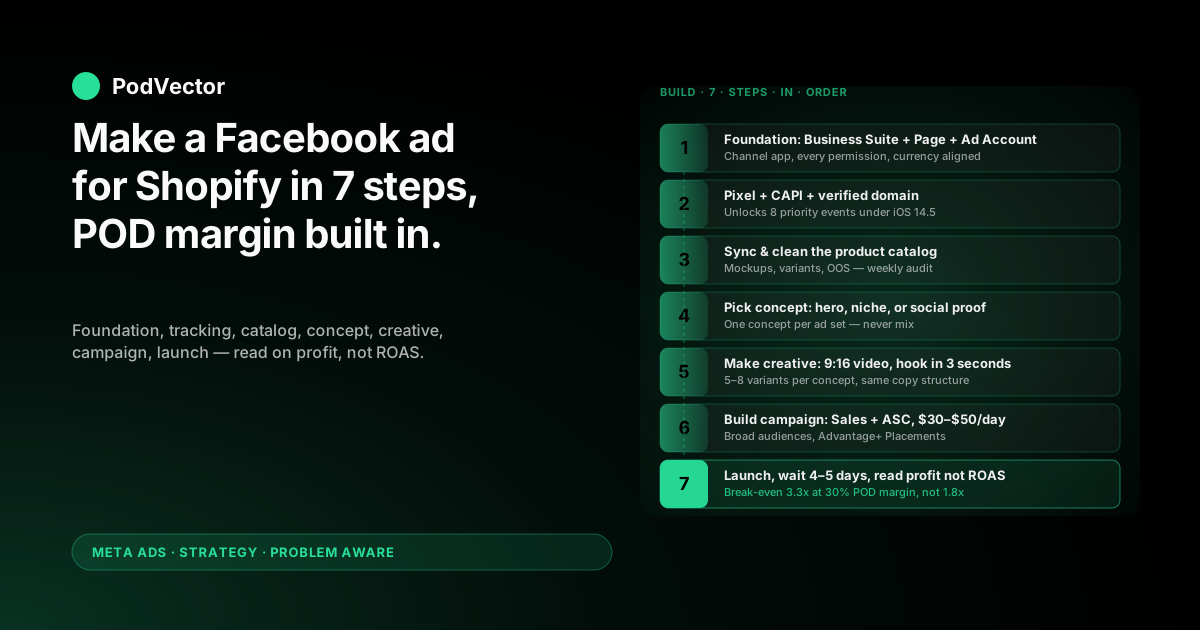
Quick Answer: Making a Facebook ad for a Shopify print-on-demand store is a two-part job. The first half is plumbing — wiring Meta to Shopify, the Pixel, and the Conversions API. The second half is the ad itself — concept, creative, copy, and launch.
Most generic guides treat the build as a single 30-minute checklist. POD operators can't. At 28–35% contribution margin after Printify or Printful supplier costs, the wrong objective or the wrong creative format is a profit hole that ROAS dashboards won't show you.
This walkthrough takes you from "I have a Shopify store and a Facebook page" to "the first ad is live and I know how to read it on profit, not on Meta's reported ROAS." Seven steps, every one POD-aware.
Why making POD Facebook ads is different from generic Shopify
The technical steps to make a Facebook ad for a POD Shopify store are the same as for any other Shopify store. Connect the channel, install the Pixel, build the campaign in Ads Manager. OptiMonk's beginner guide and Measureschool's setup walkthrough both cover that mechanic well.
What they don't cover is the cost layer underneath your storefront. POD operators don't own the inventory they sell — Printify, Printful, or Gelato do. Every order subtracts a supplier invoice from the revenue line before you see a cent of contribution.
The break-even ROAS gap
An owned-inventory Shopify store with 55% gross margin breaks even around 1.8x ROAS. A POD store at 30% contribution margin breaks even closer to 3.3x.
So when a tutorial calls 2x ROAS "healthy," that headline is true for inventory businesses. For POD, the same number is the algorithm quietly manufacturing a small loss.
Meta optimises on receipt size, not your profit
Meta's purchase optimisation reads order subtotal from the Pixel and the Conversions API. That subtotal is the revenue you collected — not the slice that's actually yours. Meta will push budget toward the orders that look biggest to it, even when those orders carry the worst contribution margin in your store.
Every step below is built around that fact. The plumbing is the same; the way you read the numbers is not.
Step 1 — Build the foundation (Business Suite, Page, Ad Account)
You can't make a Facebook ad without three accounts wired together: Meta Business Suite, a Facebook Page that represents your brand, and an Ad Account inside that Business.
Set up Meta Business Suite
Go to business.facebook.com. If you've ever clicked an ad on Instagram, Meta has probably auto-created a Business for you. Check first — duplicate Businesses are painful to merge later.
Inside Business Settings, add your Facebook Page (create one if you don't have it yet) and create an Ad Account. Set the Ad Account currency to whatever your Shopify store transacts in. Mismatched currencies break ROAS math without throwing a visible error.
Add the Facebook & Instagram channel app to Shopify
In Shopify admin, go to Settings → Apps and sales channels → Shopify App Store and install the official "Facebook & Instagram by Meta" app. Open it, click Start setup, and walk through the prompts.
This single flow connects the Page, the Business, the Ad Account, and the Pixel. Grant every permission it asks for. Half-granted permissions are the most common cause of "events aren't firing" panic a week later.
Verify business identity if Meta asks
New POD stores increasingly trip Meta's automated identity checks. If you're prompted, complete identity verification before you launch ads — not after. Ad Accounts paused mid-campaign for unverified identity sit dark for 5–10 business days, which is more painful than the 20-minute upload up front.
Step 2 — Install Pixel, CAPI, and verify the domain
Two trackers, both required, doing different jobs. Skip either and your ad spend turns into a guess.
Pixel: browser-side events
The Shopify channel app installs the Pixel automatically once permissions are granted. Verify it works with the free Meta Pixel Helper Chrome extension.
Load your home page, a product page, the cart, and the checkout in sequence. The helper should count PageView, ViewContent, AddToCart, InitiateCheckout, and Purchase. If any one is missing, Meta won't optimise toward it and your retargeting audiences built on it will be empty.
CAPI: server-side events
Conversions API (CAPI — Meta's server-to-server event channel) sends purchase events directly from Shopify's server to Meta's. After iOS 14.5, somewhere between 25% and 40% of browser-side Pixel events fail to fire because of opt-outs and content blockers. CAPI catches them.
The Shopify Facebook channel app turns CAPI on by default in newer setups. Verify it in Meta Events Manager → Data Sources → your Pixel → Settings. The Server column should land within roughly 10% of the Browser column for Purchase events over a 7-day window. The detailed setup walkthrough lives in the ads pixel and Facebook setup guide for POD.
Verify your domain (the eight-event ceiling)
Inside Business Settings, go to Brand Safety → Domains, add your Shopify domain, and verify with the meta-tag method through Shopify's Online Store → Themes → Edit code → theme.liquid. Drop the verification tag into the <head>.
Verified domains can prioritise eight conversion events under iOS 14.5's Aggregated Event Measurement. Unverified domains are capped at three. That difference shows up later as "why is Meta only optimising on PageView?"
Step 3 — Sync the product catalog cleanly
The Shopify channel app pushes your full catalog into Meta Commerce Manager automatically. The sync is the easy part. The cleanup is where POD differs.
What POD sellers fix on first sync
Open Commerce Manager → Catalog → Items and scan three things:
- Image quality. Plain mockup images under 500×500 pixels get downranked in dynamic ads. Lifestyle shots and on-model photos beat flat mockups by a wide margin on cold audiences.
- Variant explosion. One t-shirt design with 10 colours and 5 sizes turns into 50 catalog items. Meta treats each as its own ad unit. Either consolidate variants on the Shopify side or use catalog product set rules to group by parent product.
- Out-of-stock items. POD providers occasionally pause SKUs when a supplier goes offline. Meta keeps showing dynamic ads for unavailable items unless availability is set to
out_of_stockin the feed. The channel app handles this if Shopify inventory tracking is on; if you sell pure POD with no inventory tracking, set the field manually.
Catalog hygiene is what makes Advantage+ Catalog Ads usable later. Skip it and your dynamic retargeting will surface broken images and unavailable products to your warmest audience.
Step 4 — Pick the ad concept before opening Ads Manager
Most operators open Ads Manager first and stare at the campaign objective screen until something looks plausible. That's the wrong order.
The first decision isn't "what objective?" — it's "what is this ad trying to do?" Three concepts cover 90% of POD ads:
Concept A — the design hero
One specific design, framed as the visual hook. Used for prospecting on cold audiences who've never heard of you. The ad is the design; the brand is secondary.
Best when you have a design that's resonating organically (TikTok views, Etsy sales, repins on Pinterest). Bad when you're trying to launch ten designs at once.
Concept B — the niche identity
Not one design — an entire niche aesthetic. "Designs for night-shift nurses" or "Funny gear for sourdough obsessives." The hook is the audience, not the product.
Best for stores with a clear vertical and 5+ designs that all serve it. Niche identity ads tend to outperform single-design ads for retargeting because the audience is already self-identifying.
Concept C — the social proof reel
Customer reactions, unboxings, or UGC stitched into a 15–30 second vertical video. Often the single best-performing concept for POD on Reels and Feed video placements.
Hardest concept to make from scratch (you need actual customer footage), easiest to scale once you have a stable customer base producing organic content. Most POD stores reach this concept around month 4–6, not month one.
Pick one concept per ad set. Don't mix them. Mixing concepts in the same ad set turns Meta's algorithm into a coin-flipper instead of an optimiser. The deeper concept-by-funnel-stage map sits in the complete Meta Ads playbook for POD.
Step 5 — Make the creative (format, hook, copy)
Now you actually make the ad. The concept from step 4 dictates format; the format dictates everything else.
Format priority for POD
Vertical 9:16 video first. Static single-image ad second. Carousel third. Collection ads only after you have a winning concept.
For prospecting on cold audiences, short-form vertical video — even mobile-shot, UGC-style footage — outperforms polished brand video. Reels-style placements now consume 40%+ of impressions on most POD ad accounts, and they reward video that looks native to the feed.
Static images work as the cheap workhorse for retargeting and detail-shot messaging. Carousels are useful once you have one winning concept and want to show variants of the same design (a graphic on a t-shirt, hoodie, mug, and tote).
The first 3 seconds
Meta's view-time data shows watch-time decisions happen in the first three seconds. Open with the strongest visual hook — your hero design at full frame, or a customer reaction shot.
Don't open with the brand logo. Don't open with the product packaging. Don't open with a "Hey guys, today I want to show you…" voiceover. Operators have run those tests against this format thousands of times. Native, hook-first wins.
Copy structure that works
Three lines on top, one CTA at the bottom:
- Line 1 — the audience hook ("For dog moms who can't fit one more mug into the cabinet")
- Line 2 — the design promise (what makes your design different from the 50 other dog mom mugs)
- Line 3 — the offer or proof (free shipping, 4.8★ rating, "10,000+ shipped")
- CTA — "Shop the design" / "Get yours"
Make 5–8 creative variants per concept. Same copy structure, different hooks. Let Meta pick the winner inside the ad set.
Iframe the design before exporting
One step most generic guides skip: preview the ad inside Meta's Ad Preview tool before you publish. Shopify-side mockups occasionally crop in unexpected ways inside the 9:16 frame, especially for designs that fill the t-shirt chest area.
A 30-second preview check beats discovering the design's title is half-cropped after $400 in spend.
Step 6 — Build the campaign and ad set
Now open Ads Manager. Click Create. Three layers, top down: campaign, ad set, ad.
Campaign objective: Sales
Pick Sales. The Sales objective optimises toward the Purchase event you set up in step 2. Traffic, Engagement, and Awareness objectives will deliver cheaper clicks and cheaper impressions; they will not deliver cheaper customers.
For POD margins, the only objective that returns positive contribution is one optimised on Purchase. Anything else is the algorithm finding people who like clicking, not people who buy.
Advantage+ Shopping Campaign vs manual structure
For a fresh account with under 30 purchases per week, start with one Advantage+ Shopping Campaign (ASC — Meta's auto-targeted shopping campaign type) at $50–$100/day. ASC needs less structure to exit Meta's learning phase, and the algorithm has gotten genuinely good at finding POD buyers when fed clean catalog data plus 5–8 creative variants.
Add a manual prospecting campaign once ASC clears 30 purchases/week and you want to test specific cold audiences. The criteria for layering manual structure on top of ASC sit in the scaling Facebook ads playbook for POD.
Ad set budget: $30–$50/day per ad set
Meta's learning phase needs about 50 conversions per ad set per week to exit. POD AOV averages $30–$50, so an ad set running below $30/day rarely generates enough purchase signal to graduate.
Budget too low and the ad set never stabilises. Budget too high before you know which creative wins and you're paying tuition. $30–$50/day per ad set is the floor that actually clears learning.
Audience: broad first
Meta's algorithm is now strong enough that broad targeting usually beats layered interest stacks. Start with:
- Country — your top-converting Shopify region only, not "worldwide"
- Age — the band that holds 70%+ of your existing Shopify customers
- Gender — match your Shopify customer split, or "All" if it's mixed
- No interests, no behaviours on the first prospecting ad set
Add interest-stacked ad sets only if the broad ad set fails to exit learning after $1,500 of spend. Layered interests usually constrain Meta's algorithm more than they help it find buyers.
Placements: Advantage+ Placements, then audit
Pick Advantage+ Placements (Meta automatically distributes across Feed, Reels, Stories, and the rest). Run for 14 days. Pull the placement breakdown and look at cost-per-purchase by placement.
If one placement consumes 60%+ of spend at 2x worse cost-per-purchase than the others, switch to Manual Placements and exclude it. The most common offender for POD is Audience Network, which delivers cheap impressions on low-intent inventory.
Step 7 — Publish, then read on profit not ROAS
Hit Publish. The hardest step is the next four days.
Don't touch it for 4–5 days
Meta's learning phase is real. Pausing ads, raising budgets, swapping creatives, or shifting audiences in the first 96 hours resets the phase and burns the spend you've already paid.
Set the campaign live at 9 AM Monday. Don't open Ads Manager until Friday. Use the time to clean catalog images, draft new creative variants for the next test, and pull your Shopify and supplier cost data so you're ready to read results on profit.
Read results on contribution profit, not Meta-reported ROAS
This is where POD operators differ from owned-inventory stores. Open Shopify orders and Ads Manager spend side by side, and calculate:
- Revenue from Meta ads (Shopify orders attributed via UTM or Meta-reported, whichever you trust more)
- Minus Printify or Printful supplier cost on those orders
- Minus Shopify payment processing fees (~2.9% + $0.30/order)
- Minus ad spend
- Equals contribution profit from Meta ads
If contribution profit is positive, the campaign is working — even if Ads Manager shows 2.5x ROAS that looks "average" in a generic guide.
If contribution profit is negative at 3x ROAS, your supplier cost ratio is higher than you assumed and the campaign needs creative work, not budget. The full ROAS-to-profit translation lives in the complete guide to Meta Ads ROAS and attribution for POD.
Mistakes that quietly burn POD margin
Reading Meta-reported ROAS as if it were profit
Ads Manager has no idea what your Printify or Printful invoice looks like. A 2.5x ROAS at 30% margin is a 25% loss on every order. Always translate to contribution profit before deciding to scale, pause, or duplicate an ad set.
Scaling on the daily ROAS spike
POD daily ROAS bounces hard — a single $80 hoodie order on a $50/day ad set looks like a 5x day. The next day at 1.2x looks like the campaign died. Neither is true. Scale and cut on rolling 7-day blended ROAS, never on the last 24 hours.
Letting catalog feed errors compound
A Printify supplier pauses a SKU. The Shopify product stays "in stock" because POD doesn't track inventory. Meta keeps running Advantage+ Catalog Ads on the unavailable item. You discover it 14 days later when refunds spike. Audit Commerce Manager weekly, not monthly.
Running Traffic objective to "warm up" the Pixel
Common advice in older Shopify Facebook tutorials. The Pixel doesn't need warming. Traffic objective optimises toward clickers, not buyers, and pollutes your retargeting audiences with people who will never convert. Skip it. Go straight to Sales.
Killing ad sets at the 3-day mark
The learning phase needs 7 full days of stable budget to exit. Operators kill ad sets on day 3 because the ROAS looks weak, then re-launch a near-identical ad set three days later — restarting the learning phase from zero. Patience is cheaper than re-tests. Hold the line for 7 days.
FAQs
How much budget do I need to make a Facebook ad work for a Shopify POD store?
The honest minimum is $1,500 over 30 days — roughly $50/day across one ASC campaign. Below that, the Pixel never accumulates enough purchase signal to exit learning, and you're paying for testing without enough data to act on it.
Can I make Facebook ads for a Shopify store with no sales yet?
Yes, but ASC will spend more per purchase in the first 2–3 weeks because Meta has no Pixel data to optimise on. Plan for $200–$400 cost-per-acquisition during the cold-start period, then expect it to halve as Purchase events accumulate. Generic ecommerce CPA benchmarks don't apply to POD's cold-start curve.
Do I need both Pixel and CAPI, or is one enough?
Both. Pixel-only setups lose 25–40% of Purchase events to iOS opt-outs and browser blockers, which inflates your real cost-per-purchase by the same amount inside Ads Manager. CAPI is what makes the data accurate enough to scale on. The Shopify channel app turns it on by default — verify it's actually firing in Events Manager.
Should I make videos or static images first?
Vertical 9:16 video for cold-audience prospecting on Reels and Feed video. Static single-image ads for retargeting and detail-focused product messaging. Carousel ads only after you have one winning concept worth showing across multiple product variants. The format-by-funnel-stage breakdown sits inside the Facebook Ads best practices Shopify playbook for POD.
How is "make" different from "run" Facebook ads for Shopify?
Practically, the same workflow. "Make" leans toward the build phase — concept, creative, and campaign assembly. "Run" leans toward operations after launch — scaling, budget management, audience iteration. Most operators do both. The post-launch scaling side is covered separately in how to run Facebook ads for Shopify.
What's the single most common mistake POD beginners make on their first ad?
Reading Meta's reported ROAS as if it were profit. A 3x ROAS in Ads Manager can be either a 20% gain or a 5% loss for a POD store, depending on which products converted. The fix isn't a different ad — it's a different way of reading the dashboard. The full account architecture sits inside the Meta Ads topic hub, and the cluster of strategy playbooks is at the Meta Ads strategy hub.
Make the ad. Read the result on profit, not on receipt size.
Meta Ads Manager shows ROAS on subtotal. Printify shows the supplier invoice. Shopify shows the order revenue. The margin sits in the gap between three dashboards — and most POD operators never close it.
Victor is the AI employee that pulls Shopify, Printify, and Meta into one live data warehouse and answers the question Ads Manager won't: is this campaign making me money on profit, not on receipt size? Ask in plain English, get the number from your real data, decide on the right one.
Try Victor free