
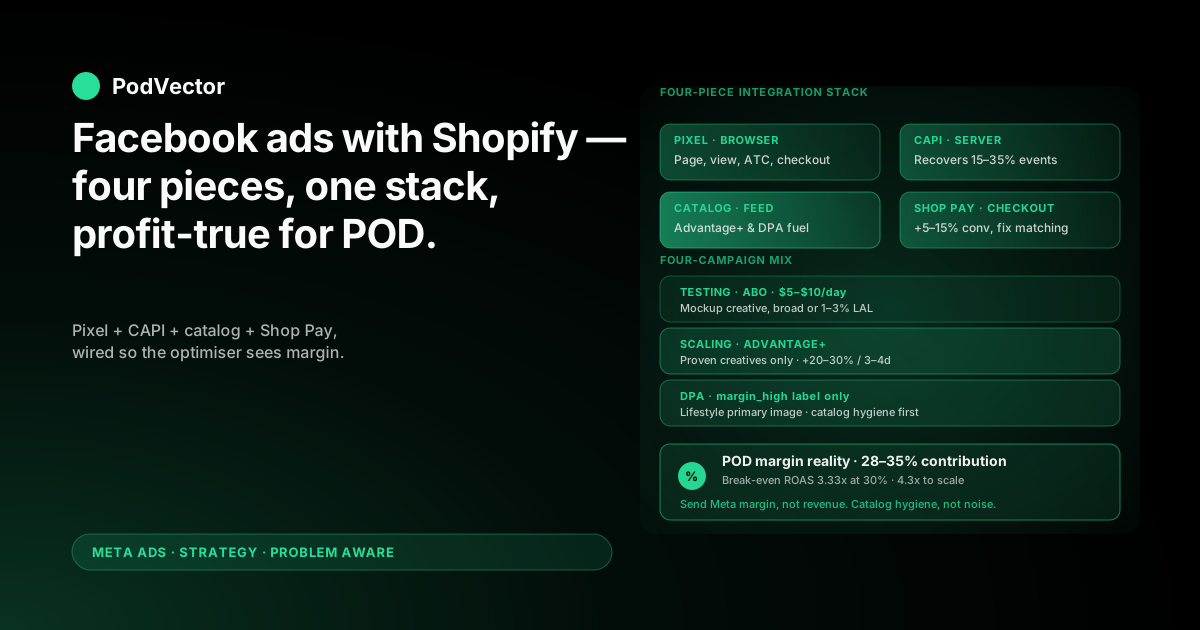
Quick Answer: Running Facebook ads with Shopify works when you treat the two platforms as one connected stack — Pixel, Conversions API, product catalog, and Shop Pay all feeding the same signal back to Meta. Generic Shopify guides assume a 50–70% margin brand, but POD operates at 28–35% after the supplier takes their cut.
That margin gap rewrites every number in the playbook. Break-even ROAS doubles. The default Shopify-Meta event values overstate profit. The Printify or Printful catalog needs careful sync rules so dynamic ads do not promote SKUs that lose money.
The operators who win on this stack are the ones who connect the plumbing once, send Meta a profit-true signal, and keep the catalog clean. Reported ROAS becomes a number you can actually trust — and the optimiser stops chasing high-revenue, low-margin orders.
The Shopify–Meta stack: four pieces that have to work together
Most Facebook ad guides written for Shopify treat the integration as a checkbox — install the app, paste a Pixel ID, done. For a POD store, that lazy install is the difference between profitable scaling and a month of losing money you do not see until your accountant flags it.
The integration is actually four moving parts, and all four need to be working together for the optimiser to do its job.
The Pixel tracks browser-side events: page views, add-to-cart, checkout starts, purchases. It runs in the visitor's browser and is increasingly blocked by ad blockers, Safari's Intelligent Tracking Prevention, and iOS opt-outs.
The Conversions API (CAPI) sends those same events from your Shopify server directly to Meta — bypassing the browser entirely. CAPI recovers 15–35% of Purchase events that Pixel misses on its own.
The product catalog is a feed of every product in your Shopify store, synced to Meta Commerce Manager. It powers Advantage+ Shopping Campaigns and dynamic product ads, both of which need accurate prices, images, and stock status.
Shop Pay is the accelerated checkout most Shopify stores enable by default. It speeds conversion but creates an attribution wrinkle — Shop Pay purchases sometimes fire from a different domain than the ad clicked, so event matching has to handle the cross-domain handoff.
Get any one of these wrong and the whole system underperforms. Most "my Facebook ads are not working" diagnostics on POD stores trace back to one of these four pieces being misconfigured, not to creative or audience problems.
If you want the full integration walkthrough rather than the strategy layer, our complete guide to Meta Ads + Shopify integration for POD covers every wiring step. The wider Meta Ads topic hub indexes everything across ad types, integrations, and attribution.
Installing the stack: app, Pixel, CAPI, and catalog
The order of operations matters. Install in the wrong sequence and you end up with duplicate Pixels, a stale catalog, or events firing twice.
Step 1: Install the Facebook & Instagram sales channel
From the Shopify App Store, install the official Facebook & Instagram channel. This is the only path that keeps your catalog auto-syncing — third-party connectors break in subtle ways and are not worth the savings.
During the install flow, connect the same Meta Business Suite account that owns your ad account and your business Facebook page. If those are split across two Business Manager accounts, fix that before you install — splitting them creates permission loops you will spend a Saturday untangling.
Step 2: Configure a single Pixel
Pick one Pixel. Use it everywhere — Shopify, any landing page builder you run, any quiz or survey tool. Two Pixels firing on the same store double-counts events and degrades signal quality for the optimiser.
In Meta Events Manager, verify the Pixel is firing the standard events: PageView, ViewContent, AddToCart, InitiateCheckout, Purchase. Use the Meta Pixel Helper Chrome extension to confirm — it tells you if events are firing and if any are duplicated.
Step 3: Turn on Conversions API
Inside the Facebook & Instagram channel settings on Shopify, enable Conversions API. There is a toggle. Flip it.
Then verify in Meta Events Manager that your Purchase event shows two source columns — "Browser" (Pixel) and "Server" (CAPI). If only one column shows, CAPI is not connected. The most common cause: you connected an old data source that pre-dates Shopify's CAPI integration. Disconnect and reconnect.
Set up event deduplication at the same time. Shopify sends the same event_id for the browser-side and server-side fire of each event, so Meta knows to count the Purchase once instead of twice. If deduplication is broken, your reported conversions will look inflated and your optimiser will get confused.
Step 4: Sync the catalog
Once the channel is connected, your Shopify catalog auto-syncs to Meta Commerce Manager. Wait 30 minutes for the first sync to finish, then check Commerce Manager → Catalogs to confirm products show up with correct images, prices, and availability.
POD-specific catalog issues to fix here:
Mockup-only product images. Default Printify and Printful mockups sync as the primary product image. They work in carousel ads but underperform in feed placements. Replace the primary image on at least your top 20% of SKUs with a lifestyle shot before serious ad spend hits the catalog.
Variant noise. A POD shirt with 5 sizes × 8 colors creates 40 variants, all of which sync individually. Meta will happily run dynamic product ads for all 40, including variants you barely sell. Use Shopify product tags or collections to limit the catalog feed to "core" SKUs you actually want to advertise.
Stale "Out of stock" flags. Printify occasionally reports a supplier shortage that flips a variant to unavailable. The Shopify-Meta catalog syncs that flag through to Meta within a few hours, which is what you want — but verify the sync cadence is set to at least every 2 hours, not the daily default.
Catalog hygiene for Printify and Printful stores
Catalog hygiene is the lever Shopify POD stores under-use the most. A clean catalog turns Advantage+ Shopping Campaigns and dynamic product ads from "okay" to "best-performing campaign in the account."
The four catalog fields that matter most
Meta uses every catalog field in some way, but four of them disproportionately drive ad performance.
Title — should describe the product clearly, not poetically. "Funny Dog Mom T-Shirt with Golden Retriever Print" beats "Daisy" every time. Meta uses the title to match products to user intent in dynamic ads.
Image — primary image is what appears in carousel and dynamic ads. Lifestyle beats mockup by 30–50% on click-through. If you only invest in better photography for one field, this is it.
Price — must reflect what the customer actually pays. If you run a discount via Shopify Discounts, make sure it flows through to the catalog so Meta shows the discounted price in ads. Price mismatches between ad and landing page tank conversion rates.
Product type / category — Meta uses this to slot products into the right shopping experiences and to choose which placements to run. A POD apparel store should set product_type to "apparel" not "merchandise" — the former unlocks Instagram Shop placement, the latter does not.
Shopify product tags as ad-set targeting
One under-known trick: Shopify product tags carry through to the Meta catalog as custom labels. You can use those custom labels to slice your catalog inside an ad set.
The pattern that works: tag your highest-margin SKUs with a custom label like margin_high, then build an ad set that filters dynamic product ads to only that label. You get Advantage+ economics on your most profitable inventory only — instead of letting the optimiser drag spend toward whatever has the highest CTR regardless of margin.
For more on the dynamic-ads side specifically, our piece on the Shopify dynamic Facebook ads product feed covers feed configuration in depth.
Campaign mix that takes advantage of the integration
With the stack installed, the campaign structure that takes most advantage of the Shopify-Meta integration is narrow and disciplined. Four campaign types, no more.
Testing campaign — ABO, broad creative discovery
One campaign, ad-set-budget optimisation (ABO), $5–$10/day per ad set, broad audience or 1–3% lookalike. Three to five creative variants per ad set.
The job here is signal — finding which designs and creative angles get above-baseline CTR and add-to-cart rate. The Shopify-Meta integration gives you fast feedback because AddToCart events fire reliably through both Pixel and CAPI, so you can read results within $50–$100 of spend.
Kill any ad set under your CTR threshold (1.0% is a reasonable floor for POD apparel) after $50–$100 spend. Promote any ad set that hits 1.3x your true break-even ROAS over $150–$200 spend.
Scaling campaign — Advantage+ Shopping
One campaign, Advantage+ Shopping Campaign type, fed only with creatives that survived testing.
This is where the integration earns its keep. Advantage+ Shopping requires a connected catalog and a Conversions API feed to work properly — both of which you set up in the install phase. With the catalog clean and the profit signal flowing, Advantage+ outperforms manual ad-set splits at the scaling stage by 15–30% on CPA.
Start at $50–$100/day. Scale by no more than 20–30% every 3–4 days — bigger jumps reset the optimiser's learning phase and burn budget.
Our deeper breakdown on scaling Facebook ads on Shopify for POD covers the scaling cadence in detail, including when to break out a second Advantage+ campaign for incremental reach.
Dynamic product ads campaign — bottom-of-funnel retargeting
One campaign, dynamic product ads (DPA), targeting site visitors and add-to-cart abandoners.
DPAs are the strongest argument for keeping the catalog clean. They automatically show visitors the exact products they viewed or abandoned — but only if the catalog has the right images, prices, and descriptions. A DPA with a mockup primary image converts at half the rate of one with a lifestyle primary.
Filter the DPA campaign to your margin_high custom label so retargeting spend goes toward profitable SKUs first. ROAS on DPAs is typically 5–8x for Shopify POD stores when the catalog is clean — well above break-even.
Retargeting campaign — non-DPA
One campaign, ABO, three ad sets: 30-day site visitors, 14-day cart abandoners, 7-day checkout abandoners.
Each ad set gets a different creative angle. Checkout abandoners need urgency or a small discount. Cart abandoners need social proof or a reason to return. Site visitors need brand reinforcement, not a product push. Same creative across all three is a mistake — they ignored you the first time, give them a different reason to come back.
Audiences built from Shopify customer data
The Shopify-Meta integration syncs your customer list to Meta as a Custom Audience, which unlocks the strongest lookalikes you can build for POD.
The seed audiences worth building
Inside Shopify, segment your customers by behavior, then push each segment to Meta as a custom audience. Three are worth the effort.
High-value customers (LTV > $100). Your top 10–20% of buyers by lifetime value. The 1–3% lookalike of this seed is the single best cold acquisition audience for most POD niches — it finds people who behave like buyers, not browsers.
Repeat purchasers (2+ orders). POD repeat-rate is low (15–25% in most niches), so the customers who do come back are gold. Build a custom audience from them, then a 1–3% lookalike. Use this lookalike specifically for new-design launches — it is biased toward buyers who buy more than once.
Recent purchasers (last 30 days). Use as an exclusion audience on prospecting campaigns to avoid wasting spend on people who just bought. Also useful as the seed for a "buy a complementary product" upsell campaign.
Why broader cold audiences still work
Once Meta has accurate Purchase signal flowing through CAPI plus a clean catalog and a custom-audience seed, the algorithm performs surprisingly well on broader audiences. A 5–10% lookalike, or even open targeting with Advantage+ Audience, often matches or beats the 1–3% lookalike at scale because Meta has more room to optimise.
The 2026 pattern: start narrow (1–3% LAL) for the first $500–$1000 of testing spend, then broaden for scaling. Going broad before Meta has a clean Purchase signal to learn from is what the broad-audience-skeptics are reacting to — they are right that broad does not work without infrastructure, and wrong that broad does not work at all.
Retargeting Shopify visitors and Shop Pay drop-offs
Shop Pay is the accelerated checkout Shopify enables by default. About 60–70% of returning visitors at a Shopify POD store will see the Shop Pay-branded "1-tap checkout" prompt.
That is mostly good — Shop Pay lifts conversion 5–15% on average. But it creates one specific tracking gap that POD stores ignore at their peril.
The Shop Pay attribution gap
When a returning visitor uses Shop Pay, the checkout sometimes happens on a Shopify-hosted shop.app domain, not your store domain. The Pixel and CAPI events still fire, but the matching window is narrower because the cookie is on a different domain.
Practical result: a small percentage of Shop Pay purchases get under-attributed to Meta in the dashboard, which makes ROAS look 5–10% lower than it actually is.
Two fixes:
Enable advanced matching in the Pixel settings. Advanced matching sends additional customer parameters (hashed email, hashed phone, name) to Meta, which improves cross-domain attribution and recovers most of the Shop Pay gap.
Reconcile against Shopify's own Sales by Channel report. Shopify's report attributes the order to the channel the customer came from, regardless of which domain they checked out on. Compare Shopify-attributed Facebook revenue to Meta-attributed revenue weekly — if the gap is > 15%, your Pixel matching needs work.
Cart-abandoner email + Meta retargeting are not the same
Shopify's built-in abandoned-cart email and Meta's cart-abandoner retargeting both target the same visitor, but they should run different messages.
Email reaches the visitor 1–24 hours later when they are at their desk. Meta retargeting reaches them within minutes while they are still on Facebook or Instagram. The email can carry a longer message and a real discount; the Meta ad needs a thumb-stopping visual and a one-line hook.
Run both. Sequence them: Meta retargeting in the first 48 hours, email at 24 and 72 hours. Then drop both — visitors who do not return after 72 hours are unlikely to return at all and continued spend on them dilutes ROAS.
Budget allocation by Shopify store stage
What budget makes sense depends entirely on store stage. The same $50/day that is plenty for a new store is rounding error for a scaling one.
Starting (under $5k/month revenue)
$30–$50/day total. Allocation: 70% testing, 20% retargeting, 10% DPA. Skip Advantage+ Shopping until you have at least 50 Purchase events in the last 28 days — the algorithm needs that minimum to optimise.
The early job is creative discovery, not scaling. Spend most of the budget testing 5–10 designs to find which ones have demand, then narrow.
Growth ($5k–$50k/month revenue)
$100–$500/day total. Allocation: 40% scaling (Advantage+), 30% testing, 20% DPA, 10% retargeting.
This is where the integration starts paying off in a measurable way. Advantage+ Shopping Campaigns become the largest line item, fed by proven creatives from testing. DPA grows because catalog signal is now mature.
For the wider playbook on this stage, our piece on Facebook ads best practices for Shopify POD goes through the optimisation rituals weekly.
Scaling ($50k+/month revenue)
$1,000+/day total. Allocation: 50% scaling, 20% DPA, 15% testing, 10% retargeting, 5% brand/awareness.
At this scale, creative volume becomes the bottleneck. Plan for 4–6 new creative variants tested per week to keep the scaling campaign fed. Lifestyle UGC becomes the dominant format because saturation on the same creative shows up in 2–3 weeks instead of 2–3 months.
Why Shopify and Meta show different revenue
The single most common confusion among Shopify POD operators running Facebook ads: Meta says you generated $20k. Shopify says Facebook generated $14k. Which one is right?
Both are right. They are measuring different things.
Meta's number is click-attributed and 7-day window
Meta counts a conversion if a user clicked a Facebook or Instagram ad within the last 7 days, regardless of what other channels touched them after. It also counts view-through conversions (the user saw the ad but did not click) within 1 day.
This number is generous on the upside because it claims credit for any visitor who saw or clicked an ad before buying — even if Google search or an email actually closed the sale.
Shopify's number is last-touch
Shopify's Sales by Channel report attributes a conversion to whichever marketing channel the visitor used immediately before checking out. If the visitor clicked a Facebook ad on Monday, then came back via Google search on Wednesday and bought, Shopify credits Google.
This number is conservative because it ignores assist channels.
The truth is between the two — and that is where Victor lives
For most POD stores, true Facebook contribution is 70–85% of Meta's reported number and 110–130% of Shopify's reported number. The gap is the assist credit and the cross-device tracking that neither system fully captures.
Reconciling this gap manually is grueling — it means joining order data, ad spend data, and attribution data from three or four sources every week to understand what your Facebook campaigns actually generated.
This is the work Victor does inside a single source of truth: a unified data warehouse pulling Shopify orders, Printify or Printful supplier costs, and Meta ad spend into one model. Ask "what did Facebook actually generate this week, after supplier cost?" and you get a number — not a 90-minute spreadsheet exercise.
Our deeper take on the attribution side specifically: the complete guide to Meta Ads ROAS and attribution for POD.
Five integration mistakes that bleed POD ad budgets
From auditing ad accounts on Shopify POD stores, these five integration mistakes show up most often. Each one quietly kills 10–30% of ad efficiency.
1. Pixel-only, no CAPI
You skip the Conversions API toggle during install. Meta loses 15–35% of Purchase events to ad blockers and iOS opt-outs. Optimiser learning phase takes 2–3x longer. Cost per acquisition runs higher than it should.
Fix: enable CAPI in the Facebook & Instagram channel settings. Verify both source columns show in Events Manager. Takes 5 minutes.
2. Default Purchase event value (revenue, not profit)
Shopify sends Meta the order subtotal as the Purchase value. That number includes supplier cost. Meta optimises toward audiences and SKUs that drive the highest revenue — which, for POD, are often the lowest-margin orders.
Fix: override the Purchase value with order_subtotal − supplier_cost − shipping_subsidy via a Shopify script or a server-side tool. Or, simpler, send Meta a flat margin multiplier (30% of subtotal). Crude but directionally correct.
3. Variant noise in the catalog
All 40 SKU variants sync to Meta. Dynamic product ads burn budget on variants you barely sell. Top-performing variants get diluted in the catalog signal.
Fix: limit the Meta catalog feed to your top 20–30% of SKUs by margin and velocity using Shopify product tags or a dedicated "core" collection.
4. Multiple Pixels firing at once
You have one Pixel installed via the Shopify channel and another installed via a theme.liquid edit from when you tried a different connector last year. Both fire on every page load. Meta sees double conversions, deduplication breaks, reported ROAS becomes meaningless.
Fix: audit theme.liquid, headers, and any embedded apps for stray Pixel snippets. Use the Meta Pixel Helper extension to confirm only one Pixel ID fires per page.
5. No catalog refresh schedule
Catalog syncs once a day on the default setting. Stock changes, price changes, and new SKUs are 24 hours behind. Dynamic ads run promoting out-of-stock variants for hours.
Fix: in Commerce Manager, set the catalog feed to refresh every 2 hours. For Printify, also enable webhook-triggered sync so stock changes propagate within minutes, not hours.
FAQs
Do I really need both Pixel and Conversions API?
Yes. Pixel-only loses 15–35% of conversion events to ad blockers and iOS privacy restrictions. CAPI fills that gap. Running both with deduplication enabled is the 2026 baseline — anything less is leaving signal on the table.
What is a good ROAS for a POD store running Facebook ads on Shopify?
It depends on margin. POD margins are 28–35% after supplier cost, so break-even ROAS is 1/(margin %) — for a 30% margin, break-even is 3.33x on revenue. A "good" target is 1.3x break-even or higher, which is roughly 4.3x reported revenue ROAS at 30% margin. If Meta's dashboard says you are running 2.5x ROAS, you are losing money on every order.
Should I use Advantage+ Shopping Campaigns or manual campaigns?
Both, but at different stages. Manual ABO ad sets for testing — they give you more control and faster signal on which creatives work. Advantage+ Shopping for scaling, fed by creatives that survived testing. Switching to Advantage+ before you have 50+ Purchase events in the last 28 days starves the algorithm of signal.
How do I track Facebook revenue accurately for a Shopify POD store?
Meta's reported number is generous (click + view-through, 7-day window). Shopify's Sales by Channel is conservative (last-touch only). True contribution is somewhere in the middle — usually 70–85% of Meta's number for a POD store. The cleanest approach is to pipe Shopify orders, Printify or Printful supplier costs, and Meta ad spend into one data model and reconcile weekly.
Can I run Facebook ads on Shopify without the Conversions API?
Technically yes. Practically, no. Without CAPI you lose enough Purchase signal that the optimiser cannot find your buyers efficiently. Cost per acquisition runs 20–40% higher than it should. The setup takes 5 minutes — there is no good reason to skip it.
How long before I see Facebook ad results on a new Shopify POD store?
Plan for 14–21 days of testing before you know whether a design or angle has demand. Meta's algorithm needs a learning phase of 50 conversion events per ad set to stabilize. At $5–$10/day per ad set, you reach that threshold in 1–2 weeks. Operators who pull the plug at day 5 are pulling before the optimiser has converged.
Should I use Shop Pay if I am running Facebook ads?
Yes. Shop Pay lifts conversion 5–15% on average. The cross-domain attribution gap it creates is real but small (5–10%) and mostly fixable with advanced matching enabled in the Pixel. The conversion lift outweighs the attribution noise.
What budget do I need to start running Facebook ads on Shopify for a POD store?
Minimum viable budget is $30–$50/day for the first month — enough to test 3–5 designs at $5–$10/day per ad set. Less than that and you cannot accumulate enough Purchase events for the optimiser to learn from. Plan for the first $1,000 of spend to be tuition while you find the creative angles that work.
Stop guessing what Facebook ads actually generate
Meta says one number. Shopify says another. Printify or Printful changes the math again. Without a single source of truth, every weekly review turns into a spreadsheet wrestling match — and the optimisation decisions you make from those numbers compound the wrong way.
Victor is the AI employee that pulls Shopify orders, supplier costs, and Meta ad spend into one live data layer and answers profit questions in plain English. "Which creative is profitable after supplier cost?" "Which audience drives repeat buyers, not just first orders?" "What is true Facebook ROAS this week?" — answered in seconds, not Saturdays.
Start with a free Victor account, connect Shopify and Meta, and ask your first question today.
Try Victor free