
Quick Answer: Most "Facebook Ads for ecommerce stores" guides answer the campaign question — which placements, which audiences, which creative formats. For a print-on-demand store, the harder question lives one layer below: which decisions on the storefront itself are quietly capping every campaign.
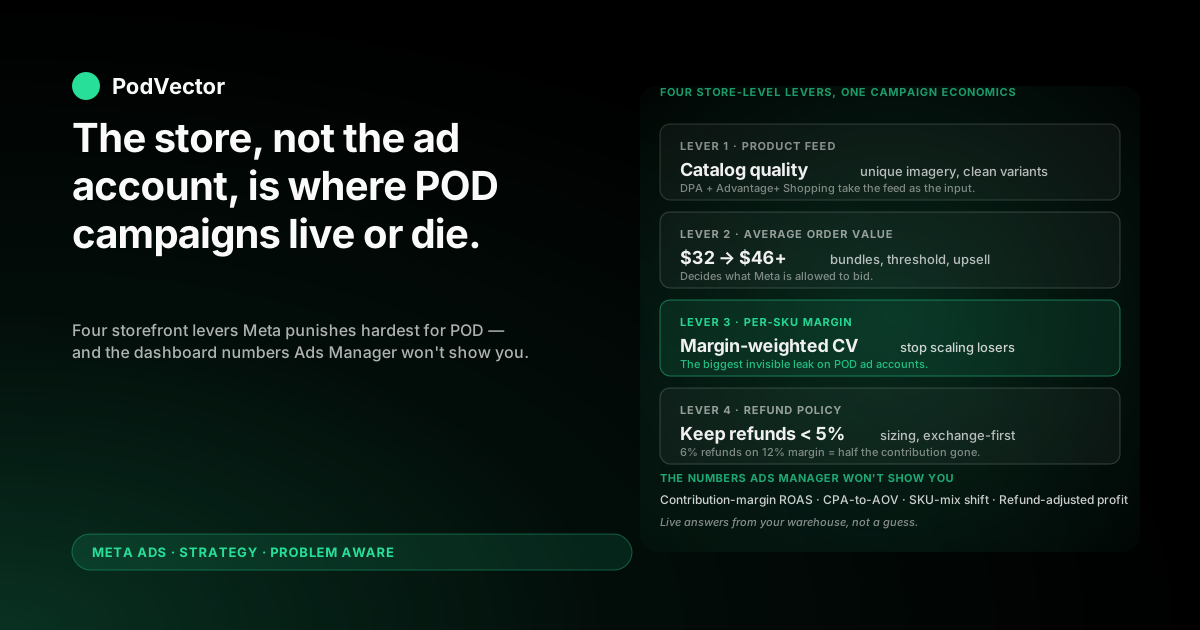
Product feed quality, average order value, refund policy, and per-SKU margin are the four levers Meta's algorithm punishes hardest for POD. Get those right and a 1.6 ROAS becomes profitable; get them wrong and a 3.0 ROAS still loses money.
This guide walks the store-side strategy: the catalog setup, AOV mechanics, retargeting offers, and reporting that turn Facebook Ads from a creative experiment into a unit-economic engine for your POD store.
Why "stores" needs a different angle than the generic ecommerce playbook
Search the keyword and the top results — Convertcart's 26 Facebook Ads secrets, Top Growth Marketing's 2025 ecommerce guide, and AdStellar's 8 proven strategies — share a common shape. They cover audiences, creatives, formats, and bid strategies. They assume your store is a finished, well-tuned conversion machine that the ads simply have to feed.
For a print-on-demand store that assumption is wrong twice. The supplier cost is much higher than the typical ecommerce baseline (60–70% of price, not 30–40%). And the storefront variables — product feed, AOV, refund policy, SKU mix — change the campaign's economics more than any creative test will.
This guide is for the operator who already knows the campaign mechanics and is wondering why the math isn't working. The campaign-side playbook lives in the sibling Facebook Ads for ecommerce strategy for print-on-demand; the business-side stages and capital math live in Facebook Ads for ecommerce businesses strategy for print-on-demand. This piece is the storefront-as-the-product piece.
The four store-level levers Meta punishes hardest for POD
Generic ecommerce stores can fix a weak campaign with better creative. POD stores can't. The margin is too tight, and Meta's bidder is too good at finding the people the storefront isn't ready for.
These four levers do more for ad performance than any audience or creative change.
1. Product feed quality
The catalog you sync to Meta Commerce Manager is the input to Advantage+ Shopping (Meta's automated full-funnel campaign type, called ASC) and Dynamic Product Ads. Bad feeds — missing GTINs, generic mockup images, single-color titles, no variant breakdown — break both.
POD stores are the worst offenders here because the supplier-supplied mockups are uniform across the platform. Meta's algorithm can't tell two stores apart, so it can't decide which catalog to favor.
2. Average order value
A $30 single-product order at $9 contribution margin can't absorb a $14 cost-per-purchase. A $52 two-product order at $17 contribution margin can. The storefront's bundling, upsell, and free-shipping-threshold mechanics are not "merchandising" — they decide what Meta is allowed to bid.
3. Refund and return policy
POD refunds are quietly expensive: the supplier already produced the shirt, you keep paying transaction fees, the ad cost is sunk. A 6% refund rate on a 12% margin store wipes out half the contribution. Most ecommerce playbooks ignore this entirely; for POD it's a top-three driver.
4. Per-SKU margin
Selling a $24 mug and a $42 hoodie at the same ROAS produces wildly different real profit, because the supplier-cost ratio is different. If the campaign is optimizing on Purchase events without weighting by SKU margin, the algorithm cheerfully scales the unprofitable items. This is the single biggest invisible leak on POD ad accounts.
Store-level setup checklist before any ad spend
None of the four levers above can be tuned after the campaign is live. They have to be in place before the first dollar of spend.
The store-level pre-spend checklist:
- Meta Pixel installed and firing via the platform's native integration, with PageView, ViewContent, AddToCart, InitiateCheckout, and Purchase validated in the Test Events tool. Setup details in Ads Pixel for Shopify Facebook ad setup guide for POD sellers.
- Conversions API live alongside the Pixel, deduplicating browser and server events. Browser-only Pixel has been functionally degraded since iOS 14.5.
- Catalog synced to Meta Commerce Manager with at least one unique product image per SKU (not the bare supplier mockup), specific variant titles, GTIN or MPN populated where the supplier provides them, and a clean Google product category.
- Free-shipping threshold set above your single-item AOV, so the ad's landing experience naturally pushes the customer toward a profitable basket size.
- Per-SKU contribution margin recorded as a metafield, custom column, or warehouse table — covered below.
- Refund policy and process tightened so refund rate is below 5% on the categories you're about to advertise. Sizing charts, fit photos, and a strict "exchange not refund" default cut this in half.
Stores that skip this phase typically spend the first $1,500 of ad budget paying tuition on items 1–3.
SKU-level margin: the store-side number that decides every ad decision
Meta's bidder optimizes for whatever event you tell it to. Tell it "Purchase" with no margin information attached and it will optimize for the cheapest purchases — which on a POD catalog means the lowest-margin SKUs.
The fix is upstream of the campaign. Every SKU in the store needs a recorded contribution margin: subtotal minus supplier cost minus payment fee minus prorated refund rate. On Printify catalogs this varies by 30–40% across what looks like the same product, because Printify routes to the cheapest available print provider per order. On Printful it's stable but generally tighter at the start.
Where to put the number
Three options, in order of operator effort:
- Metafield on each product — manageable up to 50–100 SKUs, painful above that.
- Spreadsheet keyed to SKU — fast to start, breaks the moment two people are editing it.
- Live data warehouse — Snowflake, Databricks, Redshift, or whatever your stack supports — fed by the store, the supplier, and the ad platform, with margin computed in SQL. The only option that scales past 200 SKUs without breaking.
How the number changes the campaign
Once per-SKU margin is available, two campaign-side moves open up. First, you can set Custom Conversion Values on the Pixel — Meta then optimizes for revenue-times-margin instead of pure revenue. Second, you can suppress unprofitable SKUs from the catalog feed, so DPA stops scaling them.
The deeper margin model and how it ties into ROAS reporting is the subject of the complete guide to Meta Ads ROAS and attribution for POD.
AOV mechanics: how the storefront changes what Meta is allowed to bid
POD stores live or die on AOV. A $32 single-shirt order can't carry a $13 CPA at any ROAS the algorithm is willing to deliver. A $58 bundle order can.
The store-side moves that lift AOV without lifting ad spend:
Bundles at the product page
"Buy 2 shirts, save 15%" outperforms a sitewide discount because it forces a basket-level decision in the same moment as the add-to-cart. POD margins absorb 15–20% off on the second unit because the marginal supplier cost on item two is the same as item one — the customer-acquisition cost is what diluted.
Free-shipping threshold above single-item price
If a shirt is $30 and free shipping kicks in at $40, the customer is forced to add. This single setting often lifts AOV 10–15% on a POD store.
Post-purchase upsell
One-click post-purchase offers (mug bundled with the shirt, design-on-different-garment) carry near-zero ad cost because the customer is already converted. Even a 6% take rate on a $14 upsell adds $0.84 to every order's contribution.
Why this matters for the ad account
If the storefront's AOV moves from $32 to $46, the same $14 CPA goes from breakeven to clearly profitable, even before the algorithm gets smarter. The campaign didn't change. The store changed what the campaign was allowed to do.
Storefront conversion rate: the multiplier on every dollar of spend
If the campaign drives 1,000 sessions and the storefront converts at 1.4%, you get 14 orders. Lift the storefront to 2.1% — same traffic, same campaign — and you get 21 orders for the same spend. That's a 50% lift in ROAS without a single change inside Ads Manager.
The storefront moves with the highest leverage on a POD store:
- Real lifestyle photos on every advertised product, not the bare supplier mockup. POD operators who add three on-body photos typically see CVR rise 30–50%.
- Sizing chart specific to the product, not a generic one. Fit anxiety is the single biggest abandonment driver on apparel.
- Clear shipping ETA on the product page. POD has 5–10 day production windows; hiding them creates refund surprises and trust failures.
- Page speed under 3 seconds on mobile. Apps and over-built themes routinely add 4+ seconds to first paint, and Meta traffic is 80%+ mobile.
- Reviews above the fold on every product page, with photo reviews where available. The single highest-converting trust signal on POD apparel.
None of these are ad-account changes. All of them change what the ad account is capable of producing.
Full-funnel structure for a POD store
The full-funnel structure is the same shape every guide recommends. The difference for POD is which lever inside each stage actually moves the number.
Top of funnel — prospecting
One Advantage+ Shopping campaign, broad audience, no interest stack. Meta's algorithm trained on a clean Pixel and a clean catalog will outperform any manual interest segmentation a POD operator can do, because the operator's competitive moat is the design and the storefront, not the audience research.
The mistake to avoid: turning on three "test" interest audiences alongside ASC and starving each of data. ASC needs the volume to escape learning. Two prospecting campaigns competing for the same budget is a self-inflicted wound.
Mid-funnel — engagement-based retargeting
People who watched 50%+ of a video, engaged with the page, or clicked but didn't add to cart. Treat these as warm cold traffic — the offer is "here's the design in motion" or "here's the customer wearing it," not a discount. POD is impulsive; closing too fast on a cold-warm audience trains the wrong muscle.
Bottom of funnel — purchase-intent retargeting
Add-to-cart non-purchasers (3 days), checkout abandoners (1 day). The offer here is shipping insurance, a sizing reassurance, or a 10% code — never the same product image. The product is already in their head; the friction was something else.
Retention — past purchasers
The most underused audience on POD stores. Past purchasers convert at 4–8x cold rates, the supplier cost is the same, and the creative cost is zero (existing design library). Excluding them from prospecting and running a dedicated retention campaign at $10/day usually returns 4.0 ROAS+ in week one.
Retargeting offers that match the store, not the generic 7/14/30 windows
The standard retargeting playbook is "show your product to people who saw your product, segmented by 7/14/30/180 day windows." It's correct in shape and wrong in offer for POD.
POD-specific retargeting offers that work:
The sizing-doubt unblocker
For add-to-cart abandoners, the friction is almost always sizing. The retargeting ad shows the size chart, two on-body photos at different heights, and a "free exchange if it doesn't fit" line. Conversion rate on this audience routinely doubles vs. a generic retargeting creative.
The "design only available this week" framing
POD's manufacturing model lets you frame any design as a limited drop. For checkout abandoners, "the design closes Sunday" pulls 3–5x the urgency that a generic 10% code does, and at zero margin cost.
The bundle nudge
For viewers who didn't add to cart, a retargeting ad showing the same design across two products (shirt + mug, hoodie + sticker) raises AOV in the same impression. Carousel format works best here; one design in three product configurations.
Reading store-level signal — what to watch, what to ignore
Meta's Ads Manager dashboard is built for advertisers running 90%-margin SaaS or 40%-margin retail. For POD it shows the wrong numbers in the most prominent positions.
The numbers that actually matter for a POD store, in priority order:
- Contribution-margin ROAS — revenue-minus-supplier-cost divided by ad spend. Should sit above 1.5 to grow the business; below 1.0 means every additional dollar destroys cash.
- CPA-to-AOV ratio — cost-per-acquisition over average order value. Should be under 30% on apparel POD; over 40% and the math doesn't survive any refund or attribution noise.
- SKU-mix shift — which products did the campaign actually sell? If the algorithm scaled the lowest-margin items, ROAS looks fine and the bank account doesn't.
- Refund-adjusted profit per order — net of returns, fees, and supplier cost. The only number that ties the ad account back to the bank statement.
The numbers Ads Manager shows in the headline (CPM, CTR, impressions) are diagnostic at best. They tell you whether the algorithm is delivering — not whether the store is making money.
Connecting these numbers to a unified store dashboard is what an AI employee (an agent that joins your store, supplier, and ad-platform data) is for. PodVector AI's Victor is a chat-based AI employee that reads from your live Shopify, Printify or Printful, and Meta data and answers margin questions in plain English — what was the contribution-margin ROAS by SKU last week, which Meta campaigns scaled the wrong items, what's the refund-adjusted profit on yesterday's spend.
Five store-level mistakes that look like Meta problems
Operators bring these to the ads agency or the consultant assuming the campaign is broken. The campaign is fine. The store isn't.
1. "ROAS is 2.0 but the bank is empty"
Almost always SKU mix. The campaign scaled the items with the worst margin profile, because Meta optimized on revenue with no margin signal attached. Per-SKU margin recorded and Custom Conversion Values configured fixes this in 7–14 days.
2. "Cart abandons are way up since I started ads"
Almost always shipping ETA disclosure. Cold Meta traffic doesn't know POD has a production window. The product page needs an explicit "ships in 5–7 days" line above the buy button. Also covered in Discrepancy between Facebook Ads and Shopify strategy for print-on-demand.
3. "The Pixel says 100 purchases, Shopify says 78"
Almost always attribution model differences (Meta's 7-day-click vs. Shopify's last-click), not a tracking bug. The deeper version of this conversation is in the complete guide to Meta Ads ROAS and attribution for POD.
4. "My CPA went up after I added the upsell app"
Almost always page speed. Apps that load on the product page push first paint past 4 seconds, mobile bounce climbs, CVR drops, Meta's algorithm spends more to find a converter. Audit the app stack with a real mobile speed test and remove anything not paying for itself.
5. "Lookalikes used to work and now they don't"
Almost always the seed audience. POD stores' early purchasers are a noisy seed — discount hunters, first-design buyers, gift-giver one-offs. Refresh the lookalike with the past-90-day repeat purchasers, not the lifetime list.
FAQs
Should a POD store start with Advantage+ Shopping or manual campaigns?
Advantage+ Shopping (ASC) once the catalog and Pixel are clean. Manual interest stacking on a POD store almost always underperforms ASC by 20–40% because the operator's edge is the design and the storefront, not interest research. The exception is if you have under 30 purchase events in the past 30 days — ASC can't escape learning at that volume, and a single broad cold-prospecting set is cheaper signal.
What's a realistic ROAS target for a POD store on Facebook Ads?
Contribution-margin ROAS above 1.5 is profitable; reported ROAS above 3.0 is what you need on a typical 30%-margin POD store to clear the breakeven once refunds and attribution loss are absorbed. The reported number is roughly 2x the contribution number, so do the math both ways.
Do I need a separate retargeting campaign or does ASC handle it?
ASC includes retargeting inside the same campaign, but a dedicated retargeting campaign at $10–$20/day with a POD-specific offer (sizing reassurance, design-closes urgency) almost always outperforms ASC's default retargeting on warm audiences. Run both, in parallel, with deduplicated audiences.
How important is the catalog feed compared to creative?
For Dynamic Product Ads and ASC, the feed is the campaign. A clean feed with unique imagery and accurate variants out-performs a messy feed with great creative. Fix the feed first; the creative test runs faster on top of it.
How much store traffic do I need before turning on Facebook Ads?
Twenty-plus organic orders in the prior 30 days is the floor — below that you can't tell whether the campaign is working or whether the store would have done that volume anyway. The pre-spend store work (catalog, AOV, refund, margin) matters far more than crossing a specific traffic threshold.
Should I use lookalikes if I'm under 1,000 customers?
Generally no. Lookalikes built off small or noisy seeds (first-time discount hunters) underperform broad audiences with a clean catalog. Wait until you have 500+ repeat purchasers — that's the seed worth modeling.
What's the right budget split between prospecting and retargeting on a POD store?
70/30 prospecting/retargeting at the start, drifting to 80/20 as the prospecting engine matures. POD's repeat-purchase rate is lower than typical ecommerce, so over-investing in retargeting starves the funnel.
Stop guessing which SKU is making you money.
Facebook says one ROAS. Shopify says another. Printify says a third. Your bank says a fourth.
Victor is the AI employee your POD store talks to about profit, not just spend. Connect Shopify, Printify or Printful, and your ad accounts. Ask "what was contribution-margin ROAS by SKU last week" or "which Meta campaign scaled the wrong items" and get an answer in seconds — from your own live data, not a guess.
Read more strategy guides in the Meta Ads strategy hub, or the broader Meta Ads topic hub.
Try Victor free