
Quick Answer: Shopify Google Ads management is a weekly operating loop, not a one-time setup. The loop has four jobs: keep the feed clean in Google Merchant Center, watch conversion value (which Shopify ships to Google as order subtotal — wrong for POD stores), reallocate budget across brand, Standard Shopping, and Performance Max based on profit not revenue, and audit search terms and product titles every 7 days.
For Printify or Printful sellers running 28–35% contribution margin, the management loop has to optimize against margin instead of revenue, or Smart Bidding will quietly burn 25–40% of ad spend on orders that lose money. The five tasks below replace generic "set tROAS to 4 and walk away" advice with a profit-aware cadence that survives the POD margin reality.
What "Shopify Google Ads management" actually means
Most articles that rank for "shopify google ads management" describe campaign setup — install the Google & YouTube channel, connect Merchant Center, launch a Performance Max campaign — and then end. Setup is one afternoon.
Management is the rest of the year. It's the recurring set of decisions a Shopify operator makes after the campaigns are live, when the data starts arriving and the budget starts moving. Stan Consulting's diagnostic pillar describes five recurring failure modes that show up only after launch: tracking breakdown, brand cannibalization, feed disapproval drift, bid-strategy decay, and search-term leakage.
Every one of those is a management problem, not a setup problem. The store launched correctly and then drifted.
For a print-on-demand store, drift is faster and more expensive than for a typical Shopify merchant. Three reasons.
First, the contribution margin is thin — Printify and Printful supplier costs leave 28–35% gross after blank, print, processing, and shipping subsidy. Second, Shopify reports order subtotal to Google as conversion value, so Smart Bidding optimizes against a number that includes 65–72% supplier cost the store doesn't keep.
Third, the variant catalog is large (a single design ships in 60–120 SKUs), so feed disapprovals and underperforming variants compound quickly. A non-POD store can afford to manage Google Ads monthly. A POD store on Shopify needs a weekly cadence because every week of bad signal is a week Smart Bidding spends learning the wrong lesson.
This is also why we've built the complete Google Ads playbook for print-on-demand sellers as the cluster hub: the POD-correct version of every standard tactic lives there, and this article extends it with the management loop.
The weekly management loop (5 tasks)
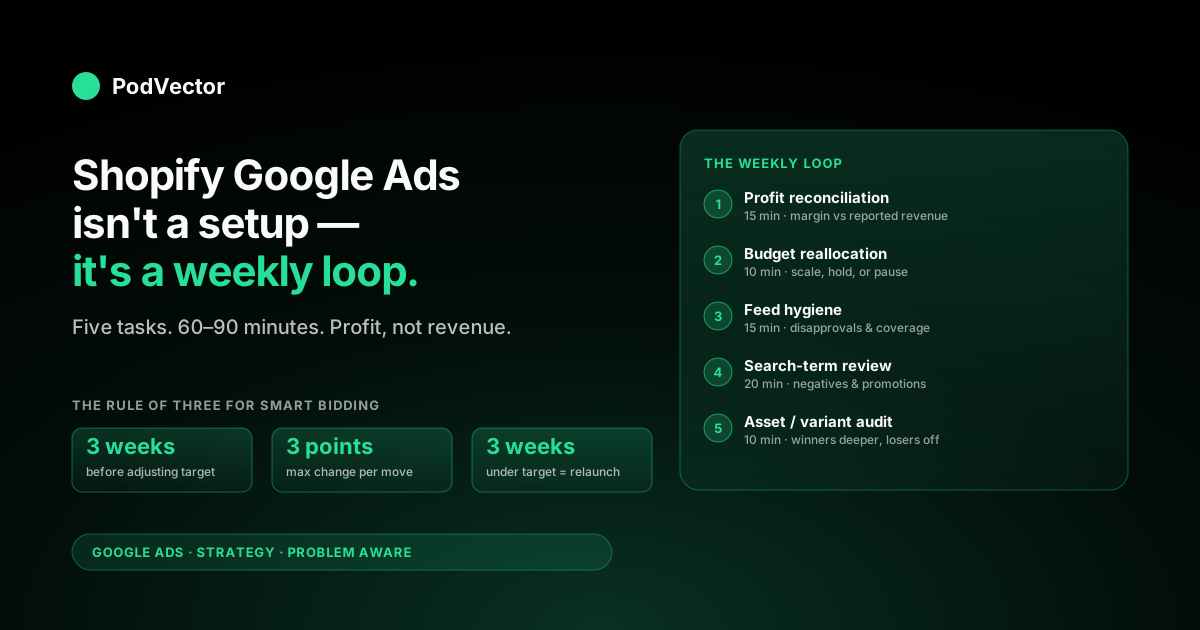
Don't think about Shopify Google Ads management as "log in and look at numbers." Think about it as five tasks that take about 60–90 minutes a week, total. Each task has a specific question it answers and a specific action it produces:
| Task | Time | Question it answers | Action it produces |
|---|---|---|---|
| 1. Profit reconciliation | 15 min | Did last week's reported ROAS hold up against actual margin? | Adjust conversion value upload or tROAS target |
| 2. Budget reallocation | 10 min | Which campaigns should scale, hold, or pause? | Budget shifts of 20–30% per campaign |
| 3. Feed hygiene | 15 min | What disapprovals or warnings appeared in Merchant Center? | Fix titles, GTINs, shipping settings, or remove SKUs |
| 4. Search-term review | 20 min | What queries triggered ads, and which were waste? | Add negative keywords, refine match types |
| 5. Asset/variant audit | 10 min | Which products and creatives drove the spend? | Pause loser variants, push winners deeper |
The cadence matters more than the depth. Most Shopify operators running Google Ads either over-manage (touching campaigns daily, breaking Smart Bidding's learning) or under-manage (logging in monthly when something looks wrong). The weekly loop sits in the middle and produces the steadiest cost-per-acquisition curve we see across POD accounts.
The first management decision: profit, not revenue
Before any of the five tasks make sense, the conversion value Shopify is sending to Google has to reflect profit. By default, when you install the Google & YouTube sales channel, Shopify reports the order subtotal as conversion value.
That's correct for a store that owns its inventory. It's wrong for a store running Printify or Printful, where 65–72% of every dollar reported is supplier cost. Smart Bidding sees those orders as more valuable than they are and bids higher than it should.
The two ways to fix the signal are described in detail at the shopify google ads conversion strategy article, but the management-level summary is:
- Margin-as-conversion-value: override the Shopify-reported value with computed gross margin (subtotal minus supplier cost minus payment processing). Cleanest signal; requires custom data layer or app.
- Adjusted ROAS target: leave Shopify's value alone, but set tROAS at the level that produces real profit. For a 30% margin POD store, that's about 3.0x–3.3x against revenue — far below the 4x default that non-POD blogs recommend.
Either choice produces a defensible profit number. What you can't do is leave the default value in place and target a 4x ROAS — that combination loses money on roughly 25–40% of orders for typical POD margin profiles, and Smart Bidding will keep buying those orders because the reported value tells it they're profitable.
How to reallocate budget across campaigns weekly
The standard Shopify Google Ads stack runs three campaigns: a brand-defense Search campaign, a Standard Shopping or Search non-brand campaign, and a Performance Max campaign. Each plays a different role and responds differently to budget changes:
| Campaign | Job | Budget behavior | Weekly management rule |
|---|---|---|---|
| Brand Search | Defend brand-name searches from competitor poaching | Inelastic — costs are low, conversions are mostly already-warm | Hold flat. Don't starve, don't scale. |
| Standard Shopping (non-brand) | Capture commercial-intent product queries | Linearly scalable up to query-supply ceiling | If margin-ROAS is above target, +20% weekly |
| Performance Max | Cross-network reach (Display, YouTube, Discover) | Volatile — large efficiency swings week to week | If margin-ROAS holds for 2 weeks, +20%; if drops 2 weeks, hold |
Three rules govern these moves. Never change more than one variable per campaign per week — if you raise budget and tROAS at the same time, you can't tell which lever produced the result. Wait two weeks for Smart Bidding to relearn after any budget change above 30% — the system enters a learning period and the data in those days is noise. Reallocate from Performance Max to Standard Shopping when query-level transparency matters more than reach — PMax's black-box reporting is fine when efficiency is good and untenable when efficiency is dropping and you need to debug. The decision sequencing is covered at the Shopify Google Ads best practices comparison.
Feed hygiene: the management task nobody wants to do
The feed is the single largest source of preventable spend waste in Shopify Google Ads management. Disapprovals don't pause campaigns — they pause individual SKUs silently, so you keep paying for the SKUs that are still approved while the disapproved variants disappear from the auction. For a POD store with 4,000+ variants in the feed, last week's disapprovals can mean this week's budget concentrating on fewer products than you intended.
The weekly feed hygiene checklist:
- Open Merchant Center → Diagnostics. Sort by "items affected." Anything above 5% of feed deserves a fix this week.
- Fix the high-frequency rejections first: missing GTINs (POD products often have none — set
identifier_exists: false), shipping mismatches (Shopify's flat-rate is rarely Google's expected format), and image quality (Printify mockup compression has occasionally tripped Google's quality filter). - Curate by ship-ability, not by what Shopify auto-syncs. Variants that take 5+ days to print should not run on Google Shopping; either remove them from the feed or split into a slower-ship campaign.
- Watch the "Limited performance" warning on individual products. A SKU with limited performance is one that hasn't generated impressions for 30 days — usually a feed quality issue, not a budget issue.
- Review feed coverage: the ratio of approved-and-eligible SKUs to total Shopify catalog. If it falls below 85%, you have a structural feed problem, not a list of one-off fixes.
The full feed-side mechanics — how Shopify pushes data to Merchant Center, where the breakages happen, and how to set up monitoring — are walked through at the Shopify and Google Merchant Center strategy article.
Search-term review: the 30-minute job that prints money
The search terms report shows the actual queries that triggered your ads — different from the keywords you're bidding on. For Standard Shopping campaigns, the gap is usually 10–25% irrelevant traffic; for the Search campaigns most Shopify operators run alongside, the gap can hit 40% with broad-match keywords. That irrelevant traffic is pure waste, and the only way to stop it is the weekly negative-keyword sweep.
The minimum-viable review process for a POD store:
- Filter the report to the last 7 days, sorted by spend descending.
- Read the top 50 queries that consumed budget. For each: did the searcher want a print-on-demand product, or were they researching, comparing, or looking for a free template?
- Add as exact-match negatives any query that consumed >$5 with zero conversions and looks intent-mismatched. Free, template, tutorial, "how to," and competitor brand names dominate this list for POD.
- Add as phrase-match negatives recurring patterns ("free [your product]," "[product] template," "[product] for kids" if you don't sell kids' products).
- Promote to keyword any query with >2 conversions at target ROAS. These are exact-match keywords waiting to happen.
This is the single highest-leverage management task. A 30-minute weekly review compounds: month one, you cut 10–15% of waste; month two, another 5–8%; by month four, your search-term-to-keyword match rate is above 80% and the budget that used to leak now compounds into conversions.
Managing Smart Bidding without breaking it
Smart Bidding (Target ROAS or Maximize Conversion Value) runs on a 7–14 day learning model. Every change you make resets some portion of that learning. The single biggest mistake we see Shopify operators make in management is touching bid strategies too often — adjusting tROAS up and down weekly chasing efficiency, which keeps the algorithm in permanent re-learning mode.
The rule of three:
- Wait three weeks after launching a new bid strategy before you adjust the target. Anything sooner is noise, not signal.
- Adjust by no more than three points at a time. If tROAS is 3.2x and you want 3.5x, change to 3.3x first, wait two weeks, then 3.4x. Big jumps cause Smart Bidding to throttle volume rather than improve efficiency.
- Three consecutive weeks of underperformance is the threshold for re-launching, not adjusting. If a campaign has been below target for three weeks straight and you've already added negatives and tightened the feed, the bid strategy itself is the problem.
The mechanics of Smart Bidding for POD specifically — including how to build the value-rules layer that lets you tell Google certain product categories carry different margins — is the subject of our Google Ads strategy for ecommerce article.
Monthly and quarterly management cadence
The weekly loop catches drift. Monthly and quarterly cadences catch structural issues the weekly view can't see.
Monthly (60–90 minutes):
- Reconcile Google Ads' reported revenue against Shopify orders. The two should agree within 3–5% over 30 days. Larger gap means tracking is leaking.
- Review the Auction Insights report. New competitors or impression-share shifts indicate market changes that need a strategy response, not a tactical one.
- Recalculate margin per product category. POD supplier prices change; shipping subsidies need quarterly review; if your tROAS target was set against last quarter's margin, it may be wrong now.
- Audit the audience signals you're feeding into Performance Max. Customer match lists from Shopify should be refreshed monthly minimum.
Quarterly (3–4 hours):
- Full account architecture review. Are you still running the right campaigns for your product mix? POD catalogs evolve fast — what was a hero product six months ago may be a tail SKU now.
- Test one new campaign type, but only one at a time. Demand Gen if you haven't tried it; YouTube Shorts Shopping if the product mix supports it.
- Re-derive your blended-margin number from Shopify's actual orders and Printify or Printful invoices. Update tROAS targets accordingly.
In-house management vs hiring an agency
Most Shopify operators eventually face the in-house-vs-agency question. There's no single right answer, but the trade-off depends on monthly ad spend and on how much profit-level visibility you need. The decision matrix:
| Monthly ad spend | Default recommendation | Why |
|---|---|---|
| Under $5K | In-house, weekly loop | Agency fees ($1.5–3K/mo) eat too much of the budget; the management loop fits in 90 min/week |
| $5K–$25K | In-house with analyst support | Spend justifies tooling but not full agency overhead; bring in a fractional analyst or AI assistant for profit reconciliation |
| $25K–$100K | Agency or in-house specialist | Volume justifies dedicated time; agency value comes from cross-account pattern recognition |
| $100K+ | In-house team | Margin sensitivity at this scale makes outsourcing the optimization decisions risky; agency for execution support only |
The lower three tiers are where most Shopify POD stores sit, and it's where in-house management produces better economics than agency relationships — provided the operator has profit-level data, not just Google Ads' default revenue view. A more granular take on the agency question is at the Google Ads services for ecommerce article.
The Shopify Google Ads management toolstack for POD
The minimum toolstack for managing Shopify Google Ads on a POD catalog:
- Google Ads + Merchant Center — the primary surface, obviously.
- GA4 — for cross-channel attribution and to verify Google Ads' reported conversions against an independent source.
- Shopify reports or a profit-aware app — the only way to see actual margin per order, since Shopify's default revenue view excludes supplier cost.
- An analytics layer that pulls Shopify orders, Printify or Printful supplier invoices, and Google Ads spend into one view. This is what tells you, weekly, which Google Ads campaigns are actually profitable. Most operators build this in a spreadsheet for the first six months and outgrow it around $10K monthly spend.
This is also the layer where Victor — PodVector AI's AI employee — sits. Victor connects to Shopify, Printify, Printful, and Google Ads, runs the profit reconciliation across them in a warehouse, and answers the operating question the weekly management loop is trying to answer: which campaigns should I scale, which should I pause, given real margin? Victor answers and acts on the answer through bounded budget reallocation — with your approval, but the AI employee layer is the necessary first step. The reasoning behind that approach is in our Google Ads topic hub.
FAQs
How much time per week should Shopify Google Ads management take?
For a single store at under $25K monthly spend, the weekly management loop should take 60–90 minutes, plus 60–90 minutes monthly for reconciliation and 3–4 hours quarterly for architecture review. Going below 60 minutes weekly produces drift; going above 3 hours weekly is usually over-management that breaks Smart Bidding's learning.
Can I just hire a Shopify app to manage Google Ads automatically?
Some apps automate parts of management — feed updates, basic budget rules, search-term negation. None we've tested handle the POD-specific profit reconciliation that drives the budget reallocation decision. The apps are useful as labor savers on tasks 3 and 4 (feed hygiene and search terms) but don't replace the human or AI employee layer for tasks 1 and 2 (profit reconciliation and budget reallocation).
What's the right ROAS target for a POD Shopify store?
Against revenue (the default Shopify reports to Google), 3.0x–3.3x for a 30% margin store. Against margin (if you've set up margin-as-conversion-value), 1.0x–1.1x is break-even on ad cost and 1.3x–1.5x is the realistic optimization target. The first version is easier to set up; the second is more defensible signal.
How do I know if Smart Bidding is working or wasting my budget?
Two checks. First, has it been running on stable conversion data for at least 14 days without changes?
If yes, it's done learning and the numbers reflect performance. Second, does the Google-Ads-reported revenue agree with Shopify's actual margin to within 5%? If the gap is wider, Smart Bidding is optimizing against a value Shopify ships incorrectly, and the answer isn't to change the bid strategy — it's to fix the conversion value at the source.
Should I run Performance Max or Standard Shopping?
Both, layered. Standard Shopping gives query-level visibility that lets you debug; Performance Max gives reach across networks Standard Shopping doesn't touch.
The standard sequence is brand Search → Standard Shopping → Performance Max, with two weeks of stable data between launches. Going Performance Max first is the most common Shopify Google Ads management mistake we see at the POD scale because it pre-empts the data you need to manage anything else.
What's the most common Shopify Google Ads management failure mode?
Touching the account too much. Operators see a bad week and adjust tROAS, then add negatives, then change budgets, all at once — and Smart Bidding spends the next two weeks re-learning instead of optimizing. The discipline of one variable per campaign per week is what separates accounts that compound from accounts that thrash.
Stop managing Google Ads on revenue Shopify never reported correctly
Victor connects your Shopify orders, Printify or Printful supplier costs, and Google Ads spend in one place — so you see the margin per campaign, per product, per week, without spreadsheets. The weekly management loop runs in minutes instead of hours, and Smart Bidding finally optimizes against profit.
Try Victor free