
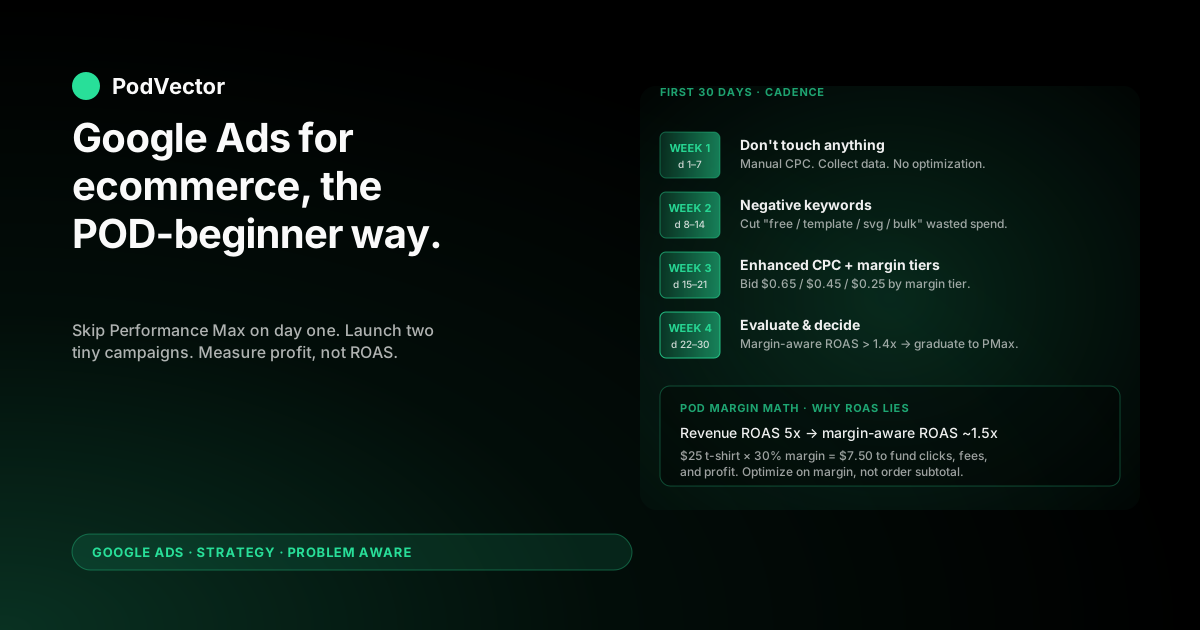
Quick Answer: If you're brand new to Google Ads and you sell print-on-demand, the right beginner strategy is the opposite of what general ecommerce guides recommend. Skip Performance Max on day one.
Start with two tiny campaigns — brand-defense Search and a Standard Shopping campaign on your top 20 SKUs — feed them margin-aware conversion values from day one (not order subtotal), and budget for a 30–45 day learning phase before any optimization decision is real. The reason general ecommerce playbooks fail for POD is margin: a 30% contribution margin on a $25 t-shirt leaves $7.50 to fund clicks, fees, and profit, which means a 4x ROAS that looks great in the Google Ads UI is breakeven once Printify or Printful's cut comes out. Beginner POD sellers who survive month one are the ones who instrument profit-after-supplier-cost before they instrument campaign optimization.
Why POD changes the beginner playbook
The published beginner guides for Google Ads ecommerce — Store Growers' Ultimate Guide, Optmyzr's Getting Started, and Sellbrite's Guide to Using Google Ads — all assume an owned-inventory store with 50–65% gross margin, single-warehouse fulfillment, and a SKU count in the dozens. They're not wrong for that store. They quietly mislead the POD beginner because three structural realities of print-on-demand break their default recommendations.
Reality one: variant explosion. A modest POD catalog of 50 designs, sold across 3 product types (t-shirt, hoodie, mug), 5 colors, and 5 sizes, is 3,750 variants. Performance Max and Smart Bidding train on conversion data; with 3,750 variants competing for the same query, Smart Bidding hits its data threshold by spending budget on whichever 8% of SKUs convert first, and the other 92% never get tested.
The general ecommerce guide says "let Performance Max optimize" — for a 50-SKU owned-inventory store, that works. For 3,750 POD variants, it concentrates spend on the wrong items before you've learned anything.
Reality two: thin margin. An owned-inventory store at 60% gross margin can absorb a 3.5x ROAS and still profit. A POD store running 28–35% contribution margin against Printify's or Printful's supplier cost needs a 5.0x–6.0x ROAS just to break even after payment fees and shipping. The beginner guides quote ROAS targets that, applied to POD, scale unprofitable accounts confidently for two months before the operator notices Shopify Profit doesn't match Google's reported numbers.
Reality three: no real inventory. Owned-inventory ecommerce uses bid signals like "stock level" and "best-seller velocity" to decide where to push budget. POD has effectively infinite inventory and zero velocity baseline — every product is "in stock" and "selling zero" until you advertise it. Smart Bidding strategies that lean on inventory and velocity feedback have less to work with on POD, which makes their first-month decisions more random.
The beginner POD playbook in this guide takes those three realities seriously: smaller initial campaign surface area, manual control during the first 30 days, profit-aware conversion values from day one, and a graduation path to automation only after Smart Bidding has clean margin signal to train on. If you've come here from a general ecommerce guide, the recommendations below will look more conservative. They are, intentionally — POD's margin doesn't forgive the aggressive defaults.
Prerequisites: the four things to do before you spend a dollar
Most beginner accounts that fail in month one fail because they launched campaigns before the four prerequisites below were in place. The campaigns ran, money was spent, and the data flowing back to Google was wrong from day one — which means even when the operator later "fixed" the account, Smart Bidding had already trained on bad signal. Get these four right before launching anything.
- Conversion tracking that fires on order completion, not "added to cart." Install Google Ads conversion tracking via the official Shopify Google & YouTube channel app or via gtag.js in
theme.liquid. Confirm in Google Ads → Tools → Conversions that "Purchase" is the only primary conversion action. The default install often includes secondary actions (begin checkout, add to cart) that Smart Bidding will optimize toward, which is wrong for POD because cart adds don't pay supplier costs. - Conversion value that reflects margin, not order subtotal. This is the single most important POD prerequisite. By default, Shopify's channel app sends the order subtotal (e.g., $25) as the conversion value. Smart Bidding then optimizes for revenue, not profit. Override via Shopify Customer Events: add a JavaScript snippet that calculates
(line_item.price - line_item.product.metafields.cost.supplier_cost) × quantityper item, sums to a margin total, and passes that as the Google Ads conversion value. The Smart Bidding signal is now profit, not revenue. The conversion-value override walkthrough covers the JavaScript and metafield setup in detail. - Supplier cost populated on every product. The override in step 2 requires a per-product cost. Add a metafield (namespace
cost, keysupplier_cost, typemoney) and populate it during your Printify or Printful product import — most POD apps support a one-line modification to write supplier cost into this metafield automatically. Without it, the conversion-value override either falls back to subtotal (you've fixed nothing) or fires zero (Smart Bidding optimizes against nothing). - A funded Google Ads account, a Merchant Center linked, and a documented return policy that matches reality. POD suppliers don't accept change-of-mind returns; they replace defects only. Merchant Center will eventually verify the policy you declare. Setting "free returns" because Google rewards it with placement preference works for two weeks, then suspends the account when the policy team checks. Document defective-replacement-only with a 30-day window, post the policy at
/policies/refund-policy, link Merchant Center to it.
Total time for the four prerequisites: 60–90 minutes if the supplier-cost metafield is automated, 3–4 hours if you're populating cost manually for an existing 200-SKU catalog. The temptation is to skip step 2 and "fix it later" once campaigns are running.
Don't. Smart Bidding's first 30 days of training set the optimization direction for the next quarter, and a campaign that trained on revenue can't be retrained on margin without a learning-phase reset.
Campaign types: which one to start with as a POD beginner
Google Ads offers seven campaign types in 2026: Search, Shopping (Standard and Performance Max), Display, Video, Demand Gen, App, and Local. The beginner ecommerce guides typically suggest Performance Max plus Search for ecommerce. For POD, that recommendation needs surgery. Here's what each campaign type does for a POD beginner, in priority order.
| Campaign type | What it does | POD beginner verdict |
|---|---|---|
| Search (brand) | Text ads when someone Googles your store name | Start here. Cheap clicks, high conversion rate, defends against competitors bidding on your brand. Launch first. |
| Standard Shopping | Product listing ads in Google Shopping with manual product-group control | Launch second, on top 20 SKUs only. Gives you visibility into which products convert before automating. |
| Search (non-brand) | Text ads against design-related or category keywords | Skip for now. Non-brand Search for POD requires keyword research and ad copy work that's hard to do well as a beginner. |
| Performance Max | Single campaign across Search, Shopping, Display, YouTube, Gmail, Maps | Skip for the first 30 days. Powerful but opaque; needs clean conversion data to train. Graduate to it once Standard Shopping has produced 30+ conversions on margin-aware values. |
| Display | Banner ads on Google's display network | Skip. Display works for retargeting at scale, not beginner POD. |
| Video / YouTube | Video ads on YouTube | Skip. Requires creative production beyond beginner scope. |
| Demand Gen | Visual ads optimized for discovery on Discover, YouTube, Gmail | Skip. Decent for upper-funnel awareness; not where POD beginners should spend. |
The contrarian call here is "skip Performance Max for 30 days." General ecommerce guides treat PMax as the default starting point because it works well for owned-inventory stores with strong feeds. POD's variant explosion and thin margin make PMax actively dangerous for beginners — it concentrates budget too fast, on too few SKUs, against an under-instrumented conversion signal. Standard Shopping is slower but legible: you see exactly which products converted, at what cost, with what margin, and you can intervene.
After 30 days of clean Standard Shopping data with margin-aware conversion values, PMax is a reasonable graduation. Before then, it's a coin flip with your budget.
Your first two campaigns, in order
Campaign 1: Brand-defense Search ($5–$10/day)
Brand Search is the cheapest, highest-converting campaign type for any ecommerce store including POD. Someone who Googles your brand name has already decided they want what you sell; the ad just makes sure they land on you instead of a competitor bidding on your brand.
Costs typically run $0.20–$0.80 per click for low-volume POD brands, with conversion rates of 8–18% (vs 1–3% for cold traffic). It's the first campaign every beginner should launch.
Setup: Google Ads → New campaign → Sales objective → Search → set daily budget to $5–$10 (you don't need more; brand searches are limited by how many people search your name, not by budget). Bidding: Manual CPC, max bid $1.00.
Keywords: your brand name, your brand name + "shop," your brand name + "store," your brand name + "official." Match types: phrase match. Add negative keywords for "review," "complaint," "scam," "wikipedia" — these are info-seekers, not buyers.
Ad copy: lead with brand name in headline 1, value prop in headline 2, call to action in headline 3. Final URL: your homepage.
Why Manual CPC instead of Smart Bidding? Brand Search has so few daily impressions that Smart Bidding can't train. Manual CPC at $1.00 max bid keeps costs predictable while you build conversion history.
Campaign 2: Standard Shopping on top 20 SKUs ($15–$30/day)
Standard Shopping shows your products in Google's Shopping tab and Shopping ad blocks on Search results. Unlike Performance Max, Standard Shopping is product-group controllable: you can see exactly which SKUs spent and which converted, and pause individual products that bleed without restructuring the campaign. For a POD beginner, that legibility is worth more than the marginal performance gain PMax might offer.
Setup: First, in Merchant Center → Products, identify your top 20 SKUs by trailing-90-day Shopify revenue. (If you have less than 90 days of sales history, use top 20 by gut + product-page traffic.) In your Shopify Google & YouTube channel app, restrict the synced product feed to those 20. This is the single biggest beginner lever — feeding 20 well-curated products to Standard Shopping rather than 3,000 variants is the difference between trainable signal and noise.
Then: Google Ads → New campaign → Sales objective → Shopping → Standard Shopping (not PMax). Daily budget $15–$30 (Standard Shopping needs more headroom than brand Search to gather product-level data). Bidding: Manual CPC or Enhanced CPC. Set a max CPC of $0.50 across all products initially; you'll segment by margin tier in week three.
Negative keywords from day one: add "free," "tutorial," "diy," "template," "svg," "png," "wholesale," "bulk." POD ads attract bargain-hunters and template-seekers; these negatives cut 15–25% of wasted spend immediately. The companion piece on Google Ads for ecommerce stores strategy for POD has the full negative-keyword list to layer in over weeks two and three.
Budget reality for POD beginners
The general ecommerce guides quote a beginner budget of $30–$50/day. For POD that's directionally right, but the framing matters more than the number. Three constraints set the real budget floor.
- Smart Bidding learning-phase floor: 30 conversions in 30 days. If your average margin per order is $7.50 and your conversion rate is 1.5%, you need ~2,000 clicks to hit 30 conversions. At $0.40 average CPC, that's $800 in 30 days, or $27/day. Below that, Smart Bidding never exits learning phase and the algorithm makes worse decisions, not better ones.
- Margin headroom: ROAS target of 5.0x to break even. If your beginner account hits $50 in spend and produces $250 in revenue (5x ROAS), you're roughly at breakeven for a 30%-margin POD store: $250 × 30% = $75 in margin minus $50 ad spend = $25 in profit before Shopify fees, payment fees, and shipping subsidies. Aim for 6.0x+ in the first 30 days; you'll trim down later as Smart Bidding learns.
- Beginner mistake budget: 25–30% of month one. Plan for the first 25–30% of your monthly budget to produce nothing. Onboarding queries that look like buyers but aren't, broad-match leakage, the negative-keyword list still being incomplete — beginner accounts hemorrhage some non-trivial fraction of week-one spend. Don't panic-pause on day three; let the learning happen.
A beginner POD account that sets $30/day across the two campaigns ($10 brand Search + $20 Standard Shopping) and runs it cleanly for 30 days will spend ~$900 and produce a clear answer to "is paid acquisition viable for my store at my current margin?" That answer is the actual deliverable of the first month. Scaling decisions come in month two.
Bidding strategy: why "Maximize Conversions" wrecks POD accounts
The beginner-friendly bidding strategy Google Ads offers in the campaign wizard is "Maximize Conversions" or "Maximize Conversion Value." Both are Smart Bidding strategies that hand control of CPC to Google's algorithm, which then bids whatever it takes to win clicks predicted to convert. For owned-inventory ecommerce with strong margin, those strategies usually work. For POD beginners they fail in a specific way: they can and will bid $2.50 to win a click on a $25 t-shirt with $7.50 of margin, lose money on the click, and call it a successful conversion because the conversion fired.
The fix isn't avoiding Smart Bidding forever. It's staging the bidding strategy alongside the conversion-value instrumentation:
- Days 1–14: Manual CPC. You set the max bid. Google can't overspend on a single click. The data you gather is clean and attributable.
- Days 15–30: Enhanced CPC. Google can adjust your manual bid up or down by ±30% based on conversion likelihood. Limited Smart Bidding influence, contained downside.
- Day 30+: Maximize Conversion Value with target ROAS. Once you have 30 margin-aware conversions in the account and the campaigns have produced clean signal, switch to Maximize Conversion Value with a target ROAS of 5.5x. Smart Bidding now has profit data to optimize against, not revenue data, which is the difference between "scales the account" and "scales the loss."
The general ecommerce guides skip stage 1 and 2 because their assumed reader has owned-inventory margin to absorb Smart Bidding's first-week bid experiments. POD doesn't. The two-week manual phase isn't a beginner crutch — it's how POD beginners avoid burning month one's budget on Smart Bidding's training experiments.
Measurement: ROAS lies, profit doesn't
Open the Google Ads UI on day 30 and the dashboard reports: Spend $900, Conversions 42, Conversion Value $1,890, ROAS 2.1x. Your Shopify Profit dashboard reports for the same period: Revenue $1,890, COGS $1,322, Payment fees $57, Shipping costs $189, Net profit $322.
The "ROAS 2.1x" line in Google Ads describes the ratio of revenue to spend. The "Net profit $322" line in Shopify describes what's actually in your bank account. They're answering different questions, and beginner POD operators routinely scale on ROAS and discover three months later that the real profit number is negative.
The fix isn't ignoring ROAS. It's adding two derived metrics to your weekly review:
- Profit-after-spend. Net profit (after COGS, fees, shipping) minus Google Ads spend. This is the actual answer to "did paid acquisition produce money this week?" If it's negative, scaling makes it more negative.
- Margin-aware ROAS. If you instrumented the conversion-value override correctly (prerequisite step 2), the ROAS Google Ads reports is already margin-based. A 1.0x margin-aware ROAS means you broke even on margin, which is profitable after spend (because Google Ads spend was already subtracted). Aim for 1.4x–1.8x margin-aware ROAS in month one.
The two general ecommerce metrics you'll see quoted — 4x ROAS, 8x ROAS — are revenue-based. They translate to roughly 1.2x and 2.4x margin-aware ROAS respectively, for a 30%-margin POD store.
The companion piece on Shopify Google Ads tracking strategy for POD covers the tracking-side instrumentation; Google Ads attribution explained for POD sellers covers why the conversion that gets credit isn't always the one that earned it; the parent complete Google Ads playbook for POD sellers covers the full multi-month measurement framework. For the broader strategy cluster, see the Google Ads strategy for POD index; for everything across ad types, integrations, and attribution, the Google Ads topic hub is the directory.
The first 30 days: a beginner's optimization rhythm
Beginner accounts that succeed share a habit: they don't optimize daily. They optimize on a fixed cadence that gives Smart Bidding and Manual CPC enough time to produce signal, and they resist the urge to pause campaigns on day-three weak data. Here's the cadence that works.
Week 1 (days 1–7): Don't touch anything
Launch the two campaigns. Watch the dashboard daily.
Don't change bids, don't pause products, don't add keywords. Week 1 is data collection.
Brand Search will produce 5–15 conversions; Standard Shopping might produce 0–5. Both numbers are normal for week 1.
The exception: pause a single product if it spends more than $20 with zero conversions and zero add-to-carts in 5+ days. That's a clear signal of bad product-query match, not just data sparseness.
Week 2 (days 8–14): Negative keyword pass + product trim
In Google Ads → Reports → Search terms, sort by spend descending. Add as negatives any search term that spent more than $5 with zero conversions. Common POD culprits: "free [your design type]," "[brand name] discount code" (these convert via Honey, not your store), "[your design] meaning." Pause Standard Shopping products that produced 100+ impressions and zero clicks in week one — the listing isn't competitive on Shopping, so the spend is wasted.
Week 3 (days 15–21): Switch to Enhanced CPC + segment by margin tier
If brand Search and Standard Shopping have each produced 10+ conversions, switch both to Enhanced CPC bidding. In Standard Shopping, split the campaign by custom-label margin tier: high-margin products get a max CPC of $0.65, medium-margin $0.45, low-margin $0.25.
The Custom Label setup happens in your Shopify product feed (a metafield read by the channel app). The companion piece on Google Ads services for ecommerce covers when this DIY tier-bidding approach hits its limits.
Week 4 (days 22–30): Evaluate and decide
Calculate margin-aware ROAS for both campaigns. If brand Search is above 3.0x (it almost always is for any active store), keep it running indefinitely.
If Standard Shopping is above 1.4x, switch to Maximize Conversion Value with target ROAS in month two and start expanding the product feed. If Standard Shopping is below 1.0x, the issue is usually one of: insufficient margin floor (your products cost too much to make at current price), insufficient supplier-cost instrumentation (the conversion value is wrong), or a non-product-market-fit (you're advertising designs people don't want at this price). Pause Standard Shopping and diagnose before scaling.
Five beginner mistakes that quietly kill POD ad accounts
- Launching Performance Max on day one. The wizard makes it the default; resist. PMax needs clean margin-aware conversion data to train, and a beginner account on day one has neither. Run Standard Shopping for 30 days, then graduate.
- Using order subtotal as conversion value. Default behavior of every Shopify ecommerce integration. Smart Bidding optimizes for revenue, your business needs profit, the two diverge. Override via Customer Events on day one, before any campaign launches.
- Submitting all variants instead of one item per product. 50 designs × 5 colors × 5 sizes is 1,250 Merchant Center entries from one design. Shopping query gets fragmented. Set the channel app to submit primary variant per product, with size and color as item-group attributes.
- Setting a $5/day budget across multiple campaigns. Smart Bidding learning-phase floor is 30 conversions in 30 days. At $0.40 CPC and 1.5% conversion rate, that's ~$27/day minimum. A beginner who launches 3 campaigns at $5/day each ($15/day total) never exits learning phase on any of them, so all three perform worse than one focused campaign at $20/day.
- Pausing campaigns on day three. The week-one performance dashboard always looks bad — it shows pre-conversion spend before conversions accumulate. Beginners panic-pause on Friday of week one, which destroys the data Smart Bidding needs to start working in week three. Hold the line for 14 days minimum before any pause decision.
FAQs
How much should a complete beginner spend on Google Ads for their POD store in the first month?
$25–$30/day across two campaigns is the realistic floor. Below that, you can't gather enough conversion data for Smart Bidding to ever exit learning phase, which means month two performs worse than month one.
The split is roughly 30% to brand Search ($8–$10/day, more than enough to capture all branded queries for a beginner store) and 70% to Standard Shopping on a curated 20-SKU feed ($17–$22/day). Total month-one spend lands at $750–$900, which is the budget needed to honestly answer "is paid acquisition viable for my POD store at my current margin?" Spending less doesn't save money; it just produces an inconclusive month-one and forces month two to repeat the experiment.
Should a beginner POD seller use Performance Max or Standard Shopping?
Standard Shopping for the first 30 days, then graduate to Performance Max if the data warrants it. Performance Max is the more powerful campaign type — it spans Search, Shopping, Display, YouTube, and Gmail in a single campaign with unified Smart Bidding.
The catch: PMax is a black box. You can't see which queries triggered which clicks, and the product-group control beginners have in Standard Shopping doesn't exist in PMax.
For a beginner, that opacity means month-one mistakes go undetected. Standard Shopping forces you to look at the data, which is the entire point of month one. Once you've learned what your account looks like at the SKU and query level, PMax can take over with adult supervision.
Do I need a Google Merchant Center account if I'm just starting out?
If you plan to run Shopping ads (which every POD beginner should), yes — Merchant Center is the product feed engine that feeds Google Shopping. Setup takes 30 minutes.
The Shopify Google & YouTube channel app handles most of the Merchant Center configuration automatically once installed. The only piece beginners often miss is the return-policy declaration: POD sellers should set defective-replacement-only with a 30-day window, not "free returns," because Printify and Printful don't accept change-of-mind returns and Google's policy team will eventually verify and suspend accounts that lie about it.
What's a realistic first-month ROAS target for a beginner POD store?
Revenue-based ROAS of 4.0x–5.0x in month one is the realistic range for a beginner account that's instrumented correctly. That translates to 1.2x–1.5x margin-aware ROAS for a 30%-margin POD store, which is breakeven-to-slightly-profitable after spend.
The temptation is to chase 8x+ ROAS like the general ecommerce guides quote — those numbers come from owned-inventory stores in mature accounts with two years of Smart Bidding training data. Month-one PoD beginners hitting 4x revenue-ROAS are doing fine. The improvement from there comes in month three and four as Smart Bidding accumulates margin-aware signal and the negative keyword list matures.
How does PodVector AI help a beginner POD seller running Google Ads?
The hardest part of beginner Google Ads for POD is measurement: knowing whether the campaigns are actually profitable after Printify or Printful's supplier cost, payment processing fees, and shipping subsidies — not just whether Google's reported ROAS looks good. PodVector AI connects Shopify, Google Ads, and Printify or Printful into one live profit view that shows margin-after-everything by campaign, by design, by day.
The conversion-value override this guide describes is a hand-rolled version of what PodVector AI does automatically; instead of writing JavaScript in Customer Events to subtract supplier cost from order subtotal, you connect PodVector AI and the live data warehouse view does it. Victor, the AI agent layered on top, answers questions like "which campaign is actually losing money this week?" in plain English.
For a beginner, that turns the month-one diagnostic question — "is paid acquisition viable?" — from a Sunday-night spreadsheet into a chat reply. Start without PodVector AI if you want; most operators add it once they realize the spreadsheet reconciliation is the work.
See your real Google Ads margin from day one — not month three
PodVector AI connects your Shopify store, Google Ads account, and Printify or Printful catalog and shows Victor — your AI employee — which beginner campaigns are actually profitable after supplier cost, payment fees, and shipping. Most POD beginners discover at the end of month one that their reported Google Ads ROAS is 60–70% higher than the real margin number; PodVector AI shows the real number first, so the campaigns you scale in month two are the ones actually making money. And connect Shopify, Google Ads, and Printify in under 10 minutes.
Try Victor free