
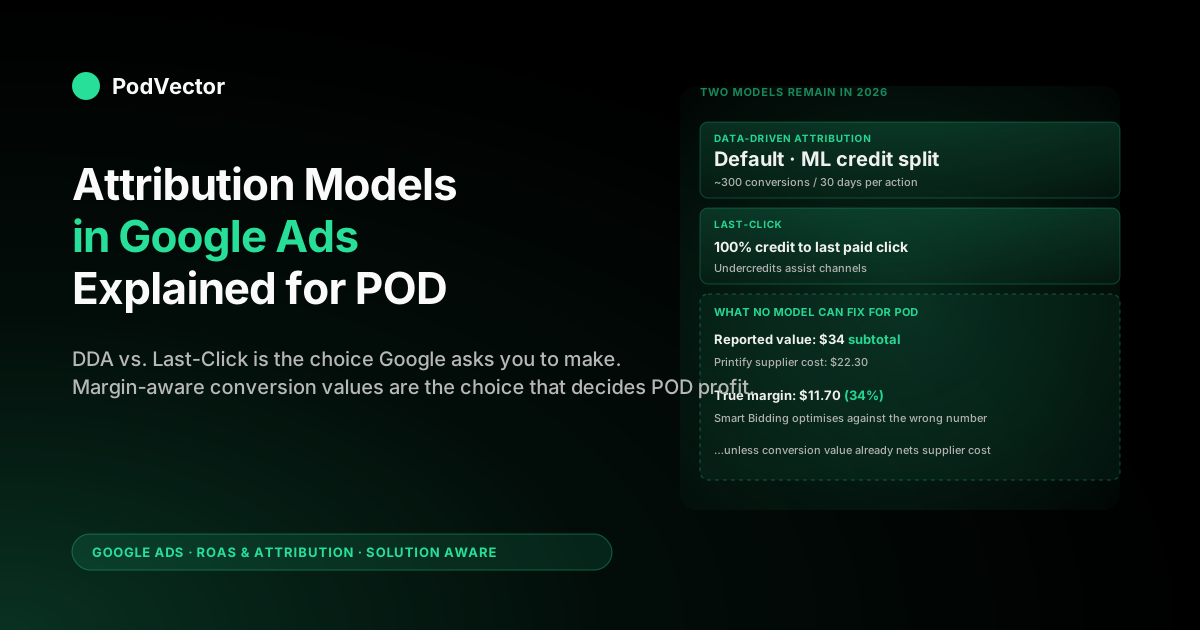
Quick Answer: Google Ads now offers only two attribution models in 2026 — Last-Click and Data-Driven Attribution (DDA). DDA is the recommended default and feeds Smart Bidding the richest signal, but it requires roughly 300 conversions per conversion action over 30 days, which most POD stores under $20K/month don't hit. The bigger problem nobody warns POD sellers about: every model in Google Ads credits the order subtotal you send it, so attribution decisions only translate to real ROAS if the conversion value already nets out Printify or Printful supplier cost and refunds.
What attribution actually does in Google Ads
An attribution model is a rule for splitting credit. When a shopper clicks three ads on three different days and finally buys a $34 hoodie, Google Ads has to decide which of those clicks "earned" the conversion. The attribution model is what makes that decision.
That decision is not cosmetic. The conversion credit you assign flows directly into:
- Reported ROAS per campaign, ad group, and keyword.
- Smart Bidding — Target ROAS, Maximize Conversion Value, and tROAS all read the same attributed conversion values when they decide what to bid on the next auction.
- Budget allocation — campaigns that look "underperforming" under one model can look profitable under another, and budget tends to follow the credit.
For a POD seller running Search, Performance Max, and YouTube remarketing in the same account, attribution is the difference between Smart Bidding learning that your top-of-funnel YouTube view nudges sales (data-driven view) and learning that only the bottom-of-funnel branded Search keyword matters (last-click view). Same shopper, same purchase — wildly different bid recommendations.
The two attribution models available in 2026
As of 2026, Google Ads supports exactly two attribution models for new and existing conversion actions:
- Data-Driven Attribution (DDA) — the default. Uses machine learning on your account's own conversion paths to assign fractional credit across every interaction.
- Last-Click — gives 100% of the credit to the last paid Google Ads click before the conversion.
That's it. The "external attribution" option still exists for advertisers importing credit from third-party tools like Northbeam or Triple Whale, but inside Google Ads itself the model dropdown is now a two-row list. We covered the broader landscape in our Google Ads attribution models guide — this article goes deeper on the two that remain and why the choice matters more for POD than for most verticals.
The four models Google retired (and why)
Until 2023, Google Ads supported six rule-based attribution models. Four are now gone:
- First-click — 100% credit to the first interaction.
- Linear — credit split evenly across every interaction.
- Time decay — exponentially more credit for interactions closer to the conversion (7-day half-life).
- Position-based — 40% to first, 40% to last, 20% spread across the middle.
Google's stated reason for the retirement: rule-based models were heuristics that didn't reflect each account's real customer paths. DDA already outperformed them on conversion lift across the studies Google ran, and maintaining six models added decision fatigue without improving outcomes.
The unstated reason: Smart Bidding works better when fed a single, ML-friendly attribution signal. Six rule-based models meant six different "truths" feeding the bidder; collapsing to DDA + last-click means the bidder gets cleaner training data.
If your account had conversions on a retired model, Google migrated those actions to DDA automatically. You may have received an email about it; the conversion values themselves didn't change, but the credit distribution shifted the moment migration happened.
How Data-Driven Attribution actually decides credit
DDA is a counterfactual model. The mechanic, in plain language:
- Google looks at every conversion path in your account — say, "YouTube view → Display impression → Search click → conversion."
- It also looks at every non-converting path with the same touches.
- For each touchpoint, it asks: "How much does the conversion probability change if I remove this interaction from the path?"
- The interaction whose removal drops conversion probability the most gets the most credit. The fractional credits across all touches sum to 1.0.
This is why DDA can credit a YouTube view with 0.18 conversions on a $34 sale — it isn't saying the YouTube view "made" the sale, it's saying that across all your shoppers who saw that same view, the ones who saw it converted at a measurably higher rate than the ones who didn't.
Two things to know about the math:
- Credit is not capped per channel. A single converting path can have all six touches credited, with each touch getting a fraction.
- Credit is asset-aware. DDA distinguishes ad format (Search vs. Shopping vs. YouTube), device, time-of-day, and the sequence of interactions — not just the channel name.
None of this is visible on the campaign overview screen. To see DDA's credit distribution you have to open the attribution reports, which we'll walk through below.
Why attribution is the difference between profitable and unprofitable POD
Here's the thing the top-ranking attribution guides skip: every attribution model in Google Ads operates on the conversion value you send it. None of them know your supplier cost.
A typical POD scenario: you sell a $34 unisex hoodie via Printify. Printify charges your card $22.30 for the blank, the print, and shipping. Your true gross margin per order is $11.70 — about 34%. Now suppose your Smart Bidding strategy is Target ROAS = 3.0, optimized on the order subtotal you reported to Google Ads.
Google Ads will happily bid hard on any auction where it believes the predicted ROAS exceeds 3.0. On a $34 sale that means Google is comfortable spending up to $11.33 to acquire the click that converts. Your supplier cost alone is $22.30. You are losing money on every "winning" auction by design.
Attribution model selection — DDA vs. last-click — affects which campaigns Smart Bidding believes are profitable, but it can't fix this. Both models will burn cash if the conversion value you feed them is the gross subtotal. The fix is to send Google Ads a margin-aware conversion value before you ever care about the attribution dropdown.
For a deeper walkthrough of the margin math and how to compute true ROAS after Printify and Printful supplier costs, see Data-Driven Attribution Google Ads Explained for POD Sellers. For the supplier-cost mechanics specifically, the broader playbook lives in the ROAS & Attribution cluster hub.
The 300-conversion gate (where most POD stores sit)
DDA used to require 600 conversions and 15,000 ad interactions per conversion action over 30 days. Google has since loosened the requirement, and as of 2026 the practical threshold cited across the current guides is roughly 300 conversions and about 3,000 ad interactions per conversion action over 30 days. Conversion actions that don't clear it can't run DDA — Google keeps them on, or automatically reverts them to, Last-Click until they accumulate enough data.
POD reality: a store doing $20K/month at a $34 average order value has about 588 sales per month. If those sales are split across 4 conversion actions (Purchase, Add-to-Cart, Initiate Checkout, Lead), no single action is hitting 300 in 30 days. Most POD stores under $20K/month don't qualify for DDA at the conversion-action level even though Google's UI lets them flip the model on.
What happens when a conversion action sits under the threshold:
- Google Ads keeps the data-driven label on the action where it can, but below the data minimum it effectively credits like Last-Click — and newer accounts that never reach the threshold are automatically reverted to Last-Click.
- Smart Bidding will use whatever attributed value it's getting, which can flip per auction.
- Reports show "data-driven" but credit may not be fully distributed.
Practical guidance: if you're under the threshold, leave DDA on (it's the default and the long-term direction), but trust your Smart Bidding read fewer days at a time. If you're under 300 conversions per month total, your bigger problem isn't attribution — it's that no model has enough data to optimize against, and you should be running manual or Maximize Clicks bidding while you scale.
Setting and changing your attribution model
The attribution model is set per conversion action, not per campaign. To change it:
- In Google Ads, click Goals → Conversions → Summary.
- Click the conversion action you want to edit (e.g. "Purchase").
- Click Edit settings and scroll to Attribution model.
- Select Data-Driven or Last-Click.
- Click Save.
The change is retroactive: historical conversions will be re-credited under the new model in your reports. This means a campaign that looked profitable yesterday under last-click can look unprofitable today under DDA, even though no new sales happened. Don't panic when this happens — it's the expected behavior of a model swap.
One caveat: if you change the model on a Purchase action that Smart Bidding is optimizing against, give the bidder 1–2 weeks to relearn before judging campaign performance. Smart Bidding rebuilds its internal model from the new attributed values, and the first week is noisy.
Attribution windows: what to pick for POD demand
Attribution model and attribution window are different settings. The model decides how credit gets split; the window decides how far back Google Ads is willing to look for clicks to credit.
For Search and Shopping clicks, the default conversion window is 30 days. You can shorten it to 1, 7, 14, or 30, or extend it up to 90 days. View-through windows for Display and YouTube are usually 1 day.
POD-specific considerations:
- Evergreen designs (gifts, niches, family humor): 30-day click window is appropriate. Shoppers research, screenshot, and come back.
- Trend-driven designs (current events, drops): shorten to 7 days. Late-attributed clicks past the trend window credit campaigns that are no longer relevant and skew Smart Bidding toward stale auctions.
- Holiday cycles (Q4, Mother's Day, Father's Day): the 30-day default catches the planning-to-purchase window cleanly. Don't shorten during these cycles.
For more on choosing the right window for POD seasonality, see our guide to Google Ads attribution windows for POD sellers.
How attribution feeds Smart Bidding
Smart Bidding strategies — Target ROAS, Maximize Conversion Value, Maximize Conversions, Target CPA — read attributed conversion values per auction. The attribution model decides which past clicks are even eligible for credit, and the model's distribution decides how much value sits in each campaign.
Concretely:
- Under last-click, top-of-funnel campaigns (YouTube, Discovery, broad-match Search) get zero credit unless they were the last touch. Smart Bidding learns to bid almost nothing on them and concentrates spend on bottom-funnel branded Search.
- Under DDA, the same top-of-funnel campaigns get fractional credit when they assist conversions. Smart Bidding learns they're worth bidding on, expands reach, and the conversion path widens.
This is why the choice of attribution model matters most for accounts running multiple campaign types simultaneously. A POD store running only branded Search will see almost identical bids under both models — the last touch is also the only touch. A POD store running Performance Max + YouTube + Search will see materially different bids and budget allocation.
Reading the Google Ads attribution reports
Find them under Tools → Measurement → Attribution. The reports that matter most:
- Overview — top-line conversion volume by primary path, average path length, and time to conversion. Use this to sanity-check that your conversion paths are actually multi-touch (if they're 90%+ single-touch, attribution model choice barely matters and you should focus on traffic mix, not the dropdown).
- Top paths — actual sequences (e.g. "Generic Search → Brand Search → conversion"). Read these for understanding, not for optimization decisions.
- Path metrics — clicks, impressions, days to conversion. Useful for tuning the conversion window.
- Model comparison — the most useful report. Compares conversion volume per campaign under different model assumptions. Lets you see how badly last-click underrates your top-of-funnel before you flip to DDA.
For POD-specific report-reading patterns, including which metrics are signal vs. noise at sub-$20K/month volume, see Google Ads Attribution Reports Explained for POD Sellers.
POD attribution mistakes that quietly burn margin
The model and window settings get all the attention. The mistakes that actually cost POD sellers money are upstream:
1. Sending order subtotal as conversion value
This is the single biggest error. A $34 hoodie reported at $34 to Google Ads with $22.30 supplier cost means every Smart Bidding decision is optimizing toward an inflated ROAS. The fix: send margin-net or contribution-margin-aware values, even if you have to estimate the supplier cost in your conversion script as a percentage of subtotal.
2. Not feeding refunds back
POD return rates aren't huge (typically 2–5%), but on a 34% gross margin product, a refunded order doesn't just zero out — it creates a $22.30 loss because Printify already charged you for fulfillment. If refunds aren't fed back into Google Ads as negative conversion values, your reported conversion value is consistently overstated by 2–5%, and Smart Bidding bids accordingly.
3. Counting Add-to-Cart as a conversion
POD funnels have notoriously high cart abandonment. Counting ATC as a conversion action — even with a low value — pollutes your conversion data with intent signal that doesn't translate to revenue. Either remove ATC as a conversion action entirely or make sure it's flagged as secondary so Smart Bidding doesn't optimize against it.
4. Running DDA below the threshold without acknowledging it
DDA on a 50-conversion-per-month action is mostly Last-Click in disguise with a "data-driven" label in your reports. Don't draw conclusions from a model that doesn't have data. Operate as if you're on Last-Click until your monthly conversion volume per action clears 300.
5. Ignoring cross-device paths
POD shoppers research on phone, buy on desktop. Google's cross-device attribution catches most of this if you're signed in to Google Analytics 4 with cross-device measurement enabled. If you only have GA Universal-style tracking or you blocked third-party cookies aggressively without Enhanced Conversions, mobile-research-desktop-buy paths show up as two unrelated sessions and attribution credits the wrong campaign.
How to choose the right model for your POD store
Three signals to weigh:
- Volume. Above 300 conversions per month per primary action: DDA. Below: DDA still by default, but read reports cautiously.
- Channel mix. Single-channel branded Search: model choice is almost cosmetic. Multi-channel (Performance Max + Search + YouTube + Discovery): DDA matters a lot, last-click materially undercredits assist channels.
- Bidding strategy. Manual bidding: model choice mostly affects reporting. Target ROAS or tROAS: model choice changes which campaigns get spend.
For most POD sellers running Performance Max + Search + a small remarketing layer above $10K/month: stay on DDA, send margin-aware conversion values, and keep the 30-day click window unless you sell trend-driven designs.
Below $10K/month and running mostly branded or single-keyword Search: DDA is fine but don't over-tune to it — your decisions are about traffic and creative, not about the attribution dropdown.
If you're choosing between models, the attribution-models cluster sits inside a broader Google Ads strategy. The complete Google Ads playbook for POD sellers walks through how attribution interacts with campaign structure, and the Google Ads topic hub indexes everything else by funnel stage.
FAQs
What attribution model does Google Ads use by default in 2026?
Data-Driven Attribution. As of 2026, DDA is the default for new conversion actions and the only ML-based model still supported alongside Last-Click.
Is Last-Click still available for Google Ads in 2026?
Yes. Last-Click remains an option you can manually select per conversion action, even though it's no longer the default. It's still useful for accounts running only one campaign type (e.g. branded Search only) and for advertisers debugging attribution shifts.
Why did my campaign performance change after switching to DDA?
Attribution model changes are retroactive. Switching from Last-Click to DDA re-credits historical conversions across the path, which usually shifts credit away from branded Search and toward upper-funnel campaigns. Spend allocation under Smart Bidding will catch up over 1–2 weeks.
How many conversions do I need for DDA to work?
Google's official documentation says DDA "needs sufficient data" — in practice, around 300 conversions per conversion action over 30 days. Below that threshold DDA still operates but with reduced confidence; reports may show data-driven credit while underlying allocation behaves more like Last-Click.
Should I use the same attribution model for all conversion actions?
Not necessarily. The Purchase action — what Smart Bidding optimizes against — should almost always be DDA. Secondary actions (Lead, Add-to-Cart) can be Last-Click for cleaner reporting; they shouldn't drive bidding.
Does attribution model affect my actual ad spend, or just reporting?
Both. Smart Bidding strategies (Target ROAS, Max Conversion Value) read attributed conversion values to decide bids. Changing the model changes the attributed values, which changes the bids in real auctions. Reporting impact is immediate; bidding impact is delayed by 1–2 weeks of relearning.
Does DDA work with Performance Max?
Yes. Performance Max campaigns rely on DDA for credit distribution across asset groups (Search, Display, YouTube, Discovery, Gmail). Performance Max is one of the strongest cases for DDA because the multi-channel paths it creates are exactly what last-click underrates.
Can I import attribution from third-party tools like Northbeam or Triple Whale?
Yes, via offline conversion imports. The attributed values from your third-party tool become the conversion values in Google Ads, which Smart Bidding then optimizes against. This is a different mechanism from the in-account attribution model — and it's how higher-volume DTC stores typically handle multi-channel attribution.
What's the difference between Google Ads attribution and GA4 attribution?
Google Ads attribution credits only paid Google Ads interactions. GA4 attribution credits all channels, including organic search, direct, email, and other paid platforms. They use similar DDA mechanics but operate on different scopes. For a deeper read on the difference, see the ALM Corp 2026 attribution modeling guide.
Stop optimizing toward inflated ROAS
Picking the right attribution model is necessary but not sufficient. If the conversion value you send Google Ads is the order subtotal, every Smart Bidding decision is optimizing against a number that ignores Printify or Printful supplier cost — and the better your attribution model gets, the faster it bids you into unprofitable auctions. Victor connects to your store, your Printify or Printful account, and your Google Ads in minutes, then reports true ROAS net of supplier cost so the bids you're paying for actually produce margin.
Try Victor free