
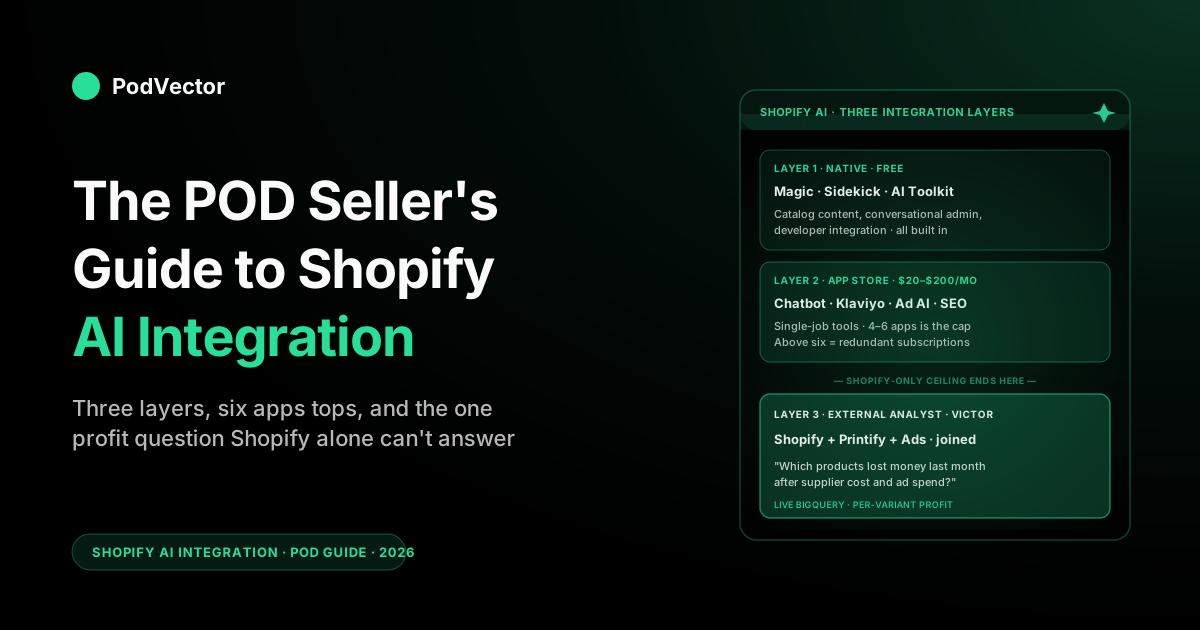
Quick Answer: In 2026, "Shopify AI integration" means three layers, not one app. The native layer — Magic and Sidekick, free inside the admin — handles catalog and content. The third-party app layer (chatbots, email, SEO) handles single jobs you install from the App Store.
The third layer is an external AI employee that connects Shopify to your Printify or Printful supplier costs and ad spend. It's the only one that can tell you which best-seller is actually losing money, because Shopify alone doesn't store that data. This guide walks all three layers, the integrations that matter for a POD store, and the order to roll them out.
The three layers of Shopify AI integration in 2026
If you searched "Shopify AI integration" five years ago, you got an article about installing a chatbot. Today, the phrase has stretched to cover the entire AI surface area attached to a Shopify store, and that surface has split into three layers that operate on different data, on different timelines, with different bills attached. Confusing them is the most common reason a POD store ends up with seven AI apps installed and no clear answer to "is this product making money."
The three layers are simple to name and worth being precise about:
- Native — the AI Shopify ships inside the admin: Magic generative buttons, the Sidekick conversational assistant, the AI Toolkit for developers, Catalog metadata generation, Inbox reply suggestions. Free on every plan, including Starter.
- Third-party apps — the AI tools you install from the Shopify App Store: customer-support chatbots, abandoned-cart messaging, AI SEO, AI ads, AI analytics dashboards. Usually $20–$200/month per app, with a few free tiers.
- External AI employee — the layer that sits outside Shopify and connects to Shopify, your supplier (Printify or Printful), your ad accounts, and your bank to answer business questions across all of them. This is the layer that exists because Shopify, by design, doesn't store your supplier cost data.
POD stores in particular need all three. The native layer handles the catalog content grunt work; the app layer handles the customer-touching surfaces; the external layer is the only one that can tell you a "best-seller" is actually unprofitable because the supplier cost on that variant is $4 higher than you remember.
We'll walk each layer, then close with a rollout order. If you want a one-page primer on the AI surface area before the integrations, the POD seller's guide to Shopify and AI covers the high-level picture.
Layer 1: Native — Magic, Sidekick, the AI Toolkit
The native layer is the cheapest and most immediately useful AI surface on a Shopify store, and it's the one most POD sellers under-use because they assume the good stuff lives in paid apps. In 2026 that is no longer true. The Winter '26 release pushed Magic and Sidekick from "nice content helpers" to "primary catalog and operations layer," and the AI Toolkit released in April makes Shopify the only major commerce platform with first-class support for AI coding agents.
Magic — generative content across the admin
Shopify Magic is the umbrella name for generative AI features baked into the admin. There's no separate plan, no per-generation pricing, and no install step.
Wherever Shopify expects content — a product description, an email subject line, a blog post, a theme block, an Inbox reply, an alt tag — there's a "Generate with Magic" button next to it. For a POD operator launching a new design family, that means 40 product descriptions in 20 minutes of supervised generation instead of a half-day of typing.
The 2026 release added Brand Voice Cloning, which trains Magic on your existing store copy so the output reads like your store rather than generic ecommerce filler. It also expanded the surfaces Magic touches — auto-tagging, SEO metadata, bulk alt-text, social ad headlines, blog drafts. For a feature-by-feature breakdown of what each Magic surface does on a POD store, the guide to Shopify Magic AI features goes deep.
Sidekick — the conversational, increasingly agentic, store assistant
Sidekick is the chat surface that lives in the bottom-right of every admin page. You ask it questions ("what's my conversion rate this week?") or give it tasks ("set up a 15% discount for Black Friday weekend"), and it answers or executes against your live Shopify data. It is store-aware: it knows your products, your orders, your shipping zones, your inbox queue.
The agentic upgrade is the part to watch. Sidekick now builds apps — single-page Shopify apps generated from a natural-language prompt — and creates Shopify Flow workflows from a description.
For a POD store, the immediate wins are the operational tasks: Sidekick can configure a shipping zone, set up a discount, build a "tag any order from Printify-Europe" flow, or draft a Black Friday campaign in Shopify Email, all from a chat. The deeper write-up of what Sidekick can do for POD specifically is in the Shopify Sidekick AI guide.
The Shopify AI Toolkit — the developer integration surface
Shopify shipped the open-source AI Toolkit in April 2026 — a free plugin that wires popular AI coding assistants — Cursor, Codex, and others — directly into Shopify's developer surface. It feeds the AI assistant live Shopify documentation, real-time API schemas, and the ability to execute changes through the Shopify CLI. Two-command install in your editor, then your AI coding assistant is store-aware.
For most POD operators this matters less than for app developers — but it matters more than zero. If you ever need a one-off theme tweak, a Shopify Function for shipping logic, or a small private app to wire Printify cost data into a custom dashboard, the AI Toolkit cuts that work from "hire a Shopify dev for a week" to "describe what you want in Cursor, review the diff, deploy." For a Stage-4 POD operator who has no engineering team, this collapses the cost of small custom integrations to roughly zero. Presta's deep dive on the AI Toolkit walks the developer workflow in detail.
Catalog and the conversational-shopping surface
The fourth native AI surface is the one most operators don't see directly: the Shopify Catalog. Shopify is investing heavily in being the index that conversational shopping agents (ChatGPT Shopping, Copilot, Google Shopping AI Overviews) read from when answering "find me a tee with a tiger illustration that ships from EU." Native AI generation of product tags, alt text, and structured metadata feeds that index.
If your catalog is well-tagged — which Magic auto-tagging makes nearly free — your products surface in conversational queries that keyword-only catalogs miss. This is a slow-burn lever, not a same-week one, but the floor is rising.
The 2026 accelerant here is the Universal Commerce Protocol (UCP) — an open standard Shopify co-developed with Google so AI agents can connect to and transact with any merchant. Native shopping is rolling out across Google surfaces, which means Shopify merchants can sell directly inside Google's AI Mode and its companion assistant apps. A well-tagged Catalog is what gets you into those answers; a thin one leaves you invisible.
Connecting your store to ChatGPT and Claude
The other side of the conversational surface is outbound: Shopify now ships first-party connectors that let you preview, claim, and manage a store from inside an external AI assistant. The Shopify app for ChatGPT and the Shopify app for Claude install like any other app — you approve a data-access scope in the admin, and the assistant can then read store data and, where you allow it, make changes: update product listings, adjust prices, edit store settings. You control the scope and can revoke it any time by uninstalling.
For a POD operator this is a real time-saver on catalog grunt work — "rename every product in the Halloween collection to lead with the design name" is a sentence now, not an afternoon. The caveat is the same one that runs through this whole guide: an assistant connected only to Shopify still can't see your Printify or Printful supplier cost, so it will happily "optimize" a price down into negative margin if you let it. Use it for content and structure; keep pricing decisions on the external AI-employee layer that actually knows your costs.
Layer 2: Third-party apps you actually want installed
The Shopify App Store has a reputation for "10,000 apps, 9,800 of which are abandonware." For AI specifically, the productive set is small and well-known. A POD store running a typical 100-SKU catalog with paid social as the main acquisition channel typically needs four app-layer integrations, and almost certainly does not need more than six. Above six and you start paying for redundant capabilities and creating data-sync issues between apps.
Customer support: an AI chatbot for the messaging surface
Shopify Inbox handles the basics — Magic suggests replies, Sidekick gives you queue stats — but Inbox alone is not a full customer-support layer. Most POD stores end up installing a dedicated AI chatbot that consolidates email, chat, social DMs, and SMS into one queue with AI auto-response on the deflection-heavy questions: where's my order, what's your size chart, when does it ship. Tidio and Gorgias are the typical picks; the breakdowns of what they look like on a POD store specifically are in the Shopify AI chatbot guide and the comparison piece best AI chatbots for Shopify, compared.
The integration depth matters more than the model quality. A chatbot that's read-only on Shopify orders is half a chatbot.
The good ones write to Shopify — issue a refund, edit an order, push a tag, trigger a shipping notification — without the operator opening the admin. For POD specifically, the bot also needs to handle the supplier-shipping-time question correctly: "your order shipped from Printify-Latvia, expect it in 5–7 business days" is the answer 30% of your inbound asks, and getting it wrong on a chatbot scale-burns a lot of trust.
Marketing automation: Klaviyo, with AI features turned on
Klaviyo's AI features (Smart Send Time, Predicted Lifetime Value, AI-generated subject lines, audience prediction) are now table stakes for a POD email program. The integration with Shopify is deep — order data, browse data, abandoned-cart events all flow in — and the AI features add a 5–15% lift on top of basic flows when configured well.
Klaviyo also competes increasingly with Shopify Email's Magic-generated copy; in practice you use both, with Klaviyo handling lifecycle automation and Shopify Email handling one-off broadcast drops. The cost layer matters here too: a flow that re-engages "high-value customers" is only meaningful if the value calculation includes supplier cost, which Klaviyo doesn't see.
SEO and content: AI-assisted, not AI-replaced
The AI SEO category is full of apps that promise to "auto-generate SEO content for your store." Most of them produce slop that hurts you in 2026's Google AI Overview era. The two that work for POD are Surfer SEO (for blog posts and category-page optimization, used outside Shopify and pasted in) and the native Magic SEO metadata generation.
Plus a real human writing or editing the actual long-form content. The pattern is: AI does the scaffolding, you do the judgment, and you publish less but higher-quality content. POD niches reward this because the audiences (specific job titles, specific hobbies, specific fandoms) are searchable and underserved.
Ads: AI for creative iteration, not for budget allocation
Meta and Google's ad platforms now embed AI features for creative generation, automated bidding, and audience expansion. The integrations with Shopify are mature: Shopify Ads, the Meta sales channel, and Google Ads all push catalog and conversion data automatically.
The AI inside those platforms does most of the bidding and audience work; the creative side benefits from external image-generation tools (Midjourney, DALL-E, Magic's Tinker) for variation testing. The thing not to do is hand budget allocation across channels to a black-box AI tool — that's a financial decision and it depends on real per-product margin, which neither Meta nor Google sees.
Layer 3: The external AI employee layer (the POD-specific gap)
The third layer is the one most POD sellers don't realize they need until they hit the ceiling of what the first two can answer. The ceiling shows up the same way every time: an operator looks at the Shopify analytics dashboard, sees a top-selling product with strong revenue, and the bank balance is shrinking.
Shopify says it's a winner. The bank says otherwise. The native layer can't reconcile that, the app layer can't reconcile that, and the reason is simple — Shopify's data model doesn't include your supplier cost.
Why Shopify-only AI hits a ceiling on profitability questions
When you sell a $32 hoodie in Shopify, the system records a $32 sale. The cost of that hoodie — the $14.20 you paid Printify, the variable shipping line, the $3.80 in Meta ad spend attributed to that order, the Shopify payment fee, the per-unit allocation of monthly app subscriptions — lives in five different systems that Shopify does not own.
Shopify Magic, Sidekick, Klaviyo, your support bot, your ad platforms can each see their own slice of the picture. None of them sees the whole P&L per product, per variant, per ad campaign, per day.
This is not a Shopify bug. It's the architectural reality of building on a hosted commerce platform that handles checkout but not procurement.
For a single-source retailer who buys inventory upfront, you can paper over the gap with cost-of-goods spreadsheets. For a POD seller running supplier-direct fulfillment, where every variant has a different supplier cost depending on supplier, region, and current pricing, the spreadsheet approach breaks the moment you cross 50 SKUs.
What the external AI employee layer actually does
Victor is an AI employee who works outside Shopify and brings together the things Shopify cannot show you by itself: your Shopify orders (revenue, fees, refunds), your Printify or Printful costs (what each product actually costs to make and ship), your ad spend (what each campaign spent and which orders it brought in), and your own bookkeeping ledger (monthly app fees, transaction fees). Victor lines all of this up for each order, each product, and each day, so he can answer questions that touch more than one of those areas at once.
That's the gap PodVector AI's Victor sits in. Victor is an AI employee built specifically for POD sellers. He brings together your Shopify, Printify or Printful, and ad platform data so you can ask him questions like "which products lost money last month after supplier cost and ad spend," "what's my real GPAM by design family," or "show me variants where supplier cost changed in the last 30 days." Victor doesn't just answer — with your approval, he can already pause an underperforming ad campaign or reprice a product whose supplier cost has gone up. For a fuller treatment of what an external AI employee means for POD analytics specifically, see the complete guide to AI analytics for print-on-demand and the complete guide to AI agents for ecommerce analytics.
How the AI employee layer integrates with Shopify
The integration on the Shopify side is straightforward — a Shopify app that connects via OAuth and reads orders, products, customers, refunds, fees, and shop metadata via the Admin API. On the supplier side, Printify and Printful both expose order-level cost data via API, which the AI employee layer pulls and joins to Shopify orders by order ID.
On the ad side, Meta and Google's marketing APIs feed campaign-level spend with conversion attribution back to Shopify. The result is a single analytical surface that answers cross-system questions without the operator copy-pasting between five tabs.
A reference Shopify AI integration stack for a POD store
For a POD store doing $10K–$200K/month in revenue, here's what a typical AI-integrated stack looks like in 2026 — minimum useful, maximum sane:
- Native (free): Shopify Magic for product descriptions, SEO metadata, bulk alt-text, email subject lines. Sidekick for conversational admin tasks and Flow generation. Inbox with Magic reply suggestions for the basic support queue.
- Customer support: one AI chatbot — Tidio or Gorgias — installed and trained on your shipping policy, return policy, and size chart. Read/write integration with Shopify orders.
- Email/SMS: Klaviyo with AI features enabled. Welcome flow, abandoned-cart flow, post-purchase flow, win-back flow. Shopify Email for one-off broadcast drops.
- Ads: Meta and Google ad platforms with native AI bidding. Image variations generated outside Shopify (Midjourney or Magic's Tinker).
- Analytics — the external layer: a POD-aware AI employee (Victor or the equivalent) that pulls Shopify + Printify/Printful + ad data into one queryable surface. This is the layer that answers "is this product profitable."
- Optional: Surfer SEO for blog content if you're investing in organic, an AI image-gen tool for design ideation if you're not relying solely on freelancers.
That's six to seven integrations total. More than that is usually a sign of feature overlap and unrolled-back trial subscriptions. For a broader view of the AI tool landscape for POD sellers — including what each app actually does — the complete guide to AI tools for POD sellers covers it.
The rollout order that doesn't blow up your store
The order matters. Most POD operators install everything at once, hit data-sync conflicts, and end up either ripping out half the stack or living with phantom apps eating $200/month. The order below is what we'd recommend — it front-loads the highest-leverage, lowest-risk integrations and pushes the high-stakes ones to last.
- Week 1: Native. Turn on Magic Brand Voice. Use Magic to regenerate product descriptions for the top 20 SKUs by revenue. Use Magic for the next email subject line. Open Sidekick, ask it three operational questions, get a feel for the surface.
- Week 2: Inbox + chatbot. Configure Shopify Inbox with Magic reply suggestions. Install Tidio or Gorgias. Train it on your shipping/returns policy. Test five real customer questions before launching it on the live queue.
- Week 3: Klaviyo with AI on. If you don't already have it, install Klaviyo. Turn on Smart Send Time and Predicted LTV. Migrate or upgrade your welcome and abandoned-cart flows to use AI subject lines.
- Week 4: External AI employee layer. Connect a POD-aware AI employee (Victor or equivalent) to Shopify, Printify or Printful, and your ad accounts. Run the first "which products are losing money" query. Brace for surprises.
- Week 5+: Ads AI tuning, content AI tooling, image gen, etc. Anything that touches budget allocation or paid acquisition goes last, after you have profitability visibility from step 4.
The reason step 4 is fourth and not first is operational, not technical: until your support and email layers are AI-supplemented, you don't have time to absorb the analytical surface. And until you have profitability visibility, the ad-platform AI is making decisions on incomplete data — which it will happily do, badly. For a deeper look at what the AI employee layer means for an existing Shopify store specifically, the POD seller's guide to Shopify AI and the guide to a Shopify AI assistant cover adjacent angles.
The five integration pitfalls that cost POD sellers money
Five recurring failure modes show up in POD stores that have AI integrations but aren't getting value out of them:
- Stacking three chatbots. Inbox + Tidio + a niche FAQ bot is one too many — the customer hits the wrong one and the routing gets ugly. Pick one primary chatbot, let Inbox handle low-volume direct messages, retire the third.
- Trusting Shopify analytics for profitability. Shopify's "best-sellers" report sorts by revenue. Your bank doesn't care about revenue, it cares about gross profit after marketing. The two diverge constantly on POD because supplier cost is non-trivial and varies by variant. Always cross-check best-seller signals against an external profit-aware view.
- AI-generated content with no human edit pass. Magic and Sidekick output is good, not perfect. The 5% of cases where it gets a price wrong, hallucinates a feature, or strikes the wrong tone are exactly the cases your customer remembers. Always edit before publishing.
- Over-integrating apps that don't share data cleanly. If app A and app B both want to be the source of truth on customer tags or product metafields, you'll spend more time fixing sync conflicts than you save. Design your stack so each surface owns one slice and others read from it.
- Treating AI ad bidding as set-and-forget. Meta and Google's AI bidding optimizes for the conversion event you tell it to optimize for. If that event is "purchase" with no margin awareness, the platform will happily spend you into negative gross profit on unprofitable variants. Feed it real margin data — or at minimum, exclude unprofitable SKUs from the catalog feeds — and it improves immediately.
What changed in 2026 that you can't ignore
Three shifts matter for any POD store re-evaluating its Shopify AI integration in 2026:
The native layer crossed a quality bar. Pre-2026, Magic was helpful but rough; Sidekick was a pretty chat surface that mostly told you to read the help docs. The Winter '26 release pushed both into "actually agentic" territory — Sidekick builds apps, generates Flows, executes admin tasks; Magic clones brand voice and generates campaign-grade copy.
The implication: paid alternatives that were worth paying for in 2024 may not be worth it now. Audit your stack.
The conversational-shopping surface is going from zero to meaningful. ChatGPT Shopping, Copilot, Google AI Overviews all read from Shopify Catalog. Stores with thin product metadata are invisible to that channel; stores with rich, AI-generated tagging surface in conversational queries that keyword search would never have matched. This isn't a "today" channel for most POD stores, but it will be a "this year" channel, and the cost of getting ready is one Magic auto-tag run.
External AI employee layers are now table stakes for serious POD operators. Five years ago, "wait until you have a finance person to track gross profit per product" was a defensible answer. In 2026, when AI can join Shopify, Printify, and ad data automatically and answer profit questions in natural language, the operators who don't run that layer are competing blind against the ones who do. For a frame on why this gap exists architecturally — and what fills it — see the AI analytics topic hub, the AI overview cluster, and the POD seller's guide to AI for ecommerce.
FAQs
Is Shopify AI integration free, or does it cost extra?
The native layer — Magic, Sidekick, the AI Toolkit, Inbox reply suggestions, Catalog metadata generation — is free on every Shopify plan, including Starter. There are no per-generation fees and no usage caps for typical merchant use.
Third-party apps in the App Store are paid (typically $20–$200/month each). The external AI employee layer is paid separately and varies by vendor and store size.
Do I need a developer to integrate AI with my Shopify store?
For the native layer and the App Store layer: no. Both are install-and-configure.
For deeper custom integrations — say, wiring Printify cost data into a custom report — the Shopify AI Toolkit has cut the developer requirement substantially: a non-engineer using an AI coding assistant like Cursor with the Toolkit installed can build small private apps and Shopify Functions without writing code by hand. For an external AI employee layer that integrates with Printify or Printful and your ad accounts, the integration is OAuth-based and requires no developer involvement on the merchant side.
Will Shopify Magic replace my email-marketing tool or my chatbot?
Not yet. Magic generates email subject lines and bodies inside Shopify Email, but Klaviyo and similar platforms own the lifecycle-automation surface (welcome flows, abandoned cart, win-back) that Magic doesn't replicate.
Inbox handles the basic support queue with Magic suggestions, but a dedicated AI chatbot still wins for multi-channel routing (email + chat + social DMs + SMS). The native layer raises the floor; it doesn't replace the specialists yet.
How does Shopify AI integration work for a POD store specifically, vs. a general ecommerce store?
The native and app layers are largely identical to a general ecommerce store. The difference shows up in the analytics layer: a general retailer can compute profitability inside Shopify because cost-of-goods is a static number per SKU; a POD seller cannot, because supplier cost varies by variant, supplier, region, and current Printify or Printful pricing. POD stores therefore need an external AI employee layer in a way that, say, a single-warehouse apparel brand does not.
Does the Shopify AI Toolkit work for store owners or just developers?
It's marketed at developers but the practical impact reaches store owners with no engineering team. A non-engineer can use an AI coding assistant like Cursor with the Toolkit installed to build small apps, theme tweaks, or Shopify Functions by describing what they want — the AI assistant has live access to Shopify documentation and APIs. For most POD operators, this means small custom integrations that would have required hiring a Shopify dev are now feasible in an afternoon.
Can I connect my Shopify store to ChatGPT or Claude?
Yes. Shopify ships first-party connectors — the Shopify app for ChatGPT and the Shopify app for Claude — that let you preview, claim, and manage a store from inside the assistant. You install the app, approve a data-access scope in the admin, and the assistant can then read store data and make the changes you authorize (product edits, pricing, store settings). You can revoke access any time by uninstalling.
For a POD store, lean on these for catalog and content work, not pricing: an assistant wired only to Shopify can't see your Printify or Printful supplier cost, so any price it sets is margin-blind. Pricing belongs on the external AI employee layer that joins supplier cost to revenue.
Can I run AI integrations on the Shopify Starter plan?
Yes for the native layer (Magic, Sidekick, Inbox, Catalog metadata are all available on Starter), and yes for most App Store apps that don't require Shopify Plus. The external AI employee layer also works on Starter. The only AI features gated to higher plans tend to be enterprise-tier ones like Sidekick's Plus-specific dashboards and certain B2B-oriented Magic flows.
How many AI apps should I have installed on a POD Shopify store?
Four to six in the App Store layer plus the external AI employee layer. Specifically: one chatbot, one email/SMS platform (Klaviyo), one or two ad platform integrations, optionally one SEO tool. Above six, you start paying for redundant capabilities. Below four, you're probably leaving native or near-native AI features unused.
Want the layer Shopify can't give you?
Shopify Magic, Sidekick, and the App Store cover content, support, and marketing. The piece they can't cover is profitability per product — because Shopify doesn't store your Printify or Printful supplier cost. PodVector AI's Victor agent connects Shopify, your supplier, and your ad accounts, then runs the ops on top: reallocating ad spend, re-pricing variants whose supplier cost crept up, and pausing the SKUs that are quietly losing money — each with your approval.
Try Victor free