
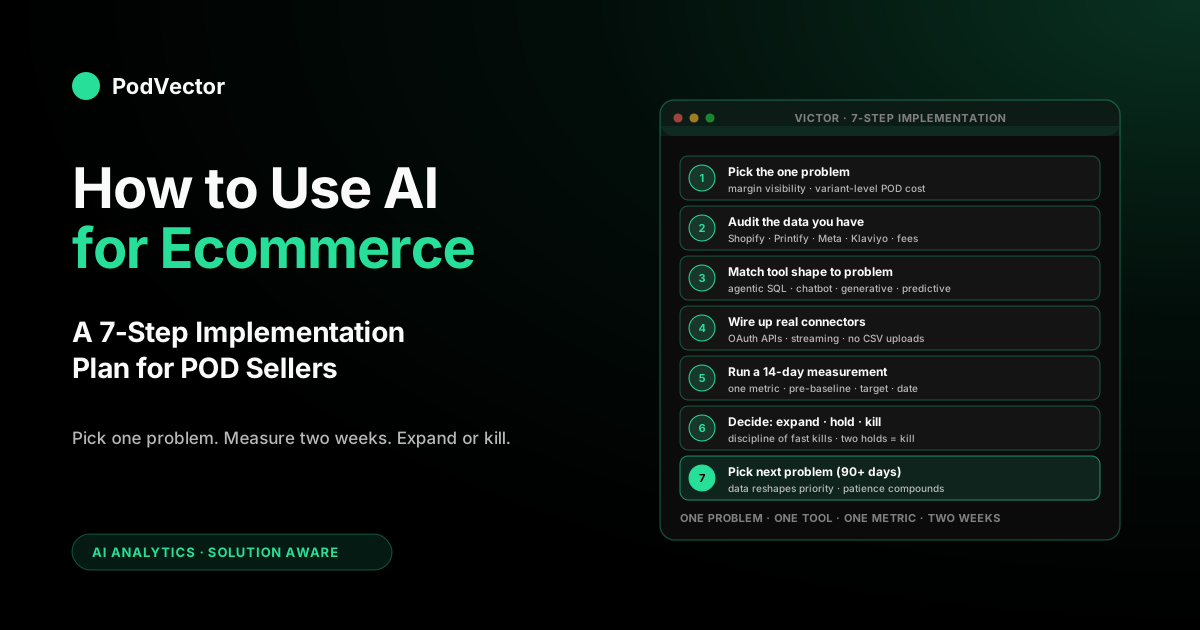
Quick Answer: Use AI for ecommerce in this order: pick the single most expensive operating problem you have, pick a tool that solves that one problem, plug it into your data with real connectors (not CSV uploads), measure one metric for two weeks, expand only after that metric moves. For a print-on-demand store the most-expensive problem is almost always margin visibility — variant-level Printify cost on every order, blended into campaign ROAS so you actually know which campaigns made money.
Start there, run it for a quarter, and the next-best problem to tackle (creative iteration, customer support, repeat-purchase modeling) will reveal itself in the data the first tool produced. Skip the "implement AI everywhere" pitch — it fails for the same reason "implement BI everywhere" failed five years ago: too many surfaces, too few decisions changed.
Why a generic ecommerce AI plan fails for POD
Most "how to use AI for ecommerce" guides on the first page of Google are written for stocked-inventory DTC brands or platform-agnostic retailers. They're not wrong — the seven categories they list (personalization, search, content, pricing, inventory, support, analytics) are the same seven categories that matter for print-on-demand. But the order of priority is different, the data sources are different, and several of the recommendations actively don't apply because the underlying assumptions break at the variant level.
Three things make POD different in ways that change the AI playbook. First, your fulfillment cost is variant-specific and supplier-driven.
A Bella+Canvas 3001 in size M with a single-color print costs you $5.40 to fulfill on Printify; the same shirt in 2XL with a multi-color front-and-back print costs $12.80. Generic ecommerce analytics tools blend these into an average and tell you the campaign is profitable when it might be losing money on its actual variant mix.
Second, your inventory is on-demand, which means most of the inventory-forecasting and stock-out-prevention AI features that DTC brands use don't apply to you. The AI capability you need instead is design portfolio analysis — which designs are tired, which are warming up, which should be retired — and almost no generic tool ships that out of the box.
Third, your supplier costs drift continuously without notice. Printify and Printful update base costs on individual SKUs throughout the year. A tool that doesn't snapshot cost at fulfillment time will silently misreport your historical margin, and most generic ecommerce tools don't snapshot.
The implication for an operator-facing plan: skip the generic guide's seven-category roundup. You're going to do the same seven things eventually, but the order and the implementation specifics matter.
Run the steps below instead. The whole approach assumes you're a solo or small-team POD operator, not an enterprise retailer with a data team — which is the audience the top-three search results are quietly written for, even when they don't say so.
Step 1: Pick the one problem AI is actually going to solve
The biggest mistake first-time AI implementers make is starting with capability instead of problem. "What can AI do?" is the wrong question; "which problem in my business is costing me the most money or the most time, and would AI plausibly fix it" is the right one. The reason this matters is operational: every AI tool you adopt has a setup cost, a connector cost, an ongoing supervision cost, and an opportunity cost. If you adopt three tools that each solve a 5%-impact problem, you've spent the budget and the attention you needed for the one tool that would have solved a 30%-impact problem.
For most POD stores, the candidate problems and their typical impact rank like this. Margin visibility — knowing the post-cost ROAS of each campaign and the post-cost margin of each variant — usually sits at the top, because the absence of this number means every other decision is being made on bad data.
Creative iteration is second; AI can compress the time between concept and live test from days to hours, which compounds across a year. Customer support automation is third for stores past a certain order volume; under about 50 orders a week, the human time savings doesn't justify the setup.
Personalized email sequences via Klaviyo's predictive features come fourth, because they require enough order history to train against — under 1,000 customers and the recommendations are noisy. Generative content for product descriptions is fifth, mostly because the marginal return on better descriptions is real but small.
Pick one. Write it down.
The whole rest of the plan flows from this choice, and if the choice is wrong, every step downstream is wasted effort. The most common right answer for a POD store generating $20K–$200K monthly is margin visibility — start there unless you have a specific reason not to. For deeper context on the analytics side specifically, read the complete guide to AI analytics for print-on-demand before you commit to a vendor.
Step 2: Audit the data you already have
Before you evaluate any tool, take an honest inventory of the data you can actually feed it. The reason: AI tools are only as good as the data they read, and a tool that reads bad data confidently produces wrong answers — which is worse than no AI at all because it accelerates wrong decisions.
For the margin-visibility problem, the data you need has five sources. Shopify orders with line items at the variant level, including SKU, variant ID, quantity, price, and discounts.
Printify or Printful fulfillment records with itemized cost per line — base garment, print, shipping, broken out, snapshotted at fulfillment time. Meta and Google ad spend with UTM tagging clean enough to attribute to Shopify orders.
Klaviyo flow-attributed revenue with the attribution window you actually use. And payment processor fees from Shopify Payments or your gateway, also at the order level.
Walk through each source and answer two questions: do I have an API connection or am I exporting CSVs, and how recent is the freshest record I can query right now. If your answer for any source is "I download a CSV monthly," that source is a bottleneck and your AI tool will be reasoning about month-old data.
If your answer is "I only get numbers once a night," that's fine for a weekly check-in, but it's not fast enough for same-day ad decisions. If your answer is "I get live numbers all day long," you're set up to actually use AI tools that take action for you, the way they're meant to work.
Most POD stores at the $20K–$200K range start in the middle: they have APIs but no warehouse, no transformation layer, and no semantic model on top of their data. That's the gap a tool like Victor or a comparable agent fills end-to-end. The AI data solution for ecommerce guide walks through what each layer of this stack actually does and which ones you can buy versus build.
Step 3: Choose the tool shape that matches the problem
"AI tool" is a loose enough phrase to mean anything from a chatbot to a forecasting model to an autonomous agent. For each problem you might pick in step 1, there's a specific tool shape that's appropriate, and shape-matching is the difference between a successful rollout and a wasted quarter.
For margin visibility, you want a tool you can ask plain English questions, that looks at your live numbers, and shows you exactly how it got the answer. Victor (built for print-on-demand), Shopify Sidekick (built into Shopify, but weaker on POD support), Hex (built for technical teams), and a few newer tools work this way. Dashboards with a chat box bolted on — like Triple Whale Moby or Polar Analytics — aren't built for this. Their chat only summarizes numbers that were already calculated ahead of time. They can't dig into your raw numbers on the fly, which is exactly what you need to see true margin on each product variant.
For creative iteration, the appropriate shape is a generative AI tool with image and copy capabilities — ChatGPT Plus, Claude, or platform-specific tools like Shopify Magic. These produce drafts that humans edit; they don't make decisions on their own. The mistake is over-relying on the AI for taste; use it for speed.
For customer support, the appropriate shape is a chatbot with deflection and escalation — Tidio, Gorgias's AI add-on, Zendesk AI, or a custom Intercom agent. The right success metric is deflection rate (percentage of tickets the AI resolves without human escalation). Stage-1 implementations should aim for 30–50% on order-status questions; higher numbers usually mean the AI is sending wrong answers and customers are just giving up.
For email personalization, the appropriate shape is the predictive features inside Klaviyo or Omnisend, plus an LLM-driven copy layer. Don't try to build this from scratch; the platforms have it, and your data isn't bigger than what their models were trained on.
For product descriptions, the appropriate shape is a templated LLM workflow — Jasper, Copy.ai, or a custom prompt against the OpenAI API. Cheap, fast, low risk. The compounding return is small.
Each problem has a wrong tool shape too. Don't use a chatbot to answer analytics questions — they're not connected to your data.
Don't use Shopify Magic for creative iteration on ad creative — it's optimized for store content, not paid-media testing. Don't use a generic LLM for support deflection without a knowledge base layer — it will confidently invent return policies that don't match yours.
Step 4: Wire up real connectors, not CSV uploads
The single most common reason AI ecommerce projects fail at month two is data freshness. The tool was set up using CSV uploads in week one because they were available right away, the operator promised themselves they'd "wire up the API later," and three months later the CSVs are out of date, the AI is answering questions about February when it's now May, and trust in the tool has collapsed. The decisions that depend on the AI either get made on stale data or stop getting made at all.
Real connectors mean three things. API-based connections to each source system, not file uploads or copy-paste exports.
Your numbers should update at least once a day — even better if they update within minutes of a sale. The tool should also catch it when something changes on Shopify's or Printify's end, like a renamed field. You want the tool to tell you right away that a connection is broken, not quietly skip your data.
For each tool category from step 3, here's the connection quality you should expect. A good AI analytics tool should connect safely and directly to Shopify, Printify, Meta, Google, Klaviyo, and your payment processor at minimum, with the option to add other data sources if you need them.
Chatbots should connect to your Shopify customer and order data via the Shopify API, not via screenshot training; Gorgias does this well, generic ChatGPT integrations rarely do. Email predictive features are inside the email platform itself, so the connector quality is whatever your Klaviyo-Shopify connection already is — make sure it's two-way (events flow Shopify-to-Klaviyo, segments flow Klaviyo-back-to-Shopify for ads). Generative tools for content don't need data connectors so much as prompt templates and brand-voice fine-tuning; the input there is editorial discipline, not data engineering.
The rule of thumb: if the tool's setup process can be completed in fifteen minutes by uploading a CSV, you're either looking at a demo product or a tool that won't survive contact with real operations. Real connectors take an hour to wire up the first time and pay for that hour every week thereafter. The POD seller's guide to AI solutions for ecommerce covers connector evaluation in more depth.
Step 5: Run a 14-day measurement window
You picked one problem (step 1), you have the data (step 2), you chose the right tool shape (step 3), and you wired up real connectors (step 4). Now you measure. Two weeks is the right window — long enough that the noise of a single weekend doesn't dominate the signal, short enough that you don't waste a quarter on a tool that isn't working.
Define one primary metric and write down what success looks like before you turn the tool on. For margin visibility, the primary metric isn't usage of the AI tool — it's the operating outcome the tool was supposed to enable.
Two reasonable choices: blended weekly post-cost ROAS (does it move up because you're catching unprofitable campaigns earlier) and weighted-average net margin per order (does it stabilize or drift up because you're enforcing variant-level pricing better). Pick one, baseline the prior 14 days from your existing data, and re-measure at day 14.
For creative iteration, the metric is creative throughput — how many tested creative variants you launched in the window — and the secondary metric is win rate (percentage of tested creatives that beat the control on the primary KPI). The trap here is measuring number of creatives generated by the AI; that number always goes up, which doesn't mean it's making your business better. The number that matters is creatives that ran in production and produced a result.
For customer support, the metrics are deflection rate and CSAT on AI-handled tickets. The trap: a 60% deflection rate with a 30% CSAT means the AI is giving wrong answers and customers are giving up rather than getting helped. Both numbers have to move the right direction simultaneously.
For email, the metric is incremental revenue from predictive segments versus a holdout — Klaviyo and Omnisend both have native A/B test setups for this. Run the AI segments against a control segment that gets the same email but without predictive ranking, and look at revenue per recipient at day 14.
For product descriptions, the metric is conversion rate change on rewritten product pages versus a control set of un-rewritten pages. This one needs a longer window for low-traffic pages, but the principle is the same — measure outcomes, not output.
Write down the pre-tool baseline, the target, and the measurement date. Put it on the calendar.
Step 6: Decide expand, hold, or kill
At day 14, you have data. You're going to make one of three decisions. The discipline of actually making the decision — and writing down why — is more important than which decision you make.
Expand. The metric moved in the right direction by a meaningful amount. Now you scale: more campaigns connected, more team members onboarded, more questions asked of the agent.
Watch for the integration breaking under load, not the tool itself failing. Most tools that work at the demo level work at the scale-up level too; what fails is the connector pipe getting overloaded or rate-limited.
Hold. The metric didn't move much, but you can identify a clear reason — the connector was broken for the first week, you didn't actually use the tool, the holdout was contaminated. Run another 14 days with the underlying issue fixed. Two consecutive holds without movement is a kill, not a third hold; the most common pattern in failed AI rollouts is a string of "let me give it one more week" decisions that add up to a wasted quarter.
Kill. The metric didn't move and you can't identify a fixable reason. Cancel the tool, write down what you learned, and go back to step 1 with a different problem or a different tool shape. Do not feel bad about killing — every successful AI implementation in any business is sitting on top of two or three killed pilots, and the discipline of killing fast is what makes the successful one possible.
One judgment call worth flagging: do not interpret "the AI is impressive when I demo it to friends" as a reason to expand. Demo impressive is not operating impact. The metric is the metric.
Step 7: Pick the next problem in priority order
If you killed in step 6, you go back to step 1 with what you learned and either pick a new problem or try a different tool for the same problem. If you expanded, congratulations — you've completed one full AI implementation cycle, which is rarer than the ecommerce AI marketing makes it sound. Now you decide what to tackle next.
The discipline that matters here is patience. Most operators get the first tool working, get excited, and try to launch three more the next month.
The result is the same overload that the step-1 prioritization was supposed to prevent. The right move is to run the first tool for a full quarter — at least 90 days — before adding a second.
Three reasons. First, the operating data the first tool produces will reshape your understanding of which problem is actually most expensive next, and you don't want to pick the second tool blind.
Second, the supervision cost of any AI tool is highest in the first 60–90 days; stacking a second tool on top of a still-stabilizing first tool means doubling your supervision burden during the worst possible window. Third, the team or just-you needs time to develop the habits that make the first tool stick — daily review, weekly summary, monthly recalibration. Until those habits exist, a second tool is a distraction.
When you do pick the second problem, the priority order from step 1 will probably have changed. The first tool gave you visibility into something you didn't have before, and that visibility is itself reshuffling the priorities.
The most common pattern: margin-visibility tool reveals that creative iteration is the next bottleneck because the tool is now showing you which campaigns work and which don't but you're still slow to ship new creative. Or it reveals that customer support is the next bottleneck because you can now see refund-cost-per-ticket and the AI-resolvable subset is bigger than you thought. The point is you're now picking on data, not vibe.
Three quarters in, you've probably implemented two or three tools, killed one or two attempts, and are operating with materially better visibility than before. That's the realistic shape of "how to use AI for ecommerce" — not a big-bang transformation, but a sequenced set of small implementations that compound.
The vendors who promise the big bang are selling something other than what actually works. The deeper read on the agentic side specifically is in agentic AI for ecommerce: what it looks like for POD sellers.
Where this goes next: from answers to actions
The version of "AI for ecommerce" that's available to a POD operator in 2026 is mostly the answering kind — you ask a question in English, you get an answer, you make the decision, you take the action. That's already a meaningful upgrade over the dashboard-and-spreadsheet workflow it replaced, but it isn't where the category is going.
Within twelve to eighteen months, the same tools will start taking the action themselves on a defined set of safe operations. Auto-pausing a Meta campaign that crosses a margin threshold for two consecutive days.
Pushing a price update to Shopify when supplier cost drift takes a SKU below a margin floor. Drafting and queueing a Klaviyo flow for a cohort the agent flagged.
Reordering a top-selling design's stickers when sell-through projects to stock-out within seven days. None of these are conceptually hard; what they require is a permission model where the operator approves the agent's authority for specific action types and trusts the safety rails, plus the operator-side process of supervising the agent's actions during the trust-building period.
This matters for how you set up your AI stack today. The agentic-analytics tool you choose now is also the most likely starting point for the action layer when it ships, because the tool already understands your data, your business logic, and your margin floors.
Switching costs at that point will be substantial. Choosing a vendor whose roadmap visibly includes an action layer (versus one that is purely passive analytics) is a one-year decision — but the consequences of that decision compound for several years afterward. Victor's positioning is "answers today, actions tomorrow," and the same shape applies to a small handful of comparable vendors. The vendors stuck on the passive side will keep being useful for what they do, but they'll be a different category of product within two years. The complete guide to AI agents for ecommerce analytics goes deeper on the action-layer trajectory and how to evaluate vendors against it.
FAQs
Do I need a data team to use AI for ecommerce as a POD seller?
No. You need a tool that ships with the connectors and the modeling layer pre-built — that's most of what you're paying for. The reason "no data team needed" is true for POD-specific or POD-aware tools and not true for generic enterprise analytics tools is that the latter assume your team has built the transformation layer.
POD-specific tools ship with the variant-level joins and Printify cost snapshotting already done. Pick one of those.
How much should I budget for AI tools as a POD operator?
For a $20K–$200K monthly revenue store, plan for $200–$800 per month total across all AI tools, with the bulk going to the analytics or agentic layer. A chatbot costs $50–$200, a copywriting tool costs $20–$80, and the analytics agent is the largest line item at $150–$500.
Anything substantially above this range either means you're using enterprise products you don't need yet, or you're stacking too many tools (which is the step-7 patience problem). For more on the cost side, see best AI for ecommerce compared.
What if I don't have a Shopify store — can I still use AI for ecommerce?
Yes, but the tool ecosystem is narrower. Most POD-aware AI tools are built Shopify-first because that's where most POD merchants live.
WooCommerce, BigCommerce, and Etsy storefronts can use the same tool categories, but the connector quality varies by platform, and you should ask each vendor specifically about your platform during evaluation. Etsy in particular often requires CSV bridging because Etsy's API is more restrictive — read step 4 carefully if that's your situation.
How do I know if my AI tool is hallucinating?
Two checks. First, ask the tool to show you how it got its answer. A good AI analytics tool should show you the exact numbers and math behind the answer, a copywriting tool should show you the prompt and inputs it used, and a chatbot should show you which help article it pulled the answer from.
If the tool can't show you, treat its outputs as suggestions, not facts. Second, spot-check obvious answers against your own knowledge once a week — if you ask the tool a question you already know the answer to and it gets it wrong, the trust assumption is broken and you need to escalate to the vendor or kill the tool.
Should I worry about AI replacing the things I'm good at?
For a POD operator the realistic answer is no. The things AI is replacing in ecommerce are repetitive tasks (writing 200 product descriptions, monitoring 47 metric drifts, answering "where's my order"), not strategic ones (picking which design to launch next, reading the brand-voice signal in customer feedback, deciding when to retire a niche).
The AI multiplies the time you have for the strategic work; it doesn't substitute for it. The operators who win the next three years are the ones who get the AI doing all the repetitive work so they can focus on the hard parts.
How does using AI for ecommerce relate to using AI for analytics specifically?
Analytics is one of the seven AI ecommerce categories — the one most POD operators should start with — but the broader "AI for ecommerce" picture also includes content, support, personalization, search, pricing, and increasingly action-taking. This article focuses on the implementation discipline that applies across all seven; for a deeper analytics-only treatment, read AI for ecommerce analytics: what it looks like for POD sellers. For the broader cluster of guides on the AI ecommerce overview, browse the AI overview cluster; for the cross-cluster index, the AI analytics topic hub indexes the full set of guides.
Where can I read the original SERP article that ranks for this query?
Shopify's AI in Ecommerce: 7 Ways to Get Started in 2026 is the canonical generic version of this guide. It's a useful read on the platform-agnostic categories. The POD-specific AI employee-grade version is what you're reading now.
See what an AI agent for POD looks like in your store
Victor is the agentic AI employee for print-on-demand sellers — connect your Shopify, Printify, and ad platforms, and ask questions like "what's my variant-level break-even ROAS this week" or "which designs are slipping below my margin floor" in plain English. Victor answers; on the roadmap, Victor takes the small actions that follow from the answer. And run your own step-1 problem through the workflow above.
Try Victor free