
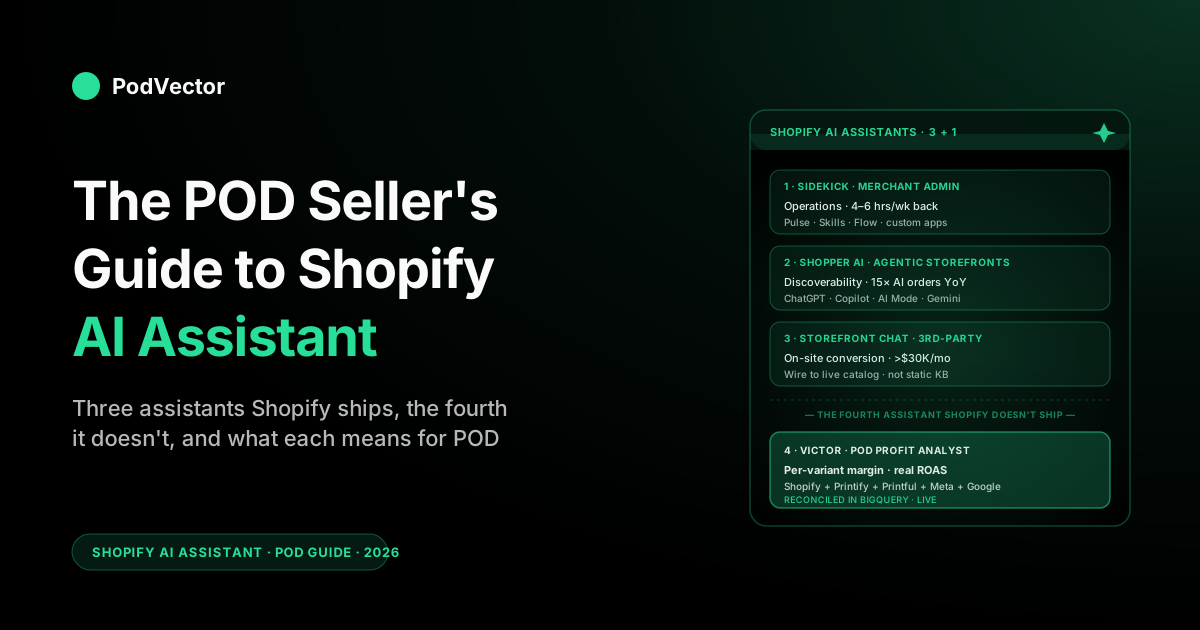
Quick Answer: "Shopify AI assistant" actually means three different things in 2026 — Sidekick (the merchant-facing admin assistant), the Shop app and Agentic Storefronts layer (the shopper-facing AI that fields buyer queries against your catalog), and third-party storefront AI assistants you install to chat with your visitors. All three matter for print-on-demand, but for different reasons.
Sidekick saves operational hours. The shopper-side AI determines whether your long-tail designs surface in ChatGPT, Copilot, and Google AI Mode results.
Storefront chat assistants influence on-site conversion. None of them touch your Printify or Printful cost layer or your ad accounts — so the assistant a POD operator actually needs is one that runs the ad spend, pricing, and listing moves those numbers drive, with your approval, and not from inside the Shopify admin.
The three things "Shopify AI assistant" actually means
Search "shopify ai assistant" and you'll get three pages of results that each mean something subtly different. Most coverage collapses them into one feature called Sidekick. That's incomplete. As of the Winter '26 release, Shopify's AI surface area has split into three distinct assistant layers, each pointed at a different person:
Sidekick is the assistant for you, the merchant. It lives in the bottom-right of every Shopify admin page, knows your store's data, and helps you run the business — generate copy, draft discounts, build flows, answer "what's selling this week." Free on every plan.
The Shop app's AI shopping assistant and the new Agentic Storefronts layer are assistants for your customers. These are the surfaces that field buyer queries — directly inside the Shop app, and through partnerships with ChatGPT, Microsoft Copilot, and Google's AI Mode — and route shoppers to your products via the Shopify Catalog rather than your storefront. You don't operate these, but the structure of your catalog determines whether your products appear in answers.
Third-party storefront AI chat assistants are the apps you install (from the Shopify App Store or as a standalone widget) that put a conversational AI on your site for visitors to interact with — pre-purchase questions, sizing help, product recommendations, support deflection. These are not Shopify-built; they're the next generation of the on-site chatbot category.
Each of these affects a different stage of a POD operation, and the strategy for each is different. The rest of this guide walks them in order, with the print-on-demand specifics that the generic coverage misses, then ends on the assistant that the Shopify ecosystem doesn't ship at all — the one that knows your supplier cost layer.
Assistant 1 — Sidekick, the merchant admin assistant
Sidekick is what most "shopify ai assistant" search results actually describe. It's the chat experience inside the Shopify admin that you talk to in everyday language to get things done — generate a product description, set up a discount, draft a flow, ask why traffic is up, ship a theme tweak. It launched in 2024, was free-by-default through 2025, and got the largest single update of its short life in the Winter '26 RenAIssance edition.
What Sidekick is good at, in one paragraph
Sidekick is good at three jobs. First, asking questions about your store — "what's my AOV this week vs. last week," "which product had the highest return rate in March," "show me orders from California over $80." The answers are real, pulled from your Shopify data, and almost always faster than digging through the admin.
Second, taking action — "create a 15% discount for first-time customers active for the next 72 hours," "build a flow that tags any order over $100 as VIP," "add the Tiger Dad Tee to the Father's Day collection." Sidekick proposes the change, you confirm, it ships. Third, generating content — product descriptions, blog posts, email copy, alt text — at the same surfaces Shopify Magic exposes, but addressed conversationally rather than via per-page Generate buttons.
How you talk to it has also widened. Sidekick now takes text chat, voice mode, and screen sharing — you can describe what you're looking at and have it act, and voice mode even runs on Apple Watch. For longer jobs it processes in the background: kick off a task, close the chat or navigate away, and Sidekick keeps working and notifies you when the result is ready for review. For a drop-day operator clearing a queue of edits, that "fire it and move on" behavior is the practical change, not the headline features.
For the deeper feature-by-feature treatment of Sidekick — including the Pulse proactive layer, the Skills system, plain-language Flow automation, and what changed in Winter '26 — see the POD seller's guide to Shopify Sidekick AI.
What changed in Winter '26 that matters for POD
The 2026 update added four things that change the math on Sidekick for a print-on-demand operator. Sidekick Pulse turns Sidekick into a proactive surface — it volunteers patterns ("your tiger collection conversion dropped 30% this week") rather than waiting for you to ask, which closes the gap with merchants who weren't running daily reviews. Plain-language Flow automation means you can describe an automation in English ("when a Printify-fulfilled order is more than five days old without tracking, email me") and Sidekick builds it; previously this required clicking through Flow's visual editor. Sidekick Skills lets you save and reuse prompts (the "Monday revenue review" prompt that takes 200 words to specify, but you run weekly) — you can store up to 25 of them, and share them, which is enough to encode most of a POD store's recurring workflows. And custom admin app generation lets Sidekick build small bespoke admin tools — a custom dashboard that shows new SKUs awaiting publication, for example — without touching Shopify's app SDK. The same plain-language reach now extends to your theme: "make this button rounded," "use more modern fonts," and Sidekick edits the storefront directly, no theme code or designer needed.
Where Sidekick saves a POD operator real hours
The hours back, in our experience working with POD stores, concentrate in five places: the Monday revenue review (15 minutes that used to be an hour), discount-code experiments (5 minutes per test instead of clicking through the Discounts admin), supplier-source auto-tagging on bulk imports (15 minutes per drop instead of 90), returns clustering on incoming refunds (a real workflow now instead of a spreadsheet), and theme content edits without dev support (the rep your designer used to handle, you handle yourself in chat). Together, for an active POD operator running drops every two weeks, that's typically 4-6 hours a week back.
What Sidekick does not save you on is the question every POD seller actually asks at the end of the week: was that drop profitable? Sidekick can tell you what sold. It cannot tell you what it cost. We come back to this in the blind spots section.
Assistant 2 — the shopper-facing AI (Shop app + Agentic Storefronts)
The second meaning of "Shopify AI assistant" — and the one with the bigger long-term impact on POD store traffic — is the AI surface that interacts with shoppers, not merchants. Two pieces stack here.
The Shop app's built-in shopping assistant
Shopify's consumer Shop app now ships with a conversational AI shopping assistant built directly into the buyer experience. A shopper opens the app, says "I need a funny shirt for my dad who works as a math teacher," and the assistant returns matching products from across Shopify's merchant catalog — including yours, if your product data is well-structured enough to match. This is no longer search; it's recommendation against natural-language intent, and the product description, tags, and metadata are doing the work.
Agentic Storefronts and the public Catalog
The bigger structural change is Agentic Storefronts, announced as part of the Winter '26 push and live for millions of merchants. The premise: Shopify's public Catalog is now positioned as the authoritative product index that external AI shopping agents — ChatGPT, Microsoft Copilot, Google AI Mode, and others — query when fielding buyer queries. A shopper asks ChatGPT for "a hoodie for a parent of identical twins," and the AI consults Shopify's Catalog, finds matching products from merchants who opted in, and presents them with checkout links that complete inside the AI surface.
Per Shopify's announcement, orders driven by AI surfaces grew 15x between January 2025 and January 2026. That's the kind of trajectory that gets people's attention; whether it's the next true channel or a smaller incremental one over the next few years is debatable, but the directional bet is real, and the cost to participate (catalog hygiene) is the kind of work POD stores should be doing anyway.
Why this matters more for POD than for DTC
POD stores have a structural advantage in agentic-shopping discovery that DTC brands don't. A typical POD store has 50-500 designs, each often available across multiple base products (tee, hoodie, mug, tote) and color variants — easily 1,000-5,000 SKUs.
Most of those SKUs target a long-tail interest (ICU nurses, Bernese mountain dog owners, vintage motorcycle restorers, fly fishermen who go for steelhead specifically). Keyword search has historically struggled with this — nobody types "Bernese mountain dog mom mug with a paw print and the dog's name in cursive" into Google, even if that's literally what they want.
Conversational AI shoppers do exactly that. They type long, contextual queries into ChatGPT and Copilot, and the AI matches them against product descriptions and tags.
A long-tail POD design that gets one or two organic Google searches a year for its exact phrasing might match dozens of conversational queries a week — if the product description and tags are written in a way the AI can parse. This is a meaningful traffic shift, and it's the upside story for POD on the agentic-storefronts trend. For the broader pattern of how this works across all of Shopify's AI integration, see the POD seller's guide to Shopify and AI.
Assistant 3 — third-party storefront AI chat assistants
The third meaning is the one that often shows up first when someone Googles "Shopify AI assistant" and lands on the App Store: third-party AI chatbots and shopping assistants that you install on your storefront for visitors to chat with directly. These are not Shopify-built. They're apps from companies like Tidio, Gorgias, Manifest, ShopAgents, and dozens of smaller players.
What they actually do
The category divides cleanly into two halves. Pre-purchase shopping assistants answer product questions for visitors who haven't bought yet — sizing, materials, shipping, "do you have this in navy," "what's the return policy on a custom mug." Done well, they reduce drop-off on product pages and increase conversion. Post-purchase support assistants handle order-status queries, returns, exchanges, and routine support — they deflect tickets that would otherwise hit your inbox or Gorgias queue.
For a deeper compare-and-contrast across the storefront chatbot category — including which apps are actually worth installing for POD versus generic ecommerce — see best AI chatbot for Shopify (compared) and the broader treatment in Shopify AI chatbot: what it looks like for POD sellers.
What POD operators get wrong about installing one
The most common mistake we see is treating a storefront AI assistant as a "set it up and walk away" purchase. POD differs from one-product DTC in a way that matters here: your catalog churns.
New designs drop weekly. Old designs get retired. The storefront assistant only knows what you've taught it — if it's pulling from a knowledge base you populated three months ago and your catalog has rotated 40% since then, it's confidently wrong about half your products.
The fix is mechanical. Storefront assistants for POD should be wired to pull product data live from your Shopify catalog, not from a static knowledge base, and should be configured to fall back to "let me check with the team" when asked about a SKU it doesn't recognize. Most apps support this; many merchants don't configure it because the default setup uses the static-knowledge-base mode, and the default is faster to set up.
The honest tradeoff
Storefront AI assistants are most worth installing on stores doing more than $30K/month with chat or email volume large enough to make deflection pay. Below that threshold, the install effort, the ongoing knowledge-base maintenance, and the reputation risk of an assistant that hallucinates a return policy outweigh the conversion or deflection lift. A small POD store is usually better served by Sidekick on the merchant side and clean product data on the storefront, with no on-site chat at all, until volume justifies it.
What the AI-assistant layer actually changes for a POD operator
Stack the three assistants together and the practical impact on a POD store has three components. The first is hours back on the operations side.
Sidekick, used to its full surface, recovers 4-6 hours a week for an active POD operator — drop-day publishing, weekly reviews, discount experiments, returns triage, theme tweaks. Most of this is work that previously took a virtual assistant or a part-time helper; Sidekick replaces it.
The second is a shift in catalog discoverability. The agentic-storefronts and shopper-facing AI layer changes how shoppers find your products — increasingly through long-tail conversational queries against AI surfaces, decreasingly through keyword search against your storefront. POD stores with long-tail design libraries are positioned to benefit from this disproportionately, but only if their catalog metadata is rich enough for the AI to match against.
The third is on-site conversion influence — the storefront chat assistant for stores at scale. For most POD operators this is the lowest-priority of the three, simply because it's gated by traffic volume that most POD stores haven't hit yet.
What none of the three changes is the underlying economics of your store. They make you faster at the operational layer; they don't change whether the operations are profitable.
That distinction is the throughline for the rest of this guide. For the broader treatment of how AI changes ecommerce analytics for POD specifically, see the complete guide to AI analytics for print-on-demand.
The AI-ready catalog: the POD work that compounds across all three
One piece of work pays off across every Shopify AI assistant simultaneously: making your catalog data AI-readable. Sidekick is more useful when your products are well-tagged.
The shopper-facing AI surfaces (Shop app, Agentic Storefronts, ChatGPT search) match more accurately against products with rich descriptions and structured metadata. Third-party storefront chat assistants give better answers when there's good source material to draw from. The work is the same in all three cases; the payoff stacks.
What "AI-readable" means in practice
For a POD store, the work is mechanical and finite. Product titles should describe the design, the audience, the feeling, and the base product — not just SKU codes ("Tiger Dad Tee — Math Teacher Gift — Funny Cotton T-Shirt for Father's Day"). Product descriptions should be 100-300 words, written in your brand voice, and cover audience, occasion, fit, fabric, care, and printing process. Tags should include audience tags (gift-for-dad, math-teacher, fathers-day), product tags (cotton-tee, unisex-fit, oversized), and design tags (typography, illustrated, vintage). Image alt text should describe the design clearly enough that a vision-blind AI matching against text can pick it. Product type and category should map to Shopify's standard product taxonomy where possible.
This is the work Shopify Magic was built to accelerate. The 30-second version of how to do it: turn on brand voice cloning, run Magic across your existing top 50 products to bring them to the standard above, then build the standard into your drop-day workflow so all new SKUs ship at this quality level. The full feature treatment is in the POD seller's guide to Shopify Magic AI features.
Why this matters more in 2026 than it did in 2024
Pre-2024, the default discovery surface for ecommerce was Google keyword search. Catalog metadata mattered, but mainly for the SEO surface — title tags, meta descriptions, schema markup.
The AI surfaces that exist now (ChatGPT product search, Copilot shopping, Google AI Mode, the Shop app's conversational layer) read product descriptions and tags directly. They don't reward you for keyword stuffing the same way SEO did; they reward you for clear, contextual, audience-specific writing. POD descriptions written in 2022 to game keyword search read poorly to AI and need a refresh.
Where every Shopify AI assistant hits the same wall for POD
The honest accounting on Shopify's AI assistant layer for a print-on-demand operator is that it's powerful for content, operations, and discoverability, and it's invisible to the questions that actually drive POD profit decisions. The blind spot is structural and lives in the data model, not in the AI's intelligence — and it's the same wall whether you're asking Sidekick, the shopper-facing AI, or a storefront chat assistant.
It cannot see your supplier cost layer
The most important number in a POD store's economics is per-variant net margin: revenue from one Tiger Dad Tee in size XL navy, minus the Printify or Printful supplier cost for that exact variant, minus the Shopify transaction fee, minus the per-order shipping rebate, minus the share of ad spend that drove that conversion. Shopify can see one number in that calculation: revenue.
The supplier cost lives in your Printify or Printful account. The ad spend lives in Meta and TikTok and Google Ads.
Shopify's AI has no view into any of it. Ask Sidekick "which products are losing money?" and you'll get either a confidently wrong answer (hallucinated from price minus a fake cost figure) or, in newer versions, a polite redirect that explains it doesn't have the data.
It cannot reconcile ad spend to orders
POD economics are heavily ad-driven; most stores spend 25-45% of revenue on paid acquisition. The ROAS calculation that decides whether you scale a creative or kill it is the spend on Meta or TikTok matched to the orders Shopify recorded — and a significant chunk of that match is broken by iOS attribution gaps, multi-touch journeys, and the gap between platform-reported conversions and Shopify-recorded orders.
Sidekick has no view of ad spend. The shopper-facing AI surfaces don't either. Reconciliation lives outside Shopify's universe.
It cannot answer design-level profitability
POD stores think in designs, not SKUs. "How is the Tiger Dad collection performing?" is a design-level question — it spans 12 SKUs across 4 base products and 3 color variants. Shopify's data model doesn't have the concept of a design as a first-class entity; it has products, which are usually the SKU level.
Sidekick and Magic both operate at the product/SKU level. To get design-level profitability, you have to roll up SKUs to the design abstraction yourself, which Shopify's AI assistant cannot do because it doesn't know which SKUs belong to which design.
It cannot forecast demand for designs you haven't launched
The single highest-leverage decision in a POD store is which design to launch next. The AI assistant layer can describe past performance; it cannot model demand for a design that doesn't exist in the catalog yet.
Forecasting "if I launched this concept, would it sell" requires either historical comparables across stores (which Shopify doesn't expose to its AI for privacy reasons) or external trend data (Google Trends, social signals, marketplace data) that Shopify isn't pulling in. This is the question that gets asked at the start of every drop cycle, and it's the question Shopify's AI assistant is structurally unable to answer.
The fourth assistant a POD store actually needs
Stack what we've covered: Sidekick handles operations. The shopper-facing AI handles discoverability. Storefront chat handles on-site conversion. None of them handle profit. The category gap — the assistant that lives next to your supplier costs, your ad spend, and your Shopify revenue, and answers the questions Sidekick can't — is what we built Victor for.
Victor is a chat-first AI employee that connects directly to Printify, Printful, Shopify, Meta Ads, and Google Ads. He pulls all that data together so he can see the real picture, then acts on it. Ask "which products are losing money after ad spend this month?" or "what's my real ROAS on the Tiger Dad campaign after Printify costs?" and Victor doesn't stop at the numbers — he suggests the move (pause the campaign, reprice the variant, retire the loser) and does it once you approve.
That approval gate is the point: Victor runs the ad, listing, and pricing work that the supplier-cost and ad-spend numbers actually call for, instead of leaving you to act on a dashboard yourself. Sidekick can't reach this layer at all, because it never sees your supplier cost or ad spend.
The point isn't that Victor replaces Sidekick. They sit at different layers and answer different questions. Sidekick runs the storefront. Victor runs the economics. Most POD operators use both. For a fuller picture of where AI agents fit into ecommerce analytics specifically, see the complete guide to AI agents for ecommerce analytics.
A 30-day adoption plan
If you're a POD operator who hasn't yet pulled the AI assistant layer into a real workflow, the highest-leverage 30 days look like this.
Week 1 — Sidekick on the operational rep
Open Sidekick. Run a Monday revenue review through it ("show me last week's revenue, AOV, top three products by units, and biggest mover by week-over-week change").
Save it as a Skill. Build the Sidekick Skill for your drop-day publishing checklist.
Wire one plain-language Flow automation that you've been meaning to build for months. By Friday you should have at least three saved Skills and a feel for what Sidekick is good at vs. where it falls down.
Week 2 — Catalog hygiene with Magic
Turn on brand voice cloning. Run Magic across your top 50 SKUs by revenue and bring them to the AI-readable standard above (long-form descriptions, audience-relevant tags, alt text).
This is the work that compounds across every AI assistant in the stack and pays dividends every quarter going forward. Build a drop-day SOP that ships new SKUs at this standard from launch.
Week 3 — Decide on storefront chat (probably no)
If your store is doing under $30K/month, skip storefront chat for now — the install and maintenance cost outweighs the lift at that volume. If you're above it, evaluate two apps from the App Store, install one on a 30-day trial, wire it to pull from live catalog data rather than a static knowledge base, and set the fallback to "let me check with the team" for unrecognized SKUs.
Week 4 — Connect the cost layer
Connect Printify or Printful, Meta Ads, Google Ads, and Shopify so you can see them all together in one place (Victor does this for you, or you can build it yourself if you have the engineering). Run the first pass of "which products are losing money after supplier cost and ad spend." Most operators find at least one best-seller that's actually unprofitable, which usually pays for itself in the first month. For the related profitability angle, see best Shopify apps to track profitability in print-on-demand.
FAQs
Is Shopify's AI assistant free?
Sidekick (the merchant-facing AI assistant) is free on every Shopify plan, including the Starter plan, with no per-generation usage caps under typical merchant load. The shopper-facing AI in the Shop app and Agentic Storefronts is free for shoppers and free for merchants — you don't pay to participate, though you do need to opt in. Third-party storefront AI chat assistants are paid apps with their own pricing.
What's the difference between Shopify Magic and Shopify Sidekick?
Shopify Magic is the umbrella name for generative-AI features embedded across the admin (Generate buttons on product editors, email subject-line generators, blog-post drafters). Sidekick is the conversational chat assistant that lives in the bottom-right of every admin page.
Both are part of Shopify's AI surface area, both are free, and they overlap — Sidekick can trigger most of Magic's generative work via chat, and Magic's per-page generators sometimes route through the same models that power Sidekick. Treat Magic as the embedded generative layer and Sidekick as the conversational interface to it.
Does Shopify's AI assistant work with Printify and Printful?
Sidekick can read Shopify product data that was synced from Printify or Printful, so it can tell you what those products did from a Shopify perspective — units sold, revenue, conversion. It cannot read into the Printify or Printful accounts directly, so it doesn't know your supplier cost, your fulfillment SLA performance, or your supplier-side margins. For supplier-cost-aware analysis, you need a tool that connects to both Shopify and the POD provider.
Will AI shopping agents like ChatGPT and Copilot replace traditional Shopify storefronts?
Probably not replace, but they'll meaningfully shift the channel mix. Shopify reported a 15x growth in AI-driven orders between January 2025 and January 2026, off a small base.
The realistic 12-24 month bet is that AI surfaces become a real channel — somewhere in the 5-15% of orders range for stores that opt in and have well-structured catalog data — alongside organic search, paid social, and direct traffic. POD stores with long-tail catalogs are positioned to benefit disproportionately because conversational queries match long-tail intent better than keyword search does.
Can the Shopify AI assistant tell me which products are profitable?
No. Sidekick can tell you what sold and at what revenue. It cannot see Printify or Printful supplier cost data, ad spend, or per-order shipping cost — all of which you need for true profitability.
To know your true profit per variant, you need a tool that pulls together your Shopify sales, your supplier costs, and your ad spend. This is what Victor does, and it's why Shopify's built-in AI can't answer the question.
Should I install a third-party AI chatbot on my POD store?
Probably not under $30K/month in revenue. The setup, the ongoing knowledge-base maintenance against a churning catalog, and the reputation risk of an assistant that confidently hallucinates a return policy outweigh the conversion or deflection lift at small scale.
Above that threshold, evaluate a couple of apps with a 30-day trial each, wire them to live catalog data, and set conservative fallback behavior. See best AI chatbot for Shopify (compared) for the category breakdown.
How is Sidekick different from ChatGPT?
Sidekick is grounded in your specific Shopify store — it knows your products, orders, customers, and admin in real time, and can take actions inside Shopify on your behalf. ChatGPT is a general-purpose model with no view of your store and no ability to act on it.
Use Sidekick for store-grounded questions and admin tasks. Use ChatGPT for general copy work, brainstorming, or research where the store data isn't relevant.
They complement rather than compete. The fuller treatment is in the POD seller's guide to ChatGPT for Shopify.
Where can I read more about how this fits together?
For the umbrella treatment of every Shopify AI surface and how they relate, see the POD seller's guide to Shopify and AI. For the cluster hub linking all of these together, see the AI Overview cluster hub.
For the broader topic, see the AI Analytics topic hub. The single best external reference for ground-truth Sidekick functionality is Shopify's own Sidekick help docs.
Get the AI assistant Shopify doesn't ship
Sidekick runs your storefront. Victor runs your economics. Connect Shopify, Printify, Printful, Meta Ads, and Google Ads, and Victor reallocates the ad spend, reprices the losers, and retires the dead variants Sidekick can't even see — proposing each move and acting once you approve.
Try Victor free