
Quick Answer: Shopify Sidekick is the conversational AI assistant built into the Shopify admin — free on every plan. You ask it questions in plain English (by chat, voice, or screen share, on desktop, mobile, and Apple Watch) and it answers store-data questions, builds reports, generates Flow automations, edits your theme, and builds small custom admin apps from a prompt. It never changes your store without showing you the action first for your approval.
The platform has shipped two major editions in 2026: the Winter '26 "RenAIssance" edition (December 2025) introduced Sidekick Pulse, Flow automation from plain language, and custom app generation; the Spring '26 "Everywhere Edition" (June 17, 2026) added Sidekick on every admin screen, third-party Sidekick App Extensions, native A/B testing via Rollouts, Campaign Autopilot, and an AI sales associate in Shopify Inbox.
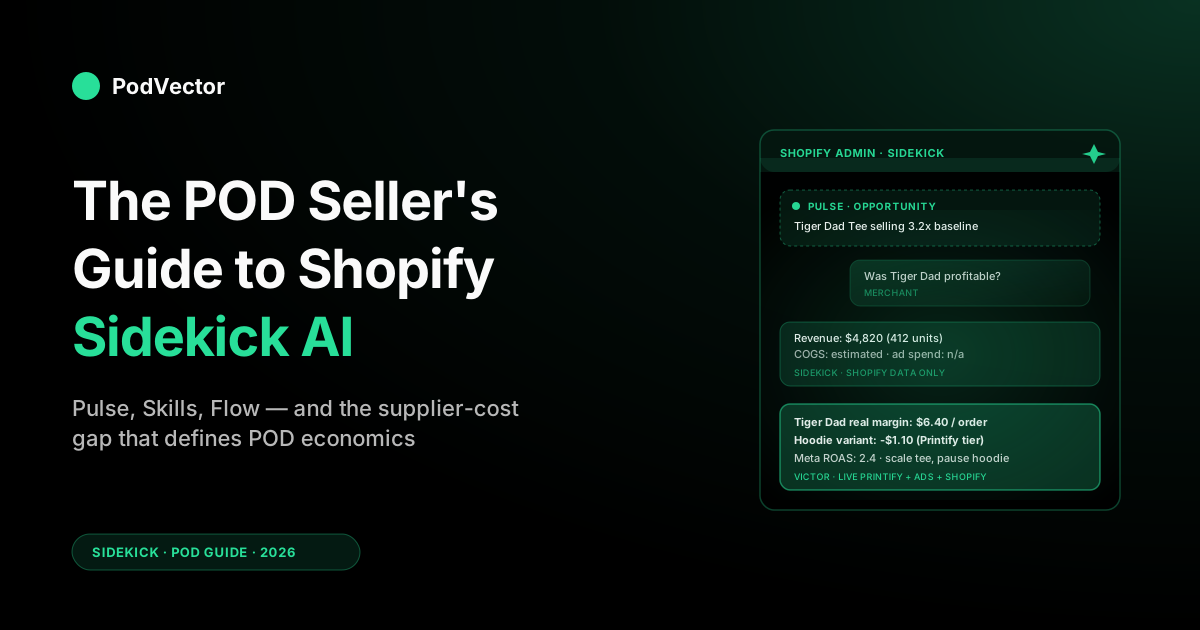
For a print-on-demand store it's a real productivity unlock on revenue and ops questions. But it can't see your Printify or Printful invoices, so any profit number it gives is built on estimated COGS — and for a typical POD margin that estimate can be materially off.
Use Sidekick for what lives inside Shopify (data, content, settings, automations). Pair it with a POD-aware AI employee that reconciles supplier invoices and ad spend, then acts on them with your approval.
What Shopify Sidekick is in 2026
Sidekick is Shopify's first-party AI assistant. It opens as a chat panel inside the Shopify admin, and you talk to it the way you'd talk to a sharp ops person who already knows your store: in plain English, with follow-up questions, and with an expectation that it will actually do the thing you asked for instead of pointing you at a settings page.
You reach it from any admin page, not just a dashboard. As of mid-2026 you can type to it, talk to it in voice mode, or share your screen so it can see what you're looking at — on desktop, on mobile, and even voice-only on Apple Watch. It remembers context across the conversation, keeps a history you can scroll back through, and will keep working on a long task after you close the panel, then notify you when the result is ready. Critically for anyone nervous about handing an AI the keys: Sidekick never saves a change without surfacing it for your review first. It respects each staff member's existing permissions, so it can't do anything the logged-in user couldn't do by hand.
Sidekick launched in beta in mid-2024 and has seen significant upgrades in every Shopify Edition since. The two 2026 editions are the ones most merchants will encounter: the Winter '26 "RenAIssance" edition (December 2025) and the Spring '26 "Everywhere Edition" (June 17, 2026). Together they represent the most concentrated push of admin-side AI the platform has made to date.
For a print-on-demand store, the practical question is narrower than "is Sidekick good?" — it's "which of the things Sidekick now does are worth your attention, and which are still better handled outside Shopify because of the supplier-cost split that defines POD economics?" That's what this guide is for.
What changed in the Winter '26 RenAIssance edition
If you tried Sidekick in 2024 or early 2025 and bounced off, the Winter '26 version was a material step up. Five things changed in that release.
Sidekick Pulse — proactive surfacing
Pulse runs in the background and posts opportunities and anomalies to the Sidekick panel without being asked. According to digitalapplied.com, Pulse redesigned the Admin home and now surfaces personalized, data-driven suggestions tailored to your store's performance and market trends. Sales spike on a single SKU, a discount code's redemption rate falls off a cliff, a new geography starts buying — Pulse flags it without you asking. It's roughly equivalent to having a junior analyst skim your dashboards on a schedule and ping you when something's worth a look.
Plain-language Flow automation
Shopify Flow used to be a drag-and-drop automation builder. Sidekick now writes Flow workflows from a sentence. According to getmesa.com, you can describe complex automations in plain language — like "When inventory drops below 10 units, send a Slack alert and tag the product" — and Sidekick builds the entire Shopify Flow workflow for you. You review the generated steps before activating.
Talk-to-your-theme editing
In the theme editor you can now click any element and tell Sidekick what to change. "Make this product card border thicker," "swap this hero block for a video background," "add a sticky add-to-cart on mobile." Sidekick edits the Liquid and the theme settings directly. You preview before publishing, but the iteration loop is conversational instead of code-edit-refresh.
Custom admin app generation
According to studioforty9.com, Sidekick can now build custom apps for your specific needs or create automated workflows in Shopify Flow, achieving bespoke functionality without intensive development. Describe what you want — "a returns dashboard that groups by product and shows refund reasons" — and it generates a deployable app you can install in your own admin. This was previously a developer task.
Sidekick Skills
Skills are saved prompts you (or your team) reuse. Build a "weekly review" Skill that runs a series of revenue, top-product, and customer-behavior queries in one shot. Build a "post-launch" Skill that drafts email copy, sets up a discount code, and schedules a Flow automation for a new product drop. Skills are the practical way to encode your team's playbooks into Sidekick.
Together these shifted Sidekick from "AI search bar" to something closer to an AI coworker. For POD specifically, Pulse and the Flow generator are the two with the most operational leverage; the theme editor and app generator matter when you're actively iterating on the storefront.
What's new in the Spring '26 Everywhere Edition
The Spring '26 Edition published June 17, 2026 with more than 150 updates, and its centerpiece is Sidekick becoming truly ubiquitous inside the Shopify admin. Four additions matter most for POD sellers.
Sidekick everywhere — every screen, every device
According to digitalapplied.com, Sidekick now works on every screen of the Shopify app via typing or voice, with no full-screen takeover, multitasking in the background, and the same context following you across desktop, tablet, and phone. Previously it was accessible primarily from a side panel on desktop; now it's on mobile screens, in POS, and voice-only on Apple Watch. The same context thread carries across devices mid-conversation.
Sidekick App Extensions
According to amwhiz.com, the Spring '26 release added developer-focused Sidekick App Extensions, which means agencies and developers can teach Sidekick new actions specific to one business: custom workflows, third-party systems, and store-specific logic. This means your Shopify partner can extend Sidekick to talk to systems it doesn't natively know — relevant for POD stores with complex supplier or fulfillment setups.
Campaign Autopilot (early access)
According to digitalapplied.com, Campaign Autopilot provides AI-managed campaigns from a single console that learns and optimizes over time within merchant-set guardrails. It launched in early access at the Spring '26 release, with more channels listed as coming soon. For POD sellers, this is worth watching — but confirm general availability before building workflows around it.
Native A/B testing via Rollouts
According to studioforty9.com, Rollouts enables native A/B testing, letting merchants schedule and run tests for storefront changes directly within the Shopify Admin. This replaces the need for third-party testing apps for most product-page experiments and pairs naturally with the talk-to-your-theme feature.
AI sales associate in Shopify Inbox
According to digitalapplied.com, the AI sales associate inside Shopify Inbox answers buyer questions, suggests products, and handles order inquiries using catalog, inventory, and policy data already in the admin. Merchants control tone and escalation. For POD stores with high pre-purchase sizing and product questions, this reduces support load without an additional app.
Every Sidekick feature, grouped by job
Sidekick covers a lot of surface area. Here's the full feature set as of mid-2026, grouped by what kind of work you'd reach for it for.
Asking questions about your store
- Revenue, orders, sessions, and conversion rate over any time window
- Top products by units, revenue, or AOV — including filters like "excluding orders with discount codes"
- Customer behavior queries ("who bought from me twice in the last 60 days," "what's my repeat purchase rate by acquisition channel")
- Inventory and fulfillment status across locations
- Refund and chargeback patterns by product, region, or supplier (where the supplier is mapped via tags)
- ShopifyQL queries against web-performance and payments data, plus fulfillment and payout queries
Taking action on the store
- Creating discount codes ("a 15% code valid this weekend, single-use, capped at 200 redemptions")
- Adjusting product prices, descriptions, tags, and metafields in bulk
- Building Shopify Flow automations from a plain-English description
- Editing themes by clicking and describing the change
- Auto-filling customer and company forms
- Looking up customers and orders mid-conversation while you're answering a support email
Generating content
- Product descriptions, in your tone, at any length
- Email subject lines and body copy
- Blog posts and landing-page sections
- Customer service replies, surfaced as suggestions in Shopify Inbox
- Image edits — background removal, banner generation, on-brand variations of product photos (including from the Shopify mobile app)
Building tools
- Custom admin dashboards for any data slice you can describe
- Small custom apps that live in the admin and run jobs (returns analysis, inventory alerts, repeat-buyer segmentation) — Advanced/Plus only
- Saved Skills that bundle a sequence of actions into one reusable prompt
- Custom Sidekick App Extensions built by developers to add store-specific actions
Pulse — proactive intelligence
- Background anomaly detection on revenue, conversion, and traffic, surfaced as Pulse Cards on the Admin home
- Opportunity flags ("this product is selling above its 30-day average — consider featuring it")
- Risk flags ("this discount code is being shared on a coupon site and is eroding margin")
- Catalog and SEO suggestions surfaced when relevant
How you work with it
- Chat, voice mode, or screen share, from any page in the admin — on desktop, mobile, or Apple Watch (voice-only)
- Context follows you across desktop, tablet, and phone mid-conversation
- Background execution — it keeps working on longer tasks after you close the panel and pings you when results are ready
- Review-before-save on every change, scoped to the logged-in staff member's permissions
- Third-party app connections via Sidekick App Extensions
For a POD store, the highest-leverage features are the question-asking layer (because admin click-through for ad-hoc reports is a real time sink), Flow automation (because POD ops live or die on tagging, segmentation, and conditional fulfillment routing), and Pulse (because catching a cost-eroding anomaly early is worth far more than a snappy report after the fact).
Pricing, availability, and limits
Sidekick is included free on every Shopify plan. There is no separate Sidekick subscription. It's available on Basic, Shopify, Advanced, Plus, and development stores, and global availability rolled out with the Winter '26 release.
There are usage limits, but Shopify hasn't published hard numbers because they're throttled by query type and by plan. In practice, for a POD store running normal admin and ops queries, you won't hit them. Heavy programmatic use (e.g., scripting Sidekick to generate hundreds of product descriptions in one batch) can rate-limit, in which case the conversational interface still works but bulk operations slow down.
The features themselves are not all uniformly available — custom app generation and some advanced Flow capabilities require an Advanced or Plus plan. Sidekick App Extensions require a developer or agency to build them. Campaign Autopilot is in early access as of the Spring '26 Edition. If you're on Basic and a feature you want is gated, Sidekick will tell you so explicitly rather than failing silently.
Sidekick ships new capabilities with each Shopify Edition (roughly twice a year) and in between. If you bounced off it even a few months ago, it's worth a second look — the list of things it can actually do has grown substantially since the original 2024 beta.
Five Sidekick workflows that actually move a POD store
Here are the workflows we've seen consistently pay back the time it takes to set them up. Treat these as patterns rather than a checklist — the value is in adapting them to your store's specifics.
1. The five-minute Monday revenue review
A Skill that runs every Monday morning: revenue and orders for last week vs. the week prior, top 10 products by revenue, top 10 products by units, conversion rate by acquisition channel, and a list of any product whose 7-day refund rate jumped above your normal baseline. Twenty clicks of admin work compressed into one prompt. Use the output as the agenda for whatever weekly review you already do. If you also use Victor for POD-side reporting, the Monday Sidekick Skill and Victor's Weekly Health Report cover complementary halves — Sidekick on Shopify-side metrics, Victor on the cross-platform picture including ad spend and supplier costs.
2. Auto-tagging by supplier and base product
POD stores typically run multiple suppliers (Printify, Printful, sometimes Gelato or Gooten) and dozens of base products (tee, hoodie, mug, poster). Tagging every order on import lets you filter by supplier and by base product later, which is essential for any cost analysis.
Have Sidekick build a Flow that reads the supplier and the SKU, parses the base product from the SKU prefix, and applies tags automatically. One-time setup, permanent payoff. This tagging layer also makes the Shopify refund workflow far cleaner when you're reconciling supplier-side credits. And if you're setting up promotions by supplier or product type, this same tag structure powers the buy-X-get-Y discount setup without manual segmentation.
3. Returns clustering on incoming refunds
Build a Skill that, on demand, returns a cluster of refund reasons grouped by product and supplier — "tigers tee, Printify, sizing complaint x12 in last 30 days." This pulls forward the design and supplier patterns that explain return rate without you needing to read each ticket. POD-specific because base product fit varies wildly across suppliers; a tee that fits true on Printful runs small on Printify. For a deeper look at how Printful fulfillment holds up on specific product types, see the honest Printful embroidery review.
4. Discount code experiments without spreadsheets
Run discount tests as conversations: "Create three 24-hour codes — POD10, POD15, POD20 — split by traffic source via UTM. Cap at 100 redemptions each." Then a follow-up later in the week: "Which of POD10/POD15/POD20 had the highest gross revenue per redemption?" You're not reading a Shopify Discounts dashboard; you're asking a question and getting back the answer. The same question against revenue holds; it's the moment you ask "and which was most profitable" that the cost gap below kicks in. For multi-product discount setups like buy-one-get-one, see the Shopify buy-X-get-Y discount guide for how to structure those offers before handing them to Sidekick to build.
5. Theme A/B without dev support
Pair the talk-to-your-theme feature with Shopify's native Rollouts A/B testing (shipped in the Spring '26 Edition) to test product-page changes without a third-party app. "Add a sticky add-to-cart bar on mobile and split-test it 50/50 against the control." Sidekick edits the theme; Rollouts reports the conversion difference. POD stores often live on a single high-traffic product page, so even a small lift is real revenue at scale.
Where Sidekick falls short for print-on-demand
Sidekick is built on Shopify's data. That means it sees orders, customers, traffic, payments, refunds, inventory, and theme code. It does not see anything that lives outside Shopify — which, for a POD store, is exactly where most of your cost data is. Three gaps matter.
Gap 1: Supplier costs aren't in the answer
When a Printify order ships, the cost — base product price, print upcharges by color and placement, shipping tier, any premium tier discount — is computed and billed by Printify. Shopify never sees that line-item cost.
So when you ask Sidekick "which products were most profitable last month," it has two options: refuse to answer, or answer with an estimated COGS that you (or Shopify) plugged in manually as a per-product cost. For a POD business where margins are thin, that estimated answer can be materially wrong — and the error is asymmetric (it typically flatters profitability). For a comparison of how Printify and Printful cost structures differ and what that means for your margin model, see Printify vs. Printful: pricing, quality, and features.
Gap 2: Ad spend reconciliation isn't in the answer either
Sidekick can show you traffic by source. It can't show you the actual ad spend behind that traffic, because Meta and Google Ads spend lives in those platforms, not in Shopify.
To get true return on ad spend, you have to reconcile attributed Shopify revenue against Meta/Google spend and your supplier costs in the same query. That's a three-system join — Shopify + ads + supplier — and it's outside what Sidekick does. For the ad platform side of that equation, see the Google Ads vs. Facebook Ads guide for POD sellers.
Gap 3: Design-level profitability isn't a concept Shopify models
POD stores typically have one design printed on many base products. The "tiger dad" design is a tee, a hoodie, a tote, a sticker. Each of those is a separate Shopify product, but they share an underlying creative asset whose performance you actually want to measure. Shopify doesn't natively model the design as an entity. Sidekick will give you per-product analytics; for design-family analytics, you have to roll up those products yourself or use a tool that natively understands the design layer.
None of these are Sidekick failures. Each is a scope decision: Sidekick is a Shopify-data assistant, not a multi-system operator. The right pairing is to use Sidekick for what's inside Shopify and run a POD-aware AI employee alongside it for the rest — one that reads supplier invoices and ad spend live, then proposes and executes actions on Shopify with your approval.
Sidekick vs. Shopify Magic
The two products overlap enough to confuse merchants, but the split is clean once you see it.
Shopify Magic is generative — it creates content. Product descriptions, email subject lines, banner images, blog drafts, theme code blocks. You hand Magic a prompt and it returns content you place into your store. It's narrowly focused on the production of marketing and merchandising assets.
Sidekick is conversational and operational — it answers questions about your store and takes admin actions. Magic generates an email; Sidekick generates the email and schedules it, sets up the segment, builds the Flow that triggers it, and reports results back later.
According to getmesa.com, they share underlying technology and Sidekick often calls Magic to execute content tasks — Sidekick handles the logic and orchestration while Magic generates the creative assets. The decision rule: if the job is "create this asset," use Magic (or use Sidekick because it falls back to Magic for content). If the job is "answer this question about my store" or "do this multi-step admin task," use Sidekick.
For POD specifically, Magic earns its keep on the catalog work — drafting hundreds of product descriptions across SKUs that share a design family. Sidekick earns its keep on the operations work — the daily questions, the automation buildouts, the in-admin actions that used to require five tabs open.
Sidekick vs. ChatGPT for Shopify work
The other natural comparison is ChatGPT or any general-purpose AI model. The split here is also clean: Sidekick wins where it can act on your store data; ChatGPT wins where you need general reasoning that doesn't depend on Shopify's specific schema.
Sidekick is better at: anything that needs your real numbers, anything that needs to take an action in the admin, anything that depends on Shopify-specific concepts (Liquid, metafields, Flow steps, Discount API constraints), anything that requires the answer to be grounded in your store's actual data rather than a guess.
A general-purpose model like ChatGPT is better at: open-ended strategy work, long-form content where you want a non-Shopify voice, anything that requires browsing the web for current info, anything that requires multi-step reasoning over a domain Shopify doesn't model well (like supplier economics, where Sidekick has no source data).
Many operators run both. Use Sidekick inside the admin for the work that touches the store. Use ChatGPT outside the admin for the work that touches strategy. Don't ask Sidekick to brainstorm a brand voice; don't ask ChatGPT for last week's revenue.
Getting started in under five minutes
If you haven't turned Sidekick on yet, the activation is trivial:
- Open your Shopify admin. Look for the Sidekick icon in the top right (it's the purple glasses icon, no setup required).
- Click it. Sidekick opens as a side panel on desktop; on the mobile app, it's accessible from any screen.
- The first time, it'll walk you through a brief tour and ask permission to read your store data. Grant it.
- Try a question: "What were my top 10 products by units last week?" If you get an answer, you're set up.
- Check the Admin home for Pulse Cards — Shopify may already be surfacing recommendations based on your store data.
That's it — there's no plan upgrade, no app install, no separate billing. From there the two highest-payoff next moves are: (a) build one Skill that captures a question you ask weekly, and (b) build one Flow automation through Sidekick that captures a recurring tagging or routing task. Both take ten minutes and pay back every week.
Mistakes POD sellers make with Sidekick
Treating Sidekick as a profit tool
Sidekick will give you a confident-sounding profit number based on the data it has. For a POD store, that number is missing your Printify production cost, your Printful shipping cost, and your ad spend. Use Sidekick for revenue and operational questions; use a POD-aware AI employee that reconciles supplier costs and acts on them for true per-order profit.
Trying to script Sidekick for batch operations
Sidekick is conversational, not programmatic. If you have a one-time job that needs 5,000 products updated in a structured way, the right tool is the Shopify Admin API or a CSV import — not Sidekick. Sidekick is the right tool for ad-hoc, conversational, judgment-driven work, not for headless automation at scale.
Ignoring Pulse because the first week is noisy
Pulse takes a few weeks to learn what "normal" looks like for your store. The first week of Pulse Cards will overfit to noise. Don't disable it on day three — let it run a month, then judge. Most operators who stuck with it treat the Pulse digest as their highest-signal source on store anomalies.
Letting Sidekick edit your theme on a high-traffic store without preview
Talk-to-your-theme is fast, which makes it easy to skip the preview step. On a low-traffic store this is fine. On a store doing meaningful daily revenue, every published change should run through preview, ideally through a dev theme, and ideally through Rollouts A/B testing if it touches the product page. Sidekick gives you the speed; you provide the discipline.
Confusing Skill outputs with workflow
A Skill that "runs your Monday review" isn't a substitute for actually doing the review. It's a faster way to assemble the inputs. The judgment — what to act on, what to ignore — is still yours. Operators who delegate the judgment to Sidekick tend to drift, because Sidekick optimizes for what it can measure, and what it can measure (Shopify-side metrics) is not the same as what makes a POD business profitable.
Skipping the Sidekick App Extension conversation with your developer
If you have a Shopify partner or developer, ask them about Sidekick App Extensions (shipped in Spring '26). These let a developer teach Sidekick new actions specific to your store — custom workflows, third-party system connections, store-specific logic that Sidekick can't do out of the box. For a POD store with a complex supplier setup, a custom extension can close gaps that the generic Sidekick cannot.
FAQs
Is Shopify Sidekick free?
Yes. Sidekick is included free on every Shopify plan, including Basic and development stores. Some advanced features (custom admin app generation, certain Flow capabilities) are gated to Advanced and Plus plans, but the core conversational assistant is universal. Campaign Autopilot launched in early access with the Spring '26 Edition — check your admin for availability.
Can Sidekick answer profit questions for a Printify or Printful store?
Only with caveats. Sidekick can use whatever per-product cost you've manually entered into Shopify's product cost field, but it can't see Printify's actual per-order invoice, which varies by color, size, print location, supplier tier, and shipping zone. For a real profit answer on a POD store, you need an AI employee that pulls supplier cost data straight from Printify and Printful before you even sell anything. Victor is built for this — he reads your Printify and Printful costs, matches them to your Shopify orders and ad spend, and shows you the true profit on every order. With your approval, he can also act on that information: repricing products, creating discounts, updating shipping thresholds. For a primer on the Printify side of that setup, see the Shopify–Printify setup guide for POD sellers.
Does Sidekick work with Shopify Flow?
Yes — and as of the Winter '26 release, Sidekick is the easiest way to build Flow workflows. You describe what you want in plain English, Sidekick generates the Flow steps, you preview them, and you activate. According to getmesa.com, complex conditional workflows or automations involving third-party apps may require manual fine-tuning after Sidekick creates the initial setup, but the construction is automatic. You can still build Flows manually in the editor; Sidekick just removes the cliff for non-developers.
What's the difference between Sidekick and Sidekick Pulse?
Sidekick is the on-demand assistant — you open the panel, you ask a question, you get an answer. Pulse is the proactive layer that runs in the background and surfaces things to you without being asked. According to hypersku.com, Sidekick Pulse shifts Sidekick from a reactive chatbot to a proactive store monitor. Pulse posts into the Sidekick panel as Pulse Cards on the Admin home. Pulse was introduced in the Winter '26 RenAIssance edition.
What are Sidekick App Extensions?
Sidekick App Extensions are a developer-facing feature shipped in the Spring '26 Edition. According to amwhiz.com, they let agencies and developers teach Sidekick new actions specific to one business — custom workflows, third-party systems, and store-specific logic. Off the shelf, Sidekick is a generic assistant; extensions make it specific to your operation. If you have a Shopify partner, it's worth asking whether an extension makes sense for your POD setup.
Can Sidekick build me an app?
Yes, for small admin-internal apps. Describe the function ("a returns dashboard grouped by product and supplier") and Sidekick generates a deployable app you can install in your own admin. This is genuinely useful for one-off internal tools. It's not a replacement for full external app development — apps that need to live in the App Store, integrate with non-Shopify systems, or handle complex stateful logic still need a real developer. Custom app generation requires Advanced or Plus.
Is it safe to let Sidekick change live store settings?
Sidekick gates destructive or high-impact actions behind a confirmation step. Low-risk changes (discount codes that auto-expire, content edits, tag additions) it'll do directly; high-risk changes (price updates, shipping rate changes, payment settings) it'll surface as a proposal you approve. The right comfort level depends on the action's reversibility — a discount code is reversible; a published price change isn't until you publish a new one. On high-traffic stores, pair Sidekick theme edits with Rollouts A/B testing rather than publishing directly to 100% of traffic.
Will Sidekick eventually handle Printify and Printful cost data?
Probably not natively. Shopify's scope is the Shopify platform; integrating with the invoice systems of every POD supplier, across plan tiers and shipping zones, isn't core to Shopify's roadmap. The realistic future is that Shopify keeps Sidekick best-in-class for Shopify-side data while POD-specific tools handle the supplier integration. The two layers complement; they don't compete.
How does Sidekick compare to other AI ecommerce agents?
Sidekick is the strongest agent for Shopify-internal work because it has direct admin access, action permissions, and full knowledge of your Shopify setup — no other agent comes close on those axes. It's weaker for any cross-system question (comparing ad spend across platforms, supplier costs, design-family rollups) because it doesn't have that outside information. For POD sellers who advertise on Meta and Google and fulfill through Printify or Printful, a purpose-built AI employee that reads those platforms and acts on Shopify is the complement — not the replacement. See also how POD-focused analytics tools compare for the broader landscape.
What about Tinker — how does it relate to Sidekick?
Tinker is Shopify's separate AI workspace for generating and editing storefront sections. The talk-to-your-theme feature in Sidekick handles in-place edits ("change this button"); Tinker handles section-level generation ("build me a testimonial carousel"). They overlap at the edges but the split is in-place edits via Sidekick, generative new sections via Tinker. For POD stores running a stable theme, Sidekick's edits — now paired with Rollouts A/B testing — are usually enough.
Where can I learn more from Shopify directly?
Shopify maintains official documentation in the Sidekick help center, and the broader Shopify AI overview lives at shopify.com/magic. The MESA team also maintains a useful third-party rundown of Sidekick features and limits if you want a non-Shopify perspective.
Sidekick answers the Shopify questions. Victor runs the rest.
Sidekick is excellent at what Shopify can answer with its own data. It can't see your Printify invoices, your Printful shipping tiers, or your Meta and Google ad spend — which is where POD profit actually lives. Victor reads those systems live and acts on them: repricing products in bulk, creating discounts, updating shipping thresholds — each move proposed to you and executed only on your approval. Pair Sidekick for in-admin ops, Victor to run the profit side.
Try Victor free