
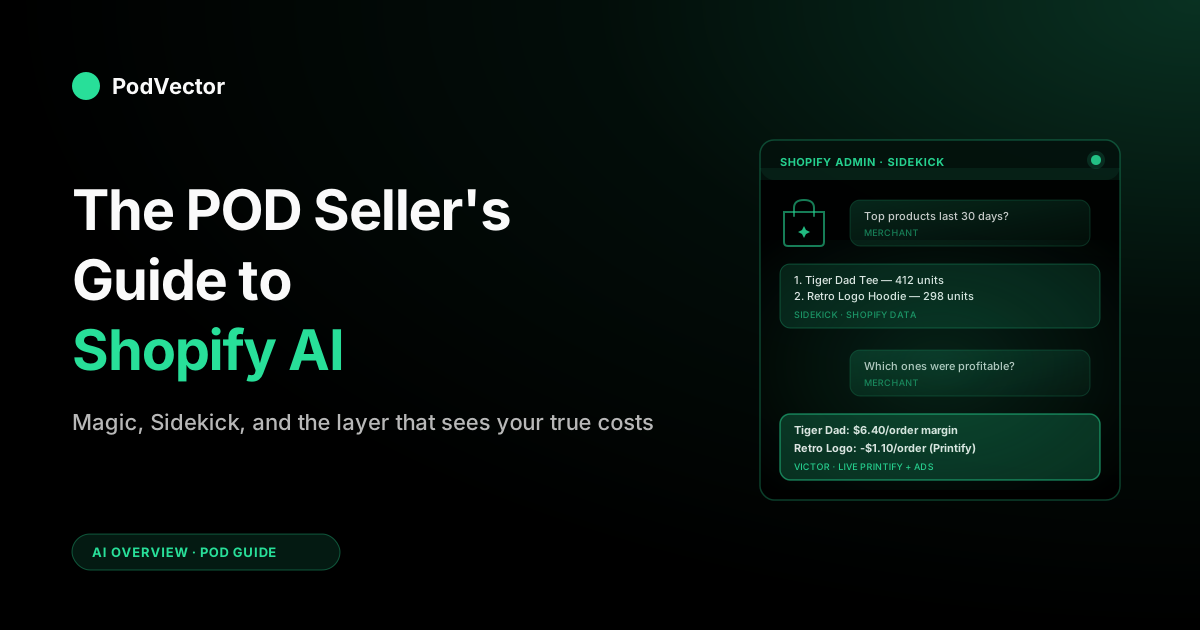
Quick Answer: "Shopify AI" in 2026 isn't one product. It's Shopify Magic (content), Sidekick (the admin assistant Shopify has invested in most), Tinker (theme builder), Shopify Inbox (support), the AI Toolkit (developer infrastructure), and Spring '26 additions like Campaign Autopilot and Agentic Storefronts. All are free and native.
For a print-on-demand store, Shopify's native AI handles content, theme, and basic store ops well. But it never sees your Printify or Printful supplier costs, so it can't act on true margin — it can't pause an ad that's losing money on every order or re-list a design that only breaks even on totes.
This guide walks through what each piece of Shopify AI does, where it stops short for POD, and the AI-employee layer that fills the gap.
What "Shopify AI" actually refers to in 2026
"Shopify AI" is not one feature. It's a family of separate products that all live inside the Shopify ecosystem but do different jobs. Before you can decide which parts matter for your print-on-demand store, you have to know which part of Shopify AI people are talking about.
Here's the current breakdown as of 2026:
- Shopify Magic — generative AI for content and media. Writes product descriptions, email copy, blog posts. Edits product images, removes backgrounds, generates banners. Free on every Shopify plan.
- Sidekick — the conversational AI assistant inside the Shopify admin. Answers questions about your store, builds custom reports, changes settings on your instruction. Included free.
- Tinker — a sandboxed AI workspace for generating and editing storefront sections. You describe a section, Tinker builds it, you preview before publishing.
- Shopify Inbox — the native messaging tool with AI instant answers that handles pre-sale and order questions on your storefront. Free, but deliberately basic; most stores past a certain ticket volume layer a purpose-built support agent on top.
- AI Store Builder — the onboarding tool that spins up a starter storefront from a one-line description. You type what you sell, and Shopify generates a theme, sample products, and copy you can edit. Useful for launch day; irrelevant once your POD catalog and theme are live.
- Campaign Autopilot — a Spring '26 addition that drafts, launches, and adjusts marketing campaigns (email, social, and ad creative) from a goal you describe. It automates the busywork of running promotions, but it optimizes against Shopify-visible revenue, not your true per-order margin.
- Agentic Storefronts — also new in Spring '26. This is the buyer-side shift: your store becomes a surface that AI shopping agents can browse, query, and buy from on a shopper's behalf, not just a page humans click through.
- AI Toolkit — developer-facing infrastructure. Lets external coding agents (Cursor, Copilot, and other AI assistants) talk to Shopify's APIs and docs with proper context. Not for merchants directly, but it's why third-party AI apps keep getting better.
- Native analytics AI — the AI summaries and natural-language query features that appear in the Shopify admin's Analytics surface. Usually powered by Sidekick under the hood.
- Universal Commerce Protocol (UCP) — Shopify's syndication layer, co-developed with Google, that exposes your catalog to AI search agents like ChatGPT Shopping, Google's AI shopping surfaces, and other answer engines. Not something you configure so much as something that's on when your store is on.
Layered on top of all of that is the third-party AI app ecosystem — chatbots, forecasting tools, creative generators, profit agents — each of which may or may not plug into the Shopify AI primitives above. For a POD seller, the question isn't "should I use Shopify AI?" It's "which pieces are worth my attention, in what order, and where do I need something Shopify doesn't ship?"
Shopify Magic: AI for content, media, and code
Shopify Magic is the most visible piece of Shopify AI because it touches the part of the admin every merchant uses every day: product pages, emails, and media.
What Magic does well
Magic generates first drafts fast. Give it a product title and a few bullet points about your design, and you get back a description in the tone and length you ask for.
Paste in a raw photo of a printed garment and Magic will clean up the background, extend the canvas, or generate a new hero banner in a consistent style. The Themes integration lets Magic produce custom code blocks you'd otherwise need a developer for.
For a POD store, this matters most in two places: the copy for hundreds of design variants that would otherwise all say the same thing, and the product imagery for designs that don't yet have real-world photos. A print-on-demand catalog often runs 500+ products from the same supplier; Magic closes the tedium gap on descriptions and imagery without hiring a copywriter or a photographer.
Where Magic stops
Magic writes copy. It does not tell you whether that copy converts.
It generates images. It does not tell you which images drove sales vs. which drove returns.
And crucially for POD, Magic has no visibility into your supplier costs — it's purely a content and media tool. Treat it as a productivity shortcut on the top of your funnel, not a system that influences what you should actually be building or selling.
Realistic expectations
Magic-generated product descriptions are a solid floor. They're readable, they hit basic SEO, and they save time.
They're not a ceiling — the best-converting product pages on POD stores still have human-tuned headlines, founder-voiced story blocks, and real customer photos. Use Magic for the bulk 80% and hand-polish the 20% that you're actively advertising.
Sidekick: the admin-side AI assistant
Sidekick is Shopify's conversational assistant for merchants. It lives inside the admin as a chat panel you can open on any page, and its job is to answer store questions and take admin actions in response to plain-English instructions.
What Sidekick can do
- Answer questions about your store data ("what were my top 10 products last month by units sold?")
- Build ad-hoc custom reports without leaving the conversation
- Change store settings on instruction ("add a 10% sitewide discount code valid until Friday")
- Write product descriptions, blog posts, and marketing copy
- Diagnose shipping issues, refund patterns, and inventory problems
- Create customers and companies from a plain-English description (added February 2026)
- Query payments, payouts, fulfillments, and web performance data — its January 2026 update widened the data it can reach
Shopify now frames Sidekick as five roles in one: designer, photo editor, writer, tech support, and marketer. Popular built-in prompts include weekly performance summaries, SEO product descriptions, pricing analysis, and even ad-spend optimization suggestions.
Sidekick is the feature Shopify has invested most heavily in, and it's the clearest direction the platform is heading: the admin as a conversation that takes action, not a dashboard you read. For a POD seller, it's genuinely useful for the "quick look" and "just do it" tasks you'd otherwise click through three menus to handle.
Where Sidekick falls short for POD
Sidekick answers questions from the data Shopify has. That's orders, customers, traffic, and payments.
What Shopify does not have is your fulfillment cost per order. When a Printify order ships, the cost of that order — base product price, print variant upcharge, shipping, sometimes a discount tier — lives in Printify's or Printful's invoice, not in Shopify. Sidekick can tell you a product had 200 orders; it cannot reliably tell you how much those 200 orders cost you to fulfill unless you've manually reconciled every SKU's cost.
That's not a bug. It's a scope decision: Sidekick is a Shopify-data assistant, not a full-stack operator.
Sidekick's newer ad-spend optimization prompt makes this sharper, not softer. It will happily suggest where to move budget — but it's reasoning from Shopify-visible revenue, blind to the supplier cost on each order, so its "scale this" can be a campaign you're losing money on. This is the exact gap that purpose-built AI analytics for print-on-demand stacks are designed to close.
How Sidekick pairs with Victor
A well-run POD stack uses both. Sidekick handles catalog questions, customer-service shortcuts, and marketing copy inside the admin.
Victor is PodVector AI's AI employee. He reads your live Printify, Printful, Meta Ads, and Google Ads data, then acts on it with your approval — pausing an ad that's losing money after supplier costs, moving spend to the campaigns that are actually making a profit, and updating or removing listings based on true per-order profit. He sees your orders, ad spend, and supplier costs together, so he can act fast — the point is the action, not the chart.
The two are complementary: Sidekick answers "what happened on Shopify," and Victor runs your ads, listings, and supplier ops against what each order is actually worth after COGS. Most POD sellers who ask Sidekick for profit numbers and find them off by 30–50% are running into this split — not a Sidekick failure, just the wrong tool for the job.
Tinker: generative theme and section building
Tinker is Shopify's newer AI workspace for generating theme sections — a description in, a ready-to-preview section out. You can ask for a testimonial section with three slots, a product carousel with a specific transition, or a hero block that pulls from a metafield, and Tinker produces Liquid code you can review and commit to your theme.
When Tinker matters for POD
POD stores live and die on the conversion rate of the product page and the hero sections. Tinker lowers the cost of iterating on those layouts without needing a developer. If you've been staring at a theme for six months because the last customization broke something and you don't want to touch it, Tinker makes experimentation cheap again.
When to ignore Tinker
If your store is running a stable, well-converting theme and your bottleneck is not page layout, Tinker is a distraction. The best-performing POD stores of 2026 don't win on custom theme blocks — they win on product selection, creative, and profit-per-order discipline. Use Tinker when you have a real hypothesis to test ("hero with dynamic product vs. hero with founder video"), not because it exists.
The AI Toolkit: infrastructure for developers and agents
The AI Toolkit is a developer-facing layer. It gives external AI coding agents — Cursor, GitHub Copilot, custom in-house agents — a structured way to read Shopify's documentation, introspect a store's API surface, and write code that's actually correct for Shopify's particular flavor of Liquid, GraphQL, and app extensions.
For most POD merchants, this is invisible infrastructure. You don't use it directly.
But it's the reason the third-party AI app ecosystem is getting noticeably better in 2026: every time an app developer uses the toolkit to build a Shopify integration, the integration is more accurate, handles edge cases better, and ships faster than the 2024-era equivalent. The practical implication is that the AI apps you evaluate this year are materially better than the ones you passed on last year, and it's worth re-evaluating the category periodically.
Shopify maintains official developer documentation for the AI Toolkit that's worth skimming if you're evaluating custom work — it clarifies what the plugin, skills, and MCP server actually expose, and what's still rough.
Where Shopify's native AI stops — especially for POD
Shopify's AI suite is genuinely useful, but it has three structural gaps that matter specifically to print-on-demand sellers. Knowing them up front is how you avoid overpaying for AI that duplicates Shopify and underinvesting in AI that fills the actual holes.
Gap 1: Supplier cost data
Shopify does not natively ingest Printify or Printful invoices. Your true cost of goods sold — the price you pay the supplier per order, including base cost, print variant upcharges, shipping tier, and any premium discounts — is computed on the supplier side and billed to you separately.
Any AI tool that only sees Shopify's data (that's Sidekick, that's most native analytics) is working with a revenue number and an estimated cost. For a low-margin business like POD, where the difference between profitable and unprofitable can be a $2 shipping surcharge, that's not precise enough.
Gap 2: Multi-channel ad reconciliation
If you run Meta and Google ads (most POD stores do), the true return on ad spend requires pulling attributed revenue from each platform, subtracting platform fees and COGS, and reconciling back to Shopify orders. Shopify's native analytics show you traffic sources but don't close this loop.
For that you need a system that either has direct a warehouse-style access to Shopify, Meta, Google, and your supplier — or that stitches the data via APIs and maintains the join itself. See the breakdown in our guide to AI for ecommerce analytics for POD sellers.
Gap 3: Design-level profitability
A POD store can easily have 10,000 design × product SKUs. Profitability at the design family level — "is this tiger print breaking even across hoodies, tees, and totes?" — isn't something Sidekick surfaces, because Shopify doesn't treat design families as first-class entities. This is the single biggest analytics opportunity in POD and the one that's most underserved by Shopify-native tools.
The AI layers a POD store actually needs
If you're running a POD store on Shopify in 2026, the realistic AI stack looks like five layers. Some are Shopify-native, some are third-party, and the right mix depends on store size and margin pressure.
Layer 1 — Content AI (use Shopify Magic)
Product descriptions, email copy, blog drafts, basic image edits. Shopify Magic is free and covers this floor. Add a general-purpose AI writing tool like ChatGPT when you need longer-form content or specific editorial voice — but you don't need a paid content AI tool for basic POD operations.
Layer 2 — Admin AI (use Sidekick)
Quick-look questions about revenue, top products, customer patterns, settings changes. Sidekick is the fastest path to these. Accept that its answers are Shopify-data only and don't ask it profit questions that require supplier data.
Layer 3 — Customer support AI (third-party, purpose-built)
Pre-sale questions, shipping status, returns — answered on your storefront 24/7. Shopify Inbox has basic capability but third-party options go further. The tradeoffs, pricing, and setup are covered in the Shopify AI chatbot guide for POD sellers.
Layer 4 — A POD-aware AI employee (third-party)
The layer Shopify does not cover and the one POD stores most need: a helper that doesn't just measure per-order profit but acts on it. This is Victor's purpose. He reads your Printify and Printful invoices and matches them to your Shopify orders and Meta Ads and Google Ads spend, so he can show you true profit on every order. Then, with your approval, he makes the next move — pausing losing ads, shifting budget to margin-positive campaigns, and updating listings.
Pure profit dashboards like TrueProfit and BeProfit show you the numbers; Victor is built to take the action behind them. The complete guide to AI agents for ecommerce analytics walks through how to pick among the category.
Layer 5 — Inventory and forecasting AI
For traditional ecommerce, this is a huge category. For print-on-demand, it's narrower — because you don't hold stock, the "inventory" question becomes "which designs should I actively promote next" rather than "how many units should I reorder." POD-specific forecasting is covered in AI inventory forecasting for Shopify POD.
The priority order for a POD seller adopting Shopify AI
If you're starting from zero, don't try to adopt every AI category at once. The leverage is in this order, and the reasoning follows.
- Turn on Sidekick and use it. It's free and it replaces 10+ clicks per admin task. This is the fastest "AI-obvious" win.
- Use Magic for product descriptions and basic imagery. Free, covers the content floor.
- Bring in an AI employee that reads your supplier invoices. This is the leverage move. Every action below — which ads to scale, which designs to push, which supplier to prefer — should run on your true margin, not just the revenue you see in Shopify. Bringing on an AI employee like Victor early means the next 12 months of ad and listing decisions get made from real numbers instead of a guess. Victor is built for exactly this — and acts only with your approval.
- Add an AI customer support layer once you're doing enough volume that support tickets are taking real time (~50+ tickets/week).
- Revisit advanced categories (creative generation, agentic marketing, forecasting) only after the first four are stable. Most POD stores don't need them until they're past $500K/year.
The single most common mistake POD sellers make with AI is skipping the AI-employee layer (step 3) and spending on advanced forecasting because it sounds cutting-edge. The AI-employee layer is where the margin lives.
Mistakes to avoid
Trusting Sidekick for profit answers
Sidekick will give you a confident-sounding profit number based on the data it has. For a POD store, that number is missing your Printify production cost, your Printful shipping cost, and your ad spend attribution.
The answer will look precise and be wrong by 20–50%. Use Sidekick for revenue and operational questions; use a POD-aware analytics agent for profit.
Paying for content AI that duplicates Magic
Third-party "AI product description" apps often run $30–60/month for features Shopify Magic does for free. Check Magic first. Upgrade to a paid content tool only if you have a specific reason — editorial tone, multi-language, batch operations that Magic doesn't support.
Treating AI as a content strategy
AI makes content fast. It does not make content good.
The POD stores that are winning in 2026 use AI to clear the routine work so humans can spend more time on the 20% that actually converts — the hero, the founder story, the ad angle. If you're outputting 40 AI-generated blog posts a month and your store isn't growing, the problem isn't AI volume; it's human judgment.
Ignoring the Universal Commerce Protocol
UCP syndicates your catalog to AI search agents automatically, but it's only as useful as the product data you give it. Incomplete titles, missing descriptions, and thin metadata mean your products show up less often when a shopper asks ChatGPT or another AI assistant "find me a shirt with X." Clean your catalog's metadata now — this is where future organic traffic is going.
Buying for the demo, not the integration
Every AI app demo looks impressive. The question that matters for POD is: does this tool read Printify invoices?
Does it reconcile Printful shipping tiers? Does it handle the multi-supplier case? A general-purpose Shopify AI tool that doesn't answer yes to those questions will give you beautiful charts that are wrong by 30% for your actual business.
FAQs
Is Shopify Magic free for Basic plan stores?
Yes. Shopify Magic is included free on every Shopify plan, including Basic. There's no separate Magic subscription. Usage limits apply (Shopify publishes them in the Magic documentation), but for most POD stores the free allotment is more than sufficient.
Can Shopify Sidekick answer profit questions for a Printify store?
Only partially. Sidekick can see revenue, orders, and customer patterns from Shopify.
It cannot see Printify's per-order production costs, shipping tier breakdowns, or any discounts applied on the Printify side. That means any profit number Sidekick produces for a Printify store is using estimated or incomplete costs — often off by 20–50%. For accurate margin — and to act on it — use an AI employee like Victor, who pulls your Printify and Printful costs directly before adjusting ads or listings.
What's the difference between Shopify Magic and Sidekick?
Magic is generative — it creates content (copy, images, theme code). Sidekick is conversational — it answers questions about your store and takes admin actions. They overlap in content generation (both can write a product description), but Sidekick is the broader admin assistant while Magic is focused on content and media production.
Do I need both Shopify Magic and a third-party AI tool?
For content and media, usually no — Magic covers the basics. For analytics, customer support, and profit tracking, yes — Shopify's native AI doesn't cover those well for POD.
A minimal POD stack in 2026 is: Magic + Sidekick (free, native) + a POD-aware profit agent + an optional support chatbot. Start with the free pieces and add paid tools one at a time.
Will Shopify Sidekick eventually cover POD-specific profit tracking?
Possibly, but not soon. Shopify's scope is the Shopify platform; integrating deeply with Printify and Printful invoice data, across premium tiers and shipping zones, is not core to Shopify's roadmap. Third-party POD-aware tools close that gap today and will likely continue to, because the specialization is what makes the analysis accurate.
How does the Universal Commerce Protocol affect POD stores?
UCP automatically syndicates your product catalog to AI search and shopping agents (ChatGPT Shopping, Google's AI shopping surfaces, and other answer engines). For POD stores, this is a growing organic traffic channel — shoppers asking AI "find me a funny dad shirt" can surface your products if your metadata is clean.
Titles, descriptions, categories, and attributes matter more than they did for traditional keyword SEO. Orders from AI searches grew 15x on Shopify between January 2025 and January 2026, and the trajectory is steeper for discovery-driven categories like POD apparel.
Is the Shopify AI Store Builder worth using for a POD store?
For day one, yes — it's the fastest way to get a themed storefront with sample products and placeholder copy so you're not staring at a blank admin. But it builds a generic starter store, not a POD-optimized one.
The moment you connect Printify or Printful and sync real designs, you'll replace most of what the builder generated. Treat it as scaffolding to skip the empty-store stage, then lean on Magic for product copy and Tinker for the layout iterations that actually move conversion.
Is it safe to let AI change my Shopify store settings?
Sidekick's action-taking features are gated — it confirms destructive or high-impact changes before executing. For small changes (discount codes, email subject lines, content edits) this works well.
For anything that affects live pricing, payment settings, or shipping rates, many merchants prefer to review suggestions and apply them manually. Adjust your comfort level based on the action's reversibility: a discount code that auto-expires is low risk; a shipping rate change is not.
When will AI agents actually run my POD store end-to-end?
The category is moving from "AI that answers" to "AI that acts." As of 2026, no agent reliably runs an entire POD store end-to-end, but individual workflows — pausing unprofitable ad campaigns, flagging high-return designs, reordering Printify premium tiers — are starting to automate. The realistic 2026–2027 trajectory is agentic AI taking over specific playbooks rather than generalized store management. Victor's roadmap follows this arc: it answers profit questions today and will execute more actions — ad adjustments, supplier routing, design de-listing — as the underlying confidence bar is met.
Hand the part Shopify AI can't run to an employee
Magic writes your copy. Sidekick runs the admin. Victor runs the money — pausing ads that lose on every order, shifting spend to margin-positive campaigns, and re-listing designs against true Printify and Printful costs. He acts only with your approval.
Try Victor free