
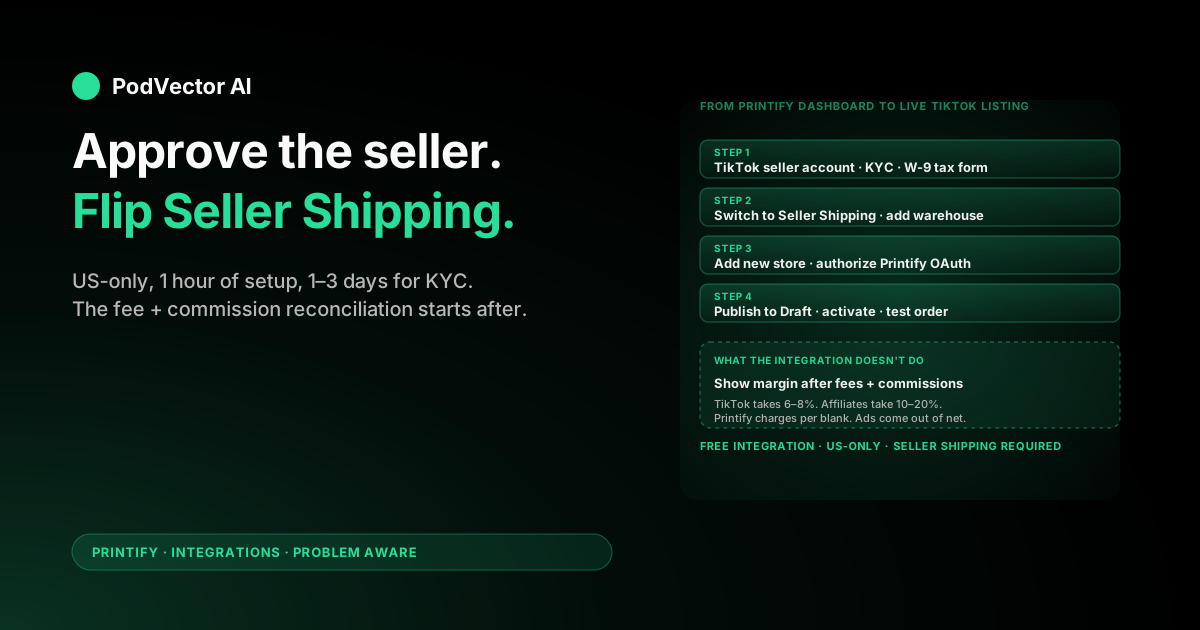
Quick Answer: The Printify TikTok Shop integration is free, US-only, and takes about an hour end-to-end once your TikTok Shop seller application is approved (which can take 1–3 business days on its own). Once connected, products you design in Printify publish straight to TikTok Shop, and TikTok orders flow back to Printify for production.
One setting almost every guide skips: TikTok Shop requires Seller Shipping mode, not TikTok Shipping. Miss it and Printify publishes will silently fail.
The integration is the easy part. The hard problem starts the day after: TikTok takes its referral fee, Printify charges per blank, and your creator and ad spend sits in a third place. This guide covers both halves.
What the Printify TikTok Shop integration actually does
The integration is the official link between your TikTok Shop seller account and Printify's print-on-demand network. After you connect, Printify becomes the back-end fulfillment system for any product you publish into TikTok Shop.
Functionally it does three things. It pushes products you build in Printify into your TikTok Shop as listings. It listens for TikTok Shop orders on those listings and queues them for production. And it pushes tracking back to TikTok so the buyer sees a normal in-app order status.
Everything customer-facing stays with TikTok. TikTok owns the storefront, the For You feed, payments, in-app messages, returns, and the creator/affiliate marketplace. Printify never touches the buyer side. Whether Printify or Shopify is the better front end depends on whether you want TikTok's native checkout or your own storefront.
Eligibility — read this before you start
This is where most setup guides bury the hard truth. The Printify TikTok Shop integration is US-only. If you don't meet every item below, the connection will not complete.
- A valid US business address. Not a forwarding service, not a virtual office in most cases. TikTok cross-checks the address against your tax forms.
- A US tax ID. Either an SSN (sole prop) or an EIN (LLC, corp). You'll fill out a W-9 in TikTok Seller Center.
- A US bank account in your or your business's legal name. The name on the bank account must match the name on your government ID or your business registration — mismatches are the single most common cause of stalled verification.
- A government-issued photo ID. US passport, driver's license, or state ID. The photo upload has to show all four corners and the expiration date clearly.
- An active Printify account. Free to create, no card required at signup. You'll add a card before production charges hit. The free plan supports up to 5 connected stores.
If you're outside the US, the native integration is closed to you. Skip to the If you're not in the US section for the two workarounds that actually function.
Step 1: TikTok Shop seller account and KYC
Your personal TikTok account is not a seller account. You apply for one separately at TikTok Shop Seller Center (seller-us.tiktok.com). The application itself is fast; approval is what takes time.
- Go to TikTok Shop Seller Center and click Register. Pick your region (United States) and your account type (Individual or Corporation).
- Enter the legal name and address. For Corporation accounts, this is the business name and registered address; for Individual, your personal info.
- Upload your government ID. Color scan, all four corners visible, expiration date legible. Blurry or cropped uploads bounce in review.
- Enter the last four digits of your SSN or ITIN. TikTok uses this for identity verification through a credit-bureau lookup, not for tax reporting (that comes in the W-9 step).
- Connect your US bank account. Routing and account number. The account holder name must match what's on your ID.
- Complete the W-9 form digitally under Settings → Account Information → Tax Information. This is required before Printify can publish products to your shop — TikTok blocks listings on accounts without tax info on file.
- Submit the application. Approval is usually 1–3 business days. Common delays: ID/bank name mismatch, low-quality ID photo, address that doesn't match a USPS-verifiable location.
While you wait, set up your shop profile under Shop Information. Pick a shop name and handle, upload a logo, write a short description, and set a return address. The return address can be Printify's facility in Fort Worth, Texas (the exact address shows up in the Printify connect flow later — don't guess it now).
Step 2: switch to Seller Shipping (the trip wire)
This is the setting every guide buries, and the one that quietly breaks Printify publishes for new sellers. By default, TikTok Shop sets new sellers to TikTok Shipping (TikTok-managed carriers with TikTok-issued labels). Printify can't ship through that. Printify ships through its own provider network with its own labels, which means TikTok needs to know your shop is in Seller Shipping mode.
To switch:
- In TikTok Seller Center, go to Orders → Fulfillment Settings → Warehouse Settings.
- Add a pickup warehouse and a return warehouse. Use a US address — Printify's Fort Worth facility is the standard pick if you don't have your own. The exact address is surfaced by Printify during the connect step in Step 3.
- Go to Orders → Shipping Settings → Delivery Settings.
- Select the warehouse you just added and switch the mode to Seller Shipping.
- Create a shipping template. Free shipping or quantity-based; flat-rate is simplest for POD. Most POD sellers price-in shipping and offer "free" delivery to keep the buyer-facing math clean.
If you skip this step, Printify's publish button will appear to work, but the listing either won't appear in TikTok Shop or will publish without a shipping option (which TikTok then hides from buyers). The error message Printify shows is generic enough that most sellers don't immediately diagnose it as a shipping-mode problem.
Step 3: connect Printify to TikTok Shop
Only after your seller account is approved and you've switched to Seller Shipping. The OAuth flow itself takes about 3 minutes.
- Sign in to Printify. From the top-left store switcher, click Manage my stores.
- Click Add a new store. Select TikTok Shop from the sales channel list.
- Printify redirects you to TikTok Shop's authorization page. Confirm you're a US-based merchant when prompted.
- Sign in to your TikTok Shop seller account (not your personal TikTok account — these are different logins).
- TikTok shows the permissions screen with the scopes Printify is requesting (read shop, read/write products, read orders, read fulfillment). Click Authorize.
- TikTok redirects back to Printify. You'll see a confirmation screen with your TikTok Shop name and a green Connected badge.
- Printify now displays the exact Fort Worth warehouse address you should use as your TikTok pickup warehouse. If you set a different address in Step 2, go back and update it now.
- Add a saved payment method in Printify under My profile → Payments. Production won't start without one.
If TikTok shows "Application under review" instead of the permissions screen, your seller account isn't approved yet. Wait for the approval email and retry.
Step 4: design and publish your first product
Connection alone doesn't move any listings. You design each product in Printify and click publish.
1. Pick a blank and a US print provider
Open the Printify catalog. TikTok Shop has a dedicated section in the catalog featuring blanks pre-vetted for faster US production — start there if you want to minimize friction. Provider choice matters more than blank choice for TikTok: TikTok customers expect fast delivery (TikTok-managed orders ship in 1–3 days), so pick a US provider with sub-4-day average production time on your blank.
2. Upload your design
Use Printify's design tool to upload artwork. It auto-generates mockups for every variant. PNG with transparent background, 300 DPI minimum. Printify's recommended size for full-front shirt prints is 4500 × 5100 pixels.
3. Set retail price
Printify shows production cost per variant in real time. You enter the retail price; Printify calculates margin live. TikTok takes a 6–8% referral fee (more on this in the fees section), so price 5–10% higher than you would on your own Shopify store to clear comparable margin.
4. Fill in TikTok-specific listing fields
Printify's publish screen asks for a TikTok-specific listing title, description, category, and attributes (color, size, material). TikTok Shop search and recommendation lives mostly in title + category + first 100 characters of the description — spend time here, not on the Printify default copy. Add at least four high-resolution images per variant; TikTok favors listings with multiple angles.
5. Choose your shipping template
Select the Seller Shipping template you created in Step 2. If you see no template option, you're still on TikTok Shipping mode — go back to Orders → Shipping Settings and confirm the switch saved.
6. Click "Publish to store"
By default the listing lands in TikTok Shop as Draft status. Go to TikTok Seller Center → Products → Manage Products, find the new product, and change status from Draft to Active. Only Active products show to buyers.
TikTok runs a content review on every new listing — typically a few hours, sometimes up to 24. Listings can get rejected for design content (trademarks, copyrighted characters, prohibited categories like kids' apparel without separate approval), missing attributes, or low-quality images. If rejected, the rejection reason appears next to the listing in Manage Products.
Step 5: place a real test order
Don't skip this. The integration has more moving parts than Etsy or Shopify, and a test order is the only way to confirm the full loop works end-to-end before you start promoting.
From a second TikTok account (not your seller account — TikTok blocks self-purchases on your own shop), buy one of your active products. Then watch what happens:
- The order should appear in Printify within 5–10 minutes under My Orders. If it doesn't, the integration isn't relaying orders — check that the shipping template is attached to the listing and that your Printify payment method is valid.
- Printify should auto-charge your saved card for production. The order moves from "On hold" to "In production" once the charge clears.
- Tracking should push back to TikTok within 24–48 hours of shipping. The buyer sees the tracking number inside TikTok Shop. If tracking never appears in TikTok, the Printify-to-TikTok webhook is broken — disconnect and reconnect the store.
Get the test order delivered. Check the print quality, the packaging, and how the unboxing reads on camera (TikTok buyers post unboxing reactions — packaging quality matters more than on Etsy or Shopify). Refund yourself once it's confirmed working.
TikTok Shop fees and pricing math
TikTok Shop's fee stack is simpler than Etsy's but more variable than Shopify's. Three numbers to know.
Referral fee: 6–8% per sale
TikTok Shop takes a 6% referral fee on the item subtotal for most categories, and 8% for some (electronics, beauty, certain apparel subcategories). The fee is calculated on the item price plus shipping. New seller programs have offered reduced or 0% intro rates — check the current rate in Settings → Fees before launch, because intro rates expire and the math changes.
Affiliate commission: 0–20% per sale, your choice
TikTok Shop's biggest growth lever is the affiliate marketplace — creators promote your products in their videos for a commission you set. The commission is on top of the referral fee. Sellers who set 10–15% affiliate rates see the most pickup; sellers who set 0% see almost none. Bake the commission into the retail price up front, or your margin collapses on the first viral video.
Payment processing: included in the referral fee
Unlike Etsy and Shopify, TikTok Shop doesn't charge a separate payment processing fee. The referral fee is the only TikTok cut. Net to your bank is item price + shipping minus referral fee minus any active affiliate commission.
Practical math: on a $25 shirt with $5 shipping, no affiliate, 6% referral: TikTok takes $1.80, leaving $28.20 paid to you. Printify charges roughly $9 for the blank + shipping. Net before ads or creator commissions: about $19.20. Add a 15% affiliate commission and you're at $14.70. Then your ad and content spend comes out.
Running the business after the integration is live
The top guides stop at "your products are live, congrats." That's the easy half.
The hard half is that the integration leaves you with four or five systems and no shared view of profit. TikTok Shop shows gross revenue and referral fees. Printify shows production and shipping cost. TikTok Ads shows ad spend. Your affiliate dashboard shows commission outflow. And Meta or Google show external spend driving traffic to your TikTok storefront. None of them join.
Five things to track from week one:
1. True margin per order
TikTok's "net payout" is gross of Printify cost, affiliate commission, and external ad spend. A $25 shirt that nets $23.20 after TikTok's cut might clear $5 once Printify charges $9 for the blank and you paid a creator $4 in commission. Export Printify orders as CSV from My Orders and join to TikTok's Order Center export on order ID.
2. Creator/affiliate performance by SKU
Some creators sell 200 units of one design and zero of another. The TikTok Shop affiliate dashboard shows commission paid by creator, not net margin per creator. A creator running a 20% commission on a $14-margin SKU is profitable; the same creator on a $4-margin SKU costs you money. Pull the affiliate report monthly, join to your per-SKU Printify cost, and tier your commission rates by margin band.
3. Refund rate by print provider
TikTok buyers are quicker to refund than Etsy buyers — the in-app return flow is one tap. Print quality complaints and wrong-variant orders go straight to your refund rate, which TikTok uses for search placement and creator visibility. Track refunds grouped by print provider, not just by SKU. A single bad provider can quietly cost you the For You page.
4. Ad spend vs. organic vs. affiliate-driven revenue
TikTok Shop revenue comes from three channels: organic discovery on the For You page, paid TikTok Ads, and affiliate creator videos. Each has a different effective ROAS. The TikTok dashboard surfaces each in isolation; the question that matters — "which channel actually paid back, after Printify cost and affiliate commission" — never shows in one view. Reconcile weekly until you can defend each channel's contribution margin.
5. Listing health: not-shipped-on-time and refund-rate thresholds
TikTok Shop has hard performance thresholds. Late shipment rate above 4% triggers warnings; sustained breaches throttle your listings in search. Refund rate above 1.5% similarly throttles. Track both weekly and flag any provider whose orders push you near the line.
All five live across TikTok Seller Center, Printify, TikTok Ads, the affiliate dashboard, and often Meta or Google Ads. None show up together in one place. You either build a weekly CSV reconciliation in Sheets, or you hand the job to a tool that pulls every source together automatically, so you can see the full picture without extra spreadsheet work. The same reconciliation problem decides whether Printify is profitable at all, and it scales as you add channels.
If you're not in the US
The native integration is closed. Two paths actually work:
Path 1: Shopify bridge
Connect Printify to a Shopify store, then connect Shopify to TikTok Shop through Shopify's TikTok app (available in more regions than the Printify-direct integration). Orders flow TikTok → Shopify → Printify. Adds a $39+/month Shopify subscription and one more sync layer, but it's the most reliable workaround for sellers in the UK, EU, and parts of APAC. Whether the Shopify layer is worth adding depends on whether you want a storefront beyond TikTok at all.
Path 2: Alternative POD provider with local TikTok Shop presence
JetPrint and CJ Dropshipping have direct TikTok Shop integrations in several non-US regions. Printful's native TikTok Shop support is also expanding. None of them match Printify's catalog breadth, but if TikTok is your primary channel and you're not in the US, a region-native POD provider often beats forcing Printify through a Shopify shim.
If you're tempted to fake a US presence to access the native integration: don't. TikTok cross-checks ID, bank, and address. The accounts get caught and banned, usually around the first $1–5k in sales — exactly when you can least afford to lose the storefront.
Troubleshooting
"Application under review" never clears
Most common cause: name mismatch between your government ID and your bank account. Less common: ID photo is too low resolution or cropped. Re-upload both with full visibility of all four corners and check that the bank account is in the exact legal name on the ID.
Printify publishes but products don't appear in TikTok Shop
You're still on TikTok Shipping mode, not Seller Shipping. Go to Orders → Shipping Settings → Delivery Settings and confirm Seller Shipping is selected and a shipping template is attached. Republish.
Products appear in Drafts but never go Active
TikTok requires you to manually move new listings from Draft to Active under Products → Manage Products. Printify doesn't auto-activate. Some sellers miss this and assume the integration is broken when their products simply aren't visible to buyers yet.
Listing rejected by TikTok's content review
Usually trademark issues (sports teams, Disney, music artists), missing required attributes (size charts, materials), or low-quality main image. The rejection reason shows next to the listing. Republish without the protected element or with the missing attributes filled.
Orders not flowing from TikTok to Printify
Check My Orders → Action required in Printify first. The two usual culprits: your Printify payment method failed, or the buyer ordered a variant Printify has since retired. The order sits waiting for you to fix the card or pick a replacement variant.
Tracking never updates in TikTok
The Printify-to-TikTok webhook is the most fragile link in the integration. If tracking is stale on multiple orders, disconnect TikTok Shop in Printify under Manage my stores, then reconnect. The reconnect refreshes the webhook subscription and clears most stuck tracking.
FAQs
Is the Printify TikTok Shop integration free?
Yes. The integration costs nothing. You pay TikTok's 6–8% referral fee per sale, any affiliate commissions you choose to offer, and Printify's per-order production and shipping cost. Printify Premium ($14.99/month) is optional and gives you a 20% production discount.
How long does the full setup take?
About 1 hour of active work, plus 1–3 business days waiting for TikTok to approve your seller application. Add another 4–24 hours for TikTok's content review on your first listings.
Can I use the integration if I'm not in the US?
Not the native version. Printify's direct TikTok Shop integration is US-only. Non-US sellers route through Shopify's TikTok app or use a region-native POD provider. See the non-US section above.
Do I need a US business entity, or can I use my SSN?
Either works. Individual sellers can register with an SSN; corporations and LLCs register with an EIN. The W-9 form covers both. Tax reporting requirements (1099-K thresholds) apply regardless of entity type.
Why do my products keep getting rejected by TikTok?
Top three causes: design contains a protected trademark (TikTok's bot is aggressive on sports, music, and entertainment IP), the main image is too low resolution or has watermarks, or required attributes (size chart, material composition) are missing. The rejection reason shows in Manage Products — read it; don't just resubmit.
Can I connect more than one TikTok Shop to one Printify account?
Yes. The free Printify plan supports 5 connected stores; Premium supports 10. Each TikTok Shop gets its own entry in Manage my stores with separate product lists and order feeds.
Does Printify handle TikTok Shop taxes?
No. TikTok Shop collects and remits sales tax based on buyer location and your tax settings. Printify only charges you for production and shipping. The W-9 you filed during seller registration controls your end-of-year 1099-K from TikTok.
What happens if my Printify payment method fails?
Orders pause in Printify's "Action required" queue and don't go to production until you fix the card. The TikTok order sits in "Awaiting shipment" status, and if it stays there past TikTok's shipment deadline, your late-shipment rate ticks up. Add a backup payment method in Printify to avoid silent outages.
Does the Printify-TikTok integration work with TikTok Shop affiliates?
Yes. Set commission rates per product or per shop in TikTok Seller Center; the affiliate marketplace surfaces your products to creators automatically. Affiliate commissions are paid out of your TikTok payouts, separate from Printify charges. Bake the commission into your retail price or you'll lose margin on the first creator video that lands.
How does this compare to listing directly on Printify Pop-Up or my own Shopify?
Different audience, different economics. TikTok Shop wins on discovery (the For You page is the cheapest organic surface in ecommerce in 2026) but takes a 6–8% cut and surrenders your customer list. Printify and Shopify are independent companies, despite the partnership rumors, and most serious sellers run both: TikTok Shop for discovery, Shopify for the email-list relationship.
Related reading
For the broader Printify ecosystem, see our Printify integrations hub and the Printify topic page. Once you've picked TikTok Shop as a channel, the next decision is what to actually sell — our guide to Printify's most profitable products covers what's converting in 2026. Printify's official TikTok Shop guide is worth bookmarking for current pricing and the connect button.
Hand off the operations to Victor
You got the seller account approved. You flipped Seller Shipping. You connected Printify and published your first listings. Now you have revenue data in TikTok Seller Center, cost data in Printify, ad data in TikTok Ads, commission data in your affiliate dashboard, and no shared view of which products actually make money.
Victor is an AI employee built for POD sellers. He looks at your orders, costs, and ad spend together, so he can answer questions in plain English, like "which SKUs lost money after ad spend last week?" With your approval, he can change your Google Ads or Meta Ads budgets, pause campaigns that are losing money, adjust your Shopify discounts, and update your Printify products. You stay in control; Victor does the busywork.
Stop reconciling four dashboards every Sunday.
Try Victor free