
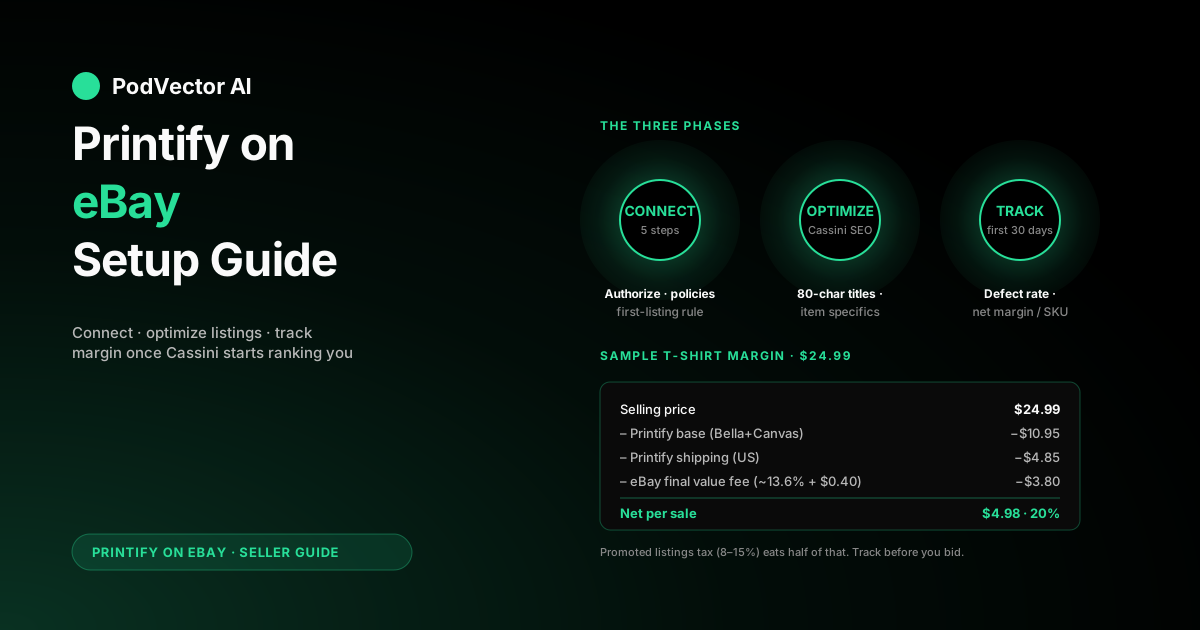
Quick Answer: Selling Printify products on eBay requires three things: a verified eBay seller account with a payment method on file, a Printify store connection (authorized through eBay's OAuth screen), and at least one listing created directly on eBay.com before Printify can push listings on your behalf.
The technical connect takes 5–10 minutes. eBay-side account prep — verifying identity, adding a payment method, and posting that first manual listing — is where new sellers lose 30–45 minutes.
Once live, eBay rewards keyword-dense 80-character titles and completed item specifics far more than brand storytelling. Treat it like a keyword-driven search engine, not Etsy.
Why eBay is worth a POD seller's time
eBay isn't where most print-on-demand sellers start. Etsy and Shopify get the attention. But eBay has two structural advantages those platforms don't.
The first is built-in buyer traffic. According to Printify's official eBay integration page, the platform connects sellers with over 100 million customers worldwide, spread across more than 20 localized versions of the eBay site. You're not paying Meta to find them.
The second is buying intent. eBay shoppers search with purchase-ready language: "vintage Ford F-150 mug," "funny dad birthday shirt XL," "engineer gift mouse pad." That long-tail specificity matches exactly what POD does well — niche, one-off, personalized products.
The catch is that eBay rewards listing volume and item-specifics discipline more than it rewards brand. If you treat eBay like Etsy, you'll get buried. If you treat it like the keyword-driven search engine it actually is, POD products move reliably.
What you need before you start
The connect itself is short. The prep is where new sellers stall.
An active eBay seller account. Personal or Business is fine. According to Printify's help center, you'll need a verified payment method added to your eBay account before any listing can go live — navigate to My eBay → Account → Payments to add it. eBay also requires that your profile registration (full legal name, street address, phone number) matches your bank account details.
A Printify account with at least one product designed and saved. Connecting an empty Printify store works technically, but you'll only verify the integration once you have something to publish. Pick one design you actually want to sell — not a placeholder.
Realistic expectations for new-seller throttling. eBay caps new sellers on how many items and how much monthly GMV they can list until they build transaction history. The cap lifts after your first few successful sales, but it exists to stop fraud and cannot be argued down immediately.
Connecting Printify to eBay in five steps
The whole flow takes 5–10 minutes once your eBay account is already set up. Printify's help documentation confirms that each completed onboarding step is saved automatically, so a mid-flow interruption is fine — but completed steps cannot be edited. A mistyped store name means disconnect and start over.
1. Open the store menu in Printify. Click the store dropdown in the upper-left corner of your Printify dashboard and choose Manage my stores. New users see a Connect button; existing users (with Shopify, Etsy, etc.) pick Add a new store.
2. Choose your eBay marketplace. Printify supports eBay US, UK, Germany, France, Italy, Spain, Canada, and Australia. Each is a separate Printify store — you can connect more than one, but you'll manage them independently. Your store name appears in the "ship from" field on shipping labels and can be changed later in store settings.
3. Authorize Printify on eBay. You'll be redirected to eBay's login screen. Sign in, click Agree on the permissions screen, and Printify receives scoped access to publish listings, sync inventory, and create orders.
4. Let Printify enable business policies. Back inside Printify, the wizard automatically enables eBay's three required policies — payment, shipping, and returns — and writes Printify-friendly defaults into each. According to Printify's help documentation, these mandatory eBay business policies must remain enabled; opting out of them in the future will break the integration.
5. Confirm the store is live. The Printify store dropdown now shows your eBay marketplace as connected. You're ready to publish products — subject to the first-listing rule below.
For the full integration walkthrough including how business policies map to Printify defaults, see our Printify integrations setup guide.
The manual-first-listing rule for new sellers
This is the step that catches most first-time POD sellers on eBay, and it's not Printify's fault.
According to Printify's official help documentation, if you're a new eBay seller with no previous listings, your first listing must be created directly on eBay before you can publish Printify products through the integration. This is confirmed by eBay community moderators as an anti-fraud account setup requirement — not an optional step.
The easiest move: draft and submit one inexpensive fixed-price listing directly on eBay.com — a used book, a spare phone case, anything. The item doesn't need to sell for the restriction to lift; the listing just needs to exist and be submitted through eBay's standard listing flow.
Once that listing is live, Printify can publish on your behalf. Some sellers report the unlock is instant; others wait an hour or two for eBay's systems to catch up. If you've waited a full day and Printify still can't publish, log a support ticket with eBay rather than retrying repeatedly.
After your first manual listing is live, you can delete or end it — Printify's documentation confirms you can proceed to publish Printify products and remove that placeholder listing once the restriction clears.
eBay selling limits and how they lift
Even after the first-listing restriction clears, new eBay sellers operate under a selling limit cap on both the number of items and the total monthly GMV they can list. According to Printify's help center, eBay's selling limits are displayed as a banner inside your Printify account so you can see exactly where you stand.
The limits lift incrementally as you complete successful transactions and maintain a clean defect rate. A few things that help the cap lift faster:
- Completing your first several sales without any defects (late shipments, Item Not As Described claims, or cancellations).
- Maintaining accurate handling-time settings so eBay's estimated delivery promise to buyers matches Printify's actual production window.
- Keeping your account in "Above Standard" seller status — eBay reviews seller performance monthly.
You can also request a selling limit increase directly from eBay through Seller Hub once you've built a transaction record. Don't request an increase before you have sales — eBay's system weighs actual performance data, not promises.
Best Printify products for eBay buyers
Not every Printify product sells well on eBay. The platform's audience skews toward gifts, hobbyist niches, and intent-driven buyers — not the boutique-apparel shopper Etsy attracts.
Products that consistently move on eBay:
- T-shirts — especially niche-interest designs (jobs, hobbies, fandoms, vehicles). Search volume for "funny [profession] shirt" is a steady channel with low competition from established brands.
- Mugs — gifting staple. Birthdays, Father's Day, retirement, and milestone events drive consistent repeat demand.
- Posters and wall art — eBay buyers searching for specific subjects (movie posters, sports teams, vintage maps) often skip Etsy entirely and land directly on eBay.
- Phone cases — model-specific search intent is strong. Titling "iPhone 16 Pro Max case [design subject]" with matching item specifics captures the search.
- Mouse pads and desk mats — gift category, low return rate, higher margin relative to apparel.
What tends to struggle on eBay: premium apparel competing on price with fast-fashion listings, home decor competing against volume retailers, and design-first products without a clear buyer-intent keyword in the title.
Listing optimization: what eBay's search actually rewards
This is the single biggest difference between eBay POD and Etsy POD.
eBay's search algorithm rewards three things: a keyword-dense 80-character title, completed item specifics, and conversion rate. Beautiful product photography and brand storytelling help conversion once a buyer lands on your page, but they don't drive discovery.
Title strategy. Use all 80 characters. Lead with the product type and main subject ("Vintage Ford Mustang Mug 11oz Coffee Cup Classic Car Gift Dad Birthday"). Avoid filler words like "beautiful," "amazing," "unique." Skip emojis and special characters — eBay's search ignores them and they waste keyword space.
Item specifics. Every empty item specific is a missed search filter. eBay surfaces category-specific fields (color, material, size, brand, theme, occasion). Fill every relevant field. Buyers filter by these on the left rail; an empty field means you don't appear in filtered results.
Description. Printify auto-generates descriptions from the product spec — fine for the bones, but rewrite the first paragraph. Lead with the gift use case or the niche the design serves. The majority of eBay traffic is mobile, so the first 200 characters are what most buyers actually read before scrolling past.
Photos. Printify pushes mockups automatically. Add at least one lifestyle shot if you have one — a white background mockup plus one product-in-context image is the minimum worth aiming for. eBay's image search and "people also viewed" surface responds better to product-in-use shots than plain studio mockups.
Handling time. Set your eBay shipping policy's handling time to match Printify's worst-case production window (typically 3–5 business days depending on the product and print provider). If your policy says "ships in 1 business day" but Printify takes 4 days to print, you'll accumulate late-shipment defects and eBay's algorithm will downrank every listing tied to your account.
Real cost: eBay fees, Printify base, and your margin
Below is a sample cost breakdown for a Printify t-shirt sold on eBay US at a fixed price with free shipping. Use this as a framework — your actual numbers will vary by blank, print provider, and product category. Always verify current Printify base costs in your Printify catalog and eBay's current fee schedule in Seller Hub before pricing.
| Line item | Note |
|---|---|
| Selling price | Your listed price |
| Printify base cost | Varies by blank and print provider — check current catalog pricing |
| Printify shipping | Varies by product, provider, and destination |
| eBay final value fee | Category-specific percentage + fixed per-order fee — check eBay's current fee schedule |
| eBay international fee | Applies when buyer is outside the seller's country |
| Payment processing | Built into eBay's final value fee under Managed Payments |
| Your net | Selling price minus all above lines |
Two things about eBay's fee structure that Printify's storefront doesn't surface for you:
Final value fees are category-specific. The rate you pay in Clothing differs from what you'd pay in Collectibles, Books, or Electronics. Always check eBay's published fee schedule for the category you're listing in — using the wrong rate in your margin math is the most common pricing mistake POD sellers make on eBay.
The Promoted Listings tax. If you opt into Promoted Listings Standard (eBay's pay-for-placement program), the ad rate is deducted from the same sale, on top of the final value fee. Don't opt in until your organic listings have enough impression and click data to tell you whether promotion is worth it. Running promoted spend on a listing with a structural price-vs-fee problem just accelerates the margin bleed.
The math gets meaningfully better in three places: raising your price (the fee is a percentage, so net dollars scale with price), switching to a lower-cost blank for the same design, or shifting product mix toward categories where the fee rate is lower and base costs favor margin — mugs and posters tend to be more forgiving than apparel on eBay.
When an order lands: who does what
Here's what happens between buyer click and delivered package:
- Buyer pays on eBay. eBay holds funds. New sellers typically face a payment hold period on their first transactions; established sellers with a clean performance record get faster releases.
- Printify receives the order automatically. Status shows as On hold until you click Approve in Printify, or 24 hours pass if you've enabled auto-approve in your Printify store settings.
- Printify routes to the print provider. Production time varies by product and provider — check the estimated production window in Printify's catalog for the specific SKU.
- Print provider ships. The tracking number flows back through Printify to eBay automatically. The buyer's eBay account updates with the tracking event and estimated delivery date.
- Buyer receives the order. If the item is late, lost, or damaged, the return policy set during your Printify onboarding governs the resolution. Printify will reprint at no cost to you if the issue is a production defect; buyer-remorse returns are your cost.
The friction point most new sellers miss: eBay's delivery promise shown to buyers at checkout is driven by the handling time in your shipping policy, not by Printify's actual production clock. Mismatched handling time is the single biggest source of late-shipment defects for new POD sellers on eBay.
If your eBay connection drops
eBay's authorization token for Printify can expire. According to Printify's help documentation, when the connection expires you'll see a reconnect prompt inside your Printify account — click Reconnect and log in to eBay to re-authorize. Previously published products are not affected when the connection expires and is re-established.
If you've connected multiple eBay stores to one Printify account, make sure you sign in to the specific store that had the connection issue — signing into a different eBay account during reconnect will link the wrong store.
What to track in the first 30 days
The numbers that matter most after launch — and where most POD sellers leak margin without noticing:
Listing impressions vs. clicks (search health). eBay shows both metrics in Seller Hub → Performance → Listings. Impressions without clicks signal a title or thumbnail problem. Clicks without sales signal a price, photo, or description problem. Diagnose which layer is broken before changing anything.
Net margin per SKU after all fees. Not the headline margin Printify's dashboard shows — that excludes eBay's final value fee, the international fee, and any promoted listing spend. The only number that matters is what actually deposits to your bank minus what Printify charges you. Reconcile weekly until you trust your model.
Defect rate. eBay tracks "transactions with defects" — late shipments, Item Not As Described claims, and seller-initiated cancellations. Staying above eBay's minimum standard requires keeping defects low. A Printify reprint for a production defect doesn't erase the original late-shipment defect from your record if the item was already marked late.
Slow-mover detection. eBay rotates listing visibility based on conversion rate. A listing accumulating impressions with no sales after 30 days is signaling a structural problem — usually price mismatch, title mismatch, or wrong category. End it and relist with a reworked title and item specifics rather than letting it drag your Cassini score.
If you're running Printify across more than one channel — Shopify, Etsy, eBay — these numbers live in three different dashboards that don't talk to each other. Compare channel strategies in our Printify vs Shopify breakdown and the broader Printify vs Teespring piece for context on which channel mix actually works.
For sellers running a Shopify-Etsy stack who are weighing whether to add eBay as a third channel, the Printify Shopify + Etsy integration setup guide and the broader Shopify + Etsy + WooCommerce setup guide cover the multi-channel wiring. The full set of Printify integrations is indexed on the Printify integrations hub, with the whole Printify topic covering broader operational and strategic context.
For the eBay-side seller documentation, Printify's official eBay print on demand page and the Printify eBay US connection guide are the canonical references.
FAQs
Does Printify charge anything to connect eBay?
No. The connection is free on Printify's Free and Premium plans. You only pay the per-item Printify base cost when an order comes in, plus eBay's own selling fees on each transaction.
Can I sell on multiple eBay marketplaces with one Printify account?
Yes, but each marketplace is a separate Printify store. eBay US, eBay UK, and other supported marketplaces have different fee structures, different listing requirements, and different buyer behaviors. Treat them as independent businesses, not one unified store.
What's the difference between this and Printify's Etsy integration?
Etsy rewards design-first listings, brand storytelling, and SEO that reads like natural language. eBay rewards keyword-packed 80-character titles, completed item specifics, and conversion rate. The Printify integration mechanics are similar; the listing strategy is essentially opposite.
Why is my first order still on hold after 24 hours?
Check three things: your Printify payment method is funded, eBay has released the buyer's payment to your seller balance, and you haven't disabled auto-approve in Printify settings. If all three are clean, contact Printify support — order routing failures are rare but they do happen.
Do I need an LLC or business registration to sell Printify products on eBay?
Not to start. eBay allows Personal accounts to sell, and tax authorities generally require you to report income rather than to incorporate. Most POD sellers revisit the incorporation question once their revenue is consistent enough to justify the cost. Consult an accountant before assuming you need one — or don't need one.
Can I use Printify's product mockups as my eBay listing photos?
Yes, and Printify pushes them automatically when you publish. They're good enough to launch with, but adding one lifestyle photo per listing — product on a desk, person wearing the shirt, mug being held — typically improves conversion. eBay's search surfaces also respond better to product-in-context imagery than plain mockups.
What happens if a buyer requests a return?
Your return policy — set during Printify's onboarding wizard — governs this. If the return reason is "doesn't fit" or "changed mind," the return cost falls to you. If it's "defective" or "not as described" due to a production error, Printify will reprint or refund their portion at no cost to you. Document the issue with photos before approving any refund.
Will Printify update my eBay inventory automatically?
Yes. Printify tracks print provider stock and pauses listings if a SKU goes out of stock at the provider level. The listing reactivates when stock returns. You don't need to manage eBay inventory levels manually for Printify-fulfilled products.
What if my eBay store connection to Printify expires?
eBay authorization tokens can expire. When that happens, Printify will show a reconnect prompt in your account. Click Reconnect, log back in to eBay, and re-authorize. Previously published listings are not affected by the expiry.
Let an AI employee run the margin work so you can focus on designs
Once your eBay store is live, the daily operational grind is what kills POD businesses. Reconciling Printify base costs against what actually deposits. Spotting which SKUs are bleeding margin. Deciding which listings to end, which prices to raise, which Shopify products need a margin fix.
Victor is an AI employee built for print-on-demand sellers running Printify across Shopify and beyond. He reads your connected business data — Shopify, Meta Ads, Google Ads, Printify, and Printful — surfaces the highest-profit next move, and executes approved actions on your Shopify store. You stay in control: nothing runs without your sign-off.
Want to understand how automation fits into a broader POD workflow? See how Victor handles Shopify store modifications through automation — the same approval-based model that governs every action he takes.
Try Victor free