
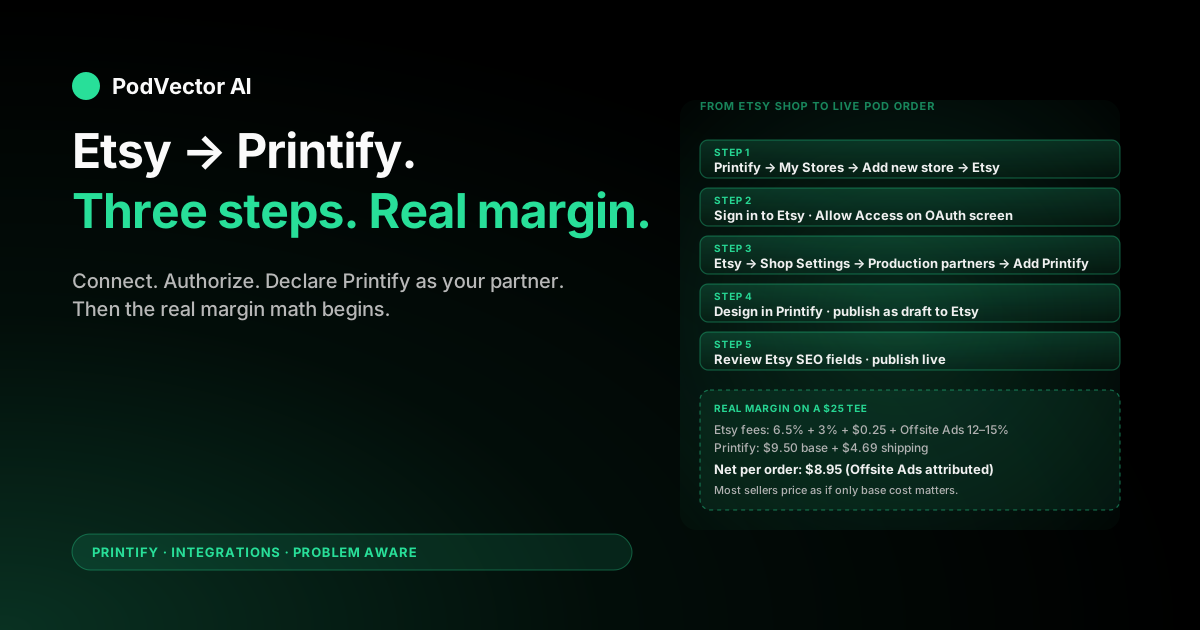
Quick Answer: Connecting Etsy to Printify takes about 10–15 minutes if your Etsy shop is already live. In Printify, click your store name → Manage my stores → Connect → Etsy, sign in to Etsy, and click Grant access. The OAuth handshake completes in seconds and your Etsy shop appears under Printify's My Stores.
Then add Printify as a production partner inside Etsy itself (Shop Manager → Settings → Partners you work with → Add a new production partner). According to Printify's 2026 guide, Etsy's Creativity Standards — updated in 2025 — make this disclosure mandatory, not optional. Skip it and Etsy can suspend listings months later, after you've built traffic.
The connection is free. Your real cost stack is Etsy's transaction fee, listing fee, optional Offsite Ads fee, plus Printify's per-order base cost and shipping. The pricing math below ensures your first profitable listing doesn't take six months of guessing.
Before You Connect: Prerequisites
The direction matters. "Etsy to Printify" usually means you already have an Etsy shop and want Printify as your production partner — not the reverse. The prerequisite list below assumes Etsy is the side that already exists.
Four things have to be in place before the connect flow will succeed.
1. An active Etsy shop. Not just an Etsy buyer account — an opened shop with bank details and tax info on file. If your shop is still in onboarding (you haven't picked a name or confirmed your bank), Printify's OAuth callback will fail. Finish the Etsy Shop Setup wizard at etsy.com/sell first.
2. A Printify account. Free is fine. Printify Premium cuts base product costs but doesn't change the connect process itself. Most sellers defer the Premium decision until they have real order volume to justify the monthly fee.
3. A payment method on Etsy. Etsy charges a listing fee the moment a Printify product publishes. If your Etsy billing card has expired or your Payment Account is on hold, the publish step fails silently — the product creates inside Printify but never appears in your Etsy shop.
4. A billing method ready for Printify. Your customer pays Etsy. Etsy pays you. Printify then charges you the base cost plus shipping when the order is sent to production. No card on file in Printify means orders sit in a "payment required" state and never ship.
One Etsy shop maps to one Printify "store profile." If you're running two Etsy shops on the same Printify account, each shop is its own profile under My Stores, and catalogs don't mix — which is the behavior you want.
Step 1: Start the Connect Flow in Printify
The handshake always starts from the Printify side, not Etsy. Etsy doesn't have a "find a print-on-demand partner" button — you walk in the other direction.
Step 1. Log in to your Printify account at printify.com.
Step 2. Click your store name in the sidebar and select Manage my stores.
Step 3. Click Connect.
Step 4. A list of supported sales channels appears — Etsy, Shopify, eBay, TikTok Shop, Wix, WooCommerce, BigCommerce, Squarespace, and a generic API option. Click the Etsy tile.
Printify opens a new browser tab and redirects you to Etsy's login screen. Don't close the original Printify tab — the OAuth flow returns to it when you finish authorizing on the Etsy side.
Step 2: Authorize Printify on the Etsy Side
This is the OAuth handshake. Etsy asks you to confirm that Printify is allowed to read your shop, create listings on your behalf, and update orders.
Step 1. If you aren't already signed in to Etsy, enter your Etsy email and password (or sign in with Google, Facebook, or Apple).
Step 2. Etsy shows the permissions Printify is requesting — typically view your shop and listings, create and manage listings, read your orders, and view your inventory and transactions. Review them and click Grant access.
Step 3. The browser bounces back to Printify and your Etsy shop name appears under My Stores. The connection is now live.
If Etsy throws an "application not authorized" error here, it's usually one of three things: you're signed into the wrong Etsy account, your shop hasn't finished onboarding, or your Etsy account has a security hold and needs identity re-verification. The third one is the most annoying because the error message doesn't mention it — check Etsy → Settings → Account → Security for any open verifications.
The connection itself is free. For a comparison of Etsy vs. Shopify as your primary storefront alongside Printify, see stores like Printify — which is best for POD sellers.
Step 3: Add Printify as a Production Partner in Etsy
This is the step most sellers skip — and the one that gets shops suspended months later, after their listings finally start ranking.
Printify's 2026 guide confirms that Etsy's policy requires every seller using a print-on-demand partner to declare that partner publicly. Etsy updated its Creativity Standards in 2025 to make this mandatory. Printify automates the listing creation but cannot add itself to your shop's production partner registry — you do this once, manually.
Step 1. Sign in to Etsy and open Shop Manager → Settings.
Step 2. In the left sidebar, click Partners you work with (previously labeled Production partners — Etsy renamed this section in its 2025 interface update).
Step 3. Click Add a new production partner.
Step 4. Fill in the form. Production partner name: Printify. Location: Wilmington, DE (Printify's registered US address). About this production partner: a short description such as "Print-on-demand fulfillment partner. Designs are my own. Printify and its network of print providers handle manufacturing and shipping." Check the box confirming you're disclosing the partner per Etsy's policy.
Step 5. Click Save. The partner now shows on every listing's production-partner field by default.
Why this matters: Etsy's policy team does sweep audits. A shop with zero production partners declared but obvious print-on-demand designs is a flag. Suspensions are reversible — but the appeal can take weeks, and during that window your traffic and ad spend evaporate. Five minutes now prevents a multi-week revenue cliff later.
Step 4: Design and Publish Your First Product
With the connection live, product creation happens inside Printify and pushes to Etsy on publish.
Step 1. In Printify, click Catalog in the left sidebar and pick a product type — t-shirt, hoodie, mug, poster, and so on. Bella+Canvas 3001 (unisex t-shirt) and Gildan 18500 (hoodie) are common starter picks; they're priced competitively and Printify routes them to multiple print providers with established track records.
Step 2. Choose a print provider. Don't auto-accept the first one in the list. Look at the production time, shipping time to your primary market, and whether the provider has positive reviews from Printify's seller community. For a US-first shop, Monster Digital and Awkward Styles are common picks. For a UK shop, Print Geek and T Shirt and Sons.
Step 3. Click Start designing. Upload your art file (PNG or JPG, at least 300 DPI at the print size). Position it on the mockup, save, and Printify generates a full mockup gallery automatically.
Step 4. Click Save product and then Publish. Printify pushes the listing to Etsy as a draft by default — the listing appears in your Etsy shop's draft section, not live to buyers.
Step 5. In Etsy, open the draft listing, review the title, tags, description, and primary photo, then click Publish. Etsy charges the listing fee at this moment.
Publishing as a draft on the Printify side is intentional. It lets you adjust Etsy-native fields (SEO title, keyword tags, category, attributes like color and size from Etsy's controlled vocabulary) before the listing goes live. Auto-publishing direct to live is available in Printify's publish settings, but most sellers leave it off until they've got a tagging routine they trust.
Step 5: Set Pricing for the Real Etsy + Printify Margin Stack
Printify's default markup is applied on top of base cost. That sounds healthy until you stack the fees Etsy takes on top.
Walk through the math with a sample t-shirt listing:
Customer pays: item price plus shipping. Let's use a $25 item and $4.99 shipping, so total order = $29.99.
Etsy takes: Transaction fee (6.5% of item + shipping). Payment processing (3% + $0.25 in the US). Listing fee (charged at publish, amortized over expected sales of that listing). Offsite Ads fee (12% or 15% depending on your annual revenue tier, only on orders attributed to Etsy's paid ads). VAT/sales tax — passthrough, Etsy collects and remits.
Printify takes: Base cost for the product variant chosen plus shipping to the buyer's address.
Two-thirds of new Etsy + Printify sellers price as if only the base cost matters. The Offsite Ads fee in particular is invisible until the order lands. Etsy auto-enrolls shops above the annual revenue threshold — so the day you cross it, your effective margin drops with no warning. Price as if every order will be Offsite-attributed and you'll never get caught short.
Three levers move your net meaningfully:
Printify Premium. Drops base costs on popular SKUs. Worth evaluating once you have consistent monthly order volume to offset the subscription fee.
Opt out of Offsite Ads if eligible. Below the threshold you can opt out; above it you cannot, and Etsy waives the fee only for orders below $10. If most of your products are above $10, calculate margin after Offsite Ads as your baseline.
Shipping markup. Charging a small shipping premium above your Printify shipping cost adds directly to net, minus the Etsy transaction fee on shipping. Most customers won't abandon over a modest shipping delta when the product is right.
Step 6: Optimize Your Etsy Listing SEO
Getting the connection live is the technical half of the job. The commercial half is making sure Etsy's algorithm surfaces your listings to buyers. This section covers what top-ranking Etsy POD guides now treat as table stakes.
Title and tags. Etsy uses both for search. Your title should lead with the buyer-intent phrase (what someone types when they want the product), not your brand name. Use all 13 tag slots — Etsy treats each tag as a separate ranking signal. Pull tags from Etsy's autocomplete, not from what you think buyers search.
Primary photo. Product photos are the first thing customers see in Etsy search results. Use lifestyle mockups where possible — images showing the product in use tend to outperform flat product-only shots in click-through rate.
Attributes and category. Fill every attribute Etsy offers for your product type (material, color, occasion, style). These feed Etsy's filtered browse and personalization signals. Incomplete attributes mean your listing doesn't appear in filtered searches.
Description. Write the first two sentences for buyers, not for SEO. Etsy's search doesn't heavily index description text, but buyers read it to decide on purchase. Confirm fit (sizes, materials), delivery expectation (production + shipping time), and your production-partner disclosure note.
Shipping profiles. Etsy requires a shipping profile on every listing. Set your expected dispatch time to match your chosen print provider's average production time — mismatched dispatch times generate late-shipment flags that suppress listing visibility.
Video. Etsy added a video slot to listings. A short 5–15 second clip showing the product (unboxing, wear, use) increases dwell time on the listing page, which correlates with ranking. Printify's mockup tool doesn't generate video; use a phone clip or a tool like Canva.
What Syncs Automatically (and What Doesn't)
Once connected, the Printify–Etsy bridge handles more than most sellers realize — and less than they assume in a few critical spots.
What syncs from Printify to Etsy automatically: new product listings (as drafts), mockup images, base description text, variants (size, color), inventory status when a variant goes out of stock at the provider, and product price updates if you bulk-edit in Printify.
What syncs from Etsy to Printify automatically: new orders (within roughly 60 seconds under normal load), shipping address, buyer-selected variant, order cancellations made before the order enters production. Printify's integration also syncs tracking numbers back to Etsy automatically once the order ships.
What does NOT sync (and bites people): Etsy-native title and tag changes (you edit those on Etsy directly), buyer-message edits to the shipping address after the order has been imported, refunds (you refund the customer through Etsy, but you still owe Printify the production cost if it's past the cancellation window), and Etsy promo codes (they reduce customer revenue but don't reduce what Printify charges you).
If you connect more than one Etsy shop to the same Printify account — different brand, different niche, same person — each shop's product changes stay isolated. Updating a design on Shop A does not push that update to Shop B. Many sellers expect cross-shop sync because Printify treats both as the same account; it doesn't.
Out-of-stock routing is worth understanding: according to Insight Agent's connector guide, "Printify automatically routes to an alternative provider with the same product (if available) or notifies you to manually fulfill or refund" when a print provider runs out of stock. Enabling inventory syncing in Printify's settings reduces how often buyers see unavailable variants.
The True Cost Stack of Etsy + Printify
Most setup guides stop at "the connection is free." That's true and not useful. The full cost stack matters because every line item compounds against margin.
Here's the per-order stack for a sample Etsy + Printify order. The exact dollar amounts will vary by product, provider, and Etsy fee tier — treat this as a framework, not a fixed formula, and run the numbers with your actual Printify base costs before pricing.
| Line item | Charged by | Notes |
|---|---|---|
| Customer pays (item + shipping) | — | Your listed price |
| Etsy transaction fee (6.5% of item + shipping) | Etsy | On every order |
| Etsy payment processing (3% + $0.25 US) | Etsy | Rate varies by country |
| Listing fee (charged at publish) | Etsy | Amortized over sales |
| Offsite Ads fee (12–15% if attributed) | Etsy | Mandatory above revenue threshold |
| Printify base cost (varies by product + provider) | Printify | Check catalog before pricing |
| Printify shipping (varies by provider + destination) | Printify | Check catalog before pricing |
| Your net per order | Revenue − all of the above |
The cost items most sellers miss at launch:
Offsite Ads is not optional above the revenue threshold. Etsy auto-enrolls shops that cross the annual threshold, and there's no opt-out at that point. Model your pricing as if the Offsite Ads fee applies to every order — you'll be protected from the day you cross the threshold.
Printify charges you sales tax on base cost in US states where Printify has nexus. This is separate from the sales tax Etsy collects from your buyer. The two are not the same dollar — Etsy's collection is a passthrough; Printify's is a real cost line you absorb.
Returns and replacements. Printify covers reprints for genuine production defects, but you cover the customer-experience cost — refund handling, the review impact. Budget a small per-order reserve for this.
What to Track Once Orders Start Landing
Most Etsy + Printify sellers track revenue and listing favorites. That's enough to confirm the shop is alive. It isn't enough to know what to do next week.
Five numbers actually drive decisions:
True net per order, by SKU. Revenue minus all Etsy fees minus Printify base and shipping minus any ad spend allocated to that order. Etsy's payment dashboard shows you revenue and fees. Printify shows you cost. Nothing puts them in the same view by default. You'll reconcile in a spreadsheet — at least once a month — or you'll fly blind.
Net per SKU vs. blended average. A healthy blended margin can hide high-margin winners and low-margin bleeds running in parallel. The low-margin SKUs eat ad budget that the high-margin ones could have absorbed. The fix is per-SKU visibility, not bigger averages.
Production lead time by provider. Different providers on the same product have meaningfully different average ship times. Your Q4 ad plan should weight providers by ship time — Christmas cutoffs don't care about your default routing.
Defect and replacement rate by print provider. Printify covers replacements for genuine defects, but you cover the customer-experience cost — late delivery, refund handling, the one-star review. The cheapest provider often isn't the highest-net once defects are factored in.
Repeat purchase rate by first-product SKU. Etsy doesn't surface this natively. The SKU that drives repeat purchases is rarely your top-grossing listing — it's usually the lowest-priced, highest-quality entry product. Knowing which one is your gateway changes which listing gets the bulk of your ad spend.
For a wider view of how the Etsy + Printify connection fits into the full POD ops stack, see stores like Printify — which is best for POD sellers. For Etsy's own canonical reference on connecting Printify, Printify's Etsy landing page covers the official sign-up flow.
When to Add a Second Sales Channel
Etsy is a strong starting point for POD sellers because it provides built-in buyer intent and organic discoverability without requiring paid traffic from day one. But it comes with structural limits: Etsy owns the customer relationship, you can't retarget buyers off-platform, and the Offsite Ads program means Etsy's paid traffic costs flow to you as fees you can't control.
The right time to consider a second channel is when you have evidence of product-market fit on Etsy — meaning you have repeat buyers, a clear best-seller cluster, and you know your true net margin per SKU. Adding Shopify alongside Etsy lets you:
- Run Meta and Google Ads to your own storefront rather than Etsy's marketplace, capturing customer data for retargeting
- Set your own pricing without Etsy's transaction fee layer
- Build email and remarketing audiences that Etsy's platform blocks
- Use the same Printify catalog connected to a second store profile
The tradeoff is that Shopify requires you to drive all your own traffic — there's no marketplace discoverability. That's why using Etsy to validate and Shopify to scale is the pattern most intermediate POD sellers land on. For a detailed breakdown of that channel decision, see how Printful's Shopify integration works and the Shopify Admin API automation guide for sellers building a more automated Shopify-side operation.
Once you're on Shopify with paid traffic running, the ad strategy layer matters significantly. The Meta Ads strategy for POD on Shopify and Google Shopping Ads for POD ecommerce guides cover the channel-specific mechanics in detail.
Troubleshooting Common Connect Errors
Five errors come up repeatedly. Each has a clean fix.
"This Etsy account is already connected." A different Printify account is already linked to this Etsy shop. Etsy allows only one Printify connection per shop. Sign in to the old Printify account, disconnect Etsy under My Stores, then re-run the connect flow from the new Printify account.
"Application not authorized." Usually a security hold on Etsy. Check Etsy → Settings → Account → Security for pending verifications, complete them, and retry the OAuth flow in a fresh browser tab.
Product publishes in Printify but doesn't appear in Etsy drafts. The Etsy billing card on file has expired or the Payment Account is on hold. Etsy needs a valid billing method to charge the listing fee, and the publish silently fails when it can't. Fix billing inside Etsy, then re-publish from Printify.
Order in Etsy but not pulling into Printify. The sync runs roughly every 60 seconds but can lag 5–10 minutes in peak periods (holidays, Cyber Week). If it's been 30+ minutes, check Printify → Orders → Order issues for an "address could not be verified" flag — Printify holds orders with invalid addresses for manual review instead of dropping them.
Variant out of stock at Printify but still showing on Etsy. There's a lag between Printify marking a variant unavailable and Etsy updating the listing. During that window a customer can still order an unavailable variant. Enable inventory syncing in Printify's settings to minimize this window, or pull aging variants out of the listing entirely.
FAQs
Is the Etsy–Printify connection free?
Yes. Neither side charges for connecting or maintaining the integration. You'll pay Etsy's standard fees on every order (transaction, payment processing, listing, optional Offsite Ads) and Printify's per-order base cost plus shipping, but the integration itself has no extra cost.
Do I need an Etsy shop before I sign up for Printify?
You can sign up for Printify first and create designs without an Etsy shop. But you can't publish a product to Etsy until the Etsy shop exists and the connection is authorized. Most sellers create the Etsy shop first because Etsy's onboarding (bank account, tax info, identity verification) is the slower step.
How long does the full setup take?
10–15 minutes if your Etsy shop is already live. Plan on 1–2 hours if you're also setting up Etsy from scratch — bank verification and identity check can introduce overnight delays on the Etsy side.
Do I need to add Printify as a production partner inside Etsy?
Yes. Etsy's 2025 Creativity Standards make this mandatory for all sellers using a manufacturing partner. Declare Printify under Shop Manager → Settings → Partners you work with. The OAuth connection doesn't auto-register this for you. Skipping it can get listings or your full shop suspended.
Can I connect more than one Etsy shop to one Printify account?
Yes. Under Printify My Stores you can connect multiple Etsy shops to the same account. Each shop is its own profile and product catalogs don't mix across shops, even though they all live under one Printify login.
What happens if a customer cancels an Etsy order?
If the cancellation happens before Printify accepts the order for production (typically within a few hours of import), Printify cancels for free. If production has started, you've already paid Printify the base cost, and the cancellation is on you. Refund the customer through Etsy regardless — Etsy's case rate cares about timely refunds, not who absorbed the cost.
Does Printify handle taxes on Etsy orders?
Etsy collects and remits sales tax/VAT from the customer in jurisdictions where Etsy is required to. Printify charges you sales tax on the base cost in US states where Printify has nexus, separately from what Etsy collected. The two are not the same dollar — Etsy's collection is a passthrough; Printify's is a real cost line.
Can I sell on Etsy and Shopify with the same Printify catalog?
Yes, but each sales channel is its own Printify store profile. Updating a design in one doesn't auto-replicate to the other. If you edit a design for Etsy, push the same update to Shopify (or vice versa) separately. For the channel decision, see stores like Printify — which is best for POD sellers.
What happens if a buyer changes their shipping address after ordering?
If Printify hasn't sent the order to production, edit the address inside Printify directly. Once production starts, the address is locked. Edits made in Etsy after the order imported do not flow through to Printify — you have to edit on the Printify side too, within the production window.
What if a print provider runs out of stock on a variant?
Printify automatically routes to an alternative provider carrying the same product if one is available, or notifies you to manually fulfill or refund the order. Enabling inventory syncing in Printify settings reduces how often buyers can place orders on unavailable variants before Etsy reflects the stock status.
Does Printify slow down my Etsy listings?
No. The integration only makes API calls when an order comes in or a product publishes. It doesn't run any code inside your Etsy storefront, so listing load times, Etsy SEO, and conversion are unaffected. Slowness on Etsy is almost always Etsy's own platform, not Printify.
Once the connection's live, who's actually running your pricing, margin tracking, and ad spend decisions?
The hard part of Etsy + Printify isn't the OAuth handshake. It's running the business after — pricing each SKU against the full fee stack, spotting the listings that are bleeding margin, and knowing when to reallocate ad spend to your highest-net products.
When you're ready to move to Shopify and run paid traffic, Victor — PodVector's AI employee — reads your Shopify, Meta Ads, Google Ads, Printify, and Printful data in a live warehouse, surfaces decisions in plain English, and executes approved Shopify-side actions like repricing a SKU to a target margin or bulk-repricing your store. He proposes; you approve; he acts. And run your POD operations with an approval-gated AI employee.
Also worth reading: AI chat tools for Shopify POD workflows and Facebook Ads strategy for POD ecommerce.
Try Victor free