
Quick Answer: The Printify–Shopify integration is the official two-way data link between your Shopify storefront and Printify's print-on-demand network. It pushes Printify products into your Shopify catalog, pulls orders back for production, and posts tracking numbers to the buyer's Shopify order page.
Setup is free and takes 15–30 minutes. The path matters less than what you decide before you click connect: which side you start from, which shipping model to publish, and how you'll keep the catalog clean after launch.
This guide covers the integration end-to-end — what it actually does under the hood, the four strategic decisions that shape your unit economics, and the operational reality once orders are flowing.
What the integration actually is
The Printify–Shopify integration is an OAuth-authorized API connection between two independent platforms. Shopify hosts your storefront, checkout, and customer relationship. Printify runs the production network that prints and ships the items you sell.
The integration sits in the middle as a synchronization layer. It moves three kinds of data back and forth automatically, and it stays out of every other part of your business.
What it syncs: product listings (Printify → Shopify), orders (Shopify → Printify), and fulfillment status with tracking (Printify → Shopify). What it doesn't sync: customer data, marketing attribution, inventory of physical goods (POD has no inventory), or financial reporting.
The customer never sees Printify. They check out on your Shopify store, get Shopify order confirmation emails, and receive a package with no Printify branding on it. From the buyer's side, it looks identical to a regular Shopify store with in-house fulfillment.
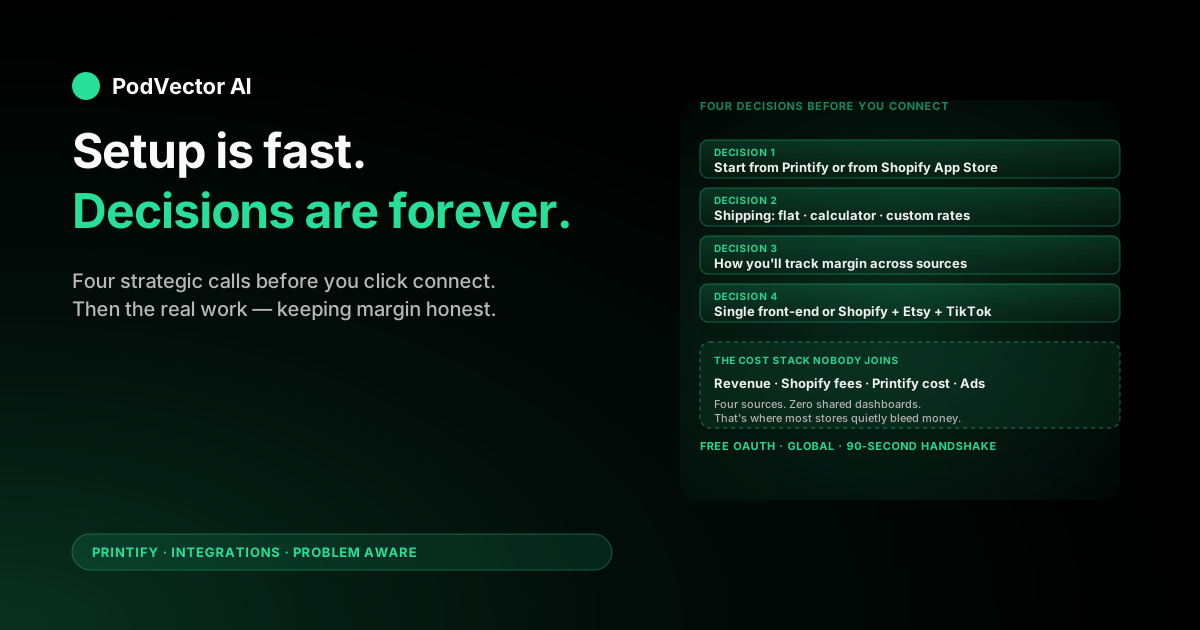
Four decisions to make before you connect
Most setup guides walk you through the click sequence and stop there. The clicks are the easy part. These four decisions shape what your store earns or loses for the next twelve months — get them right before you start.
1. Which side do you start from?
You can begin the connection from the Printify dashboard or from the Shopify App Store. Both end at the same OAuth handshake. The difference is which account you create first and which dashboard you'll spend more time in.
Start from Printify if you'll be designing products before you have a real storefront. Most POD operators do this. You build the catalog inside Printify, then push it into Shopify when you're ready to sell.
Start from Shopify if you already have a Shopify store running another product line and you're adding Printify as one more fulfillment source alongside dropshippers or in-house inventory.
2. What's your shipping model?
Shopify charges the buyer at checkout based on rules you configure. Printify charges you per order based on real cost. If those numbers don't line up, you eat the gap on every sale.
There are three workable models, covered in detail below in the shipping section. Pick one before you connect so your first product publishes with the right rate logic from day one.
3. How will you handle the multi-source data problem?
Shopify owns your revenue, fees, and order data. Printify owns your production costs and shipping costs. Meta, Google, and TikTok own your ad spend. None of those numbers live in the same dashboard, and you can't calculate margin per SKU without joining them.
You'll need a plan — a Sunday spreadsheet, a dedicated tool, or a unified data warehouse. Decide now so you start tracking from the first order rather than reconstructing six months of data later.
4. Are you running multiple front-ends?
Printify supports up to five connected stores on the free plan. Many POD operators run Shopify alongside Etsy or TikTok Shop because each channel reaches a different buyer. If that's the plan, decide which channel hosts which designs before launch — duplicating the same SKUs across all three platforms confuses your attribution and your buyers.
Connecting the two systems
This guide covers the integration as a system. For the literal click-by-click setup, we've published a focused walkthrough: Connect Printify to Shopify: setup guide covers both Printify-first and Shopify-first connection paths.
The short version of what happens during the handshake:
- You request the connection from either platform.
- You're redirected to Shopify's OAuth approval screen, which lists every API permission Printify needs (read/write products, orders, shipping, draft orders).
- You approve, and Shopify issues Printify an access token tied to that store.
- Printify stores the token, registers your store under Manage my stores, and begins listening for orders on any product Printify publishes there.
The whole exchange takes about ninety seconds. If the connection fails at any step, the issue is usually a missing Shopify plan, a missing payment provider in Shopify, or a Printify account already linked to a different Shopify store.
How data flows once you're live
Knowing the data flow makes troubleshooting infinitely faster when something breaks. Here's what happens, in order, every time a customer buys.
- Buyer checks out on Shopify. Shopify captures payment via your payment provider (Shopify Payments, Stripe, PayPal, etc.).
- Shopify creates the order. The order appears in Shopify admin under Orders within seconds.
- Shopify webhooks the order to Printify. Printify receives the order payload — buyer address, variants, design files — via the integration.
- Printify validates and queues. The order moves to "Awaiting payment" in Printify's queue while it charges your card on file for production + shipping.
- The print provider produces the item. Each provider has its own turnaround window — typically 2–7 business days.
- The carrier scans the package. Printify pushes the tracking number back to Shopify via the integration.
- Shopify emails the buyer. Standard Shopify shipping confirmation goes out with the tracking link.
Two billing channels run in parallel. The buyer pays you through Shopify, less Shopify's transaction fees. You pay Printify out of band through the card on file. Those two flows never see each other, which is what makes margin tracking annoying.
Shipping: the setting that quietly kills margins
This is the most-skipped setting in every setup guide and the most expensive one to get wrong. You have three workable models — pick one and stick with it across your whole catalog.
Model 1: Publish Printify's flat rates into Shopify
Printify exports its rate table directly into your Shopify shipping settings. Buyers see flat rates per region. Your checkout charges the same amount Printify charges you.
Best for: stores selling one or two product categories where Printify's flat rates roughly match real cost. Simplest setup; matches buyer expectations.
Model 2: Enable Printify's shipping calculator
Printify calculates real shipping per item at checkout based on weight, destination, and provider. The rate buyers see is exactly what Printify charges you. Your shipping margin is always zero.
Best for: catalogs mixing categories with very different shipping costs (a mug and a hoodie can't share a flat rate). Requires Shopify's third-party carrier shipping rate feature — included on the Shopify plan and above, or $20/month annual add-on for Basic.
Model 3: Custom Shopify rates, bake shipping into product price
You set your own Shopify rates — often "free shipping" or a single flat rate — and adjust product prices upward to cover the gap. You eat or profit on the difference between what you charge and what Printify charges you.
Best for: stores with strong unit economics on US-bound orders. Risky for international orders, where Printify shipping can hit $10–20+ even on light items. Run the worst-case math on your most expensive destination before committing.
Whichever you pick, lock it in before you publish your first product. Switching shipping models after orders are flowing means re-pricing every active listing.
Publishing your first product the right way
The integration is live, but Shopify still has zero products. Pushing one through verifies the data path and surfaces any configuration gaps before you start spending on traffic.
- Pick a starter product. A unisex T-shirt is fastest because shipping rates are well-defined and design constraints are minimal. Pick your provider in the same step — sort the catalog by location closest to your target buyers.
- Upload a design and pick variants. Use a high-resolution PNG with a transparent background. Choose 2–4 color and size variants for the first listing — you can expand later.
- Fill every Shopify-required field. Title, description, product type, and (since 2024) Shopify product category. Missing the category is the single most common reason a Printify product fails to appear in Shopify after publishing.
- Price for the full cost stack. Don't price on Printify's production cost alone. Add Shopify's transaction fee (2.9% + 30¢), shipping spread, and your target ad cost per acquisition. The cost stack section below has a worked example.
- Publish as Draft first. Don't go straight to Active. Review the Shopify-side listing once it appears — image quality, variant mapping, description formatting — before flipping it live.
- Activate and test-order. Once the listing looks right, flip it Active. Then place a real order through your live store using your own card and address.
Do not run paid traffic before a real test order has produced a tracking number. The cheapest way to find an integration bug is in a dry run; the most expensive way is from a refund request.
The full cost stack across both platforms
Most first-time sellers price against Printify's production cost and discover Shopify's cut on their first $1K month. Run this math on every product before you list it.
| Cost | Who charges it | Typical rate (2026) |
|---|---|---|
| Shopify subscription | Shopify | $39/month (Basic) → $399/month (Advanced) |
| Shopify Payments fee | Shopify | 2.9% + 30¢ (Basic, US cards) |
| Third-party gateway surcharge | Shopify (if not using Shopify Payments) | 2% (Basic) → 0.5% (Advanced) |
| Printify production cost | Printify | Per-item, varies (e.g., $9.30 Bella+Canvas 3001 tee) |
| Printify shipping | Printify | $4–8 US, $10–20+ international |
| Printify Premium (optional) | Printify | $14.99/month for a 20% production discount |
| Ad spend | Meta, Google, TikTok | Whatever you spend — never appears in Shopify or Printify |
A worked example. You sell a $24.99 T-shirt. Shopify Payments takes $1.02. Printify charges $9.30 production + $4.99 shipping = $14.29. Gross margin before ads: $24.99 − $1.02 − $14.29 = $9.68.
If your average ad cost per sale is $8, you net $1.68 per shirt. If it's $10, you're losing money on every order. Spending more on ads in that state doesn't grow the business — it accelerates the bleed.
None of these numbers live in one place by default. Shopify shows revenue and Shopify fees. Printify shows production cost. Ad spend lives in Meta/Google dashboards. Your accountant has the subscription line. That fragmentation is the problem you'll fight every week after launch — see the post-launch section.
Post-launch: the part nobody warns you about
The setup guides end at the first test order. The real work starts there. Three jobs define the day-to-day after integration goes live.
Sync monitoring
Printify-to-Shopify sync fails occasionally. A product image times out. A variant mapping breaks. An order stalls in "Awaiting payment" because your card declined. Each failure is recoverable if you catch it fast and silent if you don't.
Most stores learn about sync failures from a customer email three days later asking where the shipping confirmation is. Build a habit of checking Printify's My orders view daily, filtered to anything that's not "Shipped."
Margin tracking across sources
You'll need an answer to questions like: "Which SKUs lost money after Shopify fees and Printify shipping last week?" — and the answer is not in any single dashboard.
The starter answer is a Sunday-night spreadsheet that exports from Shopify, Printify, and your ad platforms and joins them on order ID. It works at low volume and breaks around $5K/month when reconciliation takes longer than running the actual store.
The scaling answer is a unified data warehouse — Snowflake, Redshift, Databricks, or equivalent — that ingests all three sources and exposes a single SQL surface for margin queries. The pattern is standard in B2B SaaS analytics; it just hasn't reached POD yet because nobody's packaged it for the category.
Listing and ad operations
Top-converting variants need more ad spend. Slow movers need to be paused or repriced. New designs need Shopify listings, Printify mockups, and ad creative across two or three platforms.
This is the work that pays the rent, and it's the work that gets put off when the operator is reconciling spreadsheets on Sunday. The math on outsourcing or automating it usually works long before sellers actually do it.
Troubleshooting common integration issues
The Printify embedded dashboard keeps showing the login screen
You're signed into the wrong Printify account in the embedded Shopify session. Open printify.com in a new tab, fully sign out, then sign back in via the Shopify app. Browser cookie collisions between the two sessions are the usual culprit.
Products published from Printify don't appear in Shopify
Most common cause: the Printify product is missing Shopify's required category field. Open the product in Printify, scroll to Shopify category, pick the right taxonomy, and republish. Second cause: you published to Draft and forgot to flip it Active in Shopify admin.
Orders sync to Printify but stall in "Awaiting payment"
Your Printify payment method failed. Check Printify → Payment settings. A declined card freezes every new order until you fix it. Add a backup payment method so a single decline doesn't pause production for everything in the queue.
Checkout shipping charges don't match Printify's real cost
You're using static Shopify rates instead of the Printify calculator, or the published Printify rate table is stale. Switch to the calculator (shipping model 2 above) or re-export the current Printify rate table into Shopify shipping settings.
Tracking numbers reach Printify but never appear in Shopify
Two checks. First, Shopify Settings → Notifications → Shipping confirmation must be enabled. Second, verify the order moved to "Shipped" status in Printify — Printify only pushes tracking after the carrier scan, which can lag 12–24 hours after "Production complete."
Duplicate-store error during connection
Your Shopify store was previously linked to a different Printify account. Fully disconnect from the original (Printify → Manage my stores → Disconnect, and uninstall the app from Shopify Apps), then reconnect. The duplicate-store check is the most common reason a connection fails on the second attempt.
When the integration is the wrong choice
Shopify isn't the right front-end for every POD seller. Three situations where another integration beats it:
You haven't built an audience yet. Shopify is a hosted storefront with no built-in discovery. If you don't have an email list, paid ad budget, or social following, your storefront sits at zero traffic. Etsy and TikTok Shop both have built-in discovery surfaces — fewer custom branding options, but free buyer traffic.
Your margin can't absorb Shopify's fees. $39/month plus 2.9% + 30¢ per transaction is fine at $5K+ MRR. Below $500/month it's a meaningful drag. Etsy's listing fees ($0.20 per listing) and transaction fee (6.5%) sometimes work out cheaper at low volume.
You're already running another POD platform. If you're comparing Printify to alternatives like Bonfire or looking for cheaper print-on-demand options, decide the production layer before the storefront layer. The Shopify integration only matters if you've already committed to Printify.
If Shopify is the right front-end but you want a deeper view of the integration mechanics, see the broader Printify integrations hub and the Printify topic page. LitCommerce's integration guide is also a thorough screenshot-heavy reference if you prefer that format.
FAQs
Is the Printify–Shopify integration free?
Yes. The integration itself costs nothing. You pay Shopify's subscription ($39+/month) and transaction fees, plus Printify's per-order production and shipping. Printify Premium ($14.99/month) is optional and gives a 20% production discount.
How long does setup take?
15–30 minutes to connect, publish a first product, and configure shipping. Add 5–10 business days for a physical sample to arrive before going live.
Do I need accounts on both platforms?
Yes. Shopify hosts your storefront and processes payments; Printify produces the items. The integration links the two — it doesn't replace either.
Can one Printify account connect to multiple Shopify stores?
Yes. Printify's free plan supports five connected stores; Premium supports ten. Each Shopify store gets its own entry in Manage my stores with separate product lists and order feeds.
What happens to existing Shopify products if I add Printify later?
Nothing. The integration only manages products Printify publishes. Existing Shopify products stay where they are, and you can run Printify alongside another POD provider or in-house inventory in the same store.
How do refunds work across both systems?
You refund the buyer in Shopify. Whether Printify reships, refunds you, or charges you depends on the reason — production defects and shipping damage are usually Printify's cost; buyer's-remorse returns are usually yours. Document everything with photos before opening a Printify ticket.
Does the integration work outside the US?
Yes. Unlike some Printify integrations (TikTok Shop has region limits), the Shopify integration works in every country Shopify supports. Your print provider options depend on the buyer's region, not yours.
Can I integrate Printify with Shopify and another front-end at the same time?
Yes. POD operators commonly run Shopify alongside Etsy or TikTok Shop. Each storefront gets its own Printify connection, and you'd typically split designs so the same SKU doesn't compete with itself across channels.
Does the integration require coding or developer help?
No. The integration is install-and-go via the Shopify App Store. For more advanced workflows — custom order routing, automated repricing, multi-warehouse logic — you'd use Printify's API directly. See Printify API docs setup guide, the Printify API documentation walkthrough, and the create-order endpoint setup guide for the developer surface.
Will switching from Printify to a different POD provider break my Shopify store?
The Printify-published products stop fulfilling, but the Shopify listings stay live until you delete them. You'd disconnect Printify, install the new provider's Shopify app, republish products through them, and delete the old Printify-managed listings. Plan for a few hours of catalog cleanup.
Run the integration. Hand the operations to Victor.
You connected the systems. You picked your shipping model. You published your first product and ran the test order. Now you have revenue in Shopify, production cost in Printify, ad spend across Meta and Google, and no shared view of which SKUs actually make money.
Victor is an AI employee built for POD sellers. He reads every source into one live data warehouse, answers cross-source business questions in plain English ("which variants lost money after Shopify fees and Printify shipping last week?"), and — with your approval — reallocates ad spend, pauses unprofitable variants, updates Printify and Shopify listings, and reprices SKUs when your cost stack shifts.
You stay in control. Victor does the reconciliation, the campaign-by-campaign math, and the listing operations that take your Sundays.
Try Victor free